

Your product team has a backlog full of tasks everyone understands. The API endpoints are specified, the test cases are familiar, and the documentation needs updating. Yet the planning meeting still ends with the same uncomfortable question: should the team spend the next quarter shipping features, reducing technical debt, or building the safeguards needed for both?
AI assisted software development changes that conversation, but not because a chatbot can magically replace an engineering team. The meaningful shift is operational. Developers can use AI to draft code, explore an unfamiliar codebase, generate tests, summarize requirements, and prepare reviews, while product leaders gain new ways to modernize desktop and mobile applications without abandoning the delivery practices that make software dependable.
The opportunity is substantial, but so is the catch. Teams need to measure shipped outcomes, verify generated work, manage prompts and model access, and watch cumulative AI spend. A prompt management system, such as the administrative tooling Wonderment Apps offers for existing applications, can provide that control layer. The rest of this guide connects AI assistance to the complete delivery loop, from requirements to production.
Why AI Is Reshaping the Way Teams Ship Software
A product leader sees a backlog of well-understood tickets. A developer sees repetitive endpoint work, test scaffolding, and documentation. A CTO sees a more difficult problem: every shortcut must still fit the architecture, security model, and maintenance plan. AI enters that scene as a collaborator across the workflow, not merely as a faster autocomplete box.
The adoption curve explains why this matters now. The 2024 Stack Overflow Developer Survey findings summarized here report that 62% of respondents were using AI tools in development, while 76% were using or planning to use them that year. The same source reports that the 2025 survey reached 84% using or planning to use AI tools, with 51% of professional developers using them daily. AI-assisted work has moved beyond experimentation into normal engineering routines.
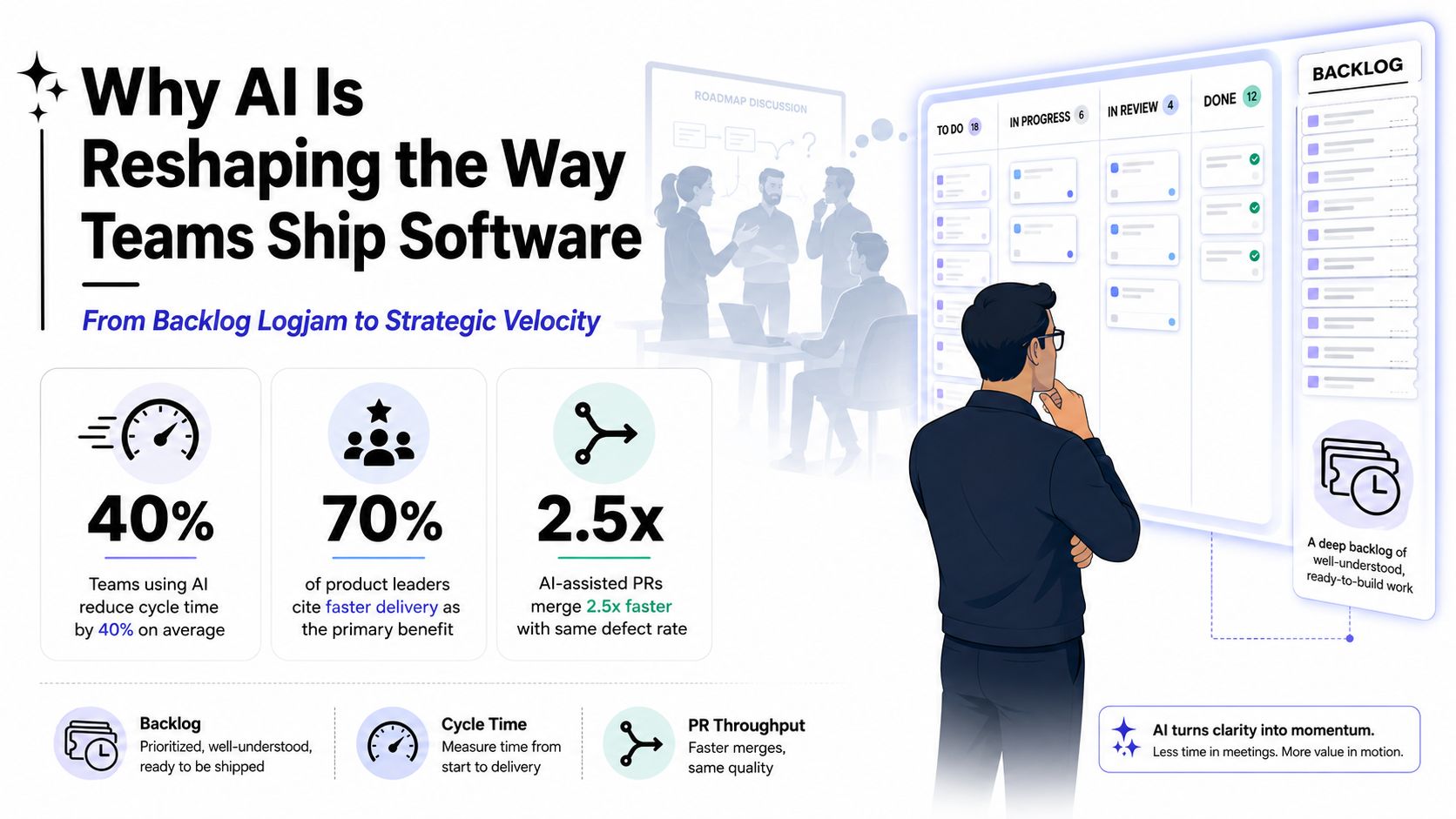
Controlled research also gives product teams more than anecdotes. An MIT Economics report on generative AI and developer productivity describes an experiment involving 4,867 developers, where a generative AI code suggestion tool increased weekly completed tasks by 26.08%. That doesn't mean every project will move at the same pace. It does show why leaders are treating AI as a workflow capability that deserves design, measurement, and governance.
The practical question isn't whether AI can write code. It can. The better question is where it can remove repetitive effort without weakening design decisions, review quality, privacy, or long-term maintainability. That distinction is where prompt versioning, model controls, logging, and cost visibility become part of the product architecture rather than an afterthought.
What AI Assisted Software Development Actually Means
Start with a simple definition: AI assisted software development is human-led software delivery supported by AI across multiple stages of the software development life cycle. The human team still owns the product decision, system boundaries, acceptance criteria, security posture, and release approval. AI helps with analysis, drafting, transformation, and feedback.
A useful analogy is a junior pair programmer who reads quickly, produces a lot of material, and occasionally sounds confident while being wrong. You might ask that colleague to draft a function or explain an unfamiliar module. You wouldn't let the colleague merge sensitive changes without review. AI deserves the same practical treatment, with additional controls for data access and model behavior.
Four layers of assistance
At the IDE layer, tools provide autocomplete, code transformation, and inline suggestions. This works well for repetitive syntax and familiar patterns, but the tool may misunderstand local conventions or invent an API that doesn't exist.
At the codebase layer, chat tools can answer questions about files, trace data flows, propose refactors, and generate tests. Their usefulness depends on the quality of the context they receive. A stale index or incomplete repository view can produce an answer that sounds reasonable but misses an important dependency.
At the agent layer, an AI system can operate across multiple files, run commands, inspect test results, and iterate on a task. This is more powerful than autocomplete, but it also expands the review surface. A small request can create changes in configuration, dependencies, tests, and documentation.
At the application layer, your product can use AI for search, summaries, recommendations, document processing, anomaly detection, or conversational interfaces. This is different from using AI to build the application. The model becomes part of the customer experience, so latency, privacy, failure handling, and cost become product concerns.
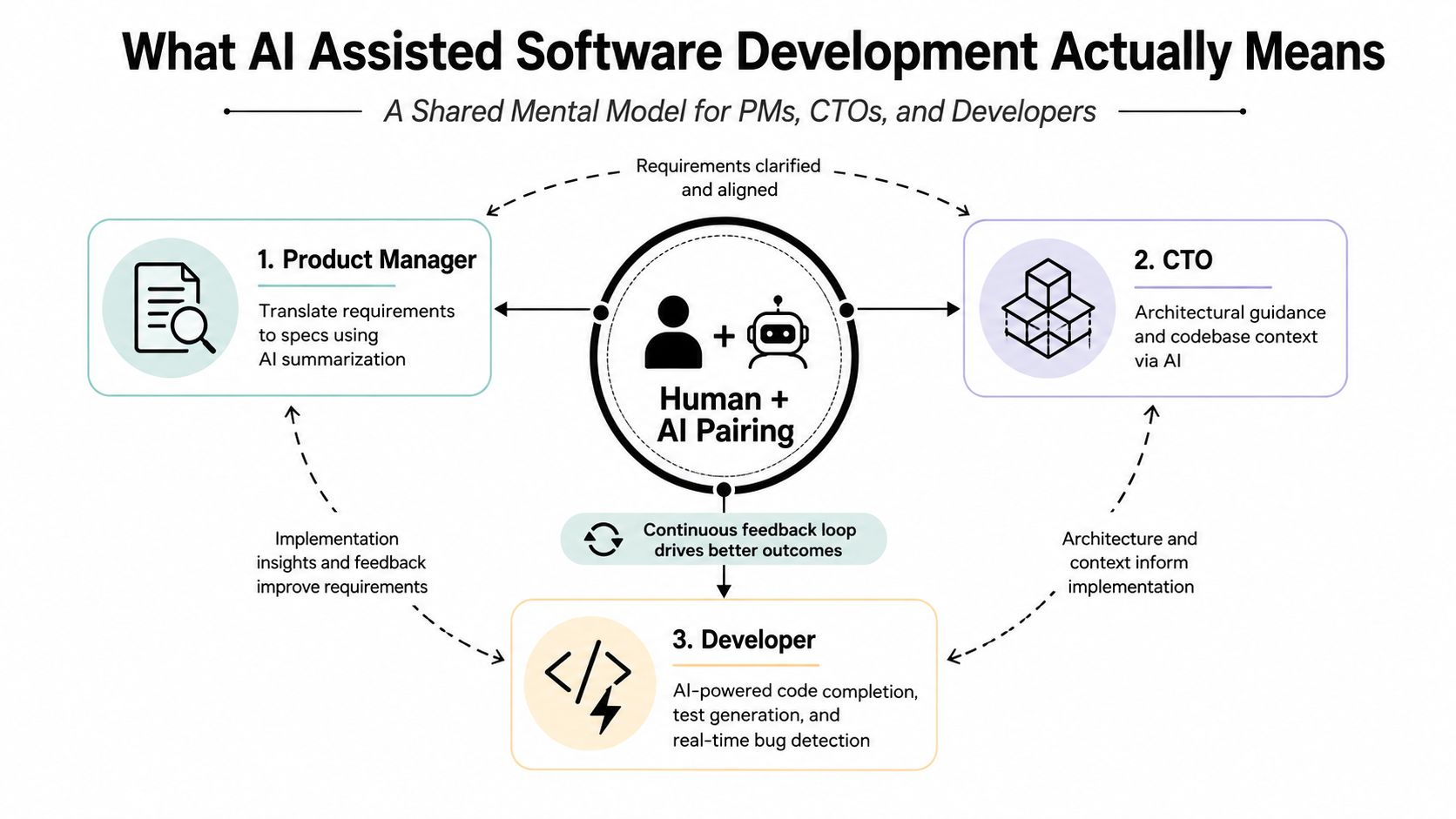
The operational layer ties these uses together. Teams need controlled prompts, safe parameters, model selection, logs, evaluations, and spending limits. Fully autonomous software engineering would remove humans from most decisions. AI assisted development doesn't. It creates a faster feedback loop while keeping accountable people in charge.
The Core Patterns Teams Actually Use in Production
Teams rarely need every AI pattern at once. The right starting point depends on whether the bottleneck is authoring, understanding, coordination, or customer-facing intelligence.
Code completion and inline suggestions
Autocomplete earns its place on repetitive work: serializers, CRUD endpoints, test fixtures, adapters, and predictable UI components. A controlled GitHub Copilot productivity experiment involving professional developers implementing an HTTP server in JavaScript found that the AI-assisted group completed the task 55.8% faster than the control group, with a 78% completion rate compared with 70%.
The ceiling appears when the task requires architectural judgment or hidden business rules. The failure mode is plausible boilerplate that compiles but violates authorization, error handling, or domain behavior.
Chat for codebase reasoning
Chat is most useful when a developer needs to understand existing software before changing it. A product team modernizing a legacy desktop application might ask AI to map dependencies, summarize a service boundary, or identify duplicated validation logic. The developer still confirms the answer against source code and runtime behavior.
Agents across multiple files
Agents can handle a defined issue, update related files, run tests, and prepare a patch. They fit specification-driven work better than ambiguous product discovery. If you're evaluating this pattern, Wonderment Apps' guide to AI agent development provides useful context for thinking about agents as bounded systems rather than unsupervised employees.
The risk grows with scope. Give an agent an unclear objective and it may “solve” uncertainty by making assumptions throughout the repository.
AI inside the product
Ecommerce teams can add semantic search or merchandising assistance. A media application can summarize content and improve discovery. A healthcare workflow can prepare a draft summary for clinician review. These features require product design, fallback states, consent decisions, and monitoring. A model response isn't a finished feature until the surrounding experience handles uncertainty.
The operational wrapper
Every production model call needs a known prompt, approved parameters, an identifiable model version, useful logs, and a spend policy. Without that wrapper, teams can't reliably reproduce behavior, investigate failures, or explain why a feature's operating cost changed. This pattern often creates less excitement than autocomplete, but it determines whether AI remains manageable after launch.
A Realistic Workflow From Requirements to Deployment
A reliable AI workflow assigns a job to the model and a decision to a person at every hand-off.
Requirements and design
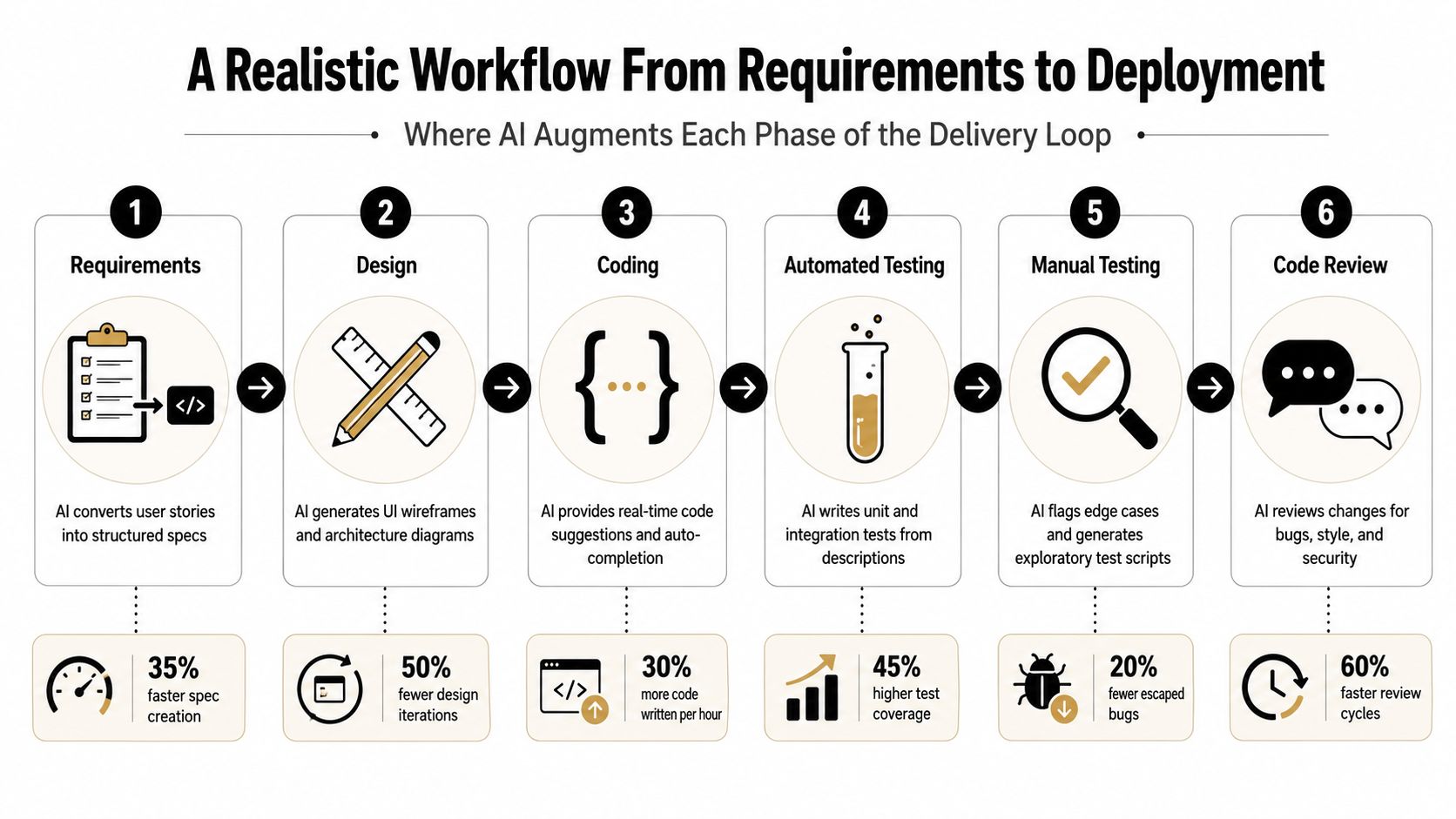
Start with a user story, business rule, and acceptance criteria. AI can turn rough notes into structured specifications, identify missing edge cases, compare interpretations, and draft a question list for the product manager. The product owner approves the behavior before development begins. Generated requirements must never become an unreviewed substitute for product judgment.
During design, AI can propose wireframes, accessibility considerations, API shapes, or architecture alternatives. The designer and technical lead select the approach based on user needs, platform constraints, data sensitivity, and future maintenance. A generated diagram is a conversation starter, not an architecture decision.
Coding and testing
Developers can use AI to draft implementation code, explain unfamiliar modules, convert patterns between languages, and generate unit or integration test candidates. The developer owns the code's correctness and confirms that tests represent the specification rather than merely matching the implementation.
A strong checkpoint asks three questions:
- Does the code satisfy the approved behavior? Compare it with acceptance criteria and domain rules.
- Do the tests challenge the code? Look for negative paths, authorization failures, malformed input, and state transitions.
- Did the change affect unrelated areas? Review the diff, dependency changes, configuration, and generated files.
AI can suggest exploratory tests and identify likely edge cases during manual QA. Testers should reproduce those cases, add observations the model couldn't infer, and verify the experience on the actual desktop or mobile environments users will operate.
Review, deployment, and observation
AI can summarize a pull request, flag suspicious patterns, suggest documentation, and identify possible security issues. The reviewer remains accountable for the merge. This is critical because AI can hallucinate library methods, misread an internal convention, or produce tests that pass without covering the underlying risk.
Before deployment, run normal checks for build integrity, security, privacy, performance, and data handling. After release, observe errors, latency, user feedback, model responses, and cost. A rollback plan should cover both application code and model or prompt changes.
Practical rule: Treat every AI hand-off as a checkpoint with an owner, an artifact to review, and a clear reason to reject the suggestion.
Governing Prompts, Models, Logs, and Spend
AI features become difficult to operate when prompts live in scattered source files, model settings change without review, and usage data remains divided across vendors. Governance doesn't mean slowing every experiment. It means creating a repeatable path from an idea to a tested, observable production behavior.
Four controls belong together
A versioned prompt vault treats prompts like code. Teams can review changes, compare variants, restore a known-good version, and connect a prompt to the feature that uses it. This is especially important when a small wording change affects tone, extraction behavior, or tool selection.
A parameter manager controls the values an AI call can use, including approved internal database access. The model shouldn't receive unrestricted access just because a prompt asks for it. Parameters need boundaries, validation, and an explicit ownership model.
Unified logging records requests, responses or structured outcomes, model identifiers, prompt versions, errors, latency, and relevant usage metadata across integrated AI providers. Logs support debugging and audits, but teams must design retention and access policies around sensitive data.
A cost manager shows cumulative spend by application, feature, model, environment, or team. A product leader should be able to see whether a new summarization feature is consuming more resources than expected before the invoice becomes a surprise.
Wonderment Apps has developed an administrative prompt management system that plugs into existing applications and combines a versioned prompt vault, parameter management for internal data access, cross-model logging, and cumulative cost visibility. It fits the operational gap between an AI API call and a production-ready AI feature. Teams planning adoption should also account for the human side of rollout, and DataLunix's guide to change management offers useful context for preparing people, processes, and responsibilities.
For implementation teams, these prompt engineering best practices help turn prompting from personal experimentation into a shared engineering discipline. The best setup connects prompt changes to evaluation results, approval rules, and observable product behavior.
Use Cases in Ecommerce, Fintech, Healthcare, Media, and the Public Sector
The same model can produce very different product risks depending on the industry. A useful rollout starts with the workflow and guardrail, not with the most fashionable AI feature.
| Industry | Practical scenario | Suitable pattern | Primary guardrail |
|---|---|---|---|
| Ecommerce | A shopper searches for products using natural language while merchandising teams review generated category summaries. | Semantic search, recommendations, and controlled content assistance. | Keep product facts, pricing, inventory, and ranking rules authoritative. |
| Fintech | An operations analyst receives a draft summary of submitted documents and a review queue for unusual transaction signals. | Document summarization with anomaly detection support. | Separate model suggestions from approval decisions and protect sensitive financial data. |
| Healthcare | A clinician reviews a concise draft assembled from patient records inside an existing desktop or mobile workflow. | Retrieval-supported summarization with explicit clinician confirmation. | Preserve privacy, provenance, auditability, and a clear correction path. |
| Media and entertainment | A content-rich application improves discovery by generating metadata and recommending relevant stories or programs. | Recommendation, classification, and editorial assistance. | Give editors control over taxonomy, tone, exclusions, and published results. |
| Public sector | Residents receive help navigating services while staff use AI to organize incoming requests. | Retrieval-based service guidance and workflow triage. | Show source information, limit unsupported answers, and provide human escalation. |
Scaling adds another design question. A feature that works for a small internal team may need queues, caching, rate controls, fallback models, and careful data partitioning before it can serve a large public audience. Your developers should understand both the model and the application around it. That includes mobile network constraints, desktop integration, accessibility, observability, and the operational behavior of the existing software.
The safest first use case usually has a clear output, a low-risk failure mode, and a human review path. Avoid starting with an irreversible decision. Begin where AI can reduce repetitive work while the team learns how users respond and where the model needs correction.
The Honest Trade-Offs You Should Plan Around
Code generation speed is not the same as delivery speed. The difference appears in review queues, debugging sessions, security findings, unclear ownership, and maintenance work that arrives after the original author has moved on.
Trust remains a central constraint. Sonar's 2026 State of Code Developer Survey reports that 42% of committed code was AI-generated or AI-assisted, while 96% of developers said they don't fully trust AI-generated code and only 48% said they always verify it before committing. Adoption can therefore increase faster than confidence, creating a verification gap.
Where the speed story breaks
The 2025 Stack Overflow survey reporting summarized by InfoWorld found that 66% of developers identified “almost right, but not quite” AI solutions as their top frustration, and 45% said debugging AI-generated code is more time-consuming. A fast first draft can become expensive if developers must reverse-engineer confident mistakes.
Security creates another failure path. The same source describes reporting from a 2025 IDC DevSecOps survey in which 41.6% of respondents occasionally identified security issues introduced by AI-generated code in fewer than half of code reviews, while 72% of organizations reported at least one production incident tied to AI code. These figures don't prove that AI caused every incident in the same way, but they make one operational point clear: generated code needs the same, or stronger, security controls as human-written code.
Research also shows that context matters. A METR study of experienced open-source developers found that AI assistance made developers take 19% longer to complete issues, even though they believed afterward that AI had made them 20% faster. Another NBER analysis of AI coding tools reported cumulative increases of 40% more commits for autocomplete, 140% for interactive coding agents, and 180% for autonomous coding agents, but those gains fell to 50% for projects and 30% for actual releases. Raw activity isn't a substitute for shipped software.
Use mandatory review, automated security scanning, data-handling policy checks, dependency validation, and named ownership for every AI-assisted merge. The team should measure whether the change improves the full delivery loop, not whether the editor produced more characters.
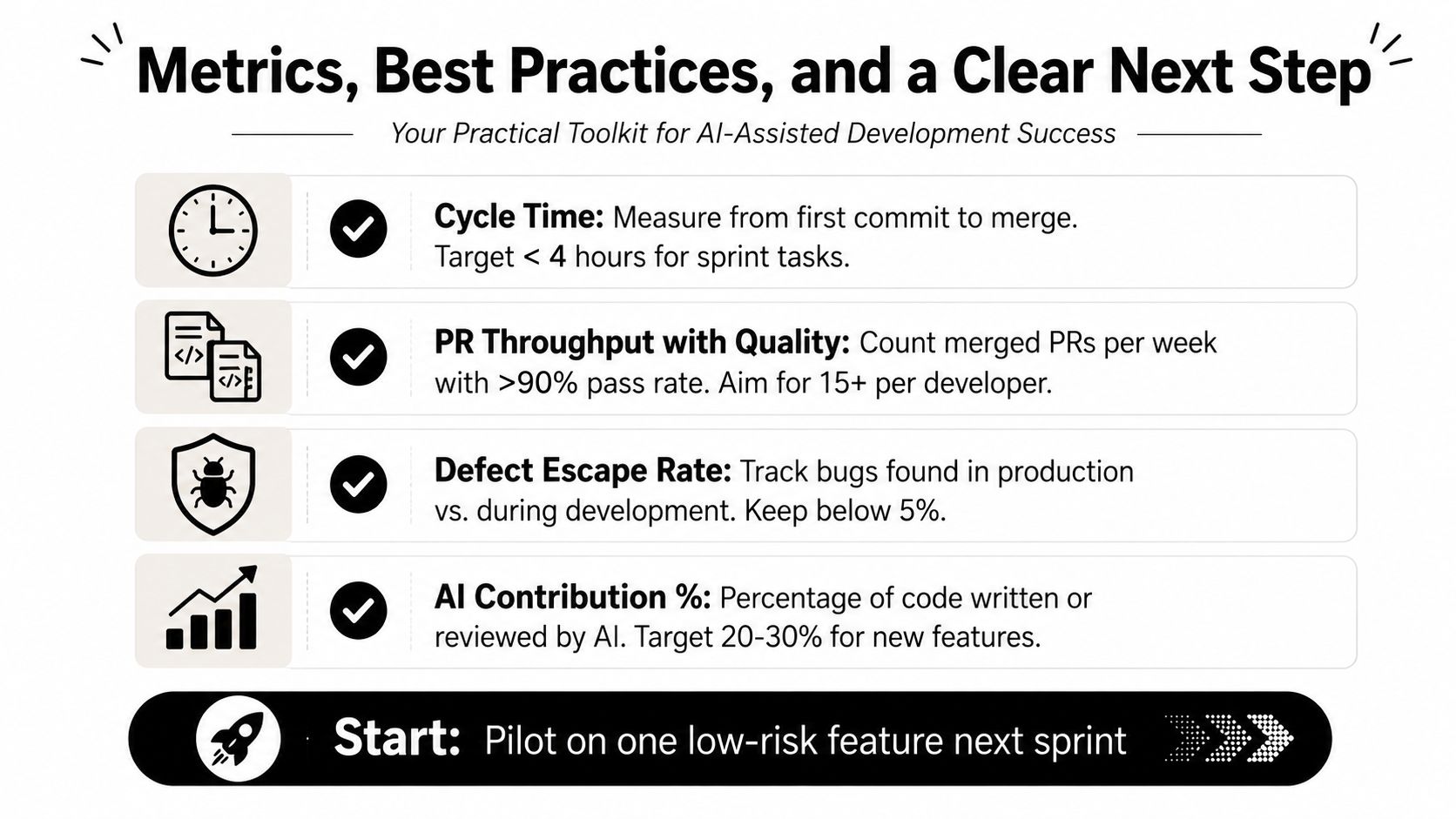
Metrics, Best Practices, and a Clear Next Step
Measure cycle time, pull request throughput with quality intact, escaped defects, AI contribution share, model spend per feature, and verification coverage. These metrics connect AI activity to software that reaches users and continues working after release. For model selection and ongoing evaluation, use a disciplined process such as the one described in Wonderment Apps' AI model evaluation guide.
Choose a low-risk first feature with clear acceptance criteria, hire developers who can review AI output rather than merely generate it, and modernize legacy code in bounded slices. A capable partner should bring engineering, QA, UX, product management, and platform judgment together, especially when a desktop or mobile application must scale without freezing the roadmap.
Wonderment Apps can help teams modernize existing software, integrate AI features, and manage prompts, integrations, logs, and token costs through an administrative toolkit. Visit Wonderment Apps to discuss a focused pilot and see how the prompt management system can turn AI assistance into a governed delivery capability.