

Your team has a prototype. It can answer questions, call a tool, and impress people in a demo. Then the substantial work begins. The prompt changes in staging but nobody knows why production behaves differently. Costs drift upward. A support workflow works for one customer segment and breaks on another. The engineering issue usually isn't the model. It's the system around the model.
That's where most AI agent development efforts either mature or stall.
The gap between a clever agent demo and a dependable product is still catching a lot of teams off guard, even as the market moves fast. The global AI agent market grew from $3.86 billion in 2023 to $5.43 billion by 2024 as enterprises shifted from pilots to large-scale deployments, according to Fwd Slash AI's AI agent market analysis. More teams are building. That doesn't mean more teams are building well.
The pattern that holds up in production is boring in the best way: narrow scope, explicit orchestration, strong evaluation, disciplined release management, and prompt operations treated like software operations. If you're modernizing a desktop product, extending a mobile app, or adding AI to an existing SaaS platform, those are the pieces that let the system last.
Understanding Requirements and Use Cases
A stalled pilot usually starts with a fuzzy sentence like "add an AI agent for customer support." That's not a requirement. That's a wish.
A usable requirement sounds more like this: "When a return request arrives, the agent classifies the request type, gathers order context, drafts the correct response, and routes edge cases to a human reviewer." Now engineering has something to build, product has something to prioritize, and legal or compliance teams have something to assess.
Start with a workflow, not a model
The teams that move fastest map a business workflow before they compare LLMs or orchestration frameworks. For an ecommerce company, that might be return triage, product content enrichment, or catalog anomaly review. For a fintech product, it might be document intake, fraud investigation prep, or support deflection with strict escalation rules.
A clean requirements pass should answer four questions:
- What job is the agent doing. Name the exact workflow, trigger, and handoff.
- What counts as success. Define outcome signals like correct routing, acceptable latency, or safe escalation to a human.
- What data can the agent touch. Include internal systems, permissions, and whether sensitive data needs masking.
- What failure is acceptable. Some workflows can tolerate "I don't know." Others need deterministic fallback logic.
Practical rule: If a team can't describe the input, expected output, and fallback behavior in one page, they aren't ready to build an agent yet.
One helpful primer for non-technical stakeholders is AI agents for automation, because it frames agent use around operational jobs instead of hype. That's the right starting point for requirement conversations.
Prioritize by operational pain
The best early use cases come from repeated operational failure, not the most glamorous demo idea. If support reps repeatedly fix the same order metadata issue, that's promising. If account managers manually rewrite product descriptions every week, that's promising too. If the use case depends on abstract strategy, open-ended creativity, or a lot of hidden judgment, it's usually a poor first deployment.
A practical shortlist looks like this:
| Use case | Good fit for early agent work | Watch-out |
|---|---|---|
| Support triage | Clear categories, measurable routing | Ambiguous customer intent |
| Content enrichment | Repeatable output shape | Brand voice drift |
| Internal knowledge lookup | High volume, clear retrieval need | Stale source data |
| Mobile in-app assistant | Helpful for guided flows | Needs graceful offline or fallback behavior |
Write requirements that survive production
Strong requirements also include operational constraints. A mobile app team needs to know what happens with weak connectivity. A desktop workflow may need async processing so the UI doesn't freeze. A regulated product needs a trace of what prompt version was used and what data the system accessed.
That kind of discipline feels slow on day one. It saves months later. Teams that skip it often discover too late that the agent was solving the wrong problem, or solving the right problem with no auditability.
Choosing Agent Architecture and Models
Architecture decisions get expensive when they're made too early and expensive in a different way when they're made too late. Few groups require the most elaborate agent stack. They need the smallest architecture that matches the workflow.
Match the agent style to the job
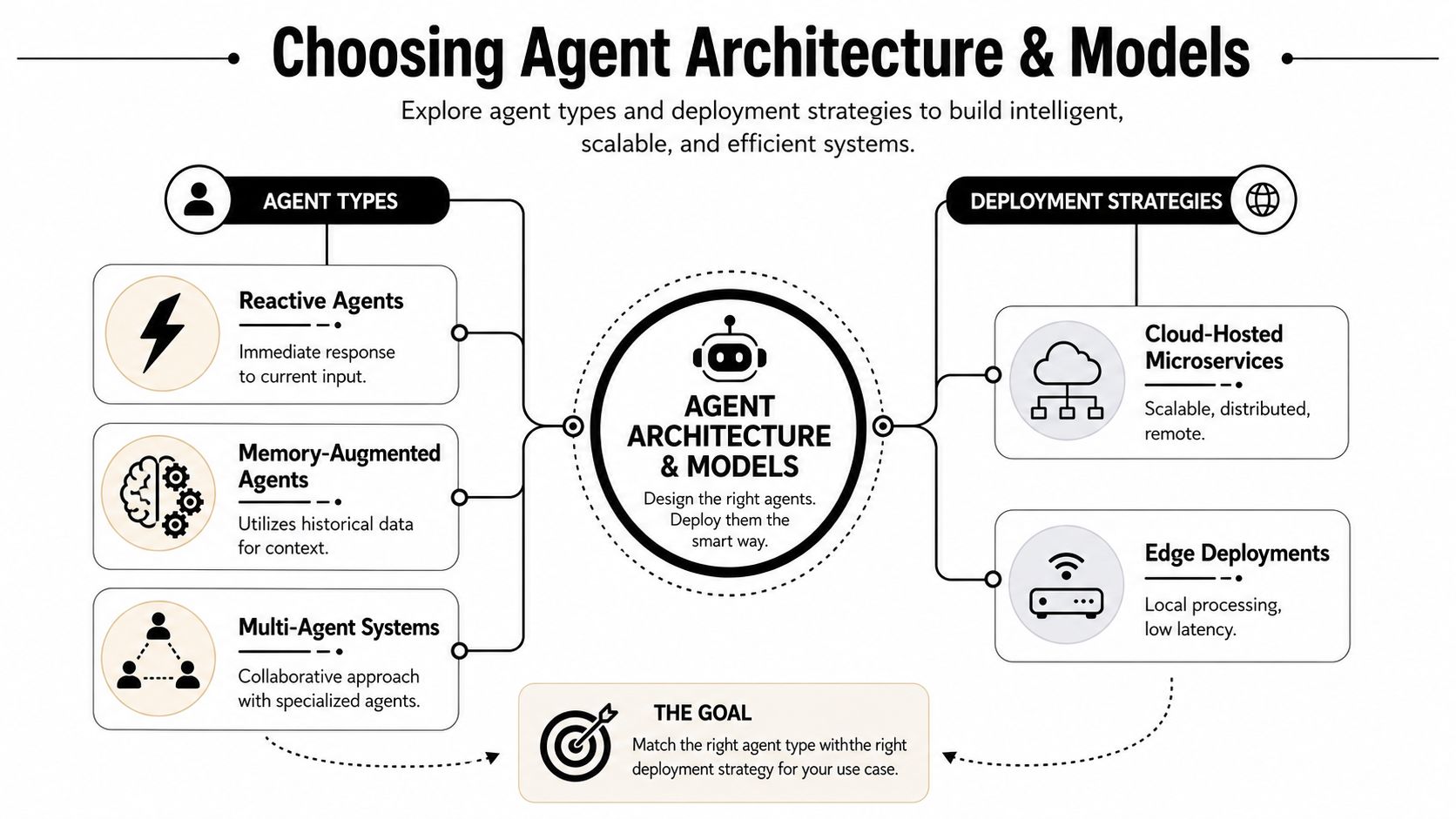
A reactive agent works when each task is short-lived and mostly depends on current input. Think FAQ routing, one-shot extraction, or a support suggestion widget.
A memory-augmented agent fits workflows where prior context matters. Customer history, previous tickets, preferences, and recent tool outputs all improve the result. These agents need careful context selection so they don't carry stale or irrelevant state.
A multi-agent system only makes sense when specialization reduces complexity. One agent may classify an issue, another may retrieve account data, and a third may draft the response. This can improve maintainability, but it also adds orchestration overhead and more places for failure to hide.
A lot of teams build multi-agent systems before they've earned the complexity. If one tightly scoped workflow can solve the problem, start there.
Choose deployment based on the user experience
The deployment model has direct product consequences, especially in desktop and mobile applications. For desktop and mobile AI integration, using microservices with REST/gRPC and async queues improves reliability and versioning, while on-device models like TensorFlow Lite enable offline support, as outlined in Kanhasoft's guide to AI and ML integration.
That guidance matters in practice:
- Cloud-hosted microservices work well when you need centralized model updates, shared logging, and access to backend tools or private data.
- REST or gRPC APIs make it easier to decouple frontend release cycles from AI backend changes.
- Async queues help when inference or tool execution could block the interface.
- On-device models are useful when latency, privacy, or offline support are core product requirements.
For a mobile shopping app, an on-device model may handle lightweight ranking, text cleanup, or offline assistance, while cloud services handle richer reasoning and tool access. For a desktop operations app, cloud orchestration often wins because the workflow depends on internal systems anyway.
Build vs buy is a product decision
Teams often frame model selection as a research problem. It isn't. It's a business and systems problem.
Use an existing hosted model when speed, broad capability, and ecosystem support matter more than proprietary behavior. Consider custom fine-tuning or deeper specialization when the workflow depends on domain language, fixed output formats, or company-specific data that generic prompting doesn't handle well.
A simple decision frame helps:
| Decision area | Start with hosted model | Consider custom approach |
|---|---|---|
| Time to market | You need to ship quickly | You can invest in tuning and iteration |
| Data sensitivity | Data can be handled with existing controls | You need tighter domain-specific control |
| Workflow complexity | General reasoning is enough | Output must fit narrow business rules |
| Maintenance | You want less model ops burden | You accept more ownership for differentiation |
Keep deterministic code in the execution path
The agent should reason about what to do. Your application code should still validate, execute, and persist the final action. Let the model produce structured intent. Let conventional software enforce schemas, permissions, business logic, and side effects.
That split is especially important in AI agent development for enterprise software. It keeps the system debuggable. It also makes upgrades easier when a stronger model appears and replaces part of your stack.
Designing Orchestration and Prompt Management
Prompt sprawl is one of the fastest ways to lose control of an agent system. It starts innocently. A developer tweaks a system prompt in one environment, another teammate copies it into a serverless function, and the mobile team hardcodes a variation to test onboarding. After a month, nobody knows which prompt version is responsible for which behavior.
Orchestration is what prevents that mess from becoming your operating model.
Treat prompts like deployable assets
Prompts aren't copy. They're configuration with behavioral consequences. They need versioning, review history, environment separation, and rollback.
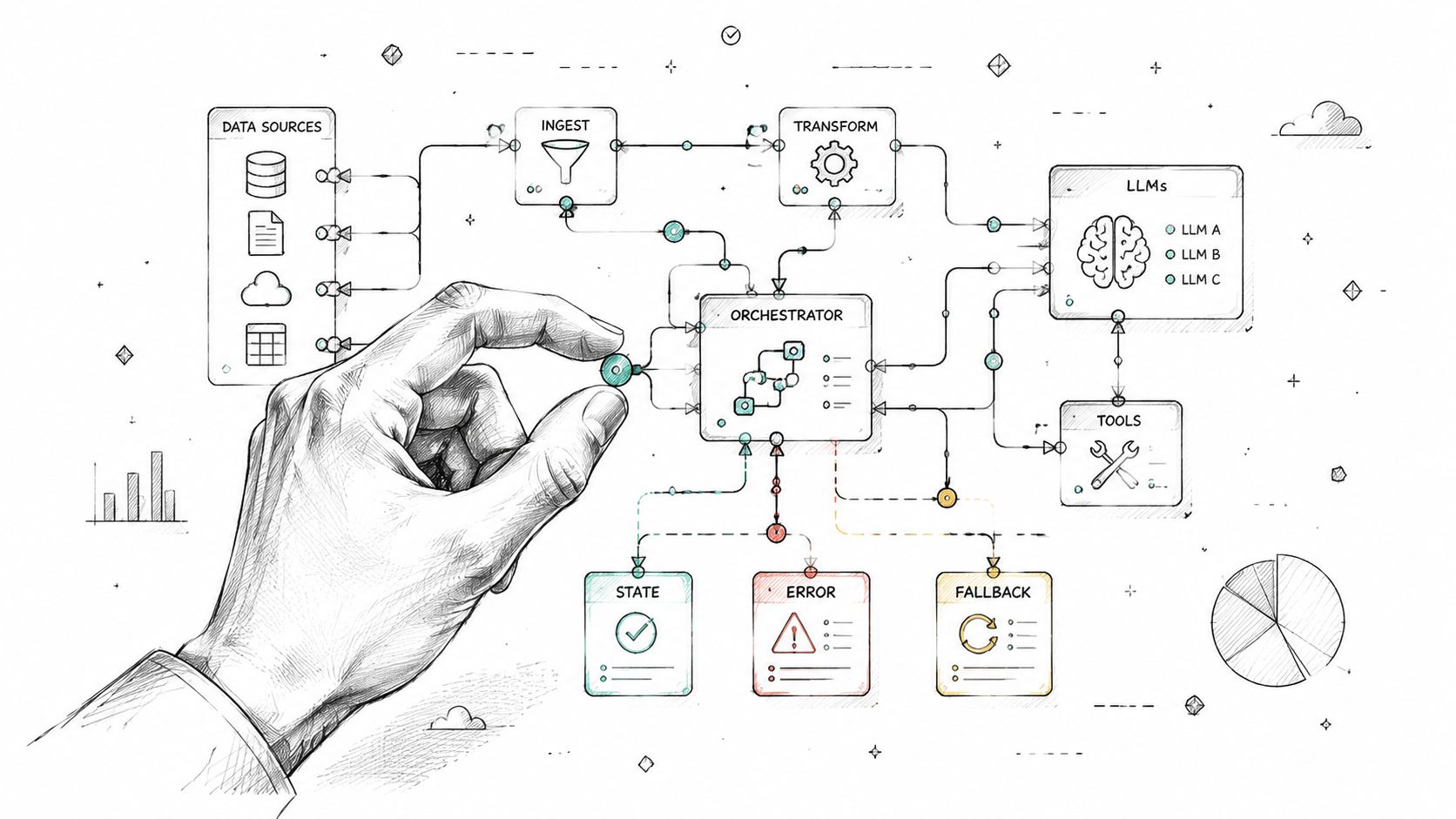
A solid orchestration layer usually includes:
- State tracking so each step knows what happened before and what data is available now
- Tool routing that decides whether the agent should retrieve data, call an API, ask a clarifying question, or stop
- Fallback logic for timeouts, low confidence, or malformed output
- Central prompt storage so every environment references the same managed prompt definitions
- Unified logs that tie prompt version, model choice, tool calls, latency, and outputs together
If your team hasn't formalized this yet, prompt management tools for production AI systems gives a useful picture of what mature prompt operations should include.
Orchestration pattern that scales cleanly
A practical pattern for web, desktop, and mobile integration looks like this:
- The client app sends a request to an orchestration service.
- The orchestration service loads the active prompt version and parameters for that workflow.
- The service retrieves required context from approved systems.
- The model produces either a structured action proposal or a direct response.
- Validation code checks schema, permissions, and business rules.
- The system either executes the action, routes to a queue, or escalates to a human.
That design keeps the frontend thin. It also prevents product teams from tying UX behavior to a single model response shape that may change over time.
Keep parameters out of the prompt body when possible
A common mistake is stuffing customer data, app settings, permissions, and database-derived flags directly into giant prompt templates. It works for a while and then becomes impossible to debug.
A better approach separates the reusable prompt text from dynamic parameters:
| Layer | What belongs there | What doesn't |
|---|---|---|
| Prompt template | Role, policy, output contract, tone | Raw customer records |
| Parameter manager | IDs, policy flags, feature toggles | Long-form instructions |
| Retrieval layer | Relevant facts and current context | Hidden business logic |
| Validation layer | Schema checks and action gating | Creative language generation |
The cleanest agent systems make prompts smaller over time, not bigger.
Use event-driven patterns for long-running work
Not every workflow should finish in one request cycle. Catalog enrichment, compliance review prep, and content moderation often belong in async jobs. Event buses and queues are useful here because they isolate retries and stop one failing step from freezing the whole application.
For AI agent development in larger products, that matters more than people expect. It keeps your mobile UI responsive, your desktop app stable, and your backend workflows observable. It also gives you a sane place to apply logging and retry policy without turning every agent call into custom glue code.
Building Robust Evaluation Pipelines
Most AI teams test the happy path, glance at a few outputs, and call that evaluation. That isn't enough. If the grading logic is weak, the deployment is weak.
Evaluation failures cause 68% of production agent breakdowns because teams skip step-level accuracy testing and robust grade coverage, according to this analysis of agent system evaluation challenges. That lines up with what shows up in enterprise rollouts. The agent looks fine until a user hits an edge case nobody measured.
Start with real failures, not curated examples
The fastest way to improve an agent is to build your eval set from real operational misses. Use support escalations, failed automations, confusing user requests, malformed inputs, and edge cases from QA. Don't start with polished benchmark examples that flatter the system.
A strong early evaluation set usually has these properties:
- It reflects production messiness. Incomplete data, vague user wording, contradictory records.
- It maps to one concrete business outcome. Did the agent resolve the issue, route correctly, or produce an acceptable action proposal.
- It can be judged consistently. Two domain experts should be able to reach the same pass or fail conclusion.
Separate your evaluations into buckets. One for correctness. One for safety and policy. One for tool use. One for resilience when context is missing or noisy.
Grade outcomes, not imagined reasoning paths
A lot of teams over-grade the process. They expect the agent to take one exact sequence of steps, then mark anything else as wrong. That punishes valid solutions and trains the system toward brittle behavior.
The more reliable question is simpler: did the agent complete the business task correctly and safely?
Use this distinction:
| Evaluation focus | Better question |
|---|---|
| Process-heavy grading | Did the agent follow the exact expected chain |
| Outcome-focused grading | Did the agent solve the business problem within policy |
| Tool-use checks | Did it use tools appropriately when needed |
| Failure handling | Did it stop, escalate, or recover correctly |
That doesn't mean process is irrelevant. It means process should support outcome grading, not replace it.
If two reviewers disagree on pass or fail, the test case is probably ambiguous and your grader is weaker than you think.
Wire evaluation into CI before release
Evaluation shouldn't live in a spreadsheet and a Slack thread. It belongs in the release path. Every prompt update, tool schema change, retrieval tweak, or model swap should trigger an evaluation suite before deployment.
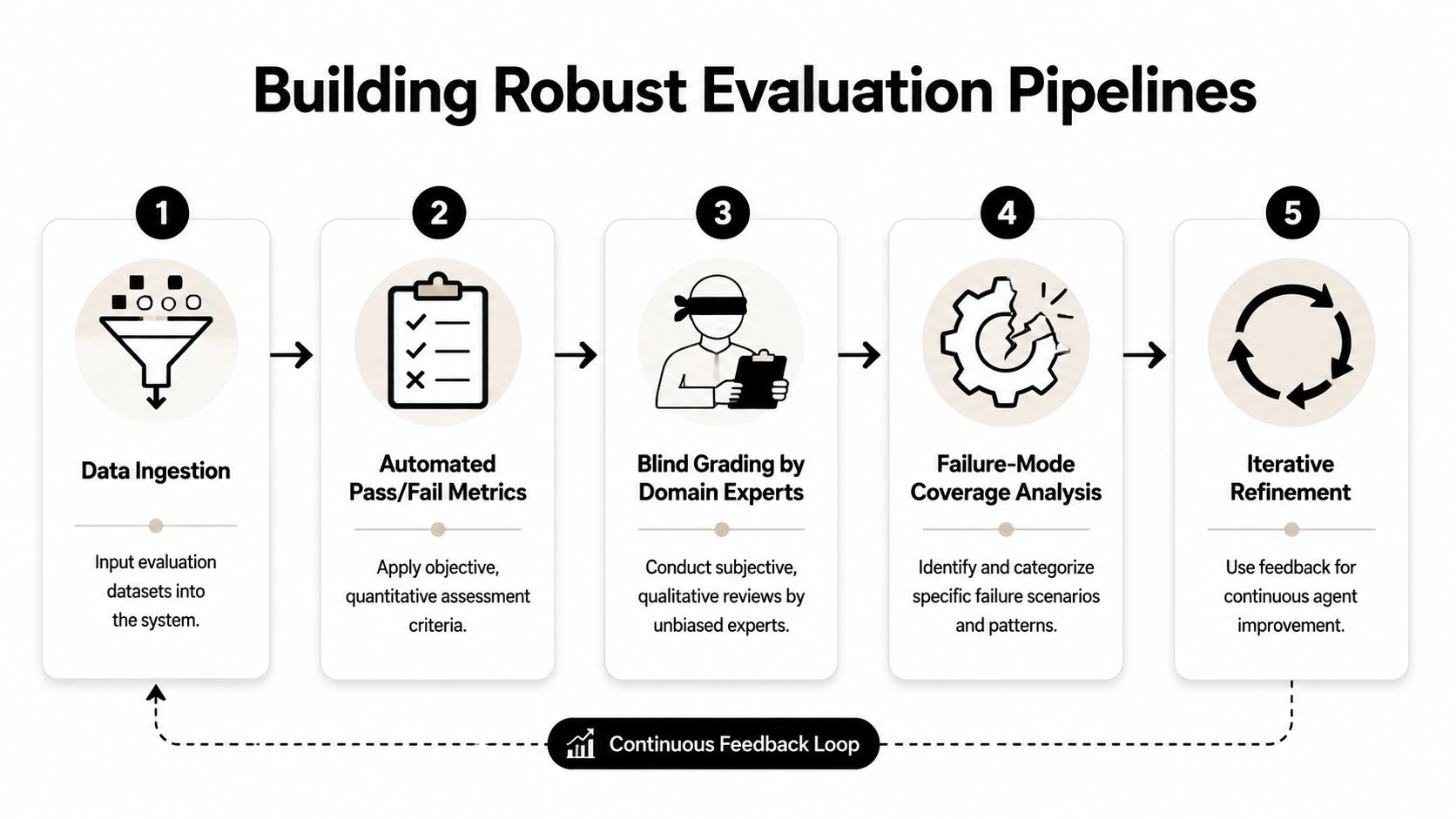
A lightweight pipeline often includes:
- Dataset load from labeled historical tasks
- Execution harness that runs the agent in test mode
- Automated grading for schema compliance, policy checks, and deterministic expectations
- Human review queue for ambiguous or high-risk samples
- Regression report that compares the current candidate against the previous approved version
Teams building this muscle usually benefit from a more structured reference like AI model evaluation practices for product teams, especially when they need to turn ad hoc review into repeatable release criteria.
Make failure modes visible
Your evaluation suite should expose where the system breaks, not just whether it passed a global score. Group failures by missing context, retrieval mistakes, prompt drift, schema violations, and weak fallback behavior.
That grouping changes engineering priorities. Instead of debating whether the model is "good enough," the team can fix the exact part of the system causing the miss.
Implementing Cost Control and Observability
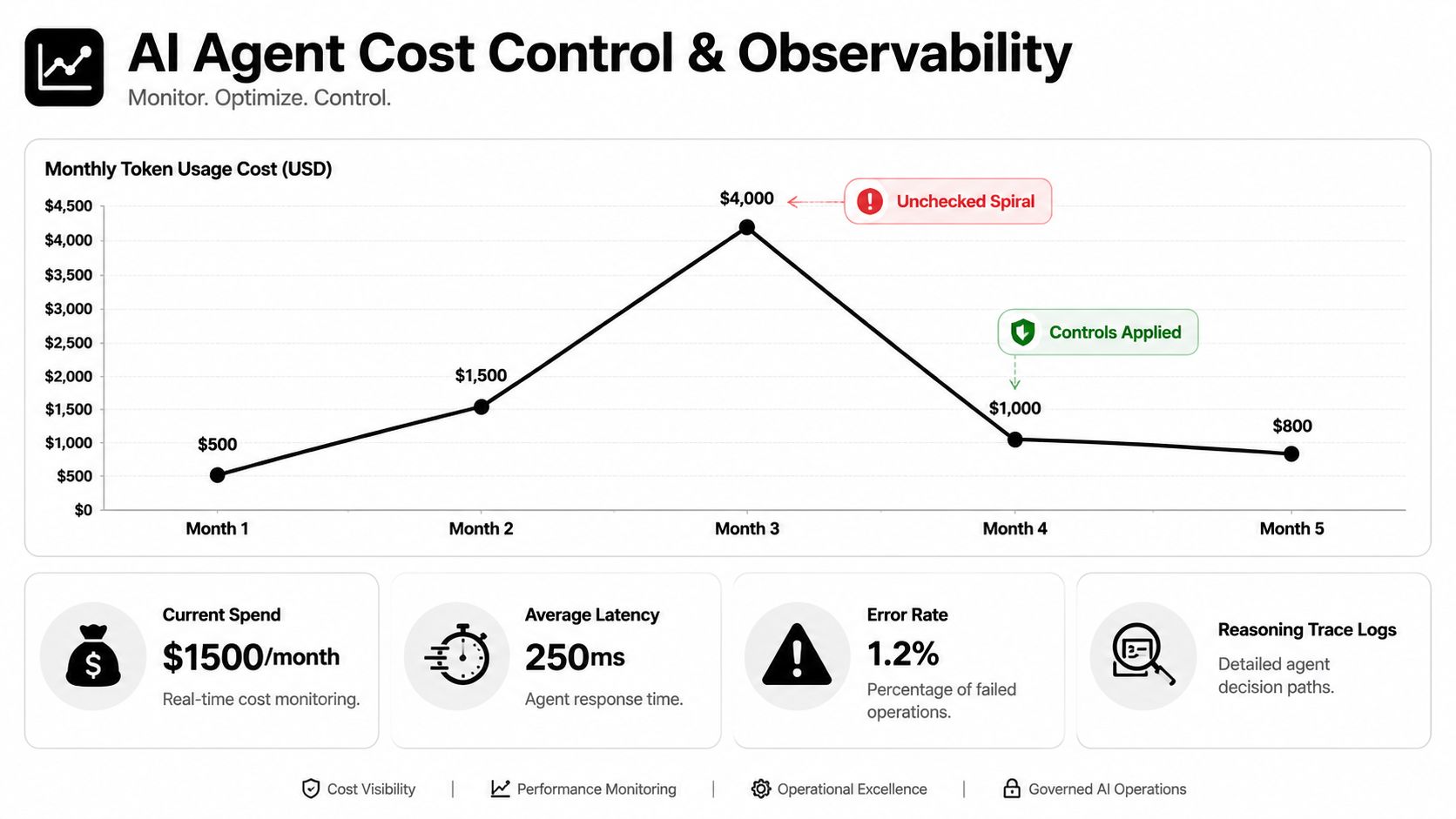
A token bill rarely explodes because one prompt is long. It explodes because the system keeps talking to itself, retrying badly, retrieving too much context, or calling tools in loops nobody instrumented.
That's why cost control belongs in design, not cleanup.
Over half of AI agent startups collapse due to uncontrolled token costs. 54% cite orchestration misuse as the culprit, according to Preuve's analysis of AI startup failure patterns. The failure pattern is familiar: too many steps, weak state boundaries, no hard limits, and no real-time visibility into spend.
Watch the metrics that actually matter
A useful observability setup for agents should answer four questions in near real time:
- How much is this workflow costing
- Which prompt or tool path caused the spend
- Where is latency accumulating
- What decision trace led to the final output or failure
Cost alone isn't enough. A cheap workflow that fails and retries endlessly isn't cheap. A fast workflow that routes bad actions into production isn't fast in any meaningful sense.
Track spend alongside latency, tool invocation counts, failure categories, and escalation frequency. Those metrics tell you whether the architecture is healthy or just temporarily quiet.
Put budget controls inside the orchestration layer
Teams often put budget alerts in finance dashboards and call it governance. That's too late. Controls need to sit where the agent makes decisions.
Good controls include:
| Guardrail | Why it works |
|---|---|
| Per-task token cap | Stops single requests from ballooning |
| Tool-call limit | Prevents looping behavior |
| Retrieval budget | Keeps context windows from filling with marginal data |
| Human escalation threshold | Routes expensive ambiguity to review |
| Environment-level spend tracking | Shows whether staging, QA, or production is leaking |
Budget warning: An agent without hard execution limits will eventually find an expensive way to be unhelpful.
Logging must connect behavior to cost
Many observability stacks fall short. They log model responses but not the full chain. Or they store traces but don't tie them to environment, prompt version, user segment, or workflow ID. That makes debugging expensive behavior much slower than it needs to be.
A better logging design captures:
- request and workflow identifiers
- prompt version
- model and parameter settings
- retrieval payload summary
- tool calls and duration
- token usage by step
- final outcome and escalation state
If your team is still building visibility around this, performance monitoring tools for AI-backed applications is a good reference for shaping the dashboard layer around product and ops needs rather than pure infrastructure metrics.
Cut cost by reducing unnecessary reasoning
The cheapest token is the one you never ask the model to generate. Before changing providers or compressing prompts, remove the work the model shouldn't be doing:
- Route obvious cases with deterministic rules first.
- Cache stable outputs where business rules allow it.
- Trim retrieval results to what the workflow needs.
- Avoid asking the model to explain itself unless that trace is required for debugging or compliance.
- Stop retries that repeat the same failing context.
In mature AI agent development, observability isn't just for outages. It's how teams keep unit economics aligned with product value.
Setting Up CI CD Monitoring and Team Roles
Reliable release management for agents looks more like disciplined application delivery than prompt tinkering. The difference is that your deployment package now includes prompts, evaluation datasets, model settings, tool schemas, and rollback rules.
That's why AI agent development needs a real CI/CD workflow and clear ownership across the team.
Release the agent like a product feature
A practical deployment path often looks like this:
- A change is proposed to prompts, orchestration logic, retrieval rules, or model configuration.
- Automated tests run for schema validation, integration checks, and agent evaluations.
- The candidate build deploys to a staging environment with mirrored logging.
- A canary release exposes the update to a limited workflow or audience segment.
- Monitoring checks for regressions in output quality, latency, escalation behavior, and operational errors.
- The system either expands rollout or rolls back automatically.
That sounds obvious. Many teams still skip steps because prompts feel "lighter" than code. They aren't. A prompt edit can materially change product behavior.
Monitoring needs product owners, not just engineers
Infra dashboards catch outages. They don't tell you if the agent is becoming less useful. Someone needs to own quality signals tied to the user experience.
Useful responsibilities usually break out like this:
- Product manager decides which workflow matters, what success means, and where human review stays in place.
- Data engineer manages retrieval pipelines, data freshness, and access boundaries.
- Prompt engineer or applied AI engineer handles prompt versions, tool instructions, and agent behavior tuning.
- MLOps lead or platform engineer owns deployment automation, environment consistency, and runtime observability.
- QA automation specialist builds regression harnesses and edge-case coverage.
- Domain reviewer validates outputs in regulated or operationally sensitive workflows.
A small team may combine these roles. The responsibilities still need to exist.
Hire for judgment, not just framework familiarity
The strongest AI engineers aren't just people who've used popular APIs. Effective hiring focuses on developers who master build vs. buy decisions, secure data practices, and pre-deployment success metrics, as described in Leanware's guidance on choosing AI-capable developers.
That hiring lens matters because agent projects fail in planning as often as they fail in implementation. You want developers who can say:
- this workflow should stay deterministic
- this prompt needs versioning and rollback
- this mobile feature should run partially on-device
- this dataset isn't clean enough for production use yet
- this vendor API speeds us up today but creates lock-in later
The best agent teams don't just ask "Can we automate this?" They ask "Should this be automated now, and under what controls?"
Make sprint reviews operational
A normal software sprint review shows completed features. An agent sprint review should also show failure samples, evaluation regressions, prompt changes, and rollout readiness. That creates a healthier culture around quality.
It also keeps stakeholders honest. If the workflow still needs human verification, say so. If a release improved one path but weakened another, surface it before production does.
Sample Implementation Patterns and Code Snippets
A good reference implementation ties the pieces together without pretending production is simple. The pattern below shows a small Node.js service that receives a task, loads a managed prompt version, enforces a budget, logs the run, and sends the result into evaluation.
Minimal service flow
import express from "express";

const app = express();
app.use(express.json());

const PROMPTS = {
  support_triage_v3: {
    version: "v3",
    system: "Classify the request, summarize the issue, and decide whether to escalate."
  }
};

function estimateBudget(input) {
  const size = JSON.stringify(input).length;
  return size < 4000;
}

function validateOutput(output) {
  return output && ["reply", "escalate", "clarify"].includes(output.action);
}

async function runModel({ prompt, customerMessage, context }) {
  return {
    action: "reply",
    summary: `Customer issue: ${customerMessage}`,
    draft: "Thanks, we're looking into this now."
  };
}

async function logRun(entry) {
  console.log("agent-log", entry);
}

app.post("/agent/support-triage", async (req, res) => {
  const prompt = PROMPTS.support_triage_v3;
  const payload = req.body;

  if (!estimateBudget(payload)) {
    return res.status(202).json({ action: "escalate", reason: "budget_guardrail" });
  }

  const output = await runModel({
    prompt,
    customerMessage: payload.message,
    context: payload.context
  });

  const valid = validateOutput(output);

  await logRun({
    workflow: "support-triage",
    promptVersion: prompt.version,
    valid,
    output
  });

  if (!valid) {
    return res.status(202).json({ action: "escalate", reason: "validation_failed" });
  }

  return res.json(output);
});

app.listen(3000);
What this pattern gets right
This tiny service already does four important things well:
- Prompt version is explicit. That makes rollback and evaluation comparisons possible.
- Budget is checked before expensive work. Even a rough guardrail is better than none.
- Validation happens outside the model. The model suggests. The service decides.
- Logging captures workflow and prompt version. That gives you a trail when behavior changes.
What to add before production
For a real deployment, extend this pattern with a managed prompt store, structured tracing, queue-based retries, environment-specific configuration, and an evaluation runner that scores sampled outputs against labeled tasks. Add human review where action safety matters. Add deterministic rules before the model where the business logic is clear.
That's the core lesson of durable AI agent development. The model matters, but the surrounding system determines whether the product is trustworthy.
If you're modernizing an existing product or building an AI-native workflow from scratch, Wonderment Apps is worth a look. Their team works across web, mobile, AI modernization, and UX-driven delivery, and they also offer an administrative toolkit for AI integration addressing the hard operational pieces teams often miss: a prompt vault with versioning, a parameter manager for internal database access, unified logging across integrated AIs, and a cost manager so entrepreneurs can track cumulative spend before it turns into a surprise. If you want to see how that works in practice, book a demo and evaluate it against your current stack.