

Your team ships an AI feature. Internal demos look sharp. The pilot users seem happy. Then production starts doing what production always does. It introduces messy inputs, strange edge cases, latency spikes, retries, stale data, and users who don't behave like your test set.
That's where most AI projects stop being a modeling exercise and start becoming a software engineering problem.
In practice, AI model evaluation isn't a final report attached to a launch ticket. It's the operating system for how you decide whether a model is safe to release, affordable to run, and stable enough to trust inside a real product. That's especially true for modern applications where prompts, retrieval pipelines, tool calls, and model configuration all change behavior. If you can't track those changes, you can't evaluate them with confidence. That's why teams increasingly need administrative tooling for prompt versioning, logging, and spend visibility, not just a notebook with a few benchmark charts.
Why Great AI Models Fail in the Real World
Monday morning looks fine. By Thursday, the same model is generating escalations, missing edge cases, and burning more budget than anyone forecast.
That pattern is common because a strong offline result says far less about production behavior than many teams expect. Evaluation often stops at the point where the software engineering work should begin. The model passed a controlled test, but the application still has to survive messy inputs, changing prompts, retrieval failures, retries, latency limits, and users who take the product in directions no benchmark covered.
The failure is rarely just “the model was bad.” More often, the system around the model was under-tested. Teams validated the model weights, but not the full runtime path that users touch.
This matters even more in regulated environments. In banking, lending, and payments, shipping a model with weak post-release oversight creates governance risk as well as product risk. The scrutiny described in reporting on monitoring AI in the financial sector reflects a broader shift. Organizations are increasingly expected to show how they monitor, review, and control AI systems after deployment.
Production failures usually come from the system, not a benchmark
A recommendation model can look strong in staging, then degrade when catalog fields change or upstream data arrives late. A support assistant can perform well on curated prompts, then fail when customers paste half-finished thoughts, screenshots, ticket IDs, and contradictory context into one message. An internal copilot can answer correctly, but still be unusable if response times spike during peak traffic or if inference costs climb every time the prompt template grows.
Those are evaluation failures.
In practice, the question is not whether the model is accurate in isolation. The question is whether the application stays reliable under real operating conditions. That includes input variability, fallback behavior, cost per request, timeout handling, prompt changes, and whether anyone can reproduce a result from last week after the team has updated the template three times.
A model that looks good in a demo but breaks inside a customer workflow has not passed evaluation. It has passed a narrow test.
Good evaluation treats AI as a living software system
Teams that do this well do not separate model quality from operational quality. They evaluate the whole stack. For classical ML, that means checking how data pipelines, features, thresholds, and business rules interact. For LLM applications, it means treating prompts, retrieval settings, tool access, caching, and model versions as part of the artifact being tested.
That changes how evaluation is run. A prompt edit can improve answer quality while increasing latency and token spend. A larger model can reduce one failure mode while making tail latency unacceptable. A stricter guardrail can lower harmful output rates while frustrating legitimate users. These are engineering trade-offs, not just modeling decisions.
The practical lesson is simple. Great AI models fail in production when evaluation is treated as a one-time data science checkpoint instead of an ongoing engineering discipline with version control, observability, and cost awareness built in.
Laying the Groundwork Metrics Baselines and Objectives
A team ships a model that scores well offline, then spends the next quarter arguing about whether it helped the product. Sales says lead quality dropped. Support says the routing logic got harder to debug. Finance asks why inference spend doubled. The root problem usually started earlier. No one defined success in a way the engineering, product, and business teams could test against.
Good evaluation starts with an operational question, not a model question. What decision will this system make, what kind of mistake is expensive, and what limits must the application stay within while making that decision?
A product search model should improve findability and conversion. A claims triage classifier should reduce manual review without sending risky cases down the fast path. A support copilot should improve answer quality while staying inside latency and token budgets. Those are software outcomes tied to a workflow, not abstract leaderboard goals.
Start with the business decision, not the model family
The first useful question is blunt. What failure are you least willing to tolerate in production?
That answer shapes the scorecard. In fraud detection, missing real fraud usually matters more than catching every borderline case. In support routing, burying urgent tickets is worse than sending a few normal tickets to a priority queue. In forecasting, the problem is not whether the model is mathematically elegant. The problem is whether forecast error is large enough to create stockouts, idle staff, or bad purchasing decisions.
| Use case | What failure hurts most | Metrics that matter |
|---|---|---|
| Fraud detection | Missing true fraud | Recall, precision, confusion matrix |
| Lead scoring | Sending weak leads to sales | Precision, baseline comparison |
| Demand forecasting | Large prediction errors | Error magnitude and business tolerance |
| Support routing | Misclassifying urgent requests | Recall, F1 score |
| Recommendations | Irrelevant output and slow response | Relevance, latency, cost per request |
The metric set should stay small enough that people can act on it. I usually recommend one primary metric tied to the business risk, a few guardrail metrics, and explicit thresholds for shipping. That keeps teams from hiding behind a dashboard full of numbers that move in different directions.
For systems that depend on data flows across services, those thresholds should be defined alongside pipeline assumptions, logging, and ownership. That work looks closer to software delivery than to notebook experimentation, especially once multiple teams touch the inputs. A lot of avoidable evaluation drift comes from weak pipeline discipline, which is why the same habits used in applying data pipelines to business intelligence also matter here.
Baselines save teams from expensive self-deception
Before approving a complex model, compare it to something simple and cheap.
That baseline might be a rules engine, logistic regression, a lightweight classifier, or an existing product heuristic. If the advanced system only produces a marginal offline lift, the added serving infrastructure, monitoring burden, prompt management, and debugging cost may erase the gain. I see this often with LLM features. A larger model improves answer quality a bit, but not enough to justify slower responses and a much higher bill.
Use a baseline to answer three questions:
- Is the model materially better? Small gains often disappear once the system hits noisy production traffic.
- Is the improvement consistent? A model that wins on one slice and loses on another may be benefitting from evaluation noise.
- Is the improvement worth operating? Better output that creates more latency, spend, or support overhead may still be the wrong choice.
Practical rule: Do not ask whether a model is good. Ask whether it beats the current decision process by a margin that justifies the extra system complexity.
Objectives should include non-accuracy constraints
Users do not experience a model as an accuracy score. They experience a response that arrives on time, makes sense, and does not create extra work.
That means the evaluation plan needs explicit non-accuracy constraints:
- Speed: Does the result arrive fast enough for the product surface where it appears?
- Cost: Can the system run at expected volume without breaking the budget?
- Stability: Are outputs consistent enough for users and downstream automations to trust them?
- Fairness: Does performance hold across the groups, regions, or edge cases the product serves?
- Operability: Can the team reproduce a result, audit a decision, and roll back safely?
This matters even more for LLM applications. The artifact under evaluation is not just the model. It is the model, prompt, retrieval setup, tool calls, fallback policy, and versioned configuration around them. If any of those can change independently, evaluation has to cover them as a unit. Otherwise teams end up debating whether quality drift came from the model, a prompt edit, a retrieval tweak, or a silent dependency change.
Strong evaluation plans feel strict because they are. They define the decision, the failure mode, the baseline, and the operating limits before optimization starts. That discipline is what makes later testing reproducible, cost-aware, and useful in production.
Preparing Your Data for Trustworthy Evaluation
A team ships a model with strong validation results. Two weeks later, support tickets spike because the production inputs look nothing like the tidy sample used for evaluation. That failure usually starts in the dataset, not the model.
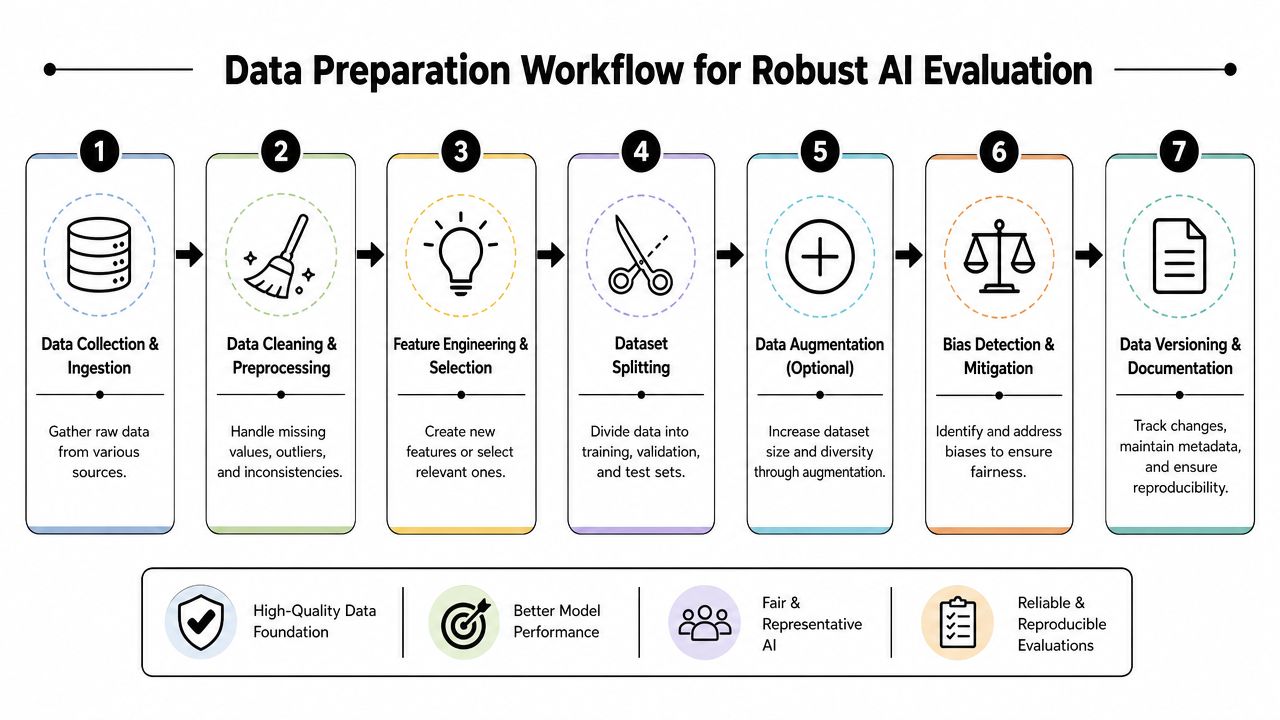
Data preparation is evaluation work. In production, the question is not only whether the model can score well on a benchmark. The question is whether the full application, including prompts, retrieval context, preprocessing, and business rules, is being tested against data that matches real operating conditions. A simpler model on well-scoped, well-versioned evaluation data will usually teach you more than a stronger model tested on a contaminated or unrealistic dataset.
A production-grade workflow should combine hold-out testing, cross-validation, and stress testing, according to AltexSoft's guide to testing and evaluating AI models. Each method answers a different engineering question. Hold-out testing checks generalization on unseen examples. Cross-validation shows whether results are stable across different slices of the data. Stress testing surfaces brittle behavior that average metrics hide.
The unseen test set is your credibility check
The final test set has one job. Stay untouched until final validation.
Once a team starts tuning prompts, features, thresholds, or retrieval logic against that set, it stops being a test and becomes part of development. I see this happen often in LLM projects because prompt edits feel lightweight, so teams treat them as harmless iteration. They are still model changes from an evaluation standpoint.
Leakage also shows up in places that are easy to miss:
- Feature leakage: A field includes information that will not exist at inference time.
- Temporal leakage: Future events appear in training examples for a time-dependent task.
- Duplicate leakage: Near-identical examples land in both training and test sets.
- Preprocessing leakage: Normalization, imputation, or encoding steps are fit on the full dataset instead of the training split.
One practical red flag is an implausibly high score on a difficult problem. AltexSoft notes that near-99% accuracy on a hard problem should trigger an investigation into train-test contamination or leakage in its evaluation workflow guidance.
Representative data beats clean-looking data
Evaluation data should look like production. That includes the ugly parts.
For most product teams, that means recent examples, edge cases, and operational variation such as mobile inputs, partial forms, typos, multilingual text, sparse metadata, or inconsistent document formats. It also means subgroup coverage across customer segments, geographies, product lines, or risk classes. A model can post a healthy average score while failing the exact slice of traffic that drives revenue, compliance exposure, or support cost.
This is also where software engineering discipline matters. If ingestion logic changes, schemas drift, or labels are regenerated without version control, your evaluation set stops being stable. Teams that invest in data pipeline practices used in business intelligence systems usually improve model evaluation too, because both depend on traceable lineage, repeatable transformations, and clear ownership of data changes.
For LLM applications, this gets broader. The evaluation dataset is not only a table of inputs and labels. It may also include prompt versions, retrieval snapshots, tool outputs, expected behaviors, and grading criteria. If those artifacts are not versioned together, teams cannot tell whether a quality change came from the model, the prompt, the retriever, or the data itself.
A practical checklist before you trust any score
Use this checklist before discussing deployment:
- Check split integrity: Confirm training, validation, and test partitions do not overlap through duplicates, shared entities, or time leakage.
- Review sampling logic: Verify the dataset reflects production traffic, not convenience samples from easy-to-access sources.
- Inspect labels: Label noise can make a weak system look acceptable or a good system look unstable.
- Segment results: Overall performance can hide failure in a high-risk subgroup or workflow.
- Stress the inputs: Run malformed, sparse, ambiguous, or adversarial examples through the full pipeline.
- Document dataset versions: Record what data was used, how it was transformed, and which prompt or configuration version was evaluated.
If your team cannot reproduce the dataset and configuration that produced a result, that result will not survive review from product, compliance, or leadership.
The Multi-Dimensional Testing Gauntlet for Robustness
Strong offline scores are only one gate.
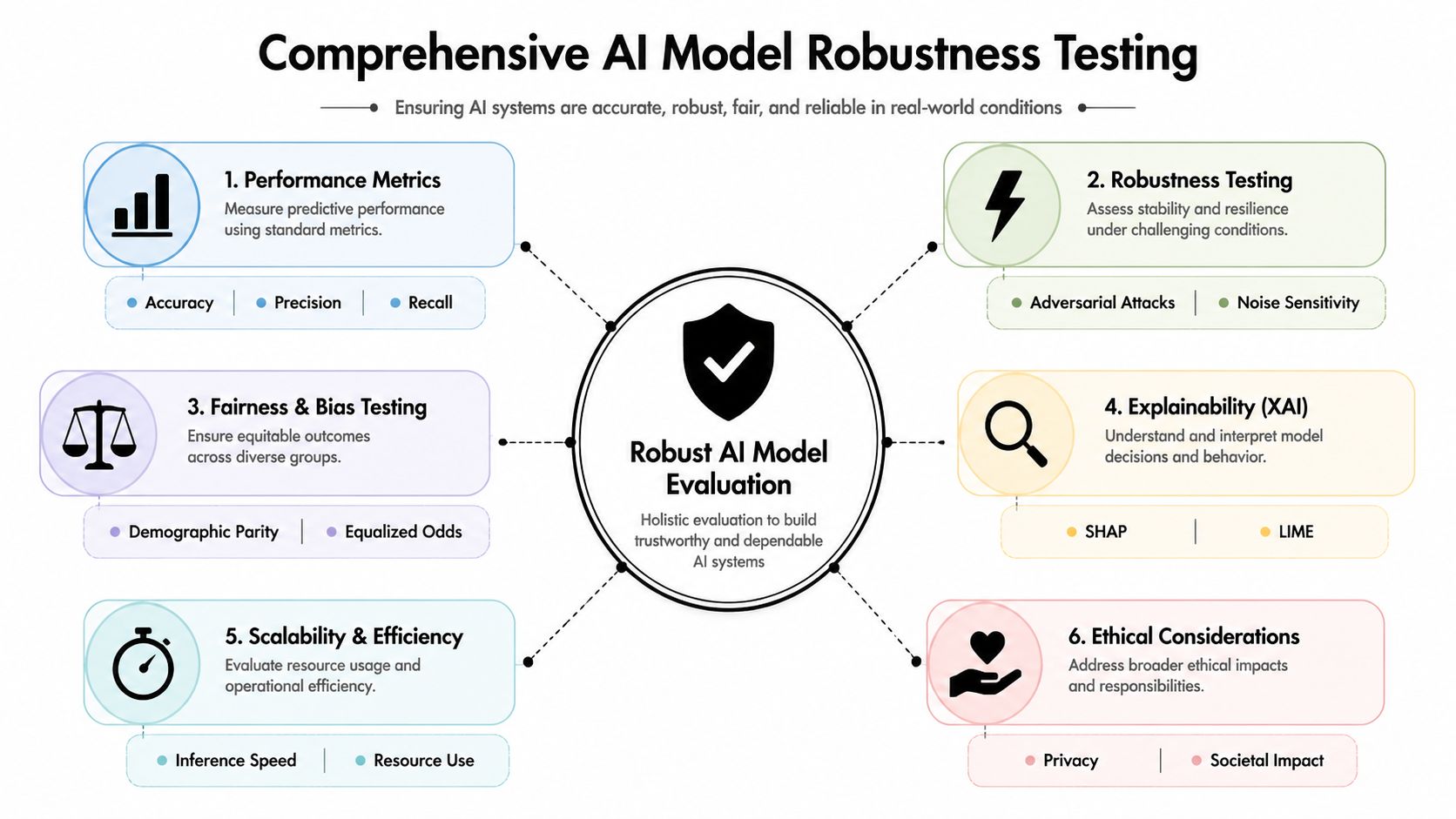
A production-ready model has to survive multiple kinds of scrutiny because users don't interact with “accuracy.” They interact with a system. That system has latency, failure modes, subgroup behavior, operational cost, and security exposure. If you don't test those dimensions, you're not evaluating the product that will be used in production.
Modern guidance reflects that shift. Evaluation should continue after deployment because real-world conditions change, and teams should monitor for model drift and concept drift while also measuring training time, inference speed, and compute or memory usage alongside predictive quality to balance quality, cost, and speed, as described in Datasaur's comprehensive guide to AI model evaluation.
Robustness testing exposes brittle systems fast
Reliability testing asks a simple question: what happens when the input isn't ideal?
For traditional ML, that might mean missing fields, outliers, skewed distributions, or malformed records. For LLM applications, it often means ambiguous prompts, contradictory context, irrelevant retrieved passages, tool timeouts, or partial user intent.
A useful reliability pass includes:
- Edge-case evaluation: Cases that are rare in volume but expensive when mishandled.
- Noise sensitivity checks: Inputs with typos, truncation, formatting variance, or inconsistent metadata.
- Dependency failure simulation: What happens if a retrieval layer, external API, or database call returns weak context?
- Load-related behavior: Whether latency and output quality degrade together under heavier use.
Software QA practices matter. Product teams that already use white and black box testing often adapt those habits well for AI systems because they already think in terms of internal logic checks and user-observable behavior, rather than trusting one test style alone.
Fairness, calibration, and confidence matter more than teams expect
If the model affects access, pricing, risk handling, or user support, subgroup analysis isn't optional. A model can look healthy on aggregate and still underperform for a demographic, geography, or product segment that matters commercially or ethically.
You don't need a philosophical debate to justify this. You need operational clarity. If a support classifier routes one customer group's urgent requests less reliably, the outcome is slower service and a measurable trust problem. If a risk model behaves unevenly across segments, the issue becomes governance as much as performance.
Calibration is another underused check. If a model outputs confidence scores, those scores should correspond to reality. A model that is highly confident when it is often wrong creates more damage than one that is uncertain in the right places. Teams use calibration to decide when to automate, when to ask for human review, and when to abstain.
The most dangerous model in production often isn't the weakest one. It's the one that sounds certain when it shouldn't.
Accuracy, speed, and cost pull against each other
This trade-off is where executive decisions are made.
A larger model may improve quality but increase latency and infrastructure burden. A faster model may fit the UX better but miss edge cases. A cheaper model may handle most traffic well and struggle on the requests that matter most. There's no universal right answer. There is only fit for context.
A practical decision table helps:
| Scenario | What to prioritize | Typical compromise |
|---|---|---|
| Real-time customer UI | Speed and consistency | Accept slightly lower peak quality |
| Back-office decision support | Accuracy and auditability | Accept slower runtime |
| High-volume automation | Cost and stability | Route only complex cases to heavier models |
| Regulated workflows | Traceability and subgroup review | Move slower on deployment |
That's why mature teams stop asking for a single winner metric. They evaluate a portfolio of trade-offs and choose the operating point that the business can support.
Validating in the Wild with Production Traffic
Offline evaluation gets you to the starting line. Production traffic tells you whether the system belongs in the product.
The mistake here is treating launch as a binary event. In reality, validation in the wild should be gradual and instrumented. You want enough exposure to learn how the model behaves in live conditions, but not so much that a bad release becomes expensive before anyone can intervene.
For modern AI systems, production readiness increasingly depends on the full workflow rather than isolated model quality. Enterprise guidance now emphasizes evaluating retrieval quality, tool or API interactions, hallucination behavior, prompt reliability, and workflow reliability as part of system-level validation for agentic and retrieval-augmented systems in Invisible Technologies' guide to enterprise AI model evaluation.
Three rollout patterns and when to use them
Different release patterns answer different questions.
Shadow mode is the safest place to begin when a current system already exists. The new model runs in parallel and generates outputs without affecting users. Teams compare results, inspect disagreements, and learn where the new model diverges before it has business impact.
Canary release is useful when the model is stable enough to see real traffic but still needs close supervision. A limited slice of users receives the new behavior while engineering and product watch logs, latency, retries, support signals, and business outcomes.
A/B testing is the most convincing method when you need to know whether the model improves the product, not just the benchmark. It answers whether users do something better when exposed to the new system.
Here's the practical comparison:
| Rollout pattern | Best for | Main advantage | Main limitation |
|---|---|---|---|
| Shadow mode | Early production validation | Safe behavioral comparison | No direct business outcome |
| Canary release | Controlled exposure | Real traffic with limited blast radius | Requires strong monitoring |
| A/B testing | Decision-making | Measures product impact directly | Slower and more operationally heavy |
Watch the chain, not just the answer
For LLM applications, “wrong output” is often the final symptom, not the root cause.
A retrieval-augmented assistant may fail because retrieval returned weak documents. A workflow agent may fail because a tool call timed out or returned malformed data. A summarization system may produce inconsistent output because a prompt revision changed instruction priority. Evaluating only the final response misses the source of the error.
That's why production validation should inspect events across the chain:
- Input quality: What the user or upstream system sent
- Retrieval behavior: Which documents were fetched and whether they were relevant
- Prompt and parameter state: The exact instructions and settings used
- Tool execution: API responses, failures, retries, and fallbacks
- User-visible output: Relevance, stability, and actionability
- Post-output outcomes: User acceptance, correction, escalation, or abandonment
Drift isn't a theory problem
Models degrade because products, users, and markets change.
A personalization model can drift when merchandising strategy changes. A support classifier can drift when ticket topics evolve. A fraud model can drift when attackers change tactics. For LLM systems, drift may also come from prompt updates, changing retrieval corpora, or dependency behavior in external tools.
The operational response is simple in concept and hard in execution. Keep comparing live behavior against prior expectations. Investigate shifts. Don't wait for aggregate metrics to collapse before you look.
Teams that validate in production well share one trait. They treat release as a supervised learning period, not a victory lap.
Reproducibility and Control with Modern Tooling
A team compares two prompt revisions on Friday, picks the apparent winner, and ships it. On Monday, support volume jumps. Nothing obvious changed in the application code, but the outputs are longer, slower, and more expensive. No one can fully reconstruct which prompt version ran, which parameters were active, or whether the retrieval settings matched the test run.
That is a tooling failure as much as an evaluation failure.
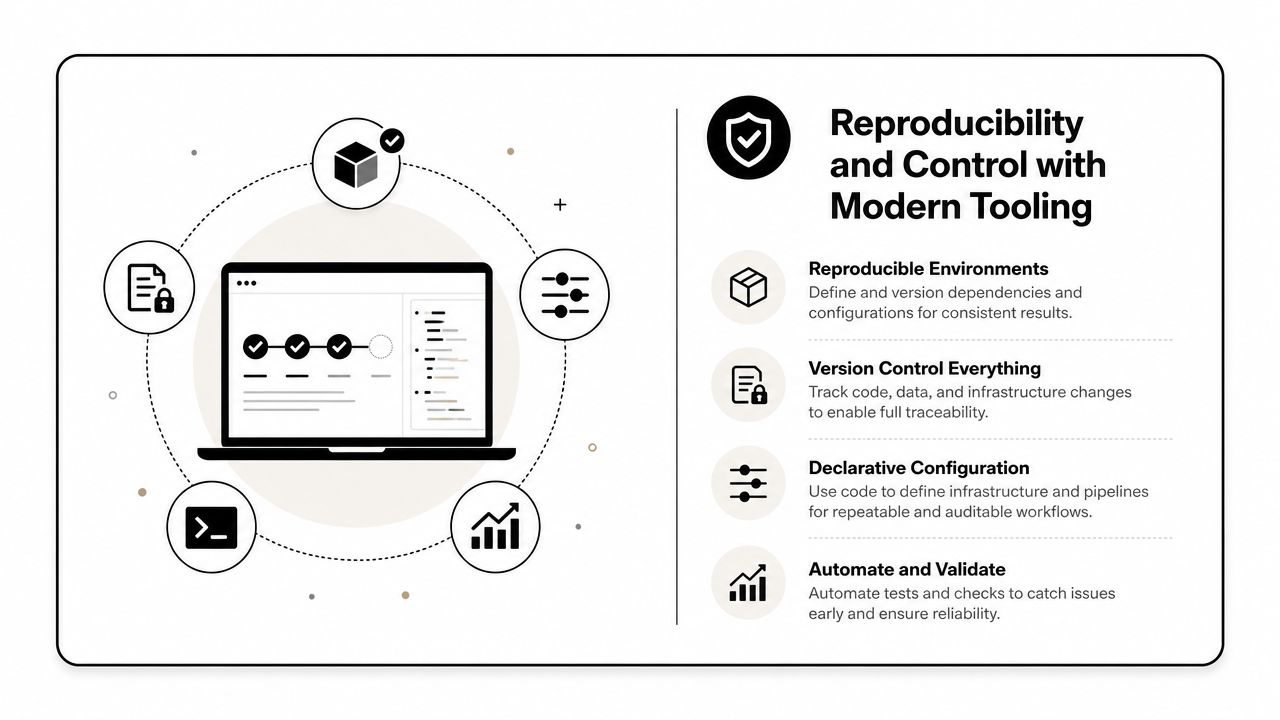
AI evaluation stops being credible when results depend on tribal knowledge, one engineer's local script, or a prompt copied from a chat thread. In production systems, reproducibility requires the same controls teams already expect for code releases: versioned artifacts, traceable configuration, centralized logs, and repeatable execution. Without that, model selection turns into opinion, and cost review happens after the budget has already moved.
For LLM and generative AI evaluation, a practical pattern from MindStudio's article on evaluating AI models is to test on 50 to 100 representative production examples, run each model 3 to 5 times to capture output variance, and track metrics such as TTFT, cost per successful completion, and p50, p90, and p99 performance. The same MindStudio article on evaluating AI models notes that over 80% of AI projects fail, with evaluation gaps cited as a recurring cause.
Reproducibility needs administrative discipline
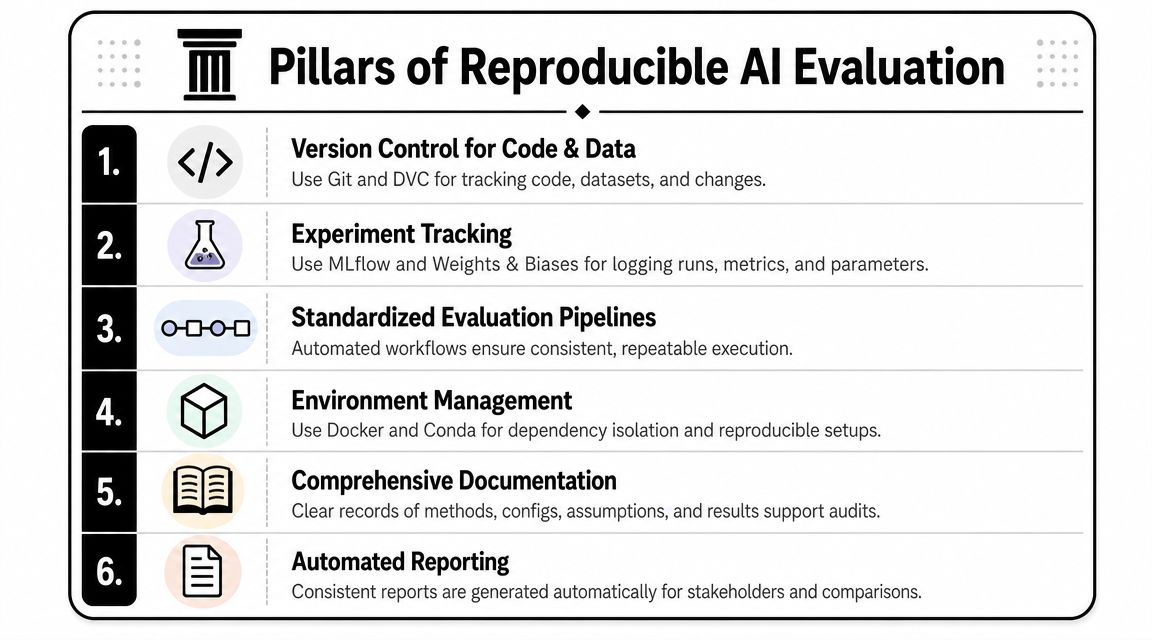
Version control for application code is standard. AI applications need the same treatment for prompts, datasets, evaluation sets, model settings, tool permissions, and runtime outputs.
A setup that holds up in production usually includes:
- Prompt versioning: Every output ties back to the exact instructions that produced it.
- Parameter control: Temperature, model choice, retrieval settings, and tool access stay consistent across runs.
- Unified logging: Requests, outputs, failures, retries, and metadata live in one place instead of across vendor dashboards.
- Spend visibility: Quality gains can be evaluated against actual operating cost.
- Automated pipelines: Evaluation suites rerun on meaningful changes, following the same discipline described in these CI/CD pipeline best practices.
Teams need this for one simple reason. Incidents rarely start with a headline metric. They start with a small change that no one can isolate quickly.
Prompt management is part of model evaluation
Many leaders still treat prompts as loose instructions around the model. In deployed systems, prompts are configuration. They shape behavior as directly as code and often change more often.
That changes the evaluation workflow. A prompt edit, retrieval policy change, or new tool exposure can alter accuracy, latency, and spend without any model swap. If those changes are not versioned and reviewable, test results do not hold for long. The team may believe it evaluated one system while production is running another.
Managed tooling helps by making those dependencies inspectable. Wonderment Apps, for example, includes a prompt vault with versioning, a parameter manager for internal database access, centralized logging across integrated AI services, and a cost manager for cumulative spend visibility. Used well, that kind of administrative layer gives teams a reproducible link between prompt state, execution behavior, and evaluation outcomes.
What mature teams actually do
Teams with strong evaluation discipline reduce variance before they argue about model quality.
Their operating pattern is usually straightforward:
- Build an evaluation set from real product tasks, not synthetic happy paths.
- Freeze prompt and parameter versions before any comparison starts.
- Run repeated trials where stochastic output matters.
- Score quality, latency, failure rate, and unit cost together.
- Store traces and scorecards together so regressions can be replayed.
- Promote changes through environments instead of editing production behavior live.
This adds process. It also removes a large amount of wasted time. Once teams can rerun an evaluation and explain exactly why results changed, they stop relitigating the same prompt tweaks and start making faster, cheaper decisions with evidence.
From Evaluation to Lasting Application Value
AI model evaluation works when it becomes part of how software gets built, shipped, and maintained.
That means treating evaluation as continuous engineering work, not a data science checkpoint. The model has to prove itself against the baseline, on representative data, under operational stress, inside production workflows, and within the speed and cost envelope your application can support. If any one of those breaks, the product feels the failure.
For CTOs and Heads of Product, the practical takeaway is straightforward. Don't buy confidence from a benchmark chart alone. Ask whether the team can reproduce results, explain trade-offs, inspect failures across the whole workflow, and monitor behavior after launch. If they can't, the evaluation process isn't finished.
The companies that get long-term value from AI usually do one thing differently. They build the evaluation loop into the product lifecycle itself. That includes data discipline, rollout discipline, and tooling discipline around prompts, parameters, logs, and spend.
Reliable AI doesn't come from a single strong model. It comes from a system that makes model behavior visible, testable, and governable over time.
If you're modernizing a web or mobile application with AI, Wonderment Apps can help you operationalize the hard part: turning AI evaluation into a repeatable engineering practice. Their team works across application development, AI integration, and administrative tooling for prompt versioning, logging, parameter control, and token cost visibility. If you need a clearer path from prototype to production, it's worth booking a demo and reviewing how that toolkit fits your stack.