

A lot of enterprise teams are in the same spot right now. Their app search works, technically, but the experience still feels expensive in user effort. A customer types a long product name on mobile, mistypes it, gets weak results, edits the query, and starts over. In a support portal, an employee knows what they need but can't remember the exact field label, so they hunt through filters instead of asking for it naturally.
That's where a strong voice search UI earns its keep. Not as a novelty. Not as a smart-speaker gimmick. As a practical layer for mobile and screen-based software where speaking is faster than typing, but visual confirmation still matters.
The hard part isn't adding a microphone icon. The hard part is designing a system that can listen, interpret, clarify, recover, and return users to the main job flow without friction. That's also why voice projects often stall. The UX, AI logic, and operational controls all have to work together.
Beyond the Tap The Rise of Voice Search
Mobile users have very little patience for clumsy search. In ecommerce, the failure mode is easy to spot. Someone wants “organic gluten-free quinoa pasta,” but they type only part of it, autocorrect changes a term, the results skew off target, and they begin narrowing through filters that should have been unnecessary. In a service app, the same pattern shows up when users know the outcome they want but don't know your navigation model.
A well-built voice query removes that first layer of effort. The user says what they want in natural language, and the system translates that into an actionable search. When it works, it feels obvious. When it fails, it feels broken faster than typed search because people expect conversation to be forgiving.
That expectation is no longer niche. Voice search has become mainstream. One industry roundup reports more than 1 billion voice searches every month, and projects that 31% of all search queries were conducted by voice in 2026, with 62% of Americans using a voice assistant on any device, according to these voice search adoption figures.
For enterprise apps, the takeaway isn't “replace text search.” It's simpler. Users already speak to devices naturally, so your product has to decide where voice belongs and where it doesn't.
Voice succeeds when it removes friction from a task users already understand. It struggles when teams expect it to replace every interaction model in the product.
That distinction matters even more in sectors like healthcare, retail, and field operations, where voice may start the interaction but a screen often finishes it. If you're exploring adjacent use cases beyond pure search, this guide to voice AI agents is useful because it shows how conversational systems fit into real service workflows, not just device demos.
There's also a practical modernization angle here. Many legacy apps already have search endpoints, ranking logic, and content structures in place. Adding voice doesn't mean rebuilding the product from scratch. It means adding a conversational layer, then managing it carefully enough that the experience stays reliable as prompts, flows, and business rules evolve.
What Is a Voice Search UI Anyway
A voice search UI is a conversation system with a screen attached. The microphone is only the trigger. The actual product experience includes listening, interpreting, confirming, and presenting results in a way users can trust.
That matters because speech is messy. People pause, restart, change their mind mid-sentence, and use shorthand that would never appear in a search bar. If the interface doesn't communicate what's happening, users assume the app didn't hear them or misunderstood them.
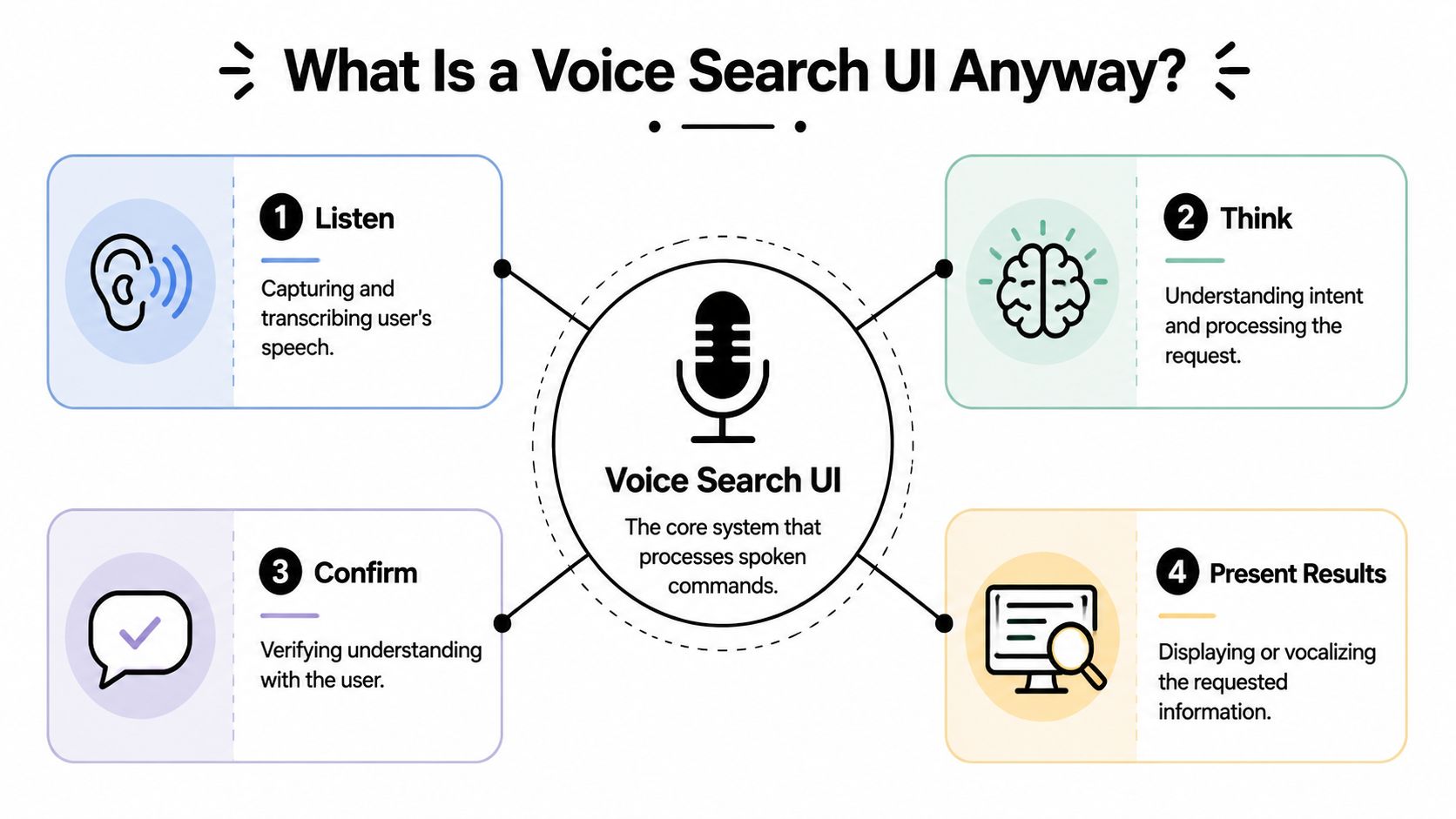
The four states users need to understand
A useful way to think about voice search UI is as four visible states.
| State | What the user needs | What the interface should do |
|---|---|---|
| Idle | A clear invitation to speak | Show a discoverable microphone entry point and explain what kinds of queries work |
| Listening | Confidence that the app is hearing them | Use motion, waveform, live transcription, or a simple listening indicator |
| Processing | Reassurance that the request is being handled | Show progress and preserve the captured query so users don't feel lost |
| Results | Confirmation and control | Present the interpreted query, corrections if needed, and a scannable result set |
Designers frequently under-design the middle two states. They focus on the microphone button and the final result list, then leave users staring at an ambiguous spinner. That gap kills trust.
Why voice needs structure
The strongest voice experiences aren't built as open-ended “say anything” systems. They're designed as constrained conversations. UX guidance recommends modeling the interaction around intent, utterance, and slot, then prototyping it as a dialog flow so the product can handle ambiguity before launch, as explained in this UX framework for voice interfaces.
In practice, that means:
- Intent is what the user wants. Find a product, locate an invoice, open an account screen.
- Utterance is how they say it. “Show me gluten-free pasta,” “Find my March invoice,” “Open billing.”
- Slot is the variable detail. Product type, date range, account name, brand, location.
If that sounds more like service design than screen design, that's because it is. Teams that get this right usually script likely requests, map clarification paths, and test misrecognition early.
For a broader perspective on how companies are approaching voice solutions for businesses, it helps to compare consumer-style voice patterns with enterprise workflows, where reliability and correction paths matter far more than novelty.
Practical rule: If users can't see what the system heard, they can't correct it quickly. A hidden interpretation model creates visible frustration.
Designing Conversations Not Just Interfaces
The best voice search UI doesn't feel like a talking form. It feels like a guided conversation that respects the user's time.
That shift in mindset changes everything. Screen designers often think in terms of pages, components, and transitions. Voice design starts with turns. What did the user say, what did the system infer, what should happen next, and how does the user recover if the inference is wrong?

Hybrid voice is the real enterprise use case
A lot of public advice still treats voice as a screenless experience. That's incomplete. In enterprise apps, users often speak first and verify second. Practical UX work increasingly centers on screen-based confirmation and correction, where people need visual disambiguation and editable suggestions on phones, smart displays, and in-car systems, as covered in this discussion of hybrid voice interactions.
That hybrid pattern shows up everywhere:
- Retail apps where a user says a product request, then compares items visually
- Field service tools where a worker speaks while moving, then taps to confirm the right record
- Internal dashboards where an analyst asks for a metric but still needs tables, filters, and context
- Healthcare workflows where voice may speed lookup, but staff still need explicit on-screen confirmation
If your team designs only for audio output, you'll miss the part that makes enterprise voice usable.
Design the correction path before the happy path is polished
Here's what usually breaks a first release. The system hears “pesto” instead of “pasta,” “renewals” instead of “manuals,” or the right noun with the wrong qualifier. If the user has to start from zero, they'll stop using voice.
Good correction design is concrete:
- Show live or near-live transcription so users can spot an issue immediately.
- Make the interpreted query editable like a normal search field.
- Offer disambiguation chips when terms could mean more than one thing.
- Preserve context after an error so users can refine instead of restart.
- Keep typing available as a first-class fallback, not a hidden escape hatch.
A voice interaction that can't be corrected is just a brittle shortcut.
“Did you mean X or Y?” is often better UX than pretending the model is certain.
Dialog flows beat generic prompts
Enterprise search has domain language. Product taxonomies, account structures, policy names, and industry terms all affect how users ask for things. That's why generic prompting usually underperforms compared with mapped dialog flows.
A practical flow might look like this:
| User says | System interprets | Screen response |
|---|---|---|
| “Find gluten-free quinoa pasta” | Product search with dietary attributes | Product grid with interpreted query shown above results |
| “Open March invoices for Acme” | Invoice search with client and date filters | Results list plus editable filter pills |
| “Show support articles about password reset” | Knowledge-base search | Article list with top intents and suggested refinements |
These aren't just prompts. They're user flows. Teams that already think carefully about navigation and state handling tend to build stronger voice interactions because they treat spoken input as one more route through the product. That's the same discipline behind strong user flow design practices.
The business payoff is straightforward. Users complete tasks faster when the app does the interpretation work for them. But that only happens when the system asks for clarification intelligently and gets out of the way when it's confident enough to proceed.
The Nuts and Bolts of Voice Integration
Under the hood, voice search UI is a chain of systems, not one feature. Each layer introduces its own product and engineering decisions. If one layer is weak, users experience the whole thing as “voice doesn't work.”
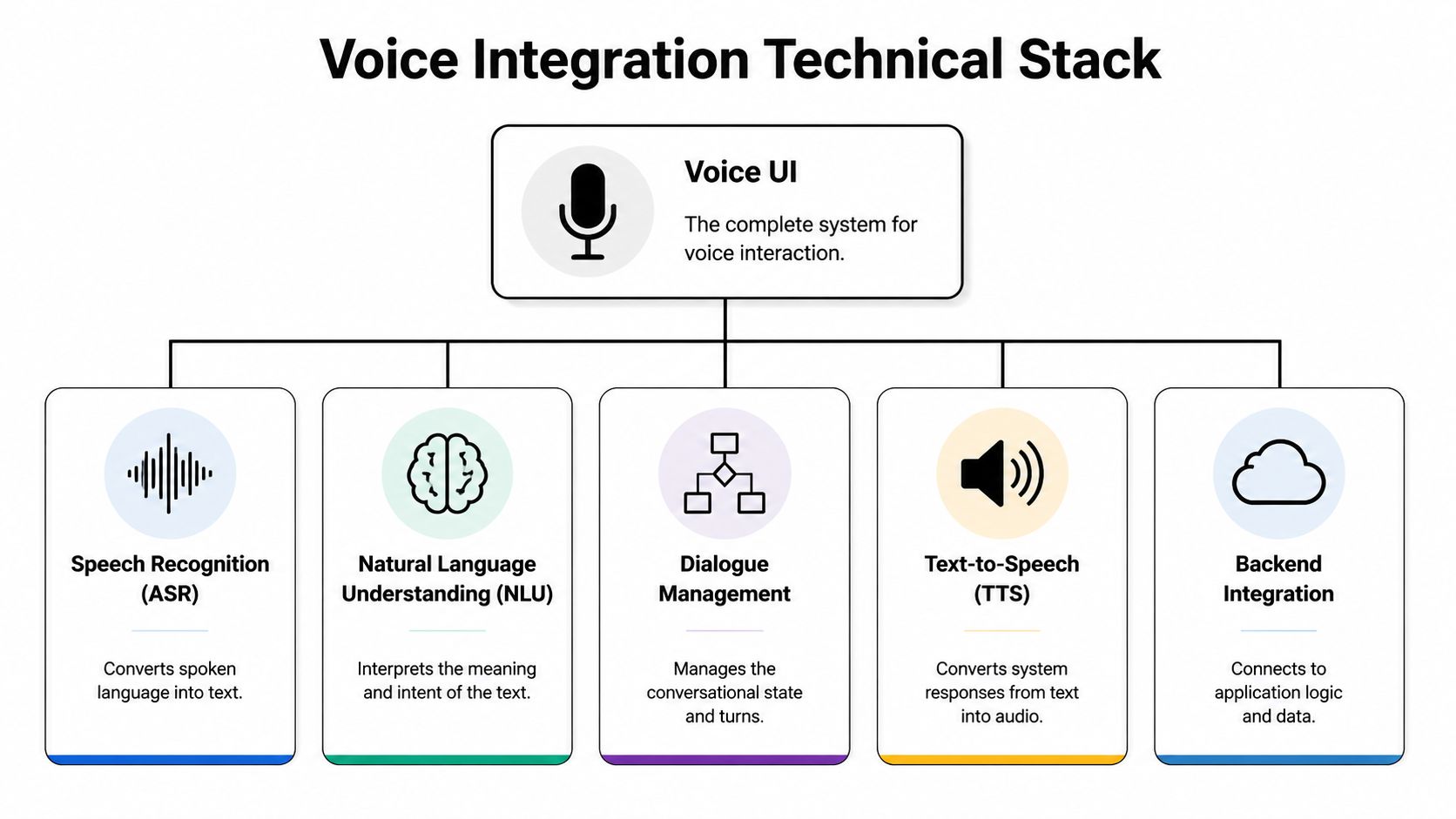
The core stack
Most implementations include five working parts:
- Speech recognition converts audio into text. This is the layer users notice first because bad transcription is immediately visible.
- Natural language understanding maps text to meaning. It determines whether “show my latest statement” is a search, a navigation command, or a request for a specific document.
- Dialogue management decides what happens next. Ask a clarifying question, run the search, or route to a fallback.
- Text-to-speech matters when the system reads something back. In many screen-based apps, this is optional, but it becomes important in accessibility and hands-busy contexts.
- Backend integration connects the interpreted request to actual app logic, search indexes, permissions, and data sources.
The common mistake is letting the AI layer float above the product without proper integration discipline. Voice can't be an isolated add-on if it needs secure data access and consistent business rules.
Native platform services or external providers
Teams usually face an early architecture choice. Use platform-native capabilities, rely on external APIs, or combine both.
Native services can reduce friction because they fit the operating system well and often provide familiar permission flows. They're a strong option when the app needs basic voice input with tight device integration.
External services can offer more flexibility for domain tuning, centralized model management, and cross-platform consistency. They often make more sense when the same voice logic has to operate across web, Android, iOS, kiosks, or custom hardware.
A hybrid model is common. Use native capture and permissions, then route interpretation through a centralized service layer. That approach gives product teams more control over how enterprise-specific intents are handled.
Latency and privacy are product decisions, not just engineering concerns
Users won't tolerate a system that pauses too long after a spoken request. Even if recognition is accurate, delays make the interaction feel uncertain. Product teams should define acceptable response behavior for each state, especially what the interface shows while the system is processing.
Privacy needs the same level of attention. Voice data can be sensitive even when the query sounds harmless. Internal record lookups, financial terms, and healthcare language raise the stakes quickly. Teams need clear rules for what audio is stored, what text is retained, how logs are redacted, and which environments can access transcripts.
A good voice architecture doesn't just interpret language. It enforces permissions, preserves context, and limits exposure.
API design matters more than most teams expect
The most reliable voice products expose clean service boundaries. Instead of wiring the voice layer directly into scattered endpoints, define stable intent handlers and parameter contracts. That keeps search logic, entity resolution, and result formatting from turning into a maintenance tangle.
A simple example:
| Layer | Good pattern | Weak pattern |
|---|---|---|
| Intent handling | Dedicated service for “find products” | Voice client calls multiple search endpoints ad hoc |
| Parameters | Structured slots for category, date, brand, status | Free-text strings passed downstream without validation |
| Responses | Unified result schema for UI rendering | Each endpoint returns different shapes |
Strong API design principles are helpful. They give the voice layer predictable contracts, which makes iteration far easier when product teams refine prompts, clarification logic, or ranking behavior.
Measuring Success and Dodging Common Pitfalls
A voice feature can feel impressive in a demo and still fail in production. Product leaders need a sharper question than “Does it work?” Instead, the question is whether voice improves task completion in the moments where users prefer speaking.
That's why voice should be judged against typed search in context. Recent guidance emphasizes that voice is strongest for specific, momentary queries and isn't automatically the right default for every product surface. The strongest investments tend to be narrow, high-frequency moments, while broad catalog browsing and more complex finance-style flows still need strong typed search, as noted in this analysis of when voice outperforms traditional search.
What to measure in practice
Skip vanity metrics like microphone taps alone. They tell you interest, not effectiveness.
Track a balanced set of operational and product signals:
- Task completion measures whether users found, opened, or selected the intended result.
- Recognition quality reveals where transcription repeatedly breaks down for your audience and domain vocabulary.
- Correction frequency shows how often users need to edit what the system heard.
- Fallback behavior indicates whether people abandon voice and switch back to typing.
- Result usefulness can be observed through refinements, repeated queries, and exits after a voice result set appears.
Those measures are more useful when segmented by scenario. Product lookup, order status, article search, record retrieval, and navigation shortcuts behave differently.
Common failure patterns
A lot of voice projects fail for ordinary UX reasons, not because the underlying models are weak.
- No visible feedback: Users speak, then stare at an empty state that doesn't confirm capture or processing.
- No editable query: The app hears something wrong and gives users no fast correction route.
- Too much ambition: Teams start with open-ended voice discovery when they should start with a small set of high-confidence intents.
- No typed fallback: Users get trapped in a voice path they no longer trust.
- Thin testing: The team validates only in quiet rooms with insiders who already know the product vocabulary.
Start with a narrow, repeatable use case where speaking is naturally easier than typing. Expand only after the correction and recovery paths are solid.
The voice products that survive procurement scrutiny usually aren't the flashiest. They're the ones with clear use-case boundaries, measurable goals, and an honest fallback plan.
Ensuring Accessibility and Global Reach
A usable voice search UI has to work for more than one speech pattern, one language setting, or one mode of interaction. Accessibility and localization can't sit at the edge of the roadmap.
Start with multimodal access. Voice should complement screen readers, captions, touch controls, and keyboard input. Users need to know when the app is listening, what it captured, and how to correct it without speaking again. That means visible transcripts, focus-aware controls, and result screens that remain navigable through standard accessibility patterns.
Give users control over spoken output
An instructive product pattern comes from Android. Google's redesigned voice search UI lets users open voice settings from the overflow menu, enable Spoken results, choose among four voices, and change the spoken language, according to this report on the Android voice search redesign. The deeper lesson isn't the menu placement. It's the decision to give users post-query control over speech playback and locale.
That's the right instinct for enterprise software too.
- Language choice matters when a workforce spans regions or a customer base is multilingual.
- Voice output preferences matter when spoken results help one user and distract another.
- Visual confirmation matters because users should never have to trust audio alone.
Localization is more than translation
A translated prompt library won't solve dialect, accent, or domain-language variation by itself. Teams need to test how people naturally ask for things in each market and role. A warehouse supervisor, a claims processor, and a retail customer may all request the same action with different phrasing.
The strongest implementations treat language controls, transcription visibility, and correction UX as part of inclusion. Not as a compliance afterthought.
Modernize Your App with Smarter Voice Control
By the time a team gets serious about voice search UI, the challenge is rarely just recognition. The primary friction shows up in operations. Prompts multiply. Intent rules change. Data mappings drift. Teams need to know which conversational flow is live, which version caused a regression, and how model behavior affects downstream cost and reliability.
That's why voice modernization needs administrative control, not just interface polish.
A scalable setup usually needs four capabilities working together:
- Prompt versioning so teams can refine conversational behavior without losing change history
- Parameter management so voice requests can connect to internal data safely and consistently
- Centralized logging so teams can inspect where a query broke, whether the issue was transcription, intent mapping, or backend response
- Cost visibility so AI features remain governable as usage grows across products and environments
Without those controls, voice work turns into scattered prompt edits, inconsistent environments, and hard-to-trace failures. That's manageable in a prototype. It's risky in production.
Why modernization fails without operational tooling
Enterprise teams usually already have enough complexity. Multiple channels. Legacy APIs. Approval requirements. Sensitive data. Several AI services in play at once. Voice amplifies that complexity because it adds another input layer that has to be observed and tuned continuously.
A practical modernization plan should answer questions like:
| Operational need | Why it matters for voice |
|---|---|
| Who changed a prompt? | Dialog behavior can shift suddenly if changes aren't versioned |
| What data can the model touch? | Search and retrieval must respect permissions and parameter rules |
| Where did the interaction fail? | Teams need logs across recognition, prompt handling, and result delivery |
| What is this costing us? | AI usage needs visibility before it spreads across business units |
This is the broader challenge behind many AI-enabled app upgrades, not just voice. If you're planning that work more holistically, a strong application modernization roadmap helps frame where conversational features fit into platform evolution.
The enterprise opportunity is straightforward. Keep the voice interface simple for users, but make the underlying system disciplined for operators. That's how teams turn a promising feature into a reliable channel.
If you're evaluating how to add voice search, conversational retrieval, or broader AI workflows to an existing product, Wonderment Apps can help you do it without creating a maintenance mess. Their prompt management system gives teams a prompt vault with versioning, a parameter manager for secure internal database access, unified logging across integrated AIs, and a cost manager for cumulative spend visibility. For organizations modernizing legacy apps or scaling new AI features across web and mobile, it's a practical way to move faster while keeping control.