

A lot of risk still lives in places your GRC platform can't see clearly.
It lives in the loan underwriting tool your fintech team customized three years ago. It lives in the inventory exception workflow inside your ecommerce admin. It lives in the staff-facing healthcare portal that relies on a mix of modern APIs, legacy tables, and too many manual overrides. If your team is still reviewing those environments through spreadsheets, email chains, and quarterly checklists, you're not just moving slowly. You're making decisions with stale information.
That's why risk assessment automation matters now. Not as a buzzword, and not only as a feature inside a large compliance suite, but as a practical way to bring live risk visibility into the software your business depends on.
Beyond Spreadsheets and Slow Reviews
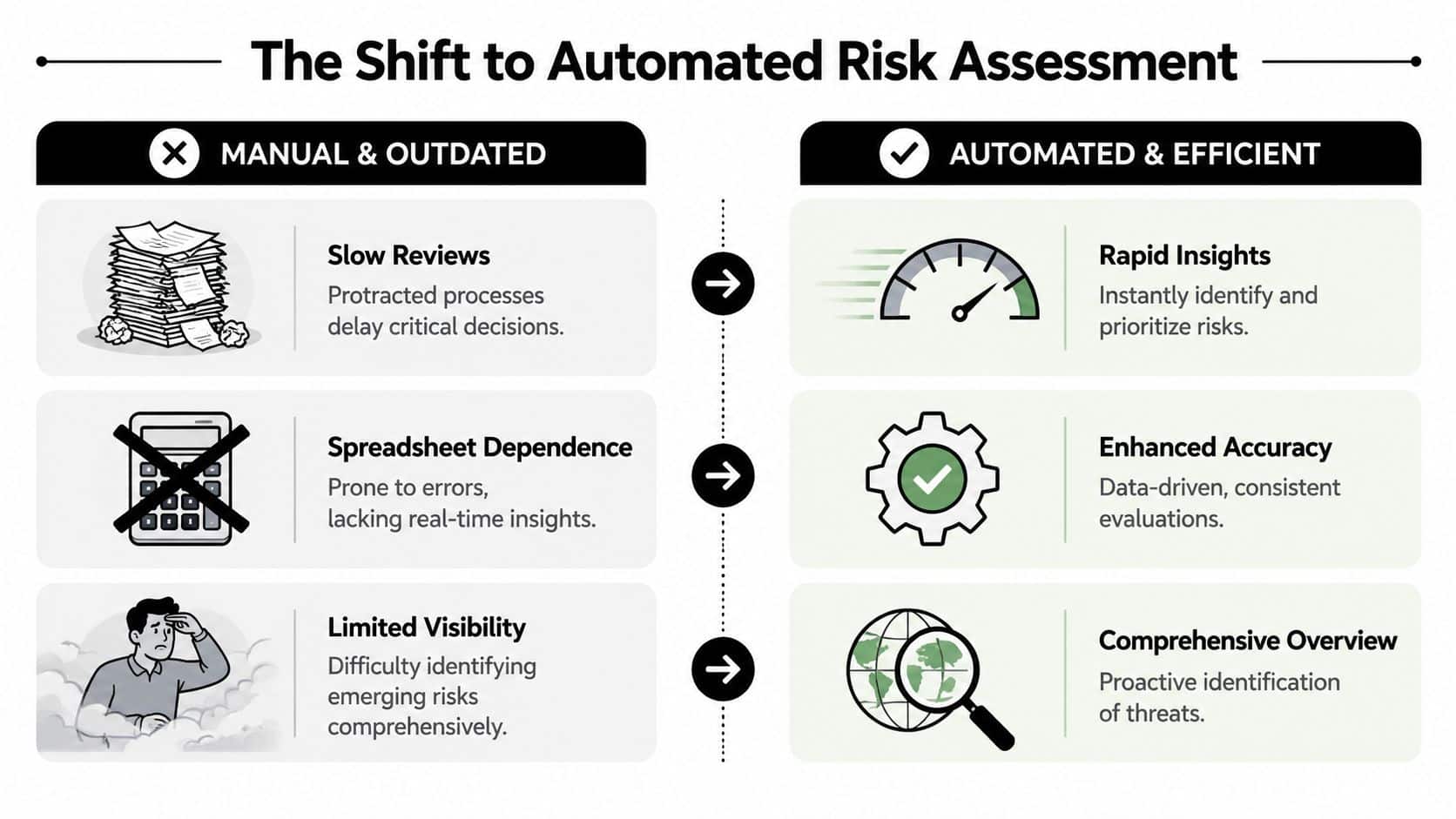
A risk lead pulls a spreadsheet on Monday to review access exceptions in a custom underwriting tool. By Thursday, three more roles have changed, one approval path has been edited, and a vendor integration is writing new data into the same workflow. The review is already behind the system it was supposed to evaluate.
That is the core problem with manual risk assessment in custom software. The issue is not effort alone. It is timing, system sprawl, and the fact that business-critical risk often sits inside internal applications that never feed cleanly into a top-level GRC workflow.
What changed
Risk teams used to assess environments at intervals because the systems themselves changed at intervals. That assumption no longer holds. Custom applications now update through APIs, configuration changes, third-party services, and internal releases that happen far more often than the review cycle.
Platforms that support continuous monitoring helped shift expectations. NIST describes continuous monitoring as maintaining ongoing awareness of information security, vulnerabilities, and threats to support risk decisions, rather than relying only on periodic checks, in its information security continuous monitoring guidance. That matters because leadership teams do not need another static questionnaire. They need a current view of risk conditions inside the software people use to approve loans, process claims, release payments, or grant access.
What automated risk assessment means in practice
In practice, risk assessment automation means connecting risk logic to the systems where events occur, then keeping that logic updated as those systems change.
For custom software, that usually includes four working parts:
- Evidence collection: Pulling data from application logs, identity systems, ticketing tools, vendor feeds, databases, and APIs
- Risk evaluation: Applying rules or machine learning models to detect exceptions, control failures, unusual patterns, or missing evidence
- Record updates: Writing changes back to the risk register, case queue, or internal dashboard without waiting for manual reconciliation
- Action routing: Sending the issue to the right reviewer, owner, or workflow based on severity and business context
Manual review still matters. Teams still need judgment for edge cases, policy decisions, and exceptions with real business trade-offs.
The difference is where people spend their time. They stop copying evidence between systems and start reviewing the cases that warrant human attention.
Practical rule: If a risk process depends on someone exporting a file to know what changed, the process is administrative, not continuous.
This is also where many automation programs stall. Buying a GRC platform is one step. Wiring risk logic into the custom applications where approvals, overrides, and operational exceptions happen is the harder step. That integration work determines whether the program produces timely, trusted signals or another reporting layer that lags behind the business.
Once teams add AI into the assessment flow, the bar gets higher. They need clear controls for model behavior, prompts, thresholds, logging, and cost, especially when those models influence scoring or escalation inside production workflows. Without that discipline, automation can scale confusion as easily as it scales visibility.
The Business Value of Automated Risk Insights
Leaders rarely fund risk programs because dashboards look modern. They fund them because they want faster decisions, cleaner operations, and fewer expensive surprises.
Risk assessment automation delivers value when it changes operating behavior inside real workflows, not when it adds another reporting layer on top of them.
Faster decisions in operational systems
Consider fintech. A lender may already have fraud tools, identity checks, and underwriting logic, but risk still slows down when analysts must manually reconcile exceptions across multiple systems. Automated scoring inside the application flow can flag contradictory evidence, missing artifacts, or unusual account patterns before the file reaches final approval.
The value isn't abstract. It means teams can separate routine cases from edge cases earlier, reserve human review for decisions with real ambiguity, and avoid dragging every application through the same queue.
Healthcare sees a similar pattern. When access changes, data handling shifts, or vendor integrations touch protected workflows, the issue is more than “compliance.” The issue is whether the organization can spot a control gap while it's still manageable. Automation helps by surfacing the risk signal while the workflow is active, not after the quarterly review meeting.
Better use of specialist time
Strong risk teams are usually overloaded with low-value chores.
A common improvement pattern looks like this:
| Area | Manual pattern | Automated pattern |
|---|---|---|
| Intake | Email requests and attachments | Structured data capture in-app |
| Assessment | Reviewer checks multiple tools | System aggregates signals |
| Escalation | Follow-up depends on memory | Workflow routes by threshold |
| Reporting | Static slides and spreadsheets | Live dashboard and current register |
That shift matters because scarce expertise should go toward judgment, not copying values from one system to another.
Teams get the best outcome when automation handles evidence collection and triage, while people handle policy exceptions, trade-offs, and material decisions.
A stronger posture without adding friction everywhere
The biggest win often isn't “more control.” It's more control in the right places.
For ecommerce, that might mean watching for unusual admin behavior, payment workflow anomalies, or supplier changes that affect fulfillment risk. For SaaS teams, it can mean tracking access drift, misconfigurations, and suspicious usage patterns across customer-facing and internal systems. In both cases, the business benefit comes from reducing blind spots without forcing every team into a slower process.
That's the difference between compliance theater and operational risk management. One produces binders. The other helps the business move with fewer avoidable mistakes.
Core Components of an Automated System
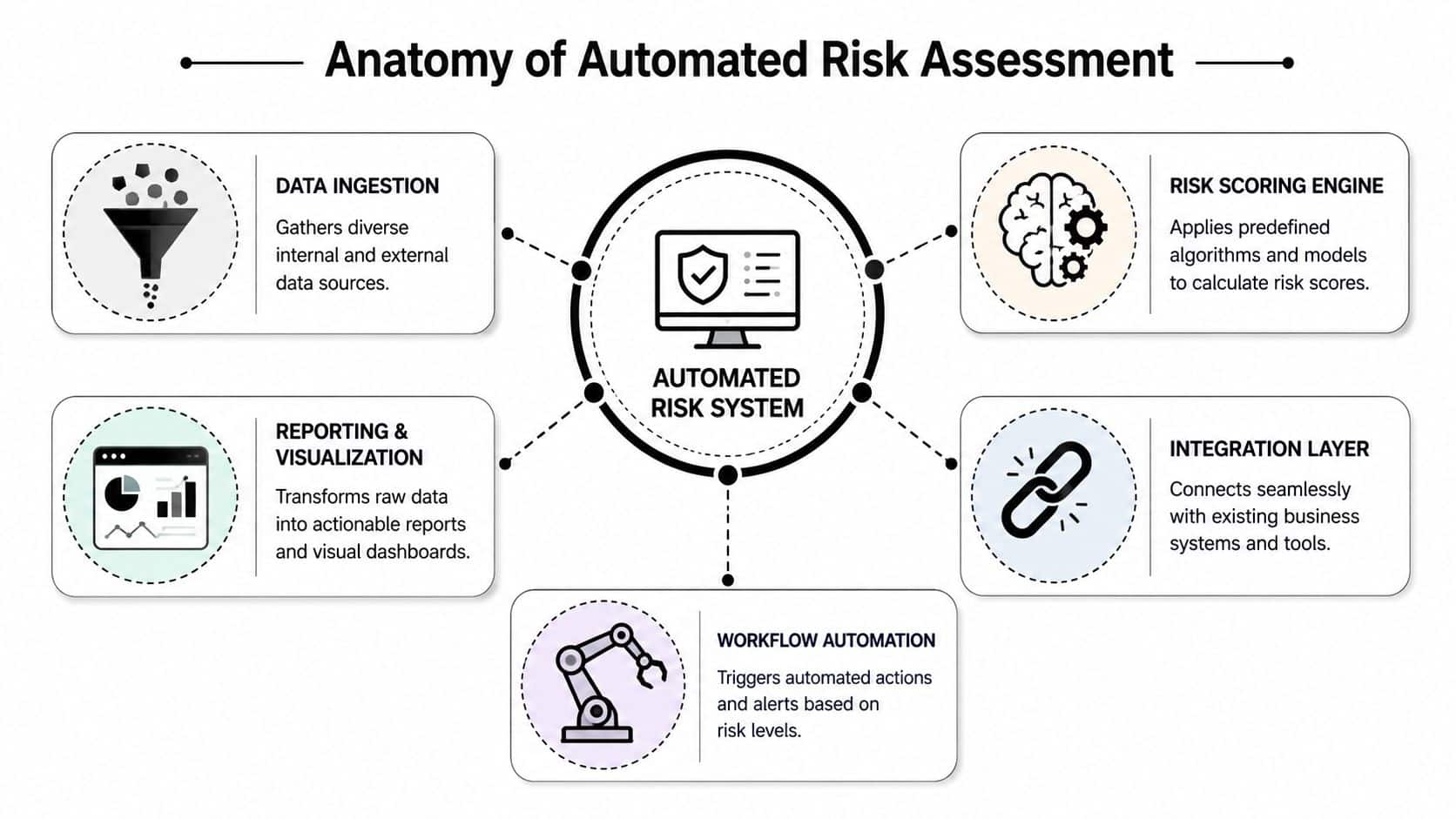
An automated risk system is easier to understand when you stop thinking of it as one giant platform and start viewing it as a set of connected layers. Each layer has a job. If one is weak, the whole setup becomes noisy, brittle, or slow.
The ingestion layer
This is the system's eyes and ears.
It pulls signals from internal tools such as identity systems, application logs, ticketing platforms, databases, and admin portals. It can also consume external data such as vendor information, public risk signals, or service alerts. If ingestion is weak, the downstream scoring engine is working from incomplete or stale inputs.
A lot of custom software teams underestimate this layer. They focus on the model before they've solved the plumbing. In reality, clean ingestion determines whether the system can observe live operational state or only replay old snapshots. Teams that want a clearer view of that plumbing challenge should spend time on applying data pipelines to business intelligence, because risk automation breaks down fast when data movement is inconsistent.
The scoring engine
This is the part that evaluates what the incoming data means.
Sometimes the logic is rule-based. Sometimes it includes anomaly detection or machine learning. Either way, the engine needs context. A failed login burst may be normal for one workflow and suspicious in another. A vendor document expiration may be low priority in one business unit and a hard stop in another.
The workflow layer
Automation becomes operational rather than observational.
A benchmark capability in risk assessment automation is continuous anomaly detection plus workflow automation. Automated systems scan for deviations, generate alerts, and update risk registers without waiting for periodic human review, which improves consistency and lowers human-error rates, as described in Certa's discussion of intelligent automation in risk management.
That workflow layer usually includes:
- Alert routing: Sending the issue to the right team or role
- Ticket creation: Opening a remediation or investigation task
- Escalation logic: Increasing urgency when conditions worsen
- Register updates: Recording risk status automatically
The reporting layer
Executives don't need raw telemetry. They need decision-grade visibility.
A useful reporting layer shows current posture, open exceptions, trend direction, and ownership. It should answer simple questions quickly: what changed, how serious is it, who owns it, and what happens next?
The best dashboard isn't the one with the most charts. It's the one that tells an operations lead what requires action before lunch.
If these layers are connected through APIs rather than manual exports, the system can evaluate real conditions as they exist. That's the point where risk assessment automation starts acting like infrastructure instead of an after-the-fact reporting exercise.
Choosing Your Data and Machine Learning Models
Many teams talk about AI in risk systems as if the model is the whole story. It isn't. The model is only as useful as the data it receives and the decision it's being asked to support.
Poor data plus a complex model still produces unreliable output. Good data plus a modest model often wins.
Start with the data that reflects real risk behavior
In custom software, useful risk signals usually come from two places.
Internal data includes application logs, user actions, approval history, permission changes, transaction events, exception notes, device context, and support activity. This data shows how your system is used.
External data can include vendor updates, public incident reporting, regulatory changes, reputation signals, or other third-party inputs relevant to your operating environment.
A practical way to think about data selection is simple:
- Choose data with operational meaning: If a field can't influence a decision, it probably doesn't belong in the first version
- Prefer machine-readable sources: PDFs and free-text notes create friction unless you have a clear extraction strategy
- Track source reliability: A noisy source doesn't become trustworthy because it arrives through an API
For leadership teams trying to frame the predictive side of this work, this primer on understanding AI-driven forecasting is useful because it explains how predictive systems depend on historical patterns, input quality, and business context.
Pick the model for the job
Not every risk problem needs the same type of model.
A few common approaches show up often in application modernization work:
| Model type | Best use | Simple example |
|---|---|---|
| Classification | Decide which category an event belongs to | Flagging whether an account action looks routine or high risk |
| Regression or scoring models | Estimate magnitude or priority | Ranking cases by likely impact or urgency |
| Anomaly detection | Spot unusual behavior without rigid labels | Detecting usage patterns that don't match normal workflow behavior |
In many organizations, the first useful version isn't a deep model at all. It's a hybrid. Rules handle obvious policy conditions. A lighter model handles ranking or anomaly detection. Humans review edge cases.
That's often the smartest path because it improves trust and keeps debugging manageable.
Match the model to governance reality
The wrong question is, “What's the most advanced model we can deploy?”
The better question is, “What model can we explain, monitor, and improve inside this workflow?”
A model that no one can calibrate becomes a governance problem. A simpler model that aligns to policy thresholds and business ownership is usually more valuable. Teams planning that kind of deployment should also understand how model choice affects maintenance, testing, and drift, which is why a grounded introduction to machine learning for businesses is often more helpful than another vendor feature sheet.
Governance and Avoiding Automated Blind Spots
The dangerous moment in any automation project comes right after the first success.
The alerts are firing. The dashboard looks polished. The team saves time. Then confidence starts to outrun control. People assume the system is seeing everything, scoring correctly, and escalating appropriately. That assumption is where blind spots grow.
Automation needs an owner, not applause
Vendor-neutral guidance makes the point clearly. Automation only adds value when it is tied to the organization's strategic objectives. The harder problem is controlling model drift, exception handling, and ownership of final decisions, as noted in this discussion of automated risk assessment governance.
That matters because risk systems don't fail only through outages. They also fail subtly:
- Thresholds age out: What counted as suspicious six months ago may now be normal behavior
- Exceptions pile up: Teams bypass the workflow often enough that “temporary” becomes permanent
- Ownership blurs: Everyone sees the alert, but no one owns the decision
Human review belongs in specific places
Human-in-the-loop doesn't mean reviewing everything manually again. It means defining where judgment is required.
Good candidates for human review include high-impact account decisions, regulated data exposure, policy conflicts, and any situation where the model can't produce adequate explanation. In healthcare environments especially, teams often pair automated detection with formal review checkpoints. Anyone working through regulated operations may find it helpful to study approaches that achieve HIPAA compliance automation, because the operational lesson is broader than healthcare alone. Automate evidence collection and monitoring, but keep accountability explicit.
Trust the system to surface the issue. Don't let the system silently own the consequence.
Explainability is practical, not academic
If a risk engine changes a workflow, blocks an action, or triggers escalation, someone will eventually ask why. That someone might be an auditor, a product leader, or a frontline manager dealing with a frustrated customer.
You don't need a research lab answer. You need a usable answer. Which inputs mattered? Which rule or model condition was triggered? What evidence supported the score? How can a reviewer override it if needed?
That's why evaluation matters as much as deployment. Teams that skip this discipline usually discover too late that they can't inspect model behavior cleanly, which makes AI model evaluation a management concern, not just a technical one.
Your Practical Implementation Roadmap
Most risk automation projects don't fail because the concept is wrong. They fail because the team tries to automate everything at once, plugs AI into messy workflows, and discovers too late that control ownership was never defined.
A better rollout is narrower, faster, and far more disciplined.
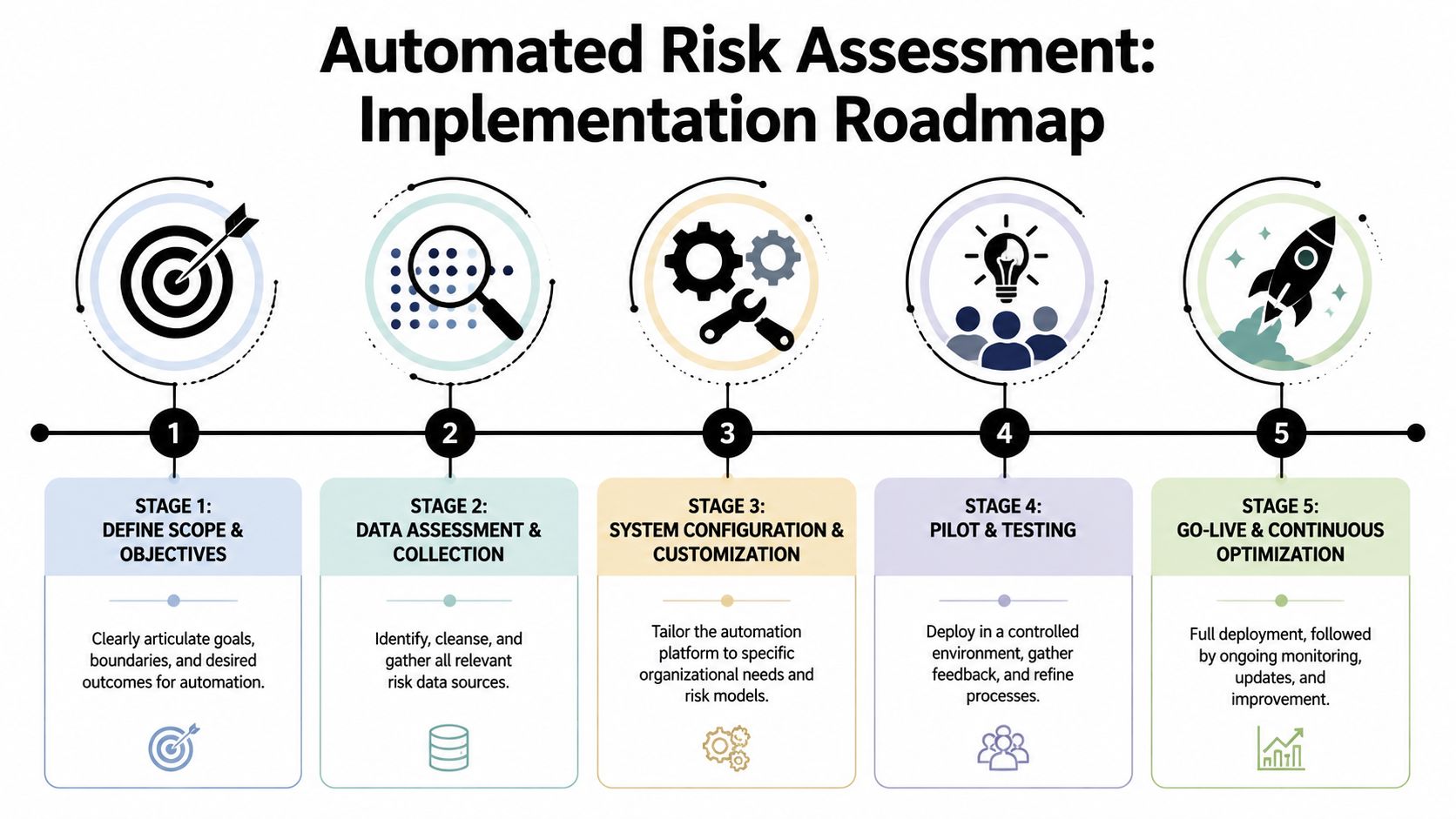
Stage one and two
Start with a bounded problem. Good first targets include vendor intake, suspicious account behavior, access reviews, workflow exceptions, or policy-based document checks.
Then assess the data before choosing tooling. Many projects rush into model selection when the underlying issue is inconsistent events, poor field definitions, or fragmented system access.
A useful opening sequence looks like this:
- Define the operational decision you want to improve
- Map the systems involved and identify where evidence currently lives
- Choose the first threshold-based workflow that can produce visible value
- Decide where human approval remains mandatory
This last point matters even more as continuous monitoring becomes standard. As AI shifts risk work from periodic review to always-on detection, organizations need to define which risks can be safely automated end-to-end and which still require human review, with thresholds and control ownership established up front, as discussed in Secureframe's overview of risk management automation.
Stage three and four
Now make the build-versus-buy decision objectively.
If your risks mostly live inside standard enterprise systems, a platform may cover much of the need. If the highest-value risk signals live in custom applications, customer workflows, or business-specific approval logic, you'll usually need custom integration work around the risk engine.
That's also where security architecture needs attention. The automation layer will likely touch identity, telemetry, app events, and sensitive internal logic. Teams connecting these services should think carefully about trust boundaries and service permissions. This guide on how to secure your dev pipelines with Zero Trust is a good companion resource because the same discipline applies to AI-enabled risk workflows.
Pilot narrowly. Don't begin with the most politically sensitive process. Choose one where the team can compare manual and automated decisions, tune thresholds, and inspect false positives without causing operational chaos.
Stage five
Go live with explicit operating rules.
That means:
- Named owners: Every alert type has a responsible team
- Documented overrides: People know when and how to bypass automation
- Logging from day one: Inputs, outputs, actions, and exceptions are retained
- Review cadence: Teams revisit thresholds and model behavior on a schedule
One implementation lesson deserves special attention. When AI is embedded in a custom risk workflow, teams need an administrative layer for the AI itself. They need prompt versioning, controlled parameters for internal database access, unified logging across model interactions, and visibility into cumulative model spend. Without that control plane, the “smart” part of the system quickly becomes the least governable part of it.
Measuring Success and Future-Proofing Your System
The success of risk assessment automation isn't measured by how impressive the architecture diagram looks. It's measured by whether teams make better decisions with less delay and more confidence.
Useful indicators are usually operational before they are strategic. Leaders should look at how quickly the team detects issues, how reliably cases reach the correct owner, whether exception handling is getting cleaner, and whether audit or compliance conversations involve less manual reconstruction. If the system produces more noise than clarity, it isn't mature yet.
A future-proof system also stays adjustable. Business priorities change. Risk appetite changes. Workflows change. The automation layer should let teams update logic, tune thresholds, add new data sources, and inspect model behavior without rebuilding the entire application around each change.
Generative AI will likely expand the way teams simulate scenarios, summarize evidence, and support investigations. That doesn't remove the need for disciplined controls. It increases it. The organizations that get the most value won't be the ones with the flashiest AI features. They'll be the ones that treat risk assessment automation as part of a durable software operating model.
If you're modernizing a custom application and need a safer way to operationalize AI inside risk-sensitive workflows, Wonderment Apps can help. Their team builds AI-ready web and mobile systems, integrates best-fit models into existing software, and provides an administrative toolkit for prompt management, parameter control, unified logging, and token cost visibility. If you want your automation to be useful, governable, and built to last, it's worth booking a demo and seeing how their approach works in a real product environment.