


Your team ships an AI assistant inside a mobile app. The demo feels magical, users try it immediately, and the product launch looks like a success. A week later, engineers are searching across repositories for the prompt that changed, finance is asking why cloud usage climbed, and support is forwarding screenshots of answers that used to be correct.
That pattern doesn't mean AI belongs outside the product. It means AI in mobile apps needs operating discipline, not just a model call hidden behind a polished screen. The teams that build durable experiences treat prompts, models, permissions, latency, cost, and evaluation as product infrastructure. This is the same mindset behind broader digital transformation with AI, where modernization has to improve the system around the feature, not merely add a clever interface.
Why AI in Mobile Apps Is Now an Operating Problem
A chatbot can begin as a small experiment. A developer adds a system prompt, connects an API, places a chat view in the app, and sends the build to testers. The trouble starts when the feature becomes real software. Product managers request a different tone, legal asks for tighter data boundaries, marketing wants a new model, and engineers make prompt edits in separate code branches.
Without a shared control layer, the team loses the answer to basic questions. Which prompt produced this response? Which model handled the request? How much did the interaction cost? Did the quality problem come from the model, the retrieved data, the mobile client, or a recent instruction change?
The market gives product leaders little reason to treat these questions as optional. Sensor Tower reported that generative AI apps approached 1.7 billion global downloads in the first half of 2025, with in-app purchase revenue nearing $1.9 billion. Downloads grew 67% half-over-half, while consumer in-app purchase spending doubled compared with the second half of 2024, according to Sensor Tower data summarized by AppVerticals. More users and more usage create more operational exposure.
The three failures that arrive together
- Prompt sprawl: Instructions live in source files, dashboards, experiments, and emergency patches with no reliable history.
- Cost surprises: A feature that looks inexpensive in testing becomes expensive when users return frequently or send long inputs.
- Quality drift: A model or prompt update changes behavior, but no one can connect the regression to the exact deployment.
Practical rule: If an AI feature can affect a customer decision, workflow, payment, or personal data, manage it with the rigor used for authentication and billing.
A practical operating manual starts with three decisions. First, decide which work belongs on the device and which belongs in the cloud. Second, manage prompts and models as deployable artifacts with owners, versions, tests, and rollback paths. Third, put cost, latency, privacy, and user outcomes in one view so the team can respond before a problem becomes a collection of panicked Slack messages.
The Core Capabilities Behind Modern AI in Mobile Apps
Think of a mobile AI system as a kitchen. Some ingredients are already in the user's fridge, so the app can prepare a quick meal locally. Other dishes require a restaurant with larger equipment, so the app sends a request to a cloud service and waits for delivery.
That analogy helps separate where intelligence runs from what the intelligence does. The main capability categories overlap, but each solves a different product problem.
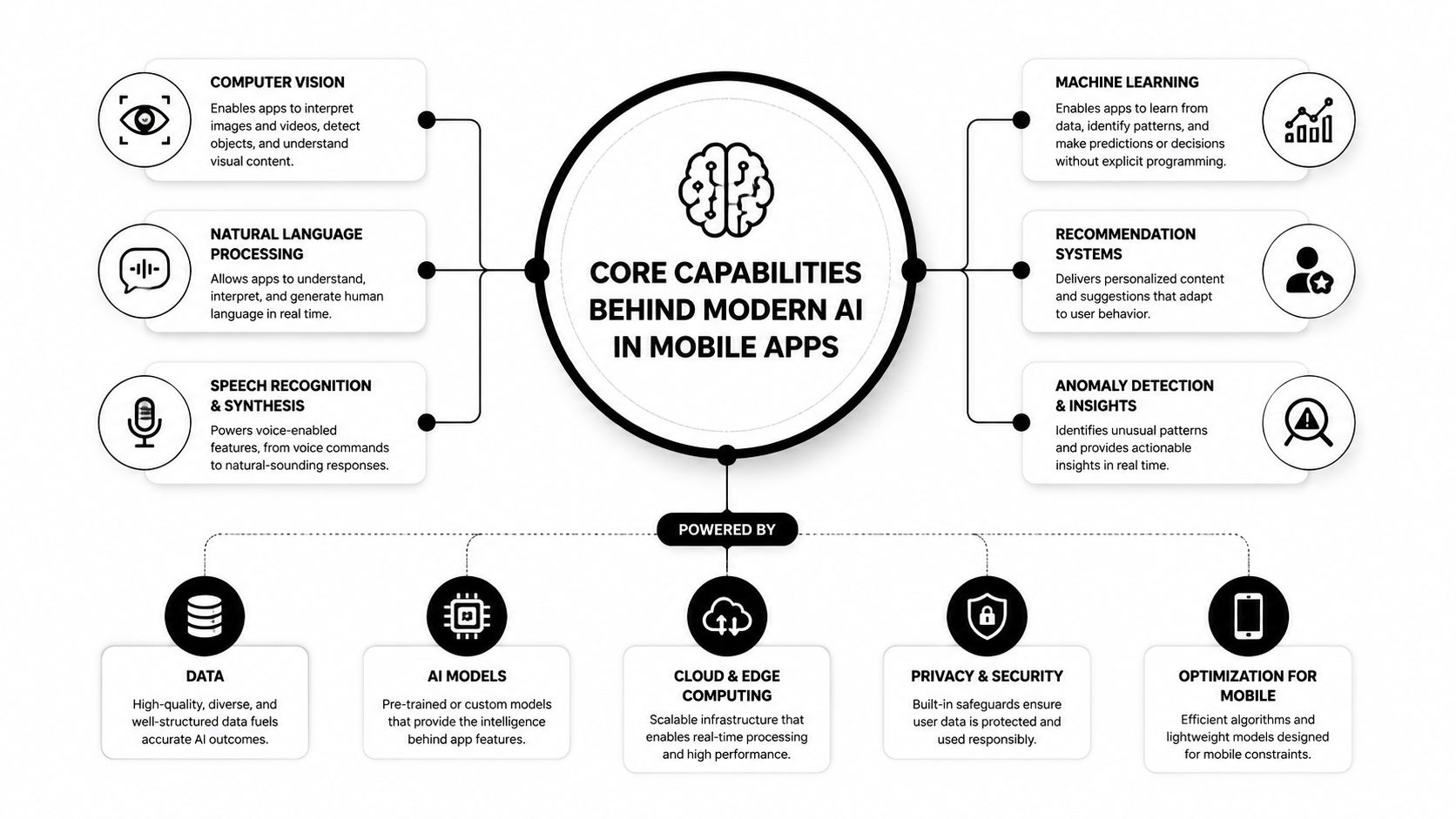
Personalization learns the user's context
Personalization changes what the app shows, suggests, or prioritizes. A shopping app can re-rank a product feed based on browsing behavior, saved items, and current intent. A fitness app can adjust a workout recommendation after noticing that a user prefers short sessions.
The important design question isn't whether a model can predict a preference. It's whether the app can explain the signal, update it safely, and let the user correct it. A recommendation system that repeatedly misunderstands a customer needs a clear feedback path, not just a larger model.
Computer vision turns the camera into an input
Vision models interpret images or video. A fitness app might count repetitions through the camera, a retail app might identify a product, and a field-service app might flag visible equipment damage.
Mobile vision often benefits from fast local processing because the user expects the camera view to respond while they move. The app may still send a selected image to the cloud for deeper analysis, but the first interaction should feel immediate.
Natural language processing makes messy input useful
Natural language processing, or NLP, converts human language into intent, entities, summaries, classifications, or structured actions. A banking app could summarize recent transactions in plain English, while a travel app could turn “find a quiet hotel near the museum” into searchable filters.
NLP is the largest application category in one 2025 market overview, valued at $11.4 billion, or 41.3% of the market, as reported by ResearchAndMarkets coverage through Business Wire. That reflects how often mobile products need conversational search, extraction, summarization, and command handling.
Assistants combine capabilities into a workflow
An assistant is a surface that orchestrates several capabilities. It may retrieve account data, interpret a question, call a recommendation service, and present a next step in one conversation.
The assistant should not become the entire architecture. Keep permissions, business rules, and sensitive actions outside the model. The model can help interpret intent, but deterministic services should decide whether a transfer, booking, refund, or account change is allowed. For a deeper foundation, Wonderment's guide to knowledge in artificial intelligence provides useful context for thinking about how information supports intelligent features.
On-Device vs Cloud Inference and How to Choose
The right question isn't “Is on-device AI better?” or “Should everything use a cloud model?” Ask which part of the experience needs local speed, private data handling, or offline reliability, and which part benefits from broad knowledge and heavier computation.
A travel app's camera translator makes the split clear. A compact optical character recognition model can detect a street sign on the phone and identify a word immediately. If the user selects a full paragraph and asks for tone-sensitive translation, the app can send that larger task to a cloud model. One feature can use both paths without making the user understand the underlying architecture.
| Decision Axis | On-Device | Cloud |
|---|---|---|
| Latency | Useful for immediate interactions and camera feedback | Suitable for tasks that can tolerate network travel |
| Privacy | Data can remain on the device | Data must be transmitted and governed |
| Connectivity | Can continue during offline or weak-network conditions | Depends on a reliable connection |
| Cost | Shifts work toward device resources | Creates usage-based infrastructure expense |
Four questions guide the routing decision
Latency: Does the interface need to react during a gesture, camera frame, or keystroke? Local inference usually fits that interaction better. A cloud response can work when the user expects a short wait and the app can stream partial output.
Privacy and residency: Identify whether the task uses health details, financial records, location history, or private messages. If the feature doesn't need raw data, reduce it before processing. A local classifier may need only a compact representation rather than the user's full record.
Offline behavior: Decide what the app should do on a flight, in a basement, or on a congested network. An offline fallback can preserve the core action even if advanced generation isn't available.
Economics: Cloud calls create a recurring cost as usage grows. Local processing can reduce request volume, but it still consumes battery, memory, and thermal capacity. Measure both paths on representative devices instead of assuming the fastest server model will create the best mobile experience.
Keep tight, personal, and offline-capable work on-device. Route heavy, knowledge-broad, and bursty work to the cloud.
Integration Patterns That Hold Up at Scale
A prototype asks whether an AI feature can work. Production asks whether it can remain useful when traffic, device diversity, model changes, and failure conditions arrive at the same time.
Start with the smallest model that clears a defined quality bar. Use a larger model only when the user-visible task needs its additional reasoning, context, or generation ability. This approach reduces unnecessary complexity and gives the team a clear reason for every upgrade.
Keep the mobile client thin
The iOS and Android applications should request a product capability, not assemble an AI workflow from scattered provider calls. A server-side composition layer can handle retrieval, prompt selection, model routing, policy checks, and response normalization. The mobile client then receives a stable contract even when the underlying model changes.
Feature flags make controlled rollout possible. The team can expose a new assistant route to a selected audience, compare outcomes, and turn it off without waiting for a full app-store release.
Design failure as part of the experience
Cloud calls time out. Local models return low-confidence results. A new model can perform well in evaluation but poorly on an unusual user input. Define what happens in each case before launch.
- Cloud timeout: Show a useful retry state, preserve the user's input, and offer a narrower local action if one exists.
- Low local confidence: Ask for confirmation or route the request to a stronger service.
- Model regression: Switch traffic back to the previous route without forcing users to install an older binary.
- Malformed output: Validate the response against a schema before the interface renders it.
A data pipeline also needs boundaries. Strip unnecessary personal information at the edge, record only the telemetry needed for debugging and evaluation, and separate training signals from inference payloads. This becomes especially important as the audience grows. A scaling interview benchmark from HackerRank's software development hiring guidance explicitly asks candidates how a system changes for 1M users versus 100k users, alongside questions about correctness, testing, debugging, queues, and databases.
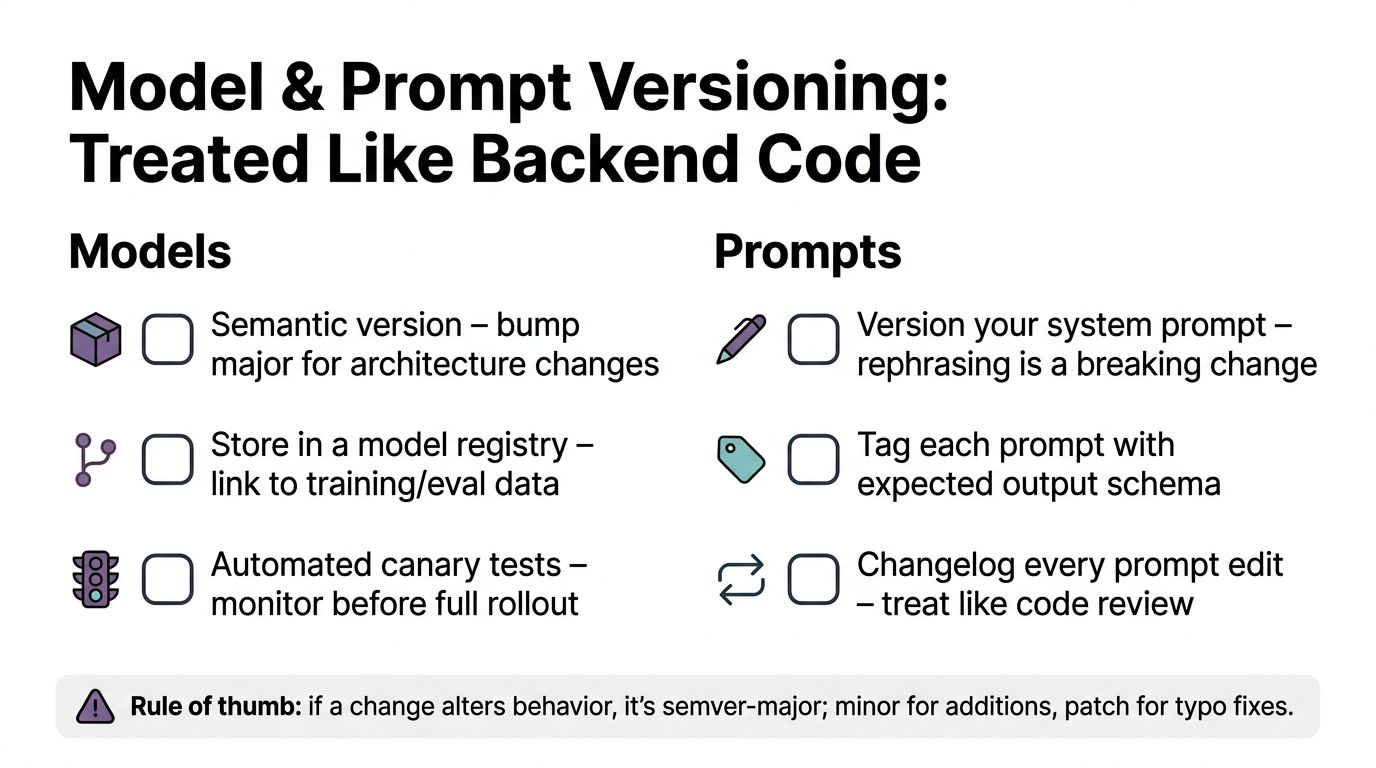
Managing Models, Prompts, and Versions Like Real Software
A prompt isn't a disposable paragraph. It controls behavior, output structure, tone, tool use, and sometimes access to application data. A model isn't a permanent dependency either. Both should have owners, version identifiers, evaluation results, and a rollback path.
Treat a prompt rewrite as a potentially breaking change. Changing “summarize this account” to “provide a concise account summary with risks first” may alter length, ordering, and downstream parsing. If the interface expects a particular schema, the prompt needs an explicit output contract and a test that checks it.
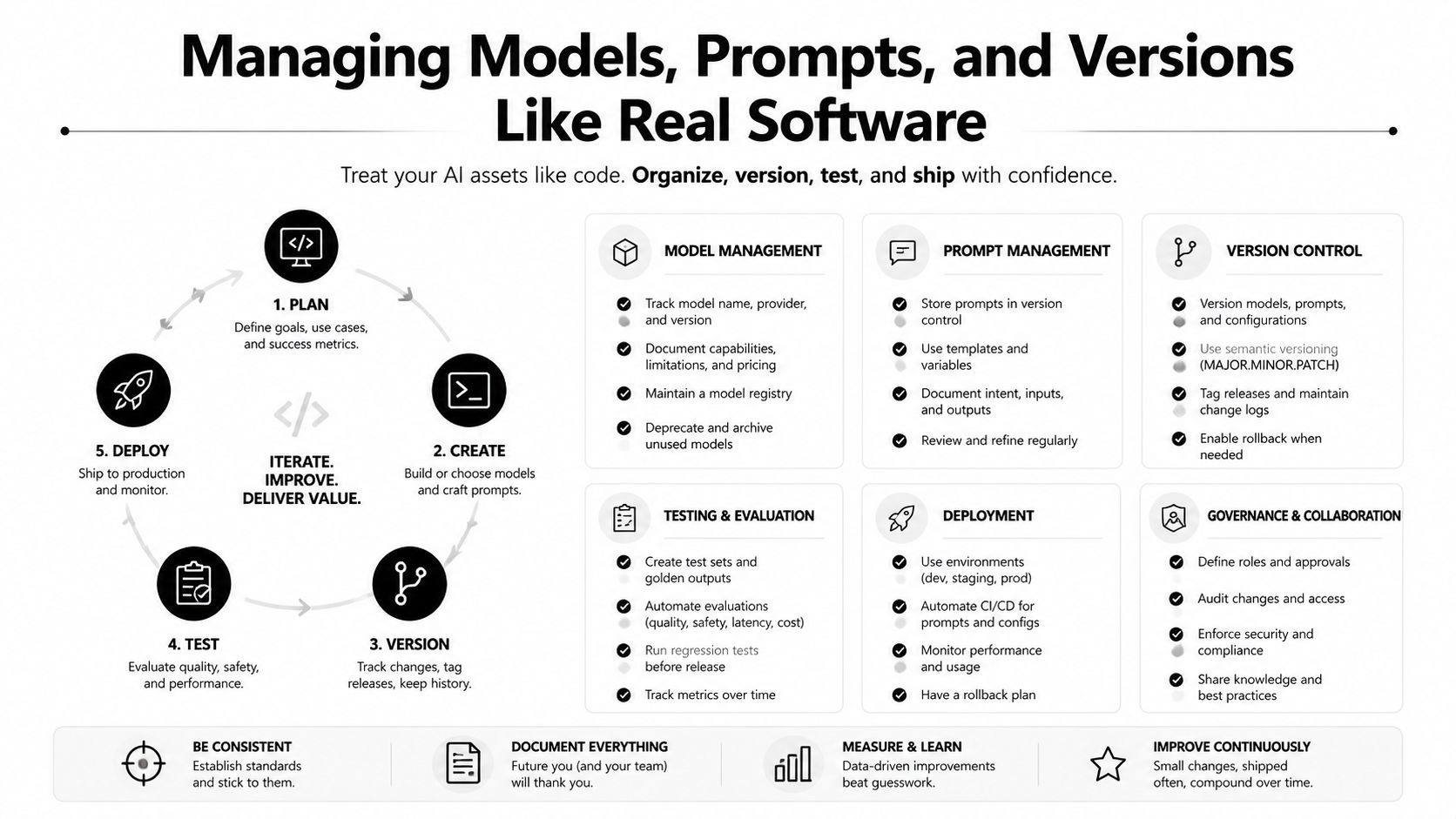
A release process for AI artifacts
- Own: Assign a responsible team or person for each model route and prompt.
- Version: Store the model identifier, system instructions, tools, schema, and configuration together.
- Test: Maintain a golden set of representative inputs, then run automated checks before release.
- Shadow: Run a candidate model beside the current model without changing the user-facing result.
- Route: Move traffic using a server-side configuration or feature flag.
- Rollback: Restore the previous prompt or model route without waiting for a mobile release.
The logging contract should capture the request type, model version, prompt version, latency, token usage where available, validation result, error category, and user outcome. Remove or protect sensitive content according to the product's data policy. Without versioned logs, a quality regression becomes a debate. With them, engineers can trace behavior to a specific change.
Wonderment Apps offers a prompt management system that can plug into an existing application or software environment. Its administrative tooling includes a prompt vault with versioning, a parameter manager for internal database access, logging across integrated AI services, and a cost manager for cumulative AI spending. Teams comparing approaches can also review prompt management tools and their operating role.
Cost, Latency, and Retention Working Together
An AI feature earns its roadmap place only when three numbers make sense together: what each interaction costs, how quickly it responds, and whether users keep finding value after the novelty fades.
A personalization feature can appear cheap in a test environment because the test audience is small and inputs are short. At production volume, long histories, repeated retries, and premium model routing can raise the bill. A slow response creates a different problem. If the screen asks users to wait through a cloud round trip for an action that feels instant elsewhere, they may abandon the flow before the model finishes.
Recent evidence challenges the idea that AI automatically improves long-term engagement. Sensor Tower reported 3.8 billion generative AI app downloads in 2025 and in-app purchases above $5 billion, while RevenueCat's 2026 subscription report found AI-powered apps had 30% faster annual churn and 20% higher median refund rates than non-AI apps, as reported in this PR Newswire summary of the Sensor Tower State of AI report. The product lesson is simple: measure repeat value, not just first-session activity.
| Inference Path | Typical Latency | Cost per 1k Calls | Offline Support |
|---|---|---|---|
| Small on-device model | Device-dependent and designed for immediate interaction | Primarily device resource consumption | Strong |
| Cloud small model | Network-dependent | Usually lower than premium cloud routing | Limited |
| Cloud premium model | Network and generation dependent | Higher usage cost | None without a fallback |
| Hybrid route | Varies by task and fallback | Can balance local work with selective cloud calls | Partial |
Build one operating view
Trim irrelevant input before sending it. Cache repeatable responses where freshness permits. Stream long responses so users see progress, and route simple requests to smaller models while reserving premium models for difficult cases.
Teams also need cost per user, latency percentiles, error rates, and outcome metrics in the same dashboard. A prompt or cost management layer can add budgets, alerts, cumulative spend visibility, and throttling controls to otherwise scattered provider calls. For teams reviewing token economics, 2026 OpenAI pricing and token savings offers a useful reference for comparing model usage and savings approaches.
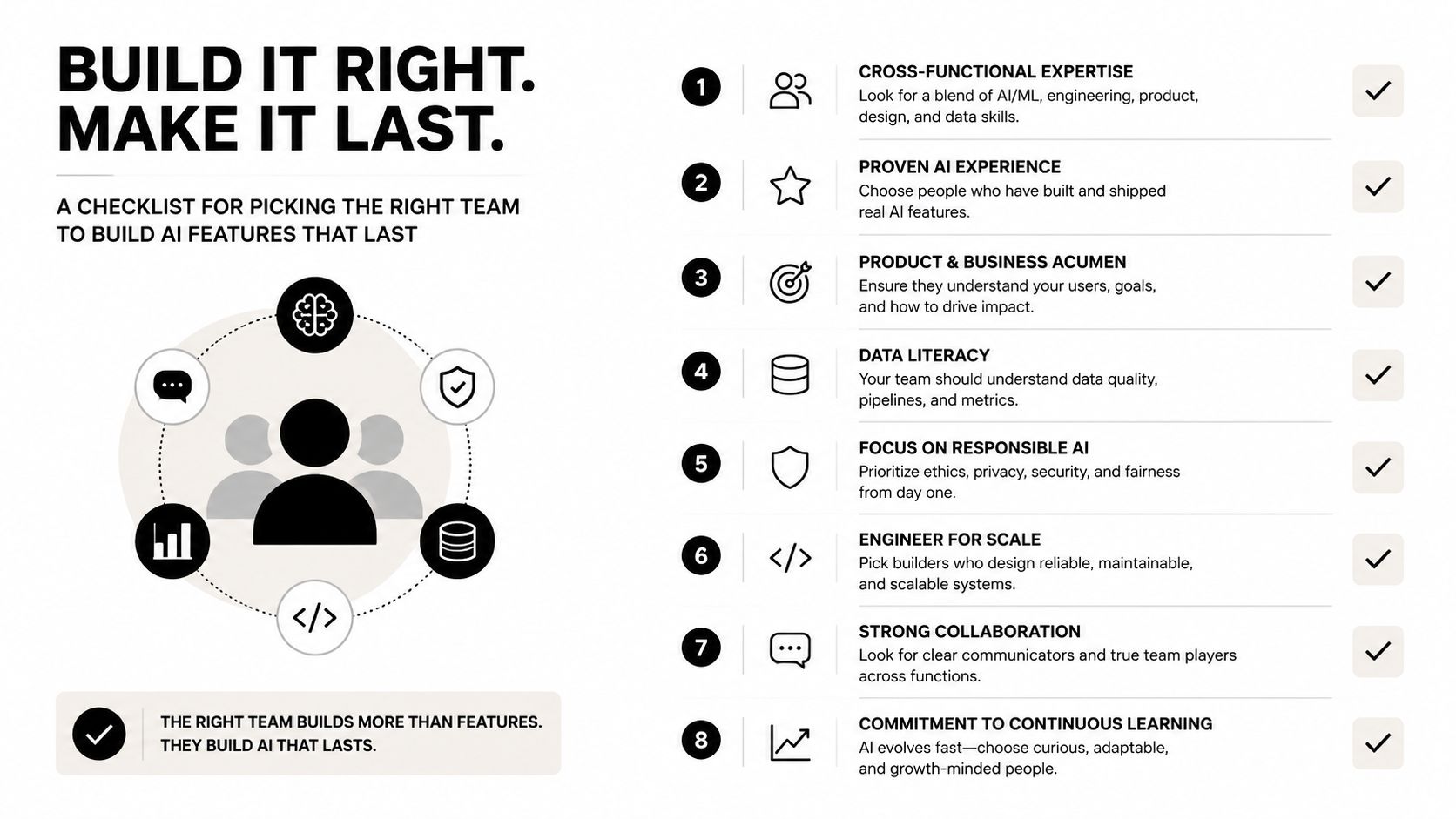
Picking the Right Team to Build AI Features That Last
Model selection matters, but the team operating the feature matters just as much. A capable partner or internal squad should show how it measures product impact, handles scale, and modernizes the surrounding system instead of presenting a list of model names.
Ask for evidence of shipped outcomes. Strong evidence might include a documented reduction in inference cost, a faster workflow, improved conversion, or a retention result tied to a clearly defined product change. HackerRank's recruiting guidance recommends looking for evidence of impact, such as a concrete API latency reduction, rather than vague descriptions of activity. It also identifies progression in responsibility, side projects, open-source work, and published work as useful signals.
Questions worth asking before signing
- Scale thinking: How would the architecture change as the audience grows from 100,000 users to 1 million?
- Release control: Can the team demonstrate prompt versioning, model evaluation, shadow testing, and rollback?
- Operational ownership: Who monitors latency, cost, permissions, quality, and incidents after launch?
- Modernization judgment: Which legacy components should be replaced, wrapped, or left alone?
- Capability boundaries: Which AI services does the team own end-to-end, and which does it orchestrate?
- Pilot discipline: What single feature and success metric will determine whether the next investment is justified?
A short pilot should produce more than a demo. It should include a working mobile flow, a measurable outcome, representative evaluation cases, failure handling, and an operating view for cost and latency. The decision window can be short, but the evidence must reflect production conditions rather than an idealized test conversation.
Choose developers who can explain what happens after launch. A polished prototype proves that a feature can be built. It doesn't prove that the feature can be governed.
AI modernization also needs a maintenance plan. An executive hiring guide from Dreamix on hiring software developers recommends prioritizing documented business outcomes such as revenue growth, cost reduction, or market expansion attributable to software work. Apply that standard to AI in mobile apps, then add model updates, prompt ownership, data controls, and long-term support.
Wonderment Apps helps organizations design and build AI-enabled web and mobile products, modernize existing software, and manage the operational layer around prompts, integrations, logging, and token costs. Visit Wonderment Apps to discuss a practical AI feature, its scaling requirements, and the engineering plan needed to keep it useful after launch.