

A retail payments team can have a polished AI assistant ready for launch and still be unable to answer a basic production question: which customer record may the assistant use, and how can the team prove what the model saw? The mainframe holds authoritative transaction data, the CRM uses inconsistent identifiers, and compliance needs an audit trail that older systems were never designed to produce.
That situation captures the challenge of integration with legacy systems in 2026. The work isn't only about moving data between old and new software. It's about creating controlled, explainable access for modern web, mobile, analytics, and AI experiences without destabilizing the systems that still run the business.
A prompt management layer can help provide that control above the existing estate. Wonderment Apps has developed an administrative system that plugs into an existing application or software environment, with a prompt vault, versioning, parameter management for internal database access, logging across integrated AI services, and cost visibility. Used appropriately, it can modernize the AI layer while leaving proven transaction systems in place.
Why Integration With Legacy Systems Is Suddenly an AI Problem
The payments team in the opening scenario doesn't have a simple connector problem. It has three different definitions of truth, several trust boundaries, and a business requirement to explain every AI-assisted decision. A connector that merely retrieves a record may technically work, yet still fail the security review because nobody can show which prompt, parameters, model call, or source data produced the result.
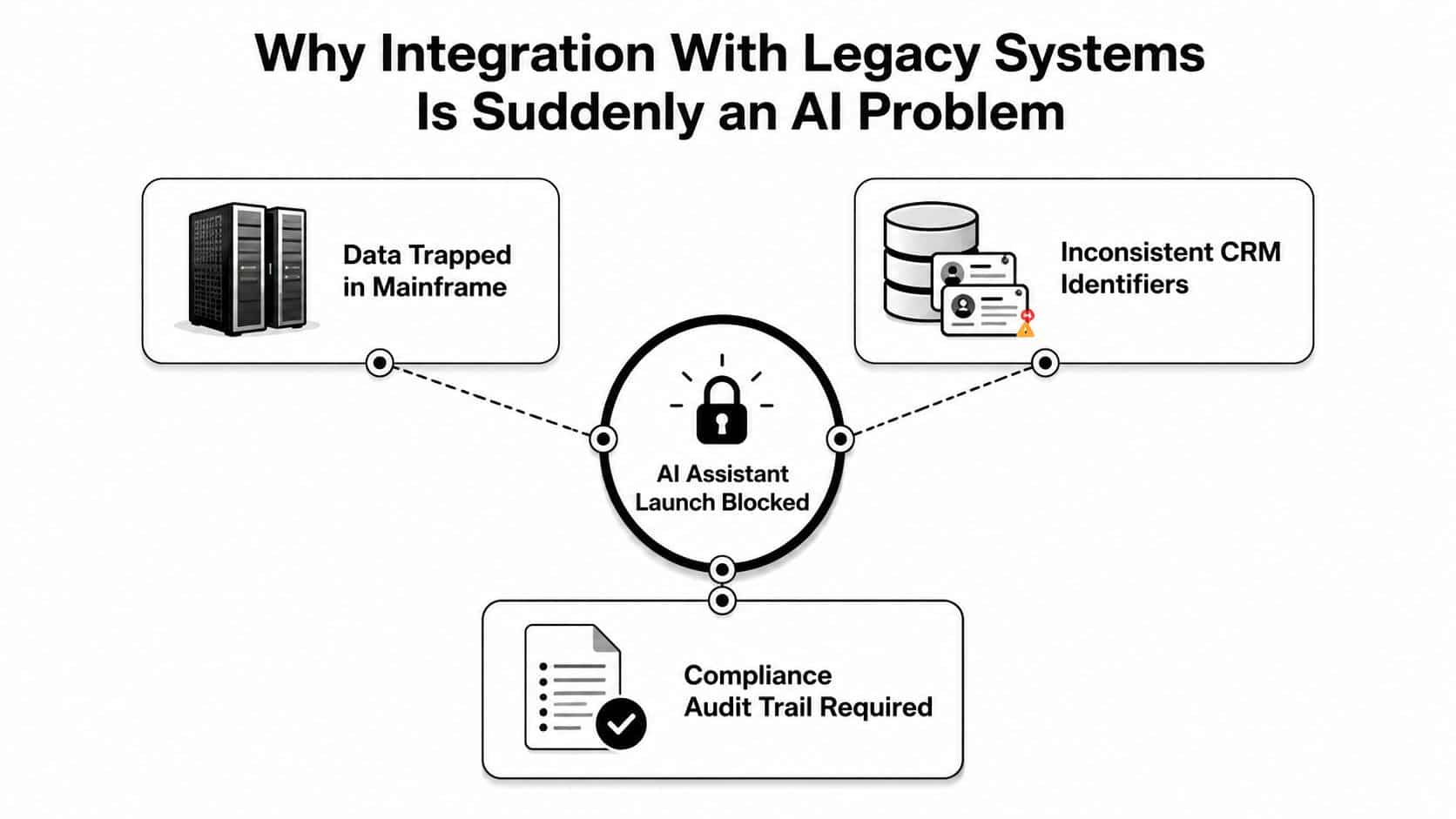
This is why I treat legacy integration as an AI-readiness and operational-governance program first, and middleware work second. Before selecting an adapter, the team needs to establish:
- Data ownership: Which system is authoritative for each field, and who approves changes?
- Identity resolution: How does a customer, member, account, or claim map across systems?
- Freshness requirements: Can the AI workflow use replicated information, or must it query current records?
- Failure behavior: What happens when the mainframe is unavailable, slow, or returns an incomplete response?
- Regulatory boundaries: Which fields may enter an AI context, and which must remain masked or excluded?
The economic pressure is substantial. Industry reporting estimates that organizations spend roughly 60% to 80% of IT budgets maintaining existing systems, while one benchmark estimates that U.S. organizations spend about $1.14 trillion annually maintaining existing IT investments (legacy integration statistics and benchmarks). The same research stream estimates maintenance at around $30 million per major system per year, which explains why integration is often a modernization strategy rather than a short connectivity project.
Practical rule: If an authorized user can't explain what data an AI workflow used, which rules governed the call, and how the result can be reproduced, the integration isn't production-ready.
A governed prompt layer doesn't turn unreliable data into reliable data. It does make the AI operating surface more visible. Teams can standardize approved instructions, manage context parameters, version changes, and review activity across models while preserving the core system as the record of truth. That distinction matters in fintech, healthcare, retail, and government, where a fast answer that can't be audited may be worse than no answer at all.
Mapping the Legacy Estate Before You Write a Single Adapter
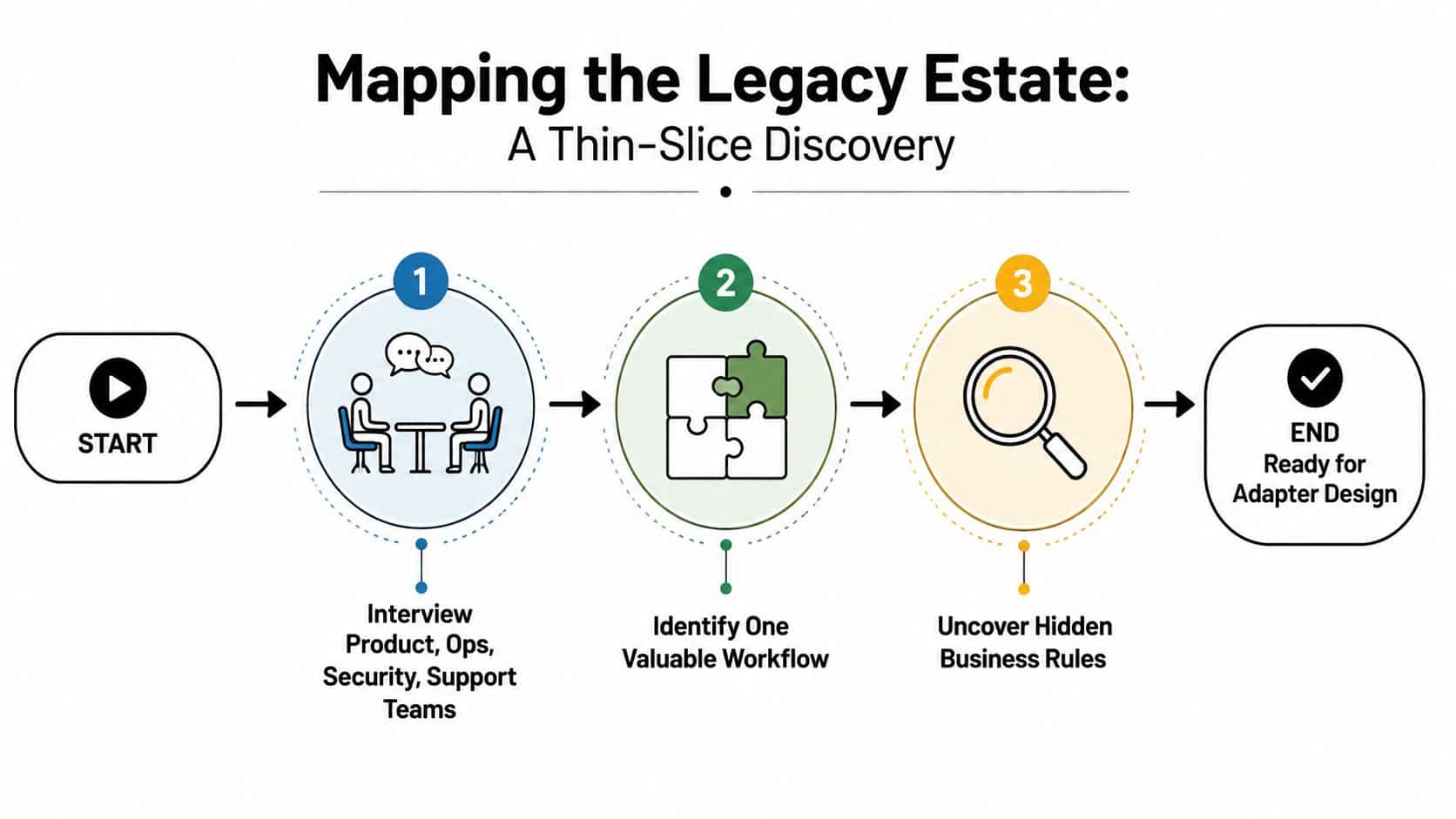
The first useful inventory isn't a spreadsheet of every application in the enterprise. It's a thin slice of one valuable workflow, traced from the user's request to the authoritative record and back again. A claims lookup, payment-status question, prescription renewal, or order exception usually reveals more about integration risk than a broad system diagram.
Start with the people who know the exceptions
Interview product, operations, security, and support teams together. Product owners know the desired experience, operators know the workarounds, security knows the boundaries, and support teams know which “impossible” cases occur every week. Include the person who understands the old screen or batch job, even if that knowledge isn't documented anywhere else.
Then trace the workflow in detail:
- Name the entry point. Record where the request begins, such as a mobile app, desktop workflow, call-center tool, or AI assistant.
- Follow each lookup and write. Identify APIs, database calls, files, queues, scheduled jobs, and external services.
- Capture hidden rules. Document decisions embedded in COBOL routines, screen behavior, spreadsheet checks, operator judgment, and error handling.
- Mark the authoritative record. Don't assume the newest-looking database is the source of truth.
- Record operational limits. Note maintenance windows, acceptable latency, supported request rates, timeout behavior, and rollback boundaries.
A field-level data map should identify the owner, sensitivity, format, freshness requirement, and permitted use of each field. Test the map with production-shaped but non-sensitive examples. This often exposes inconsistent identifiers or surprising transformations before an adapter turns those assumptions into permanent code.
Add protection only after consistency is understood
Caching can shield a mainframe or legacy database from repeated reads, but it shouldn't conceal uncertainty about freshness. Define which responses may be cached, how invalidation works, and what the application must display when cached data is older than the workflow allows.
The discovery output should be an interface-ready contract containing supported operations, data definitions, owners, non-functional limits, security requirements, and rollback conditions. Teams looking for broader guidance can also review scalable IT transformation best practices, particularly when discovery needs to connect with a wider modernization roadmap.
This sequence prevents adapters from encoding guessed business rules. It also gives product teams a defensible basis for deciding which capability to wrap, refactor, isolate, or eventually replace.
Choosing the Right Integration Pattern for Your Stack
No integration pattern wins by default. The correct choice depends on consistency, latency, traffic shape, data volume, change frequency, available skills, and the organization's tolerance for temporary divergence.
An API façade works well when the legacy platform must remain the system of record. The façade translates protocols, normalizes responses, applies policy, and gives modern applications a stable contract while the core remains unchanged. Its weakness is that it can become a permanent translation layer if the team never assigns ownership for the underlying capability.
The strangler fig pattern suits gradual replacement. Route one workflow or command through a modern service, keep the remaining capabilities on the old platform, and move responsibility as the new path proves itself. This reduces cutover risk, but it requires careful routing, duplicate-state management, and a clear retirement plan.
ETL is appropriate for reporting, analytics, and model-training datasets that can tolerate scheduled movement. It isn't a sound choice for decisions that depend on immediate synchronization. Batch data can be useful and governed, but teams must label its freshness accurately.
Event-driven integration decouples producers and consumers, which helps independent teams evolve. It also creates obligations that point-to-point calls can hide, including durable messaging, idempotency, replay handling, schema evolution, and explicit treatment of missing or out-of-order events.
| Pattern | Use When | Primary Trade-off | Key Control |
|---|---|---|---|
| API façade | Synchronous access must preserve a legacy system of record | The façade may become another long-lived dependency | Contract versioning and gateway policy |
| Strangler fig | The organization can migrate one workflow at a time | Routing and state ownership become more complex | Capability-level traffic control |
| ETL | Reporting or analysis can use scheduled data | Freshness is limited by the pipeline schedule | Data lineage and freshness labeling |
| Event-driven | Producers and consumers need decoupling | Replay, ordering, and duplicate delivery require discipline | Durable messaging and idempotent handlers |
A hybrid design often fits mature estates: change-data capture into an operational data store, an API façade for synchronous actions, and a strangler migration around selected commands. Score each option for delivery speed, consistency, fault isolation, data latency, security exposure, and ongoing maintenance.
Before approving broad rollout, run a proof of concept with realistic load and deliberate failure injection. The cheapest connector isn't necessarily the one with the least code. It's the one the team can operate during an incident, update when a schema changes, and retire without destabilizing the core. For a broader treatment of cross-system architecture, see these enterprise application integration best practices.
Designing Secure Data Flows Across Old and New Boundaries
Security has to sit at the boundary because many legacy applications can't enforce modern identity, token, or audit requirements themselves. A middleware layer or API gateway can translate protocols, normalize schemas, enforce authentication, rate-limit requests, and reject malformed payloads before they reach a mainframe or on-premises database.
Start by drawing the trust boundaries. A typical path may run from a mobile or desktop client to a cloud API, through a gateway, into an on-premises service, and finally across a COBOL transaction layer. Each transition needs an explicit decision about identity, transport, data exposure, logging, and failure behavior.
Put controls in front of the system that can't provide them
Use OAuth2 or OpenID-style token controls at the modern boundary, with token validation and authorization decisions before legacy endpoints are called. Mutual TLS can protect service-to-service transport, while schema validation prevents a modern client from sending fields or formats the older application never expected.
| Boundary | Primary Control | Implementation | Common Pitfall |
|---|---|---|---|
| Mobile or desktop client to cloud API | Token-based authorization | Validate issuer, audience, scope, and expiry at the gateway | Treating authentication as proof of business authorization |
| Cloud gateway to on-premises service | Mutual TLS and network policy | Use managed certificates and explicit service identities | Allowing broad network access because the service is internal |
| Gateway to mainframe or legacy endpoint | Schema validation and allowlisted operations | Translate only approved commands and fields | Exposing internal functions through a generic proxy |
| Sensitive data crossing the boundary | Tokenization and field-level encryption | Mask or tokenize PII before downstream processing | Sending full records when the workflow needs only a subset |
| Audit and incident review | Immutable activity logging | Record actor, purpose, policy result, and correlation ID | Logging secrets or sensitive payloads without retention rules |
Keep secrets in a vault, not in configuration files. Treat PII tokenization as an edge control, especially when an AI service only needs a compact context rather than the complete customer or patient record. Audit logs should connect the user or service identity to the request, decision, source system, and outcome, with retention aligned to the applicable compliance program.
There are trade-offs. A gateway adds latency, certificate rotation can expose brittle credential caching, and detailed logs create their own privacy obligations. Sequence controls so the first integration has a defensible minimum boundary, then strengthen policy enforcement as the workflow expands. Teams can use API authentication best practices as a practical reference while defining those controls.
Security debt grows fastest when teams make an internal endpoint “temporary” and then let production applications depend on it for years.
Where Prompt Management Fits in the Modernization Layer
A claims team may already have a useful legacy workflow. The host system stores dense records, the claims application exposes limited screens, and a new AI service needs a concise, controlled summary rather than unrestricted database access. The integration challenge is to provide relevant context without allowing every model call to become an untracked shortcut into the core.
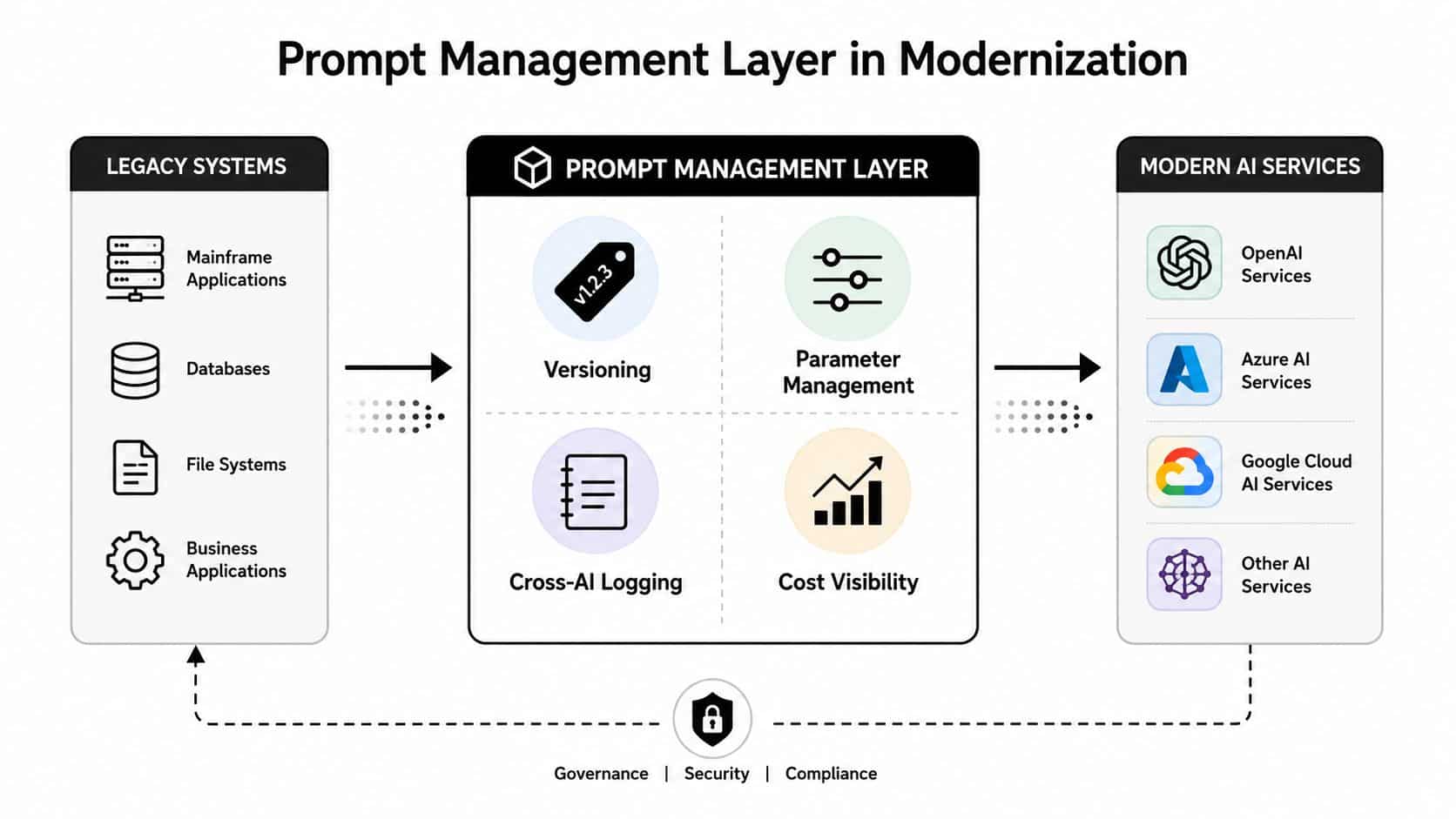
A prompt management layer sits between legacy systems and AI services. It doesn't replace the claim system, and it shouldn't become an ungoverned data warehouse. It provides operational primitives around how an application prepares context, instructs a model, records the call, and evaluates the result.
Treat prompts as deployable software artifacts
The claims workflow might transform a short COBOL record summary into a structured context object, pass only approved parameters, and route the request to an appropriate model. The important part isn't the model brand. It's the ability to understand which prompt version and parameter set produced the output, which AI service handled it, and which legacy transaction initiated the request.
A practical layer includes:
- Prompt vault with versioning: Store approved prompts as controlled artifacts, with change history and release ownership.
- Parameter manager: Select and format permitted fields from internal databases without handing the model unrestricted access.
- Cross-AI logging: Record model calls, inputs, outputs, errors, and correlation identifiers across integrated AI services.
- Cost manager: Show cumulative spend by workflow, model, team, or application so owners can connect usage with business value.
This is the same operational mindset used for database migrations and API contracts. A prompt change can alter classification, extraction, tone, or downstream actions, so it needs review, testing, staged release, and a rollback path. Teams evaluating this category can review prompt management tools alongside their existing deployment and observability stack.
Wonderment Apps' prompt management system is one example of this layer. It plugs into existing applications or software and combines prompt versioning, parameter management for internal database access, logging across integrated AI services, and cumulative cost visibility. The design is most useful when an organization needs AI capability on top of established systems but isn't ready to replace those systems.
The result is not “AI connected to the mainframe” as a vague architecture slogan. It's a traceable workflow with bounded context, explicit permissions, recorded model activity, and an operating view of cost.
Testing and Rollout Strategies That Won't Break the Core
Legacy integrations need tests that reflect the system's real behavior, including the odd responses and timing assumptions that newer services might reject. Start with contract tests pinned to documented outputs, then add tests for malformed records, timeouts, partial responses, duplicate requests, and maintenance windows.
Build confidence without touching production writes
Use shadow traffic to replay production-shaped reads against the new adapter while the existing path continues serving users. Compare normalized outputs, latency, error handling, and authorization results. Shadow traffic is especially valuable when documentation is incomplete because it reveals behavior that nobody remembered to describe.
For write operations, begin with a dark launch. Let the new path validate requests and produce a proposed command without committing it to the core. Compare the proposed outcome with the established workflow, then move a controlled slice of authorized traffic through the new route.
A rollout sequence can look like this:
- Golden dataset: Create representative, non-sensitive records covering ordinary, boundary, and failure cases.
- Contract verification: Confirm field names, formats, status codes, and error semantics.
- Shadow reads: Compare the adapter with the existing path under production-shaped conditions.
- Dark writes: Validate commands without committing changes.
- Canary release: Use feature flags to direct a small, observable slice of traffic.
- Parallel business cycle: Run old and modern paths together long enough to compare reconciliation and operational outcomes.
- Progressive expansion: Increase exposure only when the agreed SLO budget remains intact.
The rollout must have a stop button owned by a named team. Useful rollback triggers include reconciliation drift, unexpected authorization denials, rising queue depth, elevated payload errors, or latency that threatens the host bridge. The exact threshold should come from measured baseline behavior, not a number borrowed from another system.
| Tactic | Duration | Success Signal | Rollback Trigger |
|---|---|---|---|
| Contract tests | Throughout delivery | Stable outputs across approved fixtures | Breaking schema or error behavior |
| Shadow traffic | Before user exposure | New path matches expected reads | Unexplained divergence or core load |
| Dark writes | Before committed writes | Proposed commands reconcile with current workflow | Unsafe command or inconsistent result |
| Canary rollout | Progressive release | SLOs and business checks remain within budget | Core degradation or control failure |
| Parallel operation | At least one full business cycle | Matching operational and financial outcomes | Persistent reconciliation drift |
Monitoring, Maintenance, and Knowing When to Stop Integrating
An adapter is a product with a lifecycle, not a one-time bridge. Monitor it through the alerting tools the operations team already uses, and make ownership visible from the first release.
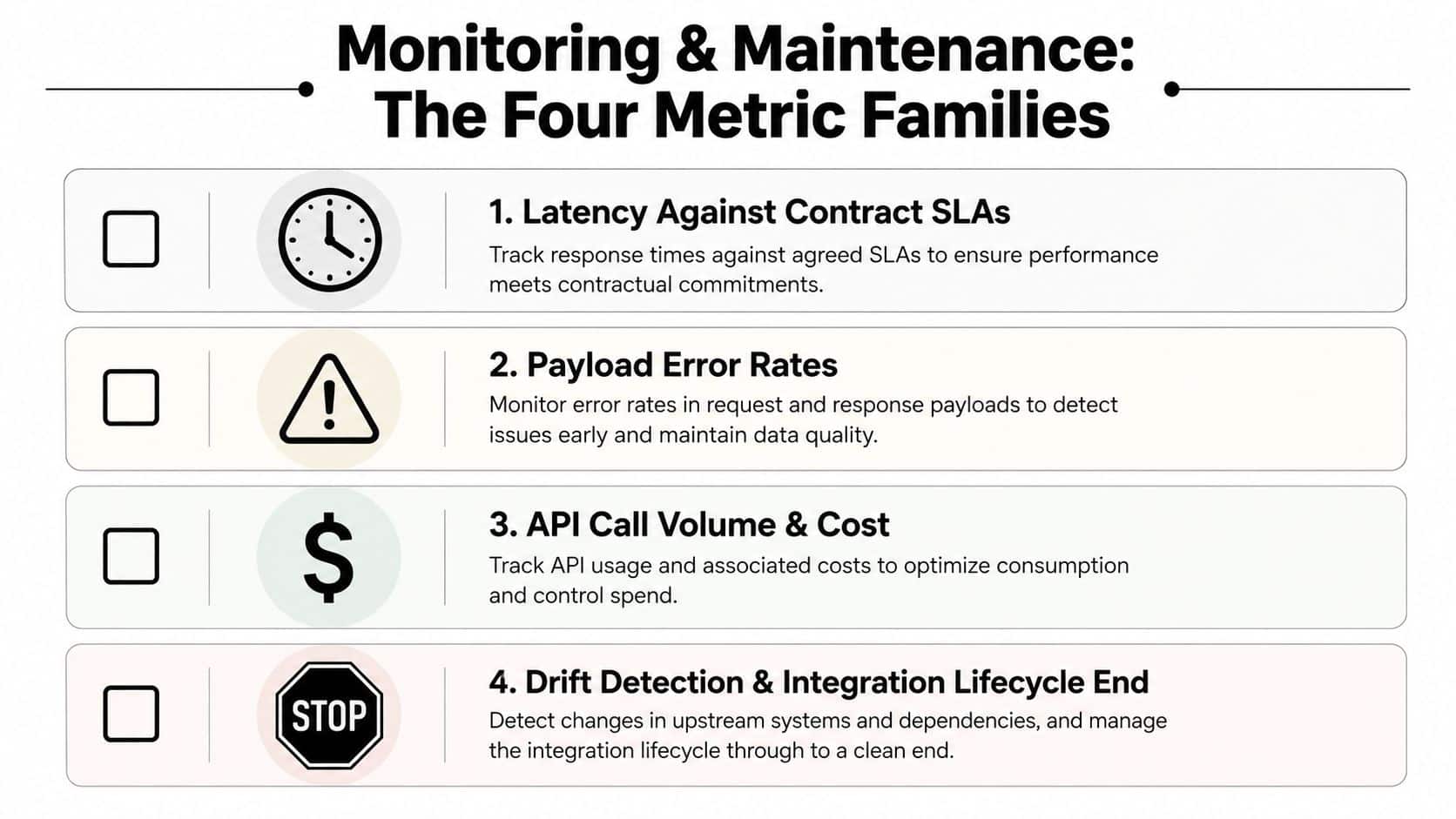
The four metric families below catch most forms of legacy drift:
- Latency against contract SLAs: Track gateway, adapter, queue, and core timings separately so a slow host call isn't mistaken for a slow mobile client.
- Payload error rates: Break failures down by schema validation, transformation, authorization, timeout, and core response.
- Queue depth and API call volume: Watch backlog, retry behavior, and AI-related usage so cost and capacity problems don't arrive as surprises.
- Authorization denials and lifecycle drift: A sudden denial pattern can indicate stale identity propagation, while repeated compatibility exceptions can signal that the integration is nearing its useful life.
Modern AI operations also need cost and quality visibility. One prompt-management platform reports 40+ metrics for cost, quality, and latency, while production AI gateways advertise support for hundreds of model providers and open-source or self-hosted deployment modes, reflecting the operational complexity of serving many users and AI integrations (AI gateway and observability benchmarks). Use those ideas as a starting point, but select metrics that map to your own workflows and controls.
Use a decision rule, not integration momentum
Integration stops paying off when the organization keeps adding translation layers without retiring old responsibility. Review the architecture quarterly and look for:
- Compounding adapters: Each change requires edits across multiple wrappers.
- Platform end-of-life signals: The host or middleware no longer receives a credible support path.
- Talent scarcity: Only a shrinking group of specialists can safely modify the system.
- Rising marginal feature cost: Every new capability takes longer because teams must understand more hidden dependencies.
The practical decision isn't always “integrate or replace.” It may be integrate when the core remains stable and the façade has clear ownership, refactor when the interface is useful but the translation layer is becoming brittle, or replace when maintenance, risk, and feature cost keep rising together. Legacy maintenance is already a major budget burden, and research reports that 49% of respondents found actual maintenance costs higher than expected, while 27% cited cloud architecture and migration expertise as a modernization talent gap (2025 modernization research).
This week, choose one integration, document its owner and authoritative record, measure its latency and error behavior, inspect its authorization and cost signals, and score it against the four warning signs above. Then make a written decision to integrate, refactor, or replace, with a next review date and a named person responsible for the outcome.
Wonderment Apps helps teams modernize legacy ecosystems through custom web and mobile development, secure integrations, AI implementation, and prompt governance that includes versioning, parameter management, cross-AI logging, and cost control. Visit Wonderment Apps to discuss a focused discovery, integration proof of concept, or modernization plan that keeps your core systems reliable while making new AI experiences operable and auditable.