

Automated software testing uses scripts and frameworks to run repeatable checks against code with minimal human intervention. In practice, only about 41% of testing is automated on average, so automation is important, but it hasn't replaced human judgment.
You may recognize the moment. It's late on Friday, a developer merges a checkout change, and everyone waits to see whether a customer can still pay, apply a discount, and receive an order confirmation. A test suite runs those known paths while the team reviews the release. When the suite fails, it doesn't tell you everything about the product, but it gives you an early signal before customers find the problem.
That distinction matters for teams building ecommerce platforms, fintech products, healthcare services, mobile applications, and AI-enabled software. Automated testing isn't a magic button labelled “quality.” It's a way to assign repeatable risks to machines while giving people more time to investigate unfamiliar, ambiguous, and high-impact behavior.
What Automated Software Testing Really Means
A developer merges a change to the checkout service. The automated suite creates a test customer, adds a product, applies a promotion, submits payment data in a safe environment, and checks whether the application returns the expected result. If the result differs, the framework records a failure and points the team toward the relevant test and code path.
That is the practical answer to what is automated software testing. It's the practice of encoding setup steps, actions, assertions, and cleanup into software so a machine can execute a repeatable check. A test might assert that an API returns an authorized response, that a calculation produces the correct total, or that a mobile screen displays an error when required information is missing.
Manual testing works differently. A person drives the application, observes what happens, interprets the experience, and records a finding. That human can notice confusing language, an awkward interaction, or a workflow that technically works but feels unsafe. A script can repeat a known check consistently, but it won't independently decide whether a new recommendation feels appropriate or whether a consent screen communicates its consequences clearly.
Automation shifts work rather than removing it
Someone must write the test, choose meaningful inputs, define the expected result, prepare the environment, and maintain the script as the product changes. Teams also need people to investigate failures, distinguish a product defect from an environment problem, and decide whether the test still represents a real business risk.
The discipline has developed alongside software complexity. Early automation in the 1970s was largely script-based. The 1980s and 1990s brought more structured frameworks and standards, including IEEE 829, published in 1983, which organized test plans, cases, procedures, and reports. Open-source frameworks such as JUnit, Selenium, and TestNG broadened access in the early 2000s, while Agile and DevOps practices later embedded tests in continuous integration and delivery pipelines. This historical development is documented in the history of automated software testing and test documentation.
The useful mental model is simple: automation handles repeatability, people handle judgment. A mature quality program uses both.
Unit Integration and End-to-End Tests Compared
A restaurant kitchen makes the testing layers easier to understand. A unit test is like a prep cook tasting an ingredient before it enters a dish. An integration test is like two stations checking that a prepared component arrives in the expected form. An end-to-end test is like the head server delivering the finished meal to a guest and observing the complete dining experience.
Unit tests inspect small pieces
A unit test isolates a function, class, or small piece of business logic. For a pricing function, it might check how the code handles a standard product, a discount, or an invalid value. These tests usually run quickly and make failures relatively easy to locate.
Their blind spot is context. A unit test may confirm that a payment-status function behaves correctly while missing a mismatch between that function and the payment provider's actual response format. It can verify the ingredient without proving that the kitchen uses it correctly.
Integration tests check the handoffs
Integration tests verify collaboration between modules and services. They can expose an API contract mismatch, a database migration problem, an authentication failure, or a message that one service publishes differently from what another service expects.
These tests provide more realistic confidence, but they require more setup. Test data, databases, queues, third-party dependencies, and environment configuration all become part of the result. A failure can therefore require more investigation than a focused unit-test failure.
End-to-end tests follow business journeys
An end-to-end test simulates a complete user path through a browser, mobile application, or API sequence. A retail example might search for a product, add it to a basket, enter delivery details, and confirm an order. This layer checks whether the whole journey works, which is valuable for release confidence.
It also has the largest maintenance burden. UI changes, network timing, test data collisions, browser differences, and environment drift can make a test flaky. Use end-to-end checks for critical journeys, not every variation of every screen. Teams comparing these layers can also use this guide to understand functional testing versus unit testing.
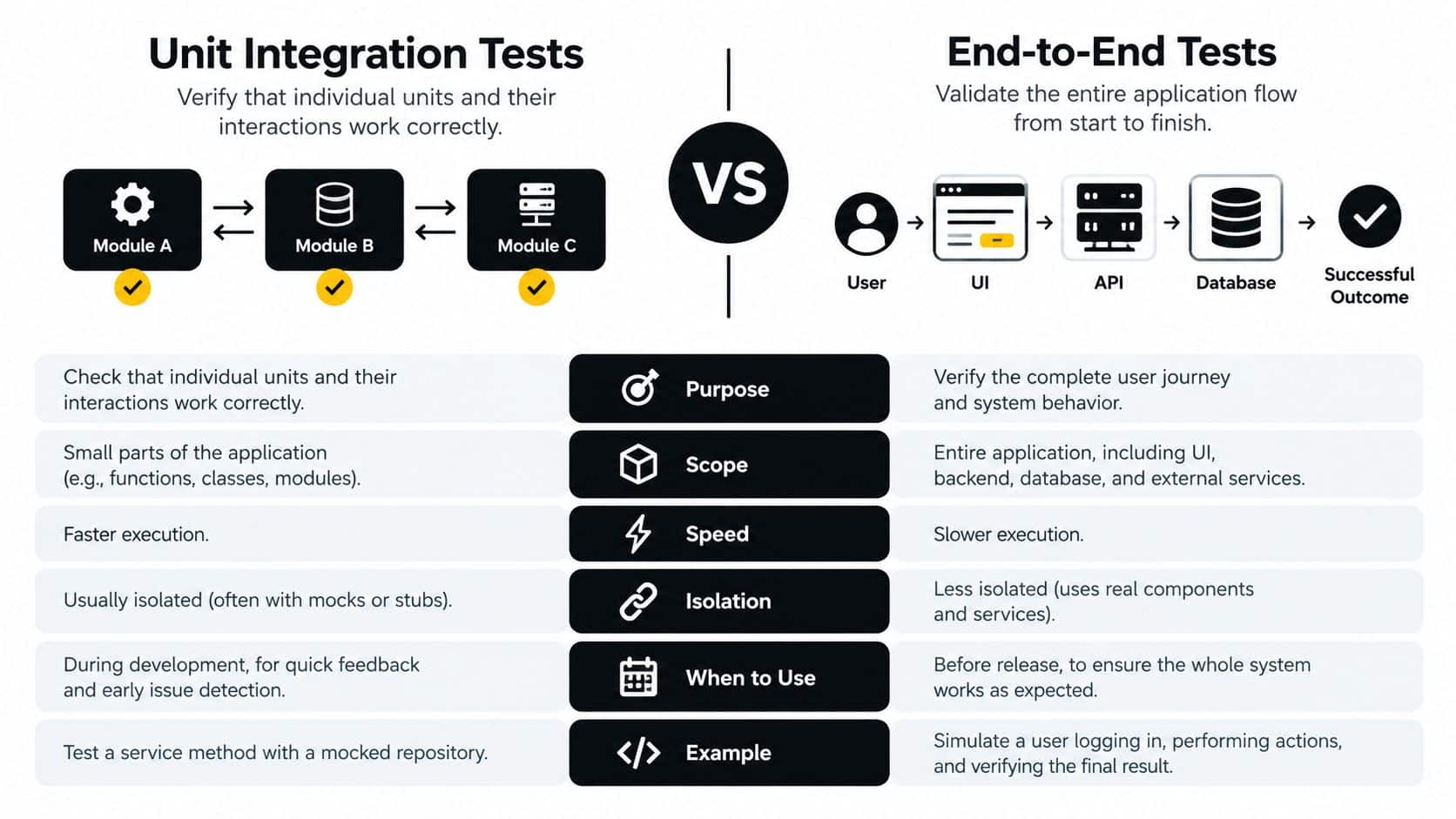
A sensible suite puts most checks at the lower, faster layers, with a smaller number of integration and end-to-end tests protecting the most important workflows. There isn't a universal ratio. The right balance depends on where failures create business risk and how quickly the team can diagnose a broken test.
Benefits of Automated Software Testing
A release is ready to ship, but the team still has to decide whether a payment change could break checkout, reporting, or an internal service. Automation helps by turning repeatable risk checks into signals the team can review before and after deployment. Its value depends on whether those signals support a decision, not on how large the test dashboard looks.
The clearest benefit is faster feedback. A developer can receive a result soon after changing code, while the implementation context is still fresh. That can shorten the time between finding and repairing a defect. Evidence from software-testing practice found that teams integrating testing into continuous integration and continuous delivery achieved a 34% faster mean time to repair. Organizations with more than 60% automated-test coverage reported a 47% reduction in production defects, with statistical significance reported at p < 0.001. The results depend on coverage, test design, and workflow integration, as described in the empirical study of automated testing practices.
Benefits and trade-offs
| Benefit | Typical metric | Caveat |
|---|---|---|
| Faster feedback | Time from change to useful result | Weak assertions can produce false confidence |
| Fewer regressions | Defects found before production | Tests cover only the risks they represent |
| Repeatability | Consistent execution across builds | Data and environments still require control |
| Better risk allocation | Manual effort redirected to exploration | People still design tests and investigate failures |
| Delivery visibility | DORA change failure and recovery signals | Teams must act on the results |
Automation repeats a deterministic check at any hour without relying on someone to remember every step. It suits regression paths, calculations, API responses, and data transformations. Manual testing remains valuable where the question is open-ended, such as whether a workflow is understandable, whether a new feature creates confusion, or what unexpected behavior a customer might encounter.
SLOs add a business boundary. A test suite can pass while checkout reliability, response time, or recovery performance still misses the service level the product promises. DORA metrics show delivery outcomes, while SLOs show whether the service meets its operating target. Together, they help teams allocate automation to risks that affect customers and delivery decisions.
Mutation testing provides another useful check. It changes code in controlled ways and asks whether the test suite fails. If a mutation survives, an assertion may be too weak or the scenario may be missing.
Maintenance remains the trade-off. The study reported average automation levels of 61% in large enterprises and 34% in small and medium-sized businesses. Flaky tests, brittle selectors, stale fixtures, and vague assertions consume engineering attention. Automate checks that are repetitive, important, and expensive to perform manually, then reserve human judgment for risks a script cannot evaluate.
Popular Frameworks and Tools Worth Knowing
Choose a tool by the failure mode you need to detect, not by the size of its logo collection. A developer testing a calculation needs a different tool from a product team validating a customer journey or a mobile engineer checking device behavior.
Match the framework to the job
| Testing type | Recommended tool | Best used for |
|---|---|---|
| Unit testing | Jest or Pytest | Logic inside JavaScript or Python code |
| Browser end-to-end testing | Cypress or Playwright | User journeys, browser behavior, and release regression |
| Mobile testing | Appium or XCUITest | Native, hybrid, and device-specific mobile flows |
| API contract testing | Postman or REST Assured | Request validation, response assertions, and service contracts |
Jest fits JavaScript and TypeScript teams that want developer-facing unit tests close to application code. Pytest gives Python teams a flexible way to express fixtures, parametrized cases, and focused assertions. Both are useful when developers need quick feedback during implementation.
For browser journeys, Cypress provides an interactive workflow that suits front-end debugging, while Playwright supports browser automation across common engines and gives teams tools for isolation and diagnosis. Neither removes the need to manage stable data and environments. A browser script can faithfully report that a button wasn't found, but the team still has to determine whether the button is missing, renamed, hidden, or blocked by a service failure.
On mobile, Appium supports cross-platform automation across native, hybrid, and mobile web applications. XCUITest is useful when an iOS team needs close integration with Apple's testing ecosystem and device behavior. API-focused teams can use Postman for approachable request scripts or REST Assured when Java-based teams want API checks integrated with their codebase.
AI-enabled applications add another layer. A prompt can change behavior without a conventional code change, so teams need versioned inputs, repeatable parameters, response logs, and reviewable expectations. Wonderment Apps offers a prompt-management system with a versioned prompt vault, a parameter manager for internal database access, logging across integrated AI systems, and cost management for cumulative spend. Those controls can help teams keep AI test inputs consistent across releases, but they don't replace human review of response quality, privacy, or business meaning.
Connecting Automated Tests to CI/CD Pipelines
An automated test has limited value if it sits in a folder that nobody runs. Its operational role begins when a code change triggers a sequence of checks and the result changes what the team does next.
A practical pipeline can work in stages:
- A commit triggers unit tests. The team gets quick feedback on focused logic and basic assertions.
- A merge triggers integration tests. Services, databases, queues, and contracts are checked together.
- A staging deployment triggers end-to-end and security checks. The team verifies critical user journeys in a more realistic environment.
- A release decision uses the combined signal. A failed high-risk check blocks promotion, while a low-risk environmental failure receives triage rather than an automatic rollback.
Testing connects to delivery performance. The 2024 DORA framework measures deployment frequency, change lead time, change failure rate, and failed deployment recovery time. Deployment frequency shows how often changes reach production. Change lead time measures the path from code change to successful production deployment. Change failure rate captures deployments that cause production failures and require remediation, while failed deployment recovery time measures how quickly the team restores service. The 2024 DORA research framework explains these measures.
Treat failures as operational information
A team that deploys frequently but constantly rolls back isn't delivering safely. DORA also distinguishes throughput from instability and includes deployment rework rate, the share of deployments devoted to unplanned work such as fixing production defects. The history of DORA metrics provides that distinction.
Test summaries should therefore reach product, support, and engineering. A release note might identify which customer journeys passed, which checks were skipped, and which known risks remain. A deploy gate should reflect business impact, not just the number of passing tests.
Teams can learn more about turning regression checks into delivery feedback through automating regression testing. The important principle is that a test result must lead to an action. Otherwise, the pipeline is just producing green or red decoration.
Why Coverage Numbers Can Be Misleading
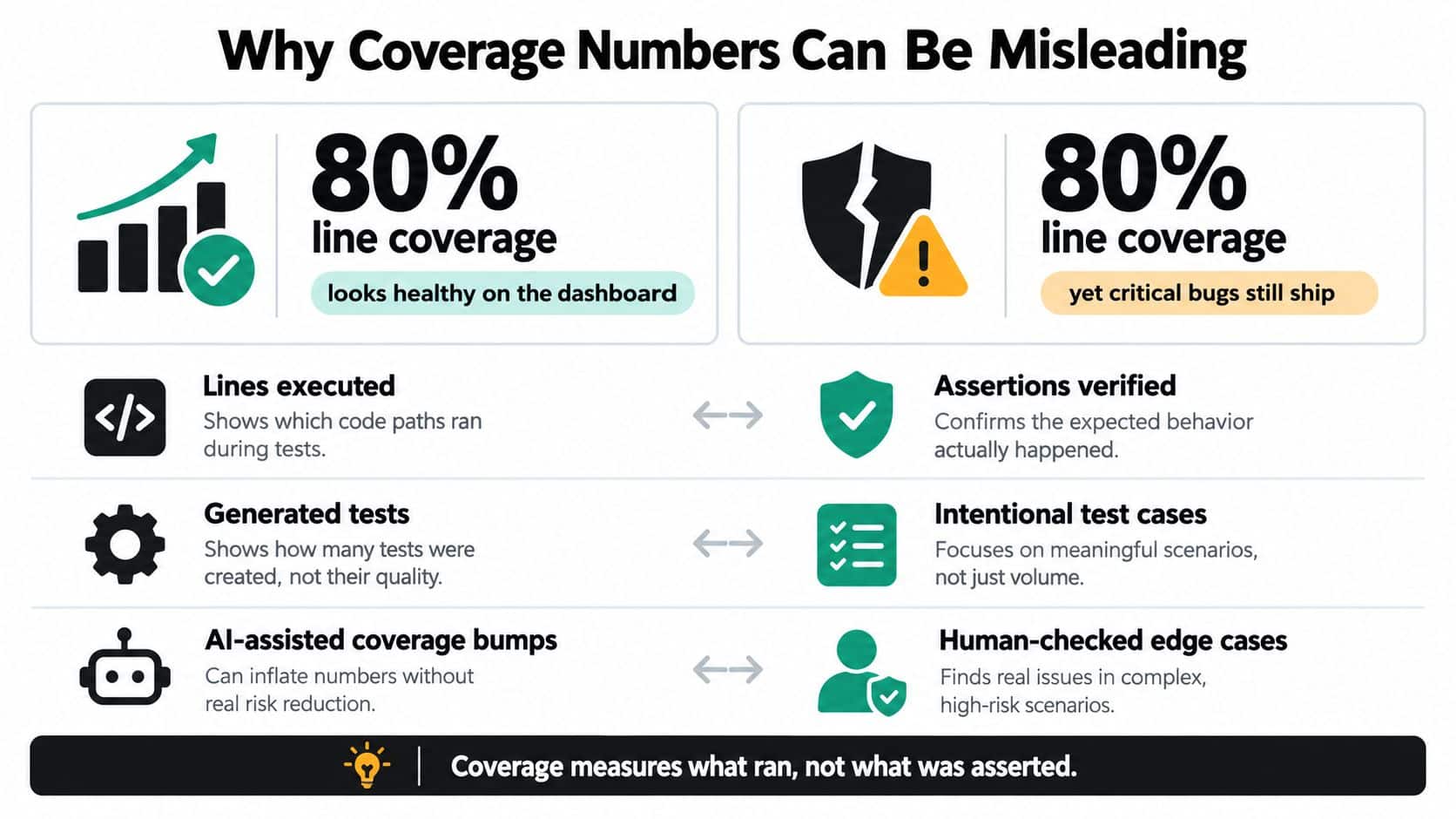
A release can show high coverage and still miss the failure that matters to a customer. Coverage answers a narrow question: which statements, branches, or paths did the tests execute? It does not show whether the assertions checked the correct outcomes. A test may call a function and receive a result without proving that the result is correct.
Generated tests make that distinction clear. An empirical study using Randoop, EvoSuite, and Agitar against 357 real Java faults found that generated tests detected 55.7% of faults overall, while only 19.9% of generated test suites detected at least one fault. The study of generated tests and fault detection separates code execution from fault detection.
Mutation testing asks a harder question
Mutation testing changes a program in small, plausible ways, such as altering an operator or reversing a condition. Each changed version is a mutant. The test suite runs against it, and the framework records whether a test fails. A killed mutant shows that the suite noticed the behavioral change. A surviving mutant suggests that the tests reached the code without proving what it should do.
Mutation score therefore complements coverage. Coverage shows where tests went. Mutation testing asks whether they would notice realistic damage in those areas. Product teams can use the result to decide which checks deserve maintenance and which only create the appearance of protection.
Practical rule: Use coverage to locate untested areas, then use mutation testing and business-focused assertions to identify tests that execute code without protecting behavior.
Human-designed scenarios can still expose logical, timer, and negation faults that generated tests miss. A useful allocation combines generated unit tests for breadth, mutation testing for assertion strength, contract and integration tests for service boundaries, and manually designed acceptance tests for authorization, pricing, consent, and payment rules.
AI-assisted testing creates a related review risk. Evidence reports that 65% of surveyed teams are experimenting with or using AI in some testing activities, while only 12.6% have embedded it across core workflows. More than half cite quality and dependability concerns, including brittle tests and difficulty automating end-to-end processes. The State of Software Quality and Testing research also identifies privacy, interpretability, training-data, and reference-implementation concerns.
A generated test can contain an incorrect expected result and still pass. Review generated assertions manually, connect tests to requirements, use masked or synthetic data, and run independent checks for security, accessibility, fairness, and real-world outcomes. Teams can find practical guidance on interpreting coverage in test coverage in testing. Coverage is a signal for investigation, not a release guarantee.
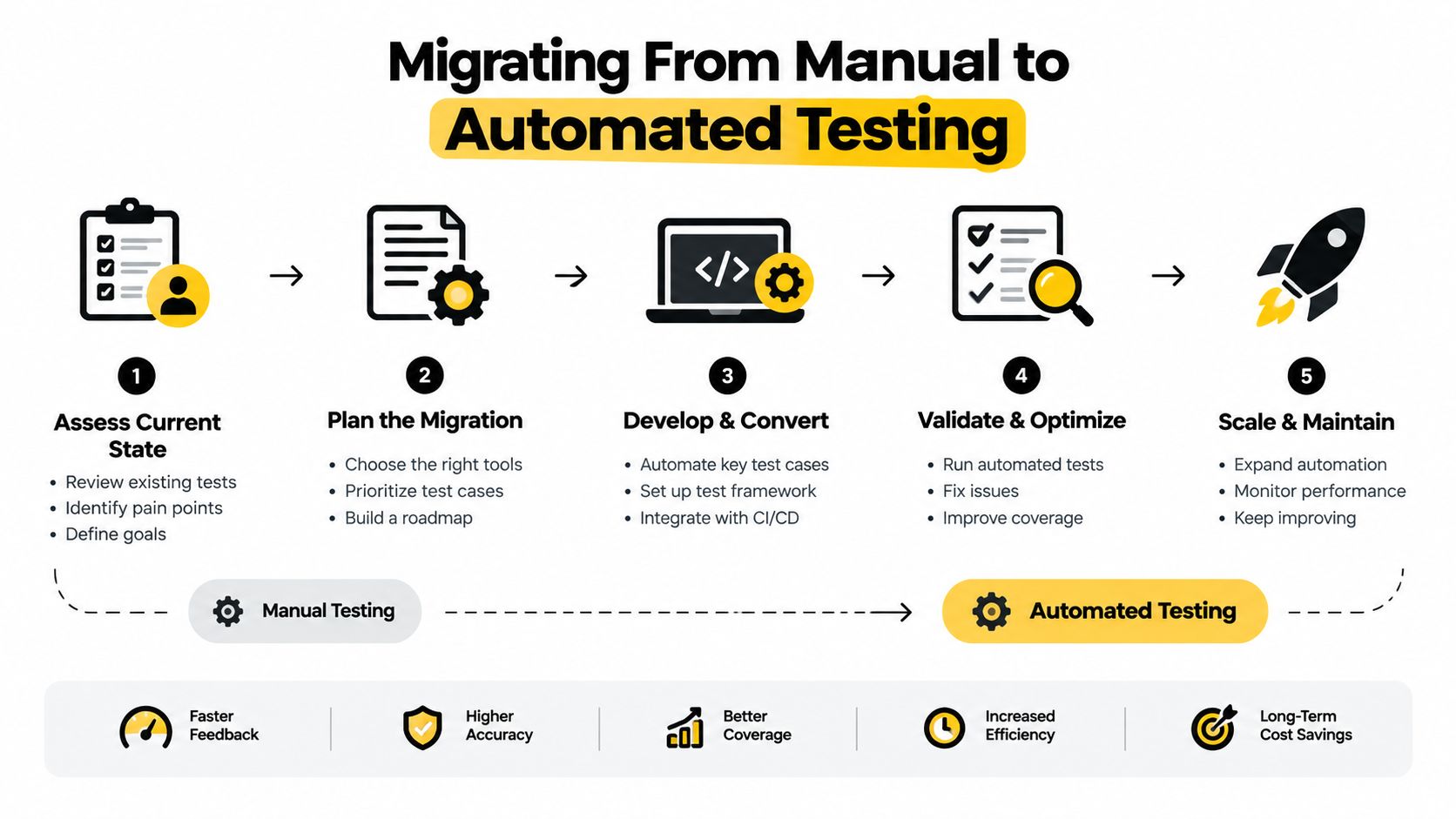
Migrating From Manual to Automated Testing
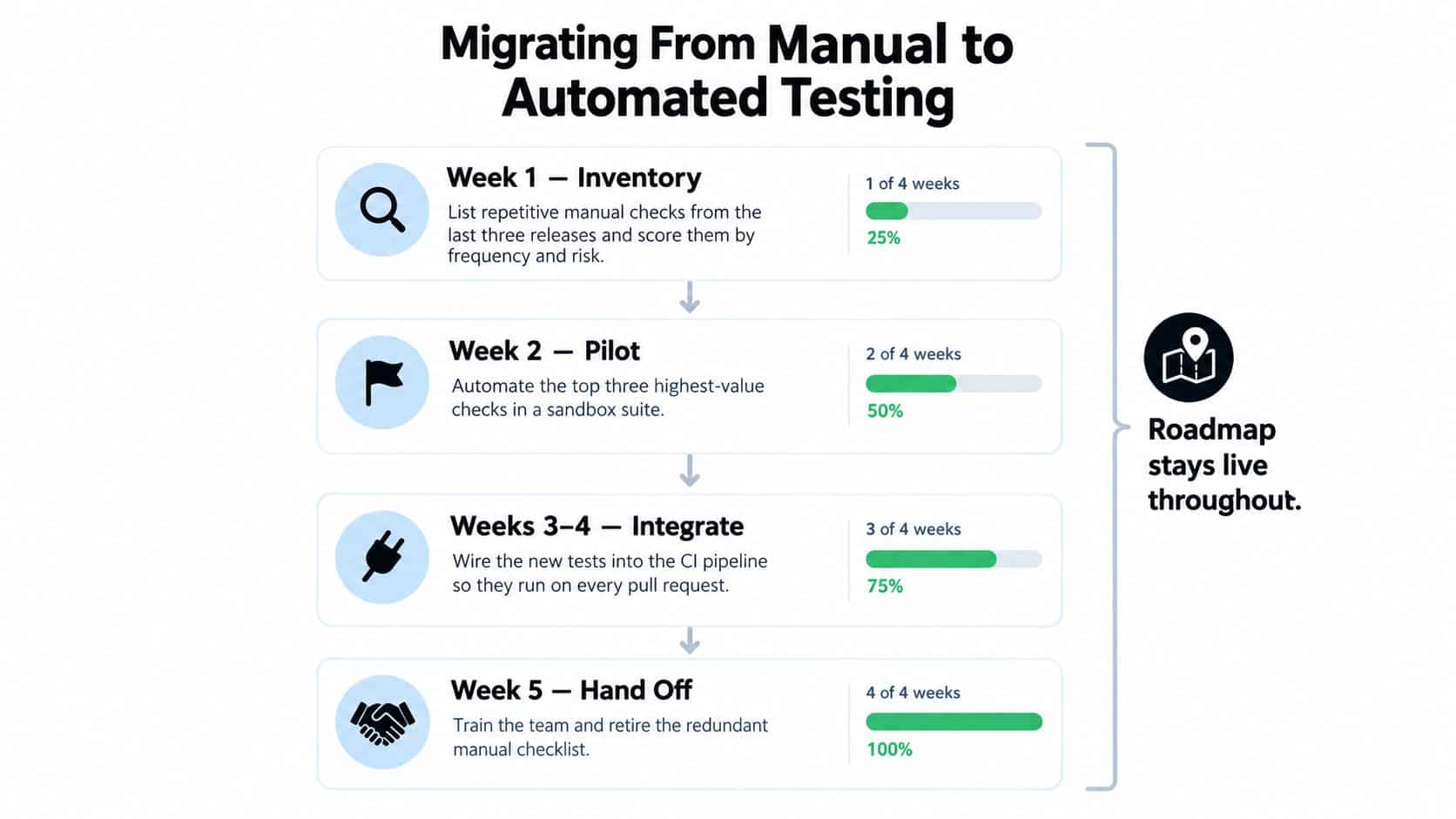
A migration succeeds when it starts with business risk rather than a tool purchase. Don't attempt to turn every manual checklist into a script. Begin with checks that people repeat often, that fail in predictable ways, and that protect important customer or operational outcomes.
Build the migration in phases
Week 1, inventory the work. Review the last several releases and list repetitive checks. Score each one for execution frequency, stability, and business criticality. A payment authorization check may deserve automation before a rarely used settings screen, even if the settings screen has more visible controls.
Week 2, run a focused pilot. Select the highest-value smoke and regression cases and automate them in a sandbox. Choose a framework that matches the application language, deployment model, and team skills. A loud vendor demo won't compensate for a tool that developers can't debug or maintain.
Weeks 3 and 4, stabilize the foundations. Define how tests create and remove data. Isolate environments, control external dependencies, and replace timing guesses with explicit synchronization. Record failure context so a developer can understand what happened without reproducing the entire run manually.
Week 5, connect the pipeline. Run the pilot suite on pull requests or the appropriate delivery event. Decide who owns triage, how failures are classified, and which conditions block release. Track useful signals such as pass and failure trends, time to detect, and the frequency of environmental failures.
After handoff, redirect human effort. Retire redundant manual scripts only after the automated checks have demonstrated stable behavior. Move QA attention toward exploratory testing, accessibility audits, usability, security scenarios, and AI-driven edge cases that require interpretation.
A migration can stall when tests are too slow, failures are noisy, or nobody owns maintenance. Reduce the suite to its highest-value checks, fix the most disruptive failure patterns, and involve product owners in deciding which risks matter. Automation becomes sustainable when the team treats test code as production code, reviews it, versions it, and removes it when the underlying feature disappears.
Key Takeaways and Where to Go Next
Automated testing is best understood as risk allocation. The question isn't whether machines or people are better testers. The question is which risks benefit from repeatable execution and which require human interpretation.
Keep this checklist near the delivery backlog:
- Automate repetition. Start with stable, high-volume checks that are costly or error-prone to perform manually.
- Use layers. Keep fast unit checks close to the code, use integration tests for service boundaries, and reserve end-to-end tests for important customer journeys.
- Protect assertions. Coverage can show that code ran, but mutation testing can reveal whether the suite would notice a meaningful behavioral change.
- Connect results to action. A test should influence a merge, deployment, rollback, investigation, or release communication.
- Measure stability as well as speed. DORA metrics distinguish throughput from failures and rework, so frequent deployment alone isn't a quality target.
- Give reliability an operating boundary. Google's SRE model uses service-level objectives and quarterly error budgets to connect measured reliability with release decisions. The SRE guidance on embracing risk describes how teams can continue releases while reliability remains within the agreed target and restrict release velocity when the budget is exhausted.
- Test growth assumptions. For applications serving changing demand, capacity models, autoscaling, launch readiness, and recovery behavior belong in the test strategy. Google's SRE engagement model identifies capacity planning, resource acquisition, automated turnups, and in-place resizing as part of preparing services to scale.
AI-generated tests need the same skepticism as any other generated artifact. Review their assertions, trace prompts and requirements, protect sensitive data, monitor drift, and check outcomes that involve fairness, accessibility, safety, or policy. AI can increase the number of tests without increasing meaningful coverage if nobody verifies what those tests expect.
Prompt-driven software adds a management problem that traditional source code tools don't fully solve. Versioned prompts, controlled parameters, response logs, and spend visibility help engineering leaders investigate why an AI test changed behavior and whether a new model or prompt altered the result. The test suite may include code, configuration, model settings, and human-approved expectations, so the audit trail needs to cover all of them.
The next practical step is to select a small set of high-risk, repeatable workflows, write assertions that reflect real business outcomes, and run them through the delivery pipeline. Then review the failures with product, engineering, QA, and support together. That conversation will tell you where automation deserves investment and where a thoughtful human still needs to stay in the loop.
Wonderment Apps helps organizations modernize web and mobile software with AI integration, automated and manual quality assurance, and scalable product engineering. Visit Wonderment Apps to explore its prompt-management tools and discuss a testing approach that keeps AI behavior, delivery risk, and long-term maintenance visible.