

You know the feeling. A sales rep swears the customer's order is “in the system,” finance sees a different address, support can't find the latest ticket, and somebody ends up copying the same data into three tools before lunch. That's not a small workflow annoyance, it's a sign that your stack has outgrown point-to-point fixes.
System Integration Services are what turn that mess into something coherent. Done well, they connect cloud apps, legacy platforms, APIs, data pipelines, and even AI tooling into one operating model, so teams aren't babysitting spreadsheets and chasing version mismatches all day. For teams exploring AI modernization, that same operating model can include a prompt vault, parameter controls for internal database access, logging, and cost visibility, which is why the right integration layer matters before you add more automation.
The Hidden Cost of Disconnected Systems
A lot of companies think they have a software problem when they are dealing with a coordination problem. One team updates a customer record in the CRM, another updates billing, and a third has a local export that never gets refreshed. By the end of the week, nobody trusts the dashboard, and every report starts with someone asking which system is “right.”

That's where system integration services stop being an IT back-office function and become a business control layer. They connect the systems that run finance, operations, customer support, commerce, and product workflows so data moves once, not five times. The market context is big enough to show this is not a niche fix, the global system integration market was estimated at USD 401.8 billion in 2024, with East Asia at 30.7%, or about USD 123.3 billion, and infrastructure system integration at 63.1% of the market (MarketsandMarkets).
What breaks first
The first thing to fail is usually trust. When records don't line up, leaders stop using self-service reports and start asking for manual exports, which slows every decision down. The next failure is process drift, because each department invents workarounds to survive disconnected systems.
A useful resource on the finance-and-ops side of this problem is connecting finance and operations, because that's often where the pain becomes visible first. If purchase orders, invoices, and inventory aren't synced, the business pays for the same mistake in three different places.
Practical rule: if a team is retyping data, the system isn't integrated, it's just sharing a login screen.
Modern integration also supports AI readiness. Wonderment's prompt management system fits into that picture as an administrative layer for AI-enabled software, with versioning, parameter control, logging, and spend tracking, so AI doesn't become another black box glued onto a brittle stack.
Integration Architectures Explained
Not every integration pattern solves the same problem, and choosing the wrong one can make maintenance painful later. A small team with two apps might survive with a direct connection. A growing organization with many systems usually needs a pattern that controls routing, versioning, and change impact instead of multiplying fragile links.
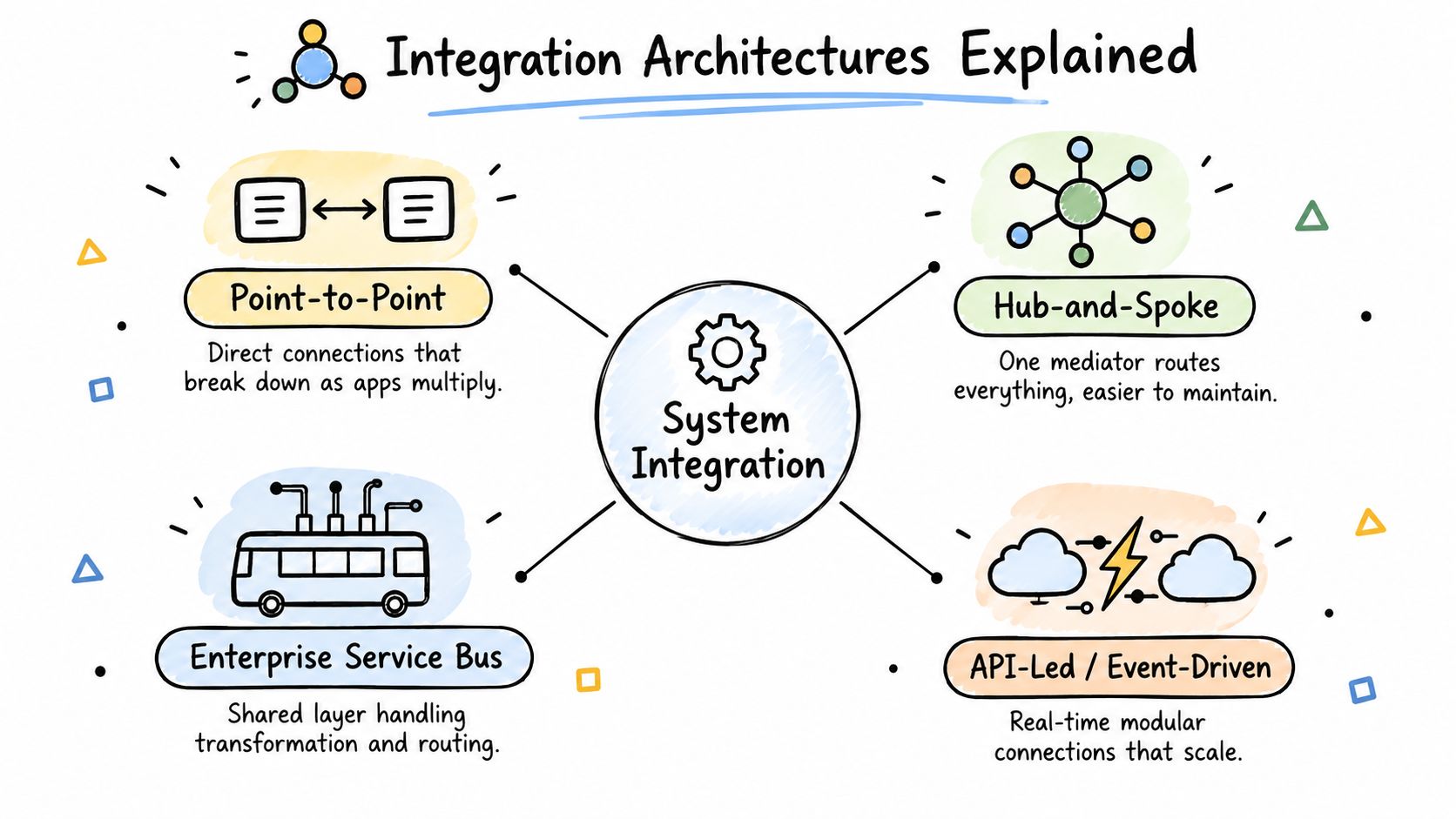
The main patterns side by side
Point-to-point is the simplest shape, one system talks directly to another. It feels fast at first, but each new app adds more custom logic, and the web of connections gets harder to change.
Hub-and-spoke puts one central mediator in the middle. That makes governance easier, because every system doesn't need to know every other system, but the hub can become a bottleneck if it isn't designed well.
Enterprise Service Bus or ESB adds a shared integration layer for transformation and routing. It works well when many systems need consistent message handling, but it still needs disciplined ownership or the bus becomes a dumping ground for logic.
API-led and event-driven designs are a better fit when teams want modular systems that can move quickly. In the API model, services expose contracts cleanly, while event-driven coordination helps systems react without tight coupling.
Where iPaaS and microservices fit
The IBM explanation of API integration is helpful here because it separates application integration from data integration, and that distinction matters in real projects (IBM). Application integration handles live workflow movement, while data integration is better when the job is analytics, reporting, or consolidation.
For a practical modernization guide, the Software Modernization Intelligence guide is worth a look because API modernization is usually where integration architecture decisions become irreversible. In microservices environments, each service needs a well-defined API and independent deployment, which means orchestration, schema drift, and sync boundaries need real design, not hope.
If your architecture can't survive one system changing its schema, it's too brittle for scale.
Why Your Legacy Systems Are Failing
A payroll platform still runs, the warehouse system still records inventory, and the customer database still holds years of history. Yet each new connection between them becomes a custom repair job. Legacy systems rarely stop at once. They slow the business through handoffs, exceptions, and workarounds that nobody formally owns.
57% of enterprises still operate legacy applications that are difficult to integrate. Across the same dataset, 71% of applications remain unintegrated or disconnected, while only 2% of IT leaders say more than half of their applications are integrated (Global Growth Insights). The gap matters for roadmap planning: teams need to prioritize the systems and workflows that create the most operational friction, rather than attempting to connect everything at once.
The bottleneck is not tooling
A new integration platform cannot remove architecture debt by itself. If older applications lack shared APIs, consistent identities, or reliable master data, the platform places a cleaner interface over the same constraints. Engineers still have to define mappings, manage failures, test changes, and assign ownership.
Compatibility reviews and security checks can also take longer than building the connector. Missing knowledge creates another delay, especially when only one person understands an old data model or undocumented dependency.
Legacy modernization is therefore an operating model change, not a product purchase. Treat integrations as a managed capability with standards, monitoring, change control, and clear service ownership. Prompt management deserves the same discipline when workflows use AI. Teams need to know which prompts are approved, who can change them, and how those changes affect downstream systems and costs.
What the hidden cost looks like
The expense appears in small interruptions. Engineers translate fields by hand, product leaders postpone releases because a downstream system is not ready, and support teams reconcile records after deployments. Over time, these workarounds form a second process architecture that is harder to see and budget for than the original systems.
A failed integration can also expose hidden legacy costs: repeated data correction, emergency testing, specialist dependency, and delays caused by brittle batch schedules. Measuring those costs helps leaders compare modernization options on operating impact, not just implementation effort.
Important: if integration depends on one person remembering tribal knowledge, you don't have a system, you have a risk profile.
For a closer examination of modernization choices, see this guide to integration with legacy systems. Legacy technology can remain useful, but it needs an explicit ownership and change strategy before it can support faster delivery.
Building Your Implementation Roadmap
A clean roadmap keeps integration from turning into a pile of ad hoc fixes. Start by mapping what you already have, because teams almost always underestimate the number of systems involved and the number of handoffs that happen outside formal workflows. From there, the work becomes much easier to prioritize.
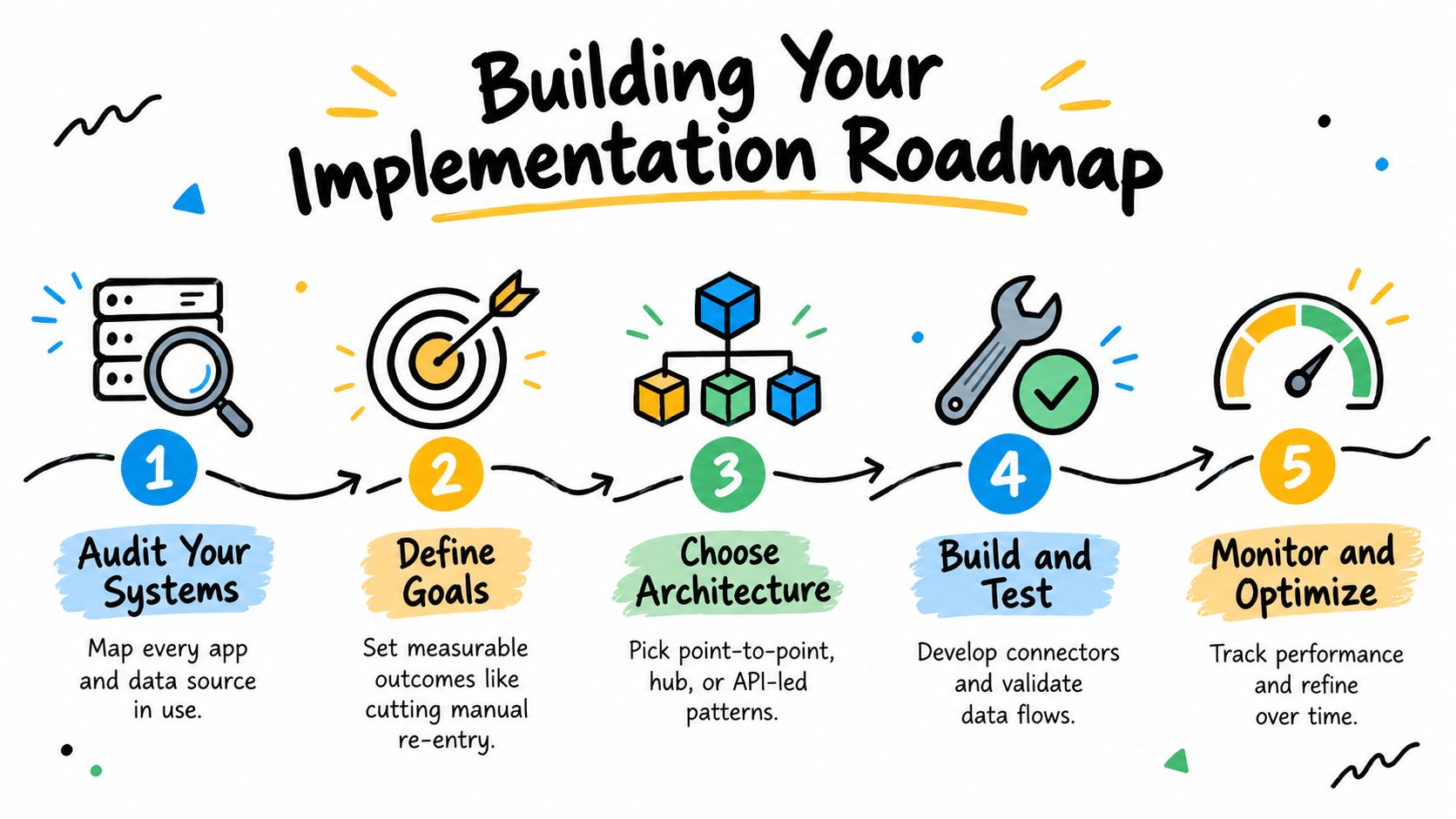
1. Audit your systems
List every application, database, and spreadsheet that moves business data. Include the “temporary” tools, because temporary tools tend to become permanent. This is also where you identify the most dangerous duplicate sources of truth.
2. Define the business goal
Integration without a target turns into expensive plumbing. Pick outcomes that matter to the business, like reducing manual re-entry, improving order status visibility, or speeding up approvals. That focus helps you decide what needs real-time sync and what can move on a schedule.
3. Choose the architecture
The right pattern depends on scale, change rate, and ownership. Direct links are fine for a few stable systems, but as your footprint grows, API-led or hub-based designs usually create less maintenance drag. In cloud and hybrid environments, iPaaS often reduces the amount of custom glue code teams have to own.
4. Build and test with discipline
Treat each connector like production code. Test failures, malformed data, retries, and access controls, not just the happy path. If you're connecting microservices, design for independent release so one update doesn't cascade across the stack.
5. Monitor and improve
Once it's live, watch latency, errors, and operational friction. Integration isn't finished at launch, it settles into a managed capability that needs ownership, alerts, and periodic review. That matters even more when AI tools are in the loop, because prompt changes, model shifts, and token costs can all move under your feet.
The architectural shift toward iPaaS and microservices is useful because it reduces dependence on bespoke code across cloud, on-premises, and hybrid systems. It also makes room for structured AI operations, including prompt versioning and logging, instead of scattering AI behavior across app code.
Industry-Specific Integration Success Stories
Different industries hit different walls, so the integration strategy has to change with the business model. Ecommerce teams usually care about live inventory, checkout reliability, and personalization. Fintech and healthcare teams care about strict contracts, auditability, and security boundaries. Public sector teams care about service continuity, compliance, and gradual modernization without breaking citizen-facing workflows.
Ecommerce and retail
For ecommerce, the integration question is usually about speed and relevance. If the storefront, ERP, and recommendation logic aren't aligned, customers see stale inventory or odd offers. Application integration is the right fit here because the workflow needs to move in real time as carts, orders, and stock levels change.
Fintech, healthcare, and regulated workflows
Fintech and healthcare teams have less room for loose coupling. They need tighter control over data contracts, authentication, and failure handling because the consequences of a mismatch are higher. In those environments, the safest pattern is often to separate orchestration from analytics so one operational workflow doesn't drag reporting systems into the blast radius.
Media and public services
Media companies often deal with high-volume content distribution, where the integration challenge is getting assets, metadata, and publishing workflows to move without delay. Public sector organizations usually need secure, scalable services that can modernize step by step instead of forcing a big-bang rewrite. In both cases, the best integrations are the ones users never notice because the service feels consistent.
Hiring also shifts by industry. A strong app team usually includes product management, UX, backend, DevOps, QA, and sometimes growth or data roles, and the technical screen should include API integration experience and version control skills. That mix matters because integration work is cross-functional by nature, not just a developer exercise.
The best integration program is the one that matches how the business actually runs, not how the vendor deck says it should run.
Managing AI Prompts and Long-Term Costs
AI makes integration more powerful, but it also adds a new layer of operational risk if you treat prompts like throwaway text. Once prompts affect production behavior, they need the same discipline you'd give any other software asset. That means version control, access management, runtime logging, and cost tracking.

A prompt management system is useful because it keeps prompts in a central registry with immutable version history, while also logging token usage and model cost for every request (PromptLayer). That matters when multiple teams are shipping AI features, because you need to know which version produced which behavior and what it cost to run.
What to compare before you commit
The practical choice isn't “AI or no AI,” it's whether your AI layer is governed or improvised. A hard-coded prompt in one service is fine for a prototype, but it gets fragile fast once product, compliance, and finance all need visibility. A managed prompt layer gives you a cleaner path to traceability and rollback.
Wonderment Apps offers a prompt management tool that organizes prompt vaulting, parameter handling, logging across integrated AI systems, and cumulative spend visibility, which makes it easier to treat AI behavior as an operational asset instead of an engineering side note. If you're modernizing software for the long haul, that kind of control belongs in the same conversation as API integration and system governance.
For a deeper breakdown of AI operations, the internal guide on prompt management is a useful companion. It helps frame prompt versioning and cost control as part of the integration stack, not a separate experiment.
Choosing the Right Partner and Avoiding Pitfalls
The wrong partner usually doesn't fail on technology alone. They fail by underestimating migration work, ignoring governance, and treating maintenance as somebody else's problem after go-live. A good partner should be able to explain the architecture, the support model, and the tradeoffs in plain language.
Start with the evidence. Ask for examples of similar environments, especially hybrid or legacy-heavy ones. Then check whether they design for observability, security, and change management from day one, because integrations that can't be monitored are hard to trust and expensive to debug.
A simple selection checklist
- Architecture fluency: Can they explain point-to-point, hub-and-spoke, ESB, API-led, and event-driven tradeoffs without hand-waving?
- Data discipline: Do they talk about master data, validation, and sync boundaries before they talk about tools?
- Operational support: Do they offer a clear model for monitoring, rollback, incident handling, and version updates?
- Security mindset: Do they build with authentication, least privilege, and auditability in mind?
- Business fit: Can they map integration work to business outcomes, not just technical deliverables?
The other pitfall is thinking the project ends when the last connector ships. Integration becomes a managed capability the moment vendors change APIs, schemas drift, or a new business unit wants access. That's why the operating model matters as much as the code.
If a provider only talks about launch and never about steady-state ownership, you're buying a handoff, not a partnership.
The strongest teams design for incremental modernization, especially where legacy systems, cloud platforms, and AI tools need to coexist. That is the true test of system integration services, not whether a demo works on a clean sandbox.
If you're mapping a legacy stack, planning API modernization, or trying to make AI features governable instead of chaotic, Wonderment Apps can help you design the integration layer and the application around it. Visit Wonderment Apps to explore how their engineering, integration, and prompt management capabilities fit into a long-term modernization plan.