

Your team ships an AI feature, then prompt changes begin appearing everywhere. One engineer edits a Python string, another changes a YAML file, and someone else tests a “better” version in a notebook. A week later, nobody can answer which prompt is live, why output quality changed, or why token usage increased.
That's the point where prompts stop being writing and start behaving like production code. A scalable AI application needs version history, evaluation, deployment controls, observability, and cost attribution around every prompt that influences user-facing behavior. Wonderment Apps' prompt management system is designed for this administrative layer, with a prompt vault, parameter manager, centralized logging, and cost manager that can plug into an existing application.
The broader shift toward AI-native products makes this discipline harder to avoid. Teams building desktop and mobile software now need to manage model behavior alongside APIs, databases, user interfaces, and infrastructure. For useful context on that wider transition, how AI changes software building explains why AI integration changes more than a single feature.
Why Your AI App Needs Prompt Management
An LLM feature can look stable in a demo while remaining operationally fragile. The prompt may be copied into several services, adjusted by different people, and deployed through unrelated release paths. When an answer becomes less accurate or a safety constraint disappears, the team has to reconstruct the prompt's history before it can even diagnose the problem.
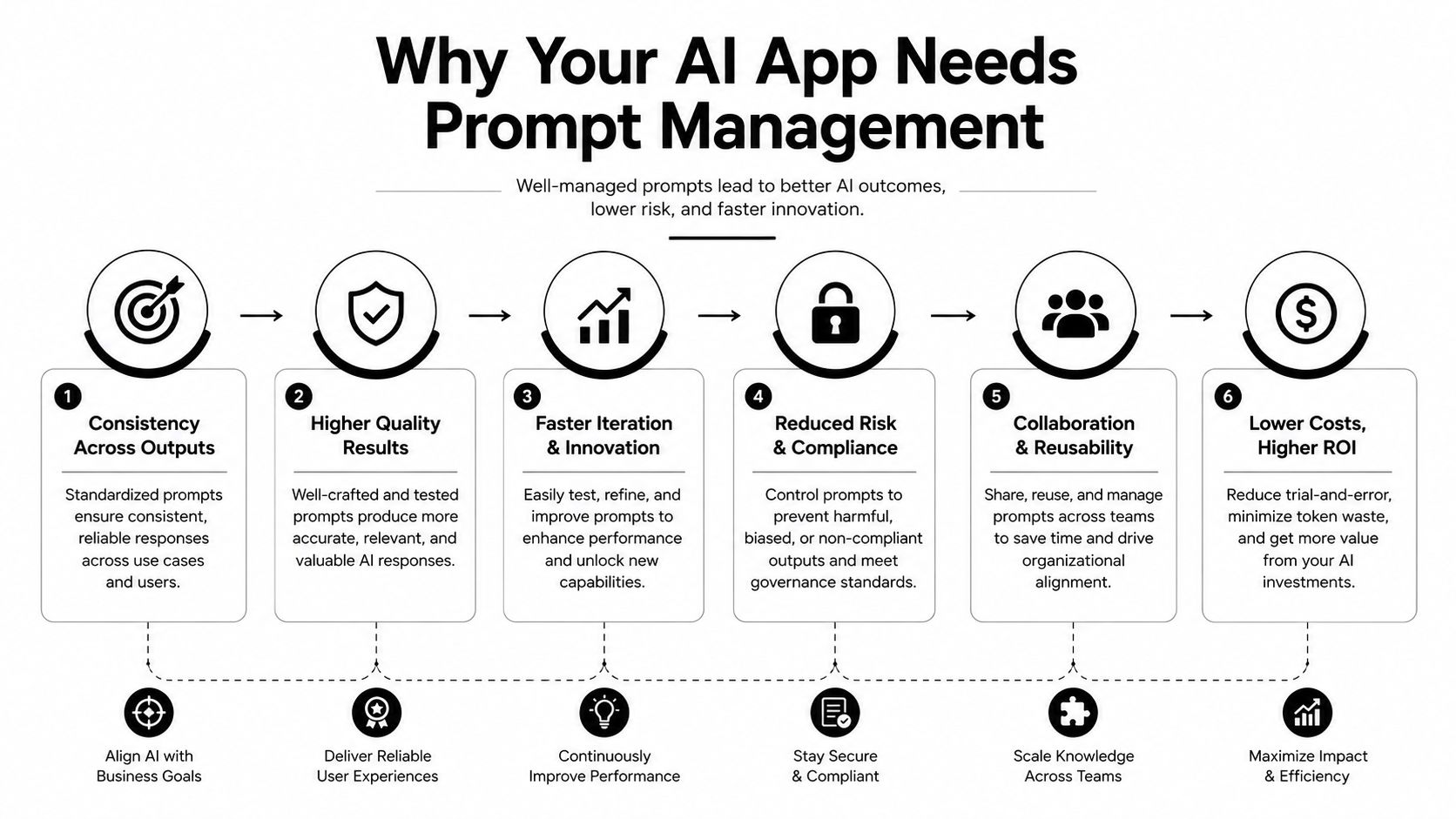
That creates three practical risks. Behavior becomes difficult to reproduce, because the team can't reliably identify the exact instructions, parameters, model settings, and context used for an output. Quality can regress without warning, because a wording change may affect edge cases that no one tested. Costs can drift upward, because longer instructions, duplicated context, or unnecessary examples consume more tokens.
Prompt management provides the missing control layer. Instead of treating prompts as scattered strings, a team stores them as named assets with ownership, metadata, deployment status, and evaluation results. Developers can update an instruction without bundling it with unrelated application code, while product and domain specialists can review behavior without searching through repositories.
The operational difference
A centralized prompt workflow lets a team answer basic but essential questions:
- Which version is active? Identify the prompt deployed to each environment.
- Who changed it? Connect edits to an author, review, and approval record.
- Did it improve behavior? Compare the revision against a fixed evaluation dataset.
- What did it cost? Track input tokens, output tokens, and spend by prompt or feature.
- Can we undo it? Restore a validated version without rewriting application code.
A prompt library alone won't solve these problems. A folder full of text files is still a manual process if nobody tests changes, records deployments, or monitors production results. The useful distinction is between storing prompts and managing their complete lifecycle.
Practical rule: If a prompt can change what a customer sees, what a model can access, or what an API call costs, manage it like production software.
This approach also supports AI modernization in existing systems. A legacy desktop workflow, mobile application, or internal operations platform can add model-powered search, summarization, recommendations, or automation without giving every feature its own unmanaged prompt store. The application remains modular because prompt behavior has its own controlled interface.
The Evolution from Ad Hoc Prompts to Production Assets
Prompt management became a distinct discipline with the rise of large language models in 2020, when OpenAI's GPT-3 paper introduced a 175-billion-parameter model and demonstrated that tasks could be steered through in-context examples instead of retraining. That milestone is widely treated as the starting point for modern prompt engineering and prompt management because the prompt became the primary interface for controlling model behavior. The historical context is documented in this account of prompt engineering's history.
By 2021, prompt programming had moved toward reusable instructions rather than one-off text, turning prompt work into something closer to configuration and software design. As teams placed LLMs inside customer support, content, analytics, and workflow applications, copying a successful prompt into production stopped being enough. Teams needed to compare variants, preserve working versions, and standardize instructions across features.
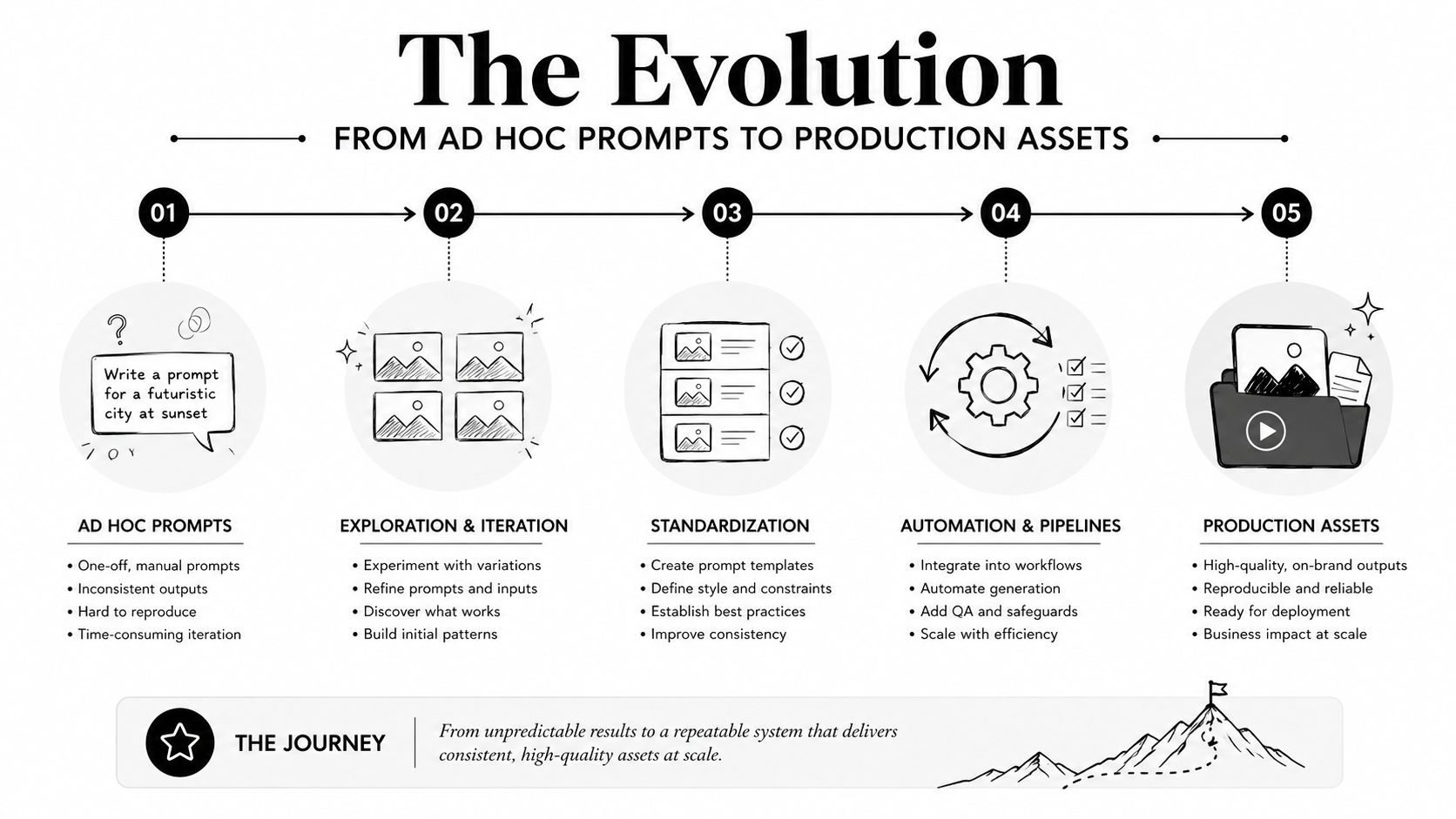
Three maturity stages
The progression usually follows a recognizable pattern:
- Experimentation begins in isolated spaces. Prompts live in playgrounds, notebooks, chat threads, or personal notes. One developer understands the intent, but the rest of the team inherits little context.
- Teams externalize basic configuration. Prompts move into templates, environment variables, or configuration files. This reduces duplication, but it doesn't automatically provide approvals, evaluation, or deployment history.
- Production teams create managed assets. Prompts receive identifiers, metadata, test results, environment status, and rollback paths. Changes move through a controlled release workflow.
The pressure to mature usually comes from a concrete failure. A model upgrade changes output style. A handoff leaves one service using an older instruction. A compliance review asks which prompt generated a decision. A small edit fixes one example but breaks another. These incidents expose the same weakness, the team has no reliable chain from prompt change to production outcome.
A 2024 enterprise study found that users spent a mean of 47 seconds editing individual prompts, with a median of 32 seconds, showing how frequently teams make small adjustments during development and review. Another analysis found that average editing sessions lasted 43.3 minutes and included about 50 seconds between prompt versions. Those figures support a straightforward engineering conclusion: prompt work happens often enough, and quickly enough, to benefit from formal version control, logging, and governance. See the enterprise analysis of prompt editing behavior.
Core Pillars of Effective Prompt Management
A dependable prompt workflow borrows from software engineering, but it must account for a special property of LLMs: small textual changes can alter behavior in ways ordinary unit tests won't catch. Four pillars work together to make those changes visible and controllable.
Versioning creates a reliable history
Every meaningful prompt change should produce a new immutable version. Store the prompt text, model identifier, parameters, author, creation date, evaluation scores, and deployment history together. A useful diff should reveal changes to instructions, examples, variables, output formats, and guardrails, not just show that a file changed.
Semantic labels can help teams communicate intent, but the essential requirement is traceability. A production trace should point to the exact prompt version that produced the output. Without that connection, debugging becomes guesswork.
Testing protects behavior
Prompt tests need more than a handful of successful examples. Build a representative dataset containing ordinary requests, edge cases, adversarial inputs, formatting requirements, and known failure modes. Evaluate each revision against the dataset before approval, then compare it with the current baseline.
Useful checks can include:
- Structure: Does the output follow the required schema?
- Task quality: Does it answer the actual user request?
- Safety: Does it respect restrictions and avoid exposing protected context?
- Efficiency: Does it use a reasonable amount of context and produce an acceptable response?
- Consistency: Does it preserve expected tone and behavior across representative inputs?
A test suite doesn't need to block every experiment. It should block unexamined production changes. Teams looking to improve the writing and structure of individual instructions can also review these prompt engineering best practices.
Governance assigns responsibility
Governance answers who can draft, review, approve, deploy, and retire a prompt. Role-based access matters when a prompt can reach sensitive data or influence a regulated workflow. Audit logs should record the content change, the person responsible, the approval event, and the environment affected.
Templates make reuse safer
Parameterized templates separate stable instructions from controlled variables. A customer-support template might accept product details, locale, and customer history, while keeping the response rules fixed. That structure reduces duplicated prompts and lets teams update common behavior centrally.
The strongest workflow treats these pillars as one release system. A new version is reviewed, evaluated, promoted gradually, observed in production, and reversible if results deteriorate. Guidance on prompt versioning, testing, and A/B releases describes this controlled-release model in practical terms.
Choosing the Right Prompt Storage and Parameter Strategy
Storage decisions should follow operational risk, not fashion. A small internal prototype may work with prompts in a repository, while a customer-facing application with multiple teams, environments, and data permissions needs a registry or administrative system.
Hardcoding gives developers immediate visibility and straightforward code review. It also ties a prompt change to an application deployment, encourages duplication, and makes non-code review difficult. External configuration improves flexibility, but a basic key-value store can become another source of mystery if it lacks history, approval records, and environment controls.
| Storage Approach | Best For | Versioning Support | Governance Level | Setup Complexity |
|---|---|---|---|---|
| Hardcoded application strings | Early prototypes and tightly controlled experiments | Git history, if changes are committed | Low to moderate | Low |
| Repository templates | Small teams with disciplined release practices | Strong file-level history and diffs | Moderate | Low |
| External configuration store | Applications needing runtime updates | Depends on the store and workflow | Moderate | Moderate |
| Dedicated prompt registry | Multi-team production systems | Prompt-specific versions, metadata, and deployment history | High | Moderate to high |
| Administrative prompt platform | Regulated or multi-provider applications | Versioning with review and environment controls | High | Moderate to high |
Parameters need boundaries
Parameter injection is useful when prompts must draw on internal data, but it shouldn't become an unrestricted channel into databases or user-controlled instructions. Define which fields are available, validate their types, constrain their length, and distinguish trusted system context from untrusted user content.
For example, a product manager might adjust a support assistant's approved tone or response policy through a managed field. They shouldn't be able to inject arbitrary database queries or override access rules. Developers can preserve this boundary by exposing named parameters such as customer_tier, product_name, or approved_policy_text, while keeping retrieval logic and authorization in application code.
Match architecture to the organization
A small product team may start with versioned templates in Git and a lightweight evaluation script. As the application expands across mobile and desktop clients, model providers, or business units, the team will need centralized ownership and runtime selection. The right storage strategy is the simplest one that preserves traceability, safe updates, and clear data boundaries.
Controlling Costs and Maintaining Observability
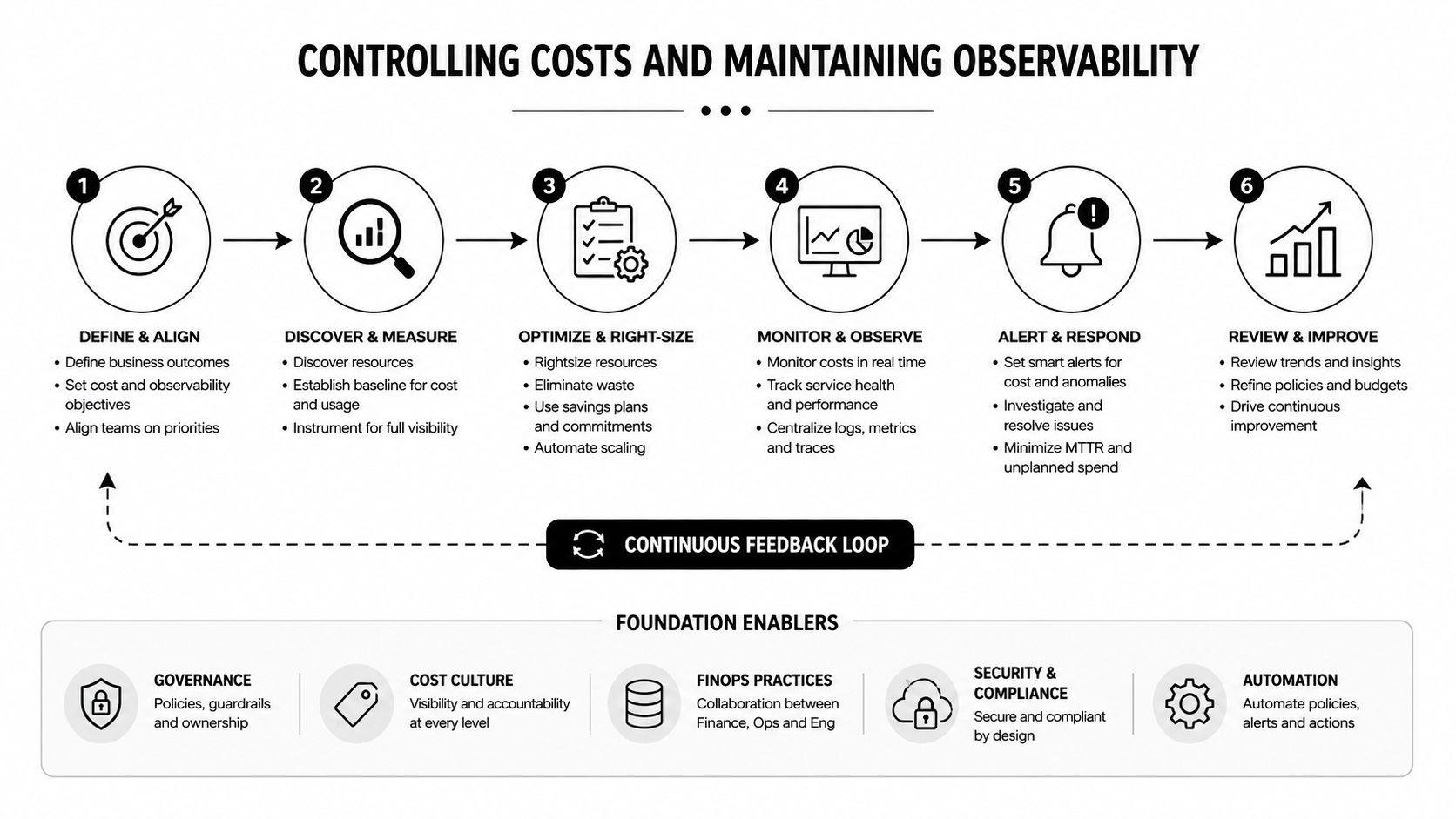
Prompt management becomes financially important as soon as an application sends repeated context to a model. The cost problem usually isn't one dramatic mistake. It's accumulated context, oversized examples, duplicated instructions, and prompts that grow without an owner.
AWS guidance recommends budgeting the context window across prompt components, with 20% to 30% for the system prompt, 30% to 40% for user context, 10% to 20% for few-shot examples, and 20% to 30% for an agent scratchpad. Those ranges are starting points, not universal laws. Teams should measure token footprints for each prompt and compress content where possible, as explained in AWS guidance on agent prompt cost control.
Measure every call
A useful trace links the prompt version to:
- Latency: How long the model call takes.
- Tokens: Input and output consumption.
- Cost: Spend calculated at request time.
- Errors: Provider failures, validation failures, and tool errors.
- Quality: Automated scores, human review, or downstream success signals.
MLflow recommends versioning every system and user prompt, emitting prompt.version on every trace, logging tokens_in, tokens_out, and cost_usd, and computing cost at call time. That approach helps teams identify anomalies on the same day instead of waiting for aggregated billing data. The full LLM experiment tracking guidance from MLflow provides the corresponding instrumentation pattern.
Caching can reduce repeated input costs when the same prefix appears across requests. OpenAI's API prompt caching is automatic on supported models and applies to repeated input prefixes. OpenAI's published examples show gpt-4o cached input at $1.25 versus $2.50 per 1M input tokens, and gpt-5-nano cached input at $0.005 versus $0.05 per 1M input tokens, reflecting discounts of up to 90%. See OpenAI's API prompt caching explanation.
Turn telemetry into decisions
Observability only matters when someone can act on it. Set thresholds for cost, latency, validation errors, or quality degradation, then connect those thresholds to alerts, rollout pauses, or rollback procedures. For agentic applications, AI agent development practices offer useful context because tool calls and scratchpad content can make prompt behavior less predictable.
OpenAI responses expose cached usage through cached_tokens inside usage.input_tokens_details. A value greater than zero indicates that part of the prompt was served from cache at the reduced rate, as documented in this explanation of the cached usage field. Teams can use that field to confirm whether caching assumptions match production behavior instead of treating cost reductions as theoretical.
Implementing Prompt Management in Your Workflow
Adoption works best as a controlled migration, not a grand rewrite. Start by finding every prompt that affects production behavior, including strings in application code, configuration files, notebooks, tests, job workers, and provider-specific integrations.
Start with an inventory
Create a record for each prompt with its purpose, owner, model, environment, input variables, data sources, and current deployment path. Mark duplicates and identify prompts that handle sensitive information or make consequential recommendations. This inventory often reveals that several features are using slightly different versions of what should be one shared template.
Next, select a small but meaningful feature for migration. Extract its prompt into a managed asset, preserve the existing version as a baseline, and route the application through a feature flag. Keep the old path available until the new path has passed evaluation and production checks.
Build the release path
A practical workflow looks like this:
- Define naming conventions. Use names that describe the capability, audience, and task rather than vague labels such as
prompt_final. - Capture metadata. Record ownership, model assumptions, variables, evaluation datasets, and permitted environments.
- Create a golden dataset. Include representative requests, difficult cases, safety cases, and examples from production feedback.
- Automate evaluation. Run checks when a prompt changes, and make important regressions visible in the pull request or review screen.
- Require approval. Separate drafting from production deployment, especially when prompts access internal data.
- Roll out gradually. Use a feature flag, canary group, or controlled comparison before making the revision active for everyone.
- Document rollback. Record which prior version is safe to restore and who can perform that action.
Tool selection should focus on integration rather than the longest feature list. Check whether the system supports your model providers, API response formats, access-control needs, Git or CI/CD workflow, evaluation framework, cost tracking, environment separation, and export requirements.
Prompt examples for operational teams can be useful during discovery. For instance, a hiring team reviewing best ChatGPT prompts for hiring managers may identify recurring tasks that deserve standardized, versioned templates instead of personal chat history.
The migration should become part of normal delivery. A prompt pull request needs a readable diff, evaluation results, reviewer ownership, deployment notes, and a rollback reference. Teams evaluating broader options can compare capabilities through prompt management tools, but the test is whether the selected workflow makes safe behavior easier than ad hoc editing.
Building AI Apps That Last with Proper Governance
Prompts deserve the same engineering discipline as application code because they influence application behavior. Versioning preserves history, testing exposes regressions, observability connects changes to outcomes, and cost controls prevent model usage from becoming an unmanaged operating expense.
The governance argument becomes stronger as an application grows. A mobile client may call one service today, while a desktop workflow, internal API, and customer portal share the same AI capability later. Without a common prompt lifecycle, each integration can drift into its own instructions, parameters, and model assumptions. Teams then spend time reconciling behavior instead of improving the product.
Research on prompts as software engineering artifacts describes a field where prompts are often created ad hoc, refined through trial and error, rarely reused, and shaped by individual heuristics. A 2025 survey found that 69% of AI engineering teams used prompt-management tooling, while 31% still relied on ad hoc or manual methods, showing a clear maturity split. Those findings are discussed in the research agenda on prompts as software engineering artifacts.
Governance becomes infrastructure when prompt text can access sensitive data, change user-facing decisions, or create an audit obligation.
That's why prompt management should include approval workflows, audit logs, injection defenses, data-leakage controls, and access restrictions. Governance-focused work argues that prompts should be versioned, reviewed, monitored, and access-controlled like sensitive software artifacts, particularly in regulated environments. The practical question isn't whether a team has a prompt library. It's whether the team can explain, reproduce, evaluate, and safely reverse a production behavior.
Wonderment Apps offers one administrative option for this operating model. Its system includes a prompt vault with versioning, a parameter manager for connecting prompts to internal data sources, centralized logging across integrated AI services, and a cost manager for viewing cumulative spend. That combination addresses the gap between an application's model calls and the operational controls needed to maintain them.
Teams that establish this discipline can change prompts without relying on tribal knowledge. They can onboard developers faster, give product specialists a controlled way to review behavior, and adapt when model providers release new versions or compliance expectations become stricter. Governed prompt workflows won't replace good engineering judgment, but they make that judgment repeatable.
Wonderment Apps helps teams modernize existing desktop, web, and mobile software with AI integrations, while its prompt management system provides a prompt vault, parameter management, centralized AI logging, and cumulative cost tracking. Visit Wonderment Apps to explore the demo and see how your team can manage prompts as scalable production assets.