

AI hasn't made manual QA testing obsolete. It has made weak QA governance more dangerous.
A 2025 global testing report found that 82% of teams still use manual testing, while only 45% automate regression testing (2025 global testing report). That gap isn't a sign that engineering teams are behind. It shows that human judgment still handles the risks scripts struggle to understand.
Wonderment Apps approaches AI modernization with the same audit-first mindset. Its prompt management system gives developers and entrepreneurs a prompt vault with versioning, a parameter manager for internal database access, logging across integrated AI systems, and a cost manager that shows cumulative spend. A working demo is worth seeing if you're adding AI to a desktop or mobile application and need generated test artifacts, prompts, and usage decisions to remain traceable.
Manual QA belongs in that same governance layer. It verifies whether the product behaves correctly for real people, not merely whether a predefined assertion passed. This playbook gives you a practical way to decide what stays human, what gets scripted, how to structure test work, which metrics matter, and how to keep AI-assisted testing accountable.
Why Manual QA Testing Still Matters in an AI-First Year
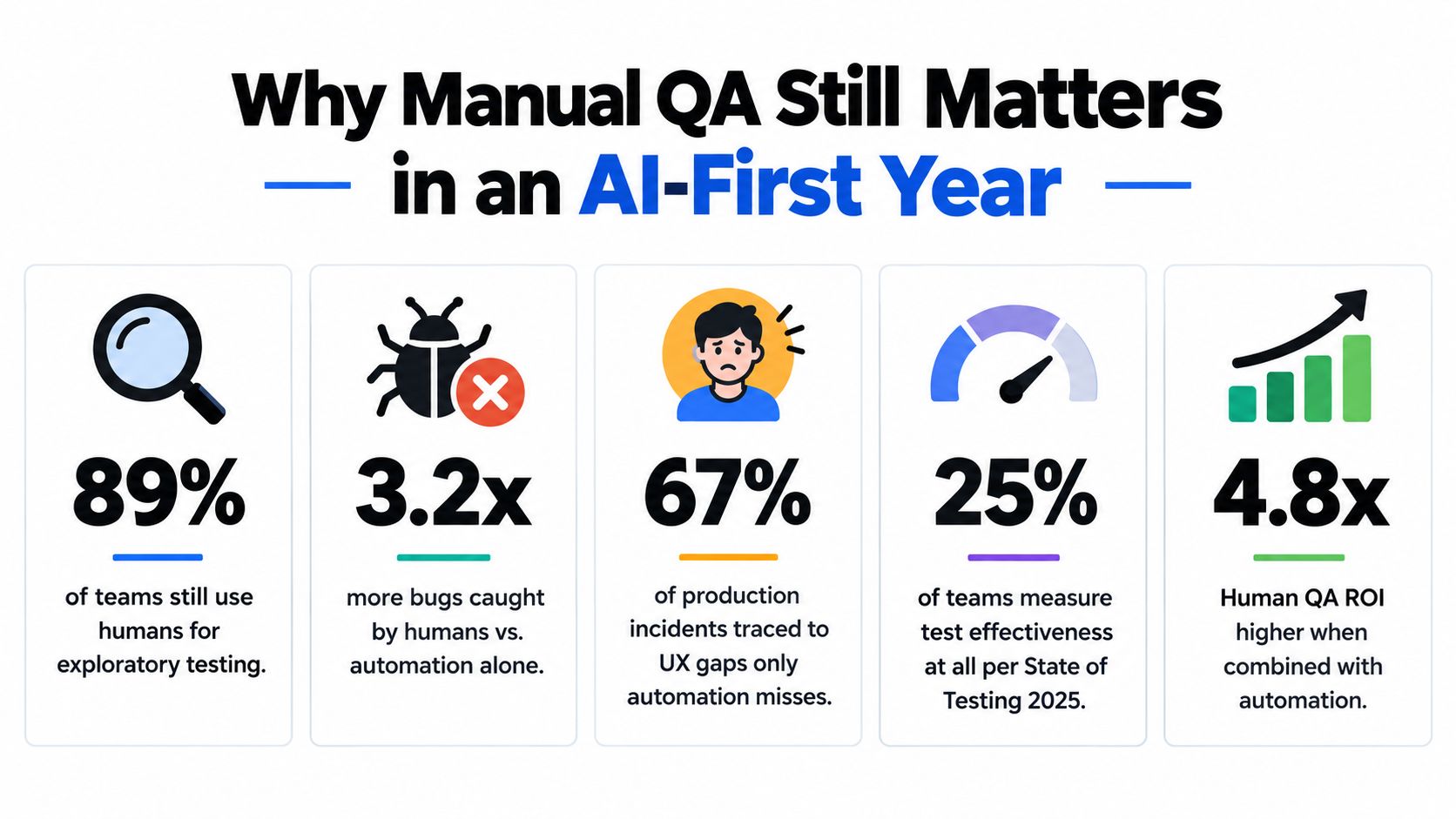
Manual QA testing is the risk-governance layer for software used by real people. As products become more complex, personalized, and AI-driven, human review must define where scripts are trusted and where judgment remains required.
Automated checks should handle repeatable work: stable regression paths, consistent API responses, and expected outcomes after code changes. Keep a human in the loop when behavior depends on context. A tester can assess whether checkout instructions confuse customers, a translated label changes meaning, an AI recommendation creates an unsafe assumption, or a user can recover after losing network access during a transaction.
Exploratory testing deserves a formal place in the release plan. An empirical survey of software-testing practices found that exploratory manual testing was the most frequently used technique among those examined. Testers also rated it highly for ease of use, effectiveness in finding critical defects, identifying varied defect types, and improving product quality. Exploratory testing is disciplined investigation. The tester learns the product, forms hypotheses, designs tests, and adapts as the application responds.
Practical rule: Automate repetition. Keep human judgment where expected behavior depends on context, user intent, safety, or business rules.
Apply that rule across ecommerce, fintech, healthcare, SaaS, and public-sector products. A payment flow can pass scripted checks while leaving users unsure about authorization. A healthcare portal can accept valid data while creating an accessibility barrier. An AI feature can produce a technically valid response that breaks a business rule no test author anticipated.
Set the boundary before selecting tools. Script predictable, high-volume checks. Keep people responsible for exploratory sessions, ambiguous requirements, unusual user paths, and AI outputs that need review. Log prompts, test evidence, and decisions so AI-assisted testing remains auditable, including through Wonderment Apps' prompt management tooling. This division gives QA a clear governance role rather than treating manual testing as leftover work.
The Real Cost of Skipping Manual QA Testing
Manual QA is often treated as a delivery expense because its value appears when something goes wrong. That accounting is backwards. Testing is a risk-control function, and the cost of underfunding it appears later as emergency engineering, customer support load, remediation, lost trust, and operational disruption.
The U.S. National Institute of Standards and Technology reported in 2002 that inadequate software-testing infrastructure cost the U.S. economy approximately $59.5 billion annually. NIST estimated that more than half of software bugs were discovered only in downstream stages, such as integration, system testing, or after release, and described defect correction as consuming approximately 80% of software-development costs in some contexts (NIST testing findings summarized by Carnegie Mellon Software Engineering Institute). These are historical U.S. estimates, not a universal current benchmark, but they make the economic logic impossible to ignore.
Where expensive defects hide
The defects that hurt most aren't always the ones automation catches poorly because the scripts are technically weak. They're often failures of interpretation and context:
- Ambiguous requirements: The software follows an interpretation nobody intended.
- Integration edges: A successful response from one service produces an unusable state in another.
- Recovery paths: A timeout, duplicate submission, expired session, or interrupted payment leaves the user stuck.
- Accessibility gaps: The workflow works for a mouse user but fails for keyboard, screen-reader, or cognitive-access needs.
- Localization problems: Dates, currency, language, content length, or cultural conventions make the journey confusing.
- Permission boundaries: A user sees, edits, or exports information outside their role.
A script can confirm that a button works. A skilled tester asks whether the button appears at the right moment, communicates the right consequence, and remains usable when the surrounding state changes.
The cheapest place to find a serious defect is before production, while the team still controls the code, data, and release decision.
That principle matters even more in regulated or high-trust systems. Fintech teams need confidence around transaction state and authorization. Healthcare teams must protect users from workflow failures that can affect care decisions. Public-sector systems need to serve people with varying devices, abilities, and levels of digital confidence. Ecommerce teams need checkout and recovery paths that preserve both revenue and customer trust.
Manual QA doesn't eliminate these risks. It gives a responsible person a chance to exercise judgment before customers do.
Manual QA Testing vs Automation Which Risks Deserve Human Judgment
Manual QA testing is the risk-governance layer between working software and a safe release. Set the boundary deliberately: which risks require human judgment and which checks are repetitive enough to script.
Apply these six criteria to every important path:
- Change frequency: Explore frequently changing features manually until their behavior stabilizes.
- User impact: Give direct attention to login, checkout, payments, clinical workflows, and account recovery.
- Regulatory exposure: Require accountable review and evidence for compliance, consent, privacy, and authorization paths.
- Accessibility and localization: Use human testers to judge meaning, usability, and realistic interaction across audiences.
- Data sensitivity: Control production-like data carefully, especially when AI tools process test inputs or outputs.
- Expected-behavior ambiguity: If reasonable people could disagree about the correct outcome, do not rely on an assertion alone.
The 2025 report shows the hybrid model clearly: 82% of respondents still use manual testing, while 45% automate regression testing (2025 global testing report). Teams do not need to choose one method. They need a documented boundary, clear ownership, and release evidence.
Decision grid
| Activity | Change Frequency | Risk Level | Recommended Approach |
|---|---|---|---|
| Exploratory testing | High or uncertain | High | Keep human-led, with charters and session notes |
| Usability and accessibility review | Any | High | Keep human-led, supported by automated accessibility checks |
| Ad hoc feature checks | High | Medium to high | Start manually, then automate stable assertions |
| Smoke testing | Low to medium | High | Automate stable checks, with human confirmation for high-risk releases |
| Regression testing | Low once stable | Repetitive and predictable | Script first, then retain targeted manual sampling |
| Performance testing | Repeatable load patterns | System-level | Automate execution and analysis, then interpret user impact manually |
Keep manual exploration for novel functionality, unusual sequences, permissions, device differences, and AI-generated behavior. Script stable, high-volume paths when the expected result is explicit and repetition consumes tester time.
AI-assisted testing adds another control requirement. Store prompts, test data, generated cases, reviewer decisions, and final evidence in an auditable record. A prompt management tool such as Wonderment, which builds tools for managing prompts, can help teams keep AI-augmented test work reviewable.
Reduce repetitive execution, not human accountability. The release decision still needs a person who understands the product risk and can explain why the evidence is sufficient.
The Manual QA Testing Workflow From Plan to Bug Report
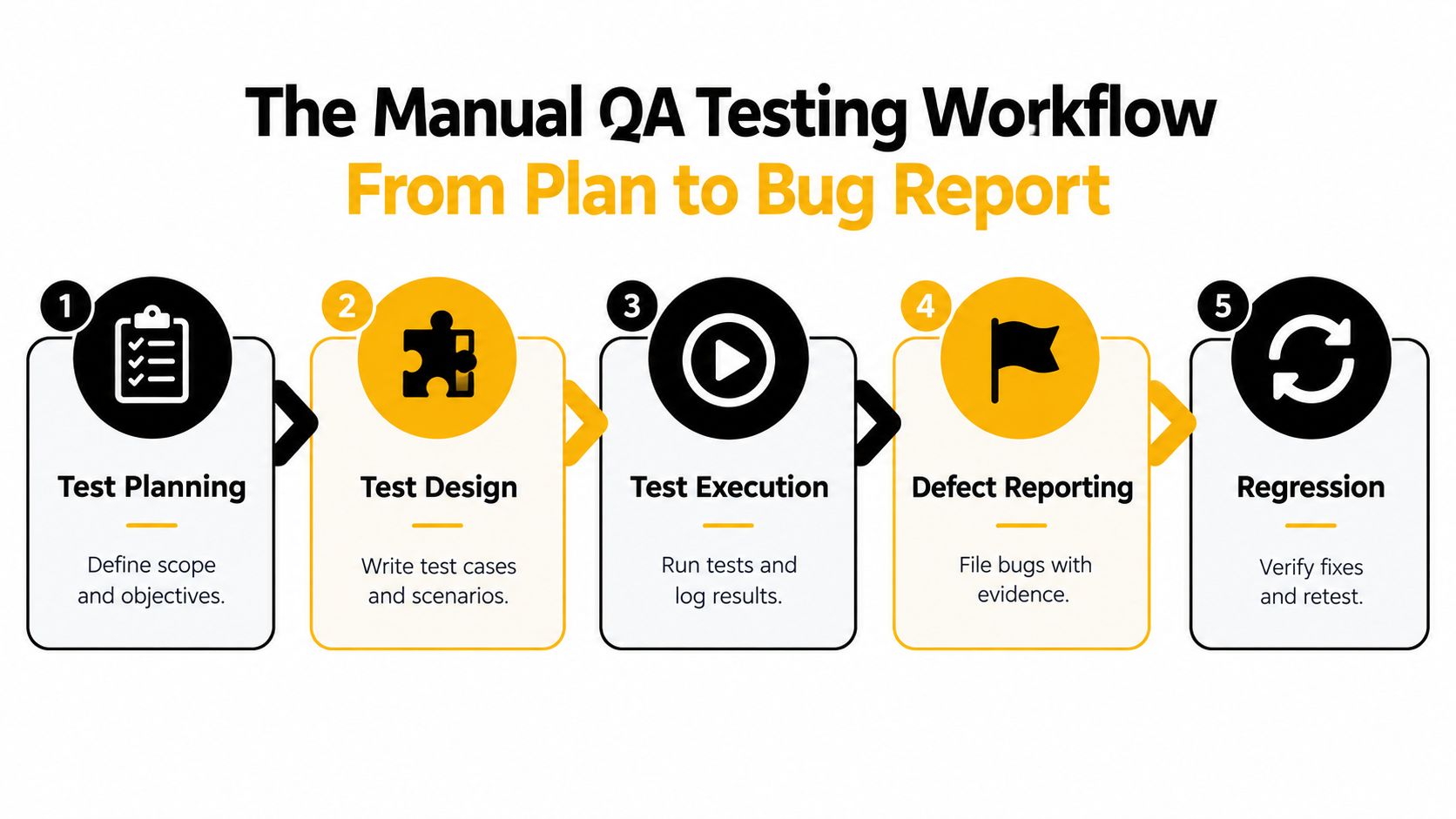
A senior tester doesn't begin by opening the application and clicking around without a purpose. The work follows a loop that connects product risk to evidence.
Plan the risk
Start with scope, objectives, environments, dependencies, supported devices, and release risks. Product, engineering, and QA should agree on what must work, what can wait, and what evidence is required for release approval.
The output is a short test plan. If nobody can understand it quickly, it won't guide execution.
Design two complementary test modes
Use a small set of risk-based test cases for critical workflows, then schedule structured exploratory sessions around the areas most likely to fail. A controlled study of 79 advanced software-engineering students found no statistically significant difference in defect-detection efficiency between test-case-based and exploratory testing, but test-case-based testing generated significantly more false defect reports (controlled empirical study).
That finding supports discipline, not improvisation. Give exploratory sessions a charter, timebox, target environment, and evidence standard.
Execute and observe
Run the critical cases first. During exploration, vary state, permissions, timing, input quality, device, and recovery behavior. Record what you tried, what changed, and what surprised you.
A useful manual QA testing process connects execution to repeatable evidence instead of relying on memory.
Report the defect clearly
A defect report should let another person reproduce the failure without a meeting. Include the exact steps, expected result, actual result, environment, account state, screenshots or video, logs where relevant, and severity rationale.
Avoid calling every unexpected behavior a blocker. Severity should describe user and business impact, while priority describes when the team should act.
Verify the fix and protect the release
Retest the original failure, then run focused regression around related workflows. A fix can resolve one state and damage another. Close the loop only when the evidence supports closure, not when the ticket changes status.
Templates You Can Steal From Test Plans to Bug Reports
Good QA documentation is brief, specific, and tied to risk. It isn't a warehouse for every click a tester has ever made.
One-page test plan
Use these fields:
- Scope: Features, platforms, integrations, and environments included.
- Objectives: The user outcomes and business risks being evaluated.
- Out of scope: Explicit exclusions that prevent false expectations.
- Test data: Accounts, permissions, records, and reset requirements.
- Approach: Risk-based cases, exploratory charters, smoke checks, and regression coverage.
- Entry criteria: Build availability, environment health, and required dependencies.
- Exit criteria: Critical risks reviewed, blockers resolved or accepted, evidence attached.
- Owners: Named people for execution, triage, fixes, and release approval.
Each field earns its place by preventing a predictable failure. Scope prevents wandering. Test data prevents blocked sessions. Exit criteria prevents a release from being declared safe because the team ran out of time.
Risk-based test case
| Field | Example |
|---|---|
| Requirement or risk | Customer must recover an interrupted checkout |
| Preconditions | Authenticated customer has an item in the cart |
| Steps | Disable network during payment confirmation, restore connection, reopen checkout |
| Expected result | Order state is clear, duplicate charge is prevented, recovery guidance appears |
| Severity | High if payment state is ambiguous |
| Evidence | Screen recording, order identifier, browser and device |
| Automation candidate | Script stable state assertions after manual behavior is understood |
For deeper guidance on writing maintainable cases, use this resource on creating test cases for product teams. Adapt its structure to your product rather than copying fields nobody will maintain.
Structured bug report
Write the title as condition plus failure, such as “Expired session returns customer to blank checkout instead of preserving cart.” Then capture:
- Environment: Build, platform, browser or device, locale, and account role.
- Steps to reproduce: Numbered, minimal, and complete.
- Expected behavior: What the requirement or user journey demands.
- Actual behavior: What occurred, including visible messages.
- Frequency: Whether the failure repeats consistently or intermittently.
- Impact: Users, data, revenue, safety, compliance, or support burden affected.
- Evidence: Screenshots, video, logs, request identifiers, and test data references.
- Severity and priority: Separate impact from urgency.
The top quality assurance tips for test case planning processes are useful when teams need more structure without turning QA into paperwork theater.
Every test should map to a requirement or risk. If it maps to neither, cut it or explain its purpose.
Metrics That Actually Improve Manual QA Testing
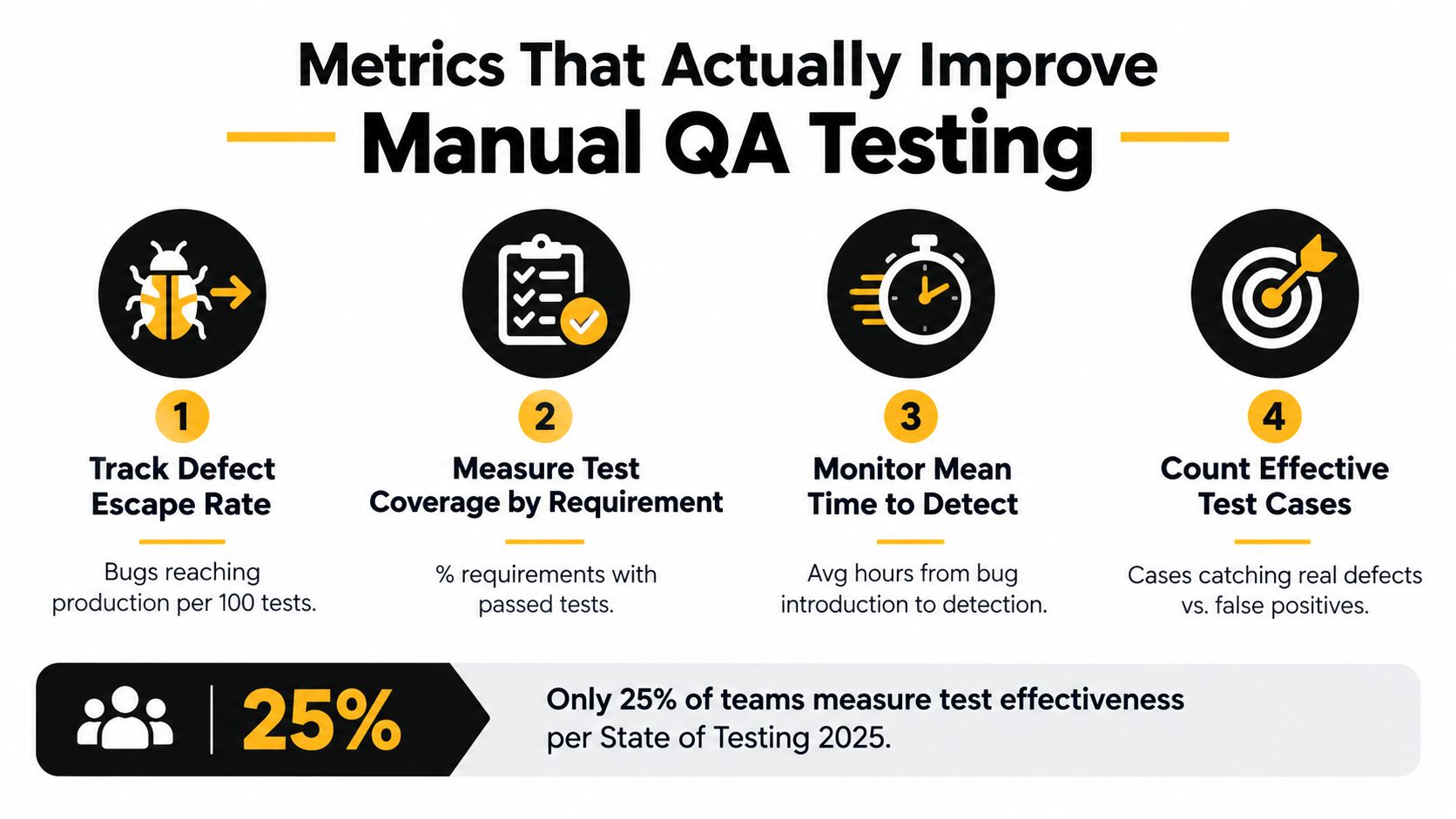
Manual QA metrics should show risk reduction, not tester activity. Test counts, execution totals, and pass rates can increase while serious defects reach customers. Review every metric by asking whether it changed a release decision, improved coverage, or exposed a weakness in the product's risk model.
Only 25% of teams measure test effectiveness, up from 19% in 2024, according to the State of Testing 2025 findings. Managers should judge QA by the defects it prevents or detects early, not by the number of cases completed.
Track escaped defects by severity
Record defects found after release and group them by impact. For each one, review the requirement, test activity, environment, and missed warning. Do not use this metric to punish testers. Use it to correct weak risk models, missing coverage, and unclear acceptance criteria.
Measure mean time to detect
Measure the time between introducing a defect and finding it. Faster detection preserves engineering context and shortens the path from cause to failure. Review patterns, especially integration changes that receive no exploratory testing.
Count exploratory session coverage
Track the risk areas, user roles, devices, locales, and recovery paths each session exercises. Session volume alone proves little. Several sessions on one happy path create less confidence than a deliberate spread across meaningful product states.
Watch the false-positive ratio
Compare confirmed defects with reports rejected as expected behavior, duplicates, or irreproducible noise. A high ratio signals unclear requirements, weak test design, or poor reporting discipline. Signal quality belongs on the dashboard because noisy reports consume engineering time and hide genuine failures.
Review these measures in sprint or release retrospectives. Assign a concrete change in planning, test design, environments, or requirements. If a metric does not influence a decision, remove it. It is decoration.
Integrating Manual QA Testing With CI Automation and AI
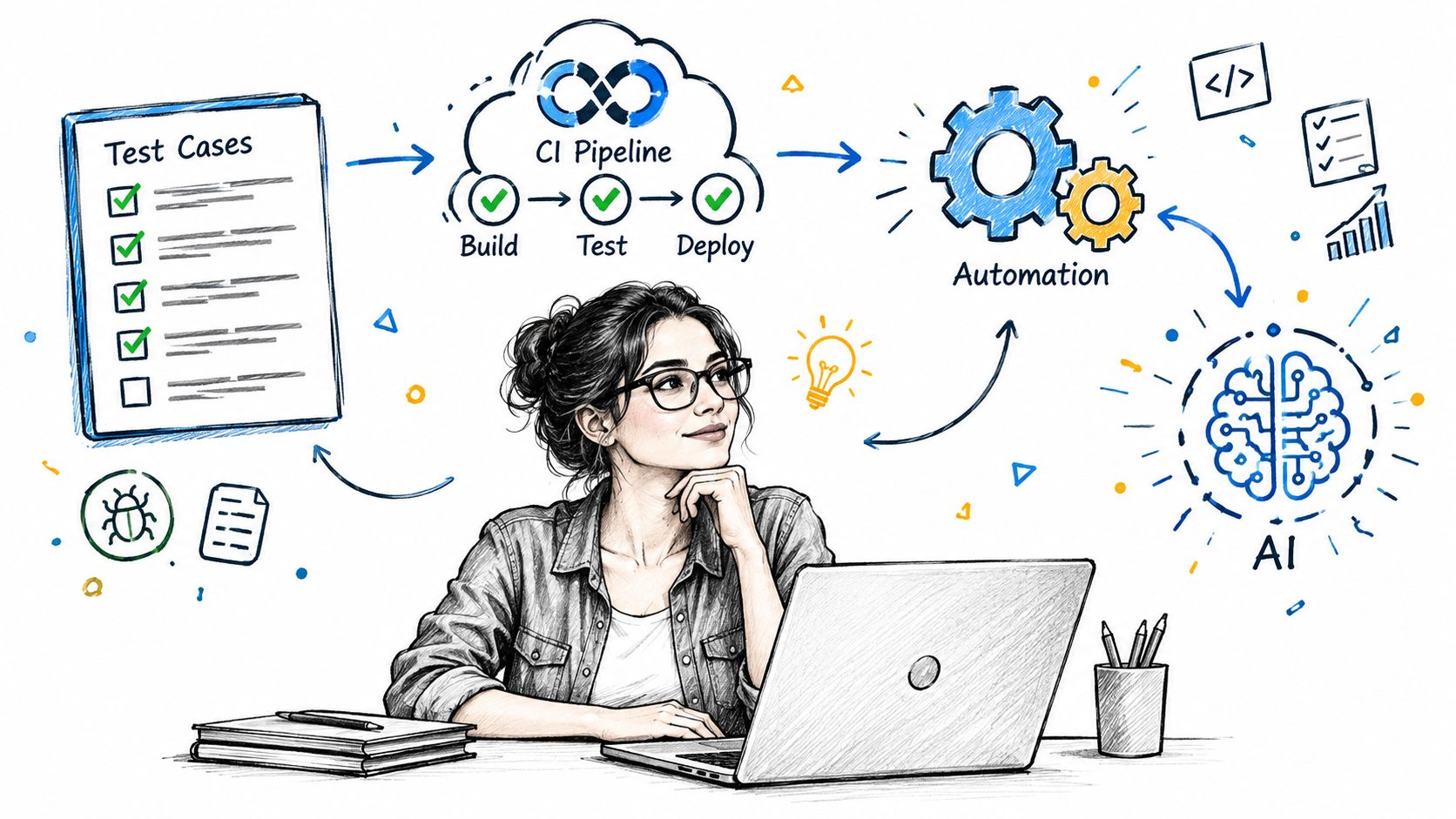
Manual QA belongs in CI as a risk-governance layer, not as a release bottleneck. Let automated checks block obvious failures, then assign human approval to changes whose impact scripts cannot judge.
A practical pipeline uses three layers:
- Fast automated checks: Run unit, integration, API, and stable smoke tests on code changes.
- Release-focused automation: Run critical regression and end-to-end checks in a production-like environment.
- Human risk review: Have QA examine changed workflows, accessibility, localization, permissions, recovery behavior, and product experience before high-risk releases.
Script stable, repeatable regression paths with a focused approach to automating regression testing. Keep the manual checkpoint narrow. QA should decide whether the release is safe for real users, not repeat every scripted assertion.
AI needs a review layer
AI-assisted testing adoption remains uneven. A 2025 software-quality report found that teams commonly use ChatGPT and GitHub Copilot, while fewer than one-third had integrated AI into core QA workflows, as summarized in the State of Testing findings noted above.
AI can draft test cases, generate data variations, suggest selectors, summarize failures, and identify untested requirements. It can also encode a wrong assumption with confidence, reproduce biased examples, expose sensitive information through prompts, or create expected results that nobody validated.
Require a human reviewer to trace each generated test to a requirement or risk. Keep sensitive production data out of prompts. Require approval for expected outcomes, then monitor escaped defects, false positives, flaky tests, and coverage gaps.
Wonderment Apps offers a prompt management system with a versioned prompt vault, a parameter manager for internal database access, logging across integrated AI systems, and a cost manager for cumulative spend. Used as an administrative layer, it helps teams audit how AI-generated QA artifacts were produced and control the data and spend tied to those workflows.
Hiring and Staffing a Manual QA Testing Function That Lasts
Staff QA against product risk, not a fixed tester-to-developer ratio. Payment flows, permissions, accessibility, and compliance changes require stronger human coverage than a stable internal tool. Make staffing decisions by asking which failures could harm users, revenue, or release confidence, then assign people to investigate those risks.
Hire a QA lead when releases span teams, environments, or regulated workflows. Add manual QA engineers when developers make release decisions without independent risk review, exploratory testing is repeatedly cut, or defect triage consumes engineering capacity. Use an external partner when specialized coverage is needed quickly, local hiring is limited, or you need one managed team across manual QA, automation, product, and UX. For compensation planning, consult a current QA engineer salary guide instead of relying on outdated assumptions.
Hire for investigation, not checkbox speed
Build a team with distinct strengths:
- The systems thinker maps requirements, dependencies, permissions, data, and release risk.
- The explorer finds seams between features by varying state, timing, devices, content, and user intent.
- The operator keeps environments usable, evidence consistent, defects clear, and regression decisions honest.
Do not hire only for fast script execution. Ask candidates to test an unfamiliar workflow, state their assumptions, identify missing information, and write a defect another engineer can reproduce. The exercise should reveal judgment, communication, and persistence under uncertainty.
Understaffing remains a practical constraint. The same 2025 global testing report found that 47% of organizations cite understaffing as a challenge, while teams aim to automate 63% of testing despite currently averaging 40%. Automation removes repetitive execution. It does not supply human risk judgment.
Set three operating commitments:
- Run a paid exploratory bug bash for every meaningful release.
- Reserve explicit capacity for accessibility and localization review.
- Review escaped defects and false positives with engineering and product, not QA alone.
Manual QA is the governance layer between “the build passed” and “we understand the remaining risk.” Keep ambiguous, consequential decisions with people. Script repeatable checks, and require an audit trail for AI-generated test artifacts before they affect a release. Wonderment Apps provides manual and automated quality assurance, AI modernization, and engineering teams for scalable web and mobile products. Visit Wonderment Apps to discuss QA coverage or AI testing governance.