

Release week is when weak process gets expensive. A feature passes a quick smoke test, the team ships, and then support starts collecting screenshots of broken checkout flows, missing data, and edge cases nobody modeled. The code may be fine in isolation. The release still fails because quality was treated like a final inspection instead of a delivery system.
That's why a strong QA testing process matters so much. It gives product, engineering, and operations a shared way to decide whether software is ready for real users, real traffic, and real business risk. For teams modernizing apps with AI, the stakes get even higher because you're no longer testing only screens and APIs. You're also testing prompts, model behavior, response quality, auditability, and cost control.
Small operational details often expose how disciplined a team really is. Something as simple as learning how to update app name in Expo projects can affect store readiness, build consistency, and downstream QA checks if teams handle release configuration casually. Good QA catches that kind of drift before users do.
Why a Solid QA Process Is Your Best Insurance Policy
A disciplined QA testing process is the closest thing software teams have to release insurance. Not because it prevents every defect, but because it lowers the chance that the most damaging defects reach customers. Those are rarely the small cosmetic bugs people joke about. They're the failures in payments, account access, security controls, and core user journeys that turn a launch into a recovery project.
The old model of QA treated testing like a gate at the end. Build the feature, toss it to testers, fix what gets found, and hope the deadline survives. Modern QA works differently. Industry guidance now describes QA as a structured lifecycle that starts with requirements review and continues through planning, risk assessment, execution, regression, and cycle closure, rather than a last-minute defect sweep, as outlined by Testlio's overview of the QA testing process.
What goes wrong without it
When teams skip process, the same patterns show up:
- Ambiguous requirements: Developers build one interpretation, stakeholders expect another.
- Thin coverage on critical paths: Checkout, login, billing, or permissions work in happy-path demos but break under real conditions.
- Late bug discovery: Issues surface when fixes are more expensive because code, tests, and environments all need to change.
- No release confidence: Product leads hear “it seems fine” instead of getting a measurable quality picture.
A release without clear QA evidence is a guess with branding attached to it.
Why clients should care
From a client perspective, QA isn't a technical side quest. It directly affects rollout confidence, support load, user trust, and how quickly your team can add the next feature without destabilizing the last one. That matters even more when your application is becoming more complex through integrations, personalization, and AI-assisted workflows.
A strong process also changes team behavior. Developers write with testability in mind. QA analysts review requirements earlier. Product managers define acceptance criteria more clearly. Everyone spends less time arguing about whether something is “done” because the process already defines what done has to prove.
The True Business Objectives of Quality Assurance
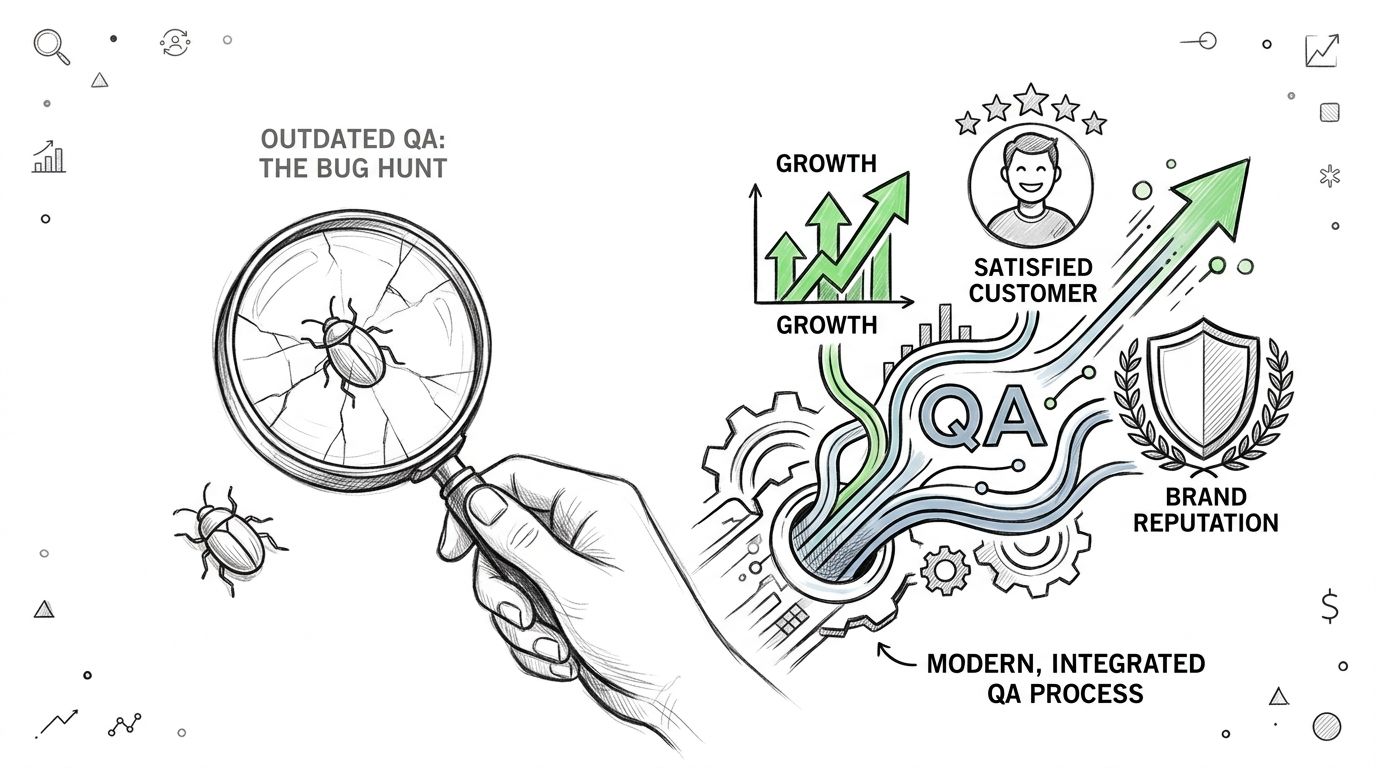
Business leaders often inherit an outdated idea of QA. They see a cost center that catches bugs after the important work is done. In practice, QA is part of the important work. It protects the business from preventable release risk and gives teams a way to scale software without scaling chaos.
Risk mitigation is the first objective
Every product has areas where failure costs more. In fintech, that may be balances, transfers, and permissions. In ecommerce, it's product data, cart logic, checkout, and fulfillment. In healthcare, it can be data integrity, workflow accuracy, and auditability.
Business objective: Reduce the chance that high-impact defects reach production.
That shifts testing away from “test everything equally” and toward risk-based coverage. Mature teams identify where a defect would cause financial, regulatory, operational, or reputational damage, then apply deeper testing there.
Brand protection is built into QA
Users don't separate product quality from company quality. If the app feels unstable, they assume the business is unstable too. That's why QA needs to validate not just functionality, but also consistency, usability, performance under realistic conditions, and the quality of edge-case handling.
A stable experience is one of the fastest ways to build trust. An unstable one burns it quickly.
QA supports growth, not just safety
The strongest QA programs help teams release more confidently because they create repeatable evidence. Modern QA reporting commonly tracks defect density, test coverage, defect leakage, mean time to detect, and mean time to resolve, which helps teams compare releases, spot where defects escape, and prioritize the highest-risk areas, as described in this guide to QA metrics every testing team should track.
Here's what that means in business terms:
| Objective | What QA contributes |
|---|---|
| Safer releases | Validates critical workflows before launch |
| Faster iteration | Reduces rework by catching requirement and integration issues earlier |
| Operational clarity | Gives stakeholders measurable release signals instead of opinions |
| Scalability | Makes frequent changes more sustainable through repeatable regression checks |
Good QA changes the executive question from “How many bugs are left?” to “What risks remain, and are we accepting them knowingly?”
That's a much better decision model.
The Five Phases of a Modern QA Testing Process
A useful QA testing process isn't a single handoff. It's a chain of decisions, artifacts, environments, and feedback loops that runs through the life of the release.
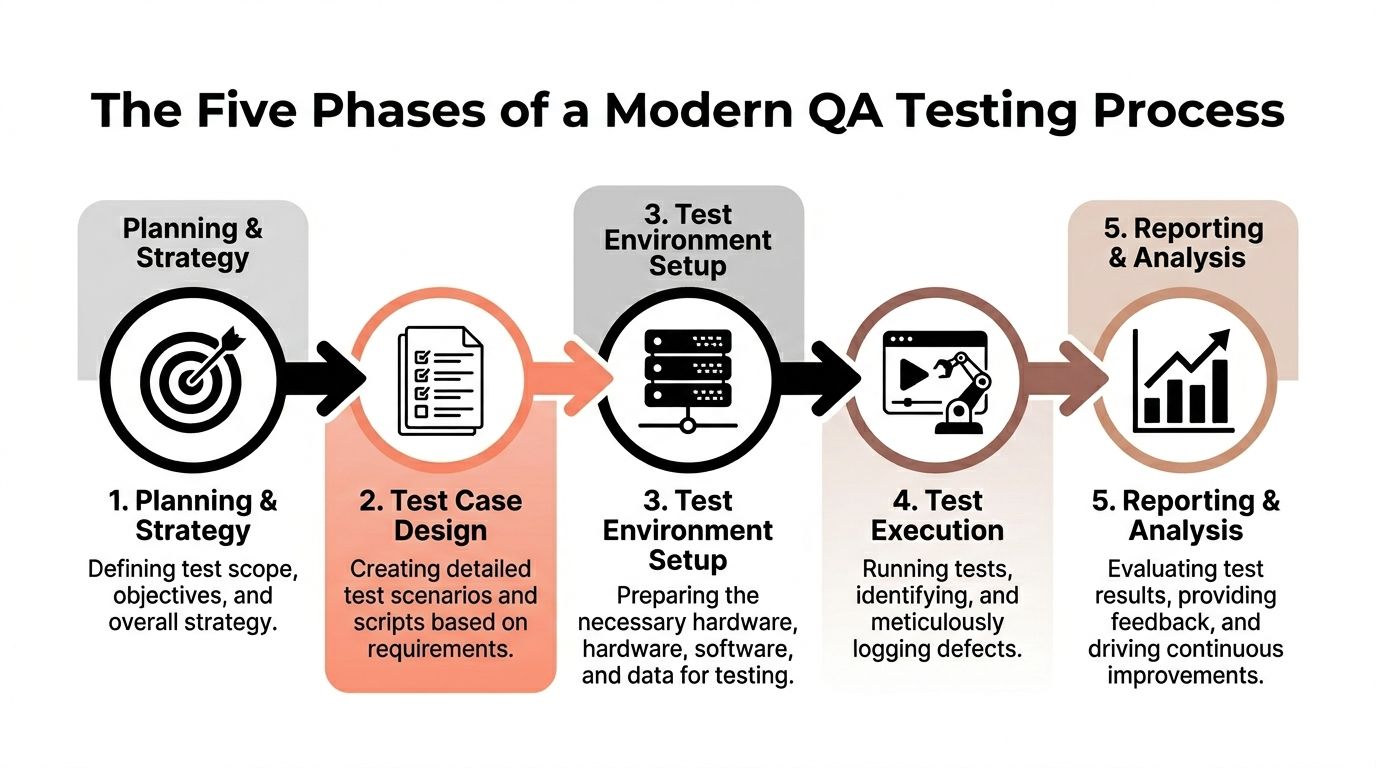
Phase one is requirement analysis and planning
Experienced QA teams earn their keep by reviewing functional and non-functional requirements, acceptance criteria, and technical details before execution starts. Mature teams also map requirements to test cases with a requirement traceability matrix, which creates accountability for coverage and exposes gaps before anyone starts clicking through test scripts, as explained in AltexSoft's guide to software quality management and traceability.
What works here:
- Clear acceptance criteria: If a team can't define success, it can't test for it.
- Risk-based prioritization: Deep coverage for critical journeys first.
- Shared planning: QA, product, and engineering agree on scope before the sprint gets noisy.
What doesn't work is treating requirement review like paperwork. It's design work.
Phase two is test design
The team turns requirements into scenarios. Not just happy paths. Good test design includes positive, negative, boundary, and integration cases.
A practical pattern is to build tests around user behavior and system dependencies at the same time. A checkout flow, for example, isn't just “user taps pay.” It's pricing, tax, discounts, payment authorization, confirmation, email triggers, order state, and fallback behavior if one dependency fails.
For teams trying to raise rigor around coverage planning, this resource on test coverage in testing is useful because it helps frame what broad versus meaningful coverage looks like.
Phase three is environment setup and execution
Execution quality depends heavily on whether the test environment resembles production. If your QA environment has different integrations, simplified auth, unrealistic data, or lower latency than production, you can get a false sense of safety.
During execution, teams run manual and automated tests, log defects, retest fixes, and keep coverage visible. At this stage, process discipline matters. Defects need clear repro steps, severity context, and linkage back to requirements or user impact.
Phase four is reporting and analysis
A release decision needs more than a bug count. Teams should review severity mix, coverage status, unresolved risk areas, blocked tests, and defect trends. By doing so, metrics become decision support instead of reporting theater.
Practical rule: A QA report should help someone decide. If it only documents activity, it isn't finished.
Phase five is regression and maintenance
Every fix can create a new problem somewhere else. Regression testing exists to catch that. It also keeps the release train moving by making sure yesterday's working features still work after today's changes.
This lifecycle model reflects a larger shift in the industry from end-stage bug finding to continuous quality work. One cited case example reports a 10x increase in test coverage and an 80% reduction in testing cycle time after process improvements in the broader move toward structured QA practice, according to Testlio's QA process guide.
Manual vs Automated Testing Choosing Your Strategy
Teams often ask the wrong question here. They ask whether manual testing is better than automation, or the reverse. The better question is which parts of your QA testing process need human judgment and which parts need machine consistency.
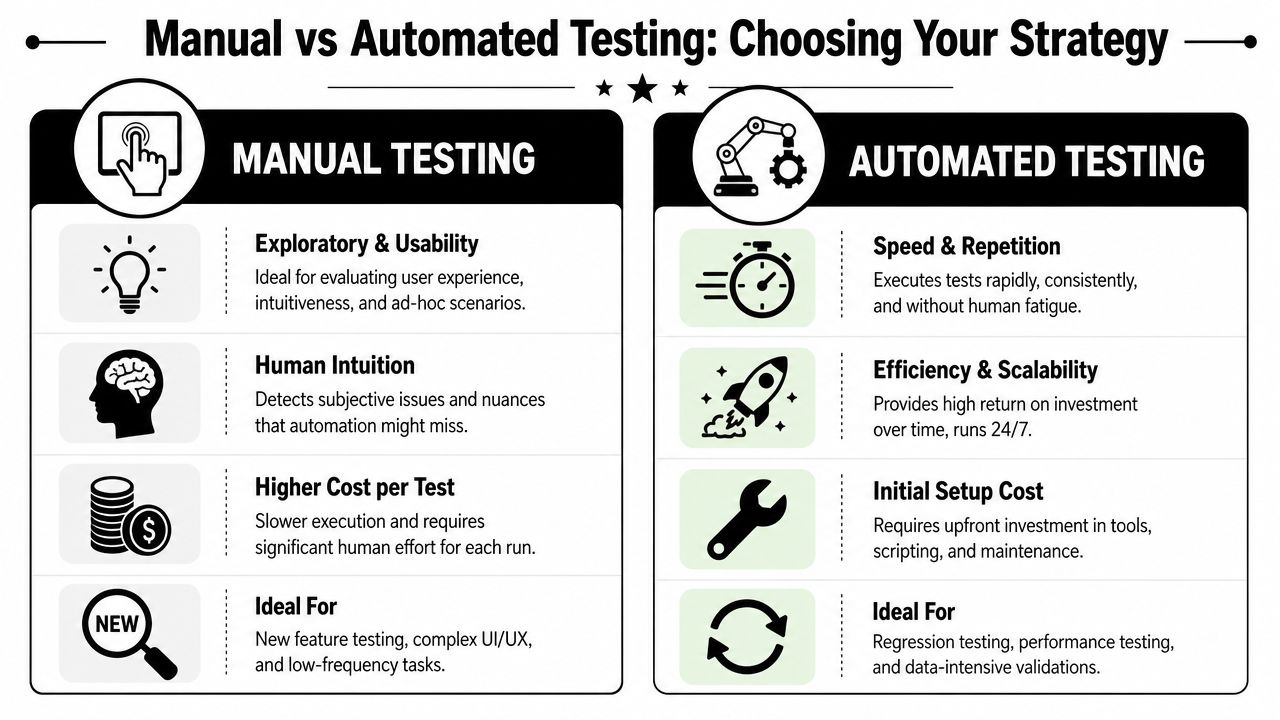
Manual testing is strongest where context matters
Manual testing is still the right tool for exploratory work, UX review, edge-case behavior, and workflows that change often. Humans notice awkward wording, unclear recovery states, confusing flows, and visual inconsistencies that a script may never flag.
Use manual testing when:
- The feature is new: Early product changes make automation expensive to maintain.
- Experience matters: Onboarding, checkout, forms, and mobile interactions benefit from real human evaluation.
- You need exploratory depth: Testers can probe odd states and unusual combinations on the fly.
Automated testing is strongest where repetition matters
Automation is ideal for repetitive regression paths, stable logic, large data sets, and checks that need to run frequently. Guidance on modern QA practice recommends automating repetitive regression routes while reserving manual testing for exploratory, UX-sensitive, and high-risk scenarios because that balance improves throughput without creating brittle confidence, as discussed in VirtuosoQA's article on the software QA process.
A useful analogy is this. Manual testing is a field inspection. Automated testing is a conveyor belt sensor. You need both if you make valuable things at speed.
A simple decision framework
| If the scenario is… | Lean manual | Lean automated |
|---|---|---|
| New or rapidly changing | Yes | Not yet |
| Highly repetitive | Rarely | Yes |
| UX sensitive | Yes | Limited |
| Data heavy | Limited | Yes |
| Core regression path | Sometimes | Yes |
For teams building more reliable release workflows, patterns from implementing Python state machines for DevOps can also help model transitions and failure states in a way that maps well to automated test orchestration.
If you're deciding where automation should start, this article on automated regression testing is a practical place to begin. Regression is usually where automation delivers the clearest operational value first.
Don't automate because the tool can. Automate because the scenario repeats, matters, and can be checked reliably.
Assembling Your QA Team and Tech Stack
Even the cleanest process breaks down if the team lacks the right mix of skills or the toolchain creates friction. A modern QA capability usually combines product understanding, test design discipline, automation skills, and enough systems thinking to work across APIs, infrastructure, and release workflows.
The team you actually need
A strong setup often includes a blend of roles rather than one generic “QA person.”
- Manual QA analysts bring detail, curiosity, and user empathy. They're often the first to expose confusing interactions and edge cases hidden behind seemingly simple requirements.
- QA automation engineers or SDETs build and maintain the automated layer. They write test code, improve reliability, and keep checks integrated into delivery pipelines.
- Product and engineering partners still own quality too. QA should never be the only team expected to care whether software works.
Quality degrades when ownership gets isolated, which is why the best teams treat QA as a cross-functional discipline with specialists, not a final checkpoint staffed by one overloaded tester.
The stack should reduce friction
Teams often need a practical combination of tools:
| Need | Typical tools |
|---|---|
| Defect tracking | Jira, Linear |
| Test case management | TestRail, Zephyr |
| Web automation | Cypress, Playwright, Selenium |
| API testing | Postman, Insomnia, custom suites |
| CI integration | GitHub Actions, Jenkins, GitLab CI |
| Device coverage | BrowserStack, Sauce Labs |
What matters isn't collecting logos. It's whether the stack supports fast feedback, reproducible results, and clear ownership when something fails.
Environment fidelity is not optional
One of the most common causes of false confidence is a weak test environment. QA guidance consistently recommends environments that mirror production configurations because mismatches can hide defects that only appear under real integration, latency, authentication, or data conditions, especially in API-heavy and mobile systems, as noted in VirtuosoQA's article on the software QA process.
If the test environment is too clean, the release report will be too optimistic.
That affects more than engineering. Clients feel it when a feature that “passed QA” fails after launch because staging didn't reflect real traffic patterns, third-party dependencies, or realistic user data.
What works in practice
A workable setup usually includes:
- Production-like test data: Sanitized if needed, but structurally realistic.
- Integrated pipelines: Tests run before merge and before deployment, not only on demand.
- Clear ownership: Someone maintains flaky suites, stale cases, and environment drift.
- Fast defect feedback: A bug report should move from discovery to triage without translation theater.
The payoff is simple. Better environments and better tooling make your QA testing process more honest. Honest signals lead to better release decisions.
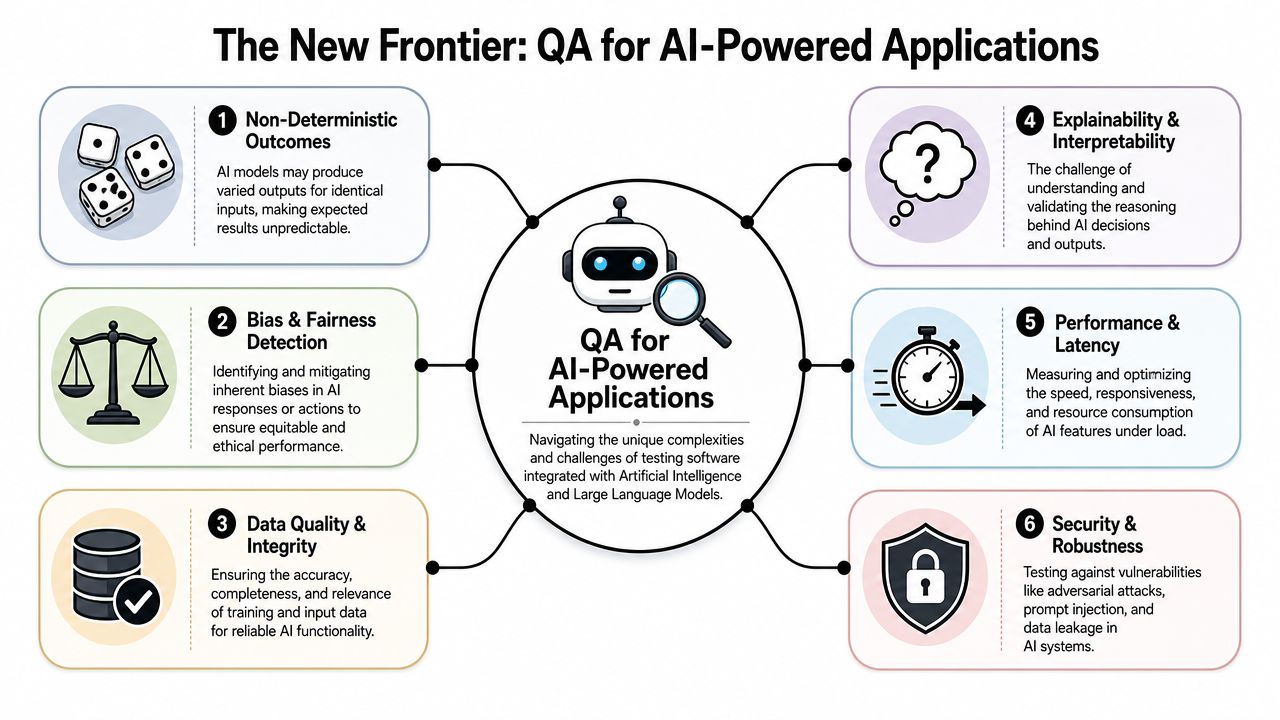
The New Frontier QA for AI-Powered Applications
AI features create a different testing problem than standard application logic. A traditional feature often has a bounded set of inputs and expected outputs. An AI feature may return different acceptable answers to the same prompt, vary by model, and degrade subtly when prompts, parameters, or source data change.
What changes when AI enters the product
The QA testing process has to expand beyond interface checks and API assertions.
You now need to evaluate things like:
- Response quality: Is the output relevant, safe, on-brand, and useful?
- Prompt behavior: Does a prompt change alter output quality or system behavior in ways the team can trace?
- Security exposure: Can prompt injection, data leakage, or weak guardrails create risk?
- Operational behavior: How does latency, fallback handling, and model switching affect user experience?
That's why modern QA process design has to adapt to AI and CI/CD without becoming a bottleneck. Industry guidance also notes that testers increasingly need skills in API, security, DevOps, and cloud tooling because QA is shifting from pure execution toward systems-level quality engineering in continuous, data-informed feedback loops, as described in SysGears' piece on what a modern QA process looks like.
Pass fail thinking gets weaker
Classic pass/fail logic still matters for infrastructure and deterministic application behavior. It becomes less useful for generative output. In AI testing, teams often need review criteria, benchmark prompts, approval ranges, and logging that lets them compare prompt versions and model responses over time.
A practical complement here is a broader guide for AI vulnerability testing, especially for teams trying to pressure-test prompts and unsafe response paths rather than just verify feature functionality.
AI quality isn't only “did it answer.” It's “did it answer in a way the business can trust.”
That's also where product knowledge matters. An AI support assistant for ecommerce, a recommendation engine in media, and a workflow helper in healthcare all need different test standards because the consequences of a poor answer differ.
For teams thinking through this shift more broadly, this piece on knowledge in artificial intelligence is a helpful companion because it frames how AI systems rely on structured context, not just model output.
Modernize Your QA with a Prompt Management System
Once AI becomes part of your application, prompt handling stops being a developer convenience and becomes a quality concern. Prompts are logic. They shape outputs, influence user experience, and can introduce regressions just as easily as code changes do. If prompts live in scattered files, copied chat logs, or ad hoc environment variables, your QA testing process loses traceability fast.
What the tool layer needs to solve
Teams need an administrative layer that makes prompt changes observable and testable. That usually means four capabilities:
- Version control for prompts: So teams can compare revisions, roll back safely, and understand which prompt was active when a defect appeared.
- Parameter management: So prompts can reference internal data safely and consistently without hardcoded shortcuts.
- Cross-model logging: So QA and engineering can inspect inputs, outputs, and failures across integrated AI systems.
- Cost visibility: So product owners can understand usage patterns and keep model spend from becoming a surprise.
Without that structure, AI testing becomes anecdotal. Someone says “the answers felt worse this week,” but nobody can tie the behavior to a prompt change, model change, parameter change, or data change.
Where this fits in a real delivery setup
In practice, this tooling sits between product experimentation and production accountability. It helps teams run prompt revisions with more discipline, review outputs with context, and keep an audit trail that supports debugging, QA review, and operational oversight.
One option in this category is Wonderment Apps' prompt management system, which includes a prompt vault with versioning, a parameter manager for internal database access, a logging system across integrated AI models, and cost tracking for cumulative spend. For teams modernizing an existing app with AI, that kind of tooling helps connect prompt iteration to a more controlled QA workflow.
The business value is straightforward. Better prompt governance reduces guesswork. Better logging shortens investigation time. Better visibility into prompt and model behavior makes AI features easier to maintain as the product evolves.
The mistake to avoid is treating AI behavior as something too fuzzy to engineer properly. You can't turn every output into a binary assertion, but you can absolutely create a quality system around prompts, parameters, logging, and review criteria.
If your team is adding AI to a web or mobile product and needs a cleaner way to manage prompts, testing, logging, and spend, book a demo with Wonderment Apps.