

Companies that build products on assumptions move slower than they think. Companies that build on evidence compound better decisions. Teams that systematically integrate user research techniques into product development grow 32% faster than competitors that don't, according to a Maze 2025 study.
That number changes the conversation. User research isn't a nice design exercise for polishing screens after the roadmap is already set. It's an operating discipline for deciding what to build, what to fix, what to automate, and where AI belongs in the product without creating noise, cost, or risk.
That matters even more for teams modernizing software. Once you start adding AI to a desktop or mobile application, feedback multiplies. You're no longer evaluating only flows and interfaces. You're also evaluating prompt behavior, model outputs, user trust, operational guardrails, and whether the system is helping or just being clever in the wrong places.
Why User Research Is Your App's Secret Weapon
Risk in app development often hides in plain sight. It usually shows up first in untested assumptions about user behavior, not in the codebase, the release plan, or the vendor shortlist.
Teams rarely miss the roadmap because they lacked ideas. They miss because they committed too early to an idea that made sense internally and broke down in real use. User research reduces that failure rate by exposing where expectations, habits, and constraints differ from what the team believed.
Research changes the quality of product bets
A roadmap built from stakeholder input alone can look coherent on paper. Then actual users arrive with different priorities, workarounds, and objections. Research surfaces those mismatches before they become adoption problems, support volume, or expensive rework.
That matters at the portfolio level as much as the feature level. Research helps product leaders decide which bets deserve investment, which ones need redesign, and which ones should stop before engineering spends another sprint on them. As noted earlier, the growth gap tied to disciplined research is useful because it connects user understanding to business performance, not just usability hygiene.
Practical rule: If a feature feels obviously valuable inside the company, test it before you scale it.
Research also protects scale. Early adopters often tolerate friction that broader markets reject. New segments bring different devices, accessibility needs, workflows, governance requirements, and expectations for speed. Teams that study those differences early make cleaner expansion decisions.
AI makes research more consequential
AI modernization raises the cost of weak user understanding. Once an app starts generating content, recommendations, summaries, or next actions, small misunderstanding turns into repeated bad output.
The trade-off is straightforward. AI can remove effort from the user journey, but it can also introduce unpredictability, trust issues, and new operational overhead. A static workflow is easier to diagnose. An intelligent workflow has to be useful, understandable, and governable at the same time.
That is why research has to cover more than interface preference. Teams need evidence on user intent, tolerance for automation, moments where explanation matters, and cases where a deterministic rule will serve the product better than a model. In AI-enabled products, research is part of product strategy and risk management.
What research protects you from
A disciplined research practice helps teams avoid familiar failure modes:
- Building for the loudest stakeholder: confidence inside the company can outrun evidence from the market.
- Optimizing the wrong metric: a local gain in clicks or speed can weaken task success, trust, or retention.
- Adding AI where rules would work better: some jobs need consistency more than probabilistic output.
- Scaling confusion: a flow that feels obvious to insiders can fail once usage expands across roles and contexts.
User research techniques do not replace product judgment. They give leaders better inputs for judgment, especially when growth, retention, and AI modernization are all on the table.
Qualitative vs Quantitative Research Methods
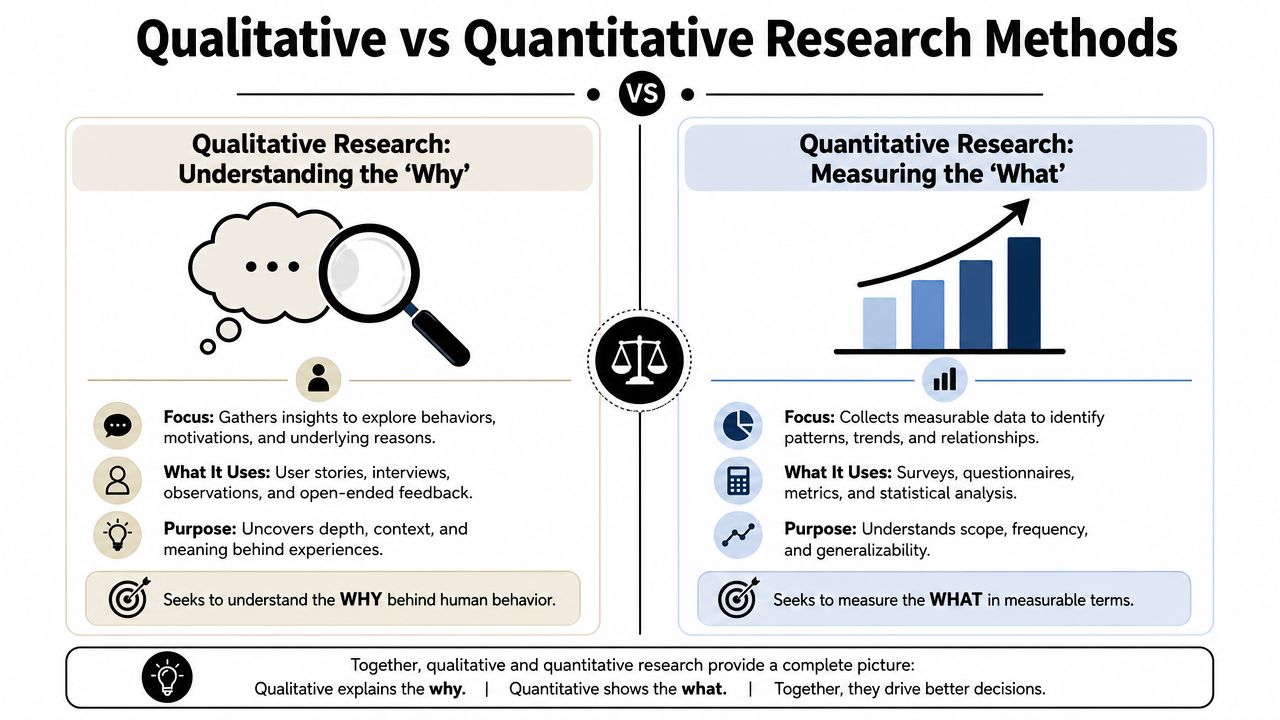
Most confusion around user research starts here. Teams talk about “doing research” as if every method answers the same question. It doesn't. Some methods explain human meaning. Others measure pattern and magnitude.
A simple analogy helps. Qualitative research works like a skilled doctor diagnosing a patient in detail. Quantitative research works like a public health analyst spotting trends across a population. You need both lenses if you want to make strong decisions.
Two lenses for different decisions
Qualitative methods help teams understand motivation, confusion, trust, language, and work context. They're how you learn why users hesitate, why they abandon a step, or why a feature that looked promising in planning falls flat in practice.
Quantitative methods tell you what's happening at scale. They're how you detect drop-off points, compare alternatives, monitor completion behavior, and validate whether a change is moving in the right direction across a large audience.
According to the Nielsen Norman Group, UX research includes 20 distinct techniques mapped across dimensions such as qualitative versus quantitative and attitudinal versus behavioral in its research methods framework. That framework is useful because it stops teams from treating every method like a universal tool.
Qualitative vs. Quantitative Research at a Glance
| Dimension | Qualitative Research | Quantitative Research |
|---|---|---|
| Core question | Why is this happening? | What is happening, and how broadly? |
| Typical output | Stories, themes, observations, quotes | Counts, distributions, comparisons, trends |
| Best use | Discovery, diagnosis, reframing problems | Validation, measurement, optimization |
| Common methods | Interviews, contextual inquiry, moderated usability testing | Surveys, analytics review, A/B testing |
| Main strength | Depth and explanation | Breadth and confidence at scale |
| Common mistake | Treating a few conversations as market truth | Measuring behavior without understanding meaning |
Good teams don't choose between qualitative and quantitative work. They use one to sharpen the other.
When each lens breaks down
Qualitative work becomes weak when teams ask leading questions, interview the wrong audience, or confuse anecdote with strategy. It's excellent for uncovering issues. It's not a shortcut for declaring market-wide certainty.
Quantitative work becomes weak when the instrumentation is sloppy or the question is vague. A dashboard can tell you where users stop. It can't tell you what they believed, feared, misunderstood, or expected in that moment.
That's why the best user research techniques are rarely isolated. A product team might start with interviews to uncover pain points, then use surveys or analytics to test whether those patterns show up broadly. Or it might spot a drop in conversion first, then run qualitative sessions to find the cause.
A useful working model
Use qualitative methods when the team says:
- “We don't understand user motivation.”
- “We need to hear how people describe this problem.”
- “We suspect there's a context issue behind the behavior.”
Use quantitative methods when the team says:
- “We need to verify whether this pattern is widespread.”
- “We need to compare options objectively.”
- “We need an ongoing measurement signal after launch.”
That distinction saves time. It also keeps research tied to decisions instead of becoming a vague activity with no operational consequence.
Uncovering User Stories with Qualitative Techniques
Qualitative research is where product teams stop guessing and start hearing the product through the user's language. That shift is often uncomfortable at first. Users rarely describe their needs in the neat categories a roadmap expects.
They talk about interruptions, handoffs, distrust, policy constraints, odd device habits, and things they do outside your product because your product doesn't fit the job yet.
User interviews for the hidden why
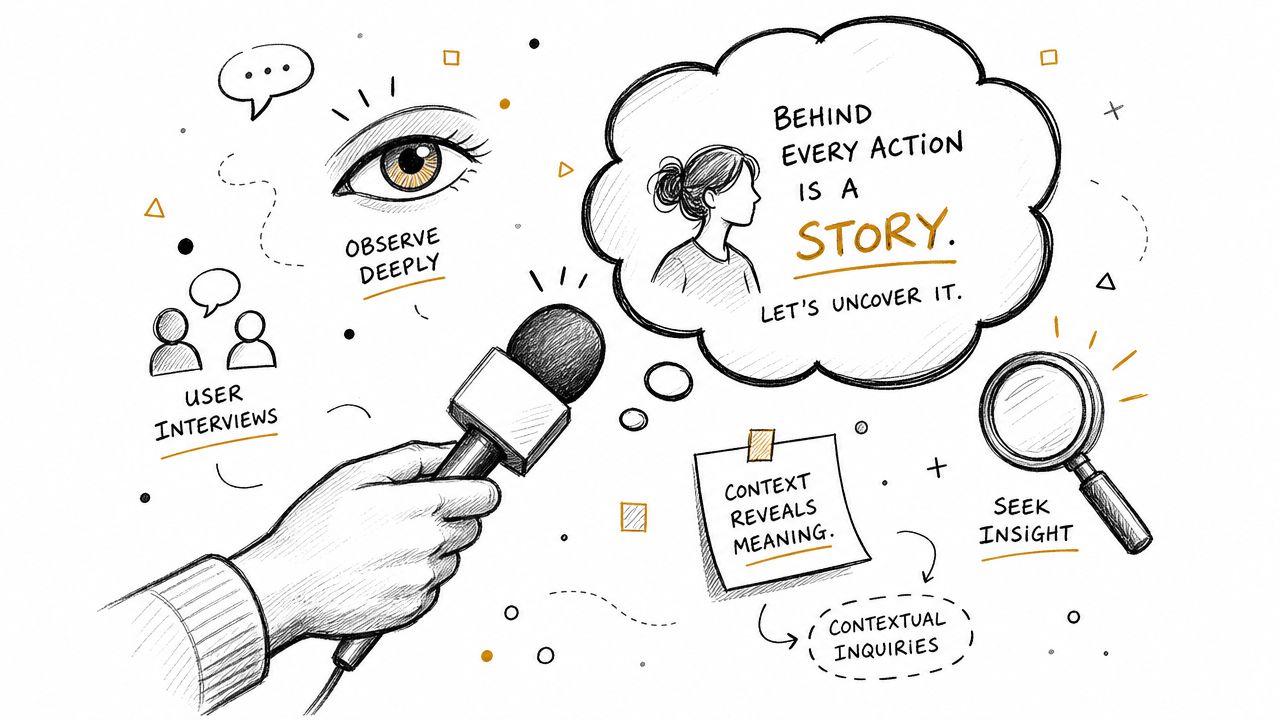
Interviews are still one of the most useful user research techniques because they reveal meaning, not just behavior. As noted in this overview of user research methods, user interviews act as a macro-lens that uncovers the why behind motivations, frustrations, and contextual gaps that quantitative data misses.
A good interview doesn't feel like a survey read aloud. It feels like guided excavation. The interviewer asks for recent examples, probes for workarounds, and keeps moving from opinion toward lived behavior.
A simple interview starter set:
- Recent behavior: “Walk me through the last time you tried to do this.”
- Trigger: “What made you start that task in the first place?”
- Obstacle: “Where did it become frustrating or unclear?”
- Workaround: “What did you do when the product didn't give you what you needed?”
- Decision context: “What else was happening around you at the time?”
The difference between a weak and strong interview often comes down to specificity. “Would you use this?” invites speculation. “Tell me about the last time this problem happened” gives you evidence.
Contextual inquiry for the real environment
Interviews tell you what users recall. Contextual inquiry shows you what shapes their work. This technique is especially valuable when the product sits inside a broader process, such as fulfillment operations, claims handling, clinical coordination, or customer support.
In those settings, the interface is only one variable. Noise, approvals, switching between systems, compliance checks, and team handoffs all affect what users can do.
Watch for the moments users don't mention because they consider them normal. Those moments often contain the design opportunity.
When teams skip this step, they redesign the visible screen and ignore the invisible workflow.
Usability testing for friction you can act on
Usability testing is where assumptions get expensive fast. A team may love a new onboarding flow, AI assistant panel, or checkout update. Then a user hesitates at the first action because the wording means something different to them.
That's why observed behavior matters. If you want a practical model for evaluating interface friction, Wonderment's guide to web page usability testing is a useful reference for structuring sessions and spotting problems people won't report on their own.
Keep the test brief and concrete. Give users realistic tasks, ask them to think aloud, and resist the urge to help too quickly.
A workable session checklist looks like this:
- Use real scenarios: Frame tasks around actual goals, not generic clicks.
- Stay neutral: Don't explain the interface unless the test requires it.
- Capture hesitation: Confusion is often visible before it becomes verbal.
- Note recovery behavior: Watching how users self-correct is as useful as spotting the error.
Diary and feedback-based qualitative inputs
Not every qualitative insight needs a live session. For products used over time, diary studies, support tickets, chat transcripts, and implementation notes can reveal slow-building frustration that a one-time interview won't catch.
That's especially relevant for AI features. A user may love the first interaction and distrust the fifth. Longitudinal signals help teams see where novelty wears off and reliability starts to matter more than flair.
Measuring User Behavior at Scale
Qualitative work gives you sharp insight. Quantitative work tells you whether that insight holds across the broader audience. If you skip this step, you can end up overreacting to a memorable conversation or a dramatic usability session.
Scale changes the standard. A pattern becomes meaningful when you can observe it consistently, compare it, and track whether a change improves it over time.
Surveys that don't bake in bias
Surveys are deceptively easy to do badly. The form builder looks simple, so teams rush. Then they ask leading questions, bundle multiple ideas into one item, or collect answers they can't act on.
A good survey starts with a narrow decision. Don't ask everything you could ask. Ask what you need to decide now.
Use these filters before sending:
- Keep one idea per question: Avoid combining ease, speed, and trust in a single item.
- Use neutral wording: “How easy or difficult was this task?” is stronger than “How smooth was the experience?”
- Match the audience to the decision: Existing users, trial users, and churned users answer from different realities.
- Plan analysis before launch: If you don't know how you'll interpret the responses, the survey isn't ready.
Surveys work best when they validate a question that already has some context from interviews, behavioral data, or support patterns.
A/B testing for decision confidence
A/B testing is powerful because it compares alternatives under real usage conditions. But it's not magic. Teams often run weak experiments because they test too many changes at once or they don't define success clearly enough.
A strong A/B test has a single hypothesis. Change one meaningful variable. Decide in advance which behavior matters. Then let the test answer that question.
For product leaders, the key trade-off is speed versus clarity. If you pack multiple design changes into one experiment, you may move faster operationally but learn less strategically. You'll know one version won, but not why.
Field note: If your experiment can't be explained in one sentence, it probably contains too many variables.
Analytics review for ongoing truth
Analytics won't tell you motive, but they're excellent for identifying where to investigate. In desktop and mobile apps, analytics review is often the first sign that a product story isn't matching user behavior.
Look for signals such as:
- Unexpected exits: A step that should be routine creates abandonment.
- Repeat attempts: Users restart the same flow because completion isn't clear.
- Feature silence: A heavily promoted feature sees little real engagement.
- Odd pathing: Users create workarounds instead of following the intended journey.
For AI-enhanced products, instrumentation should also include output-related events. Did the user accept a suggestion, edit it heavily, ignore it, or abandon the workflow after seeing it? Those signals matter because a superficially “used” AI feature can still be failing functionally.
Scale without context is still incomplete
Quantitative methods are strongest when teams resist the temptation to treat them as self-explanatory. A retention curve or task completion trend can point to a real issue, but teams still need interpretation.
That's why the healthiest product organizations move back and forth. They validate at scale, then return to users when the numbers raise a question that metrics alone can't answer.
How to Choose the Right User Research Technique
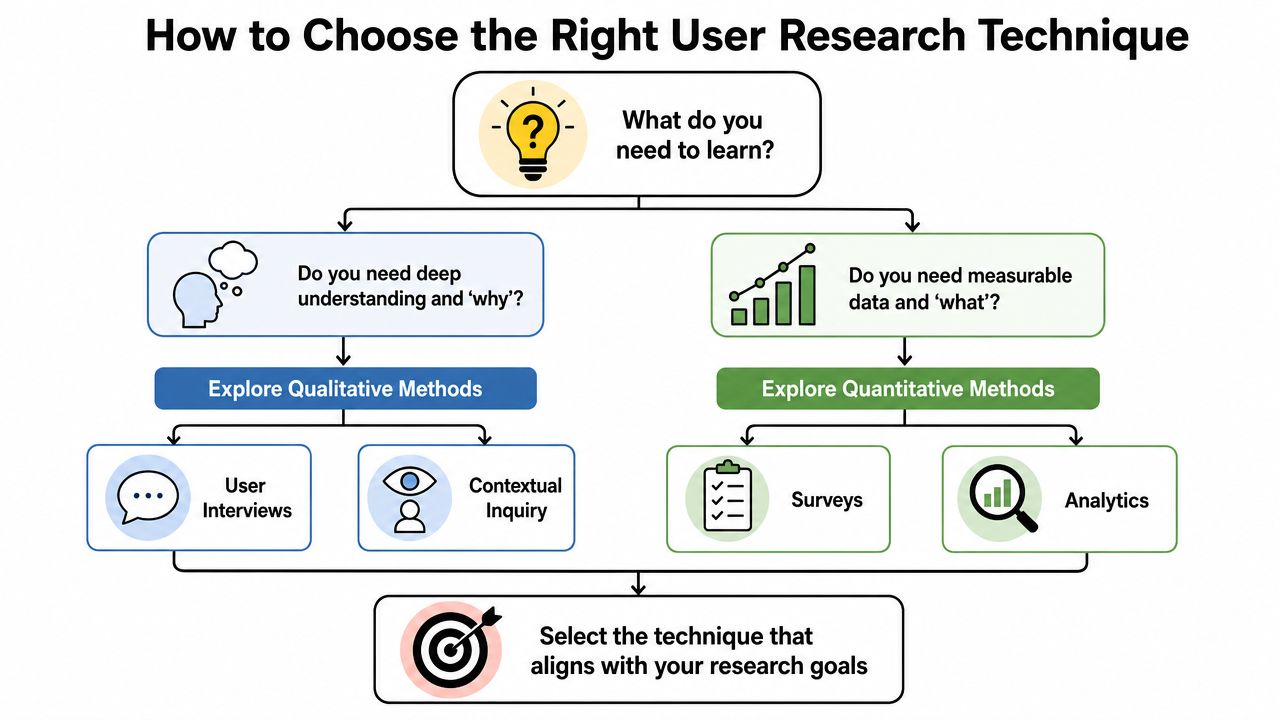
The right method depends less on research fashion and more on the decision in front of you. Teams usually get stuck because they choose based on familiarity. They run surveys because surveys are easy to launch, or they schedule interviews because interviews feel strategic.
A better approach is to choose based on stage, urgency, and evidence gap.
Match the method to the moment
When the team is still defining the problem, use methods that reveal context and language. Interviews, contextual inquiry, and exploratory usability sessions work well here because they expose the shape of the problem before the team locks into a solution.
When the team already has a design direction, use methods that validate and compare. That usually means usability testing, surveys, analytics review, or A/B testing depending on what's live and what can be measured reliably.
Here's a practical selection guide:
| Situation | Best-fit technique | Why it works |
|---|---|---|
| You don't understand user motivation | User interviews | Exposes needs, objections, and vocabulary |
| You suspect workflow friction outside the screen | Contextual inquiry | Reveals environment and process constraints |
| You need to test whether a design is understandable | Usability testing | Shows where users hesitate or fail |
| You need broad directional input | Surveys | Captures patterns across a larger audience |
| You need to compare live alternatives | A/B testing | Measures behavioral response between options |
| You need fast signal from existing user feedback | Review and support log analysis | Surfaces recurring problems without recruiting participants |
Budget changes the toolkit
A lot of research guidance assumes you have recruiting budget, participant incentives, and spare time from product and design. Many teams don't. That doesn't mean they should stop researching. It means they should use lower-friction inputs more intelligently.
One of the most underused options is the analysis of secondary behavioral proxies. App store reviews, support logs, implementation notes, Reddit threads, and community forums often contain plain-language descriptions of failure, confusion, and unmet expectations.
Recent data indicates that 68% of SaaS companies now integrate app review analysis into their research, reducing recruitment costs by 45% and uncovering 2.5x more edge-case failures than traditional usability testing, according to this discussion of alternative user research methods.
That doesn't make review analysis a replacement for every other method. It does make it a practical primary source when time is tight and participant access is limited.
A simple decision filter
Use this three-part filter before choosing a method:
- Need depth or breadth: If you need explanation, go qualitative. If you need confidence at scale, go quantitative.
- Need live behavior or existing evidence: If users are hard to recruit, start with support logs, reviews, and product analytics.
- Need discovery or validation: Don't use validation tools to discover the problem. Don't use discovery tools to declare scale.
The best research plans are rarely elaborate. They're well matched to the decision, honest about constraints, and disciplined about what the team needs to learn now instead of someday.
From Research Data to Smart Product Decisions
Collecting research is the easy part to admire. A wall full of sticky notes, a stack of transcripts, a dashboard with event streams, and a folder of survey exports can look like progress. It isn't. Value appears when a team translates raw input into decisions.
That's where many product efforts stall. Teams gather evidence, nod at the findings, and then keep the roadmap mostly unchanged because nobody turned the material into priorities, trade-offs, or design principles.
Synthesis is where the product direction gets clearer
For qualitative work, affinity mapping is still one of the simplest ways to turn observations into patterns. Group similar user quotes, behaviors, and pain points. Name the pattern in plain language. Then ask what product decision that pattern should influence.
For quantitative work, the challenge is different. Teams need to avoid reading every metric as equally important. Focus on the signals tied to the user task, not vanity movement around the edges.
A practical synthesis routine looks like this:
- Cluster evidence by problem: Don't organize by research session. Organize by recurring issue.
- Separate symptom from cause: “Users abandon here” is not the same as “users don't trust the step.”
- Write decision-ready findings: Each insight should imply a product action, test, or question.
- Flag uncertainty: Good synthesis includes what the team still doesn't know.
Research becomes strategic when it changes prioritization, not when it produces a polished readout.
AI can accelerate analysis if the inputs are governed
The value of modern tooling becomes apparent. Support tickets, reviews, free-text survey responses, and chat logs create a huge amount of unstructured feedback. AI can help summarize, classify, and surface emerging themes much faster than manual review alone.
But speed can create a new problem. If teams dump unclean, mixed-quality input into an AI workflow, they often get shallow summaries that sound plausible and hide important edge cases. The answer isn't to avoid AI. It's to use it with structure.
For leaders thinking about user behavior, product trust, and decision quality, Wonderment's perspective on user experience psychology is a useful complement because it connects observed behavior to the cognitive patterns behind it.
Good outputs look operational
A strong research synthesis should lead to artifacts the product team can use immediately:
- Prioritized pain points tied to user and business impact.
- Design principles that help teams evaluate future ideas.
- Experiment hypotheses that can be tested in product.
- Data requirements for AI features that depend on trustworthy inputs.
When synthesis is weak, teams say they're customer-centered while making the same internal decisions. When synthesis is strong, research starts influencing architecture, roadmap order, onboarding language, and model behavior.
Supercharge Your Research with AI and Modern Tooling
Many AI projects stall for a simple reason. Teams try to scale intelligence before they have a disciplined way to capture, structure, and govern user insight. Microsoft's overview of AI app challenges points to the same pattern. Weak data quality and thin pipelines break business value long before model quality becomes the primary issue.
That matters for user research because modernization changes the job. Research no longer ends at a slide deck or a readout. The findings need to feed recommendation systems, copilots, triage workflows, and personalization logic in ways product and engineering teams can audit.
Modernization needs operating rules
Teams building AI into custom software need clear standards for prompts, context windows, logging, access control, and cost management. Without those controls, research insights get flattened into generic labels, and product leaders lose confidence in how decisions were made.
The trade-off is straightforward. More automation speeds analysis, but it also increases the risk of hiding edge cases, over-weighting noisy feedback, or pushing flawed assumptions into production. Strong teams treat research inputs the same way they treat application inputs. They define what data is allowed, how it is classified, who can review it, and where it connects to downstream product behavior.
For commerce teams especially, research should inform more than interface changes. It shapes merchandising, support flows, trust signals, and personalization rules. Carti's customer experience strategies offer a useful adjacent view for leaders working on experience quality across the full customer journey.

Where tooling actually helps
The useful tooling layer is operational. Wonderment Apps includes a prompt management system for teams adding AI to existing software, and the value shows up in a few specific ways:
- Prompt vault with versioning: Teams can track changes to analysis logic as user language, taxonomies, and business rules evolve.
- Parameter manager for internal database access: AI workflows can pull from controlled internal sources instead of scattered manual inputs.
- Logging across integrated AI systems: Product, engineering, and operations teams can review how prompts and outputs perform over time.
- Cost manager for cumulative spend: Leaders can see whether an AI-assisted workflow is producing enough value to justify usage.
Those controls matter once research starts powering live product behavior. An insight that informs an onboarding flow is useful. An insight that also shapes retrieval, routing, summarization, or recommendation logic needs traceability.
If your team is deciding how to apply models inside a product, this guide on how to apply artificial intelligence in software products is a practical next read.
Cleaner inputs produce better product decisions
AI does not replace research judgment. It extends the reach of a well-run research system. The teams getting results use classic UX discipline to define the questions, then use modern tooling to manage scale, consistency, and production risk.
That is the connection between user research and AI modernization. Good research identifies where intelligence improves the product, where simple rules are enough, and what data foundation the application needs before any model ships.