

Your app probably isn't broken. It's just starting to feel slow in the ways buyers notice first.
Support teams still copy and paste answers. Product managers still wait on analysts for basic pattern spotting. Customers compare your experience to newer apps that summarize, recommend, predict, and respond in seconds. Meanwhile, your core platform still does the job, so a full rebuild feels expensive, risky, and unnecessary.
That's the exact moment when AI integration starts making sense.
The catch is that adding an AI model to a web app or mobile app isn't like dropping a chat box into a landing page. Once AI touches production software, you have to manage prompts, permissions, model behavior, logs, costs, and fallback paths. If you don't, you get the two symptoms teams complain about most: inconsistent outputs and bills that climb faster than the business value.
That control layer is where modern AI programs either become durable products or expensive demos.
Why Your App Needs an AI Upgrade Now
A lot of companies are sitting on solid software. The workflows are proven. The users are there. Revenue depends on the system. But the product no longer feels modern because the interface can't assist, recommend, summarize, or automate in the way customers now expect.
That doesn't mean you need to throw the whole thing away.
AI integration services exist for this exact situation. They let teams add intelligence to the software they already have, whether that's a desktop operations tool, a mobile customer app, an internal portal, or a legacy platform that still runs the business. The point isn't to replace your software. The point is to make it smarter without causing a renovation disaster.
The category is already large and getting larger. The global AI Integration Services market was valued at $54.55 billion in 2026 and is projected to reach $117.79 billion by 2034, with a 10.1% CAGR between 2026 and 2034, according to market projections for AI Integration Services. That projection matters because it reflects a shift in buying behavior. Companies aren't just testing AI anymore. They're budgeting for the engineering work required to fit it into real operations.
What pressure looks like in practice
Usually it starts with one of these signals:
- Your competitors ship smart features first: Search gets more useful, support gets faster, and recommendations get more relevant.
- Your team handles repeatable work manually: Staff still classify tickets, draft replies, tag content, or route requests by hand.
- Your software can't keep up with demand for personalization: Users want answers and offers that reflect their history, context, and intent.
- Your leadership wants AI, but not chaos: They want visible ROI, not another disconnected pilot.
Practical rule: If your product already has workflows, users, and data, integration is usually a better modernization path than a ground-up rebuild.
For teams evaluating implementation options, it's useful to look at how others are structuring modern app delivery. RapidNative's approach to AI app building is a good example of how teams are combining AI capabilities with app development patterns that move quickly without treating the product like a prototype.
The hidden reason timing matters
The technology is ready, but timing is really about process maturity. The longer a company waits, the more likely it is that a rival ships assistant features, predictive workflows, or automation into the same customer journey first.
That said, speed without control backfires. AI outputs drift when prompts change across teams. Costs balloon when nobody tracks usage at the prompt or feature level. Security gets messy when internal data access is stitched together ad hoc. Those are integration problems, not model problems. Fix them early, and an AI upgrade becomes a practical modernization move instead of an expensive science fair project.
Understanding AI Integration Services
Think of AI as a powerful engine that doesn't know your roads, traffic rules, or destination. Your software already knows those things. AI integration services are the work required to connect that engine to the rest of your product so it can move in the right direction safely.
A simpler analogy is plumbing. The model is the water heater. Your app, databases, and business logic are the pipes, valves, fixtures, and pressure controls. If someone installs the heater without understanding the rest of the house, you don't get reliable hot water. You get leaks, pressure problems, and irritated people.
What teams are actually buying
In practical terms, AI integration services usually include:
- Model fit assessment: Teams compare candidate models against real requirements such as performance, cost, and replaceability.
- Architecture design: The model layer is separated from business logic so the app stays stable even if the model changes.
- API integration: Engineers build secure connections with authentication, data mapping, and error handling.
- Testing and validation: The system is tested under normal conditions, edge cases, and high-load scenarios so it behaves predictably.
- Monitoring and maintenance: Teams watch output quality, failures, latency, and operating cost after launch.
That's why integration is different from “using AI.” A prototype can call a model. A production application has to route the right data, enforce permissions, recover from bad responses, and return useful output to the user without slowing the whole app down.
Good integration makes AI feel native to the product. Bad integration makes it feel stapled on.
Why this matters for modern software teams
For business leaders, value is operational. AI integration into custom software enables applications to scale and adapt as business needs change, while helping teams process large volumes of data quickly enough to support better decisions, as described in this overview of enhancing custom software with AI.
That same shift is changing discovery and content strategy too. If your software business depends on being found and understood in AI-assisted search experiences, it's worth reading about optimizing for AI search engines because integration doesn't stop at the product layer. It increasingly affects how your brand shows up in answer-driven environments.
For a more grounded definition of the term itself, Wonderment's guide on what AI integration means in software is a useful companion.
What AI integration services are not
They are not magic. They won't rescue a confusing product or replace weak business processes on their own.
They also aren't limited to chat interfaces. Strong implementations show up in mobile checkouts, internal dashboards, clinical workflows, fraud reviews, recommendation engines, smart search, content operations, and support systems. In other words, the value usually comes from embedding AI into existing moments of work, not from adding a novelty feature users ignore after the first week.
The Core Components of AI Integration
The cleanest AI systems aren't built around the model. They're built around control.
That surprises a lot of teams at first. They assume the hard part is choosing between models. In practice, the hard part is building the layers around the model so the feature behaves consistently across web, mobile, internal tools, and downstream systems.
Start with architecture, not prompts
A strong implementation uses a modular architecture that separates the model layer from business logic. That way, your developers can update prompts, swap providers, or tune workflows without breaking checkout, support routing, patient intake, or whatever your core application does.
Quantiphi's write-up on AI agent integration patterns highlights a few essentials that hold up in production: reliable API connections, authentication, error handling, data mapping, and rigorous testing across normal, edge, and high-load conditions. It also emphasizes model fit assessment, which sounds boring until you skip it and discover the “smart” feature is too costly, too slow, or too hard to replace.
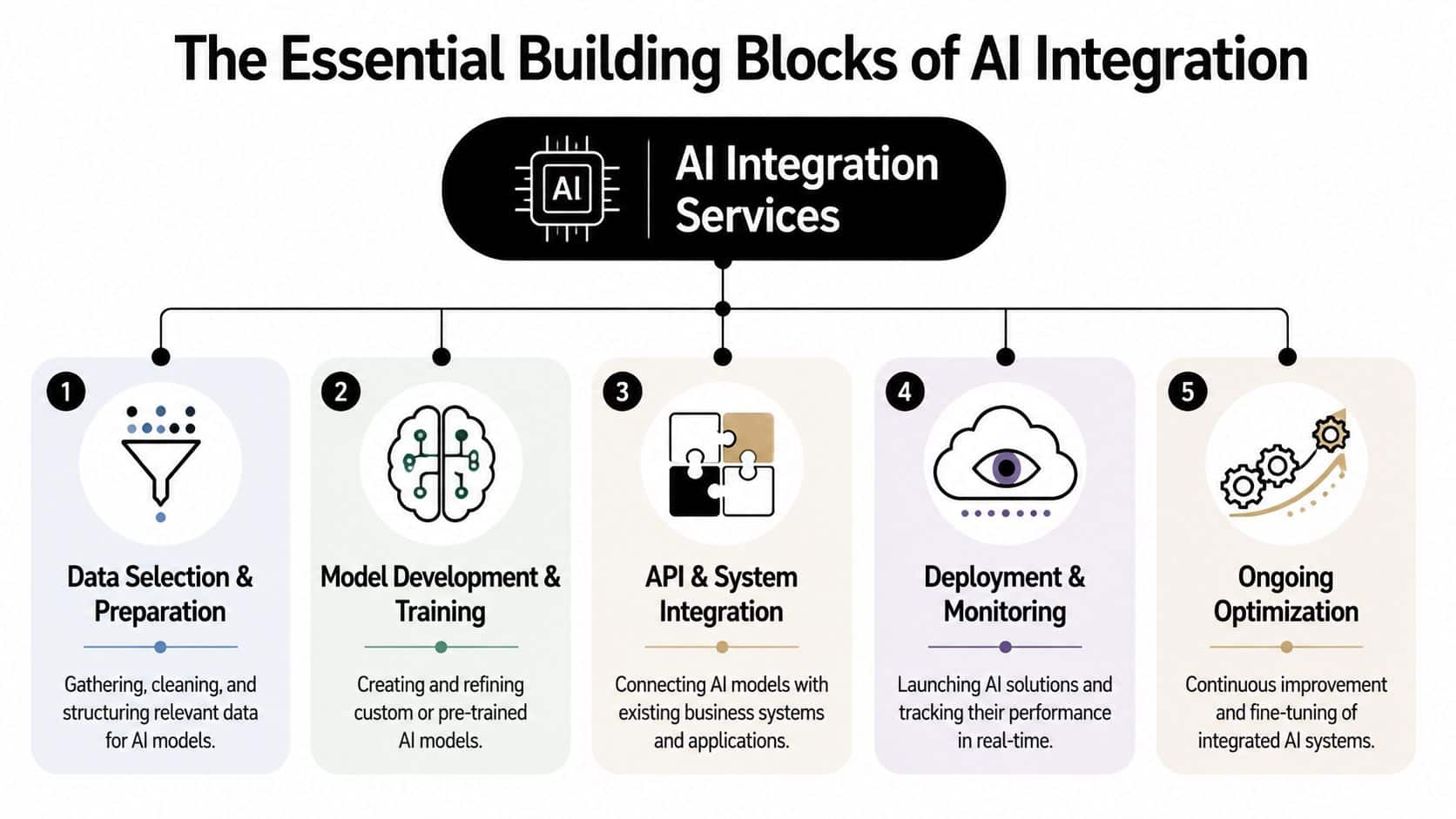
The five parts that usually decide success
Here's the stack commonly needed:
| Component | What it does | What goes wrong when it's weak |
|---|---|---|
| Data preparation | Cleans, structures, and routes the right context to the model | Garbage in, vague output, hallucinated actions |
| Model selection | Matches model capability to the job | Overpaying for simple tasks or underpowering complex ones |
| API and connector layer | Bridges AI with ERP, CRM, mobile apps, and internal tools | Broken workflows, auth issues, brittle integrations |
| Deployment and monitoring | Runs the feature safely in production | Silent failures, rising latency, no audit trail |
| Ongoing optimization | Improves prompts, workflows, and routing over time | Stagnant output quality and growing maintenance drag |
Prompt management is part of the product
This is the layer many teams underestimate.
If prompts live in scattered code files, shared docs, chat threads, or an engineer's memory, the product becomes fragile. One small wording change can alter outputs across customer support, search, recommendations, or admin workflows. That's manageable in a test environment. It's dangerous in production software.
Field note: Treat prompts like application logic. Version them, review them, log them, and tie them to outcomes.
Prompt management also matters because different user journeys need different instructions, tools, and guardrails. A mobile support assistant may need concise, policy-safe answers. An internal analyst workflow may need richer reasoning and deeper database access. If you handle both through one loosely managed prompt setup, consistency disappears fast.
Operations matter after launch
A lot of providers talk about integration as if launch is the finish line. It isn't. Enterprise-grade AI integration requires a lifecycle approach that includes readiness work, governance, architecture, development, and post-deployment monitoring, as outlined in this discussion of AI integration companies and delivery scope.
That post-launch phase is where teams discover whether the feature can scale. Are responses still useful under heavier traffic? Can support trace why the model answered a certain way? Can product teams compare prompt versions? Can engineering isolate a problem to the model, the retrieval layer, or the connector?
If those answers are unclear, the system isn't mature yet. It's only live.
Common Architectures and Sector Use Cases
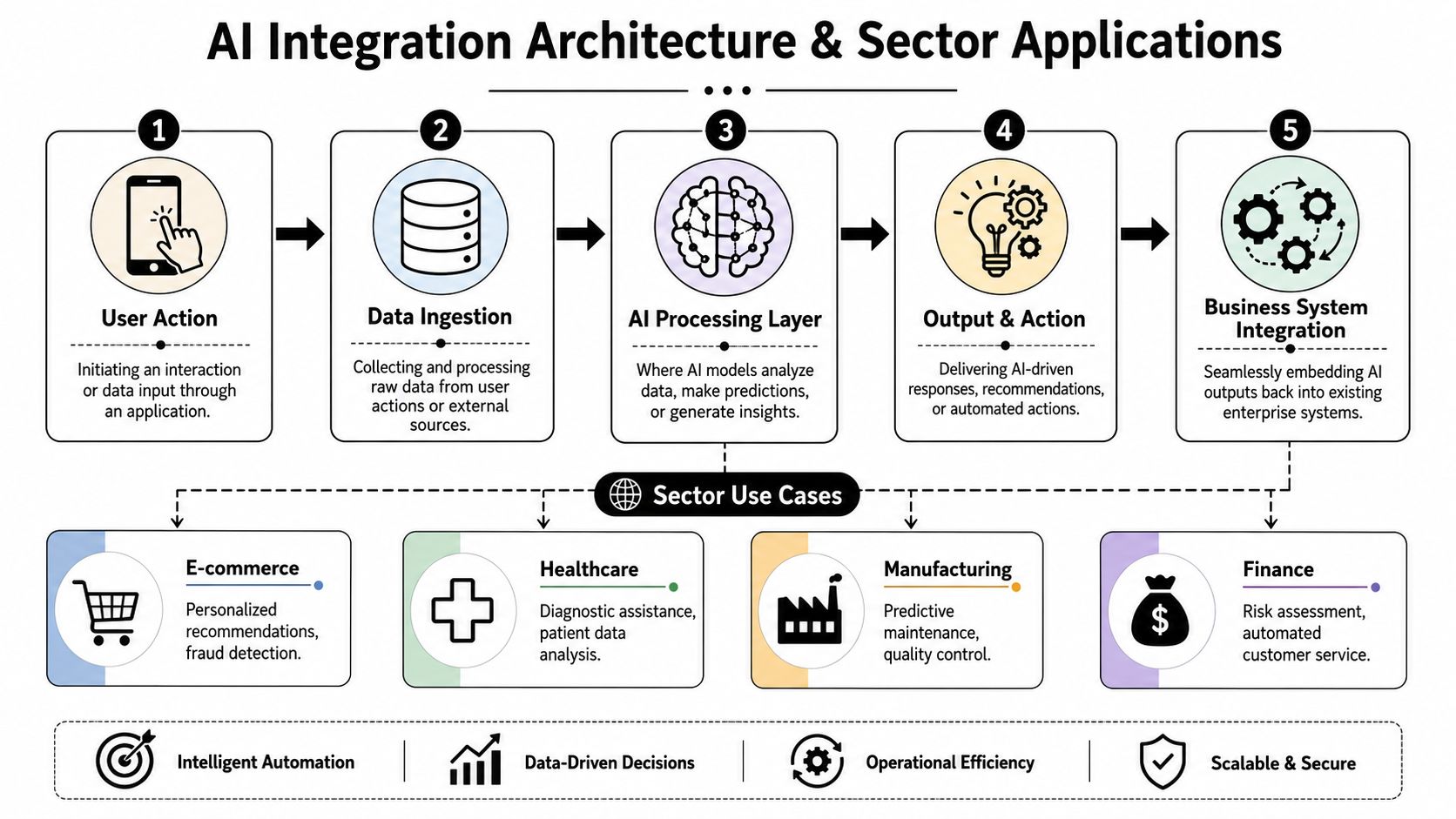
Most production AI flows follow a simple pattern. A user does something in an app. The app sends relevant context through an integration layer. The model processes the request. The result comes back into the business system and triggers a useful action.
That flow sounds abstract until you watch it happen inside a real product.
A common architecture in plain English
A customer taps a button in a mobile app. The application captures the request and user context. The integration layer pulls in account data, product metadata, or prior activity. The AI processing layer generates a prediction, summary, recommendation, or response. Then the application turns that result into something the user can act on.
For legacy systems, this often happens through secure APIs and custom connectors rather than a full replacement. That's one of the most practical modernization paths. This overview of AI integration for legacy applications describes how organizations embed capabilities such as natural language processing, predictive analytics, and computer vision into existing ERP, CRM, and cloud software without rebuilding from scratch.
What this looks like by sector
Different industries use the same pattern in different ways.
- Ecommerce and retail: Product discovery, personalized recommendations, support automation, and fraud-related checks fit naturally into storefronts and operations tools.
- Healthcare and wellness: Intake assistance, triage support, patient communication, and data analysis can reduce friction if governance is handled carefully.
- Fintech and SaaS: Teams use AI for risk review, automated service interactions, document handling, internal copilots, and workflow routing.
- Media and content platforms: Search enrichment, summarization, metadata generation, and editorial assistance often provide early wins.
Why smaller teams are using it too
This isn't limited to large enterprises with big innovation budgets. Small businesses are already using AI integration services at a rate of 61 percent to streamline operations, automate customer support, and improve marketing, according to Cloudester's write-up on AI integration services for small businesses.
That stat matters because it changes the old assumption that AI modernization is only for giant companies. A smaller retailer might use AI to improve merchandising and customer support. A clinic might use it to route patient questions more effectively. A SaaS company might build smart onboarding and admin assistance into its product without hiring a giant operations team.
The architecture doesn't have to be exotic. It has to be dependable, secure, and fitted to the workflow users already have.
One caution that shows up in regulated work
Healthcare and fintech teams face a harder version of the same challenge. The issue usually isn't whether AI can help. It's whether the data handling, permission model, and auditability are ready for production use.
That's why the best sector-specific implementations start with the workflow and the risk boundary, not with the model demo. In regulated environments, mature integration design is what turns AI from an interesting feature into software people can trust.
Your AI Integration Implementation Roadmap
Most AI projects don't fail because the model is weak. They fail because the groundwork is missing.
That's why the roadmap should start before any build sprint, vendor shortlist, or prompt workshop. If your data is fragmented, your permissions are unclear, or your software stack can't support reliable integration, the pilot may look good in a meeting and still collapse in production.
Step one is readiness
According to Gartner, 78% of enterprise AI pilots fail to move into production, often because of poor data quality or immature infrastructure, as cited in this review discussing AI readiness and deployment barriers. That's the strongest argument for starting with a readiness assessment instead of a flashy proof of concept.
A readiness review should answer basic but uncomfortable questions:
- Data quality: Is the source data current, structured enough, and relevant to the intended task?
- System access: Can the AI feature securely reach the systems it needs without unsafe workarounds?
- Governance: Who approves prompts, model changes, and data access rules?
- Operational ownership: Which team monitors outputs, failures, and user impact after launch?
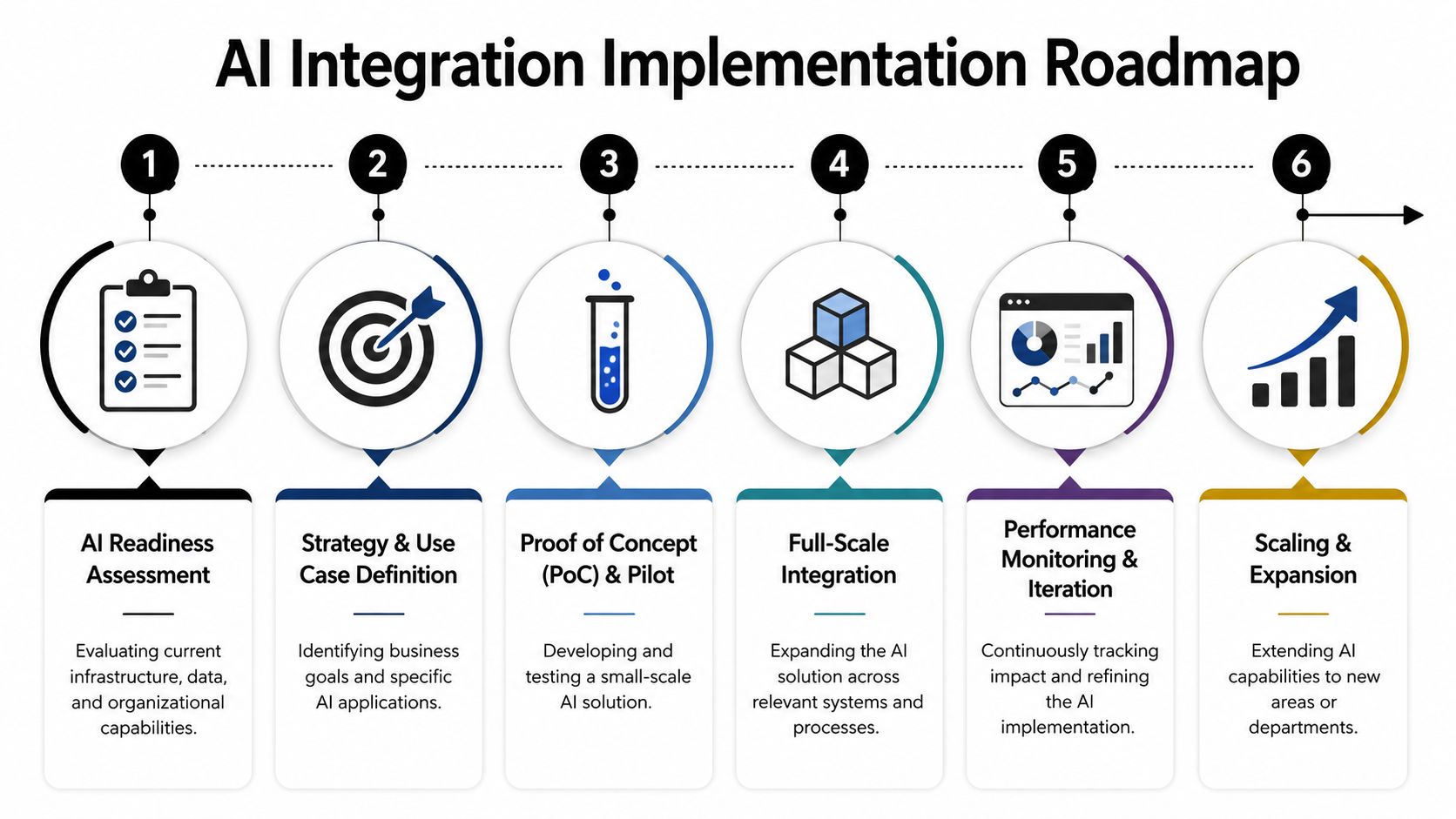
A practical rollout sequence
The order below works because it reduces risk while keeping momentum:
- Assess the environment. Audit data sources, legacy dependencies, security requirements, and workflow bottlenecks.
- Choose one use case that matters. Pick a problem with visible business value and a manageable integration surface.
- Build a constrained pilot. Define scope tightly. Add fallback rules and human review where needed.
- Integrate with the production system. Don't stop at a sandbox demo. Connect it to the application where the work happens.
- Measure behavior, not just output. Track quality, reliability, usage patterns, and operating cost.
- Expand carefully. Add adjacent use cases only after the first one is stable.
Operational advice: The best pilot isn't the flashiest one. It's the one your team can support, govern, and improve after launch.
Don't skip modernization planning
AI integration gets easier when it's tied to a broader product modernization effort. If your platform already needs refactoring, API cleanup, or UX redesign, combine those decisions instead of treating AI as a sidecar project. Wonderment's overview of an application modernization roadmap is a useful lens for that broader planning.
What a good roadmap feels like
It feels disciplined. There's a defined owner, a clear use case, a known data boundary, and a plan for measurement.
What doesn't work is the opposite approach. Teams spin up multiple experiments, wire them into weak data sources, let prompts sprawl across repos and docs, and only ask about compliance or cost after users adopt the feature. At that point, the cleanup is harder than the original build.
Choosing the Right Partner and Tools
Selecting an AI integration partner is less like hiring a designer and more like choosing a general contractor for a renovation in a house you still live in. The work touches real operations. The team has to respect uptime, security, and constraints, not just demos.
That means the right partner should be able to discuss architecture, mobile and web delivery, fallback behavior, prompt governance, testing, and post-launch monitoring in one conversation. If they only talk about model quality, they're selling the engine and ignoring the vehicle.
The shortlist checklist
Use a simple filter when comparing vendors:
- Production experience: Have they integrated AI into software that people already depend on, not just prototypes?
- Platform range: Can they work across desktop, web, mobile, APIs, and legacy systems?
- Governance thinking: Do they ask about data access, logging, testing, and review workflows early?
- Support model: Will they help after launch when prompts drift, usage grows, or models change?
- Tooling transparency: Can they show how prompts, logs, and spend are managed day to day?
A broader review of AI development services and partner capabilities can help frame those questions before you go into vendor conversations.
The issue many teams discover late
Token cost control often shows up after the feature is already popular. By then, the damage is harder to contain.
A 2025 McKinsey report found that 63% of companies exceeding $50K per month in AI token costs lack automated monitoring dashboards, which leads to budget pressure and weaker ROI. That's why prompt management and usage visibility are not nice-to-have admin features. They're operating controls.
Here's where many implementations fall apart:
| Problem | What teams do | What works better |
|---|---|---|
| Prompt sprawl | Store prompts across code, docs, and chat threads | Use versioned prompt storage with controlled updates |
| Blind spending | Review invoices after the fact | Track cumulative spend continuously and by integration path |
| Weak debugging | Guess why an output changed | Log requests, responses, parameters, and prompt versions |
| Unsafe data access | Let prompts pull broad internal context | Gate access through managed parameters and explicit rules |
The management layer that makes AI sustainable
One practical option in this category is Wonderment Apps, which offers an administrative prompt management system that plugs into existing software to support AI modernization. Its feature set includes a prompt vault with versioning, a parameter manager for internal database access, a logging system across integrated AIs, and a cost manager that shows cumulative spend.
That type of control layer matters because it separates experimentation from operations. Developers can refine prompts without losing track of what changed. Product owners can understand where usage is coming from. Business leaders can see whether the feature is trending toward durable value or budget trouble.
Teams don't lose control of AI all at once. They lose it one undocumented prompt change, one missing log, and one surprise invoice at a time.
The partner you choose should understand that pattern and build against it from day one.
Real Outcomes and Your Next Step
The companies getting value from AI integration usually aren't chasing novelty. They're removing friction from software people already use.
That might mean a retail app that gives shoppers more relevant results, a fintech workflow that helps staff review incoming requests faster, or a healthcare platform that improves how information is routed and summarized. The visible outcome is a smarter product. The less visible outcome is often more important: cleaner operations, faster decisions, and a system that can keep evolving without a rebuild.
The practical lesson is straightforward. Add AI where it strengthens an existing workflow. Keep the architecture modular. Treat prompt management like application logic. Put cost visibility in the same conversation as feature design. Choose a partner that can handle both engineering depth and operational discipline.
If you're modernizing custom software for web, desktop, or mobile, sustainable ROI usually comes from the control layer, not just the model layer.
If you want to modernize your application without losing control of prompts, logs, and AI spend, take a look at Wonderment Apps. A live demo is the fastest way to see how their prompt management system fits into an existing product stack and how it can help your team manage versioning, internal data access, integrated AI logging, and cumulative cost in one place.