

A missed shipment rarely starts as a shipping problem. It starts as a visibility problem, then turns into a customer service problem, then lands on the CFO's desk as a margin problem.
That's why supply chain software development services matter so much in 2026. The true task isn't building another dashboard. It's building an operating layer that connects procurement, inventory, warehousing, transportation, customer communication, and now AI-driven decision support without making daily operations more fragile.
A lot of leaders are in the same spot right now. They have an ERP that only tells part of the story, warehouse workflows that live in a separate tool, carrier data trapped in portals, and planning logic buried in spreadsheets. They also want to use AI, but they know that dropping a model into a messy workflow won't fix the mess. AI needs structure, context, controls, and a way to manage prompts, outputs, parameters, logs, and spend once it moves from experiment to production.
Your Supply Chain Is Talking What Is It Telling You
The warehouse says inventory is available. Customer support says the order is delayed. Finance says the order already posted. The carrier says the label was created, but nothing moved. Operations calls this “one issue.” In practice, it's four systems disagreeing at once.
That kind of chaos usually means the supply chain is producing signals faster than the business can interpret them. Every delayed handoff, duplicate SKU, missed scan, and stale ETA is useful data. The trouble is that many teams can't hear it clearly because their tools were bought in pieces and integrated later, if at all.
What the noise usually means
A missing shipment often points to one of these problems:
- Broken state transitions: An order changed status in one system but never updated downstream.
- Inventory drift: The system thinks stock exists, but the bin count says otherwise.
- Exception blindness: Teams see the problem only after a customer reports it.
- Disconnected ownership: Warehouse, procurement, and transportation all have partial truth.
Business leaders often treat these as staffing issues first. Sometimes they are. More often, the team is doing heroic work inside a weak operating model.
Practical rule: If your best employees spend their morning reconciling spreadsheets, your software architecture is asking humans to do integration work.
Custom supply chain software works best when it translates operational friction into traceable events. Instead of asking three teams to explain what happened, the system shows where the handoff failed, what inventory state triggered the issue, which downstream process stalled, and what action should happen next.
That's also where modern AI starts to become useful. Not as a magic black box, but as an assistant layered onto structured operations. It can summarize exceptions, flag unusual order patterns, suggest replenishment actions, and surface probable causes. But once prompts begin influencing workflows, leaders need a control plane for how that AI behaves. Prompt versions, model settings, database access boundaries, and usage costs can't live in random notes and Slack threads.
For a grounded look at how ERP choices shape that operational picture, Wistec's supply chain ERP insights are worth reviewing. They're a good reminder that visibility starts with system design, not wishful reporting.
Core Types of Supply Chain Software
Most supply chains don't run on one platform. They run on a stack. If you want that stack to work, you need to know what each layer is supposed to do.
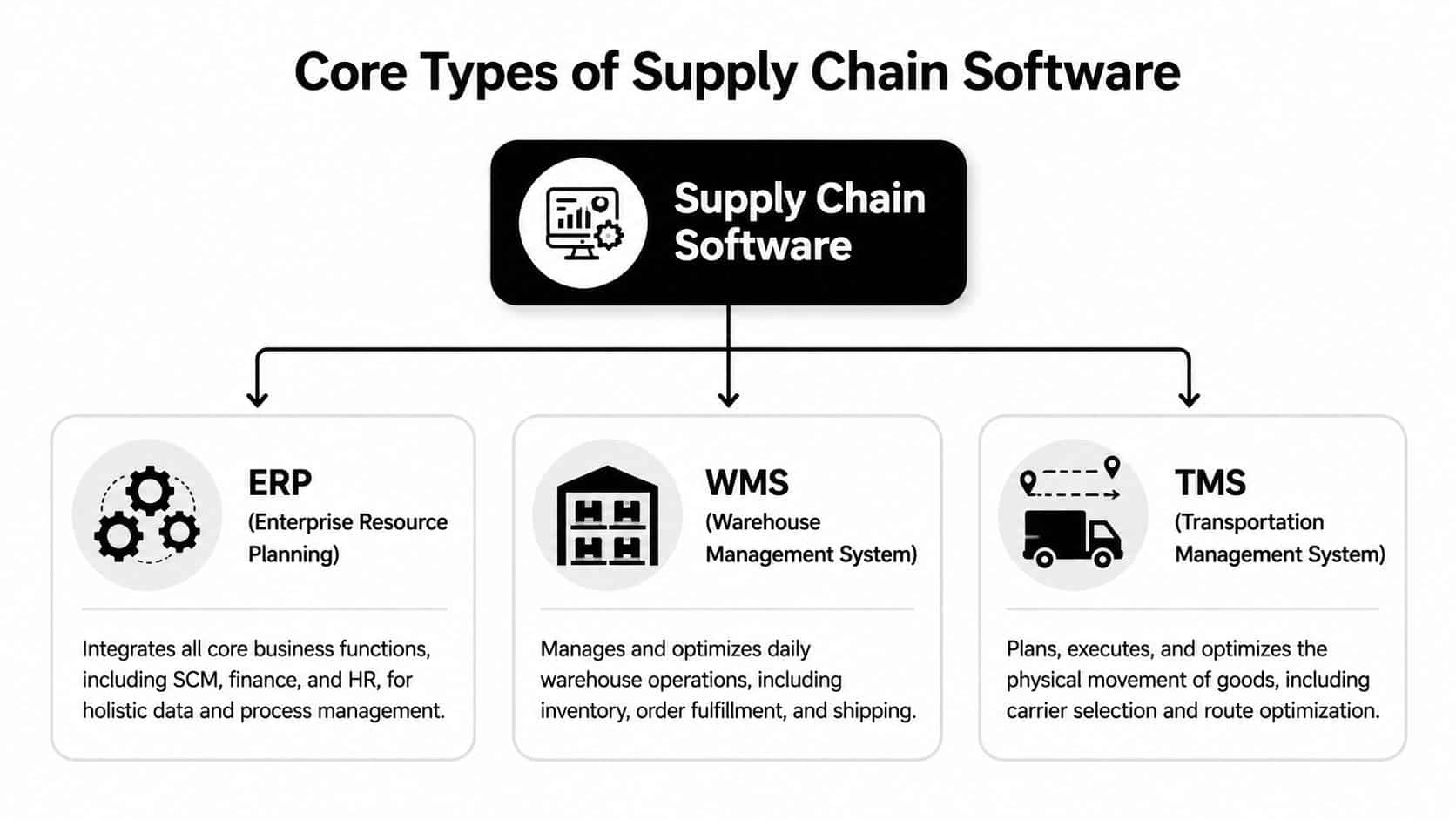
ERP is the brain
Your ERP coordinates planning, finance, purchasing, and core business records. It's where many companies define product, supplier, order, and accounting truth. That's why executives often assume the ERP should “just handle supply chain.”
It usually can't handle all of it well.
ERPs are excellent at broad process control and record consistency. They're usually less elegant when warehouse teams need fast scanning flows, transportation teams need carrier-specific logic, or operations leaders want real-time exception handling. If you're comparing ERP-led initiatives, this guide to ERP software development services helps frame where customization makes sense and where a specialized system should carry the load.
WMS is the hands and TMS is the legs
A WMS runs warehouse execution. Receiving, putaway, slotting, picking, packing, cycle counts, and returns all live here when the operation is mature enough to need precision inside the four walls.
A TMS handles movement. Carrier selection, routing, shipment planning, tracking events, freight visibility, and delivery coordination fit here.
These systems succeed or fail based on fit.
- A weak WMS creates labor waste because users fight the interface instead of moving product.
- A weak TMS creates late deliveries because transportation decisions happen after the warehouse has already committed to a bad plan.
- An overloaded ERP becomes a bottleneck because too much operational execution is forced through a tool designed for broader control.
The nervous system matters most
The best supply chain software development services don't stop at system selection. They connect the stack so data can move with context.
That means syncing master data cleanly, aligning status models, and deciding which system owns each event. It also means adding the “nervous system” layer that many legacy environments lack: barcode and scanner inputs, IoT tracking where appropriate, mobile workflows for floor teams, alerting engines, and AI services that interpret operational signals rather than just storing them.
Custom software often sits between these core systems and the business. It becomes the orchestration layer that presents one usable operational picture instead of three conflicting ones.
How Modern Supply Chain Software Is Built
Supply chain software breaks when teams build it like a brochure site with a database attached. Operations software has to survive bad scans, late carrier responses, duplicate records, partial outages, and impatient users who need the screen to load right now.
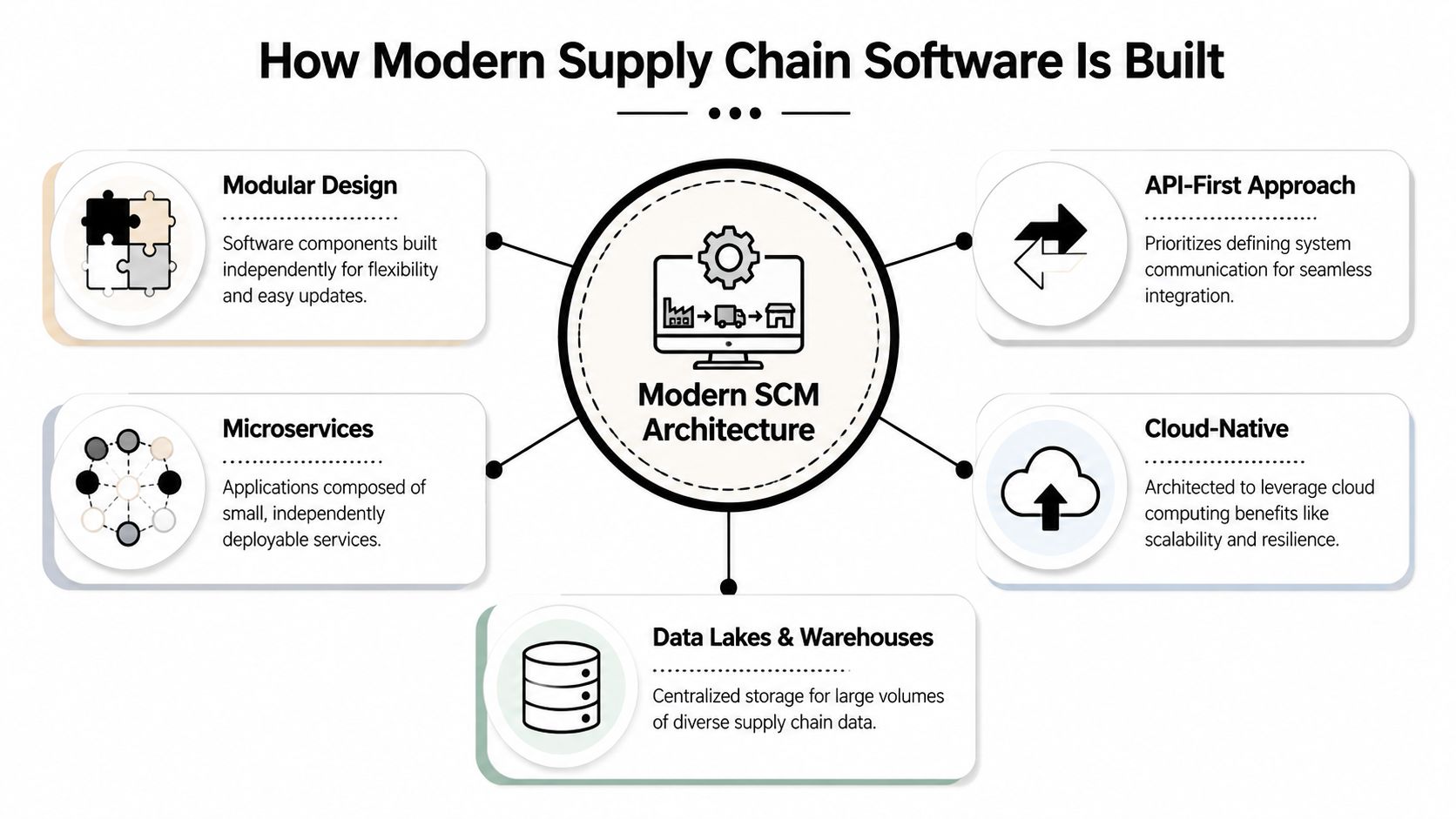
That's why modern SCM architecture starts with separation of concerns. Order ingestion, inventory availability, shipment tracking, returns, forecasting, and reporting shouldn't all live in one giant codebase with one risky deployment path.
Modular architecture beats monolith panic
A modular, API-first build gives you room to evolve. You can replace a carrier integration without touching inventory logic. You can add a forecasting service without rewriting warehouse execution. You can expose clean APIs to ecommerce, procurement, or customer portals without letting every system talk to the database directly.
The practical benefits are straightforward:
- Safer releases: Smaller services reduce blast radius when something fails.
- Cleaner integrations: ERP, 3PL, carrier, and storefront connectors can be maintained independently.
- Better scaling: High-volume transaction paths can scale without overprovisioning the entire platform.
Not every supply chain platform needs a pure microservices model. Some don't. But every serious one needs clear domain boundaries.
Integration is the product
In supply chain environments, integration work isn't a side task. It is the product.
A platform can have beautiful screens and still fail if supplier portals, accounting systems, order sources, and logistics providers don't exchange data reliably. The hard questions are almost always integration questions. Which system owns inventory reservations? When does a shipment become billable? What happens when a carrier webhook arrives before the ERP update? How is a backorder state represented across channels?
Build the event model before you obsess over the dashboard. If the system can't explain what changed, when, and why, the reporting layer will only make confusion prettier.
A technically sound SCM build should be designed for integration-heavy, high-availability operations, including modular architecture, ERP and logistics connectors, parallel quality assurance for functional, performance, usability, and security testing, plus CI/CD automation, cloud automation, infrastructure hardening, and production deployment with documentation and user training, as described in ScienceSoft's SCM delivery overview.
Reliability has to be designed in
Teams often underestimate non-functional requirements until go-live week. Then they discover the scanner workflow is slow on warehouse Wi-Fi, the rate-shopping integration times out during peak order windows, and permission models are too coarse for real operations.
A resilient build plans for those issues early. That means environment automation, auditability, rollback strategy, test data discipline, and clear fallback behavior when an external dependency fails. Fancy AI features can wait. The operational spine can't.
Your Supply Chain Software Implementation Roadmap
Custom software feels risky when the project starts as one giant wish list. It gets manageable when the work is broken into decisions, deliverables, and operational checkpoints.
Phase one and two shape the whole outcome
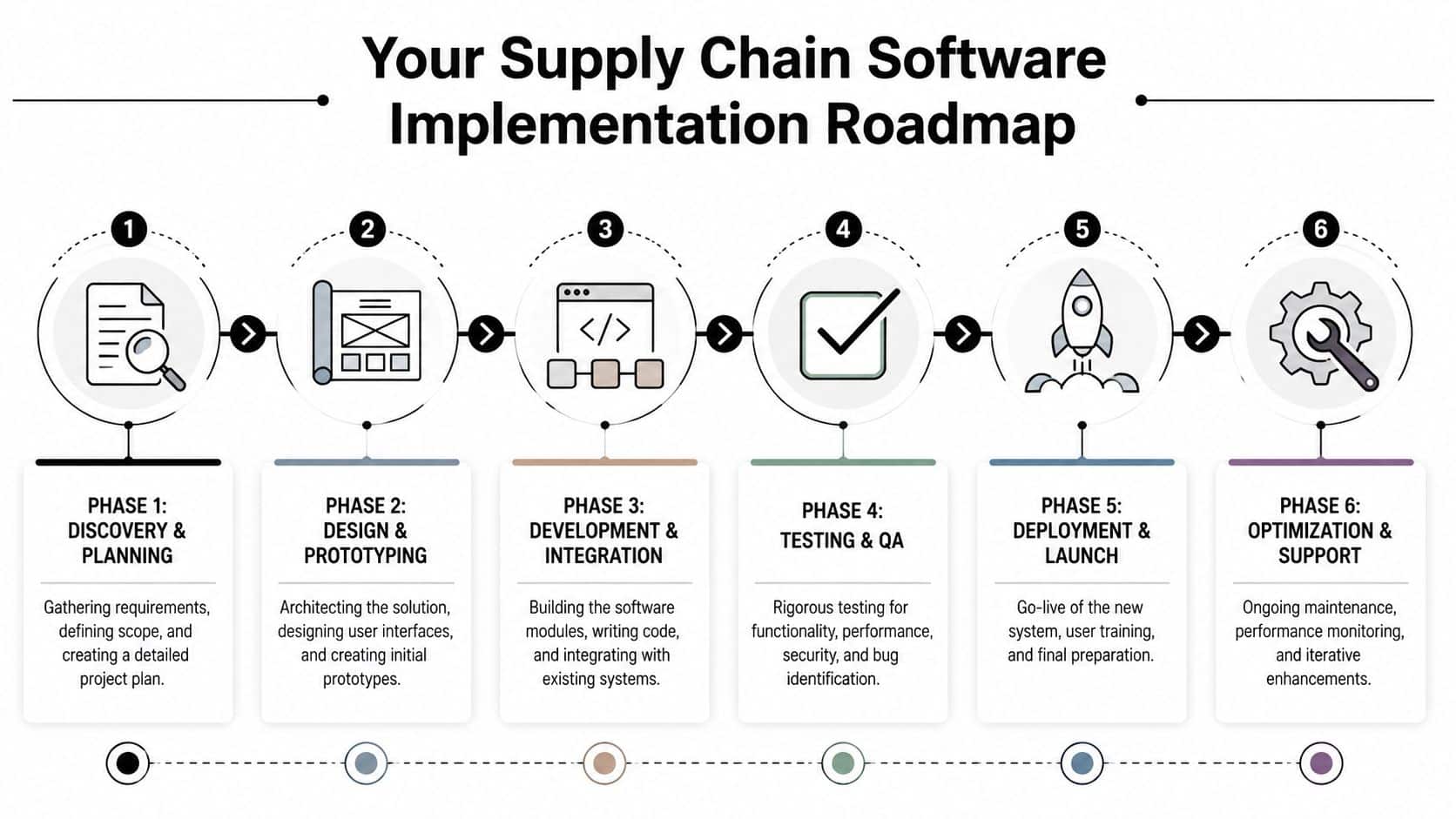
Discovery and planning is where good teams save you from expensive optimism. They map current workflows, identify systems of record, define failure points, and decide what the first release must do well. This phase should also flush out hidden complexity like customer-specific routing rules, supplier data quality problems, and returns edge cases.
Design and prototyping matters just as much. Warehouse supervisors, planners, customer service leads, and finance users all need different views into the same operation. If the UX is clumsy, teams will route around the new platform and keep using side spreadsheets.
A few signs the early phases are healthy:
- Users are in the room: Real operators review flows, not just department heads.
- Scope is ranked: The first release solves a narrow set of painful workflows well.
- Data ownership is explicit: Everyone knows which system owns what.
Development works best when execution comes first
Custom supply chain software delivers the most value when it's architected around execution first, then extended into optimization. That means inventory accuracy, order processing, and transport visibility should come before more ambitious forecasting and automation features. Leanware also highlights the importance of exposing operational KPIs such as fill rate, stockout frequency, inventory turnover, delivery performance, cost per shipment, warehouse productivity, supplier lead-time variability, and return rates in its supply chain software development guide.
That guidance lines up with what tends to work in the field. Teams that start with “AI forecasting for everything” before they can trust available-to-promise inventory usually end up disappointed.
Testing, launch, and the first 90 days
The late stages are where discipline shows.
- Development and integration should move in slices, not one massive reveal. A receiving flow, an inventory sync, or a shipment status pipeline can be validated before the entire platform is “done.”
- Testing and QA has to include operational reality. Test with scanners, mobile devices, poor network conditions, partial data, and failed API responses.
- Deployment and launch should include runbooks, user permissions, rollback plans, and training by role.
- Optimization and support starts on day one of go-live. Teams need a queue for friction reports, adoption feedback, and exception patterns worth automating.
Launch isn't the finish line. It's the first moment your software meets the real habits of your operation.
The strongest implementations create trust quickly. Once users believe the system reflects reality, adoption gets much easier.
Using AI to Forecast Demand and Cut Costs
AI earns its place in supply chain operations when it helps teams make better decisions under pressure. Not when it writes theatrical summaries of problems everyone already knows about.
The clearest wins show up in three places: forecasting, optimization, and anomaly detection. Forecasting helps teams make smarter purchasing and allocation decisions. Optimization improves routing, inventory positioning, and workflow sequencing. Anomaly detection flags disruptions early enough for someone to act before the issue spreads downstream.
Where the economics start to make sense
Industry data compiled in 2025 reports that 82% of supply chain organizations increased IT spending, while 29% of manufacturers said they were already using artificial intelligence or machine learning at the facility or network level. The same data reports that after AI-enabled supply chain management implementations, logistics costs fell 15%, inventory levels dropped 35%, and service efficiency improved 65%. It also cites a projection that the global AI in supply chain market will reach $41.23 billion by 2030 at a 38.8% CAGR from 2023 to 2030, according to Procurement Tactics' supply chain statistics roundup.
Those figures explain why so many teams are moving past “visibility only” projects. Leaders want systems that recommend actions, not just display events.
Good AI starts with operational fit
The highest-value implementations usually look boring at first glance.
- Demand forecasting models combine historical ordering patterns with business context to support purchasing and replenishment.
- Route and shipment optimization helps transportation teams react to changing constraints instead of locking in bad plans too early.
- Exception triage tools summarize the likely cause of a disruption and surface the next best action for a human operator.
For forecast-heavy use cases, this overview of time series analysis techniques is a useful companion if you're evaluating how prediction logic should be designed and validated.
The hidden challenge is control
Most companies discover the same thing after their first few AI pilots. The model isn't the hard part. The hard part is managing how the model is used.
Prompts change. Context windows change. Business rules change. Data access rules change. Teams need to know which prompt version produced an output, which parameters were passed, what internal data was exposed, and how much usage each workflow is generating.
Without that control layer, AI features become difficult to trust in live operations. And if operations can't trust them, they won't use them when it counts.
Finding the Right Team for Your SCM Project
A good development partner won't impress you with supply chain buzzwords. They'll ask uncomfortable questions early.
They'll want to know where your inventory truth lives, how many handoffs exist between order capture and shipment confirmation, who owns exception resolution, what integrations already fail, and which workflows can't tolerate downtime. That's what you want. The right team respects operational complexity instead of waving it away with generic “digital transformation” language.
What to look for in a partner
Use a shortlist, not a vague vibe check.
- Logistics fluency: They should understand execution workflows, not just front-end delivery.
- Integration discipline: Ask how they handle ERP connectors, carrier APIs, webhook failures, and reconciliation.
- Architecture judgment: They should know when modularity is enough and when deeper service separation is warranted.
- AI realism: They should talk about governance, prompt handling, observability, and human review paths.
- Launch support: They should have a plan for training, adoption, and issue handling after go-live.
A partner that jumps straight to features without mapping systems of record is usually telling you how the project will go.
Managed Projects vs Staff Augmentation
Different engagement models solve different problems. Here's the practical trade-off.
| Factor | Managed Projects | Staff Augmentation |
|---|---|---|
| Ownership | Vendor owns delivery management, staffing mix, and execution rhythm | Your internal team owns direction and day-to-day management |
| Best fit | You need end-to-end delivery with product, design, engineering, and QA working as one unit | You already have leadership in place and need extra hands or niche specialists |
| Speed to coordination | Usually faster because the team arrives with defined process | Depends on how quickly your internal leads can onboard and direct people |
| Control | More shared with the vendor | More direct internal control |
| Risk profile | Better for complex builds where accountability needs to be centralized | Better for mature teams that can absorb and manage specialists |
If you're weighing external help more broadly, this article on supply chain outsourcing covers the operating logic behind that decision.
Cost planning matters too. One market guide estimates a basic MVP at $9,000–$20,000, a mid-tier platform at $35,000–$90,000, and enterprise-grade systems with AI and forecasting at $150,000+. The same guide notes that annual support, updates, and hosting typically add 15–25% to ongoing cost in Existek's supply chain software development overview.
Cheap builds are often expensive to operate. In supply chain systems, ownership cost shows up after launch, when integrations drift and support gaps start interrupting real workflows.
The best partner isn't the one with the slickest deck. It's the one that can help you make fewer irreversible mistakes.
Managing Your AI-Powered Supply Chain
Launching the platform is one milestone. Running it well is the harder one.
Once AI becomes part of order review, forecasting support, exception handling, or internal search, the software stack needs a management layer that operations, engineering, and leadership can all trust. If that layer is missing, teams end up with prompt sprawl, inconsistent outputs, fuzzy audit trails, and surprise bills.

What that management layer should handle
An AI-enabled supply chain platform needs more than model access.
- Prompt Vault: Teams need version control for prompts so changes are deliberate, reviewable, and reversible.
- Parameter Manager: AI workflows often need controlled access to internal data and system parameters without exposing more than necessary.
- Unified logging: Cross-model visibility helps teams trace outputs, compare behavior, and investigate failures.
- Cost oversight: Leaders need one place to understand cumulative AI spend across workflows, environments, and use cases.
These controls matter even more as organizations move toward broader agent-based operations. For a useful perspective on how enterprise teams are thinking about that shift, AI Agents for Enterprises is a worthwhile read.
The day after launch is where value compounds
The strongest AI supply chain environments treat prompts like production assets. They're tested, versioned, observed, and improved over time. The teams running them know which workflow is performing well, which needs tuning, and where human approval should remain in place.
That's the difference between “we added AI” and “we modernized the operating system of the business.”
If your current tools can't manage prompts, parameters, logs, and cost in one place, your AI stack will get harder to govern as it grows.
If you're planning a custom SCM build or modernizing an existing platform with AI, Wonderment Apps can help you design the architecture, delivery model, and operational controls to make it sustainable. Request a demo to see how their prompt management system supports versioning, secure parameter handling, unified AI logging, and cost visibility for production-grade software.