

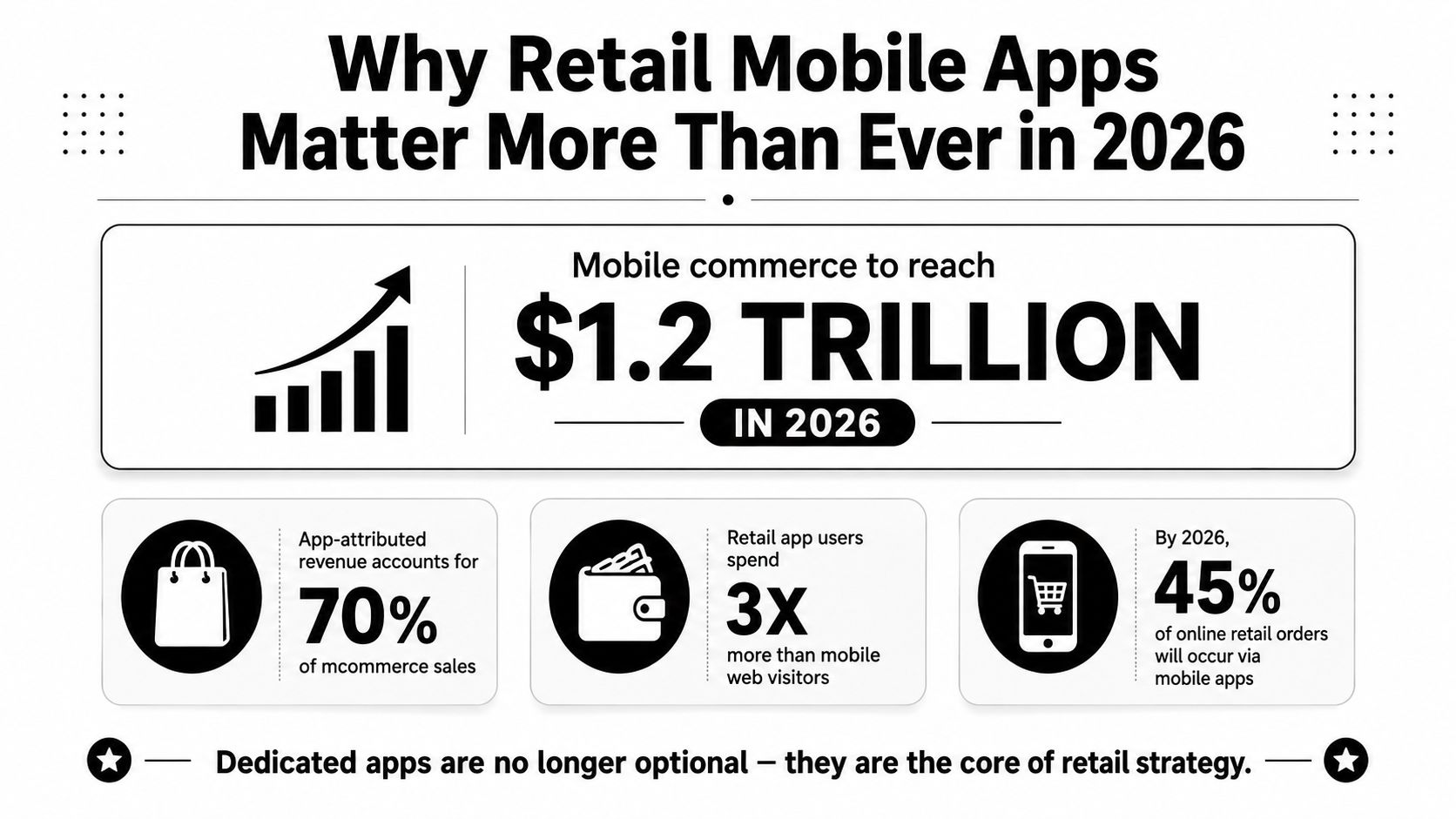
Mobile commerce accounted for 59% of global retail e-commerce sales in 2025, reaching $4.01 trillion, while U.S. mobile retail e-commerce sales reached $710 billion in the same year, according to Aarki's mobile commerce analysis. Those figures change the planning question. A retail app isn't a smaller website for loyal customers. It's a potential storefront, identity layer, loyalty surface, and operating console that sits in a channel where customers already spend significant time.
That doesn't mean every retailer should build every app feature. The difficult work is deciding which customer cohorts and purchase missions justify installation, which capabilities remove friction, and how to modernize the product without creating an expensive second legacy system. AI can help, but only when teams control prompts, data access, model behavior, experimentation, and cost.
Why Retail Mobile Apps Matter More Than Ever in 2026
Retail mobile apps matter because they can make a repeat purchase faster than a browser session. A customer who reorders diapers every three weeks can open the app, tap Reorder, confirm delivery, and check out in under a minute. That mission gives the app a clear job. Product discovery alone may not justify installation, but frequent, predictable purchases often can.
The broader market supports careful investment. Shopping apps generated more than 41.9 billion hours of engagement in 2024, according to Jiji's coverage of the mobile commerce milestone. The figure signals sustained attention, not automatic product-market fit. Retailers still need to identify which cohorts return often enough, and which tasks become easier because the app remembers context.
A useful investment test is mission frequency multiplied by saved effort. Reordering household goods, checking local inventory before visiting a store, managing rewards, booking services, using scan-and-go, and receiving relevant replenishment prompts can each create a reason to return. A one-time discount may acquire an install, but it rarely supplies a durable product strategy.
AI modernization without a full rewrite
Legacy teams do not necessarily need to replace the storefront, commerce engine, customer data platform, or mobile client before adding AI. A prompt management toolkit can centralize prompt versions, parameters for internal database access, logs across integrated AI systems, and cumulative AI spend. Wonderment Apps' administrative toolkit supports those controls, allowing engineers to add AI-driven search, recommendations, or messaging through governed integration points instead of scattering model calls through production code.
Security must develop alongside that capability. Retail apps handle identity, payment, behavioral, and sometimes location data. Teams should review application security for regulated environments before expanding AI access to enterprise systems. Privacy, authorization, observability, and rollback belong in the product requirements, not in a later remediation plan.
The strategic question is which cohorts and purchase missions justify the investment, then how the architecture can compound value over years without becoming another maintenance burden. Retail leaders can examine digital transformation for retail for a systems-level view of that modernization work.
What Retail Mobile Apps Actually Are
A retail mobile app is an installed native or hybrid application for iOS, Android, or both that owns part of the customer's storefront, account, and checkout experience. The important word is “owns.” The app can maintain a persistent identity, remember preferences, receive push notifications, use device biometrics, access the camera, support NFC-related experiences, and cache selected content for unreliable connectivity.
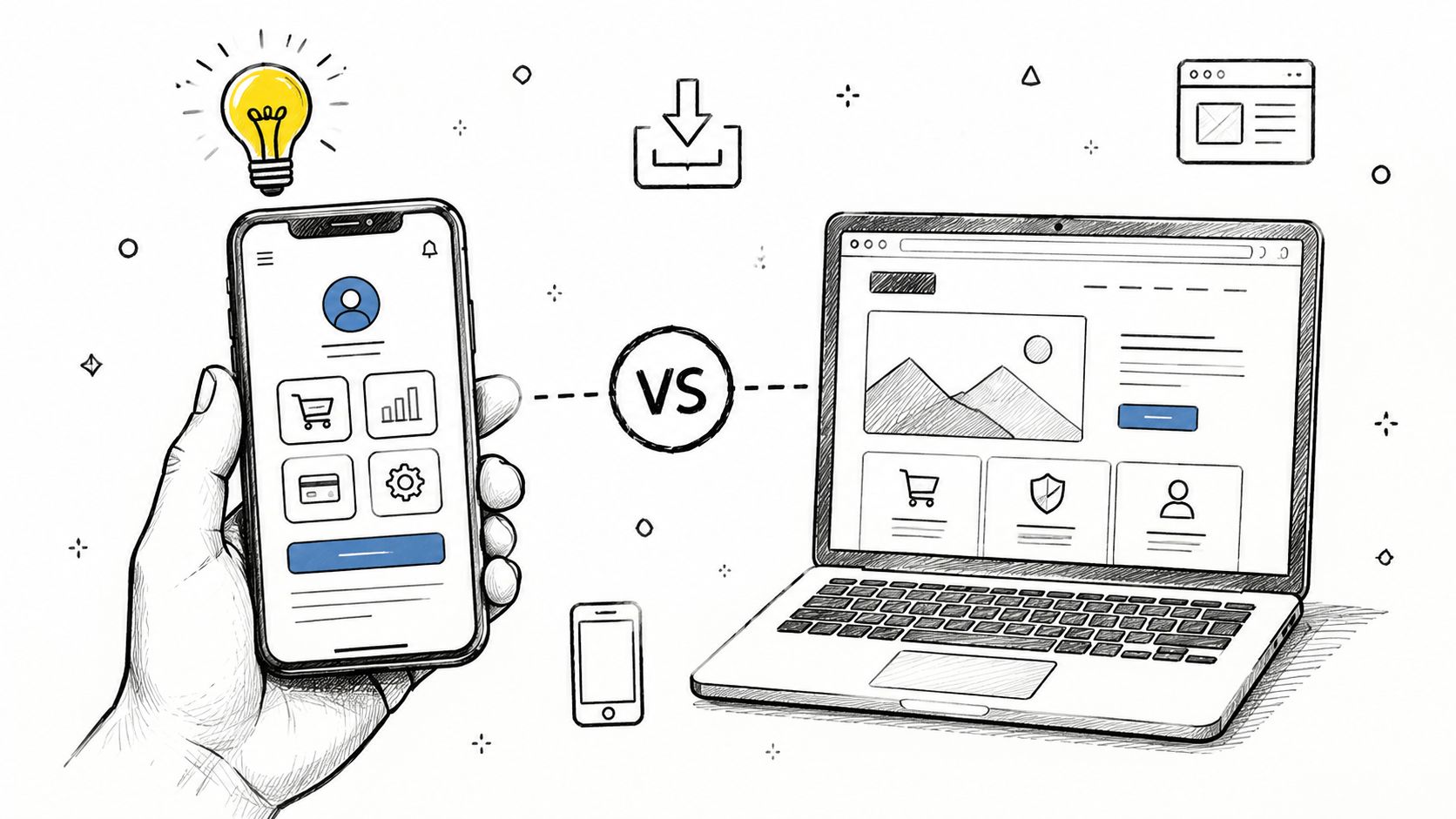
A mobile website runs inside a browser. It has broad reach because customers don't need to install anything, and it can support discovery, content, catalog browsing, and purchasing with a single link. However, browser-based sessions generally have less durable access to device capabilities and less control over the re-engagement surface. Customers can close a tab, clear storage, change browsers, or forget the address.
A useful physical-store analogy
Think of the app as a leased flagship store. The retailer controls the signage, lighting, loyalty counter, staff workflows, and checkout queue. It can recognize returning customers and offer useful services when they've opted in.
Mobile web is closer to a pop-up on someone else's sidewalk. It can attract passing traffic and serve a fast visit, but the retailer has less persistent space and fewer device-level tools. Neither format is automatically superior. The right choice depends on the customer's mission.
A grocery reorder, loyalty wallet, store inventory lookup, or appointment workflow benefits from persistence. A first-time shopper searching for a product may prefer the low commitment of mobile web. Enterprise teams should design both paths deliberately, rather than treating the app as a mobile website wrapped in an install package.
Where PWA and headless fit
A progressive web app, or PWA, uses web technology to provide app-like behavior, including caching and install options on supported platforms. It can be a practical middle path when reach and deployment speed matter more than deep native integration.
A headless commerce frontend separates the presentation layer from commerce services. That frontend may be native, cross-platform, web-based, or a combination. Headless architecture doesn't define the channel by itself. During planning, ask whether you're evaluating the installed client, the commerce backend, the content layer, or the entire customer journey. Confusing those layers leads to expensive decisions made for the wrong problem.
The Feature Set That Makes a Retail App Worth the Download
A retail app earns its place when it makes a repeated mission easier than the alternatives. Product teams should prioritize the shortest path to value, not the longest feature roadmap. An in-app benchmark covering 21 brands across the UK, U.S., Europe, and Australia found median in-app conversion at 1.8 times mobile web, with every measured merchant converting better in-app and top performers exceeding 4 times, according to POQ Commerce's mobile app revenue benchmark. That makes identity, cart state, payment, and checkout more important than decorative modules.
| Feature Group | Primary Outcome | Build Priority |
|---|---|---|
| Commerce capabilities | Lower purchase friction | First |
| Personalization | Improve relevance and decision confidence | First, after core commerce |
| POS and store integration | Connect digital and physical missions | Based on store strategy |
| Loyalty and CRM | Create reasons to return | High for repeat categories |
| Analytics and operations | Measure, diagnose, and operate the product | Foundational |
Start with commerce fundamentals
The base layer includes catalog browsing, search, product detail, cart persistence, authentication, saved addresses, and a simplified checkout. Support for Apple Pay, Google Pay, and buy now, pay later can reduce effort where those payment methods fit the retailer's customers and risk policy. The engineering test is simple: can a returning shopper move from intent to confirmation without re-entering information unnecessarily?
Personalization follows the transactional foundation. A customized home feed, recommendations, dynamic merchandising, and controlled A/B tests can help customers find relevant products faster. Don't add an AI shopping assistant while search quality, inventory accuracy, or cart recovery remains unreliable.
Connect the store when the mission demands it
Store-aware capabilities include inventory lookup, endless aisle ordering, scan-and-go, clienteling, pickup, and in-store navigation. These features require dependable connections to POS, PIM, OMS, inventory, and fulfillment systems. If those systems don't agree, the app will expose operational problems rather than solve them.
For apparel, fit can be a meaningful part of that decision. Teams considering camera-based sizing or measurement workflows can examine the product and implementation considerations in this body measurement app guide from Robosize.
Make loyalty useful, not ornamental
Points, tiers, referrals, in-app messages, and push notifications should support a recognizable customer benefit. A loyalty screen that only displays a balance is a receipt, not a relationship. Analytics should connect events across browsing, checkout, store visits, notifications, crashes, performance, and attribution. Teams planning the build can use this ecommerce mobile app development resource to frame the required commerce and engineering work.
Choosing Native or Cross-Platform Architecture
Architecture should follow the experience you need to protect. Native development with Swift for iOS and Kotlin for Android gives each platform direct access to its APIs, conventions, performance tools, and release workflows. Cross-platform approaches such as React Native, Flutter, and Kotlin Multiplatform can reduce duplicated application logic and help a team deliver catalog, account, content, and loyalty capabilities consistently.
| Criterion | Native | Cross-Platform | Hybrid |
|---|---|---|---|
| Device-specific capability | Strongest direct access | Usually sufficient, with integration work | Native modules where needed |
| Delivery pressure | Two coordinated implementation paths | Shared product logic can accelerate delivery | Balanced, but requires boundaries |
| Long-term maintenance | Two codebases and platform teams | Shared code with platform exceptions | Shared shell plus native specialists |
| Best fit | Deep platform experiences | Broad commerce surfaces | Enterprise apps with critical native flows |
| Main risk | Duplicated effort | Plugin and abstraction constraints | Architectural complexity at integration seams |
Use native where the experience is native
Biometric authentication, Apple Pay, Google Pay, push notification behavior, camera-based try-on, NFC, and augmented reality may justify native implementation when reliability or platform fidelity affects conversion. Native can also be the safer choice when the roadmap depends heavily on one platform's capabilities or when the team needs precise control over memory, rendering, and background behavior.
Cross-platform is often sensible for catalog browsing, search, account management, loyalty, content, and standard order flows. The performance gap may be irrelevant to a product grid, while a complex checkout, camera pipeline, or AR surface can expose the limits of an abstraction layer.
Treat hybrid as an engineering boundary
A hybrid app can use a cross-platform shell and native modules for checkout, payments, AR, camera experiences, or high-performance browsing. That isn't a compromise to hide. It's a deliberate allocation of complexity.
The trade-off is organizational. A hybrid team needs clear ownership, shared design tokens, compatible CI/CD pipelines, release coordination, and observability that works across stacks. A/B testing should use common experiment definitions and event names, even when the tested screens have different implementations.
Architecture rule: Choose the stack that protects your highest-value customer mission, then make every other surface conform to that decision.
Before committing, check platform-specific commitments, app maturity, seasonal deadlines, internal skills, and the next major capability on the roadmap. If the roadmap is mostly standard commerce, cross-platform may be enough. If the roadmap is camera-heavy, store-integrated, or platform-specific, native or hybrid deserves serious consideration.
How AI Personalization Works Inside a Retail App
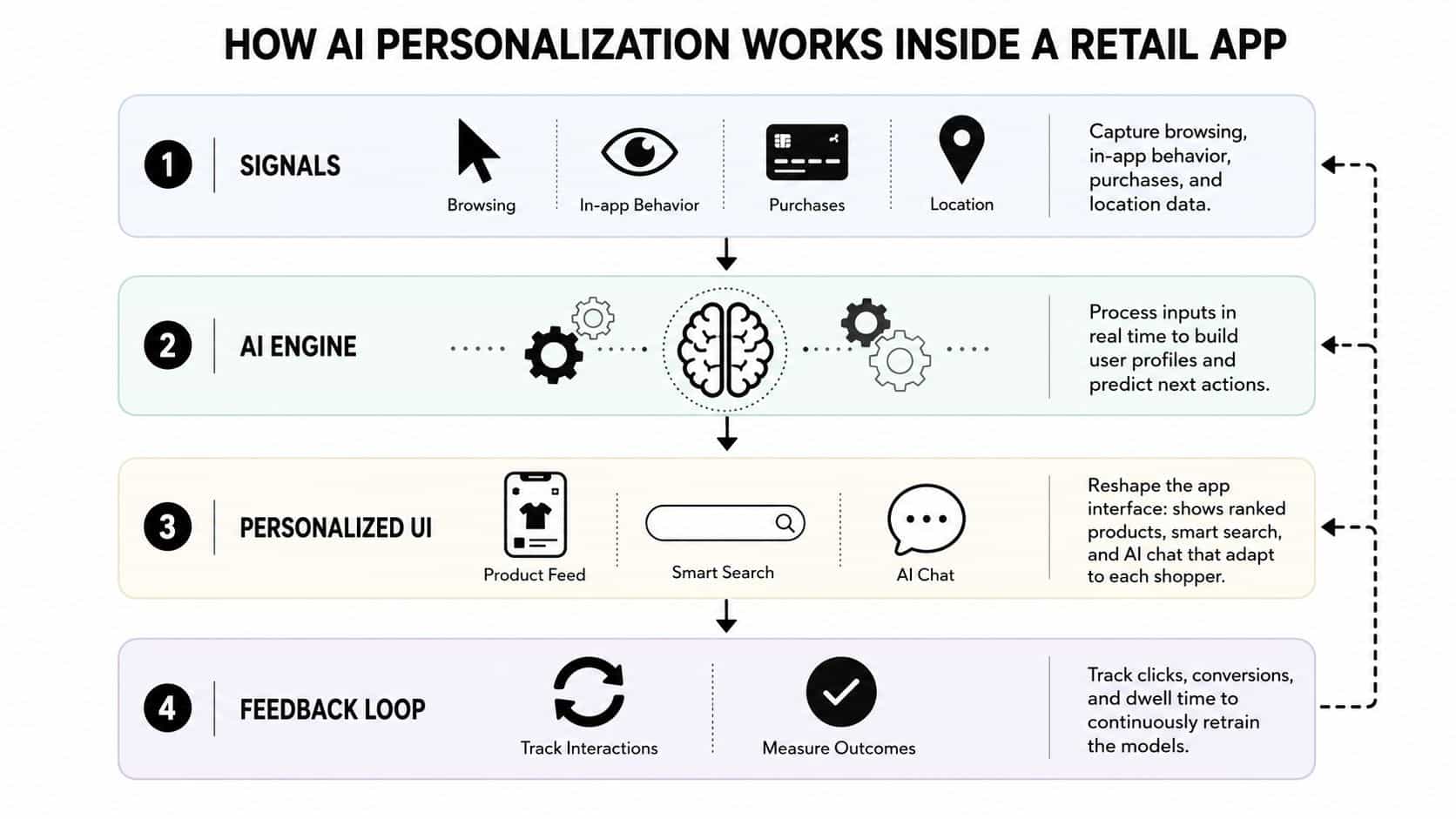
Personalization works as a connected product system, not as a recommendation widget dropped onto a home screen. A useful design separates four layers: the signals collected, the models that interpret them, the decisioning logic that chooses an action, and the surfaces that present the result.
Signals create the operating context
The app can capture browsing behavior, search terms, product views, cart actions, purchases, location where permission exists, device context, and session state through deliberate SDK instrumentation. The data model matters more than the volume. An event should identify what happened, when it happened, which customer or anonymous session performed it, and whether the event was accepted by downstream systems.
The signals layer can also combine purchase history from the commerce platform, loyalty information from CRM, product attributes from the PIM, fulfillment status from the OMS, and consent preferences from the customer profile. Identity resolution must be explicit. A guest browser, logged-in customer, and store transaction shouldn't become one person by guesswork.
Models estimate relevance
Recommendation models can rank products. Propensity scoring can estimate a customer's likelihood of taking an action. Session-based ranking can respond to what the shopper is doing right now, which helps when long-term purchase history is sparse or outdated.
The model doesn't decide everything. Rules may exclude unavailable products, respect eligibility, protect margin boundaries, or suppress a promotion a customer has already redeemed. Bandit approaches can balance exploration and exploitation, while language models can help interpret natural-language searches or rank content when the inputs are well governed.
Decisioning changes the experience
The decision layer determines what to show, when to show it, and which channel fits. Outputs may include a ranked home feed, search reranking, a back-in-stock message, a replenishment reminder, a loyalty explanation, or a conversational product comparison.
Peer-reviewed research on mobile shopping apps found that personalization positively influenced perceived system quality, service quality, information quality, and pleasure, with those cognitive and emotional factors affecting purchase behavior, as described in the KCI study on mobile shopping personalization. The practical lesson is important: personalization helps when it reduces decision effort and increases perceived usefulness, not merely when it predicts a product accurately.
Teams building this capability can use ecommerce personalization software guidance to think through the connection between models, rules, data, and presentation.
Feedback needs guardrails
Clicks, purchases, dismissals, dwell time, searches, and notification responses feed back into the signals layer. That feedback can improve ranking, but it can also reinforce poor assumptions. Product teams need explainability appropriate to the use case, privacy controls, consent-aware processing, frequency caps, human review for sensitive decisions, and a clear rollback path.
A personalized app should feel helpful, not haunted. If customers can't understand why a message appeared or can't control its frequency, short-term engagement can damage long-term trust.
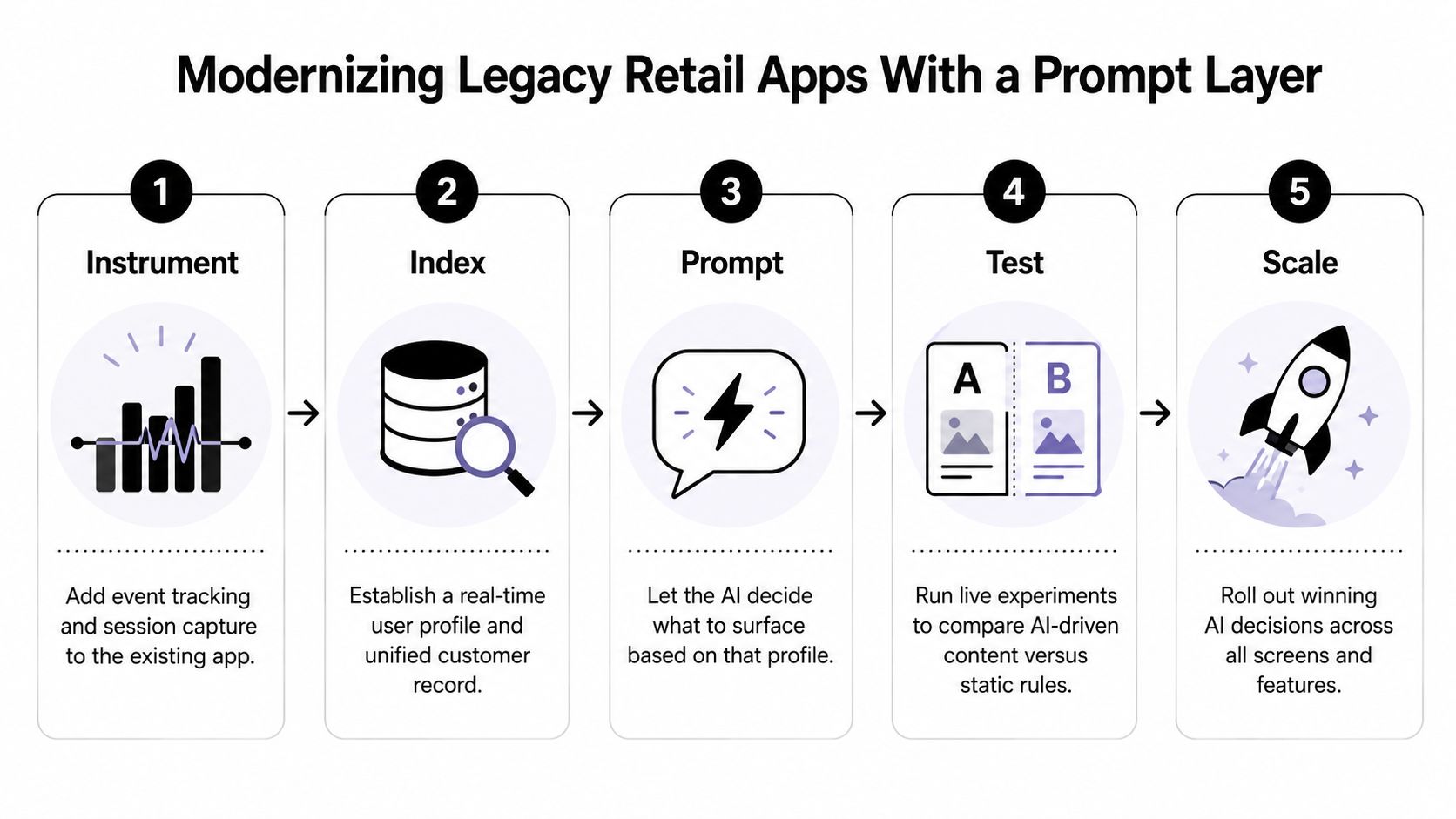
Modernizing Legacy Retail Apps With a Prompt Layer
A legacy app doesn't need a ceremonial rewrite before it can use AI. A prompt layer can sit between the existing application and model providers, centralizing the instructions, parameters, routing, logs, and controls that otherwise spread across services.
Phase one starts with instrumentation
First, add event tracking and session capture to the existing client and backend. Define the event taxonomy before selecting a model. Product views, searches, cart changes, purchases, notification interactions, errors, and consent changes should have stable names and documented payloads.
This phase may take a short delivery cycle or a longer one depending on the quality of current telemetry. The timing should be driven by data readiness, not by a calendar promise. Without trustworthy signals, AI automates uncertainty.
Phase two connects the enterprise context
Next, connect the prompt orchestration layer to the existing PIM, OMS, CDP, catalog, inventory, loyalty, and policy services. The prompt should receive approved parameters, not unrestricted database access. Authorization belongs in the integration layer, with validation before information reaches a model.
A prompt management toolkit can provide a versioned prompt vault, a parameter manager for internal database access, centralized logging across integrated AI systems, and a cost manager that shows cumulative spend. Wonderment Apps offers these capabilities as an administrative toolkit for teams adding AI integration to an existing application. The value is operational control, not a magical shortcut.
Phase three releases narrow experiments
Start with surfaces where the output is easy to evaluate and easy to suppress. AI-powered search reranking and personalized push content are practical candidates when the retailer already has reliable product data and consent rules. Run each experience against a control group, define failure conditions, and log the prompt version, model, inputs, output, and decision.
Only after those paths behave predictably should the team expand to home feed ranking or conversational shopping. Keep static rules available as a fallback.
Phase four graduates proven surfaces
Stable experiments can move into dedicated AI components while orchestration remains centralized. A native search surface may provide better responsiveness, but the prompt registry should still control versions and the policy layer should still enforce access, cost, and safety rules.
Modernization principle: Keep the legacy app stable at the edges, and make each AI capability earn its way into the product through measured experiments.
This approach preserves the working codebase, reduces migration risk, and gives product teams a reversible path. It also prevents a common failure mode, where every feature team chooses a different model, prompt format, logging convention, and spending policy.
KPIs and Signals That Prove Your Retail App Is Working
An app dashboard should connect metrics to product decisions. Install volume alone can't tell an enterprise team whether the app creates durable customer value or attracts people who never complete a mission.
| Feature Layer | Primary KPIs | Secondary KPIs | Instrumentation Notes |
|---|---|---|---|
| Acquisition | Install cost, store page conversion, attribution quality | Campaign and cohort quality | Use server-side attribution where possible |
| Identity and activation | First-purchase rate, authenticated checkout time | Account completion, saved payment adoption | Resolve guest and known identities carefully |
| Commerce | App revenue share, order value versus web, repeat purchase rate | Cart recovery, payment success | Preserve cart and checkout state across sessions |
| Personalization | Recommendation interaction, search refinement, experiment outcomes | Content relevance feedback, suppression rates | Record model, prompt, rule, and treatment versions |
| Loyalty and CRM | Loyalty enrollment, repeat use, notification-driven sessions | Push opt-in, referral participation | Respect consent and frequency limits |
| Store integration | Scan-and-pay adoption, in-store mode use | Inventory lookup, pickup completion | Reconcile app, POS, and OMS events |
| Reliability | Crash rate, latency, payment and API errors | Battery, network, release health | Segment by platform, version, and device |
Measure the funnel before the flourish
Acquisition metrics show whether the store listing and marketing path attract the right audience. Activation metrics reveal whether a new user can authenticate, find a product, and complete an initial mission. Retention metrics, including D7 and D30 retention, purchase frequency, and loyalty enrollment, show whether the app provides a reason to return.
Commerce metrics should compare app behavior with the retailer's other channels without pretending the populations are identical. Average order value, repeat purchase rate, app revenue share, checkout completion, and payment success belong in the same operating conversation.
Engagement needs context. Shopping apps generated more than 41.9 billion hours of engagement in 2024, according to Aarki's mobile commerce performance report. That figure establishes the scale of app attention, not a target for every retailer. Your team should ask whether the time reflects useful discovery, repeat shopping, store assistance, or notification fatigue.
Instrument the decisions
Create a shared event taxonomy, resolve identity between app and store, validate server-side attribution, and record treatment assignments for every experiment. Executive dashboards can run on a broader cadence, while product and engineering reviews should inspect funnel breaks, latency, errors, and cohort behavior more frequently.
A KPI without an owner is decoration. Assign each metric to the team that can change the underlying experience.
The Right Way to Start Your Retail App Journey
Begin with the mission, not the feature list. Identify the customer groups that shop repeatedly, need store assistance, depend on loyalty, or benefit from saved identity and payment. Then map the purchase missions that mobile can improve, such as replenishment, local inventory discovery, pickup, appointment booking, in-store navigation, or rapid checkout.
The data also argues against assuming universal adoption. Forrester's 2025 review found that only 37% of U.S. online adults regularly use retailer mobile apps to make a purchase, as reported in Forrester's U.S. retail mobile app digital experience review. That means a serious business case should define the core audience instead of treating every shopper as an app user.
Use a four-part starting path
Clarify the mission and audience. Decide who will install the app, why they'll return, and which behavior indicates value. A grocery replenishment app and a luxury clienteling app may both be retail mobile apps, but their success criteria differ.
Audit the current stack. Review catalog, search, checkout, identity, payments, loyalty, POS, inventory, OMS, CDP, analytics, and release processes. Mark which capabilities are reliable, which are duplicated, and which would block personalization.
Choose the architecture stance. Use the native, cross-platform, or hybrid criteria from the architecture decision. Protect the surfaces where platform behavior affects trust, speed, payment, or store interaction.
Define a narrow personalization scope. Select one or two AI capabilities, such as search reranking or customized messaging, with clear controls and a measurable comparison against existing behavior.
A small modernization experiment can validate the economics before a full rewrite. Connect a prompt layer to trusted data, version the prompts, manage parameters, log model activity, monitor cumulative spend, and expose the result to a controlled audience. If the experiment doesn't improve the customer mission or operational understanding, the team has learned that before committing to a larger migration.
The strategic question isn't whether to build an app. It's which missions, cohorts, and use cases justify sustained investment, and whether the technical foundation can support that investment for years.
Wonderment Apps helps retail teams design and modernize web and mobile products, including AI integrations that connect models to existing enterprise systems. Visit Wonderment Apps to explore the prompt management toolkit and request a demo focused on your retail app roadmap.