

A regional retailer's legacy ASP.NET MVC site can look perfectly healthy on an ordinary Tuesday. Then peak traffic arrives, an AI shopping assistant starts competing for CPU and memory, IIS worker processes reach their limits, orders stall, recommendations time out, and the on-call team starts debugging at 2 a.m. The problem isn't just old code. It's a production system without a controlled path for performance, security, deployment, and AI governance.
Modern .NET application development gives teams that path, but only when they treat the platform as an operational discipline. A practical upgrade plan combines supported runtimes, measurable performance work, reliable CI/CD, observability, and governed AI integration. A prompt management system can add another useful control layer, with versioned prompts, parameter management, AI logging, and cost visibility connected to the application instead of scattered across developer notebooks.
Why .NET Application Development Matters in 2026
A fintech payment service can process requests correctly and still fail in production when telemetry is incomplete, retries multiply load, secrets reach logs, or an AI prompt changes without review. .NET application development therefore demands more than capable C# code. It requires operating decisions about runtime support, architecture, deployment, security, performance, and AI behavior.
.NET now runs across Linux containers, cloud services, desktop clients, mobile applications, and AI-enabled workflows in ecommerce, fintech, healthcare, and public-sector systems. Microsoft released .NET Core 1.0 on June 27, 2016, establishing the open-source, cross-platform direction. Unified .NET later provided a practical migration route from legacy Windows applications to current delivery environments. Teams planning upgrades should use Microsoft's .NET and .NET Core lifecycle for release and support milestones.
The ecosystem also has a broad skills base. The 2024 Stack Overflow Developer Survey collected 65,437 responses from 185 countries and ranked .NET as the No. 1 non-web framework among respondents. ASP.NET Core ranked seventh among web frameworks, ASP.NET ranked ninth, and .NET MAUI was used by 3.1% of respondents, according to Visual Studio Magazine's coverage of the survey. The survey summary also reported .NET as the most desirable framework or tool at 21.5%, ahead of NumPy at 18.2%.
Adoption does not compensate for weak operations. A team can ship clean code with unbounded retries, missing metrics, unsafe secret handling, and deployments that depend on one person. AI adds another operating surface: prompts need version control, approval, evaluation, logging, cost limits, and rollback rules before they influence customer or financial workflows.
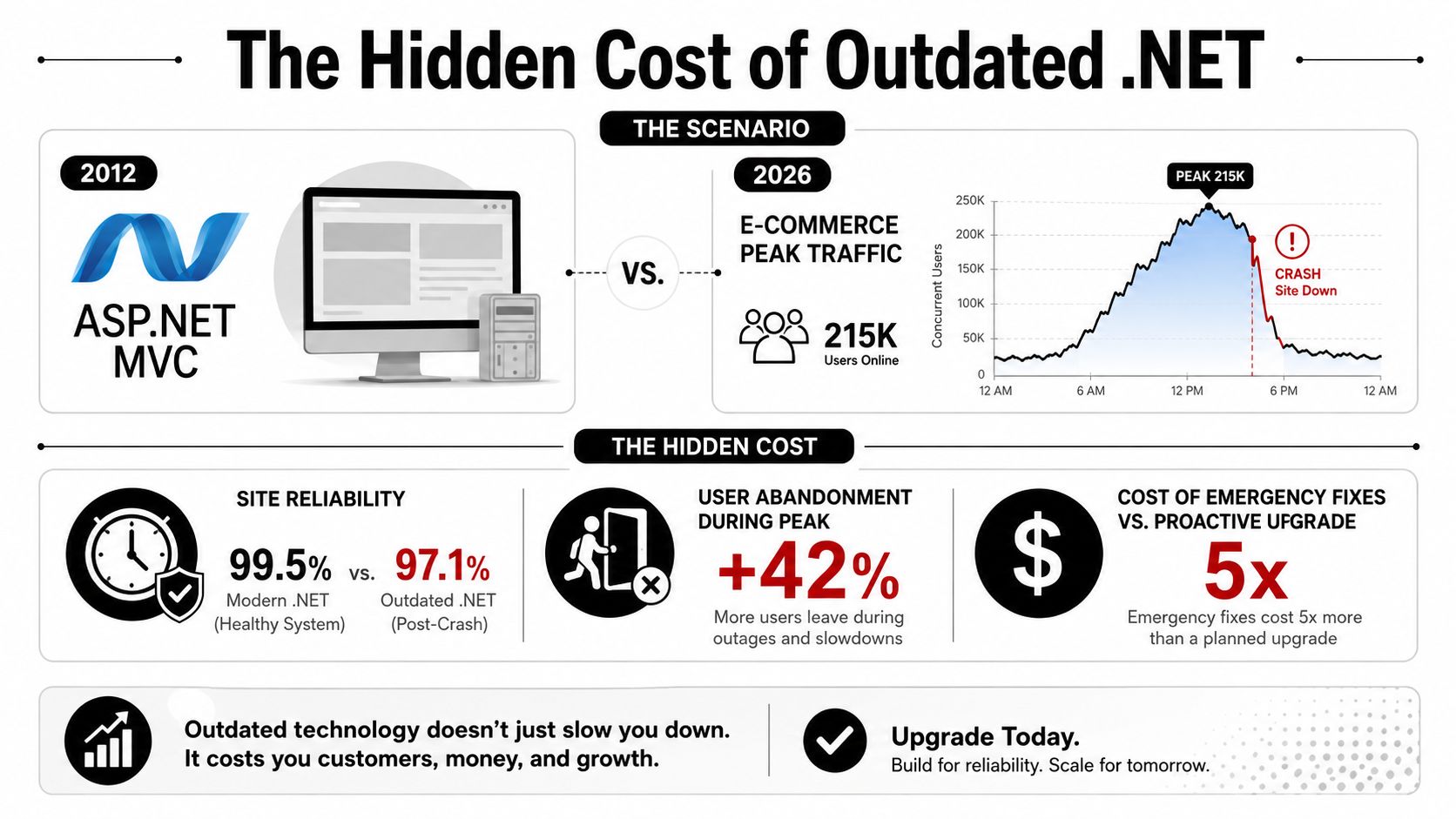
Practical rule: Treat every AI feature as a production dependency. Assign an owner, budget, evaluation process, telemetry, and rollback path before customers depend on it.
This operating model connects architecture, performance, security, testing, CI/CD, modernization, and prompt governance. AI becomes part of the system's controls, not a bolt-on experiment.
The Modern .NET Platform at a Glance
For a team inheriting a Windows-only service, the platform's history maps directly to upgrade decisions. .NET Framework remains the traditional Windows-focused generation. .NET Core established the open-source, cross-platform direction, while unified .NET brought the application model, SDK, libraries, and runtime into one platform for current development.
Microsoft's lifecycle records .NET 6 shipping on November 8, 2021 and .NET 8 shipping on November 14, 2023. .NET 8 is scheduled to remain supported until November 10, 2026. Long Term Support releases provide a three-year support window, affecting patching schedules, staffing, upgrade budgets, and the acceptable age of production dependencies. Microsoft's lifecycle documentation is the authoritative reference for an upgrade calendar.
| Release | Release Date | Support Type | End of Support |
|---|---|---|---|
| .NET 6 | November 8, 2021 | Long Term Support | November 12, 2024 |
| .NET 8 | November 14, 2023 | Long Term Support | November 10, 2026 |
A runtime upgrade requires more than changing the project file. Inventory native dependencies, authentication libraries, database providers, background jobs, hosting assumptions, and deployment images. An application can compile after a target-framework change and still fail under production traffic because of changed defaults, unsupported packages, serialization differences, or hidden Windows dependencies.
The unified SDK supports development across operating systems, side-by-side runtime installation, and consistent local workflows through the dotnet CLI. CI should reproduce the same restore, test, publish, and container steps used by developers. That is also the right point to govern AI-assisted changes, including prompt versions, evaluation cases, and approval requirements, before they enter a release.
A supported runtime lowers operational risk, but it does not replace application testing. Upgrade the platform and prove behavior under realistic workloads.
A practical policy is to select a supported release, record its scheduled end date, budget the next upgrade early, and apply servicing patches through the normal delivery process.
Choosing the Right Application Architecture
Architecture decisions should follow product constraints, team capacity, and operational tolerance, not fashion. Microsoft's architecture guidance for .NET applications emphasizes making technology and design decisions early because layering, dependencies, and deployment topology influence maintainability, scale-out behavior, and long-term change cost.
A conventional monolith is often the strongest starting point. One deployable application is easier to debug, easier to release, and usually cheaper to operate than a collection of independently deployed services. It fits an early-stage SaaS product, a domain that's still being discovered, or a team that needs to validate the product before investing in distributed-systems infrastructure.
A modular monolith adds boundaries without adding network calls. Teams can separate billing, catalog, identity, and fulfillment through assemblies, namespaces, interfaces, contracts, and explicit data ownership while keeping one deployment unit. That structure makes future extraction possible, but it avoids paying the microservices tax before the business has earned it.
Microservices make sense when independent deployment, team autonomy, or isolated scaling solves a real problem. They also introduce network latency, distributed tracing, data consistency challenges, failure coordination, deployment orchestration, and often a service mesh. A service boundary that exists only because a diagram looked cleaner usually creates more work than value.
| Pattern | Best For | Watch Out For |
|---|---|---|
| Monolith | Early-stage SaaS, internal systems, fast product validation | Tight coupling if boundaries are ignored |
| Modular monolith | Growing products with distinct business domains | Modules that bypass contracts and share everything |
| Microservices | Independent release cycles and isolated scaling needs | Network failures, consistency, tracing, platform overhead |
| Cloud-native | Containerized platforms with mature operations | Kubernetes and infrastructure complexity without a clear need |
Cloud-native isn't synonymous with microservices. It's an operational discipline that can include containers, managed databases, event-driven messaging, infrastructure as code, autoscaling, and platform-level observability. A well-run modular monolith on a managed service can be more cloud-native in practice than a fragile collection of services running on an overcomplicated cluster.
For a deeper treatment of boundaries, dependency direction, and service decomposition, the software architecture best practices guide is a useful companion.
Architecture heuristic: Start with a monolith, modularize at the seams you actually feel, and split services only when deployment cadence, ownership, or scale forces the decision.
Core Frameworks and Tools for Production .NET
A production .NET stack should make routine work predictable. ASP.NET Core covers HTTP APIs, Razor Pages, middleware, authentication, Minimal APIs, and controller-based applications. Choose Minimal APIs for small endpoint groups with direct validation. Choose controllers when the application needs stronger conventions, filters, organized models, or a larger public API surface.
Entity Framework Core is a practical default for domain-oriented persistence when its behavior is visible to the team. Its provider model supports multiple database engines, and migrations keep schema changes tied to source control and deployment. For read-heavy paths, AsNoTracking removes change-tracking work when entities will not be updated. Compiled queries can help when the same query shape runs repeatedly. Check generated SQL, query plans, indexes, and allocations before applying either optimization.
.NET MAUI gives teams a shared framework for cross-platform desktop and mobile clients. It can replace Xamarin when an application needs a common C# and .NET codebase, but shared UI does not remove platform-specific design, permissions, lifecycle behavior, accessibility, or testing work. The 2024 survey recorded .NET MAUI usage among respondents, while ASP.NET Core and .NET were more prominent in their respective categories. The survey coverage provides context for staffing and ecosystem decisions.
| Layer | Default Tool | When to Reach for It |
|---|---|---|
| Web and APIs | ASP.NET Core | HTTP services, Razor Pages, and backend applications |
| Data access | Entity Framework Core | Domain-oriented persistence and migrations |
| Desktop and mobile | .NET MAUI | Shared C# clients across supported platforms |
| Packages | NuGet | Reproducible dependency management |
| Development | Visual Studio or JetBrains Rider | Debugging, refactoring, profiling, and testing |
| Delivery | dotnet CLI and Docker |
Repeatable CI builds and portable deployment |
Supporting tools shape operational quality as much as the framework. NuGet central package management reduces dependency drift. Docker base images must match the supported runtime. Put the dotnet CLI in CI so builds do not depend on IDE-specific behavior. Record the prompts used to generate or modify AI-assisted code, then review the resulting dependencies, data access, and security behavior before merging.
Avoid reflection-heavy abstractions in throughput-sensitive services when they obscure allocations and execution paths. A few convenient conventions are not worth hiding the query, serialization, or mapping work that consumes the latency budget. In production, the best tool is the one the team can profile, test, upgrade, and operate consistently.
Building Apps That Scale Without Drama
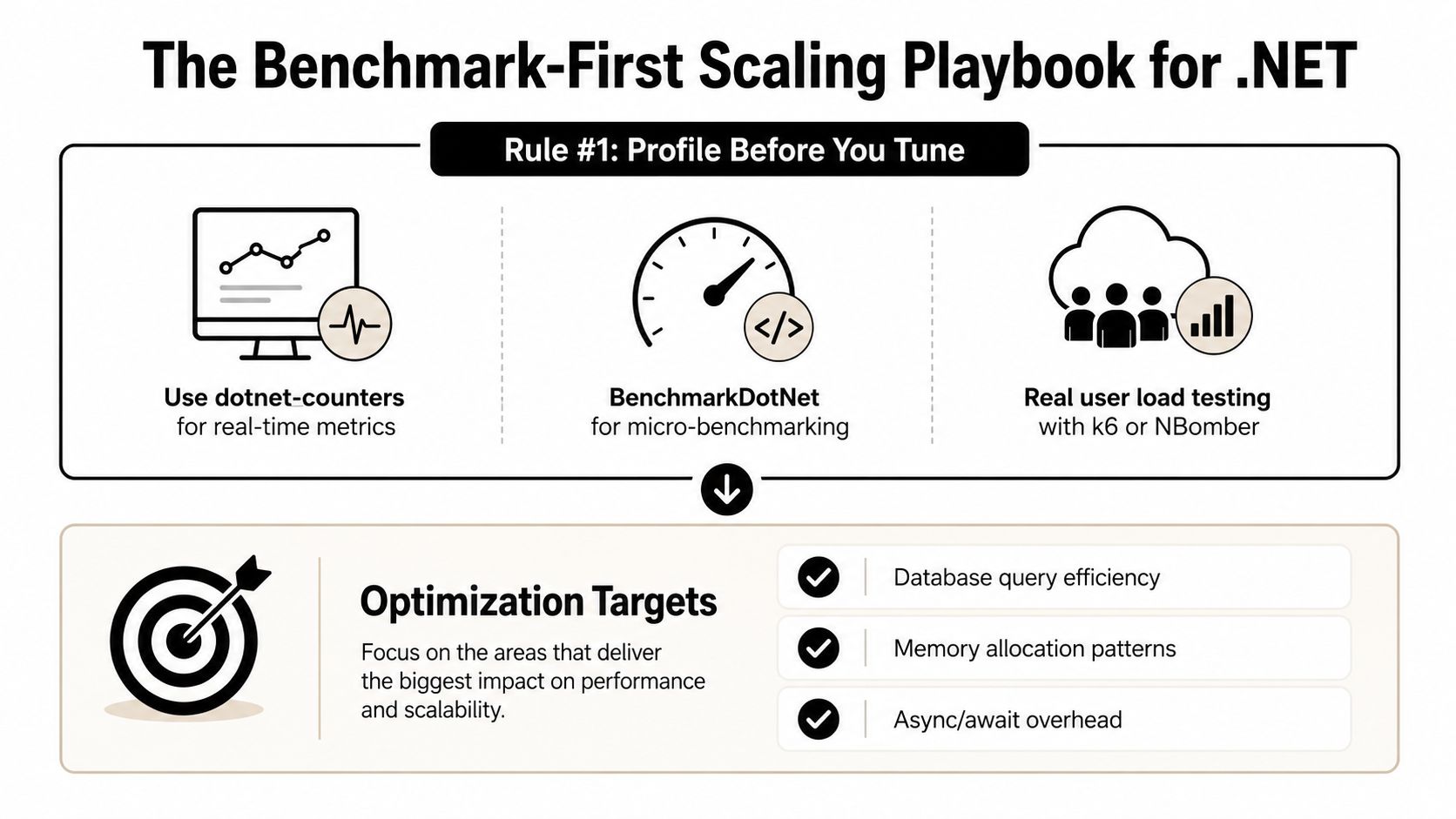
Scaling starts with measurement. Before changing a query, replacing a serializer, or adding a cache, capture a baseline with production-like data and traffic. BenchmarkDotNet is designed to transform methods into benchmarks and support reproducible measurement experiments, which makes it appropriate for isolated hot paths such as serialization, parsing, mapping, and allocation-heavy routines. The BenchmarkDotNet project explains the tool's role in controlled benchmarking.
Use dotnet-counters to inspect runtime behavior while the service runs, then use realistic load tests to understand the complete system. A microbenchmark can tell you which implementation is faster in isolation. It can't tell you whether the database, network, queue, or downstream API dominates the customer request.
Scale capacity horizontally
Keep ASP.NET Core services stateless wherever practical, place them behind a load balancer, and move shared state into appropriate external systems. Azure App Service autoscale can suit a managed deployment, while Kubernetes HPA fits organizations that already operate container orchestration effectively. A scalable design typically combines autoscaling, load balancing, caching, and stateless services rather than relying on a larger machine alone, as described in this practical scaling overview.
Caching needs clear ownership. IMemoryCache works for local hot reads that can be rebuilt on each instance. Redis is more appropriate when several instances need shared cache or session state. Output caching can prevent repeated rendering or response work when the request and invalidation rules are well understood.
Make latency explainable
Instrument traces with OpenTelemetry, publish metrics through Prometheus or Azure Monitor, and keep structured logs through Serilog or an equivalent logging stack. A service that can't show whether time disappeared in SQL, serialization, queue waits, or an external API can't be scaled safely.
Check the fundamentals before chasing exotic optimizations:
- Async I/O: Keep database and network operations asynchronous from the request boundary through the provider.
- Connection management: Configure pooling deliberately and watch for connection exhaustion.
- Thread-pool health: Avoid sync-over-async calls and blocking work that starves Kestrel workers.
- Allocation patterns: Measure large object creation, repeated mapping, and unnecessary buffering.
Security, Testing, and CI/CD as One System
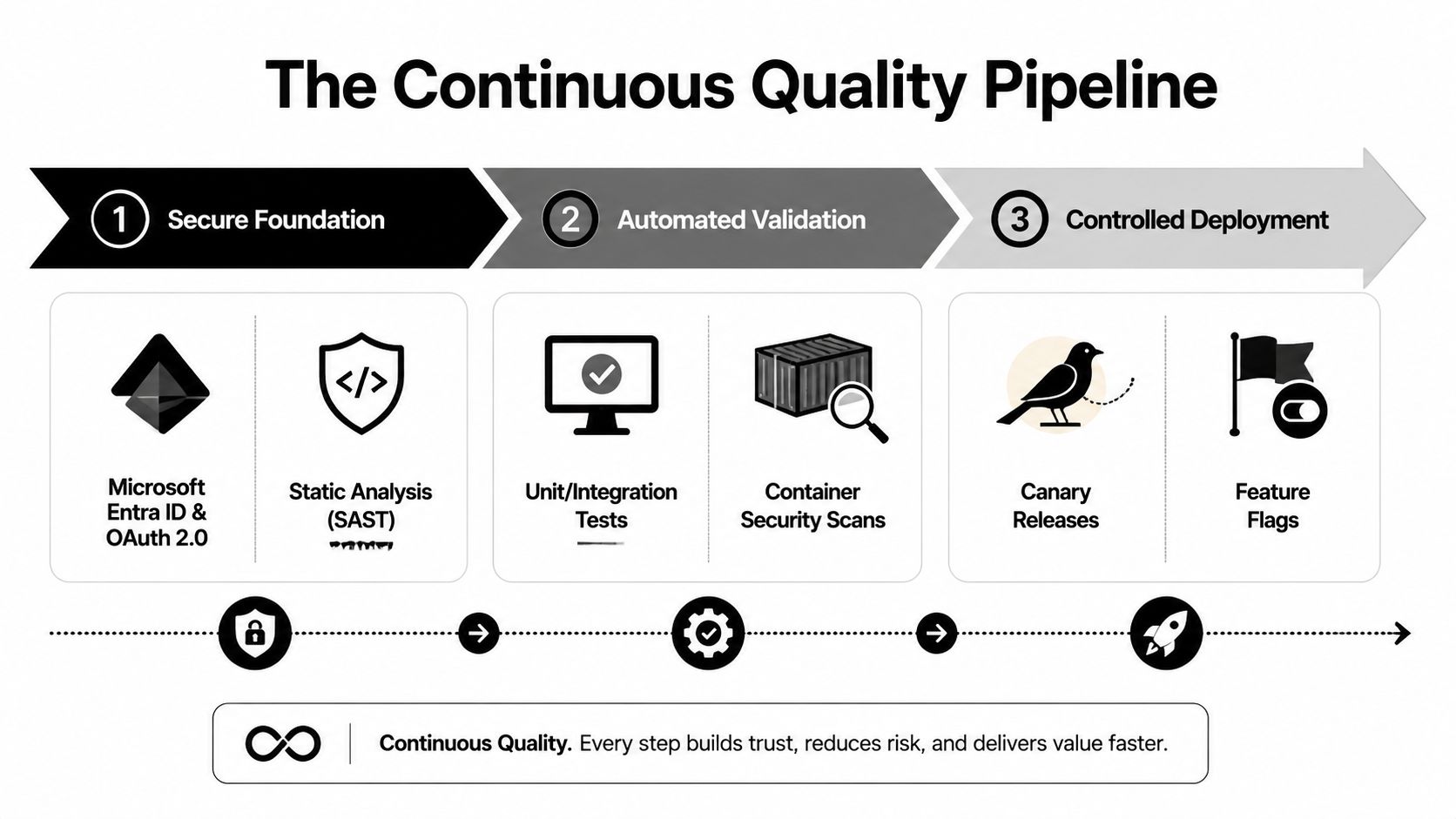
Security, testing, and deployment shouldn't be separate hand-offs. They form one quality system that begins with identity and ends with a controlled release. For customer-facing services, Microsoft Entra ID, OAuth 2.0, and OpenID Connect provide the foundation for delegated access, service identity, and token-based authentication. API keys still have limited uses, but managed identities and Azure Key Vault are safer choices for service-to-service access and secret storage in Azure environments.
A useful testing pyramid keeps feedback fast without pretending that unit tests prove the whole product works. xUnit or NUnit can cover domain rules and application behavior. Testcontainers can bring real PostgreSQL or Redis dependencies into integration tests, while Playwright can exercise critical browser workflows in ASP.NET Core front ends.
Put gates in the delivery path
GitHub Actions and Azure DevOps can run the same sequence for every change:
- Inspect the code: Run Roslyn analyzers, formatting checks, and SecurityCodeScan rules.
- Validate behavior: Execute unit, integration, contract, and selected end-to-end tests.
- Inspect dependencies: Scan packages and container images for known vulnerabilities.
- Release gradually: Use blue-green or canary deployment with health checks and clear rollback criteria.
- Control exposure: Put risky features behind flags so operators can disable behavior without rebuilding.
A deployment that can't roll back automatically is incomplete. So is a security program that waits for a quarterly review while vulnerable packages and permissive endpoints move through daily releases. Security and privacy remain the top developer deal-breaker in the survey data discussed earlier, which reinforces why teams need security controls in normal engineering workflows rather than as an afterthought.
Leads building delivery capability across distributed teams may also benefit from reviewing the skills needed for DevOps in Brazil, particularly around automation, communication, security awareness, and operational ownership. For implementation details, CI/CD pipeline best practices can help turn those principles into repeatable stages.
Modernizing Legacy .NET Apps for the AI Era
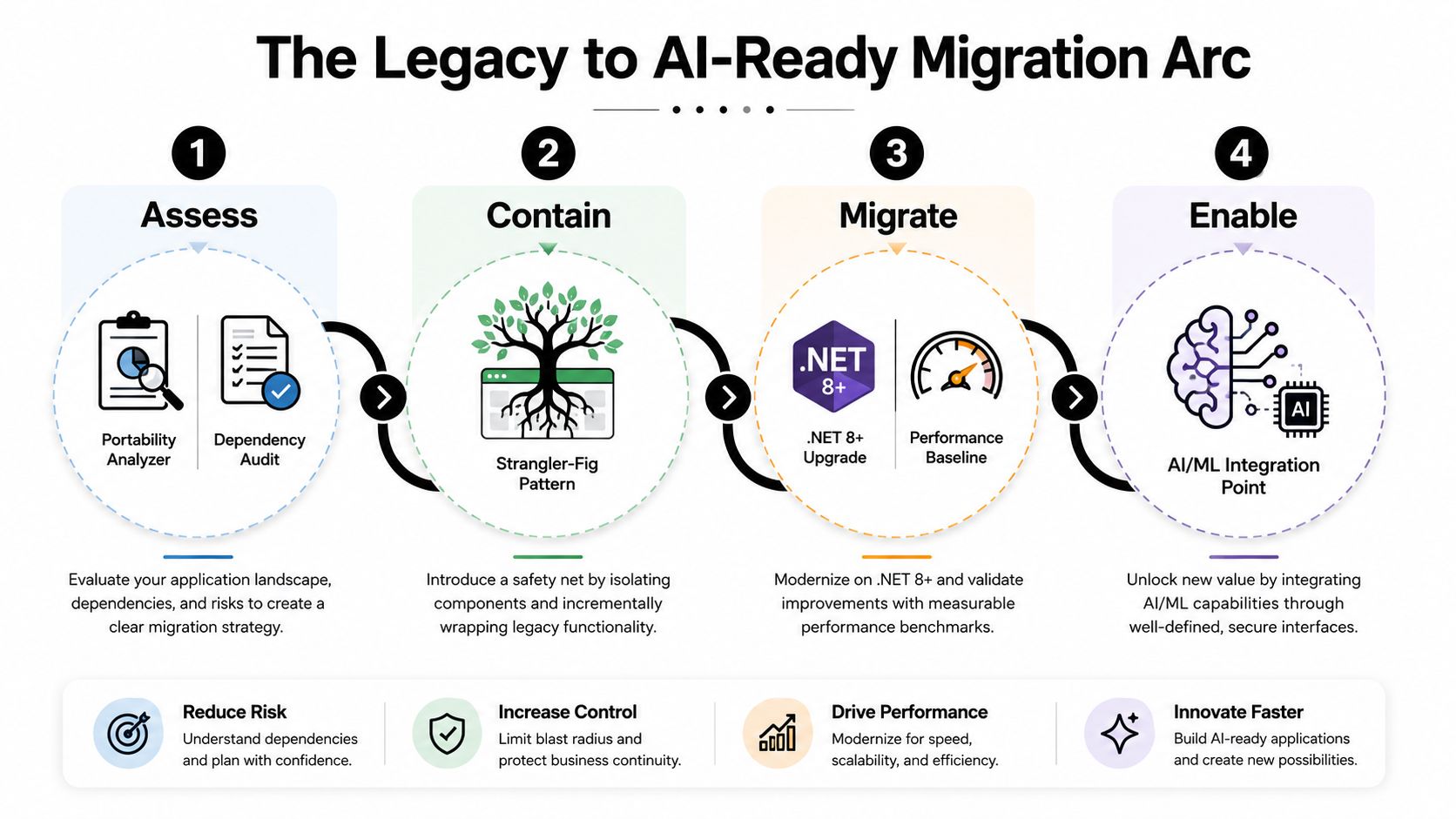
A legacy migration succeeds when the team reduces risk in slices. Start by inventorying the application, not rewriting it. Map the API surface, run a portability assessment, identify Windows-only dependencies, inspect third-party packages, and record the database, authentication, file-system, and reporting assumptions that the original system accumulated over time.
The first useful AI feature during discovery may be internal. A model can summarize telemetry, group recurring exceptions, or help engineers locate related modules, but the team still needs human verification and access controls. AI can accelerate investigation without becoming the authority that decides what production behavior means.
Contain the blast radius
The strangler-fig pattern works well when a Windows-bound module can't move immediately. Put a modern API or façade around the legacy capability, route one workflow through the new path, and leave the rest stable until the replacement proves itself. Containerize incrementally on Azure App Service or AKS where the operational team can support the hosting model.
During the rewrite, code translation copilots can help generate candidate changes, tests, and documentation. They don't remove the need for compilation, security review, regression tests, or domain-owner approval. The migration remains an engineering project, not a bulk paste into a new target framework.
Create an AI-ready boundary
After launch, semantic search over migrated modules can help developers and support teams work with unfamiliar code and documentation. The application should expose this capability through a controlled service boundary, with retrieval sources, permissions, logging, and failure behavior defined before users rely on the results.
The modernization guidance in modernizing legacy systems is most useful when paired with a concrete inventory and staged release plan. Prompt governance belongs in the same plan. Versioned prompts, evaluation records, and traceable changes prevent an AI bridge from becoming shadow IT while the legacy system is still being dismantled.
Governing AI Inside Production .NET Systems
AI features deserve the same engineering discipline as payments, authentication, and customer records. A prompt can change application behavior without a conventional code diff, a model can return malformed content, and usage can grow faster than the team's cost assumptions. Production readiness therefore requires prompt versioning, evaluation, cost ceilings, observability, and rollback paths.
Microsoft's .NET AI guidance describes scenarios that embed AI into .NET applications, including local functions used as tools and Azure AI extensions written with .NET. That supports desktop and mobile workflows as well as server-side applications, but the integration still needs application-level controls.
Use explicit guardrails
A practical governance layer can include:
- Data protection: Add PII redaction middleware before prompts leave the application boundary.
- Output validation: Deserialize structured responses with
System.Text.Jsonand reject schemas that don't meet the contract. - Usage telemetry: Export token and latency measurements through OpenTelemetry, then associate them with tenant, feature, model, and prompt version.
- Human review: Route low-confidence or high-impact responses into a review queue instead of displaying them automatically.
- Release control: Keep a known-good prompt and model configuration available for rollback.
| Risk | Control | Implementation Hint |
|---|---|---|
| Sensitive data reaches a model | Redaction and access policy | Sanitize request context in ASP.NET Core middleware |
| Invalid or unsafe output | Structured validation | Enforce System.Text.Json schemas and failure states |
| Unpredictable operating cost | Usage telemetry and limits | Track tokens by feature, tenant, model, and prompt |
| Prompt regression | Evaluation harness | Run representative cases during CI |
| Low-confidence decisions | Human review queue | Require approval for defined business actions |
Wonderment Apps' prompt management tool can sit alongside an existing .NET application as an administrative layer. Its stated capabilities include a prompt vault with versioning, a parameter manager for internal database access, logging across integrated AI systems, and a cost manager that shows cumulative spend. A typed ASP.NET Core client can connect application features to the managed prompt configuration, while product and engineering teams review changes through an administrative surface.
That separation matters. Developers shouldn't need to edit production prompt strings directly, and product managers shouldn't need deployment access to review a prompt variation. A mature setup can feed evaluation failures into CI/CD so a prompt regression receives the same treatment as a broken unit test.
Governance principle: If a prompt can change customer-visible behavior, it belongs in version control, evaluation, observability, and release management.
The practical goal isn't to freeze AI experimentation. It's to make experimentation safe enough to continue. Teams that establish those controls can modernize legacy workflows, support desktop and mobile experiences, and keep the application maintainable as models, providers, and business rules change.
Wonderment Apps helps organizations build and modernize .NET web and mobile applications while adding governed AI capabilities through prompt management, integrations, logging, and token cost control. Visit Wonderment Apps to explore the platform and book a demo for a production-focused AI modernization plan.