


AI-powered app development has reached a counterintuitive point: more AI adoption doesn't automatically produce faster delivery. A 2026 survey of 121,000 developers found that 93% used AI, while throughput gains rose only 9.97% (ShiftMag's coverage of the survey). The lesson is practical. Models can write code, summarize data, and power personalized experiences, but teams still need strong architecture, testing, governance, and cost controls.
The operational layer often determines whether an AI feature remains useful after launch. Prompt versions, model responses, database parameters, provider usage, and cumulative spend need the same administrative discipline as source code and infrastructure. Wonderment Apps' prompt management system is designed for that kind of oversight, with a prompt vault, versioning, parameter management, logging across integrated AI services, and cost tracking. You can explore the benefits of AI in software development for broader context, then use the playbook below to make AI a durable part of a web, desktop, or mobile product.
Why AI Powered App Development Has Changed Forever
A major shift is happening inside engineering teams. One recent industry benchmark reports that high-adoption organizations now use AI to generate 30–70% of committed code, and projects that this could exceed 50% of all new code by 2028 (AI coding benchmarks for 2026). The measurements span 2025–2026, which shows how quickly AI moved from an experimental assistant to part of core delivery infrastructure.
That changes the engineering conversation. AI isn't only suggesting a function or completing a line. In leading teams, it can produce substantial implementation work while engineers spend more time on architecture, review, testing, security, accessibility, and product decisions. The developer's role shifts from typing every routine instruction to defining constraints, checking behavior, and deciding whether generated work belongs in production.
The same pattern applies to the application itself. A retail app might use AI to classify support requests, recommend products, generate search summaries, or identify unusual order activity. A healthcare application may help staff access approved information, while a fintech product may extract structured data from documents. These features aren't interchangeable chatbot add-ons. Each one introduces a data path, a model dependency, a review policy, and a cost profile.
The chatbot mindset is too narrow
A chatbot can be useful, but it rarely represents a complete AI product strategy. Strong AI-powered apps place intelligence inside existing workflows, where users already make decisions. On mobile, that may mean voice input, camera-based document capture, adaptive onboarding, or personalized notifications. On desktop and web, it may mean assisted analysis, workflow automation, intelligent search, or a controlled interface for internal knowledge.
Interactive products also benefit from thinking beyond text. Teams exploring AI across games, media, simulations, and other experiences may find AI in interactive media production useful for understanding how creative workflows and software systems can meet.
The difficult work begins after the demo. Prompts change, providers update models, users find unexpected paths, and costs accumulate across features. Without versioned prompts, auditable logs, and a clear budget view, the team can't reliably explain why an answer changed or which feature caused spending to rise.
Practical rule: Treat prompts, model calls, and AI-generated outputs as production assets. If the team can't review or roll them back, the system isn't operationally mature.
Discovery and Model Selection Strategy
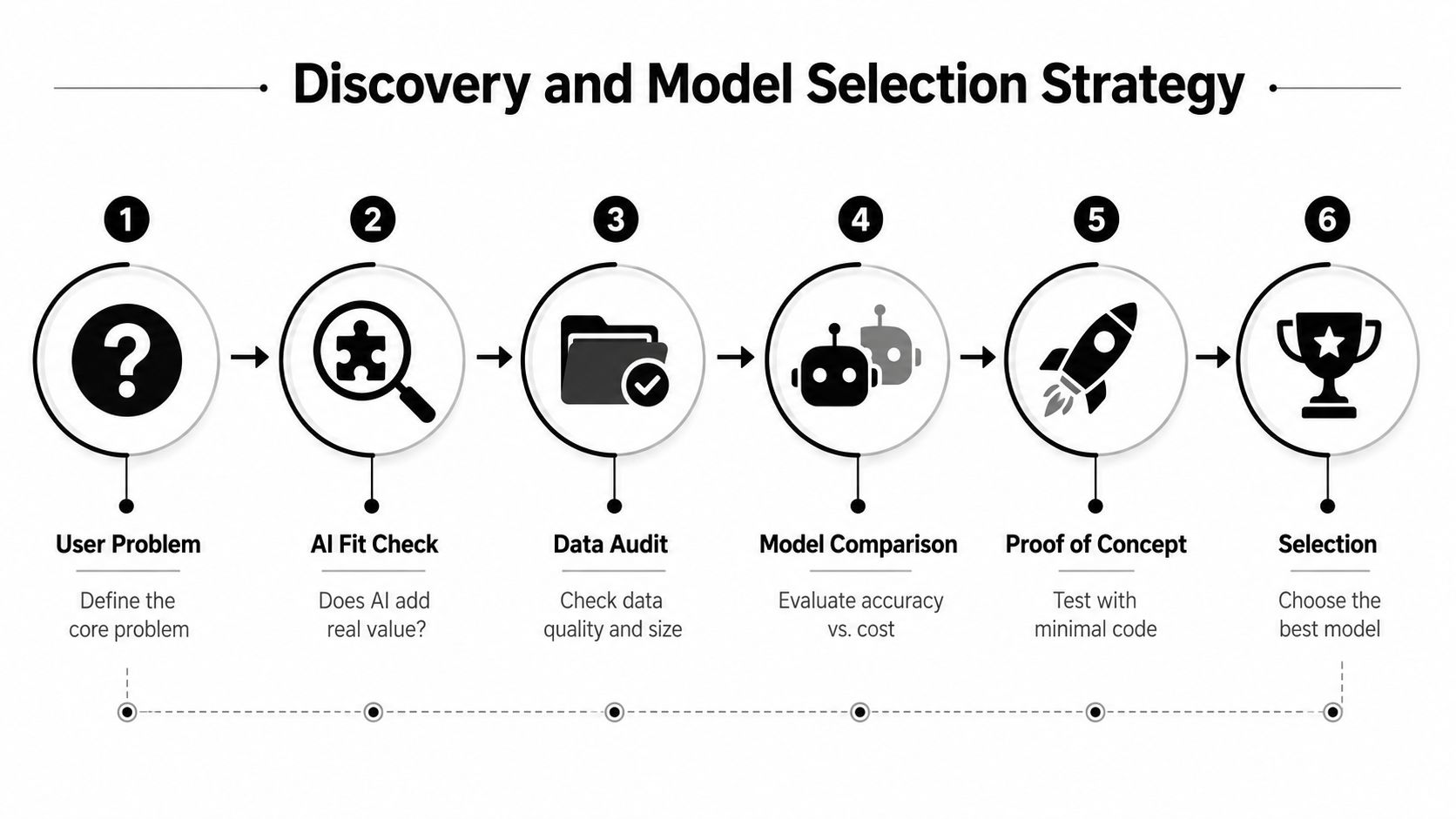
The best model is the one that fits a defined user problem, not the one receiving the most attention online. Start discovery by describing the user's desired outcome without mentioning AI. “Help a claims specialist find the relevant policy passage” is a useful problem statement. “Add an agent” isn't.
Start with the workflow
Map the current experience from input to decision. Identify where users lose time, where information arrives in inconsistent formats, and where a prediction, classification, generation, or retrieval step could reduce friction. Then separate AI-appropriate work from deterministic work.
Use traditional application logic for permissions, transaction rules, calculations, eligibility checks, and anything that must produce the same answer from the same inputs. Consider AI for language interpretation, fuzzy search, summarization, recommendations, classification, extraction, and assistance with ambiguous content. Many successful features combine both. The model interprets a request, while ordinary application code validates the result and controls what happens next.
Audit the data before comparing providers. Check ownership, freshness, duplication, access permissions, sensitive fields, labeling quality, and the consequences of an incorrect output. A model can't compensate for a knowledge base that contains contradictory policies or records the application shouldn't expose.
Build a decision matrix
Compare models against the requirements of each feature rather than choosing one provider for the whole application.
| Decision area | Questions to answer |
|---|---|
| Accuracy | Can the model follow the feature's behavioral and domain requirements? |
| Latency | Does the response fit the user's workflow, especially on mobile networks? |
| Cost | Can the feature operate within an approved budget under normal and peak usage? |
| Privacy | What data can leave your environment, and what retention controls apply? |
| Portability | Can the application switch providers without rewriting business logic? |
| Operations | Can the team observe failures, inspect requests, and manage version changes? |
Proprietary models may offer strong capabilities and managed infrastructure. Open-source models can provide more control over deployment, data handling, and customization, but they may require additional operational expertise. General-purpose models work well across varied tasks, while domain-specific systems can be preferable when terminology, format, or compliance requirements are tightly constrained.
Finish with a narrow proof of concept. Use representative inputs, difficult edge cases, and a clear human review process. The AI model evaluation guide can help teams formalize that comparison before committing the application to a provider or model family.
Architecture Patterns and Data Flow Design
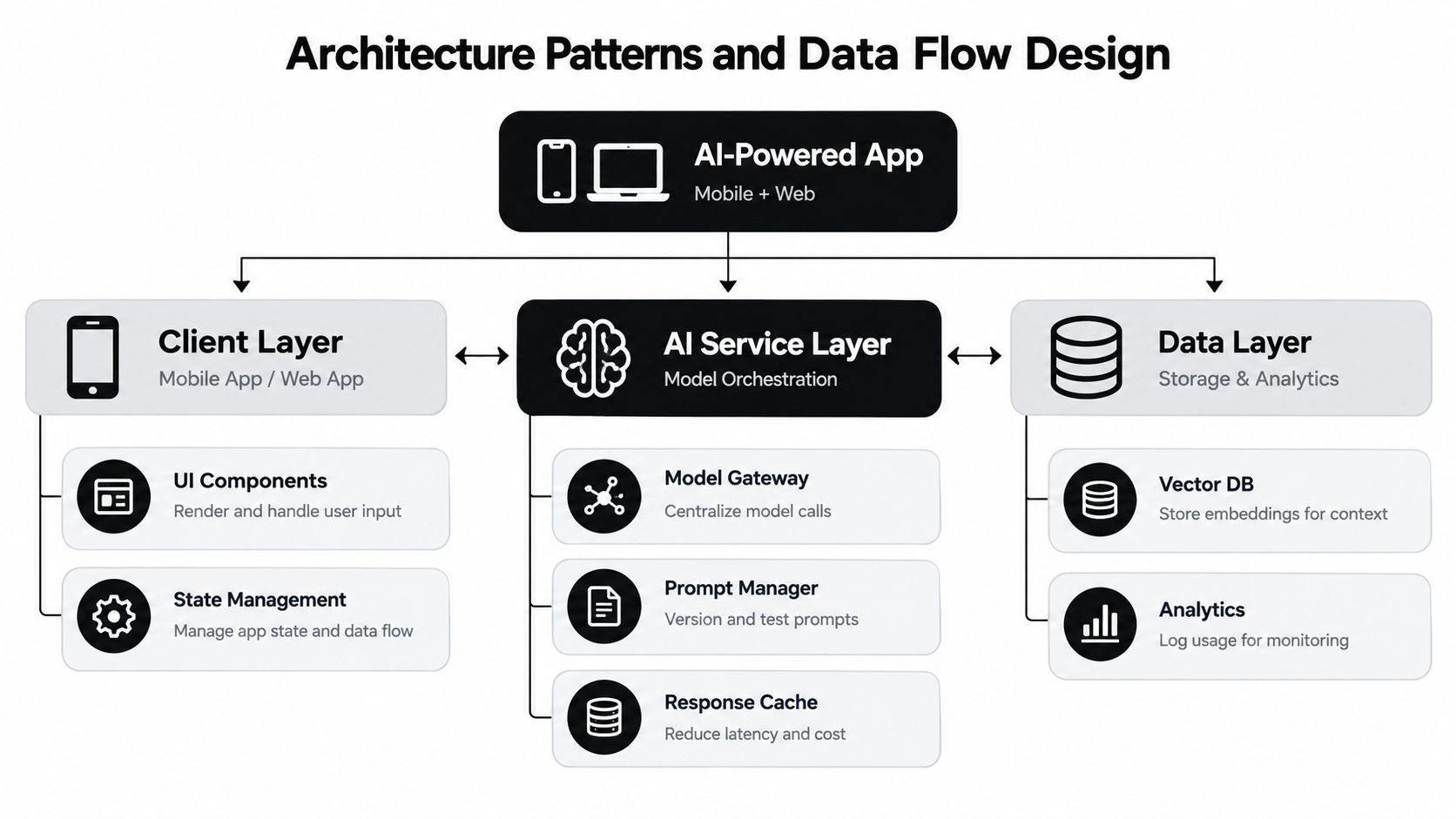
AI should sit behind a stable application boundary. A mobile or web client shouldn't contain provider-specific logic, scattered prompts, or credentials. Route requests through an AI service layer that owns model selection, prompt retrieval, context assembly, validation, retries, caching, and observability.
A practical architecture separates three concerns:
- Client layer: Renders the experience, captures input, shows progress, and handles errors without assuming every AI request will succeed.
- AI service layer: Centralizes model calls, prompt versions, tool permissions, response validation, and provider fallbacks.
- Data layer: Stores application records, retrieval indexes, usage events, evaluation results, and approved audit information.
Keep the data flow explicit
For a retrieval feature, the request might travel from the client to an API gateway, through an authorization check, into a retrieval service, and then to a model gateway. The retrieval service selects approved context from a vector database or search index. The model receives the user request and that controlled context, while the application records the relevant request metadata and validation result.
For interactive experiences, use synchronous inference only where the user needs an immediate response. Long-running document ingestion, bulk classification, report generation, and re-indexing belong in queues or event-driven workers. This keeps the interface responsive and prevents a slow model call from blocking unrelated application actions.
Context management requires restraint. Pass the smallest useful set of documents, user preferences, and conversation history. Store durable facts in application data rather than repeatedly sending an entire conversation. This improves clarity and gives the team a place to apply permissions before context reaches the model.
Design for replacement
A model gateway should expose application-level capabilities such as summarizeDocument, classifyTicket, or answerPolicyQuestion, rather than exposing a provider's raw API throughout the codebase. The gateway can then select a model by task, route requests to different providers, and preserve the surrounding application contract when a model changes.
Response caching can help with repeated, non-sensitive requests, but cache keys must include the prompt version, relevant context version, model identifier, and tenant or user boundary. Never cache personalized or confidential responses in a shared scope. Teams designing broader service boundaries can use this microservices architecture example as a reference point, while still choosing the simplest architecture that the product needs.
Prompt Management and Cost Control Systems
Prompt management becomes essential when prompts influence customer-facing behavior. A prompt hidden inside a controller or mobile release is hard to inspect, test, approve, or reverse. Treat each prompt like a deployable configuration artifact with an owner, purpose, inputs, output contract, safety constraints, and change history.
Put prompts under administration
A prompt vault gives product and engineering teams a controlled place to store system instructions, templates, examples, and feature-specific variants. Versioning matters because a response change may come from the prompt, the model, the retrieved context, the input data, or the application code. Without a version identifier on every request, troubleshooting becomes guesswork.
A parameter manager should keep dynamic values separate from the core instruction. It can define which application data a prompt may access, how fields are formatted, and what permissions apply before retrieval. This reduces the temptation to build unsafe database access directly into a natural-language instruction.
Logging should cover every integrated AI service through a consistent event format. Record the feature, model, prompt version, latency, status, validation outcome, and usage metadata permitted by your privacy policy. Store full content only when the organization has approved the retention and access model.
Make cost visible before it becomes a surprise
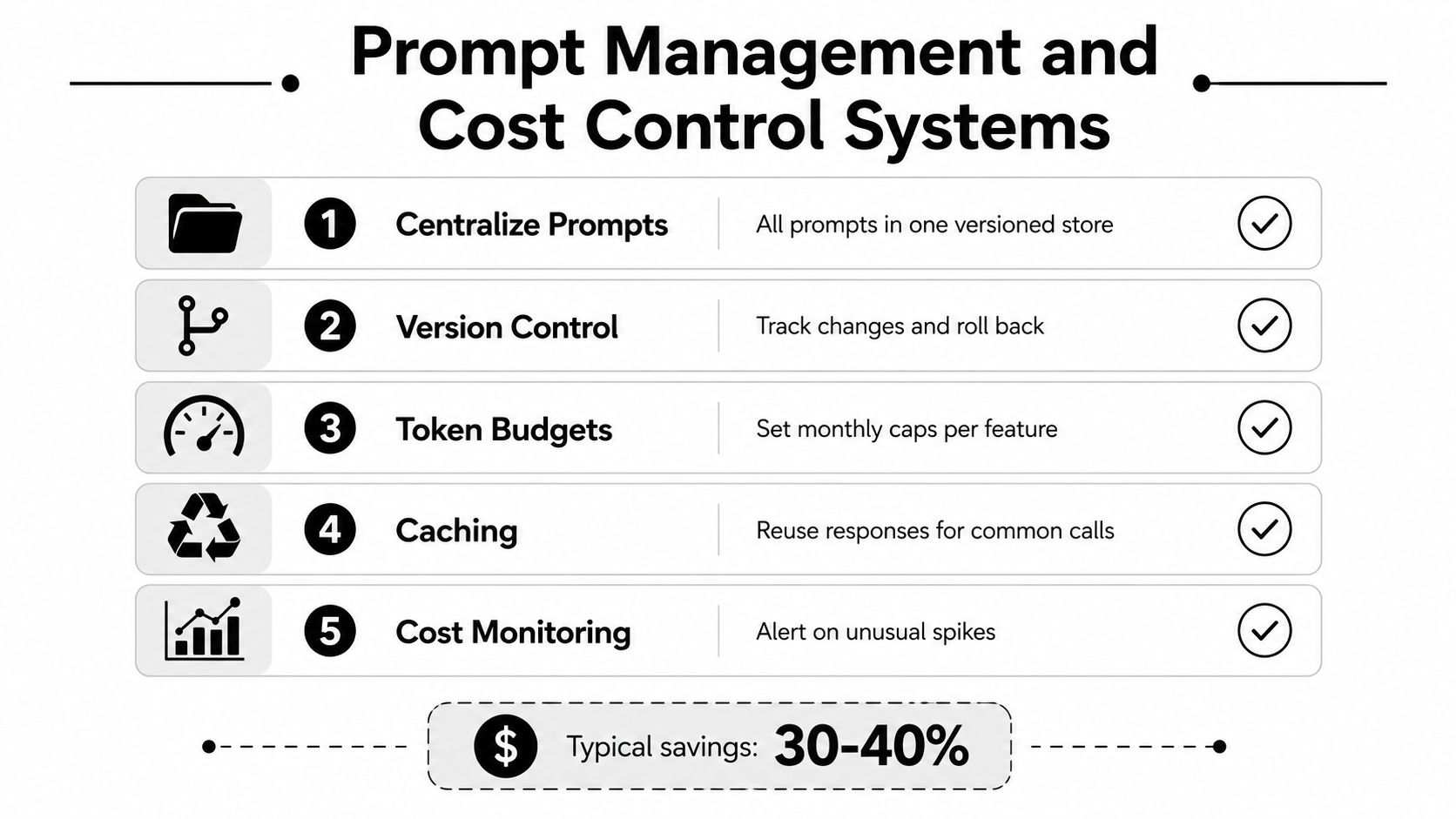
A cost manager should connect usage to business features, not just to a monthly provider invoice. Show cumulative spend by model, environment, tenant, workflow, and prompt version. Set budgets for individual features, alert on unusual spikes, and distinguish expected batch activity from an accidental retry loop.
Caching can reduce repeated work when the request and context are reusable. It won't solve an oversized prompt, poor retrieval, or an uncontrolled agent loop. Review those causes directly.
The supplied infographic includes a note stating “Typical savings: 30-40%”, but that figure isn't supported by the verified data available for this article, so it shouldn't be presented as a general outcome. Cost control needs measurement in the target application, with before-and-after comparisons based on actual usage.
Operational habit: Review prompt changes and cost changes together. A prompt that improves answer quality but multiplies context usage may still be the wrong production decision.
Engineering and QA Practices for AI-Generated Code
AI-generated code changes the volume of implementation, not the team's responsibility for the result. One industry benchmark places AI-generated committed code at 30–70% in high-adoption organizations, based on measurements spanning 2025–2026 (the benchmark summary). That level of contribution makes review design more important, not less.
The review process should inspect behavior and maintainability side by side. Ask whether the code satisfies the acceptance criteria, handles failure states, follows existing boundaries, protects data, and remains understandable to the next engineer. Generated code often looks polished while making an incorrect assumption about an API, authorization rule, concurrency condition, or empty state.
Compare speed with reliability
Controlled studies show why teams shouldn't promise a universal productivity lift. One experiment found developers using an AI pair programmer completed a JavaScript HTTP-server task 55.8% faster, while a later cohort study estimated an average 21% increase in development speed after controlling for other factors (the cited coding-assistant study). An updated METR analysis, however, reported that AI slowed experienced developers by 19% on certain open-source tasks (METR's uplift update).
The practical conclusion is to measure at the task level. AI may accelerate boilerplate, test scaffolding, migration scripts, and straightforward interface work. It may slow down unfamiliar repositories where the developer must verify every generated change or untangle code that doesn't match local conventions.
Test the contract, not the prose
Use layered validation:
- Unit tests: Check deterministic business rules and adapters around model calls.
- Behavioral tests: Run realistic user workflows through the application and verify outcomes, not merely response text.
- Schema validation: Reject malformed structured output before it reaches a database or user interface.
- Security tests: Probe instruction boundaries, unauthorized data access, unsafe tool calls, and manipulated inputs.
- Regression evaluations: Keep a representative test set so prompt, model, retrieval, and code changes can be compared.
AppBench and Vibe Code Bench highlight the danger of prompt-only delivery. Vibe Code Bench reports that frontier models solved 61.8% of realistic web application development tasks on its test split across 16 models, evaluated with 100 app specifications, 964 browser workflows, and 10,131 substeps (AppBench). Superficially plausible output can still fail behavioral specifications, so CI should include deployment checks and browser-level verification.
Security, Compliance, Deployment, and Monitoring
An AI feature needs the same security architecture as the rest of the application, plus controls for model-specific failure modes. Prompt injection can manipulate instructions through user content or retrieved documents. Excessive tool permissions can turn a helpful workflow into an unauthorized data operation. Sensitive records can also reach a provider through logs, prompts, embeddings, or error traces.
Start with least privilege. Give each model workflow only the tools and fields it needs. Separate system instructions from user content, mark retrieved text as untrusted data, validate tool arguments in application code, and require human approval for consequential actions. Don't let a model decide its own authorization boundary.
Make compliance part of the data path
Create a data inventory for prompts, context, outputs, embeddings, logs, and feedback. Define retention, deletion, access, residency, and provider-processing rules before launch. Healthcare, fintech, public-sector, and other regulated teams should involve security and compliance owners during discovery, not after the feature has already been embedded in production workflows.
Deployment also needs a release strategy for model and prompt changes. Use isolated environments, staged rollout, feature flags, rollback paths, and a known-good configuration. A model update can change tone, formatting, retrieval behavior, or tool selection even when application code remains untouched.
Monitor outcomes and operations
Track technical signals such as latency, timeouts, error rates, retries, token usage, cache performance, and provider availability. Pair them with product signals such as task completion, escalation, correction, abandonment, and user feedback. Monitor for drift in input patterns and output quality, then route suspicious changes to human review.
A useful introduction to the product and infrastructure considerations appears in this guide on how to develop an AI SaaS tool. The same principle applies to internal applications: plan the operating model before the model becomes a critical dependency.
Resilience principle: Every AI workflow needs a useful failure state. A clear fallback, a human handoff, or a delayed result is better than confident nonsense.
Building AI Apps That Last with the Right Administrative Tools
Durable AI modernization depends on the layer that governs the moving parts. A prompt vault with versioning lets teams test and roll back instructions. A parameter manager controls which application data reaches each workflow. Cross-provider logging makes model calls explainable, while a cost manager connects cumulative spend to the features creating it.
Wonderment Apps offers a prompt management system that combines those administrative functions for existing apps and software. It can provide prompt versioning, parameter management for internal database access, logging across integrated AI services, and cumulative cost visibility. That makes it a practical option for teams modernizing web, desktop, or mobile products without scattering AI operations across unrelated code repositories and provider dashboards.
The right developer partner should understand more than model APIs. Look for engineers who can design secure data flows, build mobile and web experiences, create evaluation suites, review generated code, and support the system after launch. AI-powered app development succeeds when product design, software engineering, QA, security, and administration work as one delivery system.
Wonderment Apps helps organizations build and modernize web and mobile applications with custom AI integration, prompt management, audit logging, and token cost control. Visit Wonderment Apps to explore the available services and request a demo of the administrative tooling for your next AI-powered product.