

A finance director watches the quarterly close stall because the ERP can't export transaction data in the format regulators now require. The team builds a spreadsheet workaround, security reviews it too late, and everyone knows the same problem will return next quarter. Meanwhile, customers expect faster service, employees need mobile access, and leadership wants AI features without exposing sensitive data.
That tension defines modern enterprise app development. The market is no longer a narrow IT concern. One estimate values the application development market at USD 34.82 billion in 2025 and projects it to reach USD 98.41 billion by 2035, while another estimates the broader application development software market at USD 257.94 billion in 2024 and forecasts USD 862.67 billion by 2030. Both estimates point to sustained demand for modernization, cloud integration, and software that supports digital workflows across major markets such as North America and Asia-Pacific. (Emergen Research application development market analysis)
The practical lesson is simple: treat software as an operating capability. Build for the workflow, govern the data, choose architecture deliberately, and keep improving the system after launch. AI can help, but only when teams control prompts, parameters, logs, privacy, and spend instead of bolting a chatbot onto a fragile legacy stack.
When Off-the-Shelf Software Stops Being Enough
The breaking point rarely arrives as a dramatic system failure. More often, a finance director discovers that a trusted ERP can't produce a required export, an ecommerce team can't change checkout rules without a vendor ticket, or a healthcare operations group has to copy patient-related data between systems by hand. Each workaround looks manageable in isolation. Together, they create shadow IT, duplicate records, approval delays, and operational risk.
Start by identifying the workflow that causes the most business friction. Document who performs each step, which systems they touch, where data changes hands, and what happens when something goes wrong. Then separate a genuine product gap from a configuration problem. Custom software is justified when the workflow is strategically important, the packaged tool imposes costly compromises, or the organization needs control over data, integrations, and release timing.
Enterprise app development is the discipline of designing, building, operating, and evolving software around those realities. It includes web and mobile experiences, internal systems, APIs, databases, testing, deployment, monitoring, and eventual retirement. The application becomes part of how the company works, not a project that disappears when the first release ships.
Start with the operating problem
A useful discovery conversation asks four questions:
- What decision or action is currently delayed? Look for approval queues, manual reconciliation, failed handoffs, and repeated data entry.
- Which system owns the truth? If teams can't answer this, integration design will become a political and technical problem.
- What must never happen? Capture privacy breaches, duplicate payments, incorrect clinical recommendations, and unauthorized changes.
- What will change over time? A durable application needs extension points, not just a narrow solution for today's process.
Modernization increasingly includes governed AI workflows. A prompt management toolkit can provide a controlled environment for prompt versioning, parameter tuning, and audit trails that many legacy systems lack. That matters when an AI feature moves from an experiment into a customer-facing or regulated workflow. The goal isn't to add AI because competitors mention it. The goal is to make a painful process safer, faster, and easier to improve.
What Enterprise App Development Really Means
Think of an enterprise application as the custom factory floor inside an organization. The floor is designed around the company's machinery, materials, safety rules, workers, and production sequence. A rented tool may help with one task, but it usually forces the organization to reshape its process around someone else's assumptions.
That distinction separates enterprise applications from ordinary SaaS configuration, lightweight internal tools, and small-business software. Enterprise systems commonly connect core platforms, support large user populations, handle sensitive information, and remain operational through years of organizational change. Their success depends on more than an attractive interface. The application must preserve business rules, integrate with existing systems, enforce access controls, and provide evidence of what happened.
Four traits define the work
- Mission-critical workload. The application supports revenue, fulfillment, finance, care delivery, compliance, or another process the organization can't casually pause.
- Deep system integration. It exchanges data with ERP, CRM, payment, identity, analytics, warehouse, and third-party platforms through stable contracts.
- Regulated data handling. Teams may need to account for frameworks and obligations such as SOC 2, HIPAA, PCI, and GDPR. The exact control set depends on the data and jurisdiction, but security must shape the design from the beginning.
- Continuous evolution. Business rules, devices, regulations, vendors, and customer expectations change. The team needs a roadmap for upgrades, migrations, observability, and technical debt reduction.
The historical arc explains why these traits matter. Early enterprise computing emerged in the late 1950s and early 1960s, when operating systems and programming languages began appearing in industry. Later, enterprise software expanded from back-office systems into cloud-based platforms and mobile applications. A 2026 estimate places the enterprise mobile application development market at USD 189.22 billion, up from USD 168.45 billion in 2025, with a projection of USD 338.42 billion by 2031 at a 12.33% CAGR. (Enterprise software history and market context)
That history is more than trivia. It explains why enterprise app development must prioritize interoperability and lifecycle support over novelty.
Choosing the Right Architecture and Tech Stack
Architecture should follow workload, team capability, and operational maturity. It shouldn't follow whatever diagram impressed the last conference audience.
A monolith keeps the application, deployment, and often the data access layer together. A Rails or Django application backed by Postgres and placed behind a load balancer can be fast to build and straightforward to debug. The weakness appears as teams multiply, releases collide, and a small change requires redeploying the whole system.
A modular monolith preserves one deployable unit while enforcing internal boundaries. Teams can define bounded contexts, separate domain modules, establish explicit interfaces, and use feature flags for controlled releases. This is often the most practical midpoint for enterprise applications. It reduces distributed-system overhead while preserving a path toward later service extraction.
Microservices make sense when independently deployable components have clear ownership, different scaling profiles, or strong isolation requirements. Kubernetes, managed Kafka, and per-service datastores can support that model, but they also create work around service discovery, tracing, contracts, retries, data consistency, and incident coordination.
Architecture Trade-offs at a Glance
| Dimension | Monolith | Modular Monolith | Microservices |
|---|---|---|---|
| Team size | Small or centralized team | Several teams with shared platform ownership | Multiple autonomous teams |
| Deployment cadence | One release affects the application | One release, with internal isolation and flags | Services release independently |
| Latency | Usually efficient for local calls | Usually efficient with explicit module boundaries | Network calls add latency and failure paths |
| Blast radius | A deployment can affect the whole system | Reduced through modules and controlled flags | Potentially smaller per service, but failures can cascade |
| Operations | Simpler monitoring and deployment | Moderate discipline and tooling | High observability and platform burden |
| Typical stack | Rails or Django, Postgres, load balancer | Same foundation plus bounded contexts and feature flags | Kubernetes, managed Kafka, per-service datastores |
Architecture experiments support a workload-dependent decision. One 2026 empirical comparison found that, at 100 virtual users, a microservices design delivered 5.4% higher throughput, 25% lower average latency, and 39% lower p95 latency than a monolith, with a lower median error rate of 0.00% versus 0.69%. The authors also identified service-specific failure modes that teams must manage. (Empirical microservices and monolith comparison)
Other comparative work found monoliths can deliver better p50 and p90 latency under moderate or small loads. In one migration study, a replicated microservice version processed about 85% of requests in under 800 milliseconds, while the monolith required more than 1200 milliseconds for roughly half of its requests, but the API gateway became a ceiling unless it was replicated too. (Architecture migration comparison)
Practical rule: Don't copy Netflix's architecture when your product has 50,000 users, one delivery team, and a workload that fits comfortably in a well-designed modular monolith. You'll inherit operational complexity before you earn its benefits.
Before choosing languages and frameworks, document the workload, data boundaries, deployment needs, and team ownership model. This technology stack selection guide can help structure that decision.
The Lifecycle, Governance, and AI in the SDLC
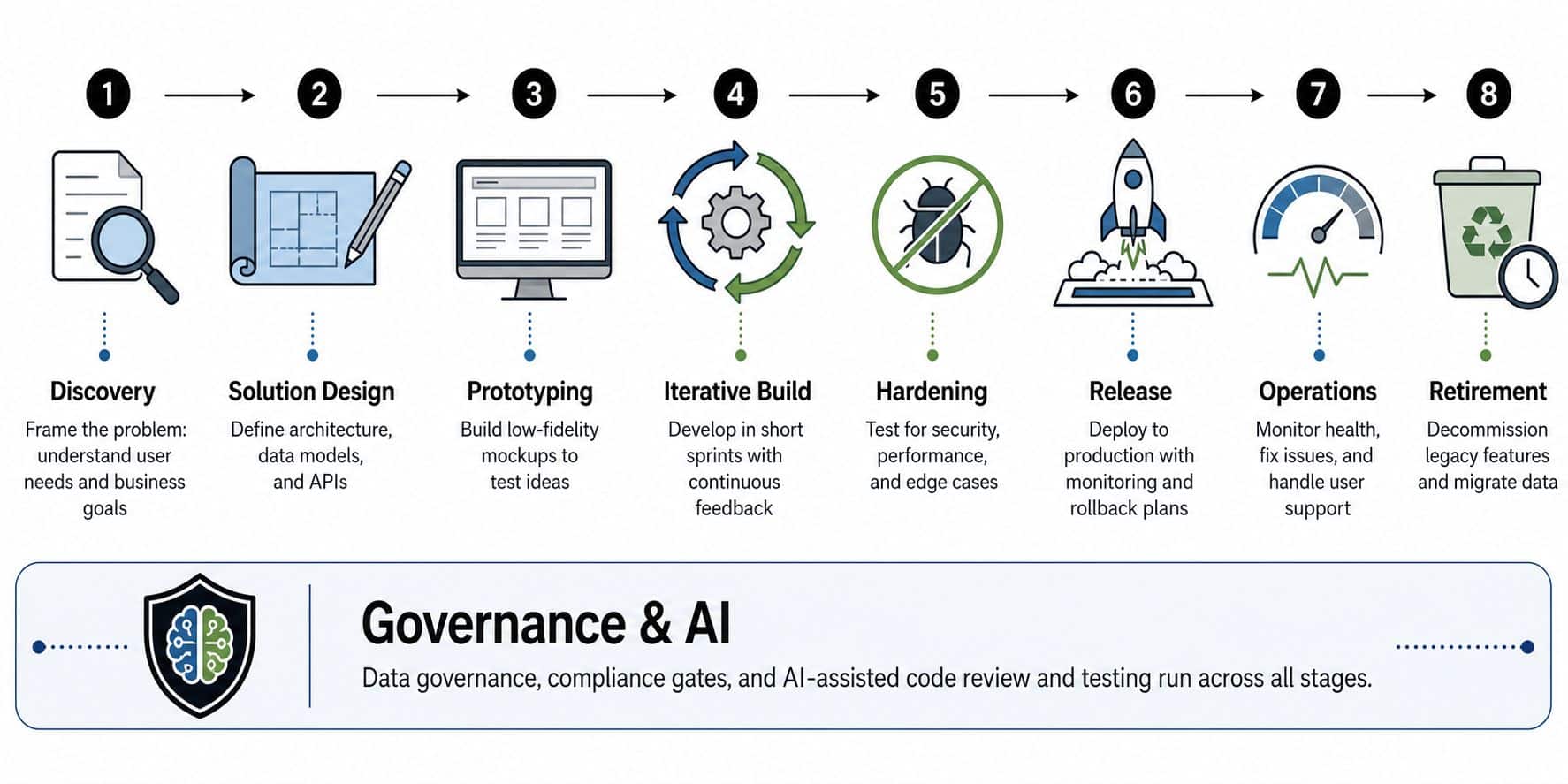
A production application has a lifecycle, not a finish line. Strong teams move from discovery and problem framing to solution design, prototyping, iterative build, hardening, release, operations, and eventual retirement or modernization. Governance belongs inside that flow, where decisions are still cheap to change.
Put an owner at every checkpoint
During discovery, product and operations leaders should agree on the problem, measurable outcome, affected users, and constraints. During design, an architecture review board should resolve cross-cutting decisions such as identity, integration contracts, data residency, and failure handling. Before regulated code lands, threat modeling and privacy review should identify abuse paths, sensitive fields, retention rules, and access boundaries.
During implementation, code review, dependency scanning, secret scanning, automated tests, and license compliance need clear ownership. AI-assisted coding makes this more urgent. Coding tools can draft useful code, but they can also reproduce insecure patterns, misunderstand business rules, or introduce dependencies that legal teams haven't approved.
For AI features, add reviews for prompt data, training data, model behavior, accuracy, bias, and production monitoring. Teams should know what inputs reached a model, what output came back, which version produced it, and whether a human approved a high-risk action. The AI software development lifecycle guide provides a useful framework for connecting these concerns to ordinary delivery practices.
Release governance should include rollback plans, migration safety, observability, and a change advisory board that can slow dangerous changes. After launch, operations teams need incident response, support processes, and retrospectives that produce named action items with owners and due dates.
The common traps are predictable:
- Unowned approval gates: A checklist without a responsible decision-maker becomes ceremony.
- Decaying documentation: If engineers don't update architecture and runbooks during delivery, the documents become fiction within a quarter.
- Performative retrospectives: A meeting that records lessons without funding corrective work won't reduce repeat incidents.
AI doesn't remove the SDLC. It makes weak governance more visible.
Scaling and Performance Patterns That Actually Work
Scaling starts with boring foundations. Use managed compute behind load balancers, managed relational databases with read replicas, connection pooling, edge caching, and caching in front of hot services. Keep the application tier stateless wherever practical so additional instances can serve requests without copying local session state.
For a reference architecture aimed at a first 10 million users, AWS guidance emphasizes managed compute and managed databases, along with performance across multiple geographies, incident detection, security and compliance, cost optimization, and services such as auto scaling groups, CloudFront, RDS read replicas, and DynamoDB. (AWS scaling guidance for the first 10 million users)
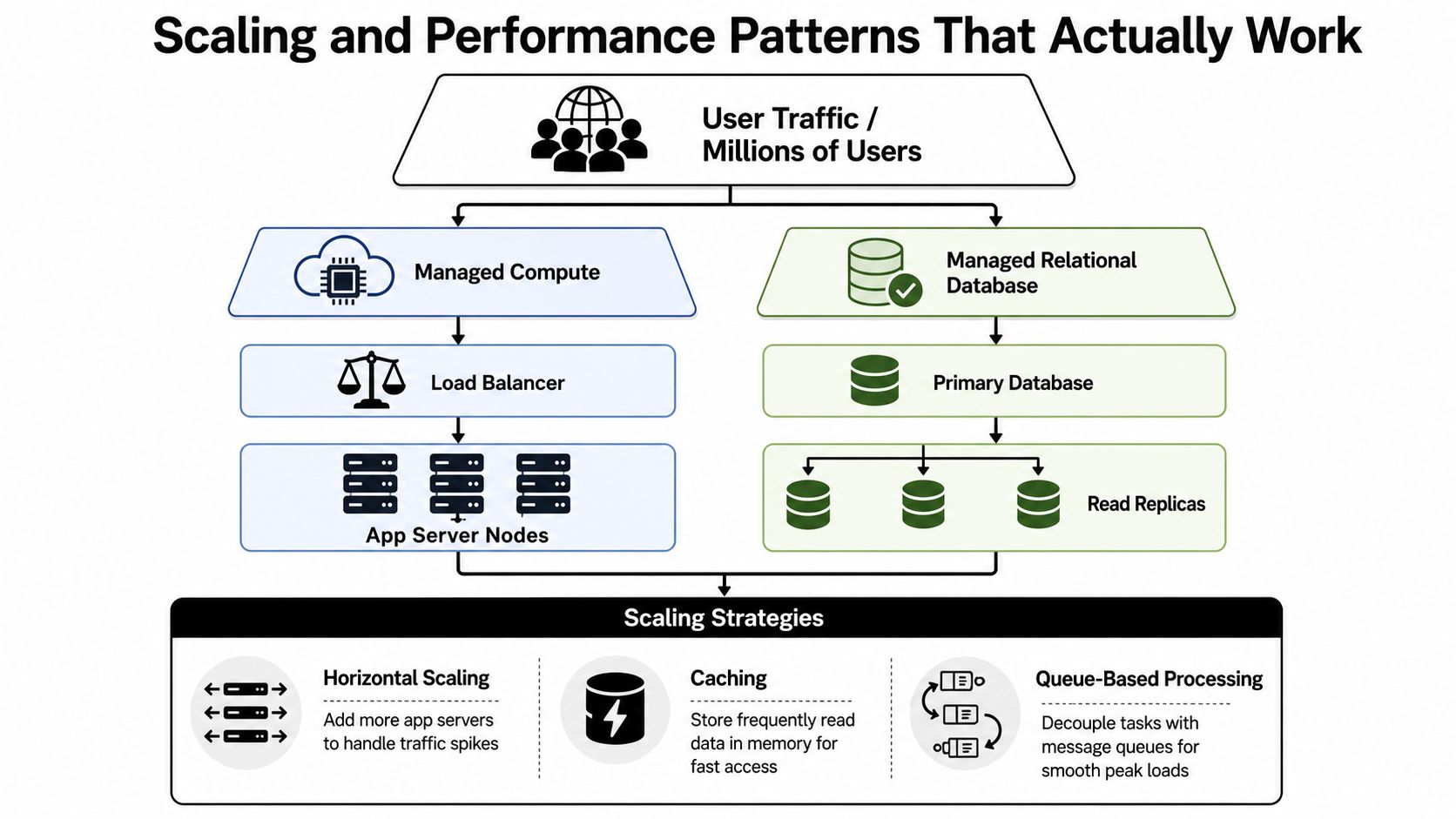
A practical version of that design looks like this:
- Stateless application tier: Run multiple application instances behind a load balancer, with health checks and controlled deployments.
- Managed Postgres with replicas: Send writes to the primary and suitable read traffic to replicas. Use connection pooling so traffic spikes don't exhaust database connections.
- Redis for sessions and cache: Keep frequently read, short-lived data out of the primary database, while planning invalidation carefully.
- Object storage and CDN: Store assets in object storage and serve them through a CDN such as CloudFront.
- Managed message queue: Move email, report generation, image processing, and other non-blocking work into durable background jobs.
- Observability layer: Track latency, errors, saturation, queue depth, and business outcomes. Turn latency budgets into service-level objectives with alerts that fire before customers notice.
Autoscaling should respond to workload signals, not CPU alone. Queue depth, request concurrency, database saturation, and response time often reveal pressure earlier than processor utilization. Backpressure matters just as much. If every tier accepts unlimited work, autoscaling can multiply the failure instead of absorbing it.
Capacity planning still matters: Autoscaling handles variation. It doesn't replace sensible limits, load testing, dependency reviews, or a plan for regional and database failure.
AI Modernization Without Breaking Trust
A mid-sized fintech bolts a public large language model onto customer support. The integration sends account numbers through prompts, the team can't reconstruct which instructions were active for a response, and the audit exposes a control failure. The issue isn't that the model produced an amusingly wrong answer. The issue is that nobody designed a trustworthy boundary around sensitive data.
A healthcare analytics team takes a different route. It introduces a prompt vault and parameter manager, version-controls prompts and model configuration, routes sensitive traffic through private inference, and gives reviewers an auditable path through the AI feature. That team treats the model as a governed production dependency, not a magic text box.
Build the control layer before the feature layer
A safe modernization kit includes:
| Tool | What it does | Failure it prevents |
|---|---|---|
| Prompt vault | Stores prompts with versions and approval history | Untraceable behavior after a prompt change |
| Parameter manager | Controls model selection and settings such as temperature | Configuration drift across environments |
| Structured logging | Records permitted inputs, outputs, metadata, and failures | Debugging by guesswork |
| Cost manager | Attributes cumulative AI spend to features or workflows | Unexplained model bills |
| Red-team evaluations | Tests unsafe, biased, manipulative, or privacy-sensitive behavior | Launching a feature without understanding its failure modes |
| Human review | Routes high-risk outputs to an accountable person | Automated decisions proceeding without judgment |
McKinsey reports that organizations in the top quintile of AI adoption in software development achieved 16% to 30% improvements in productivity, time to market, and customer experience, along with 31% to 45% gains in software quality. The research emphasizes embedding AI across the lifecycle rather than restricting it to code generation. (McKinsey AI in software development)
The same firm reports that generative AI can reduce documentation time by half, cut new-code writing time by nearly half, and reduce refactoring time by nearly two-thirds. Those capabilities make legacy modernization more practical, but they don't eliminate review. (McKinsey developer productivity research)
Wonderment Apps offers an administrative prompt management tool that can plug into an existing application or software system. It includes a prompt vault with versioning, a parameter manager for internal database access, logging across integrated AI systems, and a cost manager for viewing cumulative spend. The operating discipline still matters more than the tool itself. Prompt changes need change-board review, models need rollback procedures, and legal, security, and product leaders need clear ownership of AI behavior.
Team Models and How to Pick the Right Partner
The right delivery model depends on who should own product decisions, technical knowledge, and operational risk after launch.
An in-house product team provides the strongest long-term control. It's the natural fit for a core platform that will shape the company's identity, data assets, and roadmap for years. The trade-off is slower access to niche expertise and the need to retain engineers across architecture, security, UX, QA, and operations.
Staff augmentation adds engineers to an existing backlog and operating model. It works well when the product owner, architecture authority, and delivery process already exist, but the team lacks a specialist in areas such as mobile APIs, cloud migration, automated QA, or AI evaluation. The client keeps ownership, so onboarding and technical direction can't be neglected.
A fully managed project gives a partner responsibility for delivery outcomes. This can suit a fixed-scope launch or a modernization wave where the organization wants a partner to assemble design, engineering, QA, and project leadership. The risk is weak knowledge transfer. If the partner leaves and nobody understands the system, the business has traded one dependency for another.
Team Model Comparison for Enterprise App Development
| Model | Ownership & Control | Typical Cost | Time to Start | Best Fit | Key Risk |
|---|---|---|---|---|---|
| In-house product team | Highest internal control | Ongoing internal investment | Depends on hiring and availability | Strategic product ownership | Capability gaps or retention pressure |
| Staff augmentation | Client owns roadmap and decisions | Ongoing contractor or partner spend | Fast when roles are defined | Filling specialist gaps | Engineers lack context or direction |
| Fully managed project | Partner owns agreed delivery scope | Contracted project investment | Fast after discovery and scope definition | Fixed-scope launches and modernization waves | Knowledge transfer and vendor dependency |
Use staff augmentation versus managed services as a starting point, but evaluate vendors through evidence rather than sales language. Ask for proof of similar ecommerce, fintech, or healthcare workloads, references you can call, architecture decisions that go beyond slideware, and an AI governance story that covers prompts, models, privacy, and monitoring.
Also require SLAs with teeth, observability in the code from day one, and a post-launch support plan. In 2026, partner evaluation should include prompt and model governance maturity, FinOps discipline, and a roadmap conversation that goes beyond the next sprint.
Your 90-Day Plan for a Modern Enterprise App
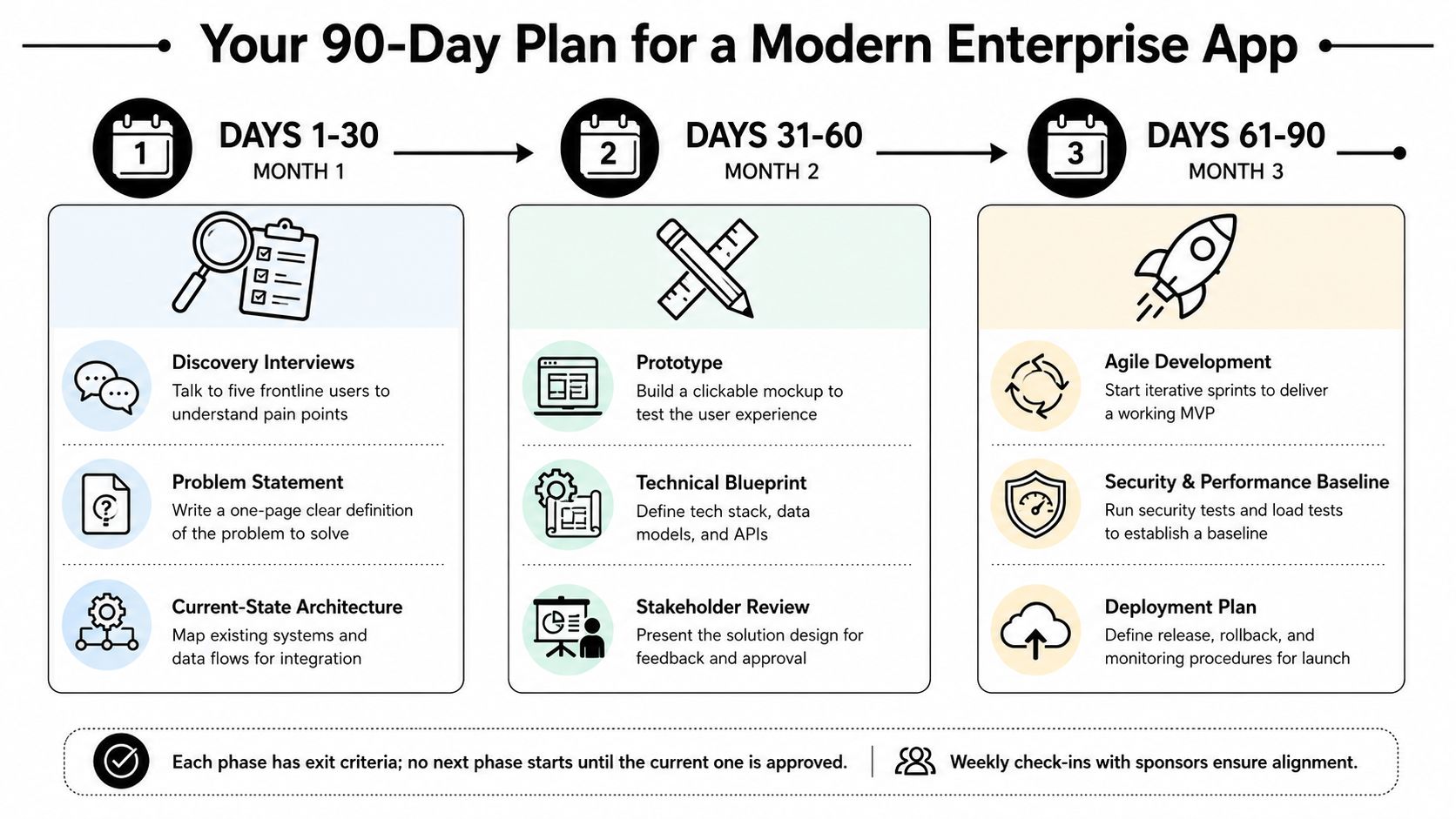
A CIO or VP of Product doesn't need a giant transformation program to start. A focused modernization wave can produce evidence, expose constraints, and give leadership a rational basis for further investment.
Days 1 to 30
Interview five frontline users across the affected workflow. Ask where they lose time, which data they distrust, what they do outside the official system, and what failure would create the greatest customer or compliance impact. Write a one-page problem statement, draw the current-state architecture, and sketch the target state.
Quantify the cost of doing nothing in terms of downtime, churn, delayed revenue, manual effort, or compliance exposure. The number should support a decision, not decorate a business case.
Days 31 to 60
Shortlist two or three partners with a weighted scorecard. Score domain fit, security posture, AI governance, references, delivery model, and total cost of ownership. Ask each candidate to explain how they'd preserve legacy behavior while introducing new interfaces, data contracts, observability, and rollback paths.
Run a paid discovery sprint or architecture workshop with the top candidate. Require concrete outputs, such as a thin-slice backlog, target-state diagram, threat model, integration plan, test strategy, and release approach.
Days 61 to 90
Lock the scope of the first modernization wave. Ship a thin slice into production behind a feature flag, instrument it, observe real usage, and decide whether the evidence supports a go-scale contract. Don't wait for a perfect replacement of the legacy system. Prove one valuable workflow end to end, then expand deliberately.
The no-regret first move is to choose one painful workflow, modernize it from user experience through integration and operations, and use that win to fund the next wave. Start next week by naming the workflow, its owner, and the evidence that will prove the new system works.
Wonderment Apps helps organizations modernize legacy software through web and mobile development, backend architecture, APIs, UX, QA, AI integration, and managed project delivery. Visit Wonderment Apps to discuss a governed enterprise app development plan that can scale without sacrificing security, operational visibility, or long-term ownership.