

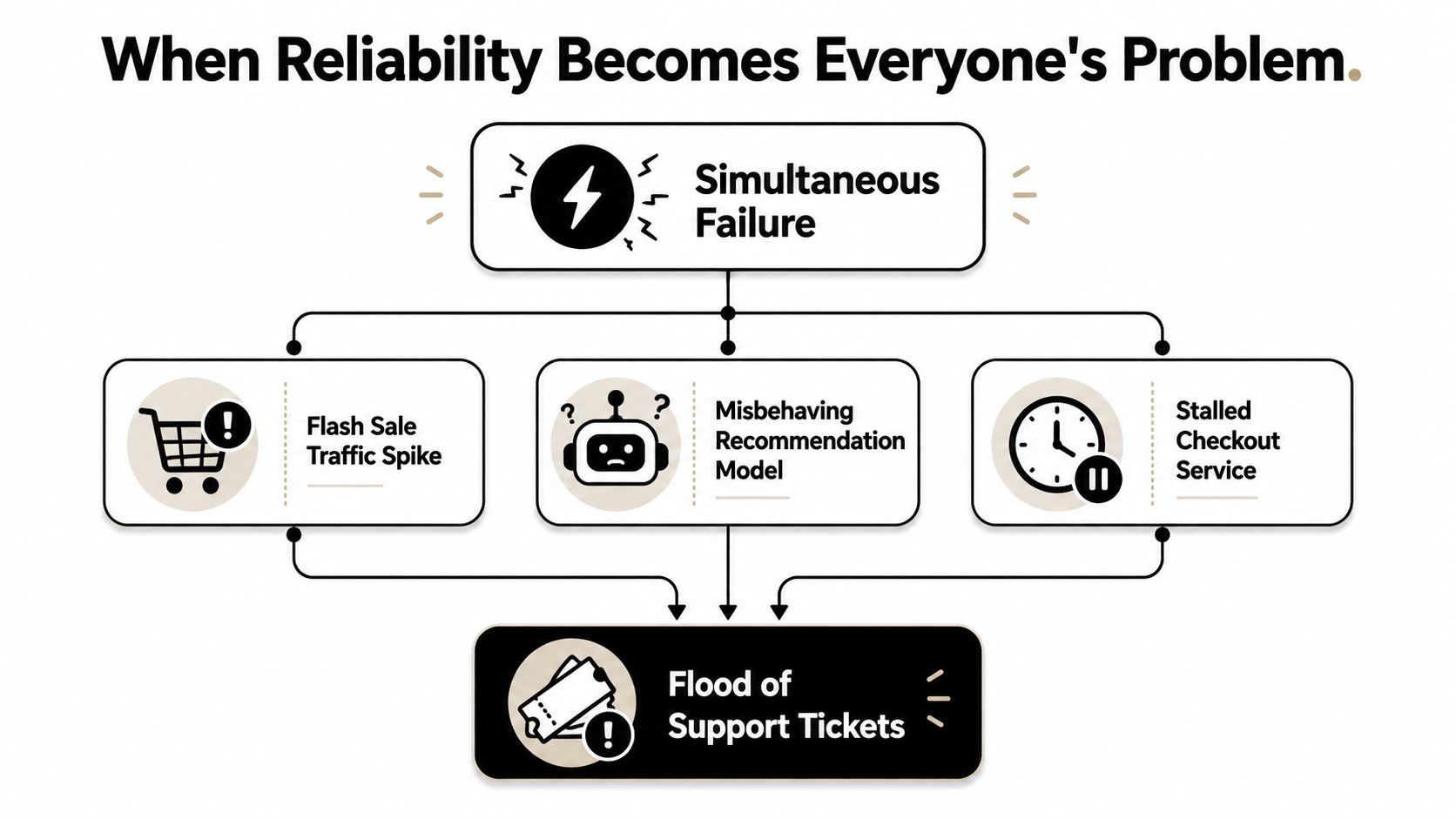
At 2 a.m., the support channel lights up. A flash sale is live, the recommendation model starts surfacing nonsense, and checkout slows to a crawl, so the small team on call is reading the same message from three directions at once, the app is failing, the AI feature is confusing users, and the infrastructure is backing up behind both of them. That's the shape of reliability engineering for modern software, not a neat diagram of isolated parts, but a system where software, infrastructure, and human decisions all collide at once, exactly the sort of interdependent reality highlighted in a 2024 review of reliability analysis for IoT-enabled and human-machine systems ar5iv review on modern reliability barriers.
Reliability engineering is the discipline of designing and operating systems so they keep delivering the experience people expect, even when parts misbehave. That means the checkout page stays usable, the mobile app doesn't panic on bad network conditions, and the AI layer doesn't drift into producing bad results while everything still looks “up.”
For teams building custom software, especially apps that now include AI, reliability isn't a back-office concern anymore. It touches revenue, retention, trust, and the internal sanity of the people who get paged when a feature crosses a hidden threshold. It also changes the product itself, because a brittle AI workflow isn't just a model problem, it's a user experience problem.
A practical way to think about it is this, reliability is a set of habits. You make choices in code, infrastructure, monitoring, incident handling, and human process, then you keep tightening those choices as the system changes.
There's also a quieter angle that matters for AI-heavy products, and I'll come back to it later. Some teams need an admin layer, like Wonderment Apps' prompt management system, to keep AI behavior versioned, observable, and financially visible as the app evolves.
When Reliability Becomes Everyone's Problem
A team usually does not think about reliability until several weak points fail together. Traffic spikes, a recommendation model misfires, checkout slows to a crawl, and the inbox fills with screenshots from customers who only wanted to buy something and now cannot. At that point, reliability stops sounding abstract and starts looking like basic product survival.
What reliability means in practice
A useful working definition is simple. Reliability engineering is the practice of making sure a system does what users need, when they need it, under the kinds of failure that happen in production. That includes cloud outages, bad deploys, model regressions, human mistakes, and dependencies that lag or fail in ways nobody predicted.
The hard part is that modern systems do not fail one piece at a time. A bad API response can trigger retries, retries can pile up, queues can grow, and a human operator may make the wrong call while the dashboard still says “healthy.” The review on modern reliability barriers points to exactly these problems, especially system interdependence, real-time IoT analysis, and human-machine collaboration.
Reliability is not a server problem. It is a product behavior problem that happens to involve servers.
That framing makes the scope easier to see. Reliability sits inside release engineering, support workflows, product decisions, and customer communication. It is not a separate department's hobby. It is a cross-functional habit that protects the experience the business is promising.
For teams modernizing software with AI, the problem also becomes one of control. A prompt can change behavior without any code diff, which means a small-looking tweak can create a user-facing incident if nobody manages it carefully. An admin layer for AI belongs in the reliability conversation because it keeps behavior versioned, observable, and financially visible as the product changes.
Why product teams should care
If the system breaks in ways customers notice, the product team owns the consequences whether or not the outage began in infrastructure. Support tickets, churn risk, refund pressure, and brand damage all show up downstream. Reliability is the glue between engineering intent and what users experience.
It also changes how leaders plan. A flashy feature that cannot survive load, bad data, or human error is not a finished feature yet. It is a demo with a future incident attached.
The Core Vocabulary Every Practitioner Should Own
Teams argue about reliability faster than they agree on the words. That usually happens because people mix up what they measure, what they promise, and what they contractually owe. Once those boundaries are clean, conversations get a lot easier.
SLI, SLO, and SLA without the jargon fog
Start with the SLI, the Service Level Indicator. That's the actual measurement, such as latency, error rate, or successful checkout completion. It's the number that tells you what the system is doing, not what you wish it were doing.
Then comes the SLO, the Service Level Objective. That's the internal target the team commits to, such as “the app should be available when customers need it” or “checkout should stay responsive enough for normal use.” Think of the SLI as the speedometer and the SLO as the speed you've agreed not to exceed on a given road.
The SLA, the Service Level Agreement, is different again. It's the promise you make to customers, usually with consequences if you miss it. That matters because not every internal target should become a contract. A product team can run with a stricter internal SLO than the customer-facing SLA and still sleep better.
Practical rule: If a number changes how the team behaves, it's probably an SLO. If missing it triggers a business consequence, it's probably an SLA.
The same logic applies in a restaurant kitchen. The ticket time is the SLI, the kitchen's internal pace target is the SLO, and the promise printed on a catering contract is the SLA. They're related, but they're not interchangeable.
MTTF, MTBF, MTTR, and the error budget mindset
The reliability metrics family adds another layer. MTTF means mean time to failure, MTBF means mean time between failures, and MTTR means mean time to recover. In plain language, one measures how long something lasts, one measures how long it takes before the next break, and one measures how quickly you get back on your feet.
You can use a lightbulb analogy for the first two. A bulb's lifetime gives you a sense of endurance, while the interval between burns gives you a sense of how often replacement becomes a real operational burden. For MTTR, think of an ambulance response time, the system has already failed, and the question is how fast you stabilize the situation.
The more modern concept is the error budget. Instead of treating reliability like a moral rule, it treats unreliability as a limited resource you spend. If you use it too quickly, you slow down change. If you preserve it, you have room to ship.
That framing helps mid-level teams make trade-offs without hand-waving. You're not asking, “Can we be perfect?” You're asking, “How much instability can users tolerate while the product still feels trustworthy?” That's a much better operating question.
Designing Systems That Stay Up When Parts Fail
Reliability starts long before the incident. The way you shape dependencies, isolate failures, and handle bad responses determines whether a small fault becomes a user-visible outage or a minor hiccup nobody notices.
Patterns that buy you breathing room
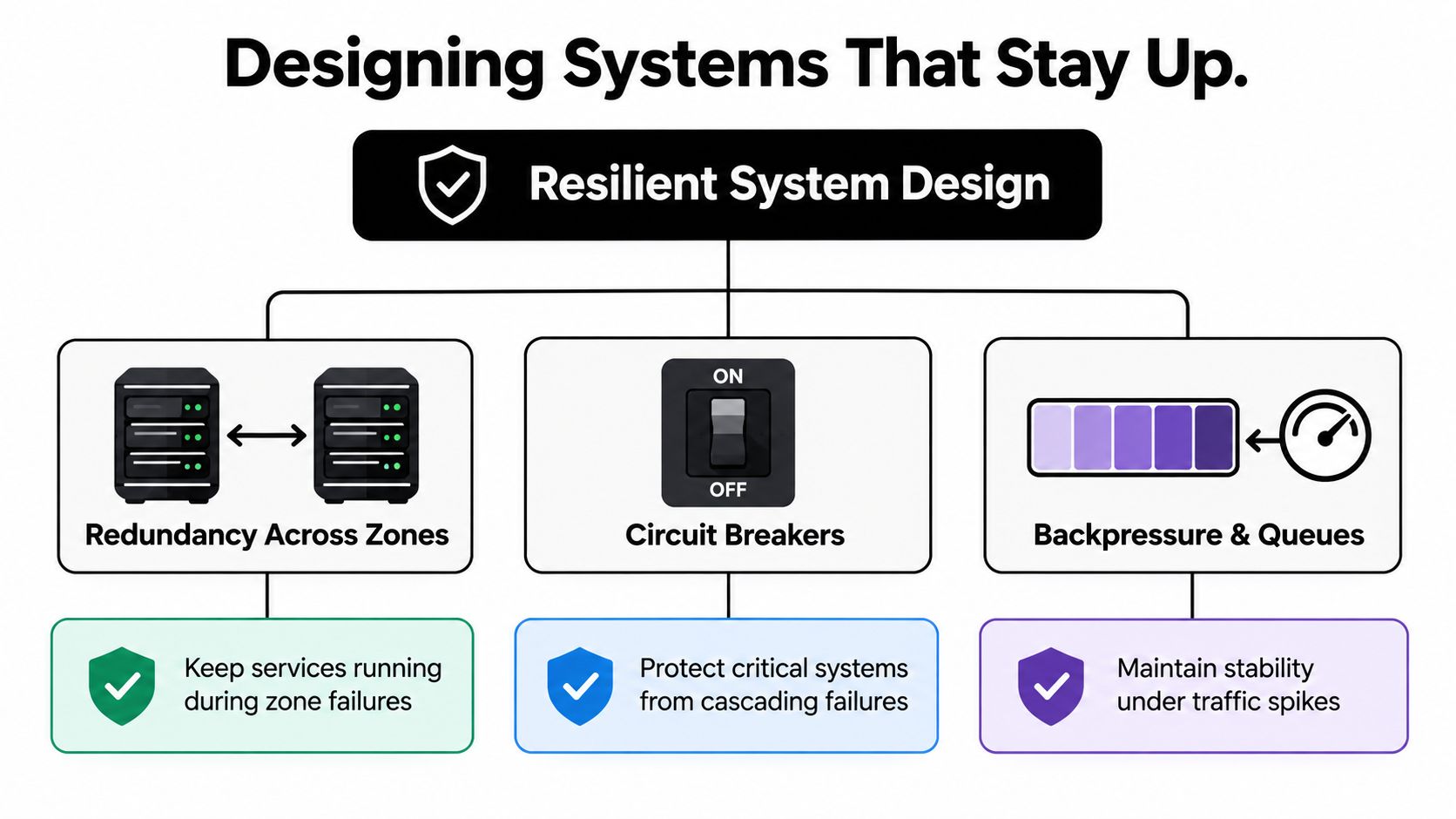
Redundancy is the simplest idea, but it's still one of the most valuable. If one zone or region fails, another can keep serving traffic. That doesn't make the system invincible, but it removes the single point of collapse that turns a local problem into a business-wide mess.
Graceful degradation is the next step. If the recommendation engine fails, the app can fall back to cached suggestions instead of blocking the whole browsing flow. If a payment processor stalls, checkout can queue the order or clearly mark the step as delayed rather than freezing the experience.
Circuit breakers protect you from cascading failure. When a dependency starts timing out, the breaker stops hammering it and gives the system a chance to recover. Bulkheads do something similar by separating critical paths from noncritical ones, so one overloaded service can't drag everything down with it.
The small details that matter a lot
Retries sound easy until they amplify a problem. A retry storm can make a flaky service worse, so teams use exponential backoff and jitter to spread out the pressure. That's a little like telling everyone to leave a crowded room through different doors instead of piling into the same exit.
Idempotency keys matter any time the same request might be sent more than once. They let the system recognize duplicate attempts and avoid double-charging, double-writing, or double-processing. Timeouts matter for the same reason, because waiting forever is just another kind of failure.
Treat every external call as untrusted until it proves otherwise. That includes APIs, queues, model endpoints, and anything your code doesn't fully control.
The trade-off is complexity. Every resilience pattern adds code, configuration, and operational overhead. That's why they're worth using when the dependency is critical, the failure mode is common enough, or the blast radius would be ugly. If the risk is tiny, adding heavy machinery can create more maintenance pain than it removes.
For teams deep in platform design, a separate systems architecture reference can help sharpen those decisions, especially when service boundaries and dependency chains start to tangle: Wonderment Apps systems design and architecture guide.
Observability and Monitoring That Drive Action
A dashboard full of charts does not mean a system is observable. If the team still cannot tell what users are feeling, where the fault started, or which dependency is dragging everything down, the monitoring stack is only decoration.
Metrics, logs, and traces each answer a different question
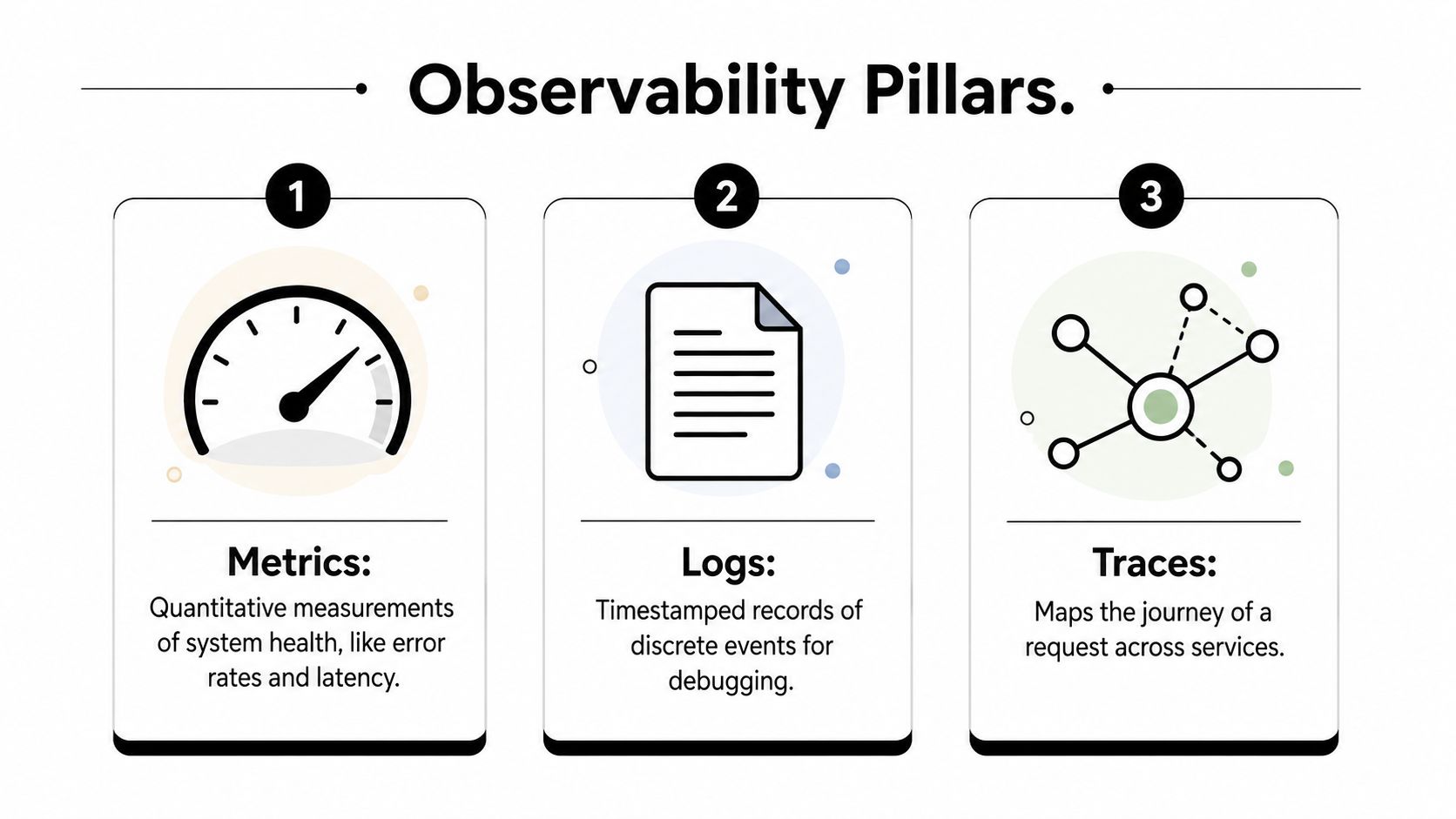
Metrics tell you what is changing over time. Error rate, duration, saturation, and request volume are the numbers you reach for when you want a quick read on system health. That makes metrics the first line of sight for both app teams and platform teams.
Logs are the timestamped record of what happened. They are the trail of breadcrumbs you need when a strange edge case shows up and the metric graph only says something went wrong. Good logs are structured, consistent, and tied to a request or user journey.
Traces show the path a request takes across services. In a distributed app, that matters because the failure may not happen where the user first noticed it. A trace can reveal that checkout was fine, but the inventory service and the payment API were fighting each other behind the scenes.
RED and USE metrics help teams avoid blind spots. RED, Rate, Errors, Duration, is useful for request-driven services. USE, Utilization, Saturation, Errors, is better when you are watching infrastructure behavior. They answer different questions, so strong teams usually use both.
Alerting should wake the right person, not everyone
A good alert is specific enough to prompt action. A bad alert is a noisy page that trains the team to mute notifications and hope for the best. If a page does not tell someone what broke, how urgent it is, and where to start, it is just stress delivery software.
Runbooks help close that loop. They give the on-call engineer a concrete sequence for diagnosis and mitigation, which is much better than asking someone to improvise at 3 a.m. Dashboards help too, but only when they are built around decisions instead of vanity charts.
Performance monitoring tools that fit into a real operating workflow are usually the ones that answer those questions cleanly. Teams do not need more noise, they need a sharper lens.
AI-assisted anomaly detection can help, especially when a team is watching many services and the important signal is drift rather than a clean outage. It can also create false confidence if the team treats the model as a substitute for understanding the system. Use it as a detector, not a judge.
Incident Response, Postmortems, and Chaos Engineering as a Loop
Incidents are unavoidable. The difference between a mature team and a brittle one is what happens after the first alert, because that's where the organization either learns or repeats the same outage in a different costume.
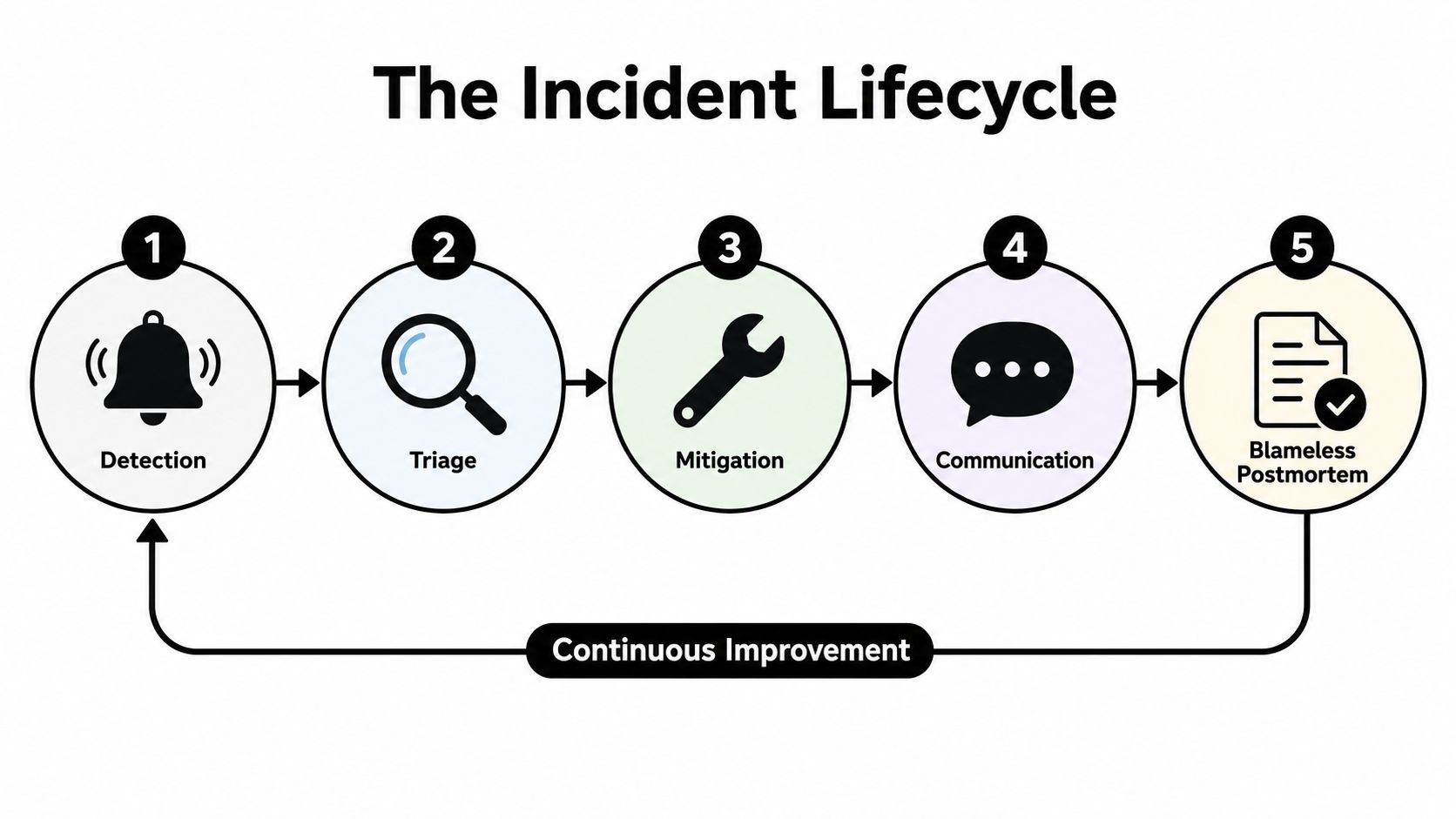
The incident flow that keeps people calm
Detection should be boring and fast. Triage should assign someone to decide what's happening, not let ten engineers crowd into the same thread with half-formed theories. Mitigation comes next, and that may mean rolling back, isolating traffic, or turning off a brittle feature before the blast radius grows.
Communication is part of the work, not a side quest. Customers deserve honest status updates, because silence creates more uncertainty than a clear outage note ever will. A status page is a reliability feature, not a courtesy, because it tells people whether the issue is theirs or yours.
A blameless postmortem is where the team turns the incident into design knowledge. The point isn't to assign guilt, it's to understand what signals were missing, what assumption was wrong, and which safeguard failed to catch the problem sooner. If the write-up doesn't change a system or a habit, it's just a document.
The best postmortems don't end with “be more careful.” They end with a change the team can actually ship.
Chaos engineering closes the loop
Chaos engineering is the habit of stress-testing assumptions before customers do. Teams run game days, inject faults in staging, and use safe production experiments when they've earned the confidence to do it. The goal is to see whether the system, the runbook, and the humans respond the way they expected.
That matters because incidents generate hypotheses. Maybe the retry policy is too aggressive. Maybe the alert fired too late. Maybe the fallback path looked good in design review but failed under real traffic. Chaos tests let the team check those beliefs in a controlled way.
Used together, incident response, postmortems, and chaos engineering create a feedback loop. A failure reveals a weak point, the postmortem names it, and the next experiment proves whether the fix holds. That loop is where reliability culture becomes real.
Capacity, Scaling, and Cost Trade-offs You Cannot Avoid
No system stays reliable forever by accident. Traffic changes, usage patterns shift, and the cost of being wrong rises when a product becomes part of someone's daily workflow.
| Approach | Best fit | Cost profile | Risk if skipped |
|---|---|---|---|
| Reactive scaling | Unpredictable workloads with clear telemetry | Lower upfront effort, but can lag demand | Spikes can outpace the system before it reacts |
| Predictive scaling | Known events, launch windows, seasonal demand | More planning effort, usually less surprise at runtime | The team may guess wrong and waste headroom |
| Proactive load testing | Critical systems with meaningful blast radius | Time-heavy, but it exposes ceilings early | Bottlenecks show up first in production |
Scaling choices are business choices
Reactive scaling follows traffic as it happens. It's convenient, but it assumes the platform can react quickly enough and that the workload doesn't move faster than the autoscaler. Predictive scaling uses forecasts and known events, which is better when the team already has a sense of demand shape.
Proactive load testing is the least glamorous and one of the most useful. It finds ceilings before customers do, which is exactly when you want to learn where the system bends. If the app serves mobile, web, and APIs, the bottlenecks will often differ, so the test plan should reflect the actual user paths rather than a generic throughput goal.
Load shedding belongs in this conversation too. When demand exceeds what the budget or architecture can support, the system needs a way to protect the core experience instead of failing everywhere at once.
For infrastructure-heavy teams that need a deeper resource pool, even something as specific as Solana RPC infrastructure resources can be a useful reference point when comparing high-performance node options and thinking about capacity discipline in a demanding stack.
Reliability targets and cost need an honest conversation
Many teams don't need perfect uptime, and they certainly don't need to pretend they do. A tighter availability target almost always means more infrastructure, more complexity, or both. The right target is the one that matches user expectations, revenue reality, and the pain cost of an outage.
The cleanest way to explain that upward is in user terms. Which failure would make customers lose trust? Which one is annoying but survivable? Which one would stop revenue entirely? Once leadership can answer those, the scaling strategy becomes much easier to defend.
AI Modernization and the New Reliability Surface
A product can look healthy and still fail in ways users feel immediately. A model drifts, a prompt changes meaning, a retrieval path surfaces the wrong record, and the dashboard keeps showing green because the infrastructure itself never tripped an alarm.
That is the new reliability problem for AI-enabled systems. The 2024 review on modern reliability barriers calls out real-time IoT-enabled analysis, system interdependence, and human-machine collaboration as active challenges, and earlier work points to system representation, model quantification, and uncertainty quantification 2024 reliability review. For AI products, that means the reliability surface is no longer just servers and APIs, it also includes model behavior, telemetry quality, and the way operators interpret signals when those signals conflict.
Why a prompt management layer belongs in reliability planning
A prompt layer is not a cosmetic add-on. It is part of the control plane for AI behavior, the place where teams reduce guesswork and keep changes from becoming invisible regressions.
Wonderment Apps' prompt management system is one practical example of that idea. The prompt vault with versioning keeps prompt behavior reproducible when wording or model behavior changes. That matters because a silent prompt tweak can change outcomes without any code diff to point to. The parameter manager for internal database access limits what the model can see, which helps contain both security risk and wrong-answer risk.
The logging system across all integrated AIs gives engineers a trail for drift, odd outputs, and latency regressions before support tickets pile up. The cost manager makes cumulative AI spend visible, so leaders can make reliability choices with budget context instead of reacting after the invoice arrives.
This is also where anomaly detection work becomes useful in practice. A tool like anomaly detection systems helps teams think about how to spot unusual model behavior, not just infrastructure outages, and that distinction matters when the failure is behavioral rather than mechanical.
The practical takeaway for AI-enabled products
AI features are part of the reliability surface now. If you cannot version them, observe them, and constrain their access, you are shipping a moving target into production. That does not mean avoiding AI. It means treating it like any other high-impact dependency, one that needs clear ownership, controlled change, and a way to tell normal variation from a real problem.
Your First 90 Days of Reliability Engineering
A team doesn't become reliable by buying one dashboard or writing one postmortem. It gets there by building a small set of habits that make incidents less surprising and recovery less chaotic.
A simple quarter-long starting plan
Week 1, pick one user-facing SLO. Tie it to a real SLI, not a vague internal feeling. If checkout, login, or feed delivery matters most, measure that first and write down what success looks like.
Week 2, add structured logging and tracing to the top three services. Focus on the paths that customers hit most often. If the logs can't answer “what request was this?” they won't help much in an incident.
Week 3, run a first chaos game day in staging. Break one dependency in a safe environment and watch what the team does. The point is not drama, it's observing whether the recovery path works.
Week 4, write and rehearse one incident runbook. Choose a common failure mode and make the steps explicit. The runbook should be short enough that an on-call engineer can use it under pressure.
Don't try to fix every reliability gap in one quarter. Pick one path, tighten it, then repeat.
The common traps that slow teams down
Treating reliability as a tooling purchase is the first trap. Dashboards and alerts help, but the true work is defining ownership, deciding what matters, and making sure people know what to do when the system drifts.
Skipping postmortems is the second trap. When the team is tired, it's tempting to move on and hope the issue won't recur. That usually means the same pattern returns later with a different label.
Chasing dashboards nobody reads is the third trap. If a chart never changes a decision, it's probably not a reliability tool, it's a screen saver.
The better habit is boring and effective. Measure one thing, improve one path, rehearse one response, then keep going. That's how mid-level teams become the people everyone trusts when the app gets busy.
If you're modernizing an app and want reliability to keep pace with AI, Wonderment Apps can help with the engineering side and the operational side together. Visit Wonderment Apps to see how their AI modernization, prompt management, and long-term software support can fit into a reliability plan that's built to last.