

Organizations often don't start by asking for custom e-learning software development services. They start by trying to make an off-the-shelf platform behave like a product it was never designed to be.
A retailer wants onboarding tied to store performance. A fintech team needs certification workflows mapped to permission levels. A healthcare group needs training updates to move through approvals without emailing spreadsheets around. The first few workarounds feel manageable. Then the cracks show. Learners bounce between systems, admins fight brittle permissions, reporting doesn't answer business questions, and every integration feels like a side project.
That pressure is rising inside a market that is already large and still expanding. Grand View Research estimates the e-learning services market at USD 299.67 billion in 2024 and projects it to reach USD 842.64 billion by 2030, a 19.0% CAGR from 2025 to 2030 according to its e-learning services market analysis. Buyers aren't just shopping for course delivery anymore. They're building digital learning products that have to scale, personalize, and stay maintainable.
The next trap is AI. Teams add recommendation engines, assistants, summarization, tagging, and adaptive content. Then they discover the actual operational problem. Who owns the prompts, who versions them, who controls model parameters, who can audit outputs, and who notices when costs drift? That's where a serious build starts to look less like a website project and more like a governed software platform.
Beyond Off-the-Shelf Your E-Learning Wake-Up Call
The wake-up call usually arrives during growth, not at launch.
A company can live with a generic LMS when training is simple and the audience is small. The same platform becomes painful once learning has to support multiple business units, external partners, regional content differences, or compliance workflows. The system still "works," but it starts creating drag in places leadership cares about.
What the breaking point looks like
Common signs show up fast:
- Engagement drops: Learners get a catalog instead of a path. They complete what's required and ignore the rest.
- Admins become bottlenecks: Simple updates need technical help, duplicate approvals, or manual content uploads.
- Data stays trapped: Training activity doesn't connect cleanly to HRIS, CRM, support systems, or internal performance tools.
- Brand and UX feel generic: The learning experience looks rented, not owned.
- AI gets bolted on: Teams add chat or recommendation features without a plan for governance, testing, or cost control.
I've seen the same pattern across industries. Leadership says they need better training. What they need is control over how learning works inside the business.
Off-the-shelf tools are fine until training becomes operational infrastructure.
Custom e-learning software development services matter at that point because the goal changes. You're no longer buying a library shelf for courses. You're building a system that fits your rules, your integrations, your reporting model, and your content operations.
Why custom becomes strategic
Once training touches revenue enablement, compliance, field readiness, or partner performance, software choices stop being cosmetic. A rigid platform forces the business to adapt to software constraints. A custom platform flips that equation and lets the software support the business model instead.
That shift also changes how you evaluate AI. Personalization sounds exciting, but unmanaged AI creates a second admin problem. Prompts sprawl. Teams copy and paste variations into hidden configs. Nobody can tell which version produced which output. Finance gets a monthly bill with no useful context.
The teams that handle this well treat AI as an operational surface area, not just a feature set. They put guardrails around prompts, parameters, logs, and spend from the start. That's the difference between an e-learning product that gets smarter over time and one that gets messier every quarter.
Defining E-Learning Software Development Services
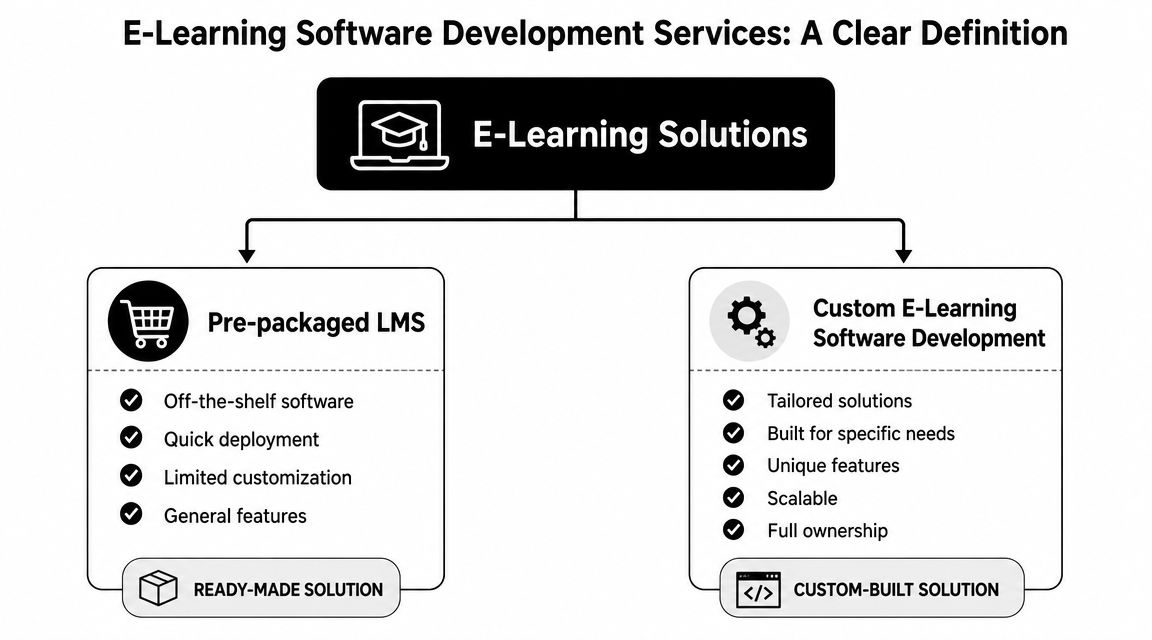
E-learning software development services aren't the same thing as buying a learning management system and turning on a few settings. One is procurement. The other is product development.
Buying software versus building an asset
A pre-packaged LMS gives you a bounded feature set. You configure users, upload courses, assign learning paths, and live inside the vendor's structure. That can be useful when speed matters more than differentiation.
Custom development is different. You define the workflows, user roles, data model, integrations, content behavior, admin tools, and reporting logic. The platform becomes part of your operating model.
A simple comparison helps:
| Approach | What you get | Trade-off |
|---|---|---|
| Pre-packaged LMS | Faster deployment, standard features, lower initial complexity | Limited control over UX, workflows, and deep integrations |
| Custom development | Tailored learning journeys, ownership, extensibility, brand fit | More planning required and stronger product governance needed |
The reason this matters is expectation. E-learning has become so widespread that 93% of businesses are projected to use it, and retention rates can improve by 25% to 60%, based on e-learning adoption and retention data. Once learning is expected to produce measurable outcomes, generic delivery isn't enough.
What buyers are actually paying for
When you engage a development partner, you're paying for decisions, not just code.
Those decisions include:
- Workflow design: How course approvals, enrollments, recertifications, and exceptions move.
- Experience design: What learners see on mobile, desktop, and embedded surfaces.
- System design: How content, telemetry, identity, and analytics connect without becoming brittle.
- Governance design: Who can publish, edit, localize, archive, or audit content and AI behavior.
- Product longevity: Whether the platform will still be operable after the first big launch.
Practical rule: If your training process is unique enough to affect performance, risk, or compliance, your software probably needs custom development somewhere in the stack.
The central nervous system model
The best custom learning platforms behave less like course catalogs and more like a central nervous system for organizational knowledge. They connect what people need to learn with what the business needs people to do.
That means a custom build might include a partner certification portal, a field enablement app, a skills dashboard for managers, or an internal academy connected to role-based permissions. It can also include AI features that support tutoring, search, content tagging, and adaptive pathways. But those features only become valuable when they're wired into real workflows and managed with discipline.
That's the buyer mindset worth keeping. Don't ask, "Which LMS has the most features?" Ask, "What learning system would make our organization easier to train, measure, and update?"
Core Features and Architecture of Modern Learning Platforms
The strongest learning platforms don't start with flashy features. They start with a clean architecture that makes those features manageable.
The architecture that keeps growth from breaking the product
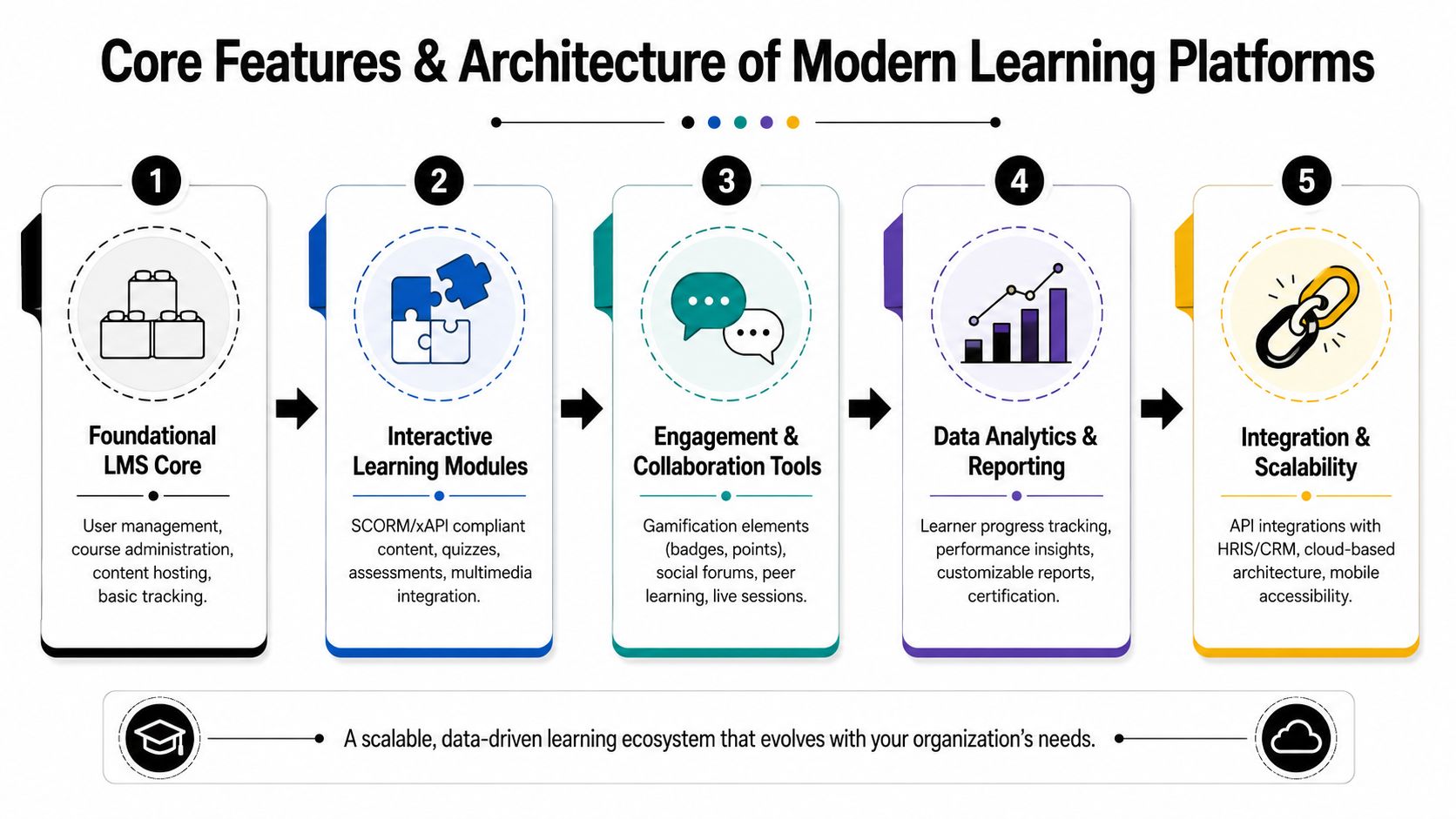
A mature platform separates authoring, delivery, and analytics. That design choice matters because each area changes at a different speed. Content teams need to edit and publish. Learners need fast, stable delivery. Leadership needs reporting and insight without slowing the experience down.
A useful technical benchmark comes from this guide to e-learning software architecture, which notes that mature systems separate these layers and use standards like xAPI for event-driven learner telemetry. In plain English, xAPI lets the platform record more granular learner activity across different environments. That creates room for personalization and reduces rework later because you don't have to keep rebuilding tracking every time the experience expands.
If your team wants a broader framing for making architecture choices early, this piece on software architecture best practices is useful because the same principles apply here. Keep services decoupled where change is frequent. Don't bury business-critical logic in brittle front-end workarounds.
What modern platforms need to do well
These capabilities usually matter more than buyers expect:
- Content interoperability: Support for SCORM and xAPI keeps content portable and tracking more flexible.
- Role-aware administration: Instructors, reviewers, compliance leads, regional managers, and learners shouldn't all see the same controls.
- Mobile-first access: Field teams and distributed workforces rarely learn from a desktop alone.
- Analytics that answer business questions: Completion reports aren't enough. Teams need activity, friction points, recertification status, and content usefulness.
- Integration readiness: HRIS, CRM, identity providers, commerce systems, and support tools often matter as much as the LMS core.
Features that work, and features that just sound good
Some feature requests age well. Others turn into expensive clutter.
| Feature area | Usually worth it | Often overrated when added too early |
|---|---|---|
| Engagement | Badges tied to meaningful milestones, cohort discussion, live help | Gamification layers with no connection to outcomes |
| Personalization | Recommendations, remediation logic, adaptive sequencing | Overly complex rules engines nobody can maintain |
| Content | Reusable modules, tagging, version control | Exotic formats that only one team knows how to publish |
| Support | Search, guided help, chatbot access to approved knowledge | AI assistants with no trustworthy source layer |
For AI-powered support specifically, the knowledge layer matters more than the chat window. That's why resources like Mava's chatbot knowledge base guide are useful. If the underlying content isn't structured, current, and governable, the assistant becomes a faster way to spread confusion.
Good learning architecture doesn't just support today's course load. It gives your team room to change content, integrations, and AI behavior without rebuilding the house.
The Development Journey From Idea to Launch
A custom learning platform goes wrong when discovery is treated like paperwork and launch is treated like the finish line. The better approach is to run it like a product build with clear business ownership.
Discovery that forces useful decisions
The first phase isn't about listing features. It's about identifying where learning intersects with operations.
Teams need to settle questions such as:
- Who are the user groups? Employees, partners, customers, contractors, managers, instructors, auditors.
- What does success look like? Faster onboarding, cleaner compliance workflows, lower admin effort, better field readiness.
- Where does the data come from? HR systems, identity tools, commerce platforms, support software, internal databases.
- Who maintains content after launch? This answer changes the admin design more than most buyers expect.
If you want a practical overview of how software moves from concept through delivery, this breakdown of the web development stage mirrors the discipline a serious learning build needs. Good projects reduce ambiguity early because ambiguity gets expensive in sprint three, not sprint zero.
Design the learner path and the admin path
Many teams spend too much time on the learner UI and too little on the operating surface behind it.
A well-run design phase prototypes both:
- Learner flows: enrollment, discovery, assessments, progress, reminders, certificates
- Admin flows: content edits, approvals, localization, permissions, reporting, exception handling
Practical trade-offs emerge. A sleek interface means very little if publishing a revised compliance module takes six approvals across email, spreadsheets, and a shared drive.
Build in increments, not in one giant reveal
Agile development works well here because e-learning products usually have multiple moving parts. Identity, course rendering, assessment logic, analytics, notifications, and integrations rarely stabilize at the same time.
A typical release sequence might look like this:
| Phase | Focus |
|---|---|
| Early sprint work | Authentication, user roles, content model, initial admin tooling |
| Middle sprint work | Course delivery, assessments, reporting foundations, integrations |
| Late sprint work | AI features, polish, edge-case permissions, performance hardening |
For teams thinking about family learning or blended audiences, examples outside enterprise can sharpen thinking. Kubrio's perspective on AI learning for families is a good reminder that personalization only works when the product respects context, motivation, and different user needs.
QA isn't a final checkbox
Learning software has more edge cases than many business apps. Certification expiry, incomplete attempts, browser quirks in SCORM packages, role inheritance, localization mismatches, and reporting delays all show up late if the team isn't testing them from the start.
A launch-ready platform isn't the one with the longest feature list. It's the one your admins can operate on Monday morning without opening five support tickets.
The handoff matters too. Training your internal admins, documenting workflows, setting up support channels, and defining post-launch ownership keeps the product from slipping back into dependence on developers for every minor change.
Unlocking Next-Level Learning with AI Personalization
AI becomes useful in learning software when it changes the experience in small, relevant ways. It becomes noise when teams force it into every screen.
Where AI actually improves the product
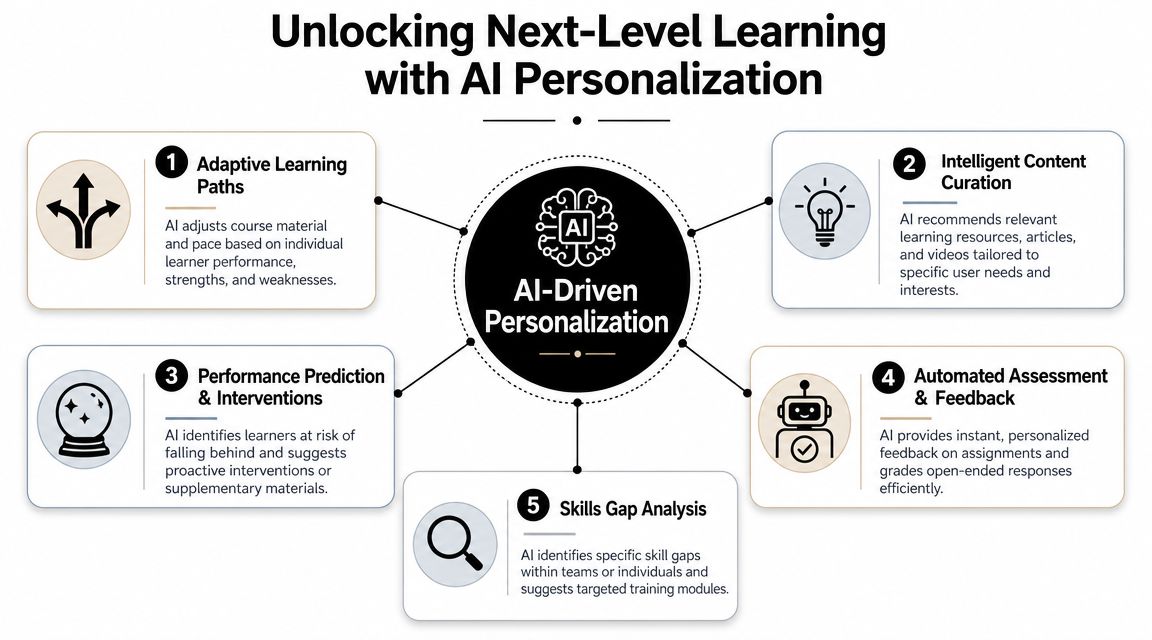
The best use cases usually sit close to learner friction.
That includes:
- Adaptive learning paths: The platform changes sequencing based on performance, skipped concepts, or repeated mistakes.
- Intelligent support: A learner can ask a question in plain language and get help tied to approved course material.
- Content assistance: AI can help tag, summarize, or draft first-pass material for review.
- Feedback loops: Managers and admins can spot which modules confuse users or trigger drop-off.
- Skills mapping: Learning paths can reflect role needs rather than one-size-fits-all catalogs.
A useful starting point for teams evaluating these ideas is this overview of knowledge in artificial intelligence. In learning platforms, knowledge structure matters because personalization is only as good as the context behind it.
Personalization needs boundaries
There's a temptation to think more AI equals better learning. It doesn't.
What works is constrained intelligence. Recommend the next lesson based on behavior. Offer guided remediation after an assessment. Surface a relevant explainer when a learner stalls. Those are focused interventions.
What fails is broad, ungoverned generation. If the assistant can answer from anywhere, rewrite policy language freely, or invent unsupported guidance, you've created operational risk, not product value.
The operational layer most teams forget
AI personalization creates a maintenance problem that traditional LMS projects didn't have. Prompts need owners. Retrieval sources need review. Model settings need consistency. Outputs need logging. Costs need visibility.
That matters even more when learning content changes often. A recommendation prompt that worked well during onboarding might behave poorly when the curriculum shifts, a policy update lands, or a new audience is added. If nobody can trace the prompt version or parameter set behind the output, debugging turns into guesswork.
Personalization isn't just a model choice. It's an operating model.
For business leaders, the practical takeaway is simple. Ask your development team how AI behavior will be governed after launch. If the answer is vague, the platform may ship with impressive demos and painful maintenance.
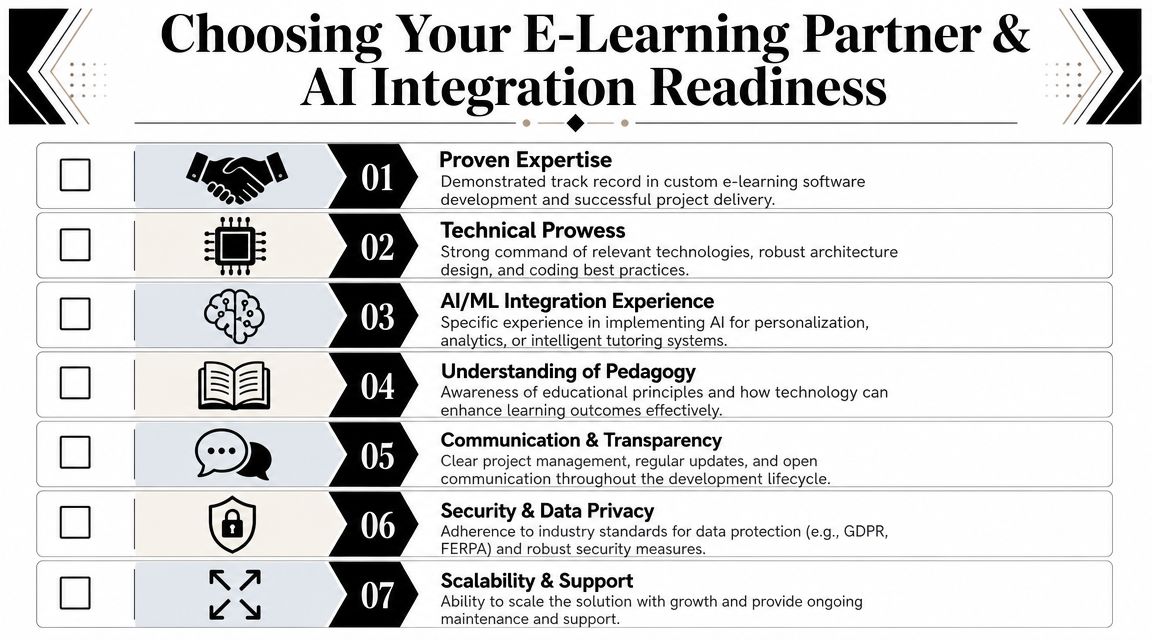
How to Choose Your Partner and Manage Your AI
A solid partner can build the platform you need. The wrong one will give you a polished prototype and a long list of future problems.
What to check before you sign
Use a practical shortlist, not a brand-name shortlist.
- Can they design for operators, not just learners? Ask to see admin workflows, approval surfaces, and reporting tools from past work.
- Do they understand regulated environments? This matters in healthcare, fintech, government, and enterprise HR.
- Can they explain architecture in business terms? If they can't explain why services are separated, they may be improvising.
- Have they shipped AI with governance? Not just an assistant demo. Ask how prompts, logs, model configs, and review workflows are managed.
- How do they handle change after launch? Content updates and AI adjustments are part of the product, not an afterthought.
- What does support look like? A learning platform isn't done when it goes live.
One market reality should push this conversation higher. The U.S. Department of Labor notes that nearly half of workers will need reskilling by 2027, as discussed in this e-learning operations and governance overview. That's why the important vendor question isn't only "Can you build it?" but whether they can build a system that stays operable and affordable.
Why AI management needs its own toolset
Teams often underestimate the post-launch AI workload. Prompts multiply. Different departments request slight variations. Someone edits a system prompt directly in code. A model switch changes output quality. Finance asks why spend jumped. Product asks which prompt version caused the issue. Nobody has a clean answer.
That is exactly why a prompt management system belongs in the conversation when you're planning AI inside e-learning software development services.
A useful toolset should include:
| Need | Why it matters |
|---|---|
| Prompt vault with versioning | Teams need to know which prompt is live, what changed, and who changed it |
| Parameter manager | Secure control over database access, retrieval settings, and AI behavior reduces ad hoc edits |
| Universal logging | Auditing outputs across integrated AI services makes support and compliance easier |
| Cost manager | Leadership needs visibility into cumulative AI spend before costs surprise the roadmap |
One option in this category is Wonderment Apps' prompt management system, which includes a prompt vault with versioning, a parameter manager for internal database access, logging across integrated AI tools, and a cost manager for cumulative spend visibility. In practice, that kind of administrative layer helps teams keep AI features consistent and governable instead of scattering prompt logic across codebases and vendor dashboards.
The partner test that catches most problems
Ask this in the final vendor interview:
"Show us how our non-technical team updates content and how our technical team audits AI behavior six months after launch."
The answer will tell you more than a polished sales deck. Mature teams can walk through the operating model. Everyone else changes the subject back to features.
E-Learning in Action Sector-Specific Outcomes
Custom platforms become easier to evaluate when you look at the operating pressure in each sector.
Healthcare
A healthcare organization usually needs more than course completion. It needs controlled updates, role-based visibility, audit trails, and confidence that outdated material won't linger in active workflows.
A custom platform can support continuing education, policy acknowledgments, and recurring compliance modules in one governed environment. The primary win isn't cosmetic. It's giving administrators a clear path to update content, route approvals, and document who saw what.
Fintech
In fintech, learning often sits close to risk. Product training, regulatory updates, and advisor enablement can't live in a content free-for-all.
The better build supports permissions by role, structured assessments, version-aware content, and reporting that maps to operational accountability. AI can help summarize dense material or guide learners to relevant policy sections, but only when the outputs are tied to approved knowledge and tracked carefully.
Ecommerce and retail
Retail teams need training that moves as fast as merchandising, promotions, and frontline turnover. That's why mobile-first design, localization, and simple content operations matter so much here.
A custom learning product can connect launch training, product knowledge, and store readiness in one flow. For operators exploring adjacent models, Tutorbase's page on their tutoring center solution is a useful example of how scheduling, communication, and learning operations often need to work together rather than live in separate tools.
Public sector and nonprofits
Public sector programs and nonprofit training initiatives often deal with distributed audiences, accessibility requirements, simulations, and complex approval chains.
A custom platform can support scenario-based learning, controlled publishing, and multilingual content governance without forcing every department into the same rigid process. That matters when the audience includes internal staff, partners, contractors, and the public.
The common thread across all four sectors is simple. The software only creates value when it remains usable after launch. That's why architecture, content governance, and AI management deserve as much attention as the learner-facing experience.
If you're planning a custom learning platform and need help thinking through architecture, AI integration, or the operational side of prompt governance, Wonderment Apps works on web, mobile, and AI modernization projects that fit that kind of build. A useful next step is to review your current learning workflow, identify where off-the-shelf tools are creating drag, and ask for a demo of the prompt management layer before AI features spread across the product unchecked.