

Your product team probably knows this feeling. Marketing has one revenue number, finance has another, customer support has a third view of the same customer, and the AI feature your team wants to ship can't get a clean answer to a basic question like “what did this user do last month?”
That's the actual starting point for the data warehousing concept. Not theory. Not buzzwords. Just the practical need to stop arguing over spreadsheets and start working from the same history of the business.
For teams building modern apps, that problem has grown. It's no longer enough to make dashboards work. You also need data that can support recommendations, forecasting, anomaly detection, and generative AI features inside web and mobile products. Then a second problem appears. Once you connect AI to your systems, you need governance for prompts, parameters, logs, and usage costs too. The companies that modernize well treat those as connected layers, not separate afterthoughts.
The Data Dilemma Modern Businesses Face
A retail company launches a new loyalty feature in its app. Product wants to measure repeat purchases. Marketing wants audience segments. Finance wants margin by customer cohort. Support wants a full customer timeline. Everyone asks for “the data,” but the data lives in different places.
Orders sit in the ecommerce platform. Campaign data sits in ad tools. App events live in analytics software. Refunds are in the ERP. Customer notes are buried in a support tool. Each system is useful on its own, but none gives a complete picture.
When every team has a different truth
It is here that confusion starts:
- Marketing sees attribution paths but not always the final refund or cancellation.
- Finance sees booked transactions but not the campaign journey that influenced them.
- Product sees app behavior but not always the downstream revenue impact.
- Support sees tickets and complaints but often misses the full purchase history.
The result isn't just reporting pain. It slows product decisions. It weakens personalization. It makes AI outputs less trustworthy because the model is pulling from fragmented context.
A lot of first-party data planning starts before warehousing, at the collection and audience-building layer. For teams sorting out consent, data ownership, and usable customer profiles, Clickstera's PPC audience building methods are a useful companion read because they show how better audience strategy depends on better data foundations.
Practical rule: If two teams can answer the same business question with different numbers, you don't have an analytics problem alone. You have a systems design problem.
Why this gets worse with AI features
AI raises the stakes because models don't clean up business ambiguity for you. They amplify it. If your application asks an assistant to summarize a customer account, recommend a next action, or generate a sales insight, the answer depends on the quality and consistency of the underlying data.
That's why the old data problem has become a product problem. A warehouse gives teams a place to combine records from multiple systems into a trusted analytical foundation. Then your application can use that foundation for reporting, machine learning inputs, and governed AI workflows.
Without that layer, teams end up building “smart” features on top of disconnected software. That usually looks impressive in a demo and messy in production.
What Is a Data Warehouse Really
The cleanest way to understand a data warehouse is to compare it to a research library.
A storefront is built for fast transactions. People come in, buy something, and leave. The systems behind it must update inventory, charge cards, and confirm orders quickly. A library has a different job. It organizes material so people can study patterns, compare sources, and answer bigger questions. A data warehouse is much closer to the library.
The modern data warehousing concept emerged in the late 1980s and was popularized by William H. Inmon, who defined it as a centralized repository for decision support that preserves historical snapshots instead of only current data, establishing the pattern of separating analytical workloads from operational ones, as described in this history of data warehousing from DATAVERSITY.
The simple definition that actually helps
A warehouse is a centralized repository that combines data from multiple sources so teams can analyze the business over time. It isn't the place where your app processes checkouts, updates passwords, or writes live transactions. It's where you ask questions like:
- Which customer segments are becoming more valuable over time?
- How did refund rates change after a pricing update?
- Which channels produce customers who stay longer?
- What patterns should feed an AI model or forecasting workflow?
Four properties that confuse people at first
Inmon's framing is still useful because it explains why a warehouse behaves differently from an operational database.
Subject oriented
A warehouse is organized around business subjects like customers, sales, products, or claims. It's not arranged around the internal mechanics of each source application.
If your order system calls someone a “buyer” and your CRM calls them a “contact,” the warehouse tries to organize those records around a shared business subject.
Integrated
Data from different systems rarely matches neatly. Field names differ. Date formats differ. Status values differ. Integration means the warehouse standardizes that mess into something teams can query consistently.
It's like translating several dialects into one shared business language.
Time variant
This matters more than most newcomers expect. Warehouse records carry time context such as an order date or snapshot date. That means analysts can compare the business across periods instead of only seeing the latest overwritten state.
A support system might only show the customer's current plan. A warehouse can preserve what plan they had before, when it changed, and how behavior shifted afterward.
Non volatile
Once loaded, records typically aren't being constantly updated by routine application transactions. That stable structure supports repeatable analysis and historical comparisons.
A warehouse is where you ask, “What changed over time, and why?” It is not where your checkout flow should look for millisecond decisions.
Why product teams should care
If you're building software, the value isn't abstract. A warehouse gives your team a dependable analytical memory. It helps business stakeholders trust reports, and it gives engineers and data teams a cleaner foundation for AI features that need consistent context rather than raw application tables.
The Core Architecture of a Data Warehouse
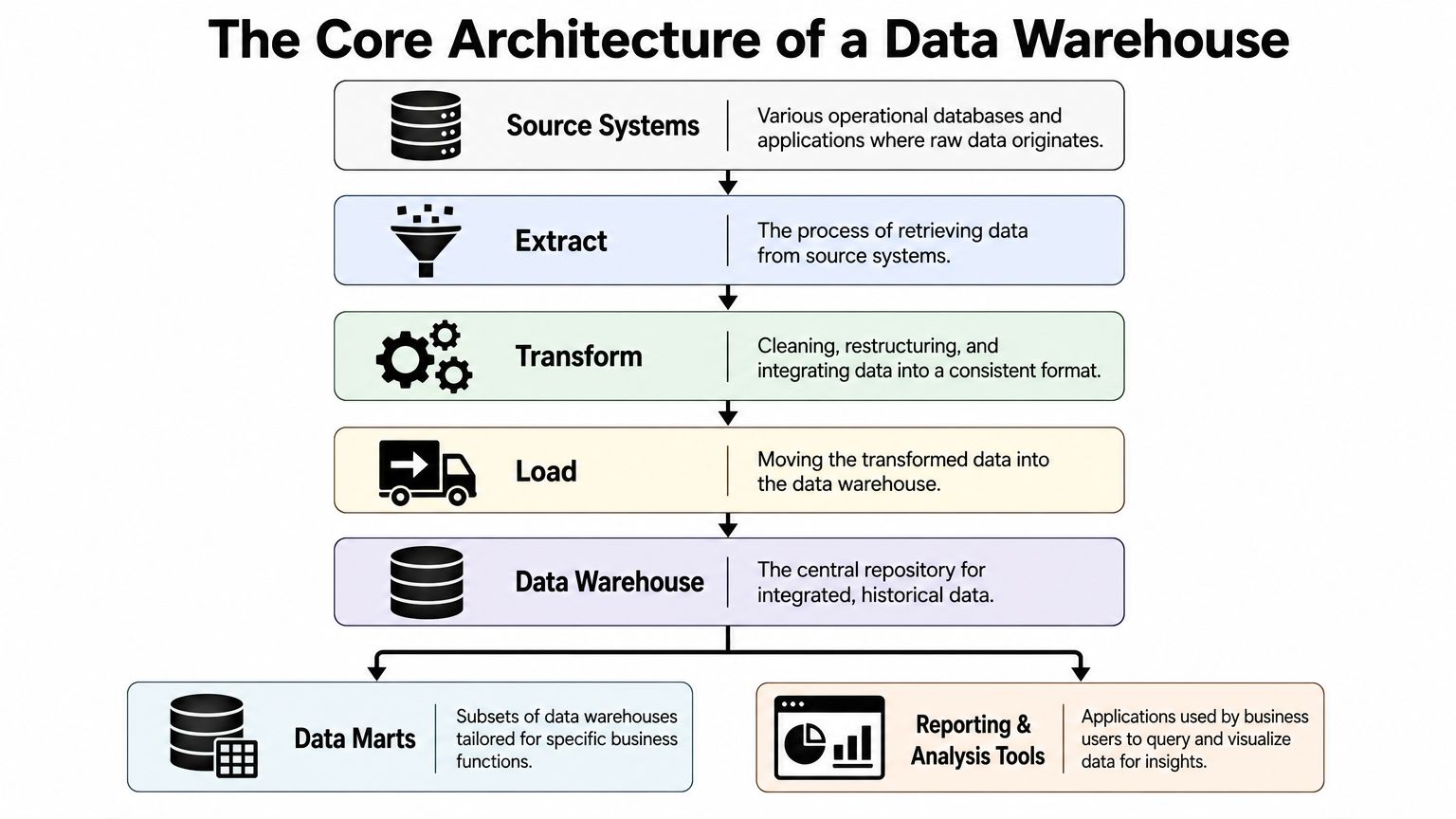
A warehouse looks complex until you picture it as a supply chain for information. Raw materials come from many places. Teams inspect them, clean them, standardize them, store them, and then package them for different business uses.
Here's the basic flow.
Source systems and extraction
The journey starts with source systems. These might include an ecommerce platform, a payment processor, a CRM, a support platform, or an internal application database.
The extraction step pulls data from those systems into the analytics pipeline. This can happen on a schedule or through more frequent sync patterns, depending on the business need.
Transformation and loading
Raw source data is rarely analysis-ready. One tool stores country names in full text. Another uses two-letter codes. One system marks an order as “complete.” Another calls the same concept “fulfilled.” Transformation cleans and standardizes those differences.
Then the data gets loaded into the central warehouse.
A lot of teams first learn this as ETL, which means extract, transform, load. Modern platforms often support ELT, which means extract, load, transform. The difference sounds small, but the workflow changes. In ETL, you clean data before it lands in the warehouse. In ELT, you load first and transform inside the warehouse using the platform's analytical engine.
Why ELT often fits modern cloud teams
Cloud warehouses have pushed many teams toward ELT because the warehouse itself can do a lot of the heavy lifting. That simplifies ingestion and gives teams access to raw and refined layers within the same environment.
If your team wants a practical companion on how data movement supports reporting and decision-making, Wonderment's guide to applying data pipelines to business intelligence is a useful extension of this architecture view.
Architect's note: Don't treat transformation as clerical work. It's where business definitions become real. If “active customer” means one thing in marketing and another in finance, the warehouse will expose that conflict fast.
The warehouse and data marts
At the center sits the data warehouse itself. This repository is built for analytical querying, not transaction processing. Modern warehouses are designed to handle large volumes of structured data and can contain summarized datasets that are sometimes many petabytes large, as explained in Coursera's overview of data warehouses.
From that central store, teams often create data marts. A data mart is a focused subset for a particular function such as sales, finance, or marketing. You can think of the warehouse as the main kitchen and the marts as plated meals prepared for different diners.
Reporting and analysis tools
The final layer includes dashboards, BI tools, notebooks, and analytics applications. Here, people consume the curated data.
A healthy architecture usually follows this sequence:
- Collect from source systems
- Standardize and shape the data
- Store it centrally for historical analysis
- Deliver focused views to teams and tools
That flow sounds straightforward. The challenge is making the data inside the warehouse intuitive enough that business users can ask good questions without needing a database engineer at their shoulder.
Organizing Data with Modeling Patterns
A warehouse can have excellent pipelines and still be frustrating to use if the data model is messy. Thus, modeling patterns are important.
The two patterns frequently encountered are star schema and snowflake schema. The names sound academic. The idea isn't.
Start with facts and dimensions
Take an ecommerce example. Suppose you want to analyze sales.
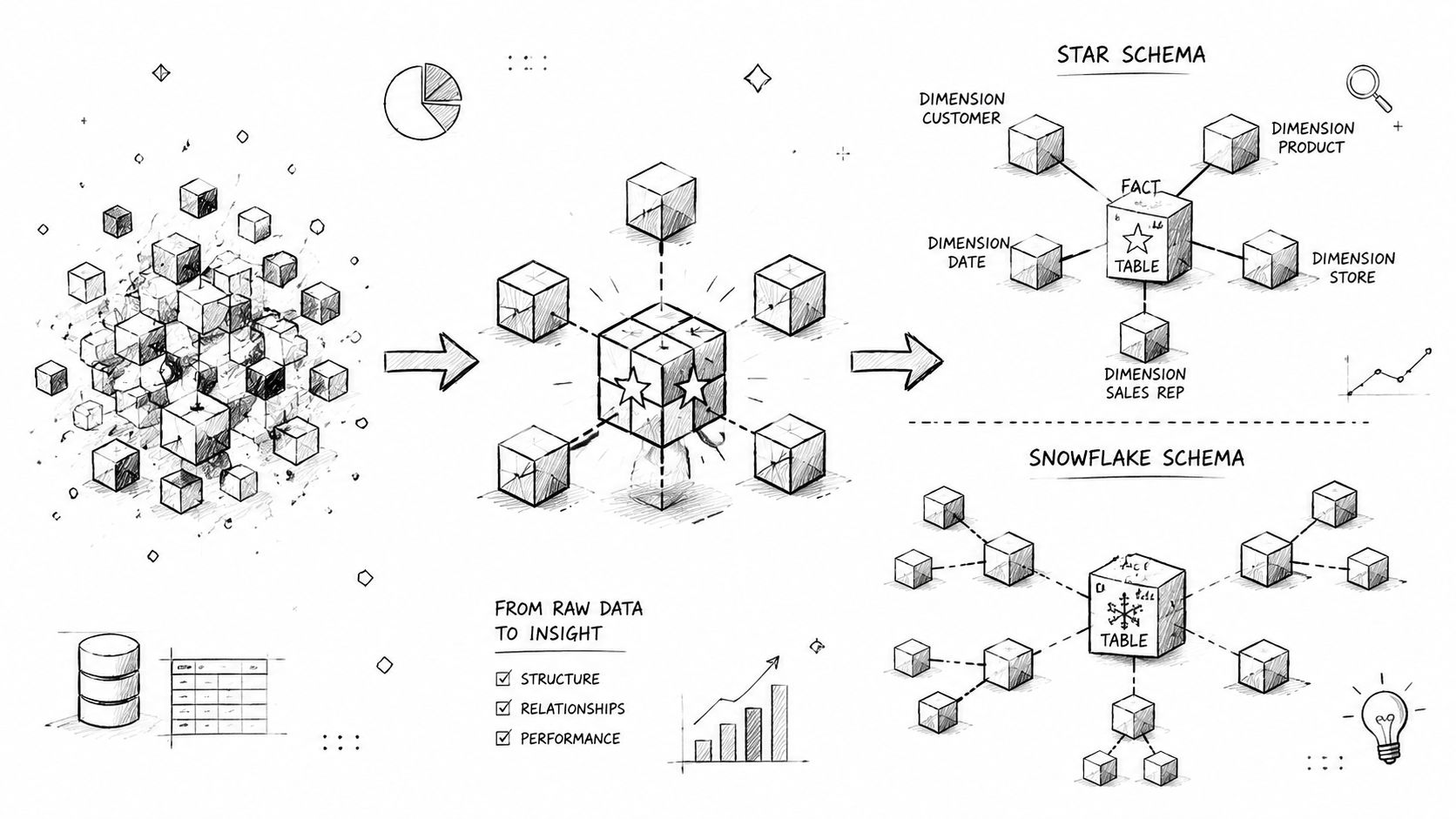
You might place each sale in a central fact table. That table holds the measurable events, such as an order line, revenue amount, discount, or quantity. Around it, you place dimension tables that describe the context, such as customer, product, date, and channel.
That's the heart of warehouse modeling. Facts are the verbs. Dimensions are the nouns.
Star schema in plain English
A star schema keeps the structure simple. The fact table sits in the middle, and the surrounding dimensions connect directly to it. It looks like spokes around a wheel.
This works well when business users need clear, fast paths for common questions:
- Sales by month
- Revenue by product category
- Average order value by customer segment
- Campaign performance by channel
The star schema is popular because it's easy to reason about. Analysts can understand it quickly. BI tools usually work well with it too.
Snowflake schema when detail branches out
A snowflake schema takes some dimensions and normalizes them into extra related tables. Instead of storing all product attributes in one dimension, you might split category, brand, or supplier into linked tables.
That can reduce redundancy and create cleaner maintenance in some environments. It can also make queries and mental models more complex.
Here's a simple tradeoff table:
| Pattern | Strength | Tradeoff |
|---|---|---|
| Star schema | Simpler queries and clearer business use | Some duplicated descriptive data |
| Snowflake schema | More normalized structure | More joins and more complexity for users |
A star schema is like a well-laid dining table. Everything you need is within reach. A snowflake schema is like a pantry with labeled shelves. It can be tidy, but you'll walk more to assemble the meal.
What product leaders should ask
You don't need to model tables yourself to make good decisions. You do need to ask the right questions:
- Who will query this data most often
- Are the questions stable or constantly changing
- Do we optimize for analyst speed or model purity
- Will this schema support downstream AI features cleanly
For many application teams, a simpler curated model beats a theoretically elegant one that only specialists can understand.
Warehouse vs Databases and Data Lakes
Many projects frequently go sideways for this reason. Teams pick one platform and expect it to do every job. That usually creates cost, latency, and governance problems.
An operational database, a data warehouse, and a data lake can all store data. They do not serve the same purpose.
Three systems, three jobs
An OLTP database runs the business. It supports day-to-day application activity such as signups, checkouts, account changes, and inventory updates.
A data warehouse analyzes the business. It centralizes structured current and historical data so teams can run SQL queries, aggregations, and BI workloads against curated models instead of raw application tables, which also reduces contention on source systems, as IBM explains in its overview of data warehouses for analytics workloads.
A data lake stores large amounts of raw data in various forms for broader exploration and processing. It's often useful when teams need flexibility before deciding how data should be structured for a specific analytical purpose.
Side by side comparison
| Criterion | OLTP Database | Data Warehouse | Data Lake |
|---|---|---|---|
| Primary job | Run application transactions | Support reporting and analysis | Store raw data for broad exploration |
| Typical data shape | Highly structured operational records | Curated structured analytical data | Raw structured, semi-structured, or unstructured data |
| Main users | Application developers and operational systems | Analysts, BI teams, business stakeholders | Data engineers, data scientists, advanced analytics teams |
| Update pattern | Frequent inserts and updates | Loaded in batches or pipelines for analytical use | Ingested from many sources with less upfront modeling |
| Best for | Checkout flows, account updates, inventory changes | Trend analysis, KPI tracking, cross-functional reporting | Experimentation, large-scale storage, varied data inputs |
| Poor fit for | Historical enterprise analytics | Low-latency app serving | Plug-and-play executive reporting without curation |
If your team is comparing operational database options for app workloads, this breakdown pairs well with Wonderment's look at Oracle vs PostgreSQL, because that decision sits in a different layer than warehouse planning.
When not to use a warehouse
This is the neglected question. Warehouses are often misused as live serving systems for customer-facing application behavior. That's where teams get disappointed.
If your app needs immediate transactional consistency or very low-latency decisions in the request path, a warehouse usually isn't the right serving layer. It shines as an analytical system of record. Operational databases, caches, and streaming systems often need to sit beside it.
A practical decision lens
Use this shortcut:
- Use an OLTP database when the app must write and read transactional records quickly.
- Use a warehouse when people need consistent cross-system analysis over time.
- Use a data lake when you need broad raw storage and exploratory flexibility.
The strongest architectures don't force one system to be everything. They give each system a clear responsibility.
Modern Warehousing AI and Governance
The classic warehouse idea still matters, but the environment around it has changed. Today's teams often work with cloud platforms, mixed data types, machine learning workflows, and AI features embedded inside customer-facing products.
That shift has widened the job of the warehouse. It isn't just a reporting repository anymore. It has become part of a broader governed analytics platform.
Why governance became a front-line concern
Current guidance on data warehousing puts much more weight on governance and cost control at scale, especially in regulated environments where access management, workload isolation, and compliance alignment matter alongside schema design, as noted in Monte Carlo's guide to modern data warehousing.
That's a major change in how product teams should think. The conversation can't stop at “Where do we store data?” It has to include:
- Who can access which datasets
- How workloads are isolated
- How costs are monitored
- How audit trails are preserved
- How AI systems interact with governed business data
Cloud warehouses and AI foundations
Modern cloud warehouses make it easier to centralize and query analytical data. They also give AI teams a cleaner substrate for feature engineering, business context retrieval, and model evaluation. If an LLM-powered assistant needs to answer questions about customer history or account behavior, you usually don't want it querying production application tables directly.
You want curated, permissioned, historically grounded data.
That's where the data warehouse concept becomes directly relevant to AI product design. Good AI needs good context. Good context needs governed data pipelines and stable analytical models.
Here's a visual example of the kind of AI operations layer teams often need on top of their data foundation.

The missing control panel for AI apps
Once the warehouse is in place, another operational layer appears. Teams need to manage prompts, application parameters, logs across model providers, and usage costs. That's not solved by a warehouse alone.
One example is Wonderment Apps' prompt management system, which includes a prompt vault with versioning, a parameter manager for internal database access, cross-AI logging, and a cost manager for tracking cumulative spend. Used alongside a warehouse, that kind of administrative layer helps teams govern how AI features consume trusted business data without treating prompt logic as scattered application text.
Good AI architecture has two forms of memory. The warehouse remembers the business. The prompt and logging layer remembers how the AI interacted with it.
Why this matters for regulated products
Healthcare, fintech, and public sector teams often need more than fast analytics. They need evidence of access boundaries, reproducible workflows, and cost discipline. Product teams building AI features in those environments should think in stacked layers:
- Governed analytical data
- Controlled access patterns
- Observable AI interactions
- Cost and policy oversight
Without that stack, AI pilots often stall when they move from demo to compliance review.
Activating Your Data Warehouse Strategy
A warehouse project succeeds when leaders treat it as a business capability, not a storage purchase. The software matters. The operating habits matter more.
The most useful starting move is to narrow the first business outcome. Don't begin by trying to warehouse everything. Start with a decision the organization struggles to make well, then work backward to the data needed to support it.
A practical checklist for business and product leaders
- Choose one high-value analytical question: Pick a question that crosses functions, such as customer profitability, retention patterns, or channel quality. That forces alignment early.
- Define shared business terms: Agree on what counts as a customer, order, refund, active account, or qualified lead before dashboards multiply.
- Protect the source systems: Keep operational apps focused on transactions. The analytical layer should carry the reporting load.
- Model for actual users: If business teams can't understand the warehouse outputs, the architecture is technically correct and practically weak.
- Design governance early: Access control, auditability, and cost visibility shouldn't wait until after rollout.
- Plan AI usage deliberately: Decide which data should power recommendations, summaries, assistants, or anomaly detection, and which data should remain outside those workflows.
One mistake to avoid early
Teams often misuse the warehouse for operational or near-real-time workloads, even though warehouses are optimized for analytical use and come with latency tradeoffs. A warehouse is best used as an analytical system of record rather than a live serving layer, as discussed in Acceldata's explanation of warehouse architecture and advantages.
That single design choice can save months of rework.
What good activation looks like
A strong strategy usually has these traits:
| Focus area | What good looks like |
|---|---|
| People | Product, engineering, analytics, and business teams share definitions and ownership |
| Process | Data pipelines, access reviews, and quality checks have clear operating routines |
| Technology | The warehouse, BI layer, and AI controls each have distinct responsibilities |
For teams that want to turn warehouse data into usable reporting and decision support, Wonderment's article on data visualization and analytics is a solid next read because activation is where architecture either becomes business value or shelfware.
Build the warehouse to answer recurring business questions first. Then extend it to support AI. Not the other way around.
A well-designed warehouse won't make every decision for your team. It will do something more valuable. It will give your apps, dashboards, and AI systems a shared factual memory of the business.
If you're modernizing an app and need both a stronger data foundation and tighter control over AI behavior, Wonderment Apps works on both layers. Their team helps organizations design scalable digital products, connect governed data systems, and add administrative controls for prompts, parameters, logging, and spend tracking so AI features can operate inside real production constraints.