

You're staring at a service nobody wants to own, a feature request depends on it, and someone still wants a release by Friday. That's the refactoring legacy code world. The temptation is to call it cleanup, then hope the code behaves while everyone keeps shipping around it. The better move is to treat it like an explicit modernization decision, with a clear sense of what you're protecting, what you're willing to risk, and what should stay untouched for now.
That mindset matters because legacy systems don't usually fail from one dramatic mistake. They fail from years of small compromises, hidden dependencies, and feature work piled onto fragile structure. If you're deciding whether to refactor, wrap, freeze, or replace, a good starting point is to find hidden business costs in the current system and compare them with the cost of doing nothing. If you need a plain-language way to orient the team around the shape of an old system before you touch it, start with this overview of what a legacy system means.
Why Refactoring Legacy Code Is a Decision, Not a Cleanup
A lot of teams talk about refactoring as if it were housework. Clean up the mess, tidy the names, make the functions smaller, move on. In a production system, that framing misses the point. Refactoring legacy code is a decision about where to spend scarce engineering attention, because every change competes with feature delivery, incident response, and operational risk.
The old codebase usually is not failing because nobody likes the style. It is failing because the system has become expensive to understand, expensive to change, or expensive to prove safe. A broad refactor is only one option. Sometimes the system should be refactored because the structure is blocking urgent work. Sometimes it should be strangler-wrapped so new behavior can grow beside the old. Sometimes the best call is to freeze it, protect the edges, and wait until there is a stronger business reason to touch it.
Use the business pressure, not the code smell, as the trigger
The trigger should be concrete. If the module changes constantly, if defects cluster there, if compliance or audit exposure is rising, or if one team member is the only person who understands it, that is a refactoring candidate. If the code is ugly but stable, heavily tested, and low churn, touching it just because it offends your eyes is usually wasted motion.
A useful discipline is to ask, “What breaks if we leave this alone for six more months?” That question is more useful than “Can we make this cleaner?” because it ties the refactor to risk, not taste.
Practical rule: if the code is slowing business delivery, creating support burden, or making regulated changes harder to prove safe, it is operating-cost problem disguised as a style issue.
For teams modernizing toward AI-enabled workflows, the next question is how long the system can keep paying its own way. A good starting point is to find hidden business costs in the current system and compare them with the cost of doing nothing. Once that decision is made, the legacy system still needs room for configuration, observability, access control, and prompt-governance tooling that keeps AI features from becoming a maintenance trap. If you need a plain-language way to orient the team around the shape of an old system before you touch it, start with this overview of what a legacy system means.
Diagnosing the Codebase Before You Touch a Line
Good refactors start with a map. Not a vague feeling, a map. If you don't know where the risk lives, the first cleanup pass can hit the wrong module and leave the blast radius untouched. Microsoft's empirical study is a useful reminder that refactoring often spreads far beyond one tidy component, with 95.07% of modules touched by at least one refactoring commit over time, which is a strong signal that legacy improvement becomes system-wide rather than isolated (Microsoft research paper).
Rank risk before you rank effort
Start by sorting modules by three things, change frequency, defect density, and business criticality. A payment path that changes often and supports revenue deserves a different treatment than an internal admin screen with little traffic. The same applies to anything tied to compliance, revenue recognition, customer identity, or data retention.
Static analysis helps when the code is large and the dependency graph is unclear. Runtime traces help when the system behaves differently in production than it does in a dev environment. A whiteboarding session with the longest-tenured engineer can beat both tools when the problem is missing institutional knowledge. In messy systems, that conversation often reveals which odd-looking branch exists for a reason and which one is just technical debt nobody has challenged yet.
Turn diagnosis into a sequencing matrix
The point of diagnosis isn't to create a prettier architecture chart. It's to choose the first changes wisely. High-value, high-risk modules need stronger guardrails. High-value, lower-risk modules are ideal for early wins because they prove the process without endangering the business. Low-value, high-risk zones are the ones to defer unless they're blocking something more important.
The best first refactor is usually the one that protects a volatile path the business depends on every day.
Many teams waste time chasing the deepest tangle because it looks impressive, then discover they've spent the quarter without reducing operational risk. A better sequence is to protect the most fragile money path, the most error-prone integration, or the module whose owner is about to leave. Once you've got that priority list, you can decide whether the right move is direct refactoring, a seam-and-wrap approach, or a temporary freeze until the surrounding system is safer to change.
Building a Safety Net Without a Full Test Suite
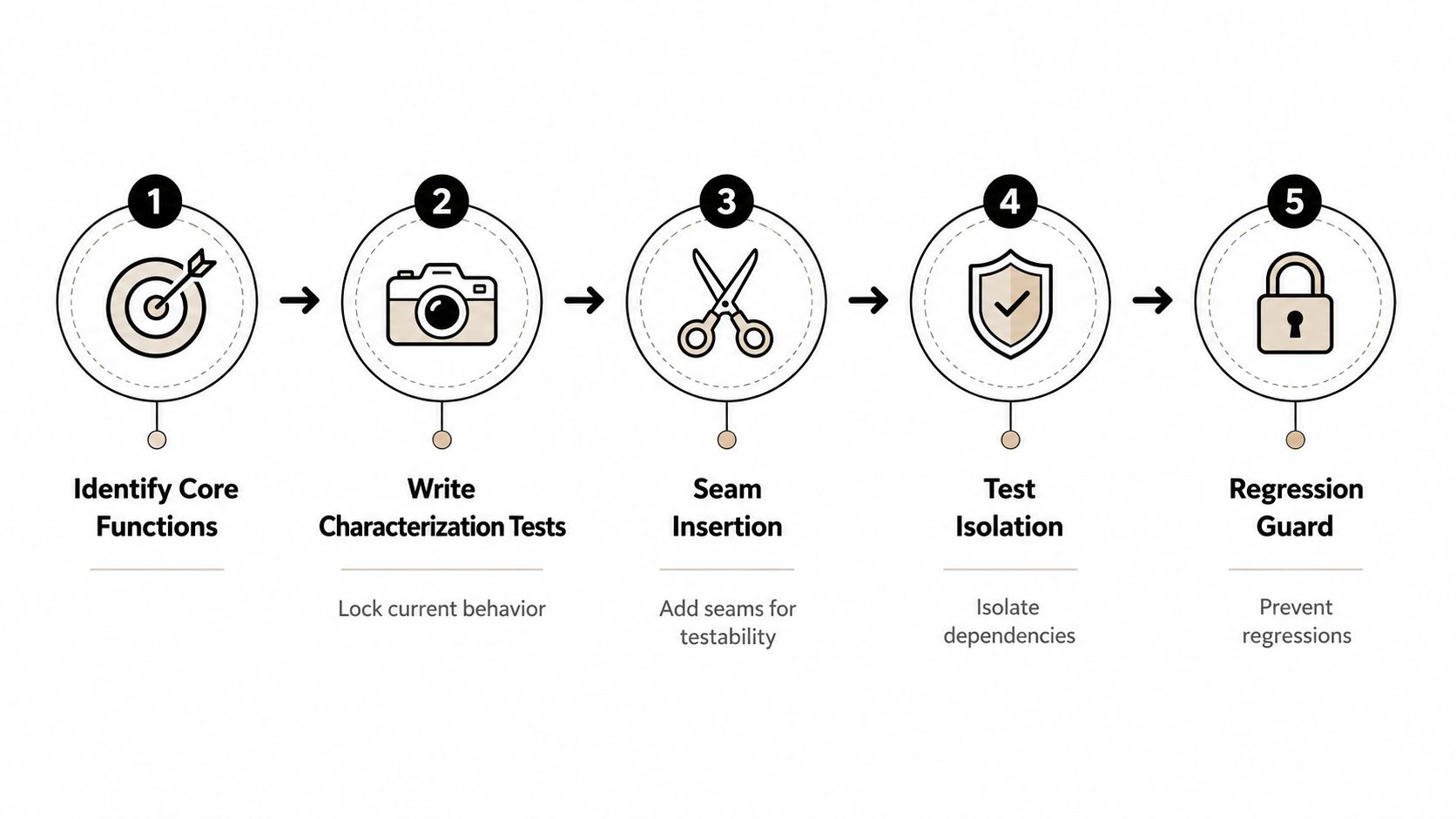
Most legacy systems don't come with a neat test blanket. That doesn't mean you're stuck. It means you need to build protection around the behavior that matters most, then widen coverage as the refactor lands. A practical workflow is to start with characterization tests, create seams around dependencies, use approval testing when outputs are complex, and add coverage first around the most volatile or most frequently changed code.
Lock behavior first, then change structure
Characterization tests are the quickest way to freeze current behavior, even when that behavior is weird. The point isn't to validate ideal logic. The point is to record what the system does so you can tell whether a change preserved it. For output-heavy flows, approval testing works well because it snapshots existing output, such as JSON, HTML, or a screenshot, then compares the refactored result to the saved baseline. If it differs, you investigate before shipping (approval testing example).
That discipline matters because refactoring support tools are only as good as the safety net around them. A study of the Extract Method refactoring found a 49% failure rate in one baseline tool, with only 51% of 122 attempts succeeding, while an improved tool raised success to 74% and reduced incorrect source-code selection errors (tool study). In practice, that means tooling can help, but it doesn't remove the need to verify behavior.
Protect the revenue paths first
If the system has no full test suite, don't try to create one in a giant preflight project. Protect the parts that pay the bills first. That can mean unit tests around pure logic, contract tests around service boundaries, or synthetic monitoring for flows that only show their problems under real traffic. High-risk code deserves more scrutiny than low-risk code, and the most active paths usually deserve the earliest test investment.
Practical rule: if a path is touched often and failure is expensive, it earns a test before it earns a refactor.
If you're trying to build that safety net in a legacy environment, a good companion read is this guide on automated regression testing. The main idea is simple, don't ask tests to prove everything. Ask them to prove the behavior that matters most, then refactor in small reversible steps.
Choosing Between Strangler, Anti-Corruption, and Modularization
Not every legacy codebase needs the same surgery. Some systems need to keep serving traffic while new code grows next to them. Some need a protective boundary around a messy external dependency. Some just need their internal structure reorganized so teams can move again. The trick is to match the pattern to the symptom, not to the trend deck.
Strangler fig for live migration
Use the strangler fig pattern when the old system has to keep running while you replace slices of it. That's the right fit for customer-facing platforms, payment flows, and other services where a hard cutover would be reckless. You route one capability at a time to the new path, keep rollback available, and migrate only when the new path proves itself in production.
Anti-corruption layer for bad boundaries
Use an anti-corruption layer when the issue is an external system that speaks a different language from your domain. This shows up in vendor APIs, payment gateways, and partner integrations that leak awkward data models into your core code. The layer translates and protects the domain so the old dependency doesn't shape your entire architecture.
Modularization for code that's still worth keeping
Use modularization when the codebase is worth keeping but needs cleaner boundaries. This is the right call for a modular monolith that's grown tangled, where teams can still ship if responsibilities are separated properly. You're not replacing the system, you're making the system legible again.
| Pattern | Best fit | Main trade-off |
|---|---|---|
| Strangler fig | Traffic must keep flowing during migration | More routing, more coordination |
| Anti-corruption layer | External dependency is messy or unstable | Extra translation code to maintain |
| Modularization | Internal structure is the problem | Requires discipline to keep boundaries clean |
The wrong pattern costs time and credibility. If you strangler-wrap a small internal module that only needed a boundary clean-up, you've added routing overhead for no real gain. If you modularize a system that should really be isolated behind a translation layer, you end up preserving a bad dependency instead of containing it.
Shipping Refactors Through CI/CD and Feature Flags
A refactor is only safe if the deployment system can catch what the tests miss. That means small pull requests, clear review boundaries, and release paths that can be reversed quickly. CI/CD should do more than run a build. It should validate contracts, run integration gates, and support a rollback path if a canary starts misbehaving.
Treat deployment as part of the refactor
The strongest refactor plans use feature flags to switch between old and new paths without another code push. That makes it possible to compare behavior in production and pause a rollout when errors climb or latency changes in ways nobody expected. Blue-green and canary releases give you room to verify the new path under real load before you commit the full fleet.
The rollout checklist should stay short and practical. Small PRs reduce review risk. Automated rollback protects the release window. Explicit stop conditions keep teams from rationalizing away the warning signs. That's the difference between a controlled change and a heroic outage.
Watch the right signals
During a refactor window, watch error rates, latency, and business KPIs that matter to the flow you're changing. If checkout conversion, payment success, or document submission starts drifting after a structural change, the code may be technically cleaner and still operationally worse. That's why “looks better” is not a release criterion.
For CI/CD hygiene, this pairs well with the basics in CI/CD pipeline best practices. The operational principle is simple, if you can't pause, compare, and roll back, you're not refactoring safely enough for production traffic.
Short version: ship refactors like product changes, not like code beautification.
Industry-Specific Refactoring Playbooks
The right refactor in ecommerce is not the right refactor in fintech, and neither looks like healthcare work. Each industry changes the risk profile, the approval path, and the module you have to protect first.
Ecommerce needs uptime and predictable checkout behavior
In ecommerce, the first thing to protect is usually checkout, inventory, or personalization. Those flows are tightly tied to revenue and customer trust, so even a “small” regression can become a support problem fast. The safest path is often canary rollout with rollback ready, especially when order processing or pricing logic is involved.
Fintech lives on auditability and idempotency
Fintech teams need sharper control over payment integrations, audit trails, and idempotency under partial failure. The refactor has to preserve traceability, because a cleaner code path that's harder to audit is not a real win. Dual-run verification or shadow traffic can help when a change touches money movement, reconciliation, or risk scoring.
Healthcare demands traceability and controlled logging
Healthcare systems bring a different set of constraints, especially around PHI handling, logging, and change traceability. A refactor that improves structure but weakens auditability is the wrong trade. Teams in this space tend to benefit from narrower changes, stronger controls around what gets logged, and a conservative release posture that keeps behavior observable.
For teams in regulated digital health environments, digital health engineering services can be a useful reference point for how compliance, product design, and delivery discipline tend to intersect in practice.
Metrics, Tools, and Extending the Lifespan of the Modernized System
A refactor is successful only if the system stays easier to change afterward. That means you need metrics that tell the truth over time, not just right after the merge. The most useful ones are lead time for changes, change failure rate, mean time to recovery, plus maintainability signals like maintainability index and cyclomatic complexity on the modules you prioritized.
| Phase | Metric to Track | Tool Example |
|---|---|---|
| Before refactor | Cyclomatic complexity | Static analysis tool |
| During refactor | Lead time for changes | CI/CD analytics |
| During release | Change failure rate | Deployment monitoring |
| After release | Mean time to recovery | Incident platform |
| Long-term | Maintainability index | Code quality scanner |
The longer game is to keep the modernized system from becoming legacy again. That's where an administrative AI layer becomes useful. A prompt management system with prompt vault versioning, a parameter manager for internal database access, logging across integrated AI, and a cost manager for cumulative spend turns AI from a loose experiment into something that can be governed, traced, and improved over time. That matters when prompt behavior starts affecting customer-facing workflows, internal support tools, or decision automation.
The point isn't to sprinkle AI onto old software and call it modern. The point is to modernize the control plane around the software so new capabilities don't create a fresh layer of hidden complexity.
If you're planning a legacy modernization, Wonderment Apps can help you turn the refactor into a safer, more durable system design, not just a cleaner codebase. Their work combines engineering delivery with the kind of AI admin tooling that keeps prompt behavior, access, and cost under control as your product evolves. Visit Wonderment Apps to see how they can support your next modernization effort.