

A lot of teams hit the same moment. The product is live, usage is climbing, AI features are on the roadmap, and everyone is focused on the app layer. Then performance gets erratic, security reviews get tense, and simple infrastructure changes start taking too long.
When that happens, leaders usually ask about cloud spend, databases, or developer velocity. They should. But one quieter choice often shapes all three. Your server Linux distribution.
That sounds technical, but it isn't just a sysadmin preference. It affects how safely you can patch production, how predictably you can scale, how much internal effort your team burns on maintenance, and how painful compliance becomes once your app handles sensitive data or AI workflows.
Why Your Server OS Is a Strategic Business Decision
A business stakeholder can be forgiven for thinking the server operating system is just plumbing. If the app works, the OS must be fine. That logic holds right up until the day the foundation starts creating friction for every team above it.
A common pattern looks like this. A company launches a customer portal, adds personalization, then starts layering in AI features such as support assistants, content generation, or internal search. The application itself may be well built. The trouble starts when production environments become inconsistent, patching windows feel risky, and scaling decisions get slowed down by uncertainty about what the base system can handle safely.
That's why this isn't a narrow infrastructure topic. It's an operating model decision.
The business impact is bigger than it looks
Linux isn't a niche choice in server environments. It powered 44.8% of all server operating systems in 2024, and 61.3% of websites whose operating system is known used Linux, according to CommandLinux's Linux distribution market share roundup. The same source notes that more than 96.3% of the top one million web servers run Linux.
Those numbers matter because they show where the internet's most demanding workloads tend to land. Businesses choose Linux for environments that need scale, automation, resilience, and broad deployment flexibility across cloud, on-premises, and hybrid setups.
Practical rule: If your product needs to grow without constant infrastructure drama, treat the server OS as part of product strategy, not a late-stage admin setting.
Bad OS choices create hidden costs
The wrong distribution rarely fails in a dramatic, obvious way on day one. Instead, it creates drag:
- Patching gets risky because updates feel unpredictable.
- Hiring gets harder because your stack is unusual or poorly standardized.
- Security reviews stall because hardening and audit practices aren't clear.
- Scaling costs rise because your base image carries unnecessary overhead.
- AI initiatives slow down because the platform below them isn't stable enough for fast iteration.
Technical choices manifest as business outcomes. Reliability affects retention. Security posture affects deal velocity. Maintenance burden affects total cost of ownership.
The OS decision sets the pace for modernization
If you're modernizing an older platform, adding AI, or rebuilding for growth, the operating system becomes a force multiplier. A solid server Linux distribution gives your engineers a stable base for containers, automation, observability, and secure integrations. A poor fit does the opposite. It turns ordinary change into risky change.
That's why mature teams don't ask only, “Which distro is popular?” They ask, “Which one helps us run this product safely for years?”
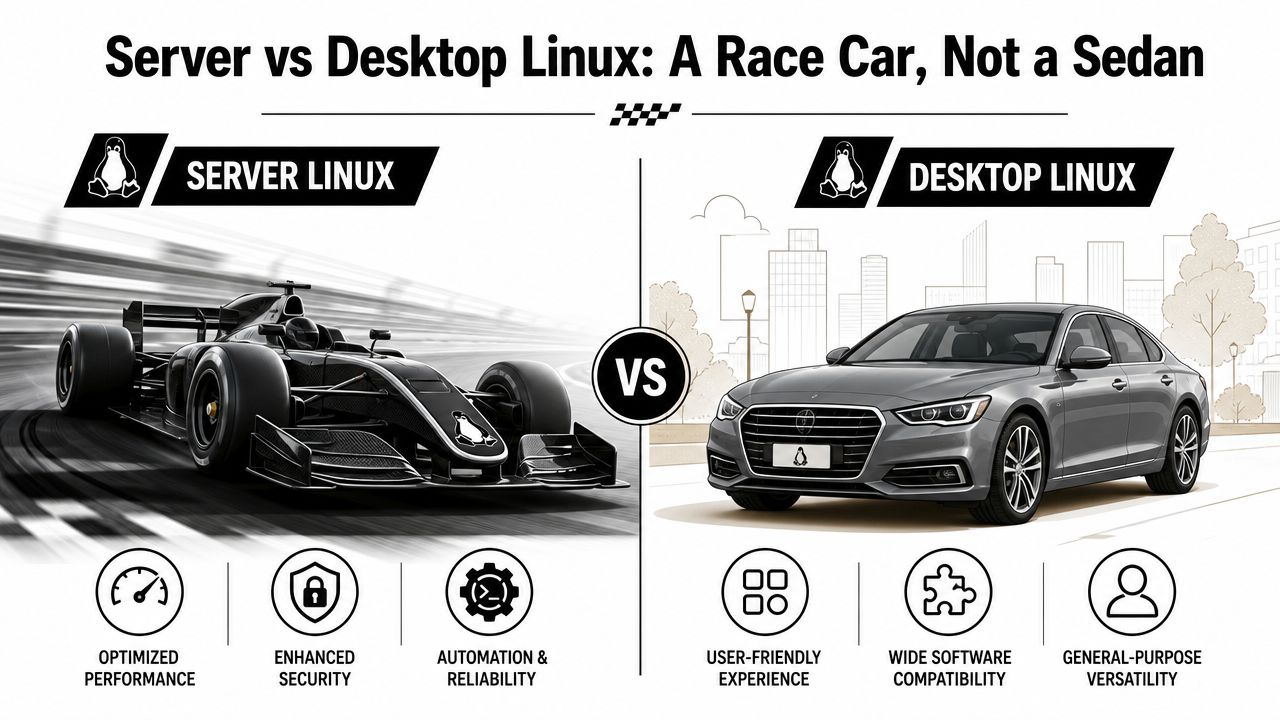
Server vs Desktop Linux A Race Car, Not a Sedan
Many non-technical leaders hear “Linux” and picture a general-purpose operating system that can do a bit of everything. That's true on the desktop. It's not the right mental model for servers.
A desktop Linux distribution is designed for human convenience. It usually includes a graphical interface, desktop apps, media support, and a broad set of tools for daily use. A server Linux distribution is built for a different job. It prioritizes stability, remote management, long-running services, and efficient use of hardware.
That's why the race car analogy works. A sedan is versatile and comfortable. A race car strips out anything that doesn't help performance, control, or reliability on the track.
What gets stripped out on purpose
On a server, less is often better. Many server installations skip the graphical desktop entirely. That leaves more system resources available for the application, database, queue worker, or API process that creates business value.
Server distributions also tend to be conservative about change. That can confuse product owners who are used to consumer software improving through constant visible updates. On servers, “latest” isn't automatically “best.” Stability usually matters more than novelty.
Why stability beats novelty in production
If a team runs a customer-facing app, they don't want surprises from the underlying OS. They want known behavior, predictable patching, and compatibility with the software stack around it.
A server Linux distribution is usually tuned around needs such as:
- Remote administration through tools like SSH and automation platforms
- Reliable networking for web traffic, APIs, and service-to-service communication
- Security defaults that are better suited to production
- Long uptime windows for workloads that shouldn't reboot casually
A production server should feel boring. Boring is what you want when revenue, customer trust, and compliance depend on consistency.
Why desktop habits can hurt server environments
Leaders sometimes inherit environments where a server was set up more like a workstation. It may have extra packages, unnecessary services, or manual one-off tweaks that “just made things work.” Over time, that creates a fragile estate no one wants to touch.
Here's the simple distinction:
| Environment | Primary user | Design goal | Typical tradeoff |
|---|---|---|---|
| Desktop Linux | Human at a screen | Convenience and flexibility | More software, more resource use |
| Server Linux | Applications and admins | Stability, security, automation | Fewer extras, slower change cadence |
If your application is meant to support growth, the server shouldn't behave like a laptop with extra uptime. It should behave like infrastructure.
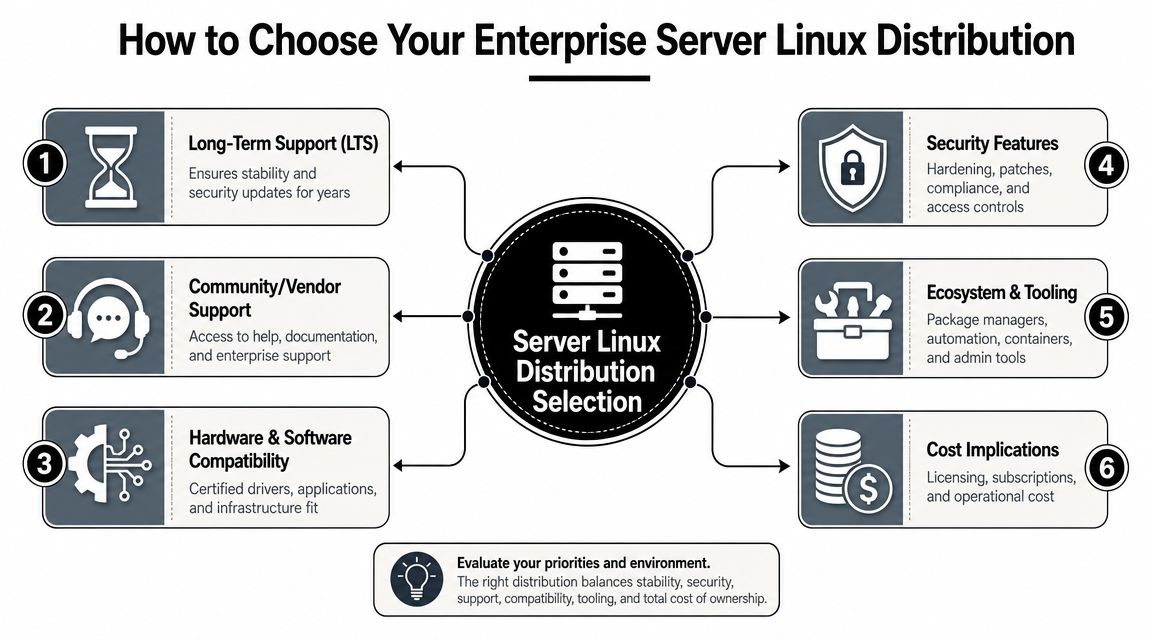
How to Choose Your Enterprise Server Linux Distribution
The right choice usually has less to do with fandom and more to do with risk. Your team isn't choosing a logo or package manager. It's choosing how production will be supported, patched, secured, and maintained over time.
According to SUSE's guidance on choosing a server distro, enterprise Linux choices are primarily about risk reduction. The major criteria are support quality, patch-testing rigor, vulnerability response speed, long-term update availability, and application compatibility. That's a much more useful lens for business leaders than “which distro is fastest?”
Start with support life, not feature lists
If your application has to live for years, support windows matter early, not later. Teams often regret choosing a distribution only after they realize its maintenance model forces rushed upgrades or awkward migrations.
A better set of executive questions looks like this:
- How long will this release stay supported?
- Can our team absorb major version changes frequently, or do we need a slower cadence?
- What happens when a security issue appears in production?
- Who owns escalation when something breaks at the OS layer?
If your team runs regulated systems, customer-facing platforms, or revenue-critical workloads, a short or unclear support lifecycle creates operational risk.
Understand the real cost of “free”
A community distribution can be a smart fit for some teams. There's nothing wrong with using one, in itself. The issue is assuming zero license cost equals lower total cost.
Sometimes a paid enterprise subscription buys something more valuable than software. It buys predictability. It can also buy tested updates, clearer support paths, and less time spent by your own engineers diagnosing lower-level issues.
Boardroom translation: The cheapest distro on paper can become the most expensive one to operate if your team has to replace vendor support with internal firefighting.
Match the distro to the hosting model
Your distribution also needs to fit where the workload will run. A single physical server, a virtualized environment, and a cloud-first deployment won't always push you toward the same answer.
For example, hardware compatibility and management tooling still matter in on-prem environments. If you're buying or refreshing infrastructure, it helps to align the OS choice with the kind of systems you'll deploy. Teams evaluating High-performance Dell tower servers often do this at the same time because compute form factor, workload profile, and OS support aren't separate decisions in practice.
A simple decision screen for leaders
| Decision area | What to ask | Why it matters |
|---|---|---|
| Support model | Do we need vendor-backed support or is community support enough? | Affects outage response and internal workload |
| Lifecycle | How often can we tolerate disruptive upgrades? | Shapes long-term roadmap stability |
| Security process | How mature is patch validation and rollback? | Reduces production risk |
| Compatibility | Will our app stack, tools, and hosting environment fit cleanly? | Avoids rework and edge-case failures |
| Cost structure | What internal effort is replaced by subscription support? | Clarifies real TCO |
A good enterprise server Linux distribution isn't the one with the loudest reputation. It's the one that makes production easier to run well.
Cloud and Container Readiness in Your Distro
The meaning of “server” has changed. For many teams, it no longer means a single long-lived machine with software installed manually over time. It might mean a container image, a node in a Kubernetes cluster, or an instance launched from code and replaced rather than repaired.
That shift changes what you should expect from a server Linux distribution. It's not enough for it to be stable in the classic sense. It also needs to fit cloud-native operations.
Modern apps need a different kind of fit
For modern applications, the operating system has to be evaluated for cloud-native and regulated environments. LogicMonitor's discussion of Linux in server environments highlights decision criteria such as support for immutable images, default security postures like SELinux, and patch cadences that align with containerized deployment models.
That matters because cloud teams optimize for repeatability. They want images that are small, predictable, and easy to replace. They want security settings that don't rely on tribal knowledge. They want updates to fit automated delivery pipelines instead of interrupting them.
Minimal and immutable approaches change the conversation
Traditional server management often assumes a machine will be updated in place for years. Container-first teams often prefer a different pattern. Build a fresh image, deploy it, test it, then replace the old one.
That changes how leaders should think about distro selection:
- Minimal footprint helps reduce resource overhead and attack surface.
- Immutable-style workflows support consistency across environments.
- Security defaults matter more when deployments are frequent.
- Patch cadence has to fit release cadence, not fight it.
If your organization is redesigning platforms around containers or microservices, your OS choice should support that model cleanly. A helpful primer on this operating style is Wonderment Apps' article on cloud-native architecture.
Teams often think they need “the best Linux distro.” What they usually need is the distro that best matches how they deploy, secure, and replace workloads.
Regulated environments raise the bar
Healthcare, fintech, and public-sector teams usually need more than convenience. They need clarity. They need to know how security controls are applied, how updates are managed, and whether the distro's defaults help or hinder compliance work.
In that context, cloud readiness and security maturity aren't separate checkboxes. They're part of the same decision. The OS has to support fast delivery without turning audits into archaeology.
Comparing the Major Server Linux Families
Once you strip away internet debates, most enterprise decisions cluster around a few major Linux families. They differ less in basic capability than in philosophy, packaging, support expectations, and lifecycle style.
The most important dividing line often isn't performance. It's lifecycle risk. As noted in the earlier discussion of distro strategy, the decision between families such as Ubuntu LTS and RHEL often comes down to how often a team can absorb updates and migrations, and how much operational predictability the business expects over multiple years.
The Debian family
This family includes Debian and Ubuntu. Think of it as the versatile workhorse category.
Debian has a long-standing reputation for stability and a broad software ecosystem. Ubuntu builds on that base and adds a more commercially familiar experience for many teams, especially those moving quickly in cloud environments or trying to standardize developer and production workflows.
This family is often a strong fit when a business wants:
- broad community knowledge
- straightforward package availability
- a practical path from startup speed to enterprise maturity
The Red Hat family
This family includes RHEL and its close ecosystem relatives such as AlmaLinux and Rocky Linux. It often shows up in organizations that care strongly about standardization, enterprise support, and predictable operations.
The tone here is more conservative. That's often a feature, not a flaw. In large businesses, slower and more validated change can be worth a lot because outages, certification issues, and support gaps cost more than a slightly more flexible setup.
The SUSE family
SUSE Linux Enterprise Server sits in a somewhat different lane. It's a serious enterprise option, often considered where organizations want mature commercial support and strong operational tooling. Some buyers also encounter it in specialized enterprise environments with complex infrastructure needs.
It doesn't always dominate casual distro comparisons, but that can make it underappreciated. In the right environment, it can be exactly the stable, supportable platform a team needs.
A practical comparison table
| Linux family | Core identity | Often chosen for | Support style |
|---|---|---|---|
| Debian and Ubuntu | Flexible workhorse | General web apps, SaaS platforms, cloud deployments | Strong community, with commercial options for Ubuntu |
| RHEL and derivatives | Enterprise standard | Mission-critical business systems, regulated environments | Vendor-driven or enterprise-oriented ecosystem support |
| SUSE | Structured enterprise platform | Complex enterprise estates, specialized workloads | Commercial support with enterprise management focus |
How business leaders should read this
Don't ask your team which family is “best.” Ask which one best fits your company's operating habits.
If your team values speed, broad familiarity, and flexible deployment paths, Debian-based options often enter the conversation early. If your organization values formal support, validation, and enterprise process alignment, Red Hat or SUSE families may fit more naturally.
The server Linux distribution decision is often less about technical superiority and more about organizational fit.
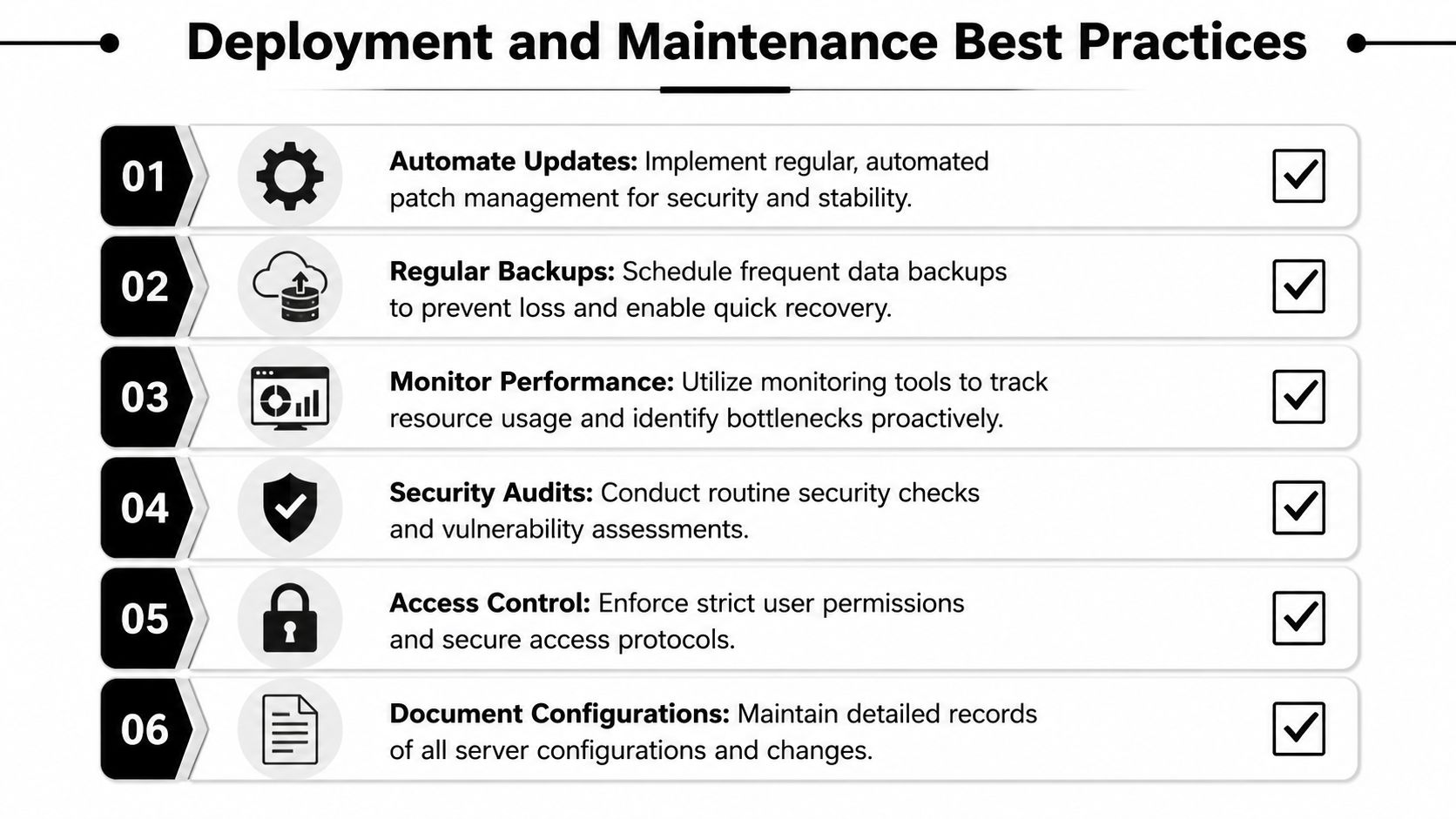
Deployment and Maintenance Best Practices
A good distro choice gives you a strong foundation. Good operations are what keep it that way.
For production workloads, minimal installs matter because they leave more CPU and memory available for the application, and common choices such as Ubuntu LTS, Debian, and RHEL derivatives are widely favored for reliability and predictable lifecycle management, as noted in M5 Hosting's guide to choosing a Linux server distro.
Keep the base system lean
A server should only run what it needs to run. Extra packages, idle services, and convenience tools increase attack surface and make troubleshooting harder.
That doesn't mean making life difficult for engineers. It means separating admin convenience from production discipline.
Automate the repeatable work
Manual server setup is usually where inconsistencies begin. Infrastructure as code helps teams define the desired state, review changes, and reproduce environments reliably.
If your team is tightening delivery discipline, Wonderment Apps' article on best practices for DevOps is a useful companion to the OS conversation.
Monitor before users complain
Strong monitoring closes the gap between “the server is up” and “the product feels healthy.” Logs, metrics, and alerting should tell your team when resources are under pressure, when services fail to restart, and when patching causes regressions.
For teams that need a practical starting point, the Fivenines Linux monitoring guide gives a grounded walkthrough of what to watch and why it matters.
Good maintenance isn't glamorous. It's the daily discipline that keeps a stable distro from becoming an unstable environment.
A short operating checklist helps:
- Install minimally: keep only required components on production hosts.
- Automate builds: use tools like Ansible or Terraform for repeatability.
- Define patch routines: decide who patches, when, and how rollbacks work.
- Centralize observability: collect logs and performance signals in one place.
- Document changes: future incidents get easier when history is visible.
Modernizing Your Stack A Migration Checklist
If you're reevaluating your server Linux distribution, don't turn it into a religion or a giant rewrite. Treat it as a modernization program with clear operational goals.
Start with a migration checklist that leadership and engineering can review together.
What to confirm before you move
- Application fit: verify that your runtime, dependencies, and deployment model match the target distro.
- Lifecycle fit: choose a support window your team can realistically live with.
- Security fit: review patching expectations, hardening defaults, and audit needs.
- Operations fit: confirm your monitoring, backup, automation, and rollback processes are ready.
- Hosting fit: align the distro with your cloud, on-prem, or hybrid direction.
If you're still weighing where workloads belong, the Blowfish Technology cloud solutions guide is a useful planning resource because infrastructure location and OS standardization usually move together.
Don't modernize only the infrastructure layer
A better server foundation helps, but it doesn't finish the job. Many teams migrate the hosting layer and then discover the next source of complexity is AI itself. Prompts multiply. Model behavior changes. Internal data access needs guardrails. Logging is fragmented. Cost visibility gets fuzzy.
That's why modernization should include the intelligence layer too. If your roadmap includes AI features, pair the infrastructure transition with an application-level plan for prompt governance, observability, and spend control. For teams mapping that path, Wonderment Apps also shares practical thinking around cloud migration for applications.
A strong server Linux distribution makes your product easier to operate. A disciplined AI management layer makes it easier to evolve.
If your team is upgrading infrastructure and adding AI capabilities at the same time, Wonderment Apps can help on both fronts. We build and modernize scalable web and mobile applications, and we've also developed a prompt management system that plugs into existing software as an administrative control layer for AI integration. It includes a versioned prompt vault, a parameter manager for secure internal data access, unified logging across integrated AI services, and a cost manager so entrepreneurs and product teams can track cumulative spend. If you're trying to build on a stable Linux foundation and make AI manageable in production, book a demo with Wonderment Apps.