


Your legacy app probably still runs the business. It also probably slows down every new idea your team wants to ship.
That's the situation many leaders face on a first major migration. The application still processes orders, stores customer data, or powers internal workflows, but every change feels risky. Releases drag. Infrastructure is brittle. Integrations behave like a pile of extension cords behind a desk no one wants to move. And when someone says, “Let's add AI,” the room goes quiet because the current stack can barely support the roadmap you already have.
A cloud migration app strategy fixes more than hosting. Done well, it creates a cleaner operating model for scaling features, improving resilience, and preparing your software for the next wave of modernization. That includes AI features that need dependable data access, observability, version control around prompts, and cost discipline. Those capabilities become much easier to manage once the application itself is running in the right cloud architecture.
Beyond Lift and Shift The Modern Migration Mindset
Most first-time migrations start with a narrow question. How do we move this application into the cloud without breaking it?
That's a fair question, but it's too small. A useful cloud migration app plan starts with a bigger one. What kind of business system do you want on the other side?
Why lift and shift isn't enough
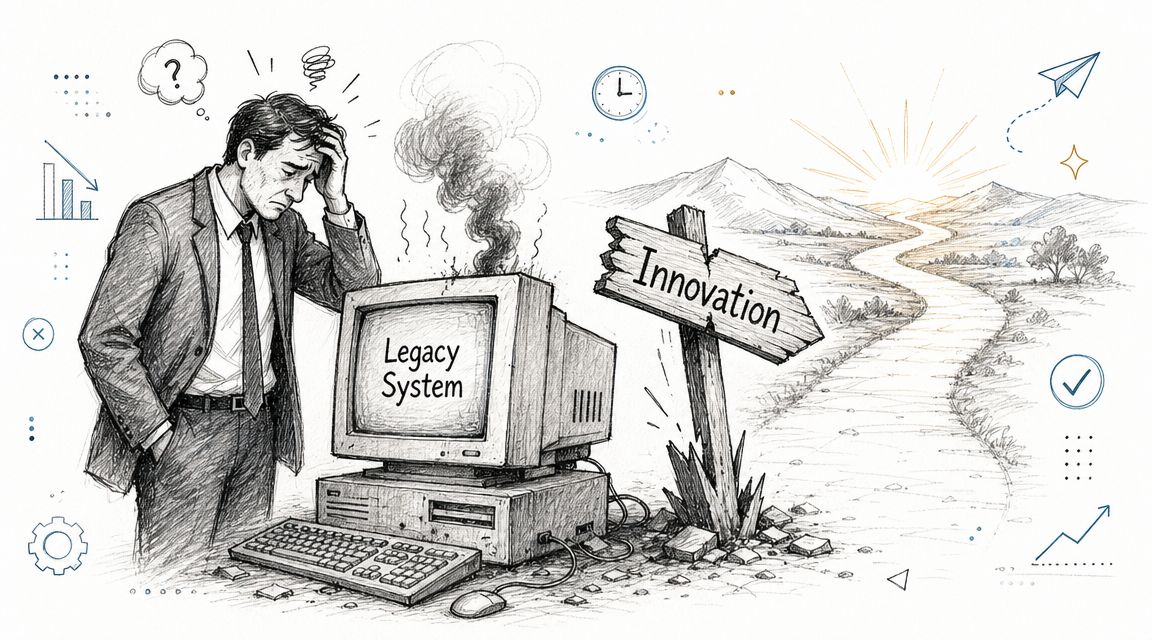
A pure lift-and-shift move can make sense for speed. It can also preserve all the same operational problems you already have. You may end up paying cloud rates for an app that still needs manual deployments, still depends on hidden integrations, and still can't support modern product work.
That's one reason this market has become so important. The global cloud migration services market was estimated at USD 10.2 billion in 2023 and is projected to reach USD 29.2 billion by 2028, growing at a 23.3% CAGR, according to MarketsandMarkets' cloud migration services market analysis. That kind of growth tells you something practical. Businesses no longer treat migration as a one-time infrastructure errand. They treat it as a strategic capability.
For leaders still framing the move in operational terms, this primer on understanding cloud migration for UK SMBs is a useful companion because it grounds the discussion in business realities rather than platform jargon.
Migration works best when the destination is defined by business outcomes, not by where the servers happen to sit.
Cloud as the setup for AI modernization
The discussion shifts to a more compelling point. Once your application runs in a healthier cloud environment, you can start adding capabilities that were awkward or unsafe in the legacy stack.
That might mean intelligent search, support copilots, content generation, anomaly detection, recommendations, or internal tools that help staff act faster. But those features don't run well on chaos. They need governed prompts, secure access to internal data, logs across model interactions, and visibility into spend.
A modern migration mindset connects these dots early:
- Cleaner architecture: Services, data flows, and ownership become easier to reason about.
- Faster product change: Teams can ship features without treating every deployment like surgery.
- Better AI readiness: Model integrations are easier to control when the surrounding app is observable and well-structured.
If you treat cloud migration as the foundation of a smarter application, the trade-offs become clearer. Some workloads should move fast. Some should be redesigned. Some shouldn't move at all.
That's what the rest of the playbook is really about.
Phase 1 Discovery and Deciding What to Move
The first mistake teams make is assuming they already know their application estate. They know the names of systems. They don't always know how those systems behave.
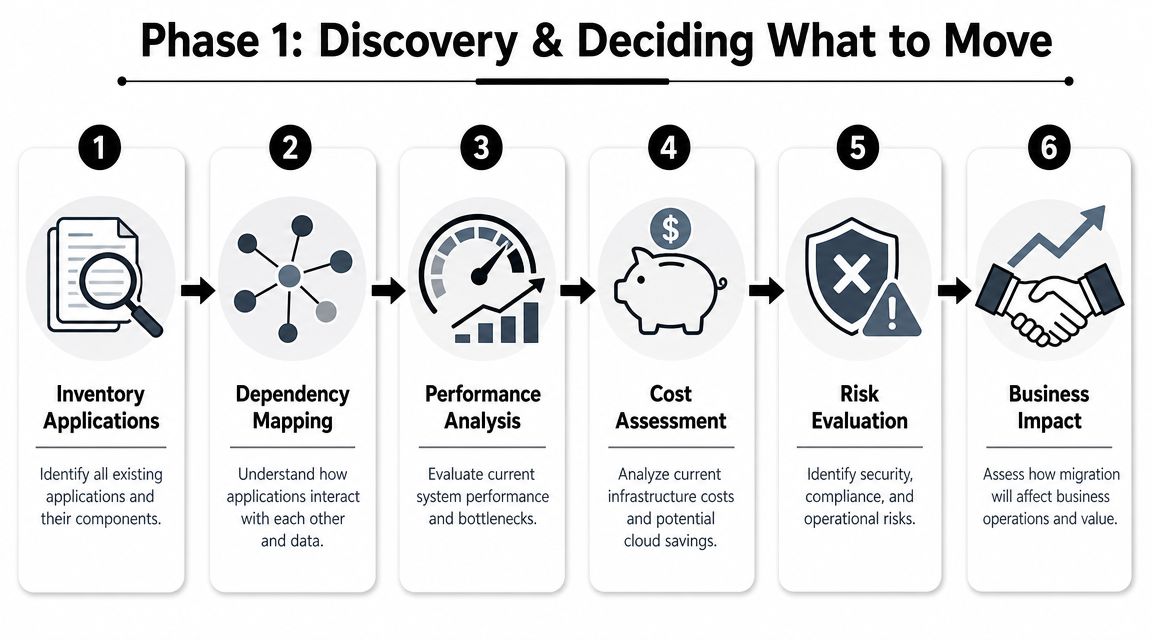
A strong cloud migration app program starts with discovery. Not the ceremonial kind where someone exports a CMDB and calls it a day. Real discovery means building a migration manifest that tells you what exists, what matters, what talks to what, and what can safely be left behind.
Start with the full inventory
Begin with a plain list of applications, services, databases, scheduled jobs, file stores, third-party integrations, and admin tools. Include the unglamorous pieces. The nightly import script often matters more than the shiny front end.
Independent migration guidance recommends a current-state assessment that catalogs applications, classifies criticality, maps dependencies, baselines performance, and defines business KPIs before any move. The same guidance also recommends staged migration instead of trying to move everything at once. You can review that approach in TierPoint's cloud migration strategy guidance.
A practical inventory should capture at least these fields:
- Business owner: Who makes the call if there's a migration issue?
- Technical owner: Who understands runtime behavior and integrations?
- Core purpose: Revenue, operations, compliance, reporting, support, or internal productivity.
- Statefulness: Does it hold business-critical data or depend on local state?
- Downtime tolerance: Minutes, hours, or not acceptable at all.
Classify by actual business value
This part needs honesty. Every department thinks its app is mission-critical. It usually isn't.
Use a short decision lens:
| Question | What it reveals |
|---|---|
| If this app disappeared for a day, what breaks? | Operational criticality |
| Does it create differentiation or just support a commodity process? | Whether to modernize or replace |
| Is usage active, occasional, or mostly historical? | Whether to retain or retire |
| Does it create regulatory or security burden? | Migration complexity |
Atlassian's Cloud Migration Assistant highlights why formal app assessment matters. It guides teams through cloud availability, feature differences, security requirements, and whether an app supports manual or automated migration paths. Atlassian also emphasizes using actual usage signals to decide whether to retain, replace, or retire apps. You can see that approach in Atlassian's app assessment guidance.
Practical rule: If nobody can explain who uses an app, what data it owns, and what process fails without it, don't migrate it yet.
Map dependencies before they surprise you
Dependencies are where first migrations get expensive. One app depends on a shared identity service. Another writes to an old reporting database. A customer portal calls an internal API that was built by a team that no longer exists.
Document these relationship types:
- System-to-system calls such as APIs, webhooks, batch jobs, and message queues.
- Shared data dependencies such as common schemas, reports, exports, and file drops.
- Operational dependencies such as identity, secrets, certificates, and monitoring.
If your migration includes data movement, it also helps to review the adjacent discipline of database migration planning, because application success often hinges on data cutover choices more than compute choices.
Decide what moves, what changes, and what stops
By the end of discovery, every app should land in one of three buckets:
- Move soon: Clear value, manageable dependencies, realistic cloud fit.
- Change first: Needs redesign, cleanup, or vendor replacement before migration.
- Stop carrying it: Low value, duplicate capability, or dead usage.
That decision alone can save months of waste. The best migration plans aren't bigger. They're more selective.
Phase 2 Choosing Your Migration Strategy and Architecture
Once the inventory is real, strategy stops being theoretical. Each workload now needs a path. Not one path for the whole estate. A path for that app, with its constraints, users, data patterns, and shelf life.
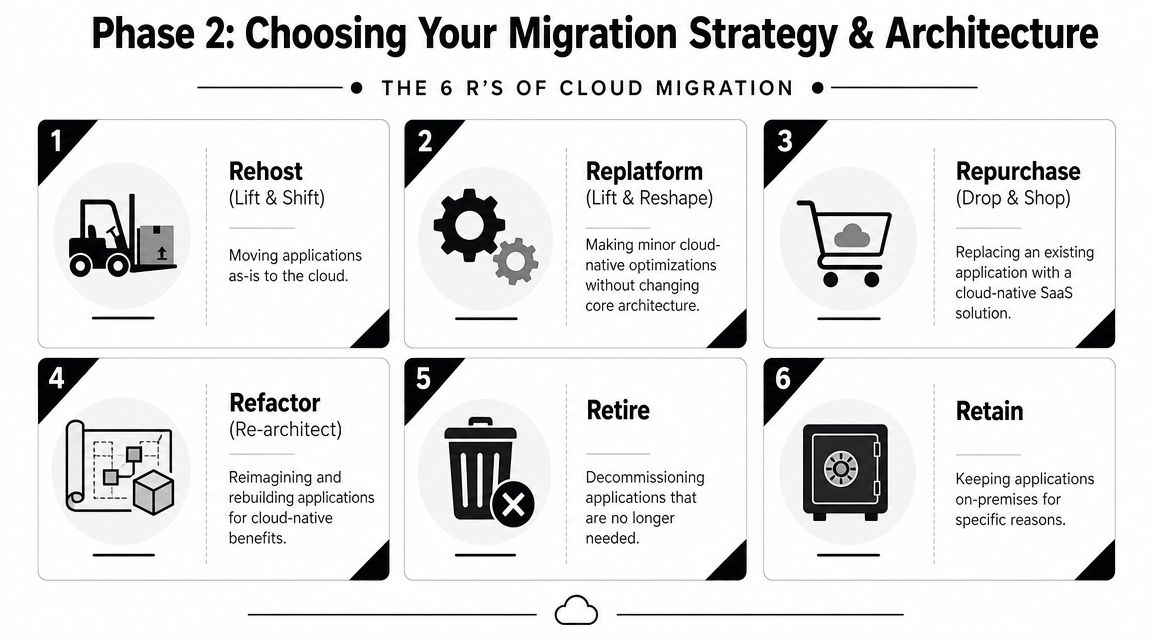
The six common paths are useful because they force a decision. They also prevent a very common failure mode. Overengineering a simple workload, or underinvesting in a strategic one.
The six paths in plain English
Here's the practical view leaders actually need:
| Strategy | Best fit | Main upside | Main trade-off |
|---|---|---|---|
| Rehost | Stable app, urgent timeline | Fastest move | Carries old design forward |
| Replatform | App works, but ops are clunky | Better cloud fit without full rebuild | Some engineering effort |
| Repurchase | Commodity capability | Offloads maintenance to SaaS | Less customization |
| Refactor | Strategic app with long future | Unlocks cloud-native benefits | Highest effort and change risk |
| Retire | Low-value or duplicate app | Cuts cost and complexity | Requires stakeholder discipline |
| Retain | Poor cloud fit right now | Avoids bad timing | Leaves a split environment |
What works for each option
Rehost works when speed matters more than elegance. You need to exit a data center, reduce hardware dependence, or create breathing room. It's often a fine first move for low-risk internal systems.
Replatform is a strong middle ground. Keep the application shape, but improve the plumbing. Move to managed databases, container hosting, or cleaner deployment patterns without rewriting the whole thing.
Repurchase is often the smartest decision leaders resist the longest. If the app handles a standard business function and your team keeps customizing around the edges, switching to SaaS may be the rational move.
What usually fails
Refactor fails when the business treats it like a technical side quest. Refactoring changes release process, testing approach, service boundaries, ownership, and often the product roadmap. If you don't sponsor it properly, it stalls halfway and leaves everyone miserable.
Retire fails because no one wants to own the political fallout. Teams cling to old tools long after business value has vanished.
Retain fails when it becomes a permanent avoidance strategy. Some apps should stay put for now. “For now” still needs a review date and a reason.
If an application is central to how you win in the market, a cheap migration is often the expensive choice.
Match strategy to target architecture
Architecture should follow the chosen path, not lead it.
A straightforward rehost may live comfortably on cloud virtual machines. A replatformed app may fit containers and managed data services. A refactor often points toward microservices, event-driven components, or serverless patterns if those align with the team's operating maturity.
This is also where environment decisions matter. Many businesses don't end up with a single neat destination. They operate across mixed environments for good reasons. If that's your reality, this breakdown of multi-cloud vs hybrid cloud helps clarify the operational differences.
For governance and planning language that many leadership teams find easier to align around, cloud adoption best practices can be a helpful reference.
Choose with pilots, not PowerPoint
A migration strategy isn't real until a team proves it on an actual workload. Practical guidance recommends staged execution, pilot testing, and establishing performance baselines before cutover. It also recommends monitoring response time and error rates before and after migration so teams can validate each phase and catch regressions early. That framing appears in the TierPoint guidance referenced earlier.
Use pilot candidates with these traits:
- Moderate complexity: Hard enough to teach you something, not so hard that it blows up the schedule.
- Known ownership: Product, engineering, and operations all have named decision-makers.
- Clear success criteria: Functionality, latency, reliability, supportability.
A first migration should produce learning, not hero stories. If the strategy depends on perfect execution from day one, it's the wrong strategy.
Phase 3 The Nuts and Bolts of Execution
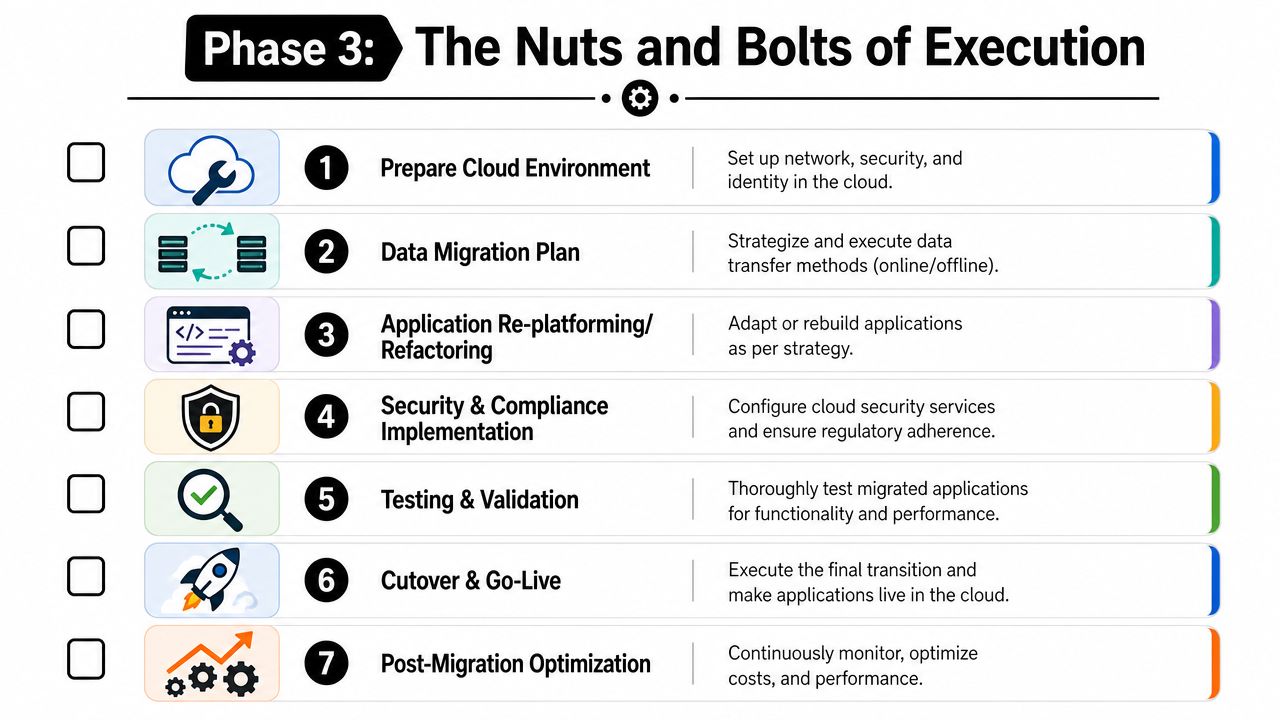
Execution is where cloud migration stops sounding strategic and starts behaving like engineering. Teams have to move data, preserve behavior, secure access, validate performance, and cut over with enough control that rollback remains possible.
That only works when the migration is treated as a program with hard gates, not a loose collection of tasks.
Data and state come first
Applications are easy to redraw on architecture diagrams. Data is where reality lives.
Before moving anything, classify your data. Separate sensitive records from routine operational data. Know what needs encryption, what carries retention obligations, and what can't move casually between environments. Migration guidance from Gart emphasizes data classification, compatibility checks, and post-migration validation as the three technical controls that matter most in application migration. It also recommends proofs of concept and phased rollouts rather than one large leap. That guidance is summarized in Gart's cloud migration strategy article.
A sensible execution plan answers these questions:
- System of record: Which database remains authoritative during the transition?
- Data freshness: Can users tolerate lag, or do you need near-real-time synchronization?
- Rollback path: If cutover fails, how do writes stay consistent?
For some workloads, a scheduled downtime window is acceptable. For others, you'll need replication and a tightly managed switch. The mistake is not choosing one. It's pretending the decision can wait.
Security changes shape in the cloud
Legacy environments often rely on a perimeter mindset. Inside the network feels trusted. In the cloud, that assumption breaks quickly.
Move security controls closer to identity, data classification, and service-level access. Tighten IAM design early. Review secrets handling before deployment. Recheck integration permissions, especially where old applications used broad credentials because nobody wanted to break the nightly jobs.
A short execution checklist helps:
- Identity first: Decide who and what gets access before workloads go live.
- Least privilege: Narrow service permissions instead of copying old broad-access patterns.
- Compliance evidence: Preserve logs and validation records for regulated workflows.
Don't migrate a security shortcut just because it has been running for years without visible drama.
Testing has to reflect production reality
A cloud migration app succeeds only when the app behaves correctly after users arrive. That sounds obvious, yet many teams test only happy paths.
Post-migration validation needs multiple layers:
| Validation area | What to verify |
|---|---|
| Functional | Core user journeys, admin flows, integrations, exports |
| Performance | Response behavior against known pre-migration baselines |
| Operational | Alerts, logs, dashboards, backups, recovery procedures |
| Security | Access paths, data handling, auditability |
Compatibility checks should happen before the move, not during cutover week. Latency-sensitive transactions deserve special attention because network behavior changes once the app sits in a different environment.
CI/CD is part of the migration, not a bonus item
If teams still deploy manually after migration, they've moved the problem more than they've solved it.
Cloud execution gets steadier when deployment pipelines are part of the plan. That means build automation, environment promotion rules, repeatable configuration, and smoke tests that run on every release. For some legacy estates, that's a substantial maturity jump. It's still worth doing because a cloud environment amplifies both good and bad operating habits.
A reliable execution pattern looks like this:
- Prepare environments consistently
- Move data with an explicit state strategy
- Validate app behavior in stages
- Cut over with rollback still available
- Harden operations immediately after go-live
The teams that do this well aren't calmer because migration is easy. They're calmer because each step has an owner, a gate, and an exit plan.
Phase 4 Optimizing and Operating in the Cloud
Cutover is not the finish line. It's the point where the monthly bill starts teaching lessons.
That's why I push leaders to treat day-two operations as part of the migration business case. If you stop at “the app is live,” you can end up with a cloud-hosted version of the same old inefficiencies, only now they arrive as variable invoices and noisy dashboards.
Cost discipline decides whether migration feels successful
Cloud costs rarely become a problem because the provider is mysterious. They become a problem because teams migrate workloads without enough workload-specific analysis, rightsizing, or governance.
Flexera's 2025 State of the Cloud report found that 84% of organizations cited managing cloud spend as their top cloud challenge, as referenced in this cloud cost management discussion. That's a useful reality check. The hard part isn't just moving workloads. It's deciding which ones should move, how they should be sized, and how they should be governed after they arrive.
What mature operations look like
Post-migration operating discipline usually shows up in four places:
- Rightsizing: Review whether compute, storage, and database allocations match actual demand.
- Autoscaling: Let the platform expand and contract where workload shape supports it.
- Environment hygiene: Shut down forgotten non-production resources and stale experiments.
- Ownership visibility: Every major resource should have a team and purpose attached.
Observability matters just as much as cost control. If your team can't connect logs, metrics, and traces to specific user journeys, they'll struggle to explain whether a problem came from application code, infrastructure, or a third-party dependency.
A migrated app becomes valuable when your team can explain its cost, health, and failure modes without guesswork.
Don't separate finance from engineering
The strongest cloud operating models bring product, finance, and engineering into the same conversation. Finance helps define guardrails. Engineering makes design choices visible. Product decides whether performance and feature gains justify the spend.
That operating model is one reason many businesses bring in outside support after migration, not just during it. If you're evaluating what that support should look like, cloud strategy consulting is often the practical layer between a successful migration and a cloud estate that stays manageable.
Real ROI shows up after the move. It appears in cleaner releases, fewer surprises, better resilience, and a cloud bill that reflects deliberate choices instead of drift.
Assembling Your Team and Embracing True Modernization
Migration plans don't fail only on architecture. They fail on staffing, ownership, and decision speed.
A first major cloud migration usually needs more than a lone infrastructure lead and a hopeful deadline. You need product input, application engineers, data ownership, QA, security review, and someone authorized to make trade-offs when the old system behaves differently than expected.
Pick the staffing model that matches the risk
Three models usually make sense:
- In-house delivery: Best when your team already understands the application thoroughly and has enough cloud experience to run the work without slowing the rest of the roadmap.
- Managed partner delivery: Useful when you need a cross-functional team that can own planning, execution, and handoff with tighter delivery discipline.
- Staff augmentation: A good fit when your internal team is strong but missing specific skills such as cloud architecture, DevOps, QA automation, mobile, or data migration.
The right answer depends on where the constraint sits. If the problem is domain knowledge, keep ownership close. If the problem is execution capacity or specialized cloud experience, bring in help deliberately.
Use migration as the start of real product modernization
Once the application is stable in the cloud, you can finally modernize with intent. At this point, AI becomes practical instead of aspirational.
For teams adding AI features into an existing app, one useful option is the Wonderment Apps administrative toolkit for AI integration. It includes a prompt vault with versioning, a parameter manager for internal database access, unified logging across integrated AI systems, and a cost manager for tracking cumulative spend. In plain terms, it helps teams govern prompt behavior, connect models to application data with more control, and keep token costs visible as AI features move into production.
That matters because AI inside a business application isn't just a model call. It's version control, auditability, usage review, and budget accountability.
Cloud migration is the infrastructure decision. AI modernization is the product decision that follows.
The strongest leadership move is to see both as one program. First, make the application portable, observable, and secure. Then make it smarter.
If your team is planning its first serious migration and wants a partner that can help with cloud architecture, application modernization, staffing, and AI integration, request a demo or start a conversation with Wonderment Apps.