

A regional operations leader greenlights a mobile app to speed up field work, reduce service delays, and give management cleaner reporting. Within weeks, the project gets pulled in four directions. IT needs it to work with aging internal systems. Security wants tighter identity and device controls. Business leaders want customer-facing features added to the same roadmap. Then someone asks for AI summaries, search, or an assistant on day one.
That is a normal starting point for enterprise app initiatives.
The first decision is rarely about features. It is about operating model. The app will shape how people access data, complete work, trigger approvals, and handle exceptions from a phone. If AI is part of the plan, the scope expands again. Teams need to decide where prompts live, who can change them, how outputs are reviewed, what usage should be capped, and how model costs will be tracked over time.
This is why weak early planning gets expensive fast. A mobile app that looks polished can still fail if it depends on brittle integrations, creates support overhead, or introduces AI behavior nobody can govern after launch.
If you are evaluating mobile app development services for business growth, start by treating the app as a business system, not a standalone product. The companies that get this right make a few hard choices early. They define who the app serves first, which workflows matter enough to mobilize, what legacy constraints are acceptable, and how AI will be managed as an operational function instead of a feature added at the end.
Introduction
A VP approves a mobile app to speed up field work. Within a month, the project has three owners, two competing user groups, and a last-minute request to add AI search or summaries before launch. That is a common starting point for enterprise mobile work.
The hard part is not getting an app into the app store. The hard part is deciding what business system you are building, who it serves first, what data it can safely reach, and how it will be operated once usage grows.
Enterprise demand for mobile software keeps rising, especially for business applications. The practical takeaway is straightforward. Mobile strategy is now tied to revenue, service speed, workforce productivity, and customer retention. It is also tied to modernization choices. Teams often use a new app to expose legacy systems, replace outdated workflows, and introduce AI-assisted tasks at the same time.
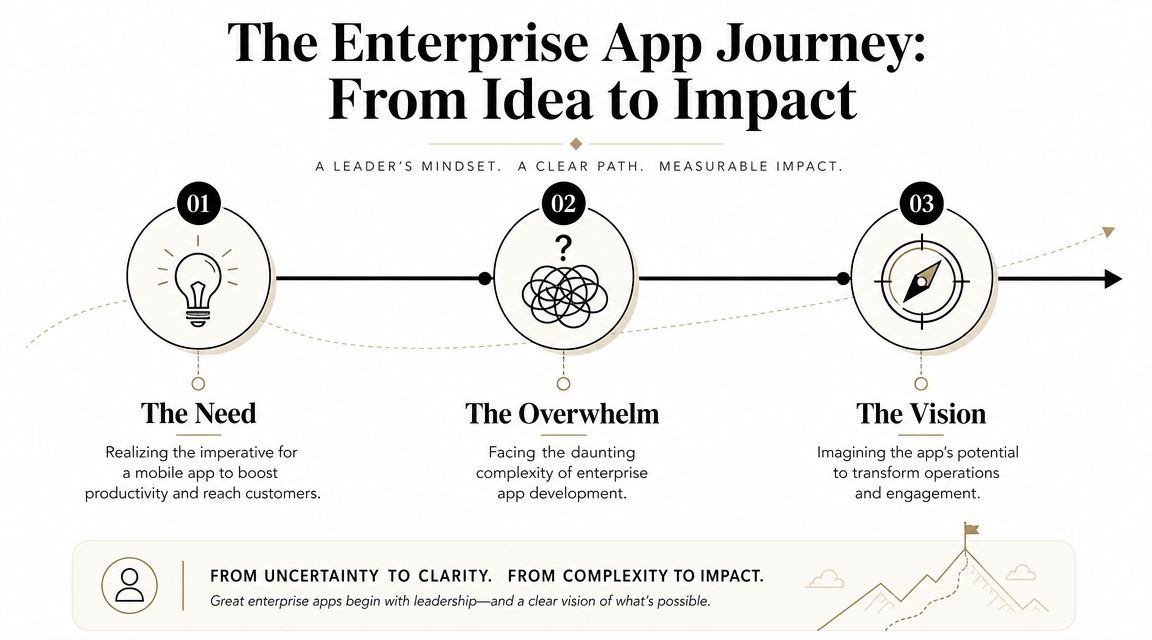
What leaders usually underestimate
An enterprise app is an operating model with a mobile interface on top.
Under that interface sit identity controls, integration rules, offline behavior, analytics, release management, and support responsibilities. Add AI, and the operating burden expands again. Someone has to own prompt changes, output review, usage limits, vendor selection, and monthly cost tracking by feature or user group.
First major projects frequently encounter setbacks. A company approves development based on screens and features, then discovers late that approvals depend on brittle APIs, security reviews slow the schedule, and AI usage has no policy for who can change prompts or approve model spend. The result is not just delay. It is a product that becomes expensive to govern after launch.
For leaders comparing mobile app development services for enterprise growth, the useful question is not which team can build fastest. It is which team can help you make the right trade-offs early, between speed and control, modernization and compatibility, AI value and AI overhead.
What this roadmap is really about
Strong mobile app development for enterprise starts with business behavior, not feature wish lists.
The goal may be faster inspections, fewer approval bottlenecks, better customer self-service, or better visibility for account teams in the field. Different use cases lead to different technical decisions, but the pattern is consistent. Define the workflow that needs to improve, set the operating rules around data and AI from the start, and choose technology based on the business outcome it needs to support.
The Discovery and Strategy Blueprint
The most expensive mistake in enterprise mobile work happens early. Teams skip discovery because they want momentum, then spend months rebuilding assumptions they should've tested in the first few weeks.
That usually shows up as feature bloat, weak handoffs between systems, or a polished interface that nobody wants to use. The hard truth is simple. Poor UX and a mismatch with user workflows are leading causes of enterprise software failure, and the primary challenge is not building the app but proving it will be adopted in frontline routines, as discussed in Finextra's guide to enterprise mobile app development.
Start with business outcomes, not features
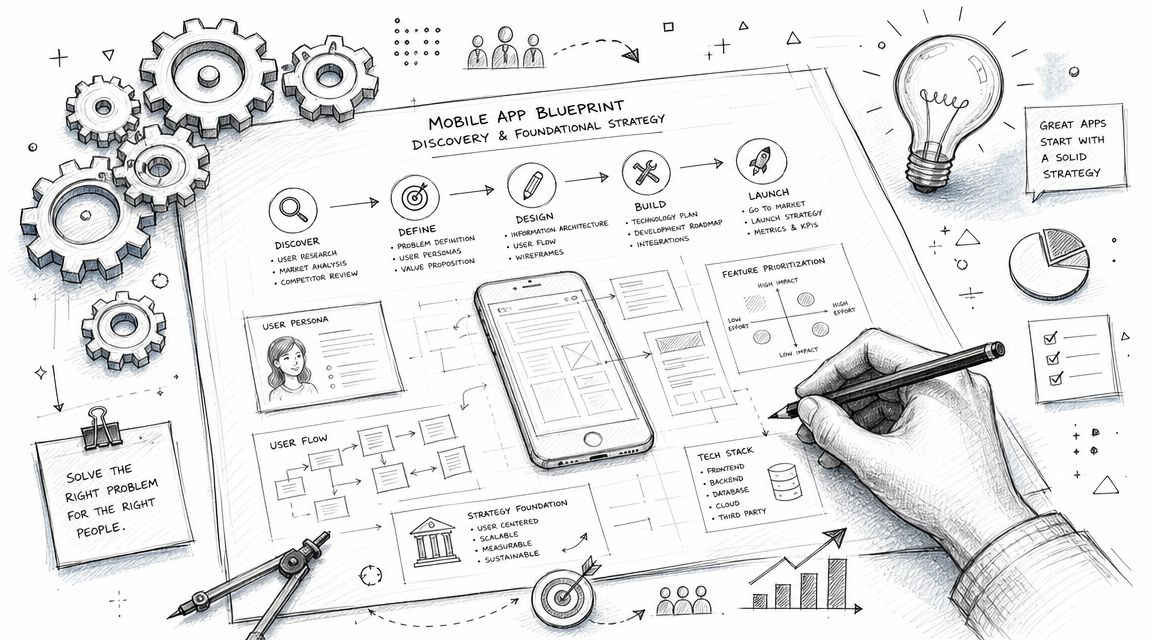
A useful blueprint answers four questions before design begins:
- What decision or task should become easier: Approving expenses, completing inspections, checking inventory, serving customers, or something else.
- Who uses the app: Not “sales” or “operations” in the abstract, but named roles with daily constraints.
- What systems the app must touch: CRM, ERP, payment tools, content systems, scheduling platforms, internal databases.
- How success will be judged: Adoption, task completion, conversion, service speed, fewer handoff errors, or stronger retention.
A vague goal like “improve productivity” won't carry an enterprise app through delivery. A concrete goal like “reduce the friction in a field visit workflow” will.
Discovery work that actually pays off
The strategy phase should produce evidence, not just enthusiasm. That means interviewing executives and end users separately, because they often describe different problems. It also means observing the current workflow rather than relying on meeting-room assumptions.
A strong discovery motion usually includes:
- Stakeholder interviews to surface business priorities, internal constraints, and political realities.
- User journey mapping to identify where mobile adds value and where it might add friction.
- Workflow analysis to catch exceptions, approvals, and hidden dependencies.
- Competitive review to understand common patterns without copying weak ones.
- Success metrics tied to the behavior you want to change.
A beautiful app that interrupts the work is still a bad app.
Keep the first version narrow
First enterprise apps fail when teams try to make them universal on day one. A better pattern is to identify the few high-frequency actions that matter most and design around those.
That often leads to a sharper product: fewer screens, clearer permissions, and better adoption. It also makes architecture decisions easier because the team knows which data flows and device capabilities matter most. The blueprint doesn't need to answer every future question. It needs to answer the right first ones.
Choosing Your Architectural Foundation
Architecture isn't an engineering side conversation. It's a business decision with a long tail.
The platform choice affects delivery speed, maintenance overhead, performance, hiring, release management, and how fast you can adapt when the business changes. Leaders don't need to know every framework detail, but they do need to understand the trade-offs.
Platform smackdown
| Criteria | Native (iOS/Android) | Cross-Platform (React Native, Flutter) | Progressive Web App (PWA) |
|---|---|---|---|
| Performance | Strong choice for performance-heavy experiences and deeper device features | Usually a good balance for most enterprise needs | Best for lightweight access, less ideal for highly device-dependent flows |
| Speed to market | Slower because teams typically manage separate platform work | Faster when one shared codebase covers most needs | Fast for web-first delivery and low-friction distribution |
| Cost efficiency | Higher ongoing investment because platform work often diverges | More efficient when product needs are similar across platforms | Efficient for broad reach, especially when app store presence isn't essential |
| User experience control | Highest level of platform-specific polish | Good consistency across devices, sometimes with trade-offs | Familiar browser-based experience, but less “app-native” feel |
| Offline and hardware access | Strong option for demanding offline or hardware scenarios | Capable for many use cases, but depends on requirements | Works for simpler offline patterns, limited for more complex device behavior |
| Best fit | Customer apps with demanding performance, security, or hardware use | Internal tools and customer products that need speed and consistency | Portals, self-service tools, content-heavy workflows |
How to decide without overcomplicating it
Choose native when the app experience depends on performance, advanced device capabilities, or highly polished interactions. That's common in demanding consumer experiences, secure financial workflows, or apps that rely on camera, biometrics, location, or rich offline behavior.
Choose cross-platform when the business needs one product across iOS and Android without doubling effort. This is often the practical middle ground for mobile app development for enterprise because it balances speed, cost, and maintainability.
Choose PWA when access matters more than deep device integration. For some self-service workflows, service dashboards, and lightweight transactional experiences, a PWA can remove installation friction and simplify rollout.
Backend and cloud decisions matter just as much
The mobile client gets attention because it's visible. The backend determines whether the app can scale, integrate, and evolve.
That's why many teams prefer modular services, API-first design, and cloud deployment patterns that support change over time. If your team is evaluating service boundaries, resiliency, and deployment models, this guide to cloud native architecture for modern applications is a useful companion.
A few practical rules help here:
- Design APIs around workflows: Don't expose raw legacy complexity to the mobile app.
- Separate core business logic from presentation: It gives you more freedom to evolve channels later.
- Plan for analytics from the start: Event design belongs in architecture, not in a rushed post-launch patch.
- Treat AI services as governed dependencies: They need controls, not just endpoints.
The Complete Development and Testing Lifecycle
Enterprise delivery works better when it's boring in the right ways. Predictable handoffs. Clear acceptance criteria. Repeatable releases. Strong quality gates.
That's why the staged lifecycle matters so much. Enterprise mobile app delivery is a multi-phase lifecycle, and jumping directly to development without proper analysis and planning is a common failure mode that often leads to scope creep and security retrofits, according to TBlocks' enterprise mobile app development guide.
The lifecycle leaders should expect
A sound enterprise delivery model usually moves through these stages:
- Strategy and requirements: lock down use cases, users, priorities, and constraints.
- Design: convert workflows into interfaces, navigation patterns, and interaction rules.
- Development: build in increments that can be reviewed and tested early.
- Integration: connect to enterprise systems in controlled layers.
- Testing and QA: validate function, usability, performance, and security.
- Deployment and support: release carefully, monitor closely, and iterate.
That sequence matters because each stage reduces a different kind of risk. Discovery reduces product risk. Architecture reduces technical risk. QA reduces operational risk.
Why Agile works in enterprise settings
Agile isn't useful because it's fashionable. It's useful because enterprise assumptions change once real users see the product.
Short sprints let teams test decisions before those decisions become expensive. They also give business leaders more control because they can review progress against working software rather than slide decks. The strongest teams pair that with CI/CD pipelines so every change is built, tested, and prepared for release in a consistent way.
Testing should answer four different questions
A serious QA practice isn't just bug hunting. It validates whether the product is safe to run in the business.
| Testing area | What it asks |
|---|---|
| Functional testing | Does each workflow behave correctly? |
| Usability testing | Can real users complete tasks without confusion? |
| Performance testing | Does the app remain responsive under realistic conditions? |
| Security testing | Can attackers, bad inputs, or weak controls break the system? |
Teams that want a sharper QA framework should review quality assurance testing best practices for software teams.
Build review into the rhythm of the project. If users only see the app near launch, the team learned too late.
Integrations and security need early airtime
In enterprise projects, the cleanest screens can hide the messiest risk. The app may look simple while depending on complex permissions, brittle data contracts, or legacy systems with inconsistent quality.
That's why good teams test integration assumptions early. They validate authentication flows, edge cases, fallback states, and sync behavior before the product feels “almost done.” Otherwise, late-stage fixes ripple through design, code, QA, and release planning all at once.
Weaving in Security, Compliance, and Integrations
Enterprise apps don't fail only because of product decisions. They also fail when they don't respect the environment they're entering.
A mobile app becomes another doorway into company systems and customer data. That means security and compliance can't sit in a final checklist. They need to shape architecture, user flows, storage decisions, and operations from the start.

Security that supports the business
At a minimum, enterprise teams should think in layers:
- Identity and access: authentication, session handling, role-based permissions, and least-privilege access.
- Data protection: encryption in transit, encryption at rest, and careful handling of cached or downloaded information.
- Application hardening: secure APIs, vulnerability scanning, dependency review, and protection against misuse.
- Operational controls: logging, alerting, incident response, and auditability.
If your organization is formalizing trust controls across systems and vendors, SOC2Auditors' insights on SOC 2 give a useful business-level overview of what those controls are trying to accomplish.
Compliance changes the design, not just the paperwork
Healthcare, finance, and public sector teams already know this. If compliance is relevant, it changes more than legal review. It can affect consent flows, retention rules, data residency, access approvals, and even what appears in a notification on a locked screen.
That's why the best teams translate compliance requirements into product and architecture decisions early. When they wait, they usually end up redesigning parts of the app after development is already moving.
Integrations are where enterprise reality shows up
Most enterprise mobile apps are wrappers around business processes that span multiple systems. CRM, ERP, inventory, scheduling, identity providers, payment tools, analytics platforms, and internal databases all need to play nicely.
The cleanest pattern is usually API-first integration with clear ownership of data movement. Avoid direct, ad hoc connections from the mobile layer into old systems wherever possible. That creates fragile products and painful upgrades.
Security, compliance, and integration aren't separate workstreams. They shape whether the app can actually operate in production.
AI raises that operational bar even further. Once an app starts calling models, retrieving internal context, or generating output for users, the team also needs controls around prompt changes, parameter access, logging, and review. At that point, the challenge shifts from building features to running them responsibly.
Launch, Operate, and Scale with Modern AI
Launch day matters, but operations decide whether the app becomes valuable or exhausting.
That's especially true in enterprise environments, where real users introduce real variability fast. Edge cases appear. Integrations behave differently under load. Support teams discover gaps. Product assumptions get tested by habits, not workshops.
Enterprise app projects can take 6–18 months depending on complexity, and a critical mistake is treating deployment as the finish line because continuous monitoring, analytics, and iterative fixes are essential to reducing risk and ensuring value, based on Purrweb's enterprise mobile app development guide.
Safer release patterns win
Big-bang launches create dramatic meetings and avoidable risk. Better release patterns are quieter.
- Pilot groups let you validate adoption and support issues with a smaller audience.
- Phased rollouts reduce blast radius if a dependency misbehaves.
- Feature flags allow controlled exposure without a full redeploy.
- Operational dashboards help leaders separate anecdotal complaints from systemic issues.
These practices are even more important in AI-enabled products, where outputs can vary and usage patterns can change quickly.
AI features need operational management
A lot of teams still think of enterprise AI as “add a model and ship it.” In practice, the operating model matters just as much as the feature. For leaders who want a broader framing, this explainer on what enterprise AI means in practice is a useful reference.
Once AI enters the app, teams need answers to basic questions:
- Which prompts are in production right now?
- Who changed them?
- What parameters can access internal data?
- How are outputs logged for review?
- Which model calls are driving spend?
- How do we compare quality after a prompt or model update?
Without those controls, AI becomes hard to trust and expensive to tune.
The admin layer most teams forget
A dedicated operations layer proves helpful. One option in that category is Wonderment Apps' prompt management system, which provides a prompt vault with versioning, a parameter manager for internal database access, logging across integrated AI services, and a cost manager for cumulative spend visibility. That kind of tooling isn't the app experience itself. It's the admin layer that helps product, engineering, and operations teams run AI features with more discipline.
That matters because AI modernization isn't only about adding capabilities. It's about controlling how those capabilities evolve after launch.
The moment AI affects customer experience or employee decisions, prompt changes become operational changes.
Scale the system, not just the code
The companies that handle mobile app development for enterprise well don't only scale infrastructure. They scale decision-making. They define ownership. They review telemetry. They tune workflows. They retire low-value features. They keep the app aligned with how work happens in practice.
That's what turns a launch into a durable business asset.
Assembling Your World-Class Development Team
The right plan with the wrong team still fails.
Enterprise app work asks for more than coding capacity. It needs product judgment, UX discipline, integration experience, QA rigor, security awareness, and leadership that can translate business goals into delivery decisions.
Three common team models
In-house team gives you direct control and strong internal context. It also creates hiring overhead, management load, and a longer runway if you need mobile, backend, cloud, QA, design, and AI operations at once.
Staff augmentation works when you already have product leadership and architecture direction but need targeted support. If you're hiring or scoping roles, even a market-facing resource like mobile developer role expectations from nexus IT group can help non-technical leaders understand what skills different hires bring.
Managed project partner fits when speed, accountability, and cross-functional execution matter more than building every capability internally. This model works well for first major enterprise app initiatives because one team owns the handoffs across strategy, design, engineering, and QA.
What to look for in a partner
Use a short checklist:
- Relevant project history: not just apps, but enterprise apps with integrations and governance.
- Clear delivery process: discovery, architecture, QA, release, and support shouldn't be vague.
- Security and compliance fluency: the team should ask good questions early.
- Communication discipline: leaders need visibility into decisions, risks, and trade-offs.
- Business thinking: feature lists matter less than whether the team can improve outcomes.
A strong team won't promise that enterprise app development is simple. They'll make it legible, manageable, and aligned with the business.
If you're planning a first major enterprise app or modernizing an existing one with AI, Wonderment Apps can support the work across strategy, UX, mobile engineering, QA, and AI operations tooling. The practical advantage is having one partner that can help design the product, connect it to existing systems, and add the administrative controls needed to manage prompts, logging, and usage costs over time.