

Most business leaders don't start by asking, “What is cloud migration?” They start with a symptom.
A release takes too long because one aging server can't be touched without a weekend change window. A customer-facing app slows down at the worst possible moment. Your team wants to add AI-powered recommendations, smarter search, or workflow automation, but the current stack already feels fragile. Every improvement looks expensive because every change drags legacy infrastructure along with it.
That's usually when cloud migration stops being an IT side project and becomes a business decision.
Is Your Old Tech Holding You Back
A leadership team approves a product roadmap, then watches it stall because the underlying systems cannot support the next release without extra work, extra cost, and extra risk. The application still runs. The business around it has changed faster than the stack beneath it.
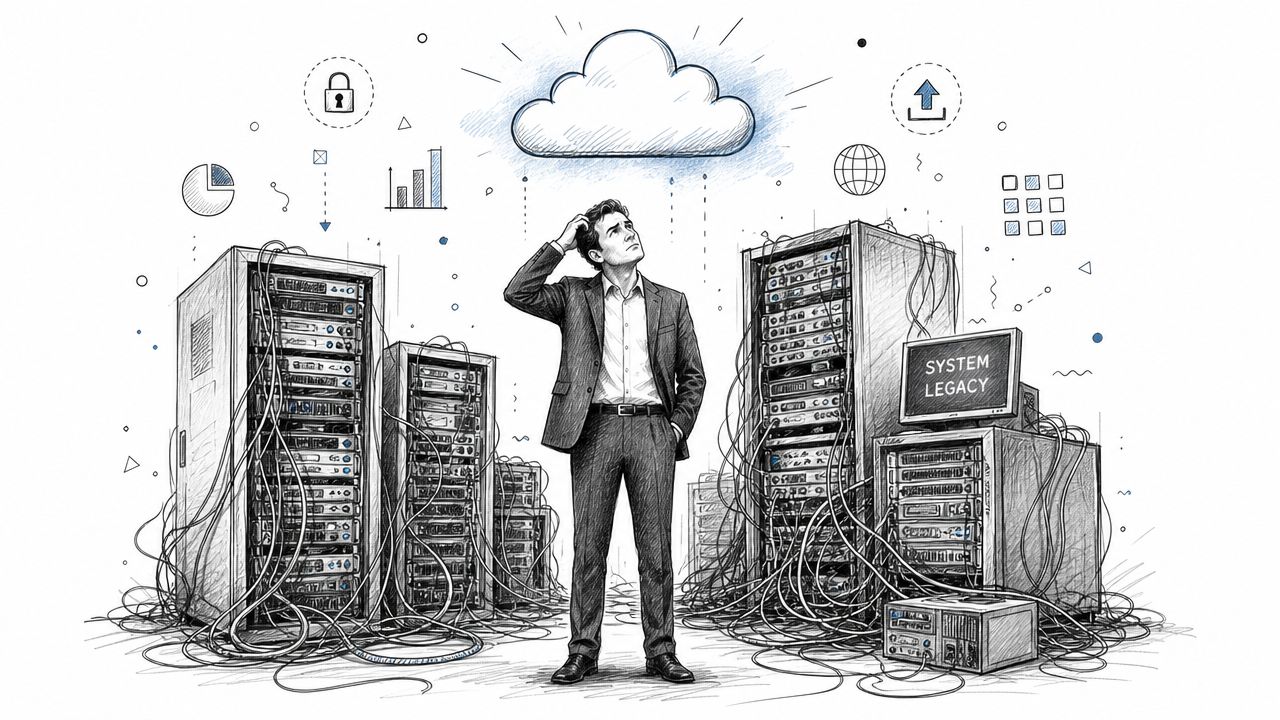
That is the practical starting point for cloud migration. It means moving applications, data, and supporting services from on-premises infrastructure, or from one cloud environment to another, so the business can run on technology that is easier to scale, maintain, and improve.
The pressure usually shows up in everyday decisions. Product teams wait on environment provisioning. Engineers spend valuable time keeping aging systems stable instead of shipping features. Finance sees infrastructure costs that are hard to justify because the spend protects old capacity rather than creating new revenue.
Cloud migration matters because it changes what the business can do next. A company can reduce dependence on aging hardware, shorten delivery cycles, and create better conditions for platform upgrades. For organizations planning AI features, that foundation matters even more. Recommendation engines, intelligent search, copilots, and workflow automation all depend on infrastructure that can handle variable demand, modern integrations, and tighter operational control. If you are planning to modernize legacy systems for faster product delivery and AI readiness, migration is often the first practical move.
Old technology rarely blocks growth in one dramatic failure. It blocks growth through slow releases, brittle integrations, rising support effort, and projects that never make it out of planning.
There is another issue that gets missed in high-level migration discussions. Moving workloads to the cloud does not automatically make AI economics work. After migration, companies often discover that inference calls, vector databases, API traffic, observability tooling, and data movement introduce a new cost profile that can change month to month. A system that looked efficient in a pilot can become expensive at production scale if usage controls, architecture choices, and provider selection are weak.
Talent is the second hidden constraint. Many mid-market businesses do not have the budget to hire a full in-house team with cloud architecture, MLOps, application modernization, and AI product experience. That gap slows delivery or pushes teams into expensive trial and error. The companies that get the best result treat migration as part of a broader modernization plan, with clear business priorities, cost guardrails, and the right external expertise to fill skill gaps without building an enterprise-sized bench. Wonderment often steps in at that point, helping teams turn a migration effort into a modernization program that is technically sound and financially disciplined.
The Six Flavors of Cloud Migration
Not every workload should move the same way. The biggest mistake I see is treating migration like a single technical event, when it's really a portfolio of decisions.
A simple analogy helps. Moving to a new house can mean loading boxes into a truck and unpacking them as-is. It can also mean renovating before move-in, replacing old furniture, or deciding some things aren't worth bringing. Cloud migration works the same way.
What each strategy actually means
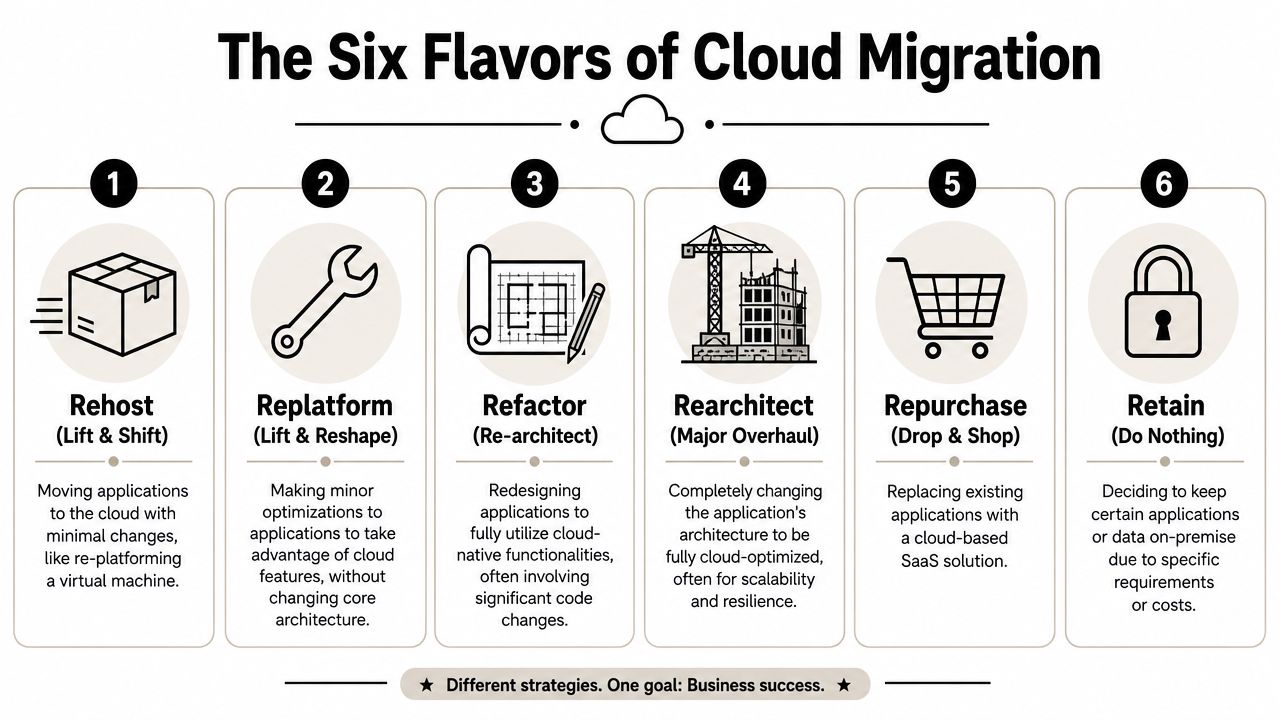
The classic framework is the 6 Rs.
- Rehost means lift-and-shift. You move an application with minimal changes.
- Replatform means making limited improvements, such as swapping in managed services while keeping the core application intact.
- Refactor means changing the code so the application can use cloud-native patterns more effectively.
- Rearchitect goes further and redesigns the system around cloud behavior such as resilience, autoscaling, and modular services.
- Repurchase means replacing the current application with a SaaS product.
- Retain means leaving something where it is for now because the timing, cost, or constraints don't support migration yet.
Some teams also use “retire” to mean decommissioning an application that no longer earns its keep. In practice, that decision matters just as much as the other Rs because unused systems still create support burden.
The trade-off is speed versus long-term value
The strategy you choose shapes cost, risk, and future flexibility. According to Akamai's explanation of cloud migration strategy, the 6 Rs framework dictates the relationship between migration strategy and outcomes, and Refactoring or Rearchitecting can create 30-50% lower long-term operational costs along with autoscaling capabilities, though they require more upfront complexity.
That trade-off is why many organizations start simple, then modernize selectively. A customer portal that just needs a safer hosting environment may be fine with rehosting. A revenue-critical platform with seasonal spikes, mobile users, and AI features usually benefits more from deeper redesign. For teams planning cloud-native software patterns, this guide to cloud-native architecture is a useful companion to the migration discussion.
Practical rule: Don't ask which migration strategy is “best.” Ask which one fits this application's business role, technical debt, and future roadmap.
Cloud Migration Strategies Compared
| Strategy | Description | Effort / Cost | Risk | Ideal For |
|---|---|---|---|---|
| Rehost | Move as-is with minimal changes | Low to moderate | Moderate | Legacy apps that need to move quickly |
| Replatform | Make targeted optimizations without redesign | Moderate | Moderate | Apps that can benefit from managed databases, containers, or platform services |
| Refactor | Restructure code to use cloud-native capabilities | High | Higher upfront, lower long-term operational friction | High-value apps that need scalability and flexibility |
| Rearchitect | Redesign the application around a new architecture | High | Higher delivery complexity | Core products with growth, resilience, or AI modernization goals |
| Repurchase | Replace with a SaaS product | Moderate | Vendor and process change risk | Commodity functions such as CRM, HR, or support tooling |
| Retain | Keep it where it is for now | Low immediate effort | Risk stays in current environment | Systems with regulatory, contractual, or timing constraints |
What usually works and what usually doesn't
What works is mixed strategy. Most application portfolios need more than one answer.
What doesn't work is blanket lift-and-shift followed by no optimization plan. That approach often solves the hosting problem while preserving the architecture problem. You've changed the address, not the design.
Unlocking Business Value in the Cloud
Business leaders usually fund migration for one reason. They want a better operating model.
The cloud changes how teams buy, use, and improve infrastructure. Instead of planning around hardware refresh cycles, they can align technology decisions more closely with product demand, release schedules, and customer behavior. That matters whether you run an ecommerce platform with seasonal surges, a fintech workflow with strict uptime expectations, or a healthcare app that can't afford brittle infrastructure.
Where the financial case comes from
The cost argument is real, but only when migration is done with discipline. According to DuploCloud's cloud migration statistics, cloud migration projects deliver an average of 20-30% cost savings, and that's a major reason 75% of CFOs plan increased technology budgets with cloud at the helm.
Those savings usually come from a few places:
- Less hardware ownership: Teams stop carrying the same capital burden for on-prem infrastructure.
- Better resource matching: Cloud environments make it easier to align compute and storage with actual usage.
- Lower operational drag: Managed services can reduce the support burden on internal teams.
- Faster delivery cycles: Product teams can test, deploy, and iterate without waiting on infrastructure bottlenecks.
Why leaders care beyond cost
Cost gets approval. Agility creates advantage.
Cloud environments make it easier to launch new digital products, support mobile and desktop applications across changing user demand, and build experiences that don't collapse under success. If your traffic jumps because a campaign lands, a new feature resonates, or a partner rollout expands usage, the architecture has room to respond.
That same flexibility matters for AI integration. Custom software can use AI for real-time personalization by analyzing user behavior and preferences to deliver more relevant recommendations, interfaces, and features, as described in IBM's overview of AI in software development. AI integration also helps applications scale with growing data volumes and evolving business needs, which Mutually Human discusses in its look at AI-enhanced custom software.
The bottom-line view
A successful migration gives the business room to move.
It can reduce infrastructure friction, support stronger release velocity, and create a practical foundation for durable software modernization. That's why cloud migration keeps showing up in growth conversations, not just infrastructure reviews.
Navigating the Hidden Risks of Migration
A lot of cloud content still treats migration like a clean before-and-after story. Old servers out, modern platform in, everyone smiles.
Real projects are messier than that.
The obvious risks are only half the story
Most leaders already expect the familiar hazards. Downtime during cutover. Security misconfigurations. Unexpected compatibility problems. Vendor lock-in if the architecture gets too tied to one provider's managed services.
Those risks are manageable, but only if the team plans for them directly. They don't disappear because the destination is modern.
The newer risk is AI cost sprawl
The bigger blind spot now shows up after migration, not during it. Teams move into the cloud, start adding AI features, and then lose visibility into the cost behavior of those services.
According to Evolving Solutions on cloud migration pitfalls, 78% of organizations exceeded their cloud budgets in 2024 due to unoptimized AI model token usage and lack of FinOps integration for machine learning. That problem rarely appears in generic migration guides, even though it directly affects modern product roadmaps.
Here's how it usually happens:
- Prompt usage expands: One feature turns into several, and no one has tight version control or usage guardrails.
- Model choices drift: Teams test multiple AI services without a clear operating policy for when to use which one.
- Autoscaling masks waste: A system stays responsive, but spend rises because inefficient workloads can still scale.
- Logging is fragmented: Costs and outputs are spread across tools, making it harder to trace where spend is coming from.
If you can't explain which AI actions are driving cloud spend, you don't have governance. You have a surprise waiting for month-end.
What generic migration advice gets wrong
Traditional migration playbooks focus on compute, storage, networking, and database movement. That's necessary, but it's no longer sufficient for companies modernizing software with AI.
AI-enabled systems introduce variable consumption patterns that don't behave like standard infrastructure. The result is a post-migration environment that looks technically successful while becoming financially noisy. Leaders need cloud planning that includes prompt operations, model governance, and cost visibility from the start, not as a cleanup project later.
Your Blueprint for a Smooth Migration
Monday morning, the new cloud environment is live, customer traffic is flowing, and the executive team expects the hard part to be over. Then the support tickets start. A legacy integration fails on a timing issue. Finance sees spend climbing faster than forecast. The AI feature the product team planned to launch now has no clear cost guardrails. Migration succeeds or fails in details like these, not in the cutover announcement.
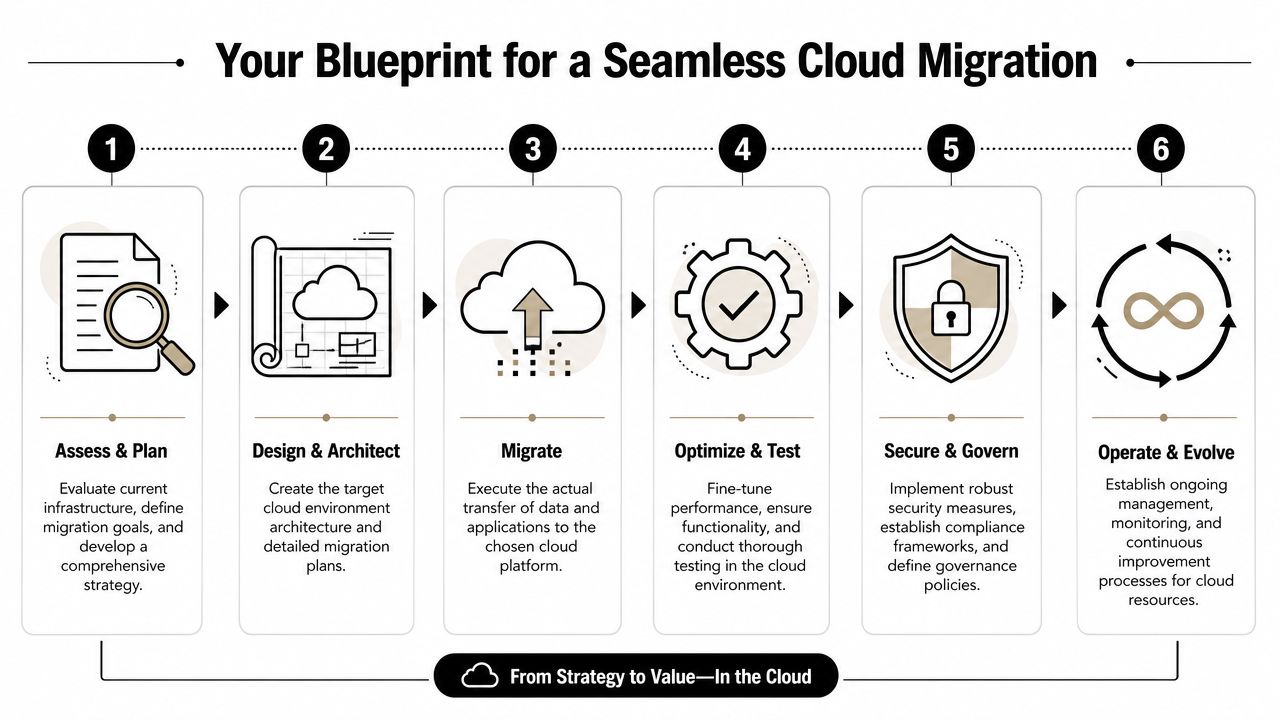
Assess and plan before anyone touches production
Strong migrations start with a dependency map, not a project deadline. Teams need a clear view of applications, data stores, integrations, identity flows, reporting jobs, and the manual workarounds no architecture diagram ever shows. Missing one dependency can turn a controlled rollout into an outage.
Cost planning also belongs here. Not after cutover. Model infrastructure costs, but also model how usage could change once teams have easier access to cloud services and AI APIs. That matters because cloud bills often grow through product behavior, testing habits, and weak governance, not just server size. If the migration includes significant data movement, AppLighter's guide to mastering React Native data migration can help product teams think through application-level data concerns alongside infrastructure planning.
A practical assessment answers four questions:
- What moves first, and why
- Which dependencies can break under load or latency changes
- How success will be measured in business and technical terms
- What the rollback path is for each critical workload
Migrate with sync, testing, and operating discipline
Execution rewards disciplined teams. It punishes optimistic ones.
For systems with active transactions, the migration plan should protect data consistency until the final cutover window closes. DryvIQ notes that delta change propagation and continuous sync reduce the risk of inconsistency during moves where downtime tolerance is low. If your team is planning a data-heavy move, this practical guide on migrating a database is worth reviewing before final cutover planning.
The technical checklist should be simple and strict:
- Keep source and target in sync until cutover is complete
- Test backup restoration before you need it
- Validate backward compatibility for older integrations, scripts, and database features
- Automate validation checks so defects are caught quickly and consistently
- Set cloud and AI spending thresholds early so product experiments do not become finance surprises
That last point gets missed often. A company can migrate infrastructure correctly and still create a post-migration operating problem if developers start using multiple AI services without usage policies, token controls, or cost ownership. Mid-market firms feel this especially hard because they need AI-skilled delivery, but they rarely have the budget depth of an enterprise team. In practice, that means migration planning should include who governs AI architecture, who monitors spend, and whether internal staff can support the target environment without burning out.
Optimize after cutover, while the system is still under scrutiny
A migration is only finished when the new environment performs as expected, the team can support it, and costs are understood well enough to forecast with confidence.
DryvIQ's cloud migration checklist recommends benchmarking performance before and after migration using the same workload patterns. That discipline matters because cloud issues often appear as small regressions at first, slower queries, noisier logs, higher egress, or rising AI inference costs tied to a feature that looked harmless in testing.
Post-cutover optimization should cover performance baselines, access controls, observability, reserved capacity decisions, and FinOps review. For businesses planning to add AI into customer journeys or internal workflows, this is also the point to decide whether the current team can manage prompt operations, model selection, and cost governance on its own, or whether an experienced modernization partner should close that gap. That is often where Wonderment adds value, by helping companies turn a completed migration into an operating model that supports growth instead of just changing where the software runs.
Cloud Migration in the Real World
The definition of cloud migration becomes more useful when you look at how it solves industry-specific problems.
Ecommerce and retail
Retail systems live with volatility. Traffic spikes don't arrive on a polite schedule, and customer patience is short. In cloud environments, ecommerce teams can design for elasticity, support promotions without scrambling for infrastructure, and create room for AI features such as personalization, recommendations, and customer service workflows.
The practical gain isn't just uptime. It's the ability to improve the buying experience without turning every peak season into an infrastructure stress test.
Fintech and SaaS
Fintech teams need speed and control at the same time. They're expected to launch features quickly, support secure transactions, and maintain strong operational discipline. Cloud platforms give those teams a better environment for managed services, testing pipelines, and workload isolation, but only if the architecture is designed with compliance and resilience in mind from the start.
For SaaS companies, migration often separates product scaling from hardware limits. That frees engineering teams to focus on reliability, customer workflows, and feature delivery instead of babysitting old infrastructure.
Healthcare and wellness
Healthcare organizations have an extra layer of caution because data handling and service continuity can't be treated casually. Cloud migration can support more modern patient portals, scheduling tools, telehealth experiences, and internal systems, but the migration plan has to account for backup restoration testing, compatibility validation, and compliance-sensitive operations.
This is also where AI gets interesting. Cloud-based modernization creates room for more responsive user journeys, triage support, content guidance, and data-informed workflows, as long as governance stays tight.
Media, nonprofits, and public service teams
Media products need performance under content-heavy demand. Nonprofits and public agencies often need to digitize services with limited internal engineering capacity. In both cases, cloud migration can make delivery more practical by reducing infrastructure overhead and improving the path to scalable web and mobile experiences.
The practical lesson is simple. The “right” migration isn't abstract. It depends on what your users need, what your regulators require, and what your team can support after launch.
From Migration to Modernization with the Right Partner
A cloud move solves one class of problems. It doesn't automatically solve the staffing and modernization questions that show up next.
That's where many mid-sized firms get stuck. They know the business needs to modernize, but they don't have an enterprise-scale cloud center of excellence waiting in the wings. According to Cyber Advisors on cloud migration barriers for mid-sized firms, 65% of mid-sized firms cite skills shortage as their top barrier to cloud adoption, while most guidance still assumes enterprise governance structures that smaller teams don't have.
What to look for in a development partner
The right partner should fit your operating reality, not an idealized enterprise model.
Look for a team that can:
- Match the migration strategy to the product roadmap: Not every system needs a rebuild.
- Provide AI-capable engineers: Modernization often spans web, mobile, backend, QA, and cloud operations at the same time.
- Work in phases: Big-bang plans sound decisive, but phased delivery usually gives leaders more control.
- Stay involved after launch: Post-migration optimization is where a lot of the actual value gets captured.
If AI integration is part of the roadmap, it also helps to know the likely delivery window. Digisoft Solution's overview of AI integration timelines notes that mid-complexity custom software projects with custom ML models typically take 3 to 6 months, while full enterprise AI integration can take 6 to 18 months, depending on scope and complexity.
The administrative layer most teams underestimate
Once cloud migration opens the door to AI modernization, a new operational need appears. Teams need administrative control over prompts, parameters, logging, and spend.
One practical option is Wonderment Apps, which offers a prompt management system that can plug into an existing application or software product for AI modernization. The tool includes a prompt vault with versioning, a parameter manager for internal database access, a logging system across integrated AI services, and a cost manager that lets entrepreneurs and product teams monitor cumulative spend. That kind of tooling matters because AI modernization can improve personalization, automation, and app scalability, but it also creates governance work that standard migration checklists don't cover.
A migration gets you into the cloud. Good administration is what helps you stay in control once AI features start doing real work.
If your team is weighing cloud migration and also thinking about AI modernization, Wonderment Apps is one place to explore the next step. A practical conversation or product demo can help you assess your architecture, identify the right migration path, and see how prompt governance, cross-AI logging, and cumulative spend tracking fit into a long-term modernization plan.