

Your app probably started as a growth engine. Then success made it awkward.
A retail platform adds more shoppers, more product data, more promotions, and suddenly every release feels risky. A fintech product adds workflows, approvals, and integrations, and one small feature request turns into a full regression cycle. Then AI enters the conversation. Leadership wants recommendations, support copilots, anomaly detection, or smarter search. The team wants to help, but the current application can barely handle a routine release without stress.
That's the moment when cloud native app development stops being a technology trend and becomes a business decision.
For many companies, the first sign is performance during peak demand. The second sign is release friction. The third is AI sprawl. Prompts live in code, logs are fragmented, model behavior changes over time, and nobody has a clean view of cumulative model spend. Administrative systems are starting to emerge to solve that layer of AI operations, especially for teams modernizing existing software instead of building from scratch.
Why Your App Can't Keep Up and What to Do About It
A familiar story plays out in ecommerce and SaaS teams. The application worked well when traffic was steady, the feature set was smaller, and one release train could serve the whole business. Then the catalog grew, checkout rules multiplied, loyalty logic expanded, and the mobile app needed to stay in sync with the web experience. What once felt manageable became a bottleneck.
The symptoms are usually business symptoms first, technical symptoms second. Marketing wants to launch a campaign, but engineering says the release window is tight. Product wants real-time personalization, but the data path is too tangled. Operations sees infrastructure costs rise because the team has to overbuild for peak moments instead of scaling only the hot paths.
What the bottleneck usually looks like
- One change touches everything because the app was built as a tightly coupled unit.
- Peak traffic hurts the whole system even when only one feature is under pressure.
- AI projects stall because adding inference, prompt orchestration, and logging on top of a brittle platform creates new failure points.
- Teams slow down because every release feels like a gamble.
That's why cloud native app development matters. It changes the unit of delivery from “the whole application” to smaller services and automated workflows that can evolve independently. The goal isn't to chase buzzwords. It's to remove the parts of your software delivery model that are blocking growth.
The market momentum reflects that shift. The cloud-native application market analysis from Fortune Business Insights states that the global cloud-native applications market was valued at USD 10.44 billion in 2025 and is projected to reach USD 59.83 billion by 2034, growing at a CAGR of 21.25%. That kind of expansion doesn't happen because teams want shinier architecture diagrams. It happens because businesses need software that can change faster than their legacy systems allow.
Practical rule: If your team avoids releasing during promotions, holidays, or major partner events, your application architecture is already making business decisions for you.
Cloud native is the fix when the app itself has become the constraint.
What Cloud Native Really Means for Your Business
Cloud native isn't just “hosted in the cloud.” It's a different way to design software so change is expected, not feared.
Think of a traditional monolith like carving a statue from one block of stone. You can create something impressive, but changing one part later is hard. Cloud native works more like assembling with modular bricks. You can replace, resize, or improve one piece without rebuilding the whole thing.
The mindset shift
The biggest change is organizational, not mechanical. Teams stop asking, “How do we protect this giant deployment?” and start asking, “How do we make each capability safe to change?” That distinction matters to business leaders because it affects release speed, outage blast radius, and how quickly a company can test new ideas.
Cloud native is also no longer niche. The CNCF State of Cloud Native report notes that as of Q3 2025, approximately 32% of all global developers, or roughly 15.6 million people, are classified as cloud native. That tells you this isn't experimental architecture anymore. It's becoming standard operating practice.
For a deeper look at the architectural model itself, Wonderment's guide to cloud native architecture is a useful companion.
The four principles that matter
Microservices
Instead of one large codebase handling everything, the application is split into focused services. Catalog, search, payments, user profiles, recommendation delivery, and notifications can each evolve on their own schedule.
That means a checkout fix doesn't have to wait behind unrelated features. It also means one problem doesn't have to take down the entire experience.
Containerization
A container packages the application code with what it needs to run. Developers and operators get consistency across environments, which cuts down on the classic “worked on my machine” problem.
For business leaders, this mostly translates to fewer environment surprises and smoother releases.
Continuous delivery
Cloud native teams automate build, test, and deployment steps so releases happen more often and with less manual coordination. The point isn't speed for its own sake. It's to make change routine.
DevOps
This is shared ownership between people building the software and people running it. When teams design with operations in mind from the start, they catch reliability and scalability issues earlier.
Cloud native works best when the architecture and the operating model change together. If a company adopts containers but keeps slow approval paths and manual deployments, it only modernizes the packaging.
The Business Benefits of Going Cloud Native
A business leader doesn't need cloud native because Kubernetes is interesting. They need it because software delays cost revenue, trust, and momentum.
The clearest benefit is selective scaling. In a monolith, a traffic spike in one area often forces you to scale everything. In a cloud-native system, teams can scale the busy service instead of the entire application. According to Appinventiv's overview of cloud-native platform capabilities, microservices and containerization can reduce resource over-provisioning by 30 to 50 percent compared to monolithic legacy systems.
Where the business value shows up
- Lower waste: You stop paying to oversize quiet parts of the application just to protect one busy workflow.
- Better launch confidence: Product and marketing teams can run promotions without worrying that one surge will punish the whole stack.
- Faster feature delivery: Small services are easier to update than an all-or-nothing release bundle.
- Improved resilience: A fault in one area is less likely to become a full-platform outage.
For ecommerce, this often shows up during demand spikes. Search traffic climbs, recommendation requests jump, and checkout still needs to stay stable. For fintech, the pressure is different. Transaction flows, ledgers, and approval systems require disciplined isolation so one overloaded noncritical service doesn't threaten core operations.
What works and what doesn't
What works is tying the architecture to a clear business bottleneck. If checkout traffic spikes, scale checkout. If personalization workloads are noisy, isolate them. If reporting jobs create contention, move them off critical paths.
What doesn't work is rebuilding everything into dozens of services without a reason. Complexity is real. Cloud native provides an advantage when teams split the system along business boundaries that matter.
The strongest cloud-native programs don't start with “let's migrate everything.” They start with “which part of the business is paying the highest penalty for our current architecture?”
That framing keeps the investment grounded in outcomes instead of fashion.
Choosing Your Cloud Native Architectural Pattern
There isn't one correct cloud-native shape. The right pattern depends on the product, the team, and the kind of risk you can tolerate.
Some businesses still do well with a structured monolith. Some need full microservices. Many ecommerce and retail platforms benefit most from a hybrid model where stable transactional services stay in microservices while event-driven AI tasks run serverlessly.
Architectural Pattern Comparison
| Pattern | Best For | Pros | Cons |
|---|---|---|---|
| Monolithic | Early products, smaller internal systems, focused teams with a narrow scope | Simpler to build, easier local development, fewer moving parts | Harder to scale selectively, riskier releases, tighter coupling |
| Microservices | Fintech, SaaS platforms, larger products with distinct business domains | Independent deployments, clearer service boundaries, better fault isolation | More operational complexity, more service communication, stronger platform discipline required |
| Serverless | Event-driven workloads, background jobs, bursty AI tasks, lightweight integrations | Fast to deploy, scales automatically, good for intermittent workloads | Harder debugging, platform limits, less ideal for long-running or deeply stateful flows |
| Hybrid serverless plus microservices | Retail, ecommerce, AI-assisted products that need both transaction control and event responsiveness | Keeps core transactions stable while handling personalization or AI triggers efficiently | Requires good boundary design, observability, and cost governance |
When a monolith is still fine
A monolith isn't automatically bad. If the application is young, the domain is still changing, and one team owns the whole product, a well-structured monolith can be the fastest path to value.
The problem starts when the monolith becomes the permanent answer to a scaling problem it wasn't designed to solve.
Why fintech often leans microservices
Fintech systems usually need clean boundaries around accounts, payments, risk workflows, customer identity, and audit-sensitive processes. Microservices support that separation well because teams can treat those domains as distinct products with explicit APIs and operational rules.
That doesn't make microservices easy. It makes them appropriate when the business itself already has hard domain lines.
For more concrete examples of how service boundaries can be structured, this breakdown of an example microservices architecture is worth reviewing.
Why retail often needs the hybrid model
Retail and ecommerce have a different tension. The transaction path must stay reliable, but the experience layer needs to react in real time. Recommendations, smart merchandising, behavioral prompts, and support automation all benefit from event-driven execution.
A practical pattern looks like this:
- Microservices handle core transactions such as carts, inventory, checkout, and order state.
- Serverless functions respond to events like product views, cart abandonment, or search refinements.
- AI services enrich the experience by generating recommendations, summaries, or support responses without sitting directly in the critical payment path.
Many teams get into trouble. They can wire up the model call, but they don't manage prompt evolution, model routing, latency budgets, or cumulative token cost with enough rigor. In production, that becomes a business issue quickly.
A good hybrid design keeps AI close to the user experience, but far enough from the transaction core that model variability can't compromise order integrity.
That's the pattern I'd choose for most retail personalization programs today.
The Modern Toolchain for Cloud Native Success
Architecture by itself doesn't ship software. Tooling turns intent into repeatable execution.
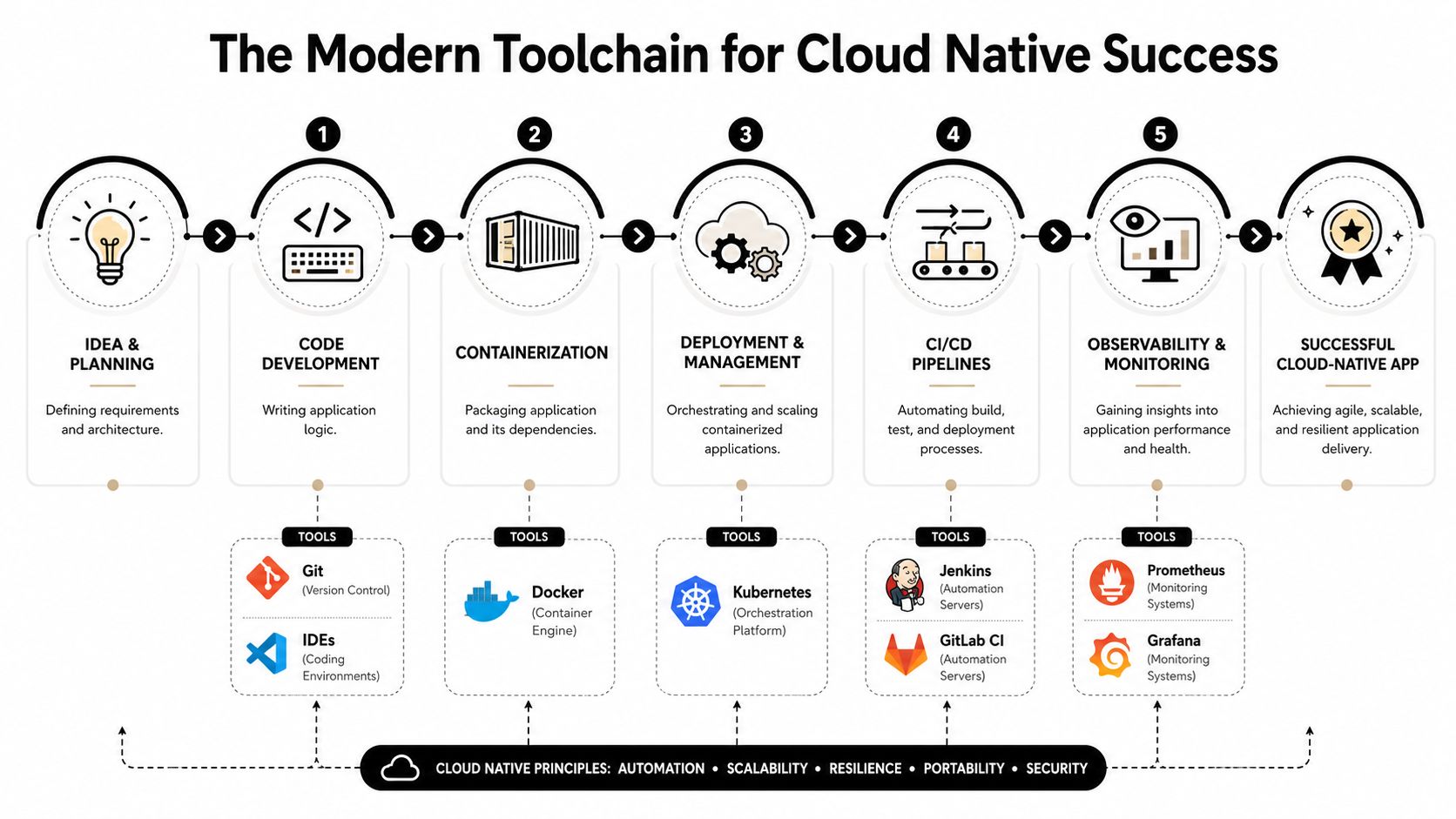
The modern cloud native stack is less about any single product and more about how the pieces reinforce one another. Git tracks change. Docker packages workloads. Kubernetes schedules and manages containers. CI/CD systems automate build and release. Observability tools tell the team what's happening after deployment. Infrastructure as Code keeps environments consistent instead of hand-tuned.
The tools that earn their keep
Docker and containers
Docker gives teams a standard packaging format. That sounds technical, but the business effect is straightforward. Releases become more predictable because the runtime environment is consistent.
Kubernetes and orchestration
Kubernetes is the control plane for containerized workloads. It handles scheduling, restarts, scaling behavior, and service coordination. It's powerful, but it also introduces operational overhead. Teams should use it when they need that control, not because it looks modern on a slide.
CI/CD pipelines
Jenkins and GitLab CI are common choices for automating tests and deployments. A healthy pipeline prevents risky manual release habits from creeping back into the process.
Wonderment's article on CI/CD pipeline best practices is useful if you're evaluating how much release discipline your team has.
Why Infrastructure as Code matters
Infrastructure as Code is one of the most impactful habits in cloud native delivery. The Oracle explanation of cloud native states that implementing IaC in cloud-native pipelines can reduce human deployment errors by up to 70% and accelerate release cycles from weeks to hours.
That's a major reliability gain, especially in regulated sectors where consistency matters as much as speed.
A practical stack for business leaders to ask about
If you're evaluating a team, ask whether they have real answers for these layers:
- Version control: How is application and infrastructure change tracked?
- Packaging: Are services deployed in a consistent container model?
- Automation: Are tests and deployments automatic or mostly manual?
- Orchestration: Who manages scaling, failover, and service health?
- Observability: Can the team trace issues across services, jobs, and AI calls?
- Environment management: Is infrastructure defined in code or rebuilt from memory?
The wrong answer isn't “we don't use every tool.” The wrong answer is “we have no repeatable system.”
Modernize Your App with Cloud Native AI
AI is becoming part of standard software delivery, not a side experiment. According to the Digital Aptech article citing Gartner, Gartner predicted that 80% of software solutions will incorporate AI components by 2026. That matters for both desktop and mobile applications because user expectations are changing fast.
The architecture question is no longer whether to add AI. It's how to add it without making the app slower, harder to govern, or more expensive to operate.
Where teams usually struggle
Retail and ecommerce teams often start with the right ambition. They want personalized product discovery, smarter support, dynamic merchandising, or an AI shopping agent that can make the buying journey more helpful.
Then operations gets messy.
- Prompts drift over time: One edit improves one workflow and inadvertently breaks another.
- Latency becomes visible: A prompt chain that looks acceptable in testing can feel slow in a live storefront.
- Costs become opaque: Model usage spreads across services and functions, but no one has a clean cumulative view.
- Auditability weakens: Teams can't easily answer which prompt version produced which response.
The cloud-native way to handle AI
The strongest pattern is to treat AI as an operational surface, not just an API call. In practice, that means separating concerns:
Keep transactional logic stable
Orders, payments, customer identity, and inventory logic should stay in tightly controlled services. These flows need deterministic behavior and clear rollback paths.
Use event-driven AI for experience layers
Recommendations, summaries, enrichment, and conversational assistance fit well in event-driven execution paths. They can respond quickly to user behavior without becoming a hard dependency for the transaction core.
Manage prompts like production assets
Prompts should be versioned, reviewed, logged, and monitored. So should parameter controls, especially when internal data access is involved.
AI features fail in production for boring reasons. Weak prompt governance, unclear ownership, and missing cost visibility do more damage than model quality in many teams.
That's why a serious AI modernization layer needs a few specific capabilities:
- A prompt vault with versioning so teams can track changes cleanly.
- A parameter manager for internal database access so prompts and data boundaries stay controlled.
- A unified logging system across integrated AI tools so debugging and auditing aren't fragmented.
- A cumulative cost manager so entrepreneurs and product leaders can see spending across model usage.
Those capabilities matter most in hybrid serverless-microservices environments because AI often spans both. One function may trigger a recommendation call, another service may assemble context, and a third system may record the result. Without centralized management, the operating model breaks down before the feature strategy does.
Your Path to a Future-Proof Application
A future-proof application isn't the one with the most services or the flashiest stack. It's the one your team can change safely, scale responsibly, and extend intelligently.
Cloud native app development gives businesses a better operating model for software. It helps teams isolate risk, release faster, and support demanding user experiences without rebuilding the whole platform every quarter. For retail and ecommerce, the hybrid serverless-microservices approach is especially useful because it protects the transaction core while creating room for real-time AI personalization. For fintech and other regulated products, it creates cleaner boundaries around the capabilities that need the most control.
The important part is choosing the architecture your business can run. Good cloud-native systems match delivery practices, tooling, and team structure. They don't just rearrange code.
If your application is slowing product delivery, making AI adoption messy, or turning traffic growth into operational stress, it's time to modernize with intention.
If you're ready to map out a practical modernization plan, Wonderment Apps can help you evaluate your current architecture, design the right cloud-native path, and modernize your software for AI with stronger governance around prompts, integrations, logging, and cost control. Schedule a conversation to see how your app can become faster to evolve, easier to scale, and better prepared for what's next.