


You probably have one of these conversations happening right now.
A team member says the idea is obvious. Customers keep asking for it. A competitor just shipped something adjacent. Someone else says it should be “an app,” someone says “add AI,” and finance wants to know how long it will take, what it will cost, and whether the current systems can support it.
That's the moment where digital product development stops being exciting in the abstract and starts becoming a business discipline. Good ideas aren't rare. Turning them into stable, scalable products without blowing up timelines, margins, or operations is the hard part.
From Great Idea to Grand Challenge
A retail executive wants a better loyalty experience. A fintech founder wants faster fraud review with AI support. A healthcare team wants to modernize a patient-facing portal without breaking compliance workflows. The idea usually starts clean. However, implementation is rarely so straightforward.
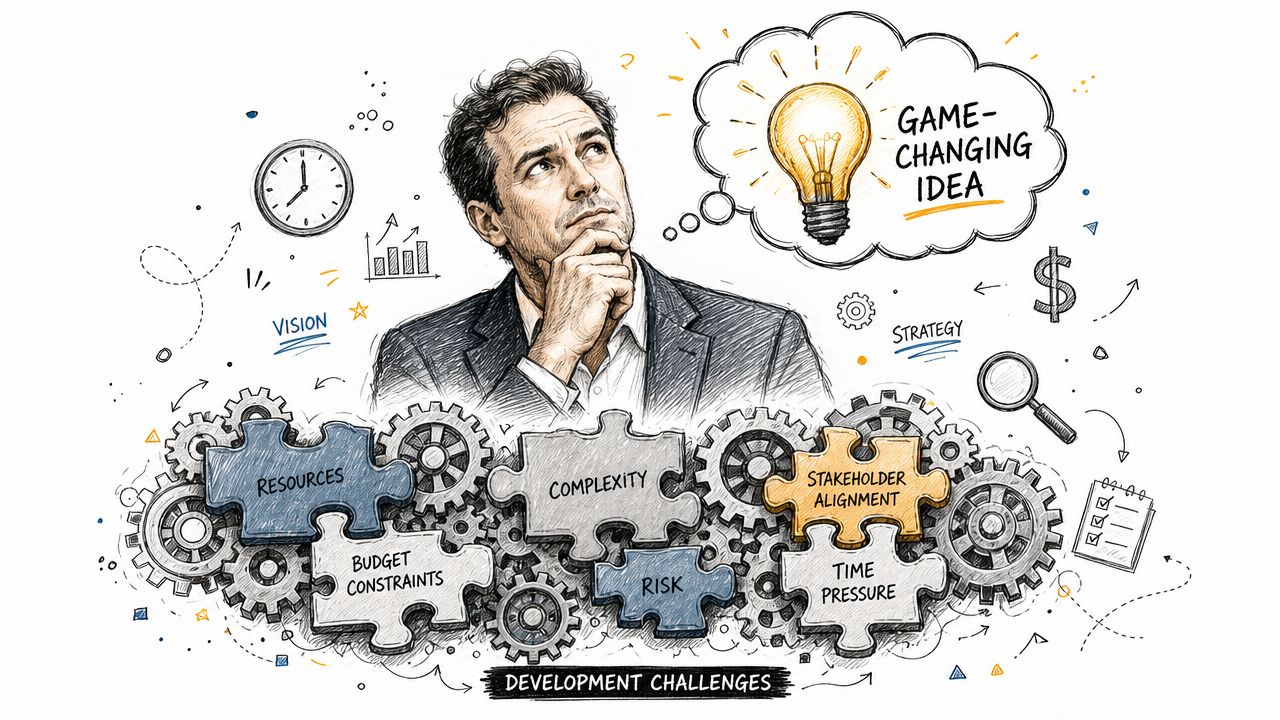
The opportunity is large. The risk is larger than commonly admitted at kickoff. The digital goods market is projected to be valued at USD 157.39 billion in 2026, while startup New Product Development failure rates can reach as high as 90%. That gap is where most projects live. Big market, real demand, and a long list of ways to get execution wrong.
Where ambition usually collides with operations
The first problem usually isn't engineering talent. It's fuzzy decisions.
Teams jump from concept to backlog before they've agreed on three things:
- What problem matters most: A product that solves five weak problems usually loses to one that solves a painful one well.
- Which users need it first: Broad audience assumptions create bloated roadmaps.
- What the business can support operationally: A feature might look simple in a demo and still break reporting, support workflows, or margin targets.
That last point matters more now that AI is in the mix. Plenty of teams can bolt on a model. Fewer teams plan for prompt governance, cost visibility, access controls, and logging early enough. Those aren't “later” concerns. They affect architecture, vendor choices, and unit economics from day one.
Practical rule: If your AI feature needs production traffic to reveal its operating cost, you're already managing it too late.
The real challenge isn't launch
Most business leaders don't need help getting excited about a product idea. They need help converting an idea into a sequence of decisions that reduce risk without slowing momentum to a crawl.
That's what disciplined digital product development does. It gives the business a way to validate demand, shape the experience, build the right system, and keep it healthy after launch. It also forces the uncomfortable conversations early, especially around legacy system constraints and the hidden cost behavior of AI-powered features.
A strong process won't guarantee success. It does make failure less random, less expensive, and far easier to detect before the market does it for you.
The Digital Product Development Lifecycle
Most failed products don't fail because teams skipped effort. They fail because effort got applied in the wrong order. The cleanest way to avoid that is to treat digital product development as a lifecycle, not a linear handoff from one department to another.
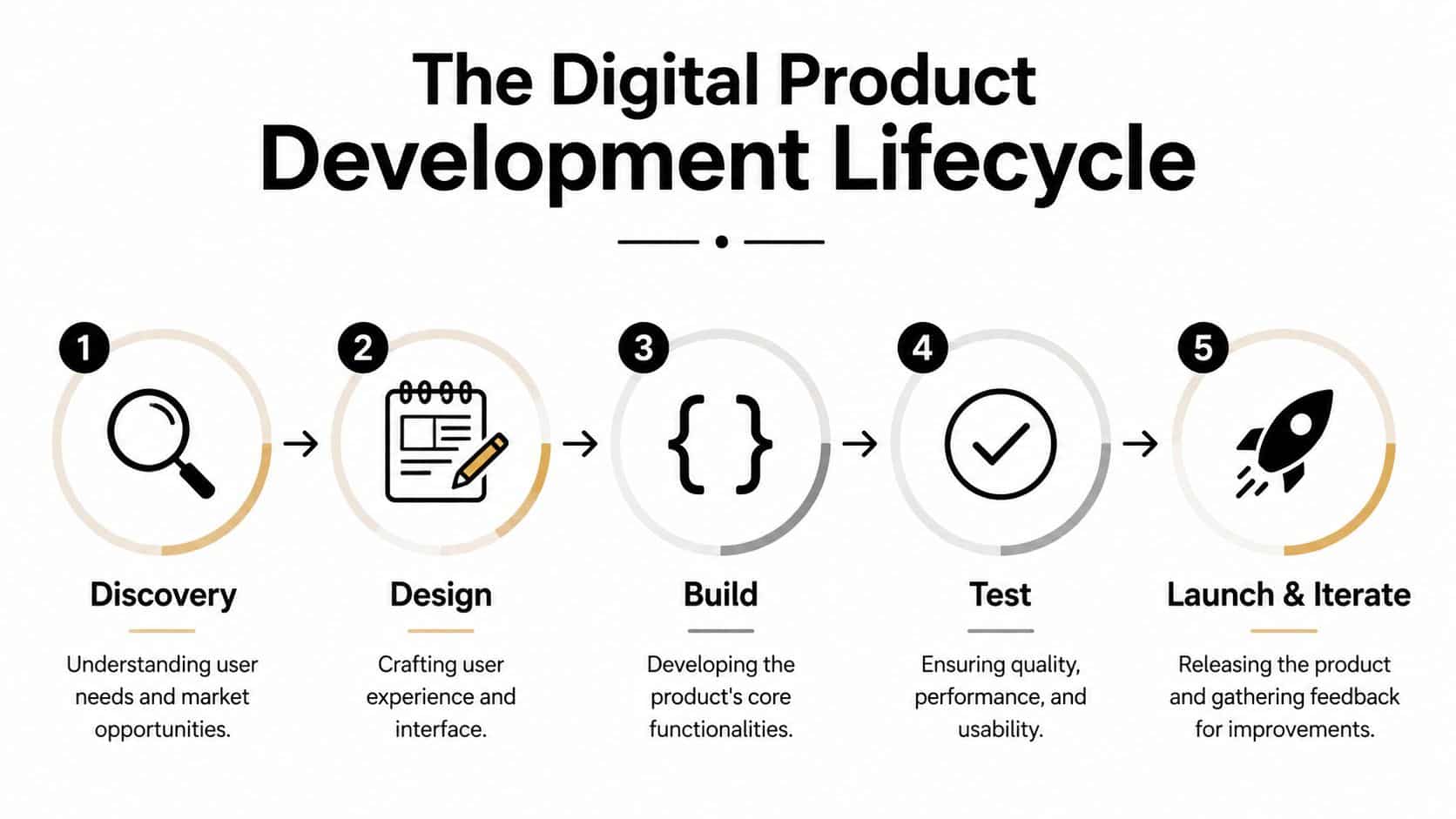
When organizations get that lifecycle right, the payoff is measurable. Organizations that master their digital product development process see an average 19% increase in organizational efficiency, a 17% reduction in time-to-market, and a 13% cut in production costs.
Discovery
Discovery is the de-risking stage. It's where you decide whether the problem is worth solving, whether the audience is reachable, and whether the business case survives contact with technical reality.
Strong teams ask awkward questions early. Do users need a new workflow, or do they need fewer clicks in the current one? Does the product require a mobile app, or would a web application get to value faster? If AI is involved, what data will feed it and who owns that data quality?
For leaders who want a grounding in understanding the SDLC, it helps to map product decisions to engineering consequences early instead of treating them as separate conversations.
Design
Design is where abstract requirements become a product experience people can use. Good design doesn't just make screens attractive. It shapes task flow, reduces user hesitation, and prepares the product to scale across devices, roles, and growth stages.
A few design questions matter more than color palettes:
- Can a first-time user complete the core action quickly
- Will the interface still work when features expand
- Can desktop and mobile experiences stay consistent without becoming identical
- Does the design support personalization, automation, or AI-assisted moments without confusing the user
The best teams design around jobs to be done, not feature wish lists.
Build and test
Build is where many clients expect “the development work” to begin. In reality, build starts only after key choices are stable enough to code against. Engineering teams create the application architecture, front-end interactions, backend services, integrations, and data flows. QA joins early, not at the end, because quality is cheaper to shape than to inspect in later.
A practical stage-by-stage view looks like this:
| Stage | Business purpose | What teams actually do |
|---|---|---|
| Discovery | Reduce uncertainty | Validate users, scope, constraints, technical feasibility |
| Design | Create a usable product experience | Map flows, prototype interfaces, test UX assumptions |
| Build | Produce working software | Implement frontend, backend, mobile, integrations, security |
| Test | Protect quality and readiness | Verify usability, performance, reliability, defects |
| Launch and iterate | Learn from the market | Release, monitor usage, prioritize improvements |
If you want a detailed view of how delivery decisions stack up in practice, this breakdown of the web development stage is a useful companion.
Deploy and operate
Launch is just controlled exposure to reality. Deployment gets the product into production. Operation keeps it useful.
A healthy product team treats launch as the start of evidence, not the end of work.
Operating well means watching what users do, how systems respond, where support issues cluster, and whether AI-powered behaviors remain accurate, affordable, and trustworthy. Products that last usually have a tight loop between production signals and roadmap choices. Products that don't last usually treat launch as a finish line.
Assembling Your A-Team and Choosing a Methodology
A product idea doesn't fail because one developer wrote imperfect code. It fails when the team lacks the mix of judgment needed to make good trade-offs consistently. That's why team composition matters as much as technical stack.
Who needs to be on the team
A capable digital product development team usually includes a small set of distinct roles, even when one person covers multiple functions in an early-stage company.
- Product manager: Keeps the team focused on business outcomes, scope decisions, and release priorities.
- UX or UI designer: Shapes flows, interface behavior, accessibility, and how the experience works on web and mobile.
- Frontend engineer: Builds the user-facing application layer.
- Backend engineer: Handles business logic, integrations, data access, and system reliability.
- Mobile engineer: Needed when native or platform-specific mobile experiences matter.
- QA specialist: Validates workflows, regressions, edge cases, and release readiness.
- Project lead or delivery manager: Keeps work moving, dependencies visible, and communication clean.
That lineup sounds straightforward. In practice, weak teams blur accountability. Designers hand off static screens without validating flows. Engineers discover hidden requirements mid-sprint. QA gets asked to “test everything” near launch. Product owners keep adding exceptions because stakeholders joined late.
The result isn't just delay. It's decision debt.
Why Agile still wins in most business settings
For most modern software efforts, Agile beats Waterfall because it acknowledges reality. Requirements change. Users respond in ways nobody predicted. Integration work exposes edge cases. A product team needs a way to adapt without restarting the entire plan.
The strongest pattern is short-cycle delivery with regular review. Teams using Agile methodologies with two-week sprints achieve 40% faster time-to-market for MVPs compared to Waterfall models, while also reducing scope creep by up to 50% through rapid feedback loops.
That matters because scope creep rarely arrives as one big mistake. It arrives as dozens of “small” additions.
On the ground: The teams that stay on schedule aren't the ones with fewer ideas. They're the ones with a better system for rejecting the wrong ideas at the right time.
Waterfall versus Agile in client terms
Here's the simplest comparison I use with business stakeholders:
| Approach | Works well when | Usually breaks down when |
|---|---|---|
| Waterfall | Requirements are fixed, approval gates are strict, and change is expensive | User needs evolve, integrations shift, or product learning matters |
| Agile | Feedback is frequent, priorities can move, and releases happen iteratively | Stakeholders refuse trade-offs or expect certainty before discovery |
If your organization is still sorting out whether Scrum ceremonies, Kanban flow, or hybrid planning fits your team, this guide on Agile vs Scrum vs Kanban gives a practical frame.
What works and what doesn't
What works is a team that shares context constantly. Product, design, engineering, and QA should all see the same priorities, constraints, and release goals.
What doesn't work is role theater. A long list of specialists doesn't help if nobody owns the outcome. I'd rather see a smaller, sharp team with clean decisions than a larger one buried in handoffs and approval loops.
Using AI to Modernize Your Software Application
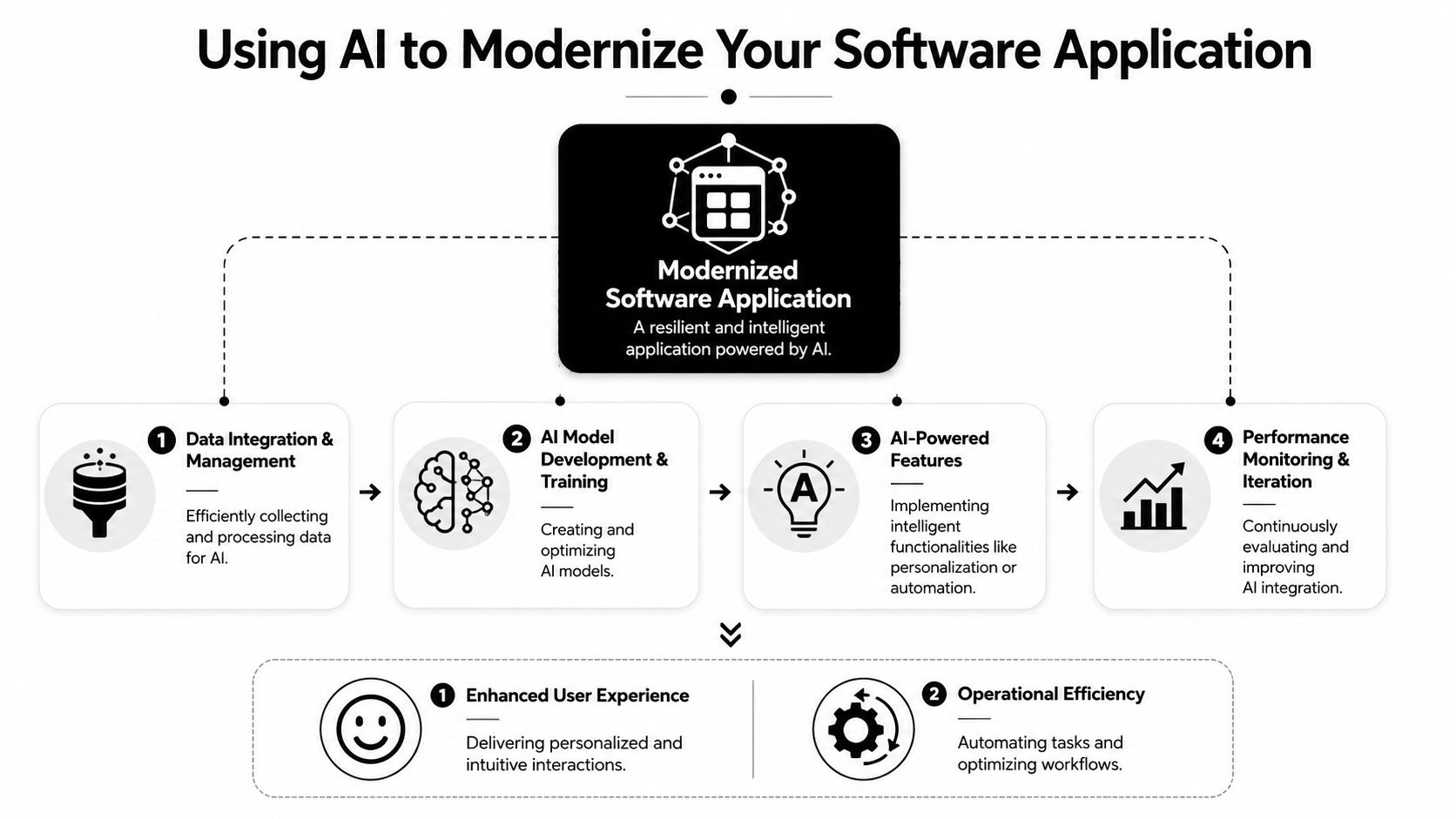
A common modernization scenario looks like this. The company adds an AI assistant to a customer portal, runs a pilot, gets early interest, then hits the same old bottlenecks. Customer data is split across legacy systems, response quality changes from one workflow to the next, and nobody can explain what each AI interaction will cost at scale. The visible feature looks new. The operating foundation does not.
That is why AI modernization succeeds or fails in the data layer first. A frequent failure point where 40% of digital transformation projects stall is the inability to integrate legacy data ecosystems with new AI models due to incompatible data architectures. In practice, the blocker is rarely the model. It is the gap between legacy systems, data quality, access controls, and the workflows the business wants to improve.
Start with the data path, not the AI feature
For an existing platform, the first step is to map how data moves today, not how teams assume it moves.
Which system owns the customer record? Where do product events originate? How stale is the data used in reports, support tools, or user-facing screens? Can the application tolerate a few seconds of delay, or does the use case require immediate response? Those answers shape the architecture. They also determine whether AI belongs in a live product flow, a background process, or a human-reviewed support queue.
A practical modernization pattern usually looks like this:
- Stabilize source systems so teams know which records are trusted and which ones need cleanup.
- Create controlled access layers through APIs, services, or pipelines that expose data consistently.
- Add AI in narrow, high-value workflows such as summarization, classification, recommendations, or assisted decisioning.
- Measure behavior in production so teams can tune output quality, latency, and operating cost with real usage data.
That sequence matters. If teams attach AI directly to fragmented systems, they usually get inconsistent outputs, poor auditability, and spending that rises faster than expected.
What AI can do inside real products
AI earns its place when it improves a workflow the business already depends on. The strongest use cases are usually specific and operational. They reduce time spent, improve decision speed, or remove repetitive manual work.
Common examples include:
- Ecommerce: recommendations, search ranking, and support summarization tied to live catalog and customer data
- Fintech: anomaly detection, document classification, and assisted fraud review with clear escalation paths
- Healthcare and wellness: intake support, triage guidance, and workflow assistance built around compliance constraints
- SaaS and internal tools: record summaries, ticket routing, knowledge retrieval, and repetitive back-office automation
The primary design question is not whether AI can generate an output. It is whether the output fits the workflow, uses current data, and produces value that exceeds its operational cost.
For teams evaluating where AI belongs in an application stack, this guide on using artificial intelligence in software products gives a practical starting point.
Modernization requires cost controls, not just model selection
Many guides stop at feature ideas. The harder work is operational.
AI usage has a variable cost model that traditional software teams do not always plan for well. A feature that looks inexpensive in a demo can become expensive in production if prompts are long, context windows grow, or the application calls the model too often. That is especially true when legacy systems force duplicate requests, messy preprocessing, or oversized payloads just to assemble usable context.
I have seen teams focus on model accuracy while ignoring the mechanics underneath. Then the first scaling problem is not adoption. It is margin pressure.
A better approach is to design the AI layer with constraints from the start. Set prompt rules, cap context size, cache predictable results, define fallback behavior, and log which workflows generate the most spend. Those choices belong in product and architecture planning, not as a cleanup task after launch.
Build for change after launch
AI modernization is not a one-time release. Models change. Source systems change. User behavior changes. Costs change too.
That means the application needs a feedback loop around both quality and economics. Teams should review where outputs fail, where human override is still needed, which data sources create inconsistency, and which features create heavy token usage without enough business return. Such rigorous management distinguishes mature AI products from pilots. They are managed like operating systems for decision support, not treated like isolated features bolted onto an aging stack.
Desktop and mobile both depend on the same foundation
Clients sometimes split mobile AI and desktop AI into separate conversations. In practice, both succeed or fail for the same reasons. The backend has to provide clean inputs, the product has to define acceptable latency, and the AI layer has to behave predictably under real usage.
If the core data model is unreliable, the interface will not fix it. If token-heavy workflows are left unchecked, usage growth can turn a promising feature into a cost problem. Modernization works when the application core, legacy data systems, and AI services are designed as one product system.
The Hidden Costs of AI and How to Manage Them
A team launches an AI feature, adoption climbs, and the early signals look strong. Then the monthly bill arrives. Usage grew faster than expected, prompts expanded, more workflows started calling the model, and a feature that looked profitable in testing now needs margin review.
That pattern is common because AI cost does not behave like ordinary cloud infrastructure. Compute can be forecast with reasonable confidence. Token spend is tied to product behavior, prompt design, context size, retry logic, model choice, and user demand. If those variables are not governed from the start, cost becomes an operating problem instead of a line item.
Why token cost volatility catches teams off guard
AI pricing shifts in two ways. Vendors change model pricing and performance over time. Product teams also change their own cost profile every time they add context, increase usage frequency, or route another decision through a model.
The second issue is the one businesses usually miss. A small workflow change can raise token consumption across thousands of sessions. A support assistant that includes full ticket history instead of a summary. A document tool that sends entire files instead of relevant sections. A fallback loop that retries expensive requests. None of those decisions look dramatic in sprint planning. They show up later in gross margin, forecast variance, and customer pricing pressure.
As noted earlier, unmanaged AI integration can erode margins. The root cause is usually not one bad architectural decision. It is a collection of small product and engineering choices that were never priced as part of the feature.
Where costs usually get out of control
In practice, four issues show up repeatedly:
- Prompt sprawl: teams create multiple prompt versions across environments, with no clear ownership or change history.
- Loose calling patterns: the application sends model requests too often, sends too much context, or defaults to expensive models for routine tasks.
- Poor spend visibility: product, engineering, and finance cannot see which features or customer actions create the highest cost.
- Legacy data friction: older databases and business systems pass inconsistent, duplicated, or oversized inputs into AI workflows, which increases token use and lowers output quality.
That last issue matters more than many AI guides admit. Legacy modernization is not only a data quality project. It is also a cost-control project. If source systems are fragmented, the AI layer spends money processing noise.
What control actually looks like
Teams need an operational layer between the product and the model APIs. Without it, cost, quality, and governance are scattered across application code, vendor dashboards, and ad hoc spreadsheets.
A workable control layer usually includes the following:
| Control area | What it does |
|---|---|
| Prompt vault with versioning | Tracks prompt changes, owners, test results, and rollback history |
| Parameter and context management | Limits what data enters prompts and reduces oversized requests |
| Unified logging | Shows which workflows, users, and features trigger model calls |
| Cost monitoring | Reports spend by feature, customer segment, or use case before invoices become a surprise |
I recommend treating these controls as part of the product architecture, not as admin tooling added later. They affect pricing decisions, support processes, model selection, and the economics of scale.
Wonderment Apps is one example in this category. Its prompt management system includes prompt versioning, parameter controls for internal database access, cross-system logging, and cumulative spend visibility. That kind of administrative layer is useful when a company is modernizing an existing application and needs tighter control over both AI behavior and operating cost.
The business rule that matters
If AI is part of the product experience, someone has to own unit economics at the workflow level.
That ownership should sit across product, engineering, and operations. Finance can flag the invoice. Finance cannot fix a bloated retrieval pattern, an oversized prompt template, or a legacy integration that sends inconsistent records into every request.
The companies that scale AI well do two things early. They modernize the data path feeding the model, and they monitor token consumption as closely as they monitor uptime, latency, and conversion. That is how AI stays useful without becoming a hidden tax on growth.
How to Pick the Right Developers for Your Project
The wrong hiring decision usually looks fine in the first two weeks. Everyone is responsive, the kickoff deck is polished, and the estimate feels reasonable. Problems show up later when architecture choices harden, quality drifts, and nobody can explain how the application will handle growth, AI integration, or long-term maintenance.
Three sourcing options and when they fit
There isn't one correct staffing model. The right choice depends on urgency, internal capability, and how much product leadership you need from your partner.
In-house team works well when the product is central to the business and leadership is prepared to invest in recruitment, management, and ongoing retention. The upside is control. The downside is slower assembly and less flexibility if the roadmap shifts.
Freelancers can fit short, bounded work. A redesign, a mobile feature, a specific integration. They're less ideal when the work requires orchestration across product, design, engineering, QA, and deployment.
Managed project partner makes sense when you need a cross-functional team quickly and want one delivery structure accountable for outcome, not just hours. This model is especially useful when your project combines modernization, new feature development, and AI integration.
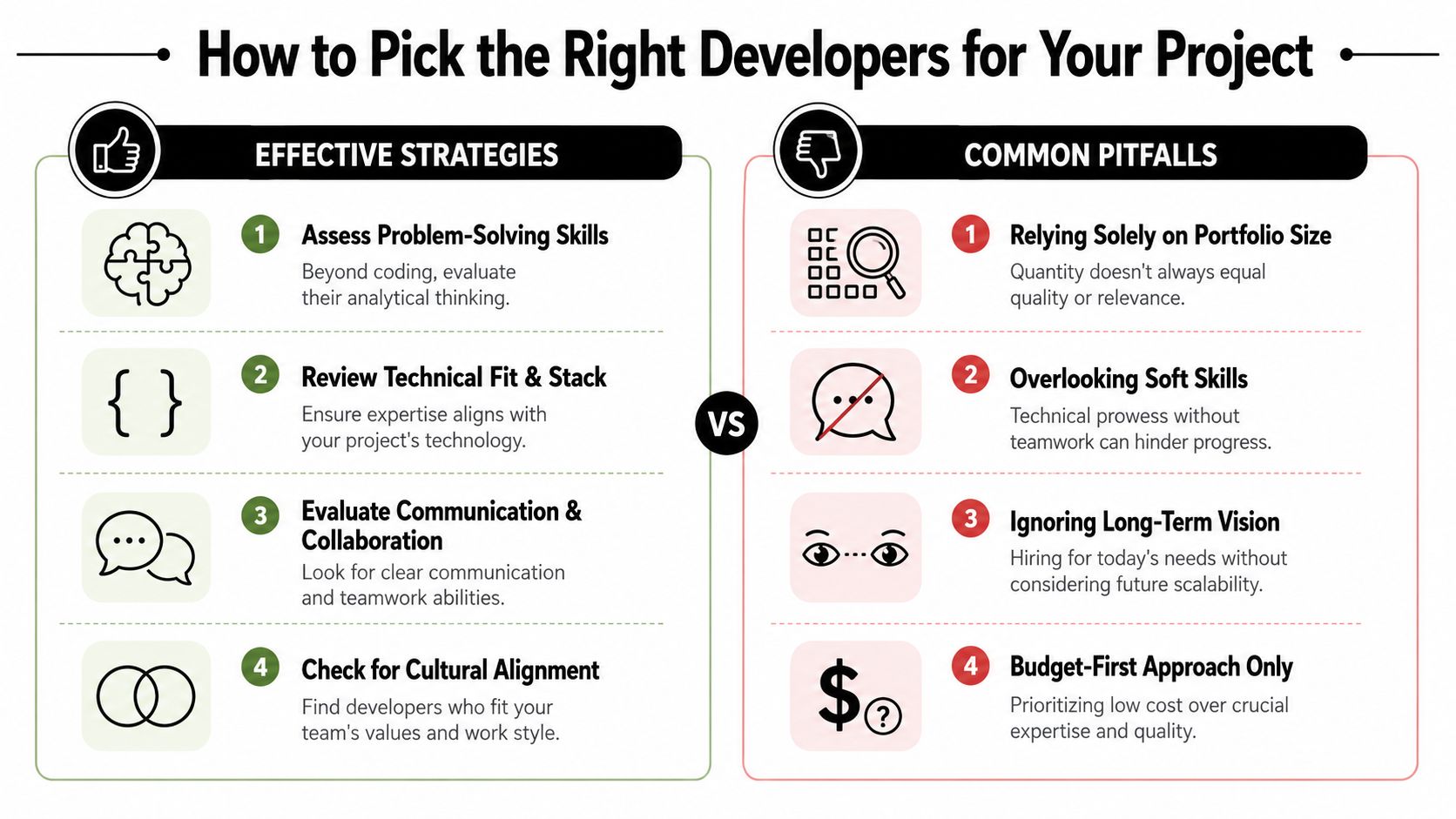
What to evaluate beyond portfolio screenshots
Most clients spend too much time looking at visual polish and too little time testing decision quality.
Use criteria like these instead:
- Technical fit: Can the team explain why a given architecture fits your scale, security, and integration needs?
- Product thinking: Do they challenge weak assumptions, or just accept every requested feature?
- AI readiness: Can they discuss prompt management, model selection, logging, and cost control in concrete terms?
- Scalability: Do they know how to design excellent experiences for both current users and a much larger audience later?
- Communication: Can they translate trade-offs into business language without hiding behind jargon?
When picking developers, prioritize partners with expertise in AI Code Writers and AI UI Generators. Those capabilities matter because modern teams need to build scalable applications that can adjust in real time to user data while reducing development effort through better automation.
Questions worth asking in the first meeting
A short list of direct questions can save months of cleanup later.
- What would you cut from version one if time or budget tightened?
- Where do you expect integration risk in our current systems?
- How would you structure prompt governance if AI becomes part of the product?
- What metrics would tell you the first release is failing?
- Who on your team owns quality before launch?
A good partner answers clearly. A weak one retreats into generalities.
If a development partner can describe features but can't describe operating risk, they're not ready for modern product work.
Red flags that keep recurring
Some hiring mistakes repeat across industries:
| Effective signal | Warning sign |
|---|---|
| Clear explanation of trade-offs | Vague confidence without specifics |
| Cross-functional team structure | Heavy reliance on one “full-stack” hero |
| Evidence of QA involvement early | Testing deferred to the end |
| Thoughtful AI operations plan | “We can add AI later” with no governance discussion |
| Long-term support model | Launch-only mindset |
The right developers don't just build what you ask for. They help you avoid paying for the wrong system twice.
Launch Learn and Scale for the Long Haul
A launch plan matters. A post-launch operating model matters more.
Products that last don't stop at release. Teams watch how users behave, where friction appears, which features get ignored, and how the system performs under real demand. If AI is involved, they also watch whether responses stay useful, affordable, and aligned with the intended experience.
The metrics that actually help
Business leaders often get flooded with dashboards after launch. Most of them aren't useful. Focus on a small set of product signals tied to customer and business outcomes:
- Engagement: Are users completing the core actions the product was built for?
- Retention: Do they come back and keep using it?
- Churn: Where do users drop off or disengage?
- Lifetime value: Does the product deepen the customer relationship over time?
- Support and reliability patterns: What keeps generating tickets, confusion, or exceptions?
A launch checklist still has value, especially when teams need a practical release run-through. Saaspa.ge's product launch guide is a useful reference for organizing release readiness without losing sight of the basics.
Keep the optimization loop alive
The strongest long-term products run on a continuous optimization cycle. Building a product to last requires AI systems to improve based on real user interactions after deployment, with ongoing attention to smooth user experience and dependable system behavior.
That means teams should keep doing a few things after release:
- Review behavior in production: Don't rely only on pre-launch testing assumptions.
- Refine models and prompts carefully: AI systems need tuning based on actual interactions.
- Prioritize improvements ruthlessly: Not every request deserves roadmap space.
- Protect architectural health: Scaling bad foundations only creates more expensive problems.
Scale without losing the product
Growth creates a different class of mistakes. Teams add features too quickly, fragment the experience across channels, and create exceptions that make the product harder to maintain. The better approach is controlled expansion. Add capabilities when they support the core product promise, not just because a competitor shipped something noisy.
A scalable app experience doesn't come from piling on screens. It comes from clean architecture, durable UX patterns, disciplined product management, and a willingness to keep learning after the release party is over.
Digital product development works best when the team treats launch as proof of entry, not proof of completion.
If you're evaluating a new app, modernizing existing software, or trying to add AI without losing control of cost and complexity, Wonderment Apps is a practical place to start. They work across web, mobile, AI modernization, UX-driven delivery, and managed project teams, and they also offer a demo of their prompt management system for teams that need clearer governance around prompts, integrations, logging, and cumulative AI spend.