


Most app projects don’t fail because the idea was weak. They fail because leadership treats the build like a design exercise, a procurement task, or a one-time launch. In practice, web and mobile app development is an operating decision. You’re shaping how customers buy, how staff work, how data moves, and increasingly, how AI participates in the product itself.
That shift matters now because the market is enormous and the bar is higher than ever. The global mobile app market reached $750–$800 billion in 2025 and is projected to reach $1.1 trillion by 2034, while the average smartphone user spends 4.6 hours per day on their device, with 90% of that time inside apps, according to RaaS Cloud’s mobile app development statistics. The opportunity is obvious. So is the competition.
Embarking on Your App Development Journey
A familiar scenario plays out in leadership meetings. Revenue is healthy, customers know the brand, and the business has momentum. But the digital product stack is starting to work against growth. The website handles marketing but not much else. The mobile experience feels disconnected from core operations. Teams are managing customer requests, approvals, reporting, and support across too many systems, and now AI is adding both opportunity and complexity.
This is the starting point for modern app work.
The first decision is not platform. It is business model
Strong app strategy starts with a harder question than "Do we need iOS, Android, or web first?" It starts with "What operating problem are we fixing, and what value does the product need to create in year one?"
That changes the build brief immediately. A customer service app has different priorities than a field operations tool. A commerce platform needs conversion, retention, and payment reliability. An internal workflow app may need role-based access, document handling, and audit trails before it needs polished animations. I have seen teams waste months debating frameworks when the bigger issue was that nobody had defined which workflow had to improve first.
That is also why custom development is not always the first move. Some businesses should begin with a tightly scoped web product, a progressive web app, or even a no-code prototype to validate process changes before they commit to a full engineering roadmap. For leaders comparing those options, this Guide to top app builders Australia is a practical reference point. It helps clarify where off-the-shelf tools can support early traction and where they start to constrain security, integration depth, or product differentiation.
If your team needs a clearer view of how early planning should shape the delivery path, this breakdown of the web development stage sequence for app projects is a useful complement.
AI modernization belongs in the plan from day one
The bigger shift is not mobile alone. It is intelligence woven into the product and the operating model behind it.
For business leaders, that means AI should be scoped during discovery, architecture, and workflow design. It should not appear late in the project as a chatbot request or a rushed recommendation engine. The practical questions come first. Which decisions should AI assist with? Which actions still need human review? What data can models access? Who owns prompt changes, output quality, and cost control after launch?
Those choices affect product design, team structure, and vendor selection. An agency that can build screens but cannot define model governance, prompt versioning, fallback logic, and observability is not equipped for an AI-modernized app program. Prompt management systems now matter for the same reason CI/CD tooling matters. They give teams a way to track prompt revisions, test outputs, control model parameters, and monitor spend before experimental usage becomes a budget and compliance issue.
A future-ready app is not the one with the longest feature list. It is the one built so new intelligence can be introduced safely, measured clearly, and improved without rewriting the product every quarter.
The Modern App Development Lifecycle
A strong app project doesn’t move in a straight line, but it does follow a disciplined path. Businesses that skip steps usually pay for them later through rework, delays, and avoidable quality problems.
This visual captures the cycle well.
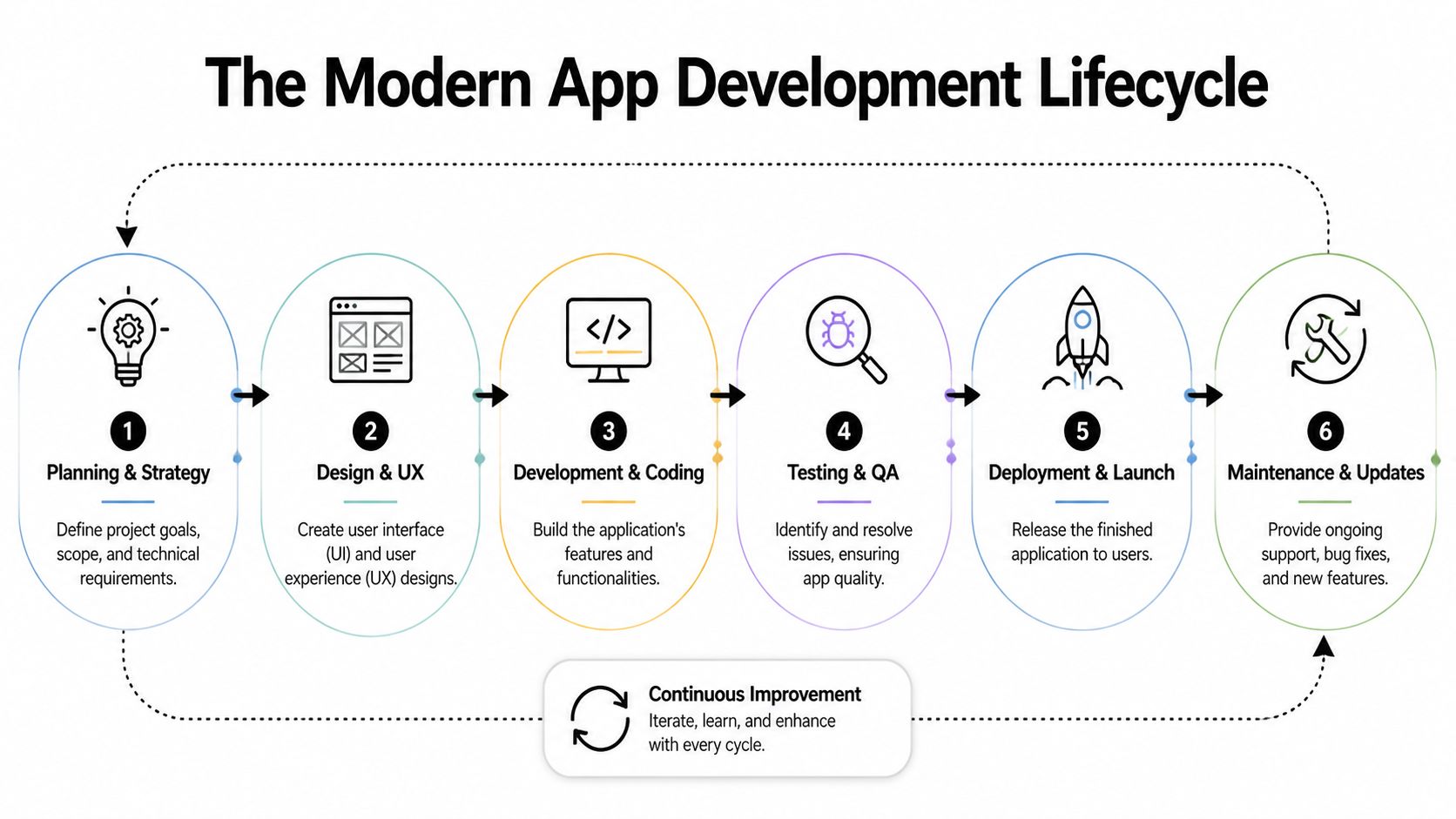
Discovery decides whether the build makes sense
Discovery is where good agencies ask inconvenient questions. Who exactly is this for? What business process needs to change? What does success look like after launch? Which workflows are critical on day one, and which can wait?
When discovery is weak, teams start coding before they’ve agreed on the problem. That’s how a “customer app” becomes a dumping ground for every internal wishlist.
Useful outputs from discovery usually include:
- Problem definition: the user pain, business goal, and scope boundaries
- Requirements framing: what must be built now versus later
- Risk map: integrations, compliance issues, data dependencies, and delivery constraints
- Product roadmap: the first release, plus the sequence after it
For leaders who want a plain-English view of process sequencing, Raven SEO’s breakdown of the stages of web development is a handy companion read. A more product-focused view is this Wonderment article on the web development stage.
UX and UI turn strategy into usable behavior
Design isn’t decoration. It’s where business intent becomes user behavior.
A good UX team reduces friction in the moments that matter most. Sign-up. Search. Checkout. Task completion. Error recovery. Support access. In regulated industries, design also has to make consent, permissions, and disclosures understandable instead of burying them in legalese.
The best interface is rarely the most original one. It’s the one users understand immediately.
UI should support the brand, but usability wins. If a team is arguing about gradients while the account recovery flow is broken, they’re working on the wrong problem.
Engineering, QA, and launch are one continuous loop
Development is where architecture, APIs, databases, front-end frameworks, and third-party integrations come together. The trap here is assuming coding is the main event. It isn’t. Coding without disciplined QA produces a polished-looking liability.
A mature lifecycle includes:
- Engineering in increments: small, testable releases beat giant reveal moments.
- Quality assurance across reality: devices, browsers, slow networks, accessibility states, and bad user input.
- Deployment with monitoring: release management, rollback plans, alerting, and visibility into failures.
- Maintenance as product work: updates, fixes, performance tuning, and feature evolution.
Many business leaders still think “launch” is the finish line. In actual web and mobile app development, launch is when the product starts teaching you what it needs next.
Architecting for Scale Security and Resilience
The architecture decision usually gets reduced to a slogan. Teams say they want “microservices” because it sounds modern, or “simple architecture” because it sounds efficient. Neither phrase means much on its own. What matters is fit.
A system serving a focused workflow with limited integrations may do very well as a modular monolith. A platform that supports multiple products, teams, and release cadences may benefit from service separation. The mistake is choosing an architecture to impress technical stakeholders instead of supporting the business model.
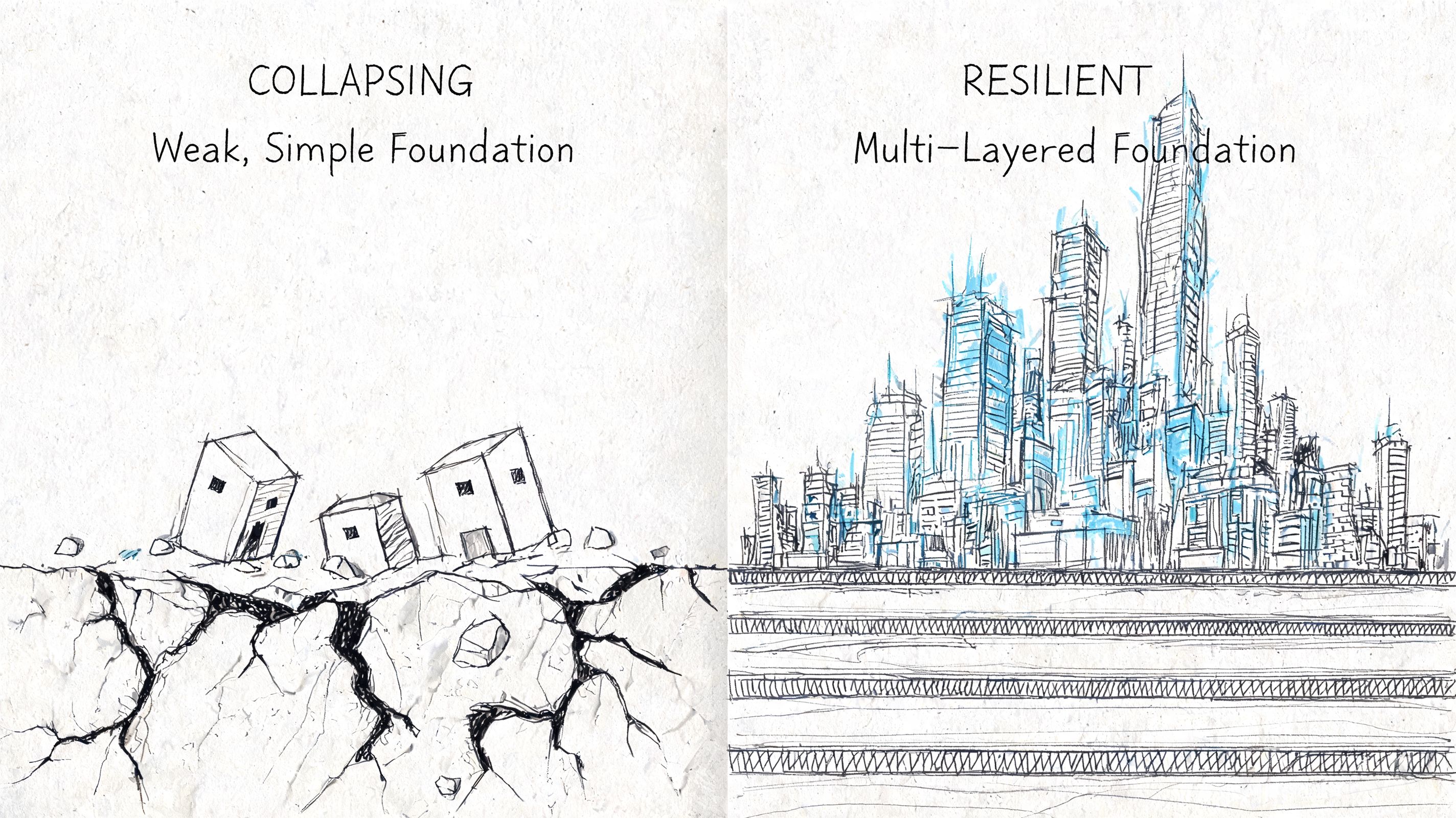
Monolith versus microservices
Here’s the trade-off in practical terms.
| Architecture | Works well when | Watch out for |
|---|---|---|
| Modular monolith | You need speed, tighter coordination, and a simpler operational footprint | Over time, poor boundaries can make changes risky |
| Microservices | Multiple teams need to ship independently, integrations are complex, or scale patterns differ by function | Operational overhead rises fast if governance is weak |
Early-stage products often overcomplicate the back end. Enterprise rebuilds often underinvest in separation where it matters. Both mistakes create drag.
Security belongs in this decision too. In healthcare, architecture has to support compliant data handling and careful access control. In fintech, transaction integrity and auditability shape data flows. In commerce, promotions, search, inventory, and checkout often deserve different reliability strategies because a failure in one area shouldn’t take down the entire buying journey.
For a solid primer on durable system thinking, this Wonderment piece on software architecture best practices is worth reading.
Your stack has to survive real life
A whiteboard app with clean Wi-Fi and a single device profile isn’t a product. Real users switch networks, pause sessions, background the app, reopen it on older hardware, and expect nothing to break.
That’s why resilience needs to be designed, not patched in later. According to ClearPoint Digital, 40% of app crashes are tied to network volatility, and poor performance on low-end devices or with inconsistent connectivity can reduce retention by as much as 25%.
That changes priorities. Offline states matter. Sync conflict handling matters. Queueing writes matters. So does graceful degradation when a service is unavailable.
What works in practice
Teams building for production usually make these calls early:
- Cache intentionally: not every screen needs live data every second
- Design offline behaviors: users need feedback about what’s saved, pending, or failed
- Separate critical from noncritical services: checkout and login shouldn’t depend on every auxiliary integration being healthy
- Test on imperfect devices and networks: flagship phones on office Wi-Fi won’t reveal underlying issues
Resilience isn’t a back-end feature. Users experience it as trust.
A fast, stable app earns forgiveness for a lot of things. An app that loses work, freezes on weak connectivity, or behaves unpredictably will be deleted no matter how elegant the pitch deck was.
AI Modernization and Smart Integrations
AI modernization works best when it solves a specific operational problem. The weakest implementations start with “we need AI.” The strongest ones start with “customers can’t find what they need,” “analysts are drowning in review queues,” or “support staff repeat the same steps all day.”
That distinction changes design, architecture, and ROI.
Ecommerce, fintech, and healthcare don’t use AI the same way
In ecommerce, AI usually earns its keep through relevance. Search gets smarter. Product discovery improves. Recommendations adapt to behavior. Merchandising teams can shape rules, but the system also learns from patterns that humans would miss.
In fintech, the useful category is controlled detection. AI can flag unusual behavior, triage transactions for review, summarize activity, and support analysts with decision context. The key is oversight. You don’t want a black box making high-stakes calls without traceability.
In healthcare and wellness, the best implementations tend to focus on assistance rather than unchecked automation. Think symptom intake support, care navigation, documentation help, or internal workflow acceleration. Clear permissions, secure data boundaries, and human review become central product requirements, not legal afterthoughts.
AI belongs inside the product system
A modern app doesn’t just call a model and hope for the best. It needs orchestration.
That often includes model routing, prompt versioning, parameter controls, logging, fallback behavior, and a way to evaluate output quality over time. A customer-facing assistant should not behave one way on Tuesday, another way on Wednesday, and leave nobody able to explain why.
For teams planning this shift, Wonderment’s guide on how to leverage artificial intelligence is a practical starting point.
Good AI products don’t hide the workflow. They make the workflow faster, clearer, and easier to supervise.
The unglamorous tooling matters most
Teams often underestimate the work involved. The “wow” moment is the assistant answering a question or generating a result. The durable value comes from the controls around it.
A useful AI administration layer typically needs:
- Prompt versioning: so teams know what changed and can roll back safely
- Parameter management: so AI features can retrieve approved internal data in controlled ways
- Unified logging: so support, product, and engineering teams can inspect behavior across models
- Cost visibility: so finance and product leaders can see usage patterns before they become budget surprises
One example is Wonderment Apps’ prompt management system, which includes a prompt vault with versioning, a parameter manager for internal database access, logging across integrated AI systems, and a cost manager for cumulative spend. That kind of tool doesn’t replace product strategy. It makes AI modernization governable.
Without that layer, teams tend to ship isolated AI experiments. With it, they can build intelligence into the application in a way that survives growth, staffing changes, and model churn.
Measuring What Matters Success Metrics and KPIs
Downloads are easy to celebrate and almost useless on their own. They tell you someone was curious. They don’t tell you whether the product created value, reduced friction, or earned repeat behavior.
That’s why mature app teams focus on retention, conversion, task completion, session quality, support deflection, and customer value, not just install volume.
Vanity metrics hide product problems
A business can spend aggressively, generate a spike in installs, and still ship a failing product. If users don’t activate, return, convert, or complete meaningful actions, the download chart is just expensive theater.
The more useful question is simple: what behavior proves this app is working?
For a retail product, that may be repeat purchase behavior, search-to-cart efficiency, or reorder completion. For fintech, it may be successful onboarding, recurring use, or reduced fraud review effort. For healthcare, it may be appointment completion, adherence to a care journey, or less support burden on staff.
Analytics gives you leverage, not just visibility
According to Stark Digital, advanced analytics and data science integration can drive 20% to 30% uplifts in retention and conversion, and apps that actively track KPIs like 30-day retention see 15% conversion boosts through personalization and A/B testing.
Those numbers matter because they shift analytics out of the reporting bucket and into product strategy. Instrumentation helps teams answer hard questions:
- Where do users stall?
- Which flows create trust and momentum?
- Which features get explored once and never reused?
- What behavior separates retained users from one-time visitors?
If a team can’t measure the moment value is created, it can’t improve it reliably.
A KPI set that business leaders can actually use
A compact dashboard is better than a crowded one nobody trusts. Focus on a small group of metrics that connect product behavior to business impact.
| Metric type | What it tells you |
|---|---|
| Activation | Whether new users reach the first meaningful outcome |
| Retention | Whether the app becomes part of ongoing behavior |
| Conversion | Whether usage turns into revenue, completion, or target action |
| Engagement quality | Whether sessions are productive rather than accidental |
| Operational metrics | Whether support load, errors, or manual work are falling |
Teams don’t need more charts. They need a shared definition of success and the discipline to act on what the data says, especially when it contradicts internal assumptions.
Building Your Dream Team Staffing and Delivery Models
The staffing model shapes the product as much as the roadmap does. Every delivery approach has trade-offs. The problem isn’t that one model is universally right and the others are wrong. The problem is choosing a model that doesn’t match the complexity of the work.
That mismatch usually shows up late. Integrations stall. QA falls behind. Design gets disconnected from engineering. AI work sits on top of a team that can ship features but can’t govern model behavior or data flow.
The mobile app gap is real
Enterprises often struggle to assemble the right blend of front-end, back-end, mobile, QA, UX, and project leadership at the right time. According to Alpha Software, demand for specialized skills in React, .NET, iOS, and Android creates a mobile app gap that prolongs delivery cycles. That’s one reason managed teams have become attractive for larger initiatives.
This is not just a recruiting issue. It’s a sequencing issue. A major app project rarely needs the same mix of talent every week. Discovery needs product strategy and UX research. Build phases need engineering depth. Stabilization needs QA intensity. Launch needs release discipline and support readiness.
The staffing models side by side
Here’s the comparison business leaders need.
| Model | Cost Structure | Speed to Start | Access to Expertise | Scalability |
|---|---|---|---|---|
| In-house team | Fixed ongoing payroll and hiring overhead | Slower | Strong if you can recruit and retain niche specialists | Harder to flex quickly |
| Freelancers | Variable, usually task or hourly based | Fast for narrow needs | Uneven across disciplines | Limited, depends on availability |
| Traditional agency | Project or retainer based | Moderate | Broad capabilities, quality varies by agency structure | Good if the agency is well staffed |
| Managed team | Flexible, role-based or blended delivery cost | Fast once scope is aligned | Strong access to cross-functional specialists | High, because roles can expand or contract |
What each model gets right and wrong
- In-house works when the product is core to the business and leadership is ready to build durable internal capability. It struggles when hiring lags behind roadmap urgency.
- Freelancers work for narrow tasks, prototypes, or specialist injections. They struggle on integrated delivery where handoffs and accountability matter.
- Traditional agencies work when you need end-to-end execution with clear ownership. They struggle if they overprotect delivery details or swap team members too often.
- Managed teams work when the roadmap changes, staffing needs fluctuate, and the business needs specialist depth without carrying all of it on payroll.
The right team model gives you the skills you need now without forcing you to overhire for work you won’t need six months from today.
For AI-enabled products, this matters even more. You may need app engineers, data integration support, QA, UX, and product leadership in a tighter collaboration loop than a standard marketing site or simple line-of-business tool would require.
The strongest partners don’t just provide resumes. They provide a delivery model that matches the stage and risk profile of the product.
Choosing Your Partner and Launching Your Project
By the time you’re evaluating partners, you shouldn’t just be asking who can build the app. You should be asking who can help your business make the right trade-offs before the expensive work begins.
A polished proposal can hide weak thinking. The better signal is how a team handles ambiguity, constraints, and uncomfortable questions.
What to ask before you sign
Use a short checklist. If a partner can’t answer these clearly, the project will get harder after kickoff, not easier.
- How do you handle discovery? You want a team that challenges assumptions and narrows scope before engineering starts.
- Who owns architecture decisions? Someone should be accountable for scalability, security, and resilience, not just feature delivery.
- What does QA look like in practice? Ask how they test on weak networks, varied devices, and real-world interruptions.
- How do you manage analytics and post-launch learning? Launch without instrumentation is guesswork.
- What’s your approach to AI governance? If AI is in scope, ask how prompts, models, logging, approvals, and costs are managed.
- How stable is the delivery team? Constant staff rotation slows velocity and weakens accountability.
The best partners speak in outcomes
A reliable partner won’t bury you in framework acronyms without tying them to business consequences. They’ll explain why one path improves speed to market, why another improves compliance posture, and why a third reduces operational burden later.
They should also talk frankly about what not to build yet.
That restraint matters. Strong teams protect the roadmap from excess. They know when a native build is justified, when a web-first rollout is smarter, when AI should support a workflow instead of leading it, and when the organization needs staffing support as much as code.
Modern delivery now includes AI administration
Many selection processes are outdated. A partner may be capable in design and engineering but still weak in operationalizing AI. If you’re modernizing a product, you need to know how intelligence will be controlled after launch.
That means asking whether the delivery plan includes:
- Prompt governance
- Model-level logging
- Parameter controls for internal data access
- Usage and spend tracking
- A practical way for product and engineering teams to collaborate on AI behavior
If a partner has no answer there, you’re not buying modernization. You’re buying experiments.
The right project launch starts with clarity. What the first release must prove. Which architecture decisions can’t be punted. Which workflows deserve AI support now. Which team model can keep quality high without bloating cost or slowing decisions.
A good build partner helps you ship. A great one helps you build something your organization can still trust a year from now.
If you're planning a new digital product or modernizing an existing one, Wonderment Apps is worth a look for both delivery support and a demo of its prompt management tooling. That combination is useful when you need web and mobile app development, AI integration, and the administrative controls that keep intelligent products maintainable after launch.