

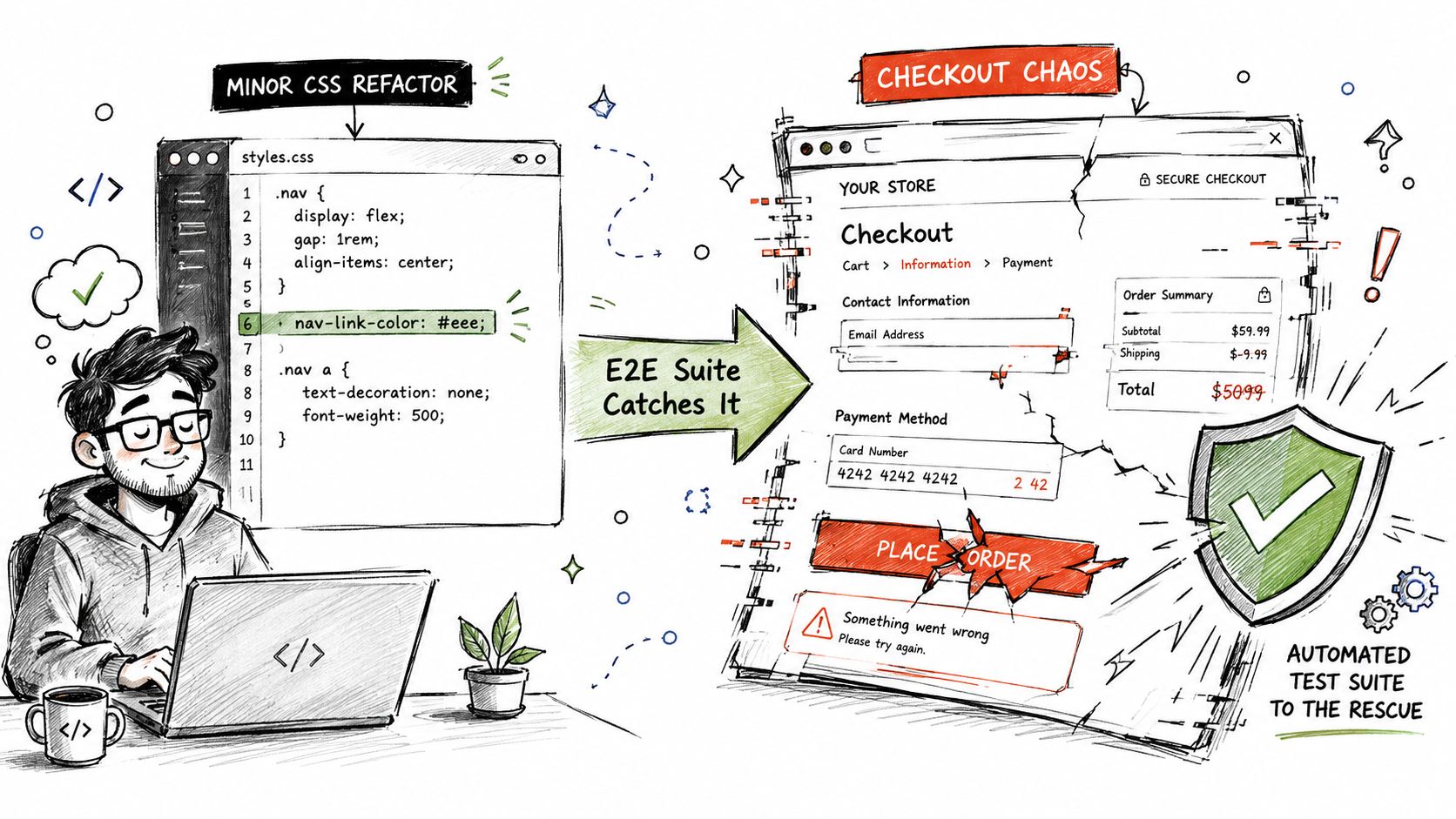
A deployment looks routine until a small CSS refactor changes the checkout layout. The page still loads, unit tests stay green, and the pull request merges. Then an end-to-end test follows the same path as a customer, discovers that the payment button is no longer reachable, and stops the release before support tickets begin arriving.
That's the practical value of end to end testing. It verifies a complete user workflow across the frontend, backend services, APIs, databases, authentication, and external integrations. The test doesn't care that each individual component passed in isolation. It asks whether the product works as a connected system.
Teams have treated E2E testing as a mainstream quality practice for years. A 2020 industry report found that 90% of teams practiced end-to-end testing in some form, while also reporting that many teams still hadn't automated even half of their E2E tests after more than fifteen years of Selenium's existence. The report also described a persistent conflict between delivery speed and quality, because browser automation remained slow while CI/CD adoption and deployment frequency increased. Read the industry analysis of E2E testing adoption and automation gaps.
The challenge isn't deciding whether E2E testing matters. It's building a suite that catches meaningful regressions without becoming a noisy, expensive second product. The sections below focus on the operational details that determine whether your tests earn trust: journey selection, data isolation, flakiness triage, CI/CD integration, compliance, and AI-assisted test maintenance.
Why End to End Testing Matters More Than Ever
A checkout regression rarely announces itself with a dramatic error. More often, a designer changes a class name, a frontend engineer adjusts responsive spacing, or an authentication middleware update changes which elements render after login. The application still compiles. API checks still pass. A real user, however, can reach the cart and find no usable route to payment.
An E2E test exposes that failure by performing the complete workflow. It opens the application, authenticates, selects a product, adds it to a cart, submits payment details, and verifies the result. That sequence crosses the UI, backend, database, payment provider, and session state. A lower-level test may confirm that each piece behaves correctly, but only the full journey can reveal that the pieces no longer cooperate.
The last check before a customer finds the bug
Modern applications create more integration boundaries. A single user action may pass through an identity service, an API gateway, several microservices, a database, a queue, and a third-party provider. Frequent deployments also reduce the time available for manual regression testing. As a result, teams need repeatable checks that exercise the workflows customers depend on.
E2E tests can simulate conditions that narrow tests can't represent, including authentication states, network delays, browser behavior, and cross-service data movement. They're particularly valuable for flows tied to revenue, retention, account access, or compliance.
Practical rule: If a broken workflow would trigger an urgent support conversation, it deserves a deliberate place in the E2E suite.
Finding a defect in a preview or staging environment gives the team a controlled failure with logs, traces, and a known code version. Finding it through customer support creates interruption, confusion, and possible data repair work. The technical difference may be one missed selector or configuration value. The operational difference is substantial.
E2E testing still has a cost. It requires the full stack, so execution is slower and failures are harder to localize than failures in unit tests. A strong suite therefore doesn't attempt to simulate every interaction. It protects the small set of user journeys where a system-level regression would matter most.
Where E2E Fits in the Testing Pyramid
The testing pyramid works because each layer answers a different question.
A unit test asks whether a small piece of logic works in isolation. For example, it can verify that a cart-total function adds item prices correctly. An integration test asks whether components communicate properly, such as whether the cart service sends and receives the expected data from an inventory API. An E2E test asks whether a logged-in customer can complete checkout after those components, plus the UI and authentication layer, are deployed together.
E2E tests sit at the top of the pyramid because they simulate real sessions across the full application. That position gives them strong cross-service coverage, but it also makes them slower, more complex, and more expensive to maintain. A software engineering study explains why E2E tests require the complete stack and should focus on critical flows.
Comparing the three layers
| Dimension | Unit Tests | Integration Tests | End-to-End Tests |
|---|---|---|---|
| Speed | Fast | Moderate | Slowest |
| Scope | Individual functions or modules | Connected components or services | Complete user workflows |
| Maintenance cost | Usually low | Moderate | Highest |
| Failure-detection capability | Logic defects | Communication and contract defects | System-level and user-journey defects |
The common mistake is reversing the pyramid. Teams write many browser tests because they feel close to customer behavior, then discover that the suite takes hours to run and produces failures nobody can diagnose. This “ice cream cone” shape creates broad E2E coverage on a weak foundation. A browser test shouldn't be the default tool for checking validation logic, formatting rules, or a single API response.
Assign each test to the cheapest reliable layer
Keep broad behavioral coverage in unit tests where possible. Use integration and contract checks for service boundaries, database interactions, and API expectations. Reserve E2E coverage for workflows such as account creation, checkout, password recovery, and the application's central feature.
A test belongs higher in the pyramid when its value comes from observing the system as a user sees it. It belongs lower when the behavior can be proven faster and more precisely without a browser. This division keeps E2E tests meaningful instead of turning them into a slow collection of assertions that duplicate lower-level coverage.
Designing Tests Around Real User Journeys
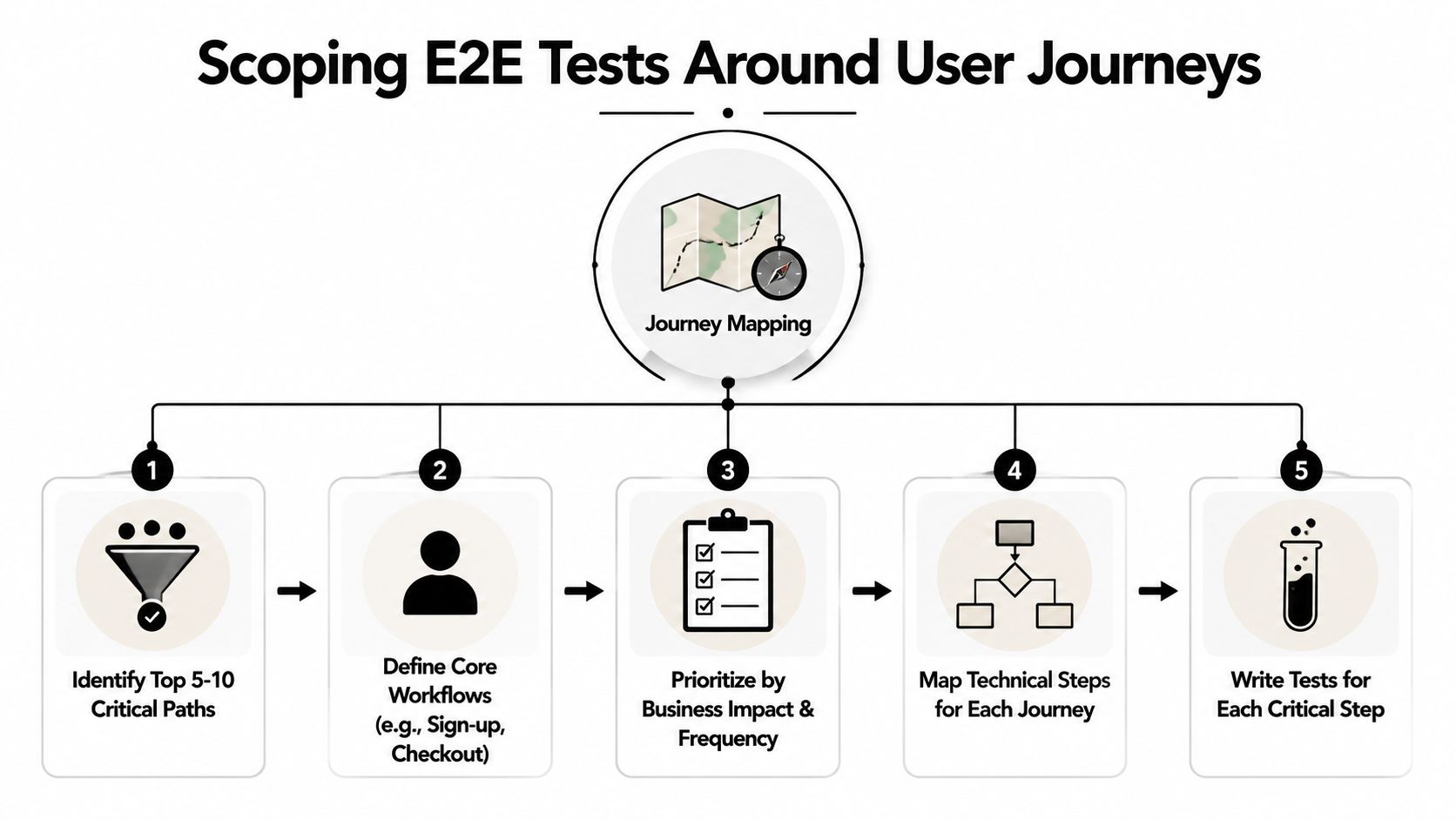
Start with business journeys, not screens. A product may contain hundreds of UI states, but only a smaller group of workflows determines whether customers can sign up, pay, return, renew, or use the feature they came for. IBM's guidance on scoping E2E testing around real-world scenarios makes the same practical point: prioritize user-centered flows instead of trying to cover every possible interaction.
Map the journeys that deserve protection
Create a journey map with product, engineering, support, and QA input. Identify the workflows most closely tied to revenue, retention, account access, or operational risk. Typical candidates include signup, checkout, password reset, subscription changes, and activation of the core feature.
Then document each journey as a testable sequence:
- Define preconditions: Specify the account state, permissions, products, or records that must exist.
- Describe user actions: Write the steps in the language a customer would use, not the implementation language of the UI.
- State observable outcomes: Identify what the user should see, receive, or be able to do after each meaningful action.
- Mark failure boundaries: Decide whether a failed payment, unavailable item, or expired session deserves a separate scenario.
- Assign ownership: Name the team responsible for updating the test when the journey changes.
The result should read like useful product documentation. A practical test case design approach helps turn that documentation into repeatable automated checks without burying business intent inside selectors and helper functions.
Make selectors and data survive change
Use stable selectors such as data-testid attributes or ARIA roles. CSS classes describe presentation, and XPath often describes document structure. Both can change during an ordinary redesign. A selector created specifically for test intent gives engineers room to refactor styling without breaking the suite. A field guide to reliable E2E practices covers selector stability, isolation, and seeded data.
Test data needs the same discipline. Each test should create its own records, use a dedicated account, or work inside an isolated tenant. Shared mutable state creates order dependence, makes parallel execution unsafe, and turns a failure into a detective story about what another test did earlier.
A Page Object Model can help when it's used to encapsulate interactions rather than hide every assertion. Keep page objects focused on reusable actions, such as addProductToCart or submitPayment, while keeping business expectations visible in the test itself.
For checkout, the test might go to a product page, add an item to the cart, proceed to checkout, enter payment details, confirm the order, and verify the confirmation screen. That flow is compact, readable, and valuable. It also remains easier to update when selectors are decoupled from visual styling.
Taming Flaky Tests Before They Tame You
A checkout test passes in one CI run and fails in the next, although the application code has not changed. That failure consumes engineering time because the team must first decide whether it reflects a product regression, an unstable test, or a damaged environment. An experience report on maintaining trustworthy E2E suites describes reliability as a condition for keeping this testing approach cost-effective. Research likewise distinguishes flaky tests by their ability to pass and fail on the same code version, which weakens confidence in CI. Review the experience report on maintaining trustworthy E2E suites.
Flakiness usually has a concrete cause. An assertion can race an asynchronous update. Parallel workers can edit shared records. A third-party service can time out, while a selector tied to a CSS class can break during a routine refactor. Slow startup, exhausted browser capacity, environment drift, and unexpected response data create the same symptom from different sources.
Mature E2E and browser suites commonly report flake rates around 15% to 25%, as reported in the Diffie 2026 analysis of flaky test costs and failure patterns. Industry coverage of flaky test costs and failure patterns presents that range as an engineering burden, not a target for acceptable reliability. Treat repeated intermittent failures as work to diagnose, rather than noise to normalize.
Diagnose the origin before changing the test
Start triage by classifying the failure as timing, data, infrastructure, or product behavior. Preserve screenshots, browser traces, request and service logs, correlation identifiers, and the records generated by the test. A rerun can hide the symptom without explaining its cause.
| Root Cause | Symptoms | Mitigation Strategy | Tracking Metric |
|---|---|---|---|
| Timing race | Assertion fails before the UI or service reaches the expected state | Wait for visible state, network completion, or a domain event instead of using arbitrary sleeps | Repeat failure pattern |
| Shared data | Results depend on test order or parallel workers | Seed unique records and reset state between runs | Data-contamination incidents |
| External dependency | Intermittent timeout or unexpected provider response | Stub non-critical providers, use controlled contracts, and set bounded retries | Dependency failure count |
| Brittle selector | Failure follows a UI or CSS refactor | Add semantic selectors and review locator changes with component updates | Selector repair time |
| Environment instability | Multiple unrelated tests fail together | Check service health, resource capacity, deployment readiness, and environment drift | Infrastructure-caused failures |
Use retries as a safety net, not a blindfold
Each wait should describe a condition the user or system needs. Poll until an order reaches its confirmed state, wait for a known response, or observe a control becoming enabled. A long sleep after every click only slows execution and leaves the race unresolved.
Set a retry budget and apply exponential backoff to transient operations. Quarantine a test only with a recorded reason, named owner, and repair deadline. Without those controls, quarantine becomes a permanent hiding place for broken coverage.
Track the flake ratio, mean time to resolution, and quarantine backlog. Compare those measures over time to see whether reliability work is reducing failures or merely hiding them. Once engineers stop trusting a red build, the suite no longer supports safe delivery.
Integrating E2E Tests Into Your CI/CD Pipeline
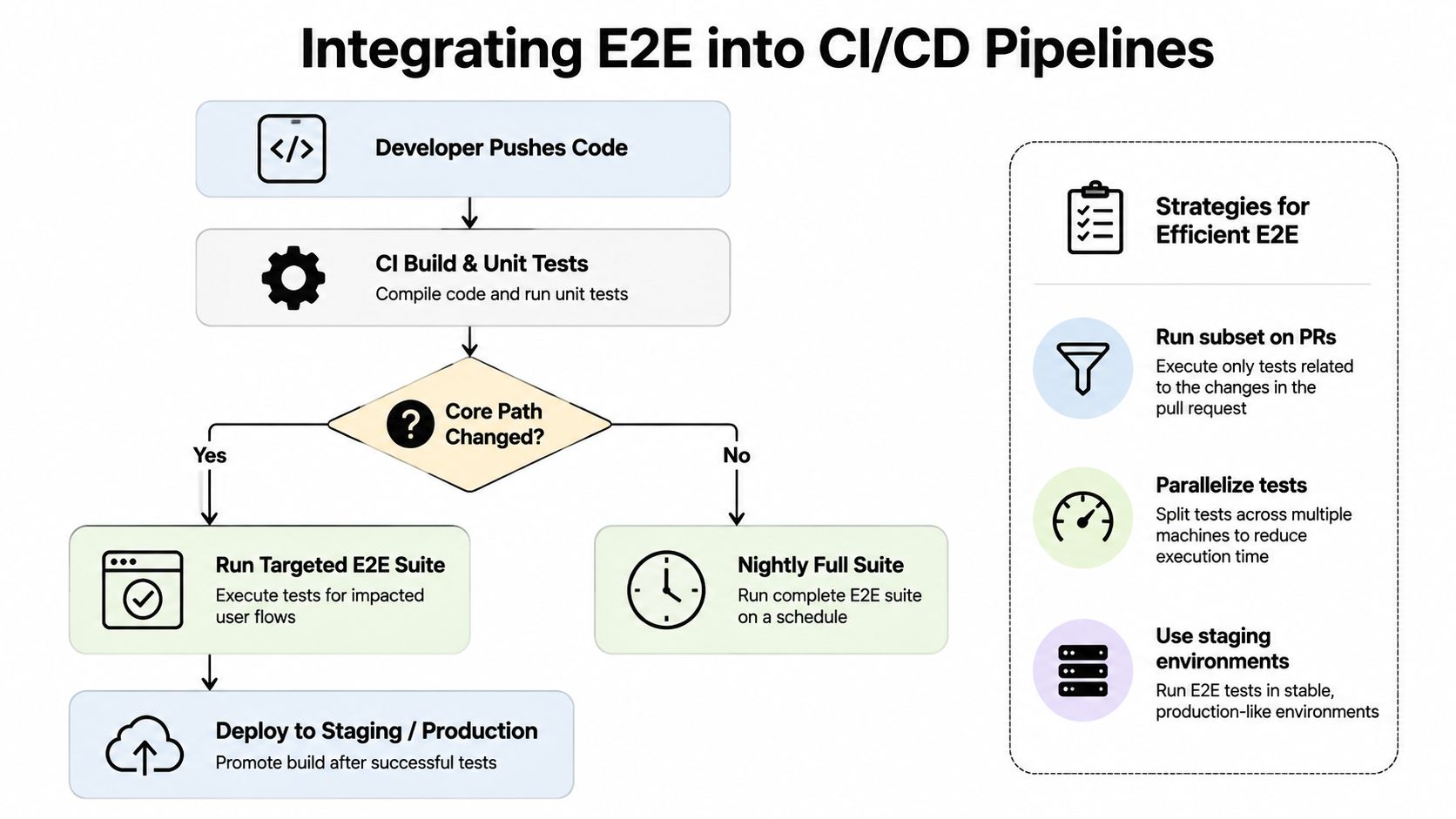
A suite that runs only at night can detect a regression after several additional changes have landed. By then, the original cause is harder to identify. The practical answer isn't running every browser scenario on every pull request. It's creating tiers that match test depth to the change and the feedback window.
Build a tiered gate
Run a small smoke suite for critical journeys on pull requests. After merging to the main branch, run a broader regression set. Use staging deployments for exploratory scenarios, cross-browser checks, and integrations that don't justify blocking every code review.
Your pipeline should make the decision visible:
- Pull request gate: Run the critical path affected by the change, plus a small application health check.
- Main branch gate: Execute the wider set against a controlled environment before release promotion.
- Staging validation: Test cross-browser behavior, role combinations, and realistic integration conditions.
- Scheduled coverage: Run lower-priority scenarios regularly, then route failures to a named owner.
Document these rules in the CI/CD pipeline best practices guide so developers know which failures block a merge and which create a warning.
Parallelize deliberately
Sharding by test count often produces uneven workers. One shard may receive several long workflows while another finishes early. Balance shards using historical duration, then monitor the distribution as the suite changes.
Parallel workers also compete for infrastructure. Database connections, browser sessions, queues, and third-party sandboxes can become the primary bottleneck. Isolate tenants and seed data per worker, cap concurrency where dependencies require it, and fail quickly when an environment never becomes ready.
Ephemeral preview environments are useful when the application can provision them reproducibly. Build the application, deploy the required services, seed known data, run the targeted suite, collect artifacts, and tear down the environment. Keep pipeline timeout budgets explicit. A test that waits indefinitely for a missing service is not providing confidence, it's consuming attention.
Track pipeline duration trends and failure categories. A gradual slowdown often appears before developers complain, giving the team time to rebalance shards, remove redundant journeys, or fix environment provisioning.
Test Data Management and Compliance Considerations
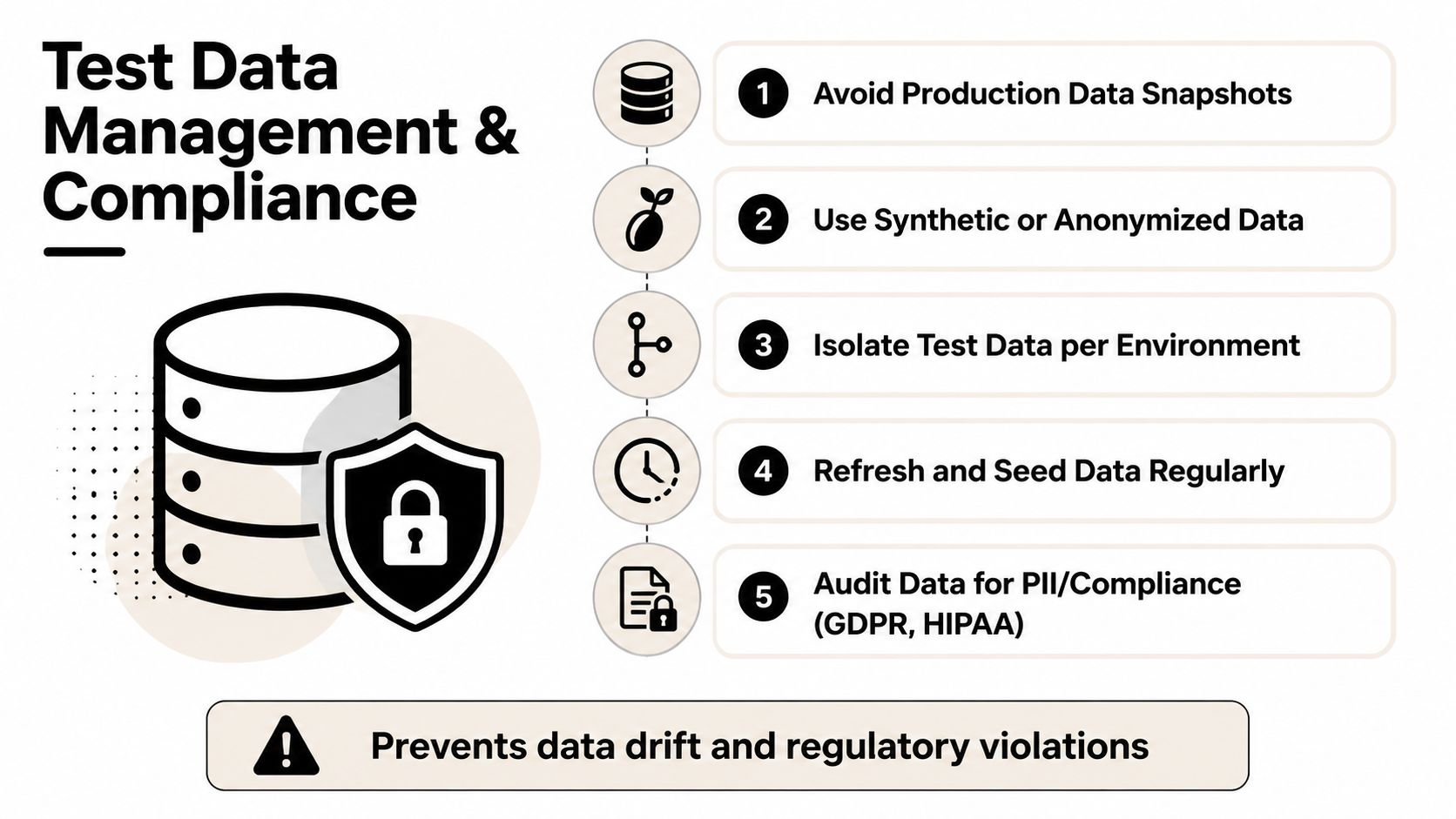
Test data is part of the test system, not disposable setup code. A shared staging database creates contamination, data drift, and difficult failure diagnosis at the same time. In regulated environments, it can also expose personal or financial information to people and tools that shouldn't access it.
Avoid production snapshots when synthetic or anonymized data can represent the required behavior. Create seed scripts that provision isolated users, tenants, products, balances, permissions, and workflow states. The script should be idempotent, meaning the team can run it again without creating duplicates or leaving conflicting records.
Treat privacy and repeatability as one problem
Healthcare, fintech, and public-sector teams need controls that cover both data content and access. Masking or tokenization can remove direct identifiers while preserving useful relationships. Audit logs should show who accessed test data, which environment they used, and what operations occurred. Role-based access controls should limit database and environment access to the people and services that need it.
A compliant test environment still needs realistic behavior. A synthetic account should be able to authenticate, an anonymized transaction should follow the same state transitions, and a seeded customer should exercise the same permissions as the relevant production role. Data that's safe but structurally unrealistic won't expose meaningful integration failures.
Reset environments instead of repairing them
Snapshot-restore patterns can reset a database between runs, while service-level fixtures can establish known records for a single journey. For distributed applications, coordinate seeds across services so that users, orders, inventory, and permissions agree about the same scenario.
Environment-as-code strengthens this model. Containerized services, infrastructure templates, and versioned configuration allow teams to provision a known environment on demand, run tests, collect logs, and destroy it afterward. That approach removes much of the shared-state problem while reducing the chance that sensitive data remains in a neglected staging system.
The operational standard is simple: every test run should start from explainable data, use controlled access, and leave no uncertainty about what happened to the environment.
Modernizing E2E Workflows With AI Prompt Management
Traditional E2E authoring makes QA engineers repeat the same maintenance tasks. They write selectors, update page objects, add fixtures, inspect failures, and repair dozens of files after a component changes. AI can reduce that repetition, but generated tests still need deterministic inputs, review, version control, and observable failures.
A prompt-first workflow describes intent in reusable language, such as completing checkout with a saved payment method or recovering access after an expired session. The AI can translate that intent into framework-specific steps, selectors, assertions, and setup code. Humans still decide which journeys matter and whether the generated test proves the right behavior.
Put prompts under engineering control
A prompt library becomes useful when it behaves like source code. Version prompts alongside application changes, record which model produced a test, and require review before generated automation enters a merge gate. When a UI component changes, the team can update the relevant prompt or locator policy instead of manually searching through every test file.
Useful controls include:
- Reusable prompt templates: Standardize how journeys describe preconditions, actions, assertions, and cleanup.
- Parameter management: Inject tenant identifiers, roles, products, and environment values without hard-coding them into prompts.
- Generation logs: Preserve the input, output, model, and review decision for each generated change.
- Quality gates: Require stable selectors, isolated data, bounded waits, and meaningful assertions before execution.
- Cost visibility: Monitor model usage so teams can choose where AI assistance creates value and where conventional code is simpler.
Wonderment Apps offers a prompt management system that developers and entrepreneurs can connect to an existing application for AI modernization. Its administrative tooling includes a versioned prompt vault, a parameter manager for internal database access, logging across integrated AI systems, and a cost manager for viewing cumulative spend. Teams evaluating this approach can explore prompt management tools as part of a broader test-generation workflow.
The best use of AI here isn't replacing QA judgment. It's letting people define the behavior while automation handles repetitive implementation, with humans reviewing the result before it becomes a release dependency.
Measuring Success and Building Sustainable Practices
An E2E suite earns its place by catching meaningful regressions, producing actionable feedback, and costing less to maintain than the failures it prevents. Test count is a poor proxy. A focused set of high-value journeys can protect a product better than hundreds of brittle browser scripts.
Measure four operational signals: defects that reach production despite expected coverage, execution-time trends, inconsistent failures, and engineer time spent diagnosing red results. Flakiness matters because every false failure consumes reruns, investigation time, and trust in the pipeline. Track the cost of that work, not only the pass rate.
Turn dashboard signals into team habits
| Metric | Target | Warning Threshold | Action Required |
|---|---|---|---|
| Defect escape rate | Critical journeys fail to produce avoidable escapes | A covered workflow reaches production broken | Add or correct coverage and review lower-level gaps |
| Suite execution time | Feedback remains compatible with the pipeline tier | A tier grows enough to delay review or release | Rebalance shards, remove duplication, or move checks lower |
| Flake rate | Failures consistently represent product or environment problems | Repeated pass and fail results on unchanged code | Triage by timing, data, infrastructure, or dependency |
| Mean time to triage | Engineers can identify ownership and evidence quickly | Failures require repeated reruns or manual investigation | Improve traces, logs, artifacts, and ownership routing |
| Quarantine backlog | Temporary exclusions have named owners and deadlines | Tests remain quarantined without active repair | Fix, rewrite, or retire the scenario |
Assign ownership whenever a test breaks. A quarantined check should have a named engineer, a reason, and a repair deadline. Review the backlog regularly, remove journeys that no longer represent current behavior, and preserve failure artifacts so triage does not depend on reproducing an intermittent result locally.
Test data deserves its own maintenance signal. Track collisions between parallel runs, cleanup failures, expired fixtures, and tests that depend on shared accounts. Isolated tenants, generated identifiers, and explicit teardown usually reduce investigation time more effectively than adding retries.
Use a coverage decision rule tied to risk. Add an E2E test when the risk spans a complete user journey. Prefer an integration or contract test for a service boundary, and use unit tests for deterministic business logic. This keeps the testing pyramid stable and prevents the suite from becoming a museum of old interfaces.
Wonderment Apps helps teams modernize legacy software and build web and mobile products with AI integration, quality assurance, UX, and ongoing engineering support. Visit Wonderment Apps to discuss an E2E strategy, explore its prompt management demo, and connect reliable testing with an application built to last.