

A lot of teams start in the same place. They have a strong AR use case, a product visualizer for ecommerce, guided overlays for field service, spatial training for healthcare, and then hit the hard part: turning a demo-worthy concept into software that performs well, scales cleanly, and still makes business sense a year after launch.
That's why developing augmented reality applications can't be treated as a graphics project alone. The camera layer, 3D assets, backend services, UX decisions, device support, AI integrations, and operating costs all affect whether the product becomes useful or just expensive. If you already know AI will be part of the product roadmap, an admin layer for prompt versioning, logging, parameter control, and spend visibility belongs in the architecture discussion early, not as cleanup work after launch.
The AR Blueprint From Idea to Immersive Reality
The AR opportunity is large and still expanding. The augmented reality app development industry is projected to reach $132.2 billion by 2028, reflecting a CAGR of 25.4% from a market valuation of $29.5 billion in 2021 according to CodeIT's overview of AR app development.
That projection matters, but it can also distract product teams into thinking demand alone will save a weak build. It won't. Good AR products succeed because the team chooses a narrow user problem, designs interactions that fit real environments, and makes technical decisions that support long-term maintenance.
For leaders who want context before picking a stack, this short walkthrough of augmented and virtual reality history is useful because it shows how quickly the interface expectations have changed from novelty to utility.
A practical place to start is with one user moment that matters. In retail, that might be “place the sofa in my room and compare finishes.” In service operations, it might be “show me the next repair step on the machine in front of me.” If you can't describe the core moment in one sentence, the feature set is probably too broad.
Start with the job, not the model
Teams often obsess over photorealistic assets too early. The better sequence is simpler:
- Define the user's decision point. What should AR help them understand, choose, verify, or complete?
- Pick the environment. Living room, warehouse, store aisle, exam room, factory floor. Each creates different lighting, motion, and safety constraints.
- Set the success condition. Faster selection, fewer mistakes, clearer instruction, better product confidence.
- Only then choose content. 3D models, overlays, labels, animations, voice guidance, or AI assistance.
Practical rule: If the experience still works as a rough wireframe with primitive shapes, you've probably found a real product use case. If it only sounds good when rendered beautifully, it may still be a concept.
The development flow itself is well established. Planning, design, coding, and testing are the backbone. The challenge isn't inventing a process. It's making disciplined choices at each stage.
Build for change on day one
AR products rarely stay “just AR.” They pick up personalization, search, recommendation logic, analytics, customer support tools, and increasingly, AI-driven features. That's why future-proofing matters at the blueprint stage.
A few decisions have outsized impact:
- Platform scope first. iOS only, Android only, or both.
- Content ownership. Are 3D assets created in-house, licensed, or generated through multiple vendors?
- Data boundaries. What stays on device, what syncs to the cloud, and what requires secure backend access?
- AI operations. If prompts, model settings, and logs are spread across scripts and dashboards, maintenance gets messy fast.
Retail teams exploring product visualization can see that connection clearly in this piece on augmented reality in ecommerce. The useful lesson is that immersion and conversion don't come from AR alone. They come from a smooth path between visualization, decision-making, and the rest of the application stack.
Choosing Your Reality Engine ARKit ARCore Unity or Unreal
Tool choice sets your ceiling. It affects performance, hiring, testing scope, release cadence, and how painful future updates become.
By the end of 2024, there were an estimated 1.73 billion AR user devices worldwide, which is a strong reminder that compatibility is a product concern, not just an engineering concern, according to Threekit's AR statistics roundup.
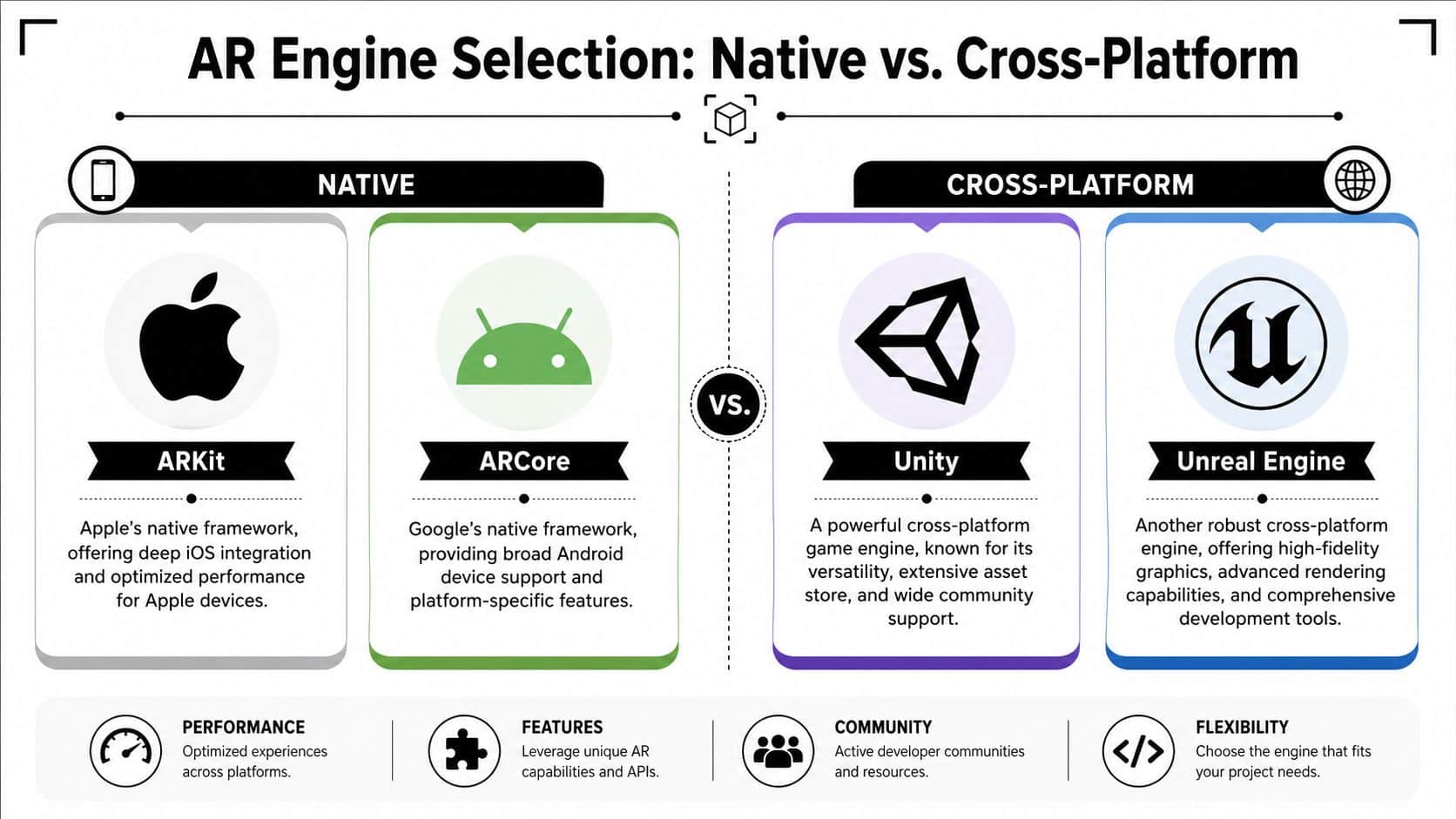
Native tools versus cross-platform engines
Here's the practical distinction:
| Option | Best fit | Trade-off |
|---|---|---|
| ARKit | iOS-first products that need tight Apple hardware integration | You're building for one ecosystem |
| ARCore | Android experiences where native device features matter | Device variation is harder to tame |
| Unity | Cross-platform mobile AR with broad plugin support and faster shared development | Teams need discipline to keep performance tight |
| Unreal Engine | AR products where visual fidelity is a central requirement | Heavier pipeline, steeper production overhead |
ARKit is a strong choice when your audience is concentrated on Apple devices and you want clean access to iOS capabilities. Native builds often give you better control over app size, platform conventions, and device-specific optimization.
ARCore makes sense when Android reach matters. That said, Android hardware diversity changes your testing burden. A feature that feels stable on one flagship device can behave differently on another.
When Unity wins and when it doesn't
Unity is often the most practical default for teams developing augmented reality applications across both mobile platforms. You get a large ecosystem, mature tooling, and a workflow many 3D teams already understand.
It's also easier to hire around. If your roadmap includes mobile AR now and headset or simulation work later, Unity usually keeps more doors open.
But don't choose Unity because it feels “universal.” Choose it when the product benefits from:
- Shared code across platforms
- Frequent content updates
- 3D-heavy interactions
- A team that already works comfortably in C# pipelines
If your app is mostly a native mobile product with one AR feature inside a broader application, a native approach can be cleaner.
Use the lightest stack that can deliver the experience well. Extra engine power doesn't help if your team spends months fighting build complexity.
Unreal is powerful, but not always practical
Unreal Engine shines when visual quality is central to the value proposition. For high-end demos, branded experiences, or advanced simulations, its rendering capabilities are compelling.
The catch is operational, not ideological. Unreal can demand more from the asset pipeline, device optimization effort, and specialist talent. For many commerce or utility apps, that overhead isn't justified.
This overview of mobile development frameworks is helpful when the AR decision is part of a broader app strategy. That's usually the key discussion anyway. You're not choosing an AR engine in isolation. You're choosing how AR fits into the rest of your product architecture, staffing plan, and release process.
Architecting Your AR App for Performance and Scale
Most AR failures don't begin in the camera view. They begin in the layers underneath it. Asset delivery is slow. State management is messy. APIs weren't designed for spatial workflows. The app works in a polished demo and buckles under real usage.
Designing app experiences that scale to millions of users often requires a hybrid architecture approach, and 68% of top-performing mobile applications use containerized microservices to manage load spikes, according to the cited Gartner-based summary in Splashtop's article on augmented reality.
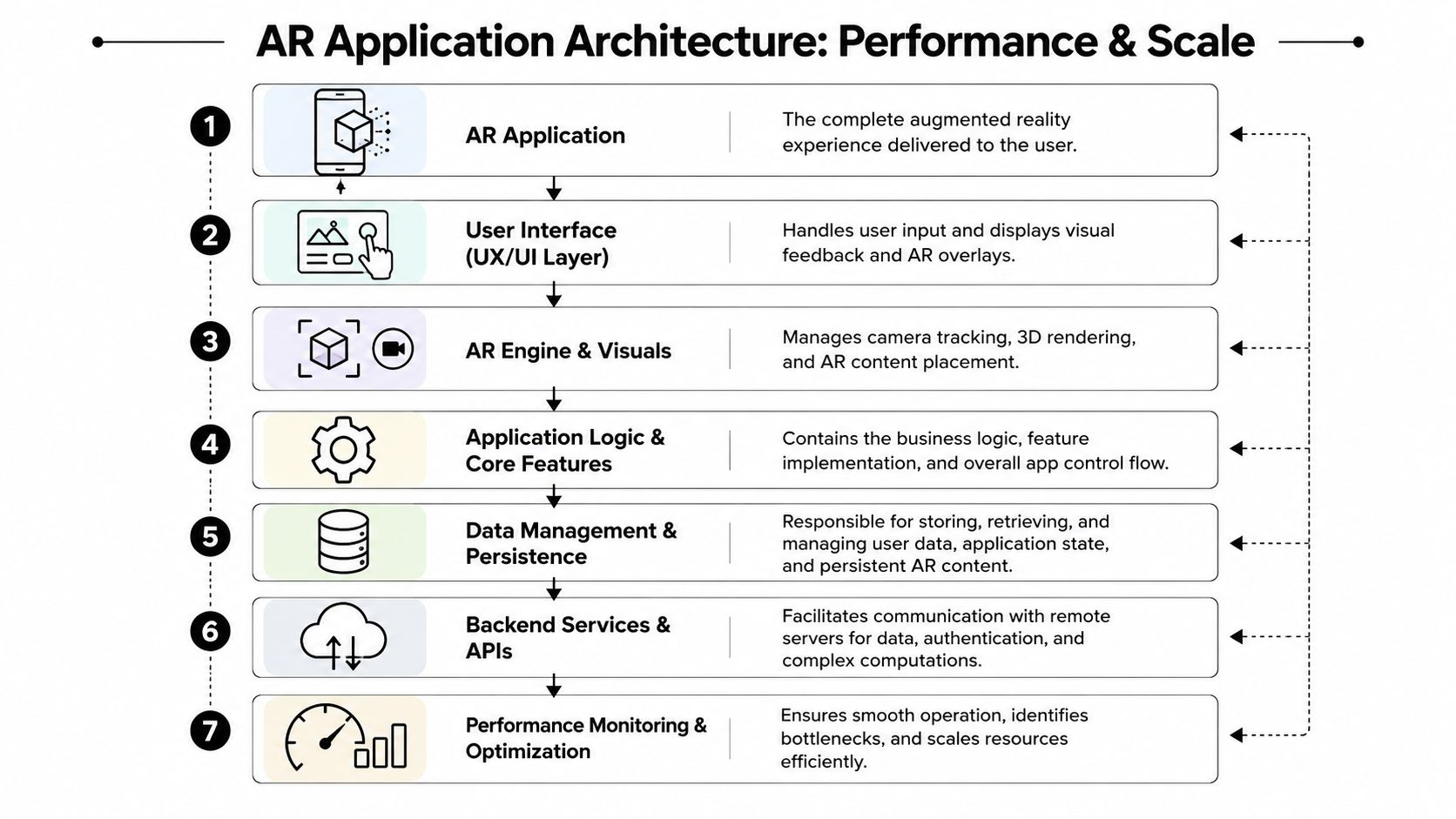
Keep real-time work on device
AR has one fundamental rule. Tracking, rendering, and interaction feedback have to feel immediate. That means the device should handle the work that directly affects perceived responsiveness.
Good candidates for on-device execution include:
- Camera processing and session management
- Anchor placement and scene interaction
- Short-lived local state
- Cached assets needed for immediate rendering
If you push those responsibilities to the backend, latency shows up where users feel it most.
Use the backend for everything that benefits from central control
The backend still matters, just in different places. It should support the AR layer, not fight it.
A sensible split looks like this:
| Layer | Keep it responsible for |
|---|---|
| Client app | Session control, rendering, interaction, lightweight caching |
| API layer | Authentication, content delivery, analytics events, sync |
| Content services | Model management, asset versioning, metadata |
| Business services | Catalog rules, account logic, permissions, workflow state |
| AI services | Classification, personalization, summarization, assistant features |
Product teams often under-scope the work. They budget for the 3D interaction and forget the catalog system, permissions model, analytics instrumentation, and release tooling.
AR doesn't replace software architecture. It exposes weak architecture faster.
Design for modular updates
The healthiest AR applications treat the AR feature as one module in a larger product system. That means you can update content, business rules, and AI behavior without rebuilding the entire experience every time.
A few architectural habits pay off:
- Version your assets so a model update doesn't break placement logic.
- Separate spatial UI from business logic so product changes don't require engine rewrites.
- Instrument performance early so you can catch frame drops, failed fetches, and device-specific regressions.
- Plan for offline or degraded states when network conditions are weak.
AI integration belongs here too. If you're adding search assistance, product guidance, support chat, or internal operator tools, don't wire prompts directly into scattered app services. Use a managed layer so prompt changes, parameter control, logging, and spend tracking are visible to both product and engineering. That keeps experimentation from turning into operational debt.
Designing Frictionless AR Interactions and Experiences
A flashy AR scene isn't the same thing as a usable AR product. Users don't care that your scene understanding is technically impressive if they can't tell where to tap, what to move, or whether the object is placed correctly.
That gap shows up clearly in the field. Industry data shows that 78% of AR failures in museums and retail stem from designs that are not presented as frictionless experiences, yet 90% of developer guides lack concrete strategies for implementing spatial audio, haptics, or semantic 3D space descriptions, as discussed in the American Alliance of Museums piece on frictionless augmented reality.
Friction usually comes from uncertainty
When users hesitate in AR, it's usually because one of four things is unclear:
- Where the app wants attention
- Whether the surface or object was recognized
- What gesture will work
- Whether the result can be trusted
That's why frictionless interaction starts with environmental confidence cues. Show the scan progressing. Signal when placement is stable. Make controls context-aware instead of permanently crowding the screen.
A useful reference point is this example of AR shoe try on, which shows how product try-on experiences live or die by alignment, responsiveness, and user confidence rather than visual novelty alone.
Design for the body, not just the screen
AR interaction design has to account for movement, posture, arm fatigue, interruptions, and real surroundings. That changes your UI decisions.
Three patterns consistently work better than overbuilt control schemes:
Direct manipulation for core actions
Let users place, rotate, and scale objects with simple gestures. Keep advanced controls secondary.Layered feedback
Use visual confirmation first, haptics second, and sound only when it adds clarity instead of noise.Sparse interface chrome
Put less on screen. In AR, every extra button competes with the world itself.
A good AR interaction often feels underdesigned on a desktop mockup. In the real world, that restraint is what makes it usable.
Common design fixes that save projects
A lot of UX problems in AR are avoidable if the team tests early in real spaces.
Placement uncertainty
Add visible plane detection feedback before placement is available.Bad scale perception
Give users an immediate real-world reference point, such as floor contact, shadowing, or known object context.Accidental object movement
Separate browse mode from edit mode so users don't drag content by mistake.Accessibility gaps
Supplement visuals with tactile and audio cues where appropriate. This guide on tactile haptic feedback is useful when your team needs to think beyond sight-based confirmation.
The most effective AR experiences remove small moments of confusion. Enough of those stack up, and the app feels natural.
Avoiding Pitfalls With Rigorous Testing and Optimization
“Build first, optimize later” is one of the fastest ways to kill an AR app. In a standard mobile product, you can sometimes fix performance debt after users arrive. In AR, users notice the debt immediately because the illusion depends on stability.
The failure rate tied to performance is hard to ignore. 40% of AR apps fail within the first year due to performance issues, such as slow rendering or high memory consumption, which overwhelm devices with limited processing power.
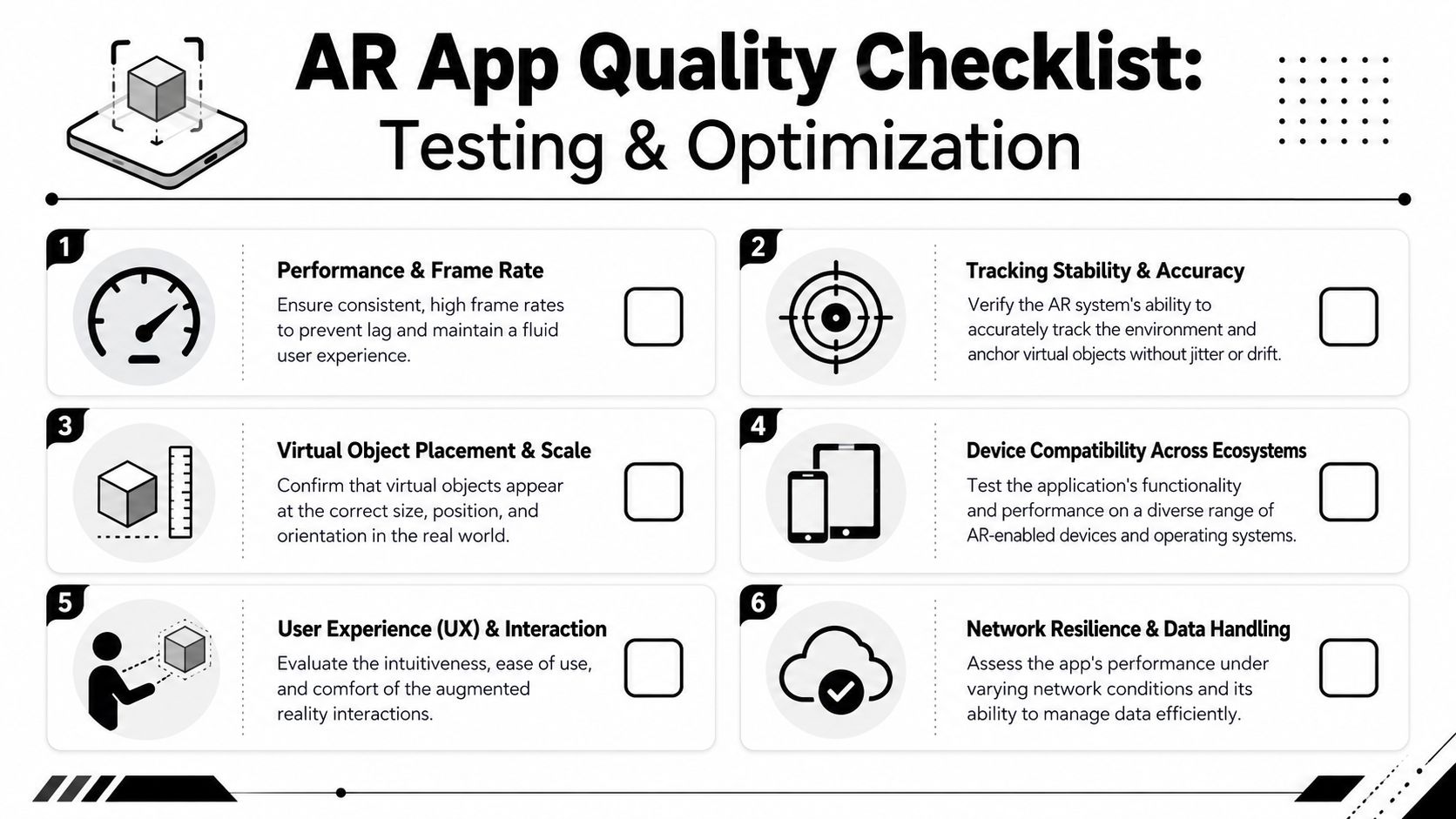
Performance has to be a feature
A stable AR experience comes from technical restraint. Teams get in trouble when they keep adding model detail, particle effects, animated UI, and network dependencies without measuring what each addition costs.
Start with these checks:
- Asset discipline. Keep 3D assets lightweight and remove detail users won't perceive on mobile.
- Memory awareness. Load what the scene needs now, unload what it doesn't.
- Frame consistency. Spikes matter as much as averages. A mostly smooth app with periodic stutters still feels broken.
- Battery and thermal behavior. Extended camera use exposes inefficiencies quickly.
If your app only behaves well in ideal office lighting on a recent flagship phone, you haven't tested the product. You've tested a demo.
Test in places that make the software uncomfortable
AR QA has to happen in varied environments. Glossy floors, low light, cluttered spaces, outdoor glare, reflective surfaces, cramped rooms, and interrupted sessions all reveal different weaknesses.
A practical test matrix should include:
| Test area | What to verify |
|---|---|
| Environmental variation | Tracking under different lighting, textures, and room layouts |
| Device variation | Different camera quality, memory limits, and sensor behavior |
| Interaction reliability | Placement, gestures, relocalization, and recovery after interruption |
| Network resilience | Asset fetches, sync behavior, and graceful degradation |
| User safety and comfort | Clear guidance, motion expectations, and interruption handling |
Test the app where your users will actually use it, not where your team likes to demo it.
Run a pre-mortem before launch
A pre-mortem is simple. Assume the app failed after release. Then list the reasons. In AR, the usual suspects are predictable:
- Objects drift or jitter
- Large assets slow startup
- A mid-range device crashes after prolonged use
- The app behaves poorly in dim or bright environments
- Users don't understand when scanning is complete
- Recovery from lost tracking is confusing
Treat those as launch blockers, not polish items. Most AR products don't fail because the idea was weak. They fail because the team tolerated too much instability before release.
Deployment AI Modernization and Long-Term Success
Shipping to the App Store or Google Play is a milestone, not the end state. The more important question is whether the app can adapt after launch without becoming expensive to maintain.
That's where AI modernization starts to matter. If your AR product includes search assistance, guided workflows, summarization, product recommendations, or internal support tooling, AI can improve usefulness over time. The operational side matters just as much as the model choice. Prompt changes, logging, parameter controls, and cost visibility need governance.
Using AI to modernize software applications and build them for long-term viability reduces production downtime by 35% and cuts maintenance costs by 25% over a 5-year period, according to SAP's overview of augmented reality and modernization.
Deployment is where operational discipline shows up
A mature release process for AR should cover more than store assets and submission forms.
It should also include:
- Feature flagging so you can limit risky rollouts
- Asset version control for 3D and content updates
- Device-specific monitoring to catch regressions after release
- Prompt and model governance if AI features are part of the experience
- Clear rollback paths for both app code and content
This is also where team composition matters. Strong launches usually come from balanced teams that include engineering, QA, UX, and product leadership, not just one excellent graphics developer trying to carry the whole thing.
AI needs administration, not just integration
A lot of teams add AI features in a hurry and create a new maintenance problem. Prompts live in source files. Parameters are hard-coded. Logs are split across services. Nobody can see cumulative spend clearly. The result is slower iteration and weaker control.
One practical option is Wonderment Apps, which offers a prompt management system that teams can plug into existing software. It includes a prompt vault with versioning, a parameter manager for internal database access, a logging system across integrated AI services, and a cost manager for cumulative spend visibility. In AR products with AI-powered assistance or personalization layers, that kind of admin tooling keeps experimentation manageable instead of chaotic.
The long-term winner isn't the app with the most features. It's the one the team can still improve confidently six months after launch.
Build the app you can keep operating
Long-term success in developing augmented reality applications comes from a simple mindset. Don't build for the demo. Build for the second year.
That means picking tools your team can support, designing interactions users understand quickly, testing under ugly real-world conditions, and treating AI as an operational system with controls, not a bolt-on trick. The AR products that last tend to be the ones that connect immersion to business process, measurable value, and disciplined maintenance.
If you're planning an AR product or modernizing an existing app with AI, Wonderment Apps is worth a look. Their team works across mobile development, UX-driven delivery, AI modernization, and the operational plumbing that keeps advanced apps maintainable, including prompt versioning, logging, integrations, and cost control.