

You've shipped the personalization feature. The onboarding flow adapts to a user's first actions, the notification copy feels more relevant, and the product team is already asking what the next intelligent experience should be. Then the practical questions arrive: Which model should run on the device? Where do prompts live? How do you stop a small experiment from becoming an unpredictable operating cost?
That's the challenge in Android app development with AI. Connecting an app to a model is relatively straightforward. Building an experience that remains fast, private, observable, affordable, and useful after the novelty wears off requires a much stronger engineering approach. A prompt administration layer can help by centralizing prompt versions, model parameters, logs, and spend visibility instead of burying those decisions inside Kotlin code.
Why AI Has Quietly Become the Default Layer in Android Apps
An Android team replacing static onboarding with an adaptive first-day experience quickly discovers that personalization isn't just a model call. The app needs to interpret usage signals, select the right content, generate helpful copy, and decide when notifications are appropriate. If the prompt changes, the team needs a controlled way to update it. If response quality drops, someone needs to see that before the feature becomes a flood of confusing messages.
That pressure reflects a wider product shift. By 2025, an estimated 43% of newly published Android applications on Google Play included at least one AI-powered feature, compared with 28% in 2023, according to market data on Android app development. The increase points to AI moving from isolated experimentation into common product expectations across personalization, automation, and in-app assistance.
Traditional Android logic asks a question and expects a defined answer. AI features often return a probability-shaped answer, which means product teams must design for uncertainty. A recommendation can be relevant without being perfect. A generated summary can be useful while still needing length limits, validation, and a fallback state.
The app surface is getting wider
Android's AI direction now extends beyond a chatbot embedded in a screen. Google describes a transition from an operating system toward an intelligence system, with system-level capabilities that can understand context and work across app surfaces. AppFunctions, Android MCP integrations, hybrid inference, multi-agent workflows, and shared context all push developers to expose useful actions, not just generate text.
That changes the product question from “Where should we put the AI assistant?” to “Which capabilities should the assistant be able to use safely?” An ecommerce app might expose product comparison or order-status actions. A travel app could make itinerary details available to a qualified agent. A communications app might help users summarize or organize information without taking an irreversible action automatically.
Practical rule: Treat every generated response as a product surface with a quality threshold, a failure state, and an owner.
Plumbing determines whether the feature lasts
Prompt engineering, model selection, and spend governance belong in the product architecture from the first release. A prompt vault with version history, parameter controls, logs across integrated AI systems, and cumulative cost tracking gives engineering and product teams a shared control plane.
Users might never see that infrastructure, but they experience its consequences. They notice when a response takes too long, when a helpful feature works only on a strong connection, or when the app confidently returns nonsense. Even a routine task, such as making international calls on Android, becomes a better experience when the surrounding app handles intent, context, permissions, and failure states clearly.
The Three Foundational Paths for AI on Android
Google's Android documentation groups generative AI implementation into three foundational approaches: on-device processing, cloud-based models, and app functionality connected to system-level AI. That framework is useful because it forces an architectural decision before a team chooses a model name.
On-device processing
On-device inference runs the work locally, using paths such as Gemini Nano and ML Kit GenAI APIs. It suits short, bounded tasks where response speed, offline behavior, or data control matters more than broad reasoning.
A notes app could summarize a short entry without sending the text to a remote service. A receipt workflow could extract structured fields locally. A voice-note feature could transcribe and classify content while the user is travelling through unreliable connectivity. The trade-off is capability coverage. A compact local model won't necessarily handle a large context window, complex planning, or a difficult multi-step research task as well as a cloud model.
Cloud and hybrid inference
Cloud models provide access to larger or more capable experiences through Firebase AI Logic, a REST endpoint, or a Gemini API integration. They earn their place when an app needs deeper reasoning, richer context, current information, or a capability that can't run comfortably across the target device range.
An email client might use cloud reasoning for semantic search across a large account. A business application might ground a response in server-side records and permission-aware data. The costs include network dependence, remote data handling, operational monitoring, and usage-based model spend. A production implementation should also keep credentials out of the APK by routing requests through an appropriate backend or managed integration.
System-level intelligence
The third path exposes an app's capabilities to qualified system-level agents. AppFunctions is designed to simplify Android MCP integrations, and Google says apps can act like on-device MCP servers through this approach. The app isn't merely answering a prompt. It's publishing carefully defined operations that another intelligence layer can discover and invoke.
That requires stricter boundaries than a chat interface. Each function needs explicit inputs, authorization checks, validation, and a clear distinction between previewing an action and executing it. A calendar app might expose event lookup while requiring confirmation before creation. A shopping app might expose product comparison but keep payment and order submission behind an explicit user gesture.
The right path depends on the capability, not the popularity of a model. Teams should classify the feature, assess its data and latency requirements, and then decide whether local inference, cloud reasoning, or system integration creates the most reliable experience.
Choosing Between On-Device and Cloud Inference
On-device and cloud inference solve different engineering problems. The decision shouldn't be made by asking which model is “smarter.” It should be made by looking at the feature's latency expectations, privacy requirements, connectivity assumptions, cost controls, and context size.
| Dimension | On-Device, Gemini Nano / ML Kit | Cloud, Firebase AI Logic / Gemini API |
|---|---|---|
| Best fit | Short summarization, classification, extraction, and responsive assistance | Complex reasoning, large context, richer generation, and server-grounded workflows |
| Latency profile | Local processing can support responsive interactions and offline use | Network conditions affect response time and reliability |
| Privacy posture | Data can remain on the device for suitable features | Data travels through a managed cloud path and needs clear handling controls |
| Cost model | Reduces dependence on remote inference for the feature | Requires active monitoring of model usage and spend |
| Connectivity | Can continue working without a reliable connection, depending on device support | Needs connectivity unless the app provides a fallback |
| Device coverage | Depends on supported hardware, Android version, and local model availability | More consistent model access across supported clients, subject to network access |
| Capability ceiling | Efficient for bounded tasks, but constrained by local resources | Better suited to broad reasoning and longer context |
A notes app's autocomplete should usually favor a local path when the output is short and immediate. A long-form drafting assistant may need cloud reasoning because users expect more context and a broader writing range. A receipt extractor could use local processing for sensitive images, then ask the cloud to resolve a difficult ambiguity only when the user permits it.
Four questions to answer before implementation
How quickly must the UI respond? A feature used while typing or tapping through a workflow needs a tight feedback loop. A background report can tolerate more delay.
What data leaves the phone? Personal, financial, health, or confidential business information needs a deliberate data path, not an assumption that the model provider will solve the policy.
What happens without connectivity? The UI should distinguish between “the model is still working,” “the request failed,” and “this capability isn't available on this device.”
What controls usage at scale? Cloud inference needs budgets, logging, quotas, and a way to change the model or disable a feature without waiting for a store release.
The strongest designs are often hybrid. The app can use local inference for immediate suggestions, then call a cloud model for an expanded result. If the connection fails, it can return a shorter local response, a cached result, or a deterministic template. Guidance on AI in mobile apps is useful background, but the Android implementation still needs a feature-by-feature decision rather than a single global model choice.
Picking and Wiring a Model the Right Way
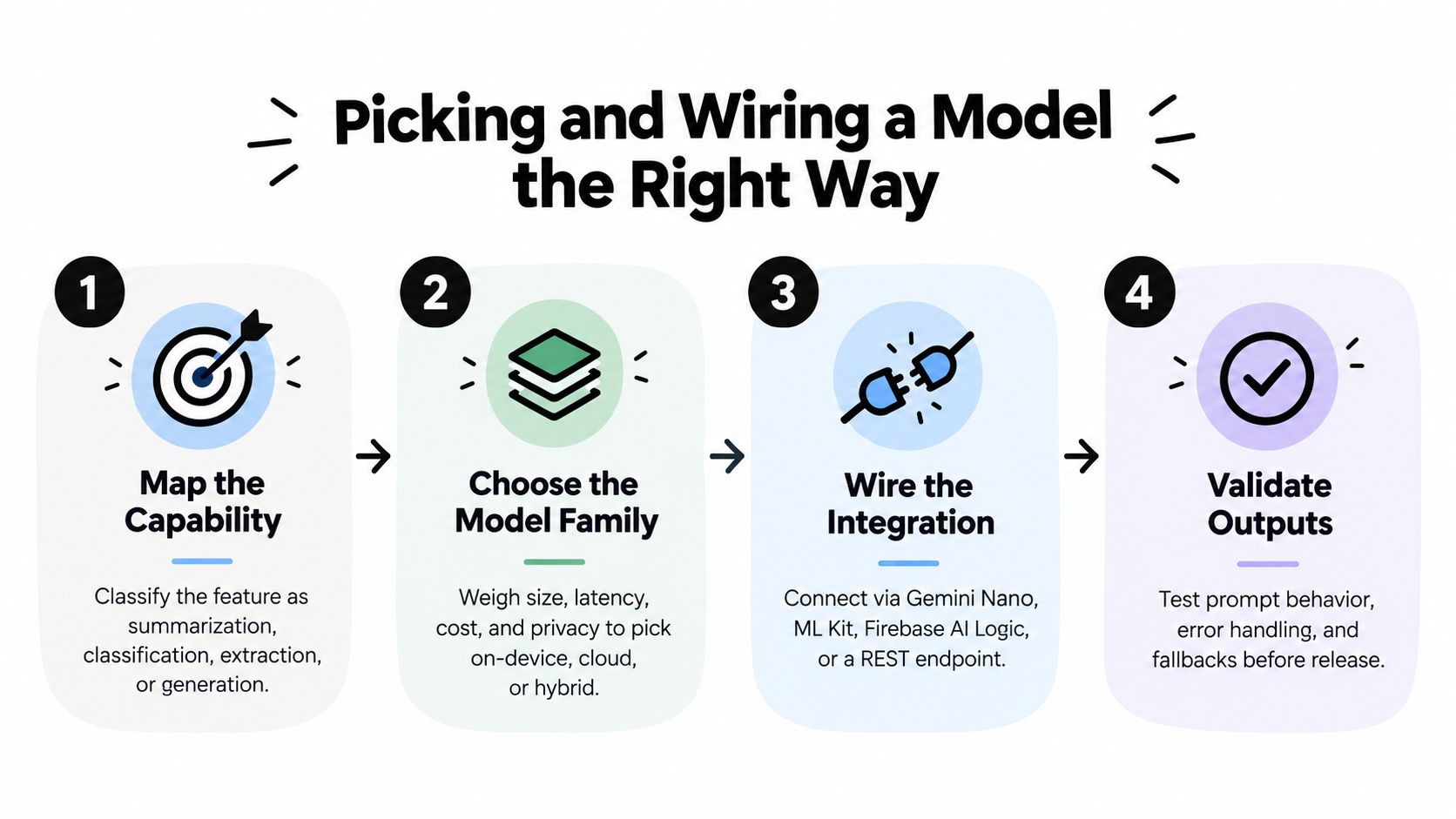
Start with the capability class, not the SDK. A feature usually belongs to one of a few practical categories: summarization, classification, extraction, vision, code assistance, or tool-using agents. Classification and short extraction may fit an on-device model. Vision and translation may fit ML Kit. A tool-using agent needs function boundaries, state management, authorization, and a model that can reliably select among available operations.
Use a capability-first decision sequence
- Map the task. Define the input, expected output, acceptable failure, and whether the result is advisory or action-taking.
- Select the model family. Consider Gemini Nano through AICore for local tasks, Gemini through a Generative AI API for cloud reasoning, ML Kit for supported vision and translation workflows, and MediaPipe for custom or open-weight runtimes.
- Choose the integration path. Use the platform surface that matches the capability instead of forcing every task through a general chat endpoint.
- Validate the output. Test malformed input, empty results, refusals, network errors, prompt injection, and unexpected model behavior before release.
Put one inference client abstraction between the UI and model providers. The presentation layer should request an operation such as summarizeNote() or extractReceipt(), not know whether the result came from Gemini Nano, Firebase AI Logic, or another backend. That separation makes it possible to introduce routing, retries, telemetry, and fallback behavior without rewriting screens.
Firebase AI Logic can serve as a managed routing layer for cloud or hybrid requests. A local implementation can become the fallback when connectivity drops, but the fallback should be designed intentionally. A shorter summary, a cached recommendation, or a structured “try again when online” state is better than pretending that a failed remote call succeeded.
Make outputs predictable
Use prompt templates for repeatable tasks and structured output for data that the application must consume. JSON schemas, typed response objects, and validation rules prevent a model from returning prose where the app expects a category, amount, or action. Function calling should expose narrow operations with validated arguments, not a general-purpose command channel.
Grounding matters when the answer depends on business records, product data, or current app state. The model should receive only the context it needs, with authorization applied before retrieval and again before any action. For system-level entry points, AppFunctions can expose approved capabilities to surfaces such as Circle to Search, giving the app useful discovery paths beyond its launcher icon.
A practical evaluation process should include real repository work, not only toy prompts. Google's Android Bench evaluates AI-assisted development across 100 real-world tasks, covering areas such as Jetpack Compose, Coroutines and Flows, Room, Hilt, navigation, Gradle, SDK changes, camera, media, system UI, and foldable adaptation. Its first release reported model success rates from 16% to 72%, which is a useful warning that coding assistance still needs review and verification for production Android work. See the Android AI model evaluation guidance when choosing an engineering workflow.
Treating Prompts, Parameters, and Spend as Product Features
A prompt in a Kotlin file looks harmless until a product manager wants a new tone, a support lead reports inconsistent answers, and finance asks why usage increased. At that point, the prompt is no longer a string. It is a versioned product asset with operational and financial consequences.
Store prompts by feature, audience, and release state. A registry in Remote Config or Firestore can let a team change a system prompt without shipping a new APK, provided the application validates the configuration and supports a safe default. Keep the prompt version alongside the model identifier, parameter preset, output schema, and rollout flag so an incident can be reproduced.
Give each control an owner
Temperature, top-k, maximum output tokens, retrieval limits, and tool permissions should be treated as named configuration rather than scattered constants. A fast preset may be suitable for autocomplete, while an accuracy-oriented preset may fit a slower research workflow. The important part is that product and engineering can see which preset is active and why.
A parameter manager can also enforce internal data access boundaries. For example, one feature might retrieve customer account information while another can access only public catalog data. The application should apply authorization in the backend or data layer, not rely on a prompt instruction to keep sensitive records separate.
| Asset | Storage | Owner | Metric |
|---|---|---|---|
| System prompt | Versioned registry with a safe default | Product and engineering | Validated quality, refusal rate, user feedback |
| Model and parameter preset | Controlled configuration | Engineering | Latency, fallback rate, output validity |
| Retrieval and tool permissions | Server-side policy configuration | Security and platform teams | Blocked unauthorized calls, action success |
| Inference logs | Analytics pipeline with privacy controls | Data and engineering teams | Volume, errors, latency, token usage |
| Spend limits | Central cost policy | Product and finance | Cost per session, budget consumption, downgrade rate |
Measure what the user experiences
Log the prompt version, model version, response validity, latency, fallback path, and user feedback. Where the provider exposes token data, record prompt and completion usage in a privacy-conscious telemetry system, then connect it to a reporting store for analysis. Don't log raw personal content by default. Log identifiers, classifications, and redacted metadata unless the business has a clear reason and lawful process for retaining the input.
A token-budget gate can route a heavy request to a smaller model, a condensed context, or a deterministic response when the user reaches a configured limit. That isn't a punishment. It's a way to protect the rest of the product from an unbounded workflow.
Run prompt-injection and jailbreak tests in CI, then keep a feedback control in the app so users can mark an output as helpful or incorrect. The prompt engineering best-practice guide can inform the working process, but governance is what keeps good prompts from becoming unmanaged production dependencies.
Shipping Safely With Remote Config, Analytics, and Abuse Prevention
An AI feature can fail in several ways. It can return poor content, consume more resources than expected, expose a backend endpoint to abuse, or become difficult to disable because its behavior is embedded in the release binary. Safe delivery treats those risks as deployment concerns, not as edge cases for later.
Put release controls outside the APK
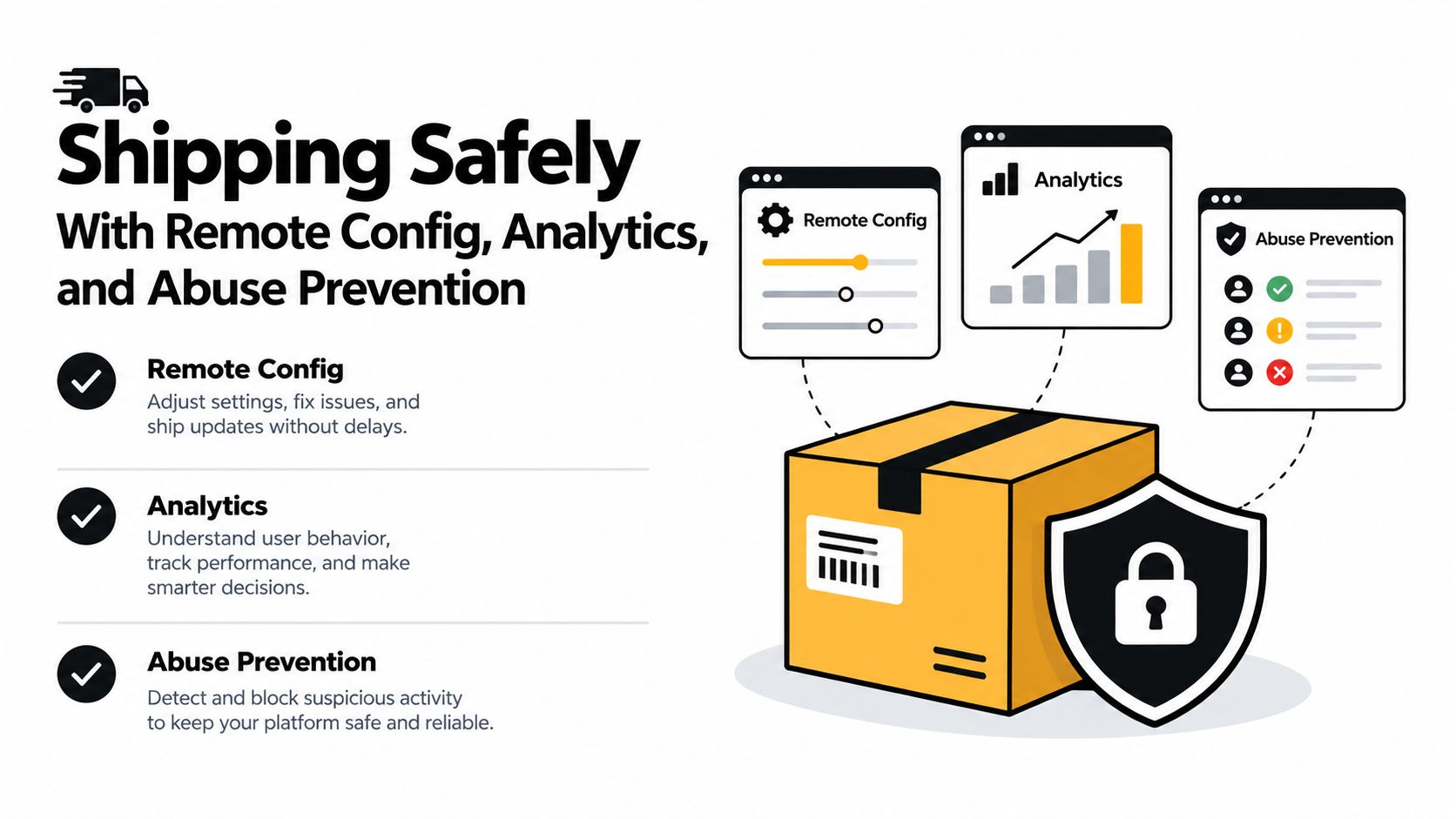
Use Firebase Remote Config for server-controlled settings such as model identifiers, prompt versions, feature gates, and fallback modes. Google documents Remote Config as a way to dynamically update the AI model and version. A kill switch should disable a problematic prompt or tool path without requiring a new app release.
Roll out by app version, device capability, locale, or cohort. Start with a small internal group, compare the AI path with the existing deterministic behavior, and expand only when the quality and operational signals remain acceptable. Play Console testing tracks can support the binary rollout, while Remote Config controls the behavior inside that build.
Instrument the complete request
Create analytics events for request start, successful completion, invalid structured output, timeout, fallback, user correction, and explicit quality feedback. Add model and prompt versions to the event properties. The dashboard should make it possible to answer three questions quickly:
- Is the feature available? Check request success, error classes, and device support.
- Is it useful? Check completion quality signals, corrections, abandonment, and user ratings.
- Is it sustainable? Check latency, inference volume, token usage, and cost telemetry.
Google's Android AI production guidance also identifies Google Analytics for feedback on AI responses and Firebase App Check with Play Integrity to help prevent API abuse. Use those controls alongside server-side authorization and rate limits. App Check isn't a substitute for validating a user's permissions, and Play Integrity doesn't make an unsafe tool contract safe.
Keep a rollback path
Route cloud requests through Firebase AI Logic or a server-side proxy so credentials aren't embedded in the APK and model changes can happen centrally. If dashboards show a quality regression, the runbook should define how to switch the model identifier, restore the previous prompt, disable tool calling, or return a deterministic experience.
The rollback plan also needs a human owner. Someone on the team should be responsible for reviewing alerts, approving configuration changes, and documenting why a model or prompt was changed. Without that ownership, Remote Config becomes a second codebase with fewer review habits.
A Launch Checklist for AI Features That Last
The first release is usually the easiest milestone. A model returns a response, the screen displays it, and the demo looks convincing. Durable Android AI development begins after that point, when the team must manage model changes, device differences, evolving prompts, user trust, and operating cost.
Model and inference decisions
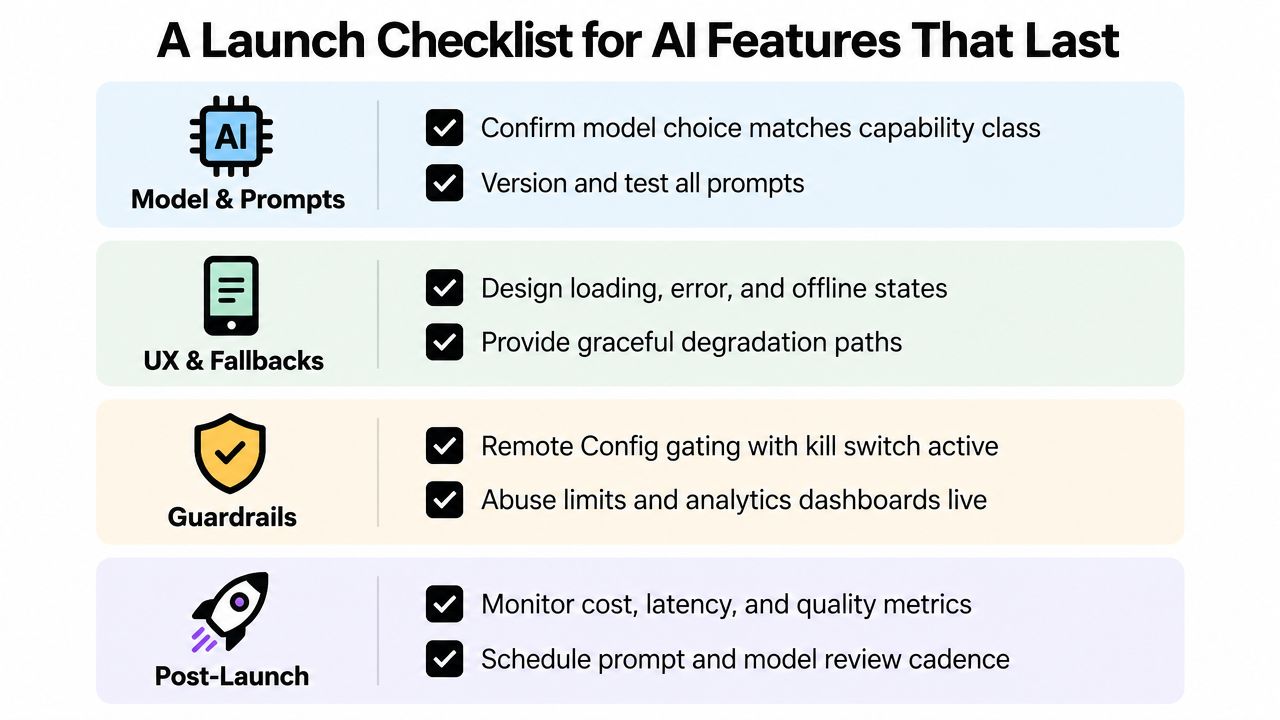
Before release, confirm that the feature has a defined capability class and a deliberate inference location. Record why the team chose on-device, cloud, or hybrid execution, then document the fallback when the preferred route is unavailable.
- Capability contract: Define valid inputs, structured outputs, confidence expectations, and unacceptable actions.
- Model record: Store the model identifier, prompt version, parameter preset, and evaluation results together.
- Fallback behavior: Decide whether the app uses a local model, cached result, deterministic template, or clear unavailable state.
- System surface: If an agent can use the feature, define the AppFunctions and Android MCP boundaries, permissions, confirmations, and audit events.
Google's Android Bench 2.0 expands evaluation to 30 long-horizon tasks, including dependency upgrades, new features, building apps from scratch, and converting a cross-platform app to Android. Its published 2026 ranking illustrates why quality alone doesn't settle model choice. One listed result reports GPT-5.5 at 74% with 15.5 average latency and $133.9 average cost, while Gemini 3.1 Pro Preview reports 72.4% with 11.5 latency and $49.0 average cost. These figures come from coverage of the Android Bench 2.0 ranking, and they demonstrate that delivery speed and spend belong in the selection discussion alongside coding quality.
Engineering and governance
Keep configuration versioned, protect endpoints with App Check and Play Integrity, and send privacy-conscious telemetry for quality, latency, fallback, and usage. The app should have a kill switch, staged rollout controls, and a written rollback procedure that the team has tested.
Schedule a recurring re-evaluation prompt for the team. On that cadence, review whether the current model still fits the capability, whether a cheaper or stronger option has become available, whether users are correcting outputs, and whether the feature's data handling remains appropriate. This review should change configuration or architecture when needed, not become a calendar meeting that produces no action.
A centralized administrative layer makes that work easier to operate. It can present prompt edits, parameter presets, integrated model logs, feature flags, and cumulative spend dashboards to authorized administrators without requiring a code push for every adjustment. For teams building an app intended to grow, modular architecture, clear separation of concerns, a single source of truth, and one-way data flow provide a stronger foundation for changing AI components over time, as reflected in mobile architecture guidance for scalable systems.
Google AI Studio can also help teams move from a prompt to a Kotlin-based Android prototype, use an embedded emulator, hand projects to Android Studio, and publish to an internal Google Play testing track, according to Google's Android app development workflow. That speed is valuable for exploration, but production teams still need architecture, testing, security review, observability, and long-term ownership.
The best Android AI feature isn't the one with the most impressive demo. It's the one that remains understandable, controllable, and useful when the model changes underneath it.
Wonderment Apps builds AI-modernized web and mobile products and offers an administrative prompt management layer with prompt versioning, parameter management, integrated AI logging, and cumulative token-cost visibility. Visit Wonderment Apps to discuss your Android roadmap and request a demo of the tool.