

You're halfway through a release, the staging environment is green, and production is still making you nervous. A dependency differs between servers. A configuration value was changed by hand. Nobody can say with confidence whether the artifact tested yesterday is the artifact running today. The application works, but the delivery system feels held together by memory and luck.
That's where the containerization benefits begin. Not with a fashionable Kubernetes diagram, and not with a promise that every workload suddenly becomes cheaper. Containers package an application with its dependencies, make the resulting artifact portable, and give teams a more repeatable path from development to production. They also introduce new operational work, especially around monitoring, security, networking, and ownership.
Wonderment Apps' prompt management system fits naturally into this modernization conversation. Teams adding AI to desktop, mobile, or web applications need more than a container for the model integration. They also need controlled prompt versions, application data access, AI request logs, and visibility into cumulative spend. The right container strategy creates a dependable operating foundation, while disciplined AI administration keeps the new layer from becoming its own sprawl problem.
The Moment Containerization Earned Its Keep
At 8:47 on release day, a payments platform began returning errors from a newly deployed checkout service. Traffic was heavy, dashboards were noisy, and the on-call engineer had a familiar choice: investigate slowly while customers continued to fail, or reverse the release and accept the risk of making several changes at once.
Before containerization, that rollback might have meant restoring virtual machines, checking database compatibility, restarting dependent services, and reconstructing the exact runtime configuration. The engineer would have been managing a chain of recovery actions, not one release artifact.
This time, the engineer opened the deployment history, selected the previous image, and instructed Kubernetes to replace the faulty version. The cluster pulled the known-good artifact, shifted traffic away from the failing pods, and brought the earlier service back into rotation. The rollback took roughly ten minutes, rather than the four hours the team had previously allowed for a comparable recovery.
The room didn't become calm immediately. People watched payment success rates, latency, queue depth, and error dashboards. The operator checked that the old image was running with the expected configuration and that dependent services had recovered cleanly. Then the graphs settled. Nobody celebrated. They stopped preparing for a much longer night.
Practical rule: The most valuable containerization benefit is reversibility. A release is safer when the team can replace an immutable artifact instead of rebuilding an environment under pressure.
The historical logic behind standardized containers is surprisingly similar. In 1956, the converted tanker Ideal X carried 58 standardized steel containers from Newark to Houston on 26 April, an experiment that helped launch intermodal shipping. Standardization reduced cargo handling time, port congestion, and shipping costs, eventually supporting regular transatlantic service in 1966 and transpacific service in 1967, as described in this history of containerization.
Software teams get the same structural advantage when builds, environments, and rollbacks share one reproducible system. That's the promise worth defending, and it's a useful lens when planning a cloud migration. Containerization pays off when it removes environmental guesswork, not when a team merely moves an application into a cluster.
Containers Explained Through the Shipping Yard
A physical shipping container works because the box has a standard shape. A crane knows where to grip it. A truck knows how to carry it. A ship knows how to stack it. The contents may differ, but the handling system doesn't need a custom process for every box.
A software container follows the same idea. It packages an application, its libraries, runtime requirements, and configuration expectations into a portable unit. A developer's laptop, a CI runner, and a production cluster can handle the package through a consistent workflow, even though the underlying infrastructure differs.
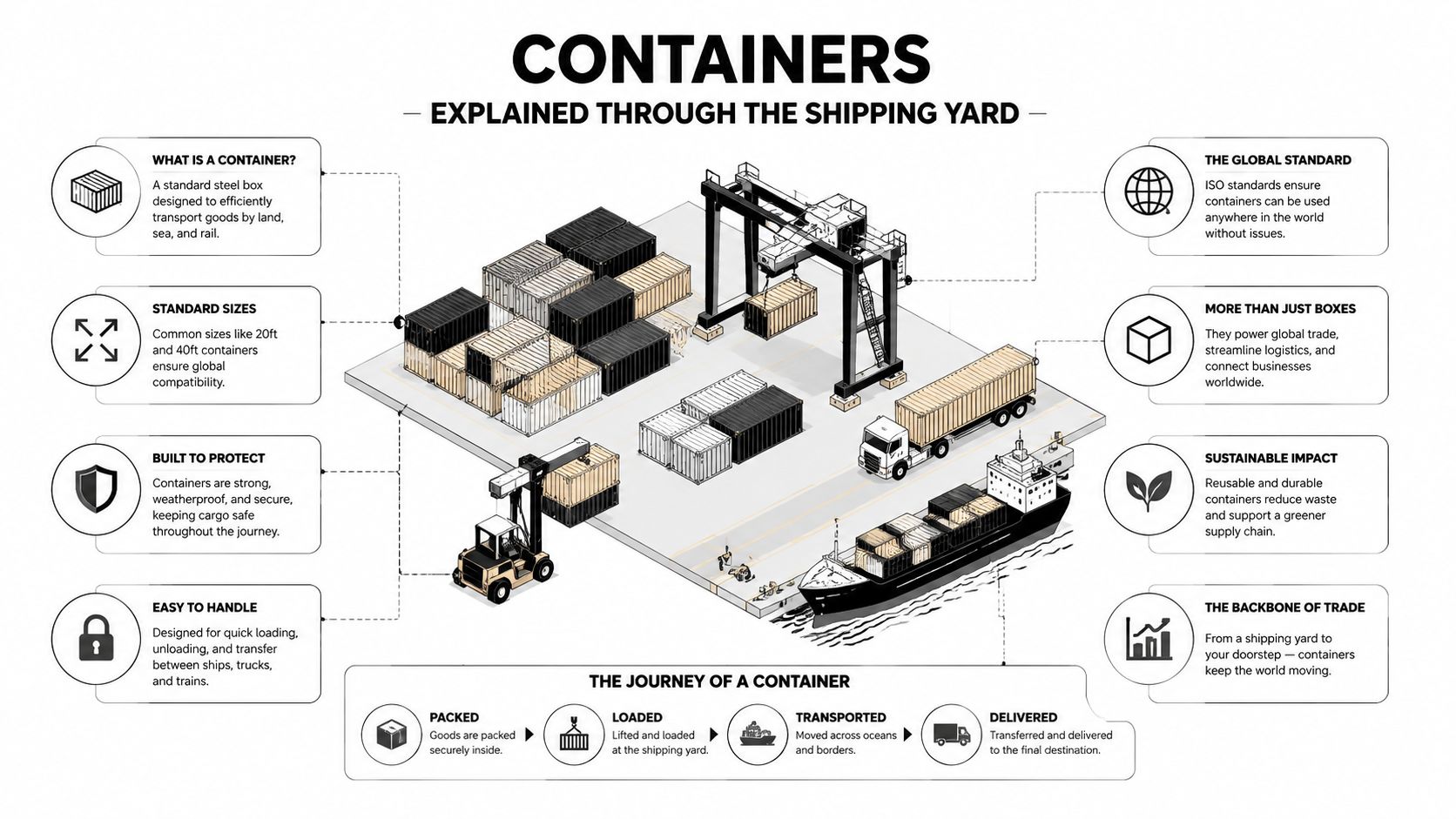
The digital yard in plain English
Here's the mapping:
- Image, the steel box: A container image is a read-only blueprint for the application and its dependencies. It's built once, tagged, stored, and used to create running containers.
- Registry, the port warehouse: A registry stores images so authorized environments can pull the exact artifact they need. It also supports versioning and controlled distribution.
- Runtime, the forklift: The container runtime, such as a Docker-compatible runtime, starts and manages the container on a host.
- Orchestrator, the yard schedule: Kubernetes decides where containers run, replaces unhealthy instances, manages service placement, and coordinates traffic and scaling.
The isolation mechanisms are less mysterious than their names suggest. Namespaces give each container a separated view of processes, networks, and other system resources. Cgroups control how much CPU and memory a container can consume, so one workload has less opportunity to crowd out its neighbors. Layers let images reuse common filesystem components instead of rebuilding every shared dependency from scratch.
Immutability means the running artifact shouldn't be edited by hand. If the application changes, the team builds a new image and deploys it. That rule makes the shipment identifiable. You know which box moved through the yard, rather than wondering what somebody changed inside it after arrival.
This mental model also helps non-engineering leaders understand microservice architecture in practice. Containers don't magically make a system simple. They standardize the units being moved, while the registry, runtime, network, policies, and orchestrator determine whether the yard operates smoothly.
The Four Technical Wins That Show Up First
Containerization earns its keep through four technical advantages: resource efficiency, portability, scalability, and delivery speed. Each depends on a concrete mechanism and disciplined operations. The benefits appear early, but teams should expect an operational complexity spike before the platform becomes easier to run.
Resource efficiency
Containers share the host operating system kernel instead of carrying a complete guest operating system for every application. That smaller footprint can place workloads more densely. Results still depend on workload behavior, resource limits, and platform configuration.
Multiple studies report execution overhead below 5% to 6% on native Linux, alongside reported memory-efficiency gains of 20% to 30%, according to this container performance study. Treat those figures as representative findings, not a guarantee. A memory-heavy workload with weak limits can waste resources inside a container.
Portability
An image packages the application and its dependencies into a consistent delivery unit. The same artifact can move from a developer workstation into CI, then into managed Kubernetes or an on-premises platform, without rebuilding the surrounding environment each time. A 2024 IEEE study identifies cloud migration and fewer environment discrepancies as core operational benefits of containerization, as documented in this research on container portability.
Portability still requires deliberate integration with storage, identity, networking, and managed services. It removes a broad class of dependency drift, but it does not erase infrastructure differences.
Scalability
An orchestrator can add instances as demand rises and remove them as demand falls. Teams can define policies around CPU, memory, or application signals such as queue depth, then apply those rules consistently across services.
Comparative research on Docker and LXC describes near-native performance and low startup time. It also reports stronger overall runtime efficiency for containers, while hypervisors add overhead in networking and memory subsystems, as shown in this ACM container performance comparison.
Scaling only helps when teams set sensible limits, useful signals, and ownership for failed decisions.
CI/CD speed
Containerized pipelines build, test, scan, publish, and deploy a single artifact from start to finish. That workflow prevents staging from validating one environment while production receives another. The gain is strongest when images work with automated tests, registry controls, deployment approvals, and rollback procedures, as outlined in these CI/CD pipeline practices.
| Pillar | Mechanism | Representative Metric |
|---|---|---|
| Resource efficiency | Shared kernel and controlled resource limits | Execution overhead reported below 5% to 6% on native Linux, with reported memory gains of 20% to 30% |
| Portability | Application and dependencies packaged in one image | Reduced environment discrepancies and smoother multi-cloud migration |
| Scalability | Fast-starting instances managed by orchestration policies | Near-native performance and low startup time |
| CI/CD speed | One tested artifact promoted across environments | Faster, more repeatable delivery through automated build and deployment workflows |
These indicators explain the technical appeal. They do not prove that an organization can operate containers well. Leaders should fund the ownership, controls, and platform skills that turn these gains into production results.
Operational Wins and the Complexity Bill That Follows
Containers improve operations when the team treats them as a system rather than as smaller virtual machines. Standardized logs, metrics, health checks, resource limits, deployment manifests, and image tags give engineers a common language for diagnosing services. Declarative autoscaling can respond to real workload signals instead of waiting for someone to notice a graph and open a ticket.
Release safety improves too. Blue-green deployments keep an older version available while the new version is validated. Canary releases expose a new image to a controlled share of traffic. Immutable artifacts make rollback concrete because the team can point to a known image instead of reconstructing a server state from notes and shell history.
The cost arrives through multiplication. Every service needs ownership, alerting, patching, tracing, capacity rules, and a response plan. A modular architecture may make one component easier to deploy, but it also creates more boundaries for traffic, identity, configuration, and failure.
What the platform team inherits
A team can become comfortable with kubectl and still lack the operating model required for production. Service meshes add traffic policy and telemetry, but they also add another control plane and another troubleshooting surface. Kubernetes can automate scheduling and recovery, yet someone still owns cluster upgrades, access policies, node health, cost allocation, and incident response.
A critical review from Tampere University of Applied Sciences highlights the central tension: modularity improves portability while increasing system complexity and the monitoring burden. The same review of containerization trade-offs points to networking and monitoring as harder problems than they are on a single virtual machine, as discussed in this technical review of containerization.
| Operational Win | What It Delivers | Complexity Cost It Introduces |
|---|---|---|
| Standardized telemetry | Consistent logs, metrics, and health signals | More services and endpoints to instrument |
| Canary deployment | Controlled exposure before a broad release | Traffic routing, analysis, and rollback policy |
| Declarative scaling | Repeatable response to load | Resource tuning and misleading signals |
| Immutable images | Reproducible releases and recovery | Registry governance and artifact lifecycle management |
| Service decomposition | Independent ownership and deployment | Distributed tracing and cross-service failure modes |
My recommendation is blunt. Don't adopt Kubernetes until you can name the owner for every production service, define the alerts that matter, and explain how an engineer will trace one customer request across service boundaries. If those answers are missing, containers will expose the weakness faster than they solve it.
Security, Compliance, and the Hardening Checklist That Matters
Containers provide useful security controls, but they don't create a secure application by themselves. Namespace isolation can separate workloads, immutable images can make patching reproducible, and policy-as-code can make compliance reviewable. Those advantages matter only when the platform team enforces them consistently.
The uncomfortable part is kernel sharing. Containers isolate processes while sharing the host kernel, so a successful container escape can affect the node and potentially other workloads. The image supply chain adds another concern. A convenient third-party base image may contain vulnerabilities, outdated packages, or components the team hasn't reviewed.
CMU SEI describes containers as improving portability, CI/CD, and performance while also increasing attack complexity. Current container-security research continues to treat security as a critical challenge that can contribute to breaches and performance degradation, as summarized in this CMU SEI analysis of container virtualization.
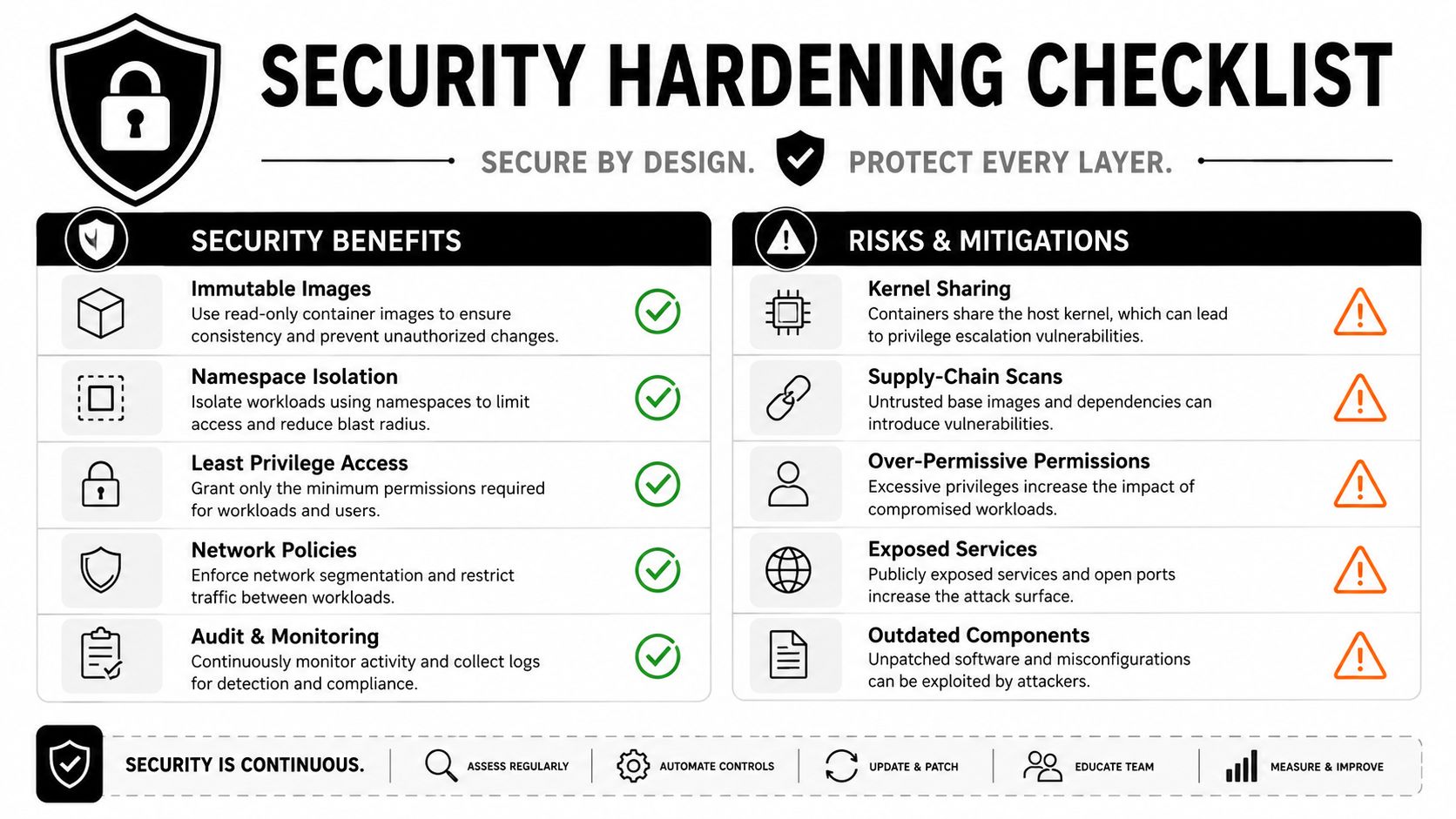
The Monday morning hardening checklist
Give each control a named owner. “The platform team handles security” is too vague to survive an audit or an incident.
- Scan images: Scan every image for known vulnerabilities before it reaches a production registry or cluster.
- Use minimal bases: Prefer distroless or otherwise minimal images when the application supports them, reducing unnecessary packages and tools.
- Control admission: Use admission policies to reject unsigned, unapproved, privileged, or noncompliant images before scheduling.
- Detect runtime threats: Monitor suspicious processes, unexpected network activity, privilege changes, and anomalous container behavior.
- Protect secrets: Keep credentials outside images and source repositories, then inject them through an approved secrets-management process.
- Generate an SBOM: Record the software components inside each image so the team can identify affected workloads when a vulnerability appears.
- Rebuild and restart: The CIS Docker Benchmark recommends frequently scanning images, rebuilding them with security patches, and restarting containers from the rebuilt images so the operating-system patch level stays current, as detailed in the CIS Docker Benchmark guidance.
A CISO should be able to ask who owns each check, where the evidence lives, and what blocks a violation. If the answer depends on a developer remembering a manual step, the control isn't operational yet.
ROI, Industry Outcomes, and When Containers Are the Wrong Call
Executives don't buy containers. They buy lower infrastructure cost per transaction, faster recovery, more dependable releases, and engineer time returned to product work. Containerization can support all four, but the business case depends on the workload and the team's ability to operate the platform.
The historical effect of standardized shipping illustrates how large the payoff can become when a common handling system spreads. One study found that containerization increased trade by about 790% over 15 years after bilateral adoption, compared with 45% for bilateral free-trade agreements and 285% for GATT membership. The same research reports that port turnaround fell from three to five weeks to less than 24 hours, while port costs fell from about half of total shipping cost to less than one-fifth. By 2019, containerships carried roughly 50% of global trade by value, according to this study of containerization and global trade.
That isn't a software ROI forecast. It's a reminder that standardization can reshape an operating model when adoption reaches the right scale.
Four business scenarios
An ecommerce company may use containers to prepare storefront and recommendation services for seasonal demand, scaling independently instead of provisioning every component together. The value appears in faster capacity changes and fewer release collisions, not in the container label.
A fintech team may gain cleaner evidence for release provenance, dependency versions, and workload placement during regulatory reviews. Containers don't satisfy compliance automatically, but reproducible artifacts and declarative policies can reduce the amount of manual reconstruction required.
A healthcare organization may place workloads according to data-residency and isolation requirements, provided its identity, storage, encryption, and audit controls are designed with the container platform. Packaging alone doesn't create HIPAA compliance.
A media company may separate content processing, APIs, and bursty delivery services so one workload's demand doesn't force every component to scale together. That architecture is useful only if the team can observe queues, dependencies, and capacity limits.
When to say no
A well-tuned monolith can be the better choice when the application has a small team, stable demand, straightforward deployments, and no pressing environment-drift problem. A managed PaaS may provide the desired deployment consistency without asking the company to operate Kubernetes. Serverless functions can fit event-driven jobs where short execution and automatic infrastructure management matter more than runtime control.
Use this decision test:
- Portability: Do you need the same artifact across local, test, production, recovery, or multiple cloud environments?
- Release control: Will immutable builds and rapid rollback materially reduce business risk?
- Demand variation: Do independent services need to scale at different rates?
- Operational capacity: Can you staff ownership for observability, security, networking, and platform maintenance?
- Alternative fit: Would a managed PaaS or serverless design solve the actual problem with less machinery?
If the first three answers are weak, don't approve a Kubernetes migration because the architecture diagram looks modern. If the fourth answer is weak, buy a managed platform or bring in experienced help before the migration becomes an internal reliability project.
A Realistic Migration Path and How Wonderment Apps Fits In
A container migration should start with a narrow service and a measurable baseline. Don't begin by moving the entire monolith, rewriting every deployment, or creating a platform team with no production workload to validate it.
Phase one, assess and pilot
Spend 8 to 12 weeks assessing dependencies, selecting one non-critical service, and instrumenting its current behavior. Track mean time to recovery, deployment frequency, failure modes, resource use, and the manual steps engineers perform today. Pick a service with clear boundaries and meaningful operational pain, not the most politically important system.
The pilot should produce a working image, registry workflow, deployment process, rollback procedure, and dashboard. It should also expose what the organization doesn't yet know about ownership and runtime behavior.
Phase two, standardize and platformize
Create the shared components before every team invents its own version. That usually includes an image registry, CI templates, base-image policy, secrets workflow, logging conventions, service templates, and a documented golden path.
This is also where teams should address the sprawl that makes containers expensive. Define image naming, ownership, retention, resource requests, alert conventions, and production access. A short guide to modernizing legacy systems for SMBs can help smaller organizations frame modernization around business priorities instead of infrastructure fashion.
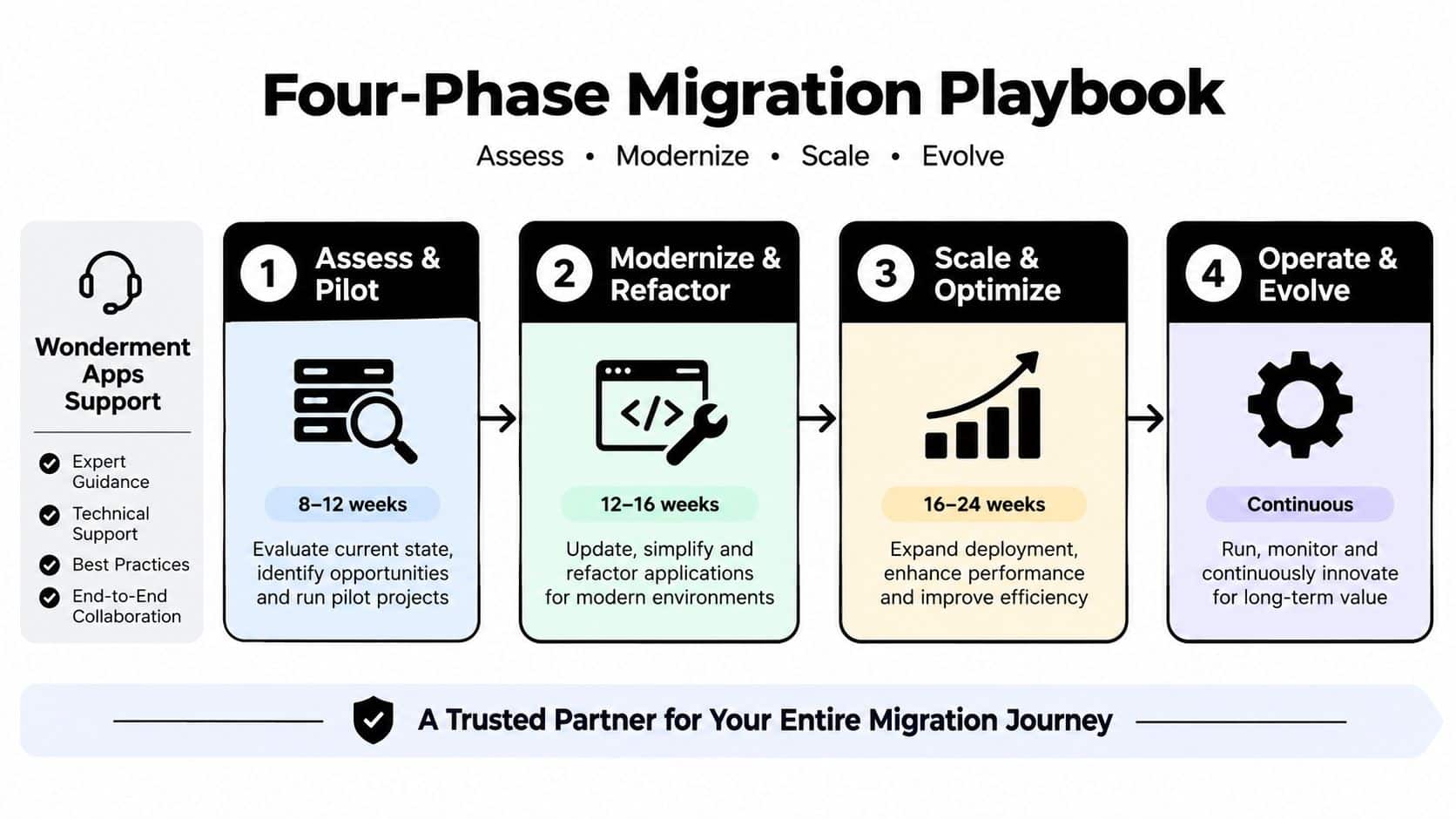
Phase three, roll out production safely
Use the strangler pattern for legacy monoliths. Move a bounded capability, route traffic deliberately, and keep the old path available while the new service proves itself. Canary releases, feature flags, and explicit rollback criteria matter more than a heroic cutover weekend.
Avoid the predictable traps:
- Orphan containers: Assign an owner before deployment.
- Bloated images: Remove unused packages and unpruned layers.
- Missing policy: Enforce OPA or Kyverno controls before production sprawl appears.
- Skipped chaos testing: Exercise dependency failures, node loss, bad images, and overloaded queues before customers find them.
Phase four, optimize and extend
Tune autoscaling from observed behavior, not copied defaults. Add a service mesh only when traffic policy, identity, or telemetry justifies its cost. Then consider AI workloads, including model gateways, retrieval services, and application features that run inside the same governed delivery system.
Wonderment Apps' prompt management system can serve as an administrative layer for an existing application. It includes a prompt vault with versioning, a parameter manager for internal database access, logging across integrated AI systems, and a cost manager that shows cumulative spend. For teams shipping LLM-backed features in containers, that control reduces prompt-versioning sprawl and makes AI behavior easier to trace alongside application releases.
Bring in a partner when the organization lacks platform experience, the legacy system has unclear boundaries, or the pilot must meet strict security and compliance requirements. Build in-house when you already have strong operational ownership and can commit to maintaining the platform after the initial migration. Sequence the work around reversibility, ownership, and evidence. Containers are worth the investment when they make those three things stronger.
Wonderment Apps helps organizations modernize web, mobile, and desktop software with scalable engineering practices, AI integration, and practical administration for prompts, AI logs, application parameters, and token costs. Visit Wonderment Apps to discuss a containerization or AI modernization project, and bring your hardest legacy or production reliability problem to the conversation.