

A marketing team can spend weeks polishing a redesign, approve the new interface, and schedule a major acquisition campaign, only to discover after launch that the page has become slow. The problem usually isn't a lack of engineering talent. It's that nobody agreed on what “fast enough” meant before feature work began.
Performance budgeting gives product, design, and engineering a shared operating rule. It turns speed, payload weight, runtime behavior, and increasingly AI usage costs into constraints that teams can check before release and monitor after launch. For teams modernizing custom desktop, mobile, or web software, that same discipline can keep an intelligent feature from becoming an expensive, sluggish layer bolted onto an otherwise healthy product.
Wonderment Apps' guide to continuous performance testing for scalable apps is useful context for the monitoring side of this practice. The harder work is deciding which measurements deserve authority when a release is under pressure.
The Moment a Performance Budget Saves a Release
The frontend team had a familiar deadline. A marketing redesign was ready, a paid acquisition campaign was queued, and everyone wanted the new landing page live before the first ads ran. The page looked excellent in review, so the team merged it.
After launch, Largest Contentful Paint rose from 2.1 seconds to 4.6 seconds. The hero image was heavier, a new analytics dependency competed for the main thread, and the page loaded several components that weren't needed for the first view. Nobody had defined a ceiling, so the regression passed review as a visual improvement.
The postmortem found a process failure, not a mysterious browser problem. A Lighthouse run in CI could have rejected the change. A bundle-size check could have highlighted the added dependency. A production alert could have shown that real mobile visitors were seeing the slowdown. Instead, the team learned about the issue after the campaign had started.
Practical rule: If a metric can affect a release decision, it belongs in the release process, not just in a dashboard.
A performance budget isn't a number filed in a wiki. It's a continuous decision system. The team defines an acceptable experience, identifies the technical inputs that threaten it, and gives those limits a place in pull-request checks, release reviews, and production alerts.
That distinction matters because feature work always creates trade-offs. A richer search interface may add JavaScript. A personalization model may add API calls. A mobile workflow may need offline storage and background synchronization. Without a budget, the fastest option is usually to accept the addition and promise to optimize later. Later rarely has the same owner, urgency, or context.
The most useful budgets survive contact with ordinary work. They tell a designer when an interaction needs simplification, help an engineer choose between two implementation paths, and give a product manager a clear reason to defer a low-value feature. The payoff isn't a perfect score. It's a release process where the team knows what it can spend, what it must protect, and who decides when a limit needs to change.
What Performance Budgeting Actually Means
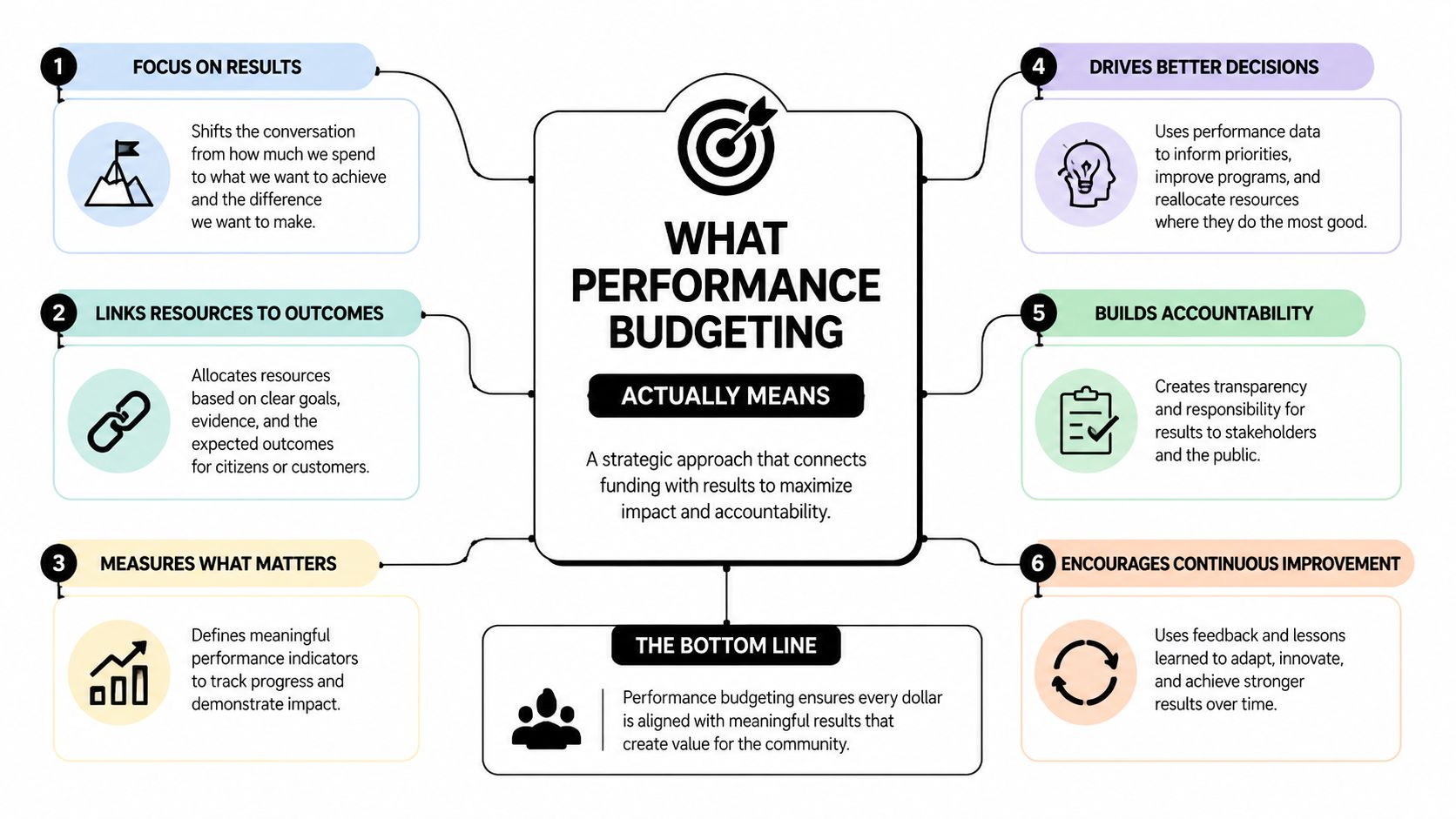
The public-sector discipline behind performance budgeting has existed since the 1960s and spread much more broadly across OECD countries from the 1990s onward. By 2018, all but 4 OECD countries reported some form of it, which shows how a niche reform became a mainstream approach in major economies. The OECD good practices for performance budgeting defines the broader idea as using performance information to inform budget decisions.
A product team can apply the same logic without pretending that a web application is a government department. The useful translation is a contract between outcomes, inputs, activities, and outputs.
Map the four building blocks
- Outcomes describe what users experience. For a web product, that can include Core Web Vitals, task completion, perceived readiness, and conversion behavior. The outcome isn't “the bundle is small.” It's “a customer can begin the important task without waiting through a frustrating load.”
- Inputs are the resources consumed to create that outcome. Think JavaScript and CSS payload, image weight, API latency, database work, model requests, and token usage.
- Activities are the engineering and product choices that consume those inputs. Code splitting, image transformation, caching, prompt design, model routing, and query optimization all belong here.
- Outputs are the shipped artifacts. A route, mobile screen, API endpoint, AI assistant, or background job is an output that must stay inside the agreed envelope.
The OECD's 2023 framework identifies four building blocks for stronger systems, meaningful performance data, accountability and transparency, an enabling environment, and direct use of performance information in budget decisions. The OECD framework on performance budgeting1/REV1/en/pdf) also supports a practical engineering interpretation: keep indicators limited, clear, benchmarkable, and connected to strategic objectives.
That connection prevents a common failure. Teams collect dozens of measurements, then nobody can explain which one should block a release. A working budget has a small set of decision-grade indicators and a known response when a threshold is breached.
A useful definition for team documentation is:
Performance budgeting is the practice of assigning measurable resource limits to product outcomes, enforcing those limits at release time, and revising them from real user evidence.
That definition leaves room for judgment. A threshold should guide a trade-off, not replace one.
The Metrics That Belong in Every Budget
A mid-size SaaS team can start with four measurements that expose different classes of failure. The values below are practical starting thresholds, not universal laws. Teams should compare them with their own real-user baseline before making them hard release gates.
| Metric | Recommended Budget | Failure Mode If Ignored |
|---|---|---|
| Largest Contentful Paint | Under 2.5 seconds | Users wait for the main content and may abandon the page |
| Time to First Byte | Under 600 milliseconds | Origin, CDN, routing, or server work delays every later milestone |
| Critical-path JavaScript | Under 200 KB compressed | More download, parse, compile, and execution work blocks readiness |
| JavaScript heap on mid-tier Android | Under 100 MB | Long sessions accumulate memory pressure and can end in tab crashes |
Largest Contentful Paint
LCP is the clearest proxy for whether the primary page content feels ready. A slow LCP often points to a hero image, render-blocking resource, server delay, or client-side rendering path that carries too much work before the main content appears.
The threshold of under 2.5 seconds is a useful starting point for a p75 mobile budget, particularly on important landing and entry pages. It doesn't mean every route needs identical treatment. A dashboard with authenticated data may have different constraints from a paid acquisition page, but both need an explicit decision.
Time to First Byte
TTFB reveals delays before the browser can do much useful work. A budget of under 600 milliseconds encourages teams to investigate origin processing, cache misses, CDN behavior, and database calls instead of endlessly compressing frontend assets.
Ignoring TTFB creates a misleading optimization loop. Engineers reduce image weight while the server still takes too long to send the first response. The page may become lighter without becoming meaningfully faster.
Critical-path JavaScript
A 200 KB compressed JavaScript budget applies to the code needed for the initial route, not every script in the entire product. The distinction matters. Lazy-loaded reporting tools or an editor can have separate budgets, while the first screen remains protected.
Payload weight compounds across navigation. A dependency that seems harmless on one route can appear in multiple chunks, trigger duplicate work, or increase parse and execution time on slower devices.
Runtime memory
A 100 MB JavaScript heap ceiling on mid-tier Android focuses attention on long-lived sessions, not just first paint. Memory leaks, retained component trees, oversized caches, and repeated data hydration may not appear in a short lab run. They emerge when a customer leaves a tab open while moving through a workflow.
Use these four metrics as a small control set. Add a metric only when the team can explain which decision it changes.
Setting Realistic Thresholds From Real Users
Copying a competitor's performance target is a poor starting point. Their traffic mix, device distribution, geography, rendering strategy, and product surface may have almost nothing in common with yours.
Start with real user monitoring. Pull p75 LCP, TTFB, critical-path JavaScript, and memory readings from the last four weeks, then segment the results by device class. At minimum, separate mid-tier mobile from desktop. If your application serves users across countries, inspect country-level network behavior rather than collapsing every visitor into one global average.
Use p75 as the working anchor
The median can hide a difficult mobile experience because it describes the middle of the distribution. The far tail can be too noisy for a first hard gate. p75 usually gives a more actionable view of the experience a substantial portion of users receive while avoiding the instability of the extreme tail.
Suppose your Android mid-tier p75 LCP is 3.2 seconds. A sensible stretch target might be a 2.8-second budget, provided the team has a credible path to reach it. If the main-thread JavaScript measures 280 KB, a compression-aware target could be 240 KB while the team continues reducing the critical path.
| Metric | Current p75 (mobile mid-tier) | Budget Target | Reasoning |
|---|---|---|---|
| LCP | 3.2 seconds | 2.8 seconds | Improvement is demanding without pretending the current page is already fast |
| Main-thread JavaScript | 280 KB compressed | 240 KB compressed | Removes avoidable route cost before adopting a stricter limit |
| TTFB | Your observed p75 | One achievable step below baseline | Directs investigation toward origin and delivery work |
| JavaScript heap | Your observed p75 | A lower safe ceiling | Protects long sessions without relying on desktop behavior |
The budget should be ambitious enough to influence design and implementation, but close enough that engineers can act on it during normal feature work. A target that fails every build becomes background noise. A target that never fails teaches the team nothing.
Put the review date on the budget
Lab data alone won't tell you whether customers on older phones or distant networks are struggling. RUM alone won't give you a stable, reproducible environment for every pull request. Use both, and document the limitations of each.
Give every budget a sunset date. Review it after the next meaningful change in traffic mix, device profile, geography, or feature surface. Without that review, a once-useful target becomes either impossible or irrelevant.
Enforcing Budgets in CI, Lighthouse, and Production
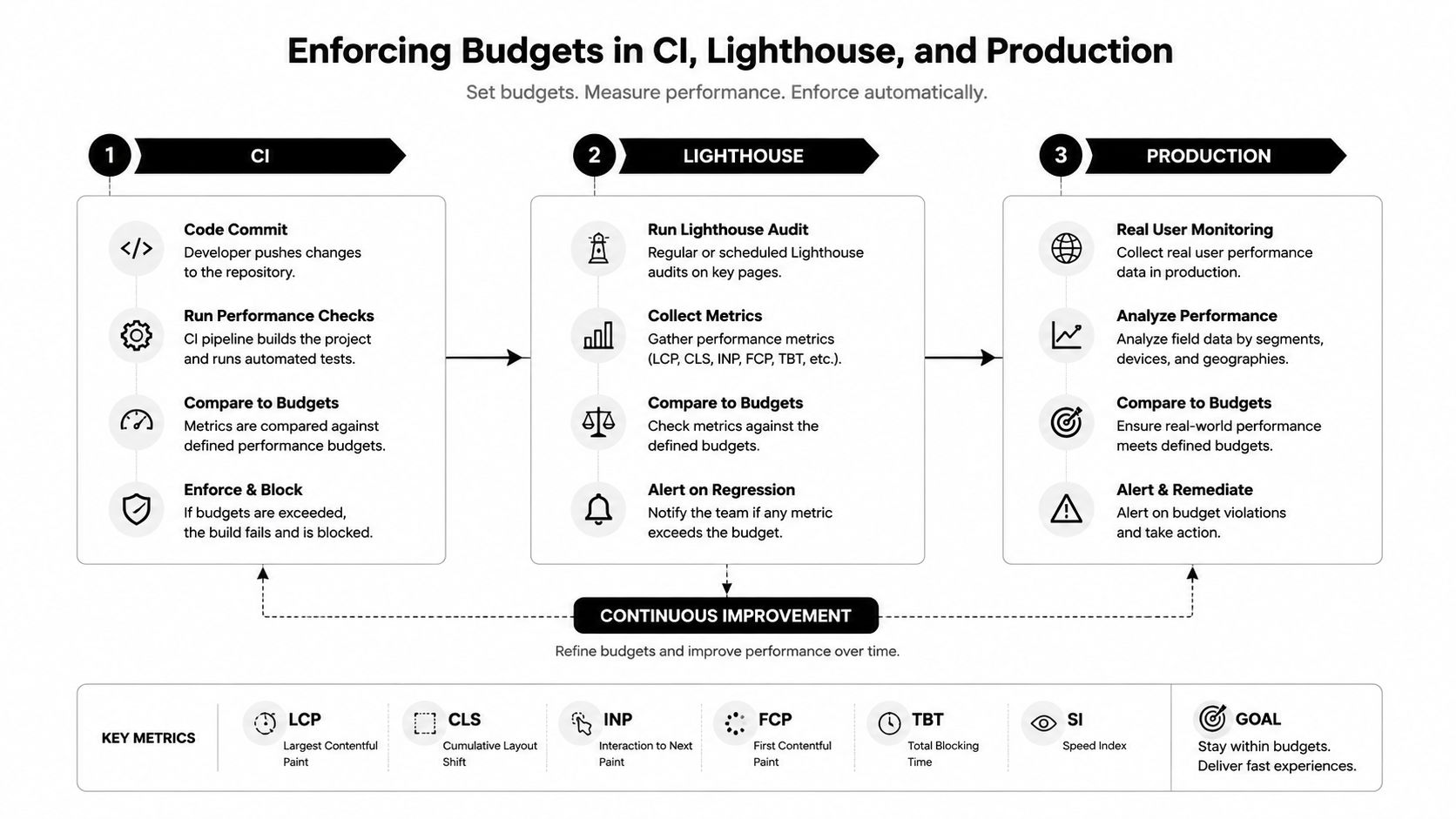
No single enforcement layer can represent the whole customer experience. Lighthouse CI, bundle analyzers, and production RUM answer different questions, so the release system should combine them rather than choosing a winner.
Three layers, three jobs
Lighthouse CI runs against a controlled reference environment. That repeatability makes it valuable for pull requests. If LCP, TTFB, or another selected metric regresses under the same test conditions, the author gets feedback before merge. It won't reproduce every carrier, device, or country, but it gives the team a consistent comparison.
Bundle analyzers and size-limit checks inspect the artifact itself. They can block a pull request when a route exceeds its JavaScript, CSS, or image allowance. This is often the fastest way to catch an accidental dependency import, an unoptimized asset, or a component that bypasses code splitting.
RUM dashboards show what happened after release. They capture device and network variation that synthetic tests cannot, but their readings are noisier and need segmentation. A production signal should trigger investigation, not an automatic blame assignment.
Teams that need a concise introduction can use this guide to understanding Core Web Vitals, especially when aligning product and engineering vocabulary.
Wire the checks into one release decision
A practical workflow can look like this:
- On pull request: Run bundle checks and Lighthouse CI in under three minutes. Fail the check when a hard route budget is exceeded, and post the metric, baseline, and likely artifact change directly to the pull request.
- On merge: Record the release identifier with the performance event so production changes can be compared against the deployed commit.
- In production: Send a Slack alert when a release keeps p75 above budget for more than 24 hours. Include the route, segment, current value, threshold, and owner.
- At triage: Classify the breach as a code regression, infrastructure change, traffic shift, measurement issue, or accepted exception.
The CI/CD pipeline best practices guide can help teams think through pipeline ownership and automation. The important design choice is to make the alert actionable. “Performance failed” is an interruption. “Mobile checkout LCP exceeded its budget after release 1842, likely due to the new payment bundle” is work someone can pick up.
AI Features Changed the Budget Conversation
Traditional web budgets focused on files, requests, and browser execution. AI features add a second resource model. A chat assistant may stream tokens, send a large prompt context, retrieve records, call tools, and render structured output while the user is waiting.
That means latency and weight no longer tell the whole story. Teams also need to track prompt size, response tokens, model choice, request frequency, and spend per feature. A chat panel that streams 800 tokens of JSON can increase parsing and rendering work, especially when the client repeatedly updates a complex interface. The exact impact depends on the payload structure, device, and implementation, but the engineering risk is clear.
Bundle size and token cost behave differently. A larger JavaScript chunk affects download and execution for users who load the route. Token usage creates a recurring per-request cost that can grow with usage patterns, context length, and model routing. Treating both as “just another API call” hides the budget decision.
Govern the prompt as an application dependency
An AI budget should answer questions that a conventional frontend budget can't:
- Which prompts are versioned and approved for production?
- What context can the application attach to a request?
- Which paths require a premium model, and which can use a cheaper model?
- What token ceiling protects the feature from runaway context?
- How much does each feature consume across integrated AI services?
- Which response formats can the client render without blocking the interface?
Wonderment Apps' prompt management toolkit fits this operational layer. It includes a versioned prompt vault, a parameter manager for internal database access, logging across integrated AI services, and a cost manager that shows cumulative spend. Teams can use those controls to connect prompt changes, model usage, and spend telemetry to the same performance-aware release conversation.
The point isn't to throttle every AI interaction until it becomes useless. Governance lets product teams spend more where the user value is high and set tighter limits on background, exploratory, or low-priority paths. A release gate can then inspect both browser performance and AI behavior before approving the feature.
A fast interface with an uncontrolled AI backend is still an unbudgeted product.
Keeping Budgets Alive After Launch
A budget decays when ownership disappears. Dashboards stop getting reviewed, the original baseline no longer matches the product, and engineers learn that a red alert doesn't block anything. The document may still exist, but it no longer influences a decision.
The OECD's evidence offers a useful warning for engineering leaders. In U.S. federal budgeting research, a 10-point increase in PART score was associated with a 4–5% budget increase, and performance information had a statistically significant influence on budget decisions, but the effect was larger for small and medium-sized programs than for large ones. The OMB-based study supports a practical conclusion: measurable, tractable work gives performance data more influence, while complex portfolios need prioritization and governance rather than automatic funding formulas.
Assign ownership before the metric turns red
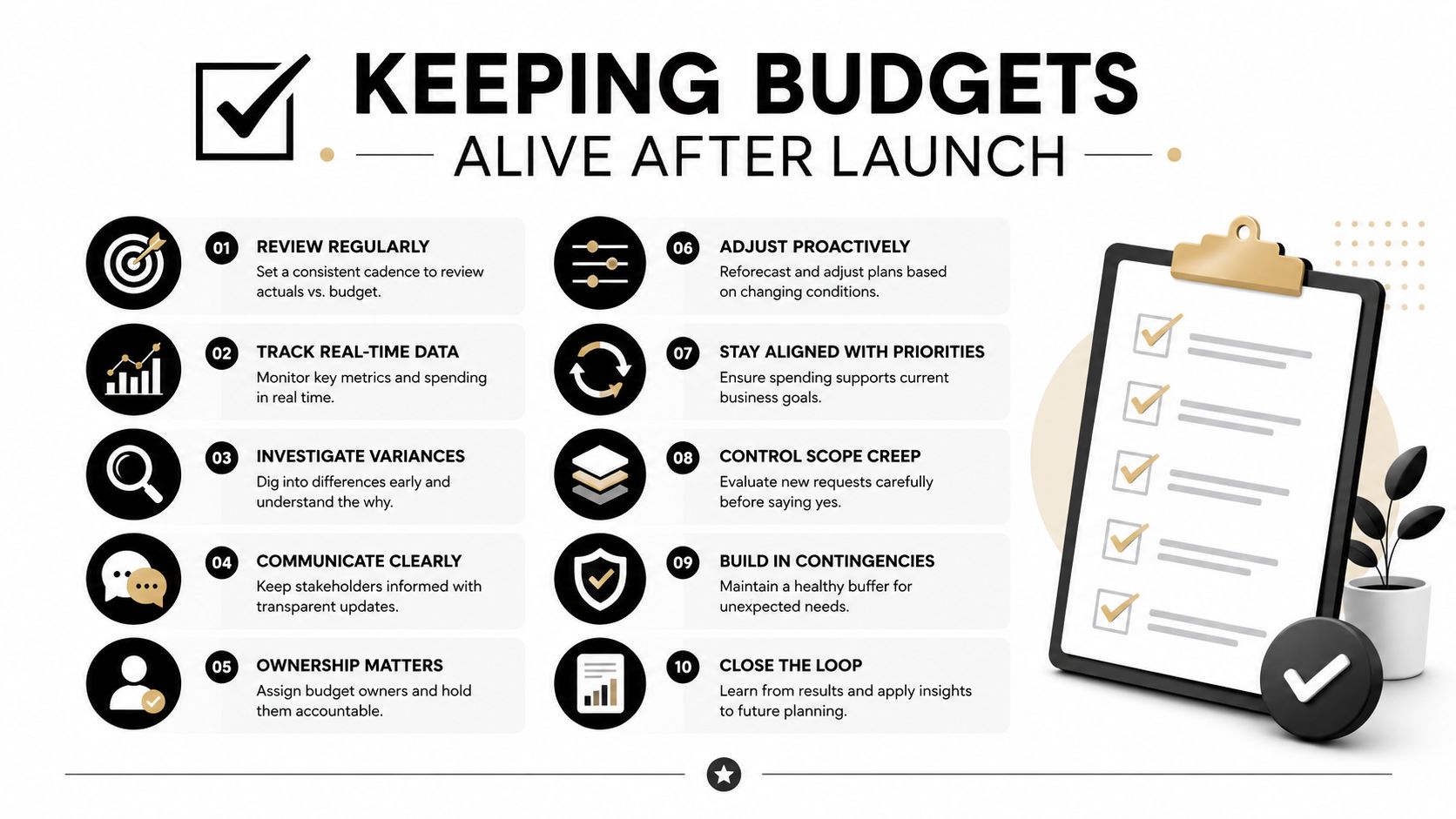
Give every budget line one named owner. That person doesn't have to fix every breach, but they must maintain the threshold, coordinate investigation, and document exceptions.
Use a maintenance rhythm that fits ordinary planning:
- Quarterly review: Recalculate p75 values from current RUM data and inspect whether the target still reflects the product's most important journeys.
- Release review: Confirm that new routes, AI features, integrations, and media surfaces have explicit budgets before development finishes.
- Re-baseline trigger: Start a formal review when traffic mix, device profile, or feature surface shifts by more than 10 percent.
- Exception record: Explain why a budget was exceeded, who accepted the trade-off, and when the team will revisit it.
The performance monitoring tools guide is a useful reference when deciding how dashboards and alerts should support this rhythm.
Some teams keep budgets alive for 18 months because their release gates reject regressions and owners respond to alerts. Other teams abandon the same practice after launch because the limits never affect a pull request or roadmap discussion.
Rule of thumb: If a budget hasn't blocked a PR or triggered a re-baseline conversation in 90 days, it isn't a budget. It's decoration.
The strongest teams treat performance budgeting as a living contract. They protect the user experience, make AI spend visible, and revisit limits when the product changes instead of allowing every regression.
Wonderment Apps helps teams modernize web, mobile, and custom software with scalable engineering, UX, AI integration, and ongoing product support. Visit Wonderment Apps to discuss a performance-aware application plan and see how its prompt management toolkit can help govern AI prompts, integrations, logging, and cumulative cost.