


You're probably trying to make an Ed Tech app do too many jobs at once. A teacher wants it to work on shared tablets, a parent wants it to be simple, a district wants it to connect to existing systems, and a product team wants it to be ready for AI without a rewrite. That combination is where most learning products either become sticky and trusted, or quietly get replaced.
What an Ed Tech App Really Is in 2026
A teacher in a mid-sized district opens a gamified lesson on five shared tablets, and two of them still have yesterday's login state. Two students are on a long bus ride home, so they need the same lesson to work offline. That's a key test of an Ed Tech App in 2026; it's not whether the interface looks modern, it's whether the product still helps someone learn when the room, the device, or the network is messy.
The category is broader than most people think
A true Ed Tech App is any software whose primary job is to facilitate learning, teaching, or skills development. That includes consumer learning apps like Duolingo or Khan Academy, classroom tools that help teachers assign and assess work, and workforce platforms that support compliance or upskilling. A productivity app with a quiz screen bolted on doesn't count unless learning is the point of the product.
The category has also grown up around three user contexts. One is the consumer learner, where habit, delight, and simple onboarding matter most. Another is the classroom and district layer, where rosters, reporting, and admin controls decide whether a pilot survives. The third is enterprise and workforce learning, where buyers care about training completion, auditability, and rollout across teams.
For a useful benchmark, MUN app key features shows how a focused learning product can make abstract coordination feel concrete for users who need structure, clarity, and repeatable workflows. That same idea applies across education software, the best apps reduce friction around the actual learning task instead of adding more screens. If you're comparing app concepts, that's the lens to use.
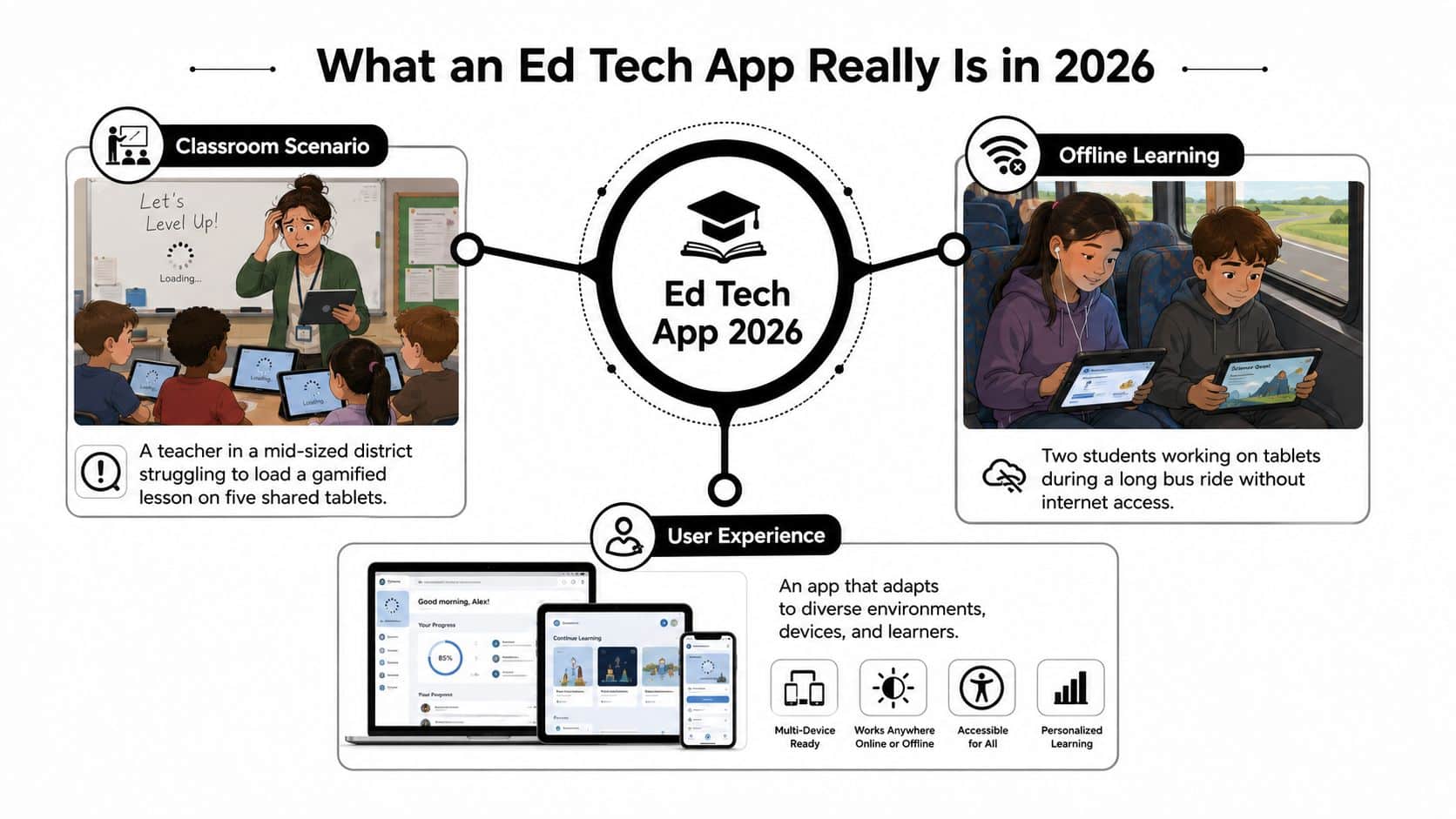
A good shorthand is to ask four questions. Who does it serve? What does it do? How does it scale? How does it stay modern? If you can answer those clearly, you're already thinking like a product team instead of a feature checklist.
For a deeper product framing, the architecture and delivery approach in this e-learning software development guide is a useful companion. It helps connect the idea of a learning product to the practical work of building one that can survive real usage.
The Three Layers of an Ed Tech App Ecosystem
Think of the market like a school cafeteria that gradually expands into a full campus. At the first table, people are buying snacks for themselves. At the next building, schools and training teams are coordinating meals for entire groups. At the far edge, enterprises are planning food service for whole departments and compliance programs.
Start with the consumer layer
Consumer learning apps are the products people download on their own, often without any institution involved. Duolingo is the clearest benchmark in the brief, with $1 billion in in-app revenue, 700 million registered users, and 172 million downloads in 2025, according to Business of Apps' education app market data. That tells you what consumer-scale success looks like, but it also tells you how rare it is.
At this layer, the app has to win on daily habit. The buyer, user, and evaluator are often the same person, which means onboarding, motivation, and retention matter more than procurement language. If the product doesn't feel immediately useful, the user leaves before any monetization strategy has a chance.
Move up to institutional learning
The institutional layer includes schools, colleges, tutoring organizations, and district-adopted tools. Here the app needs to fit rosters, gradebooks, and identity systems, not just a learner's attention span. That's where standards like LTI, SSO, and exportable reporting become part of the product itself, not a nice-to-have.
Practical rule: if the app can't plug into existing school workflows, the school ends up working around the app instead of with it.
This is also where evaluation shifts. Teachers may love the experience, but admins want reporting, supportability, and proof that the tool won't create more manual work. A product can be excellent and still fail if it asks a district to rebuild processes around it.
Finish with enterprise and workforce learning
The enterprise and workforce layer covers compliance training, certification, and internal upskilling. The daily user may be an employee, but the buyer is usually a manager, L&D lead, or compliance officer. That means the product needs strong enrollment logic, completion tracking, and clean audit trails.
To map any unfamiliar product, ask five questions: who pays, who uses it daily, who evaluates it, what data it touches, and how it gets distributed. Once you know those answers, the roadmap becomes clearer. A consumer app leans toward retention. An institutional app leans toward interoperability. An enterprise app leans toward governance and reporting. For systems thinking that supports this kind of product placement, this systems design architecture resource is a helpful reference.
Essential Features That Make an Ed Tech App Work
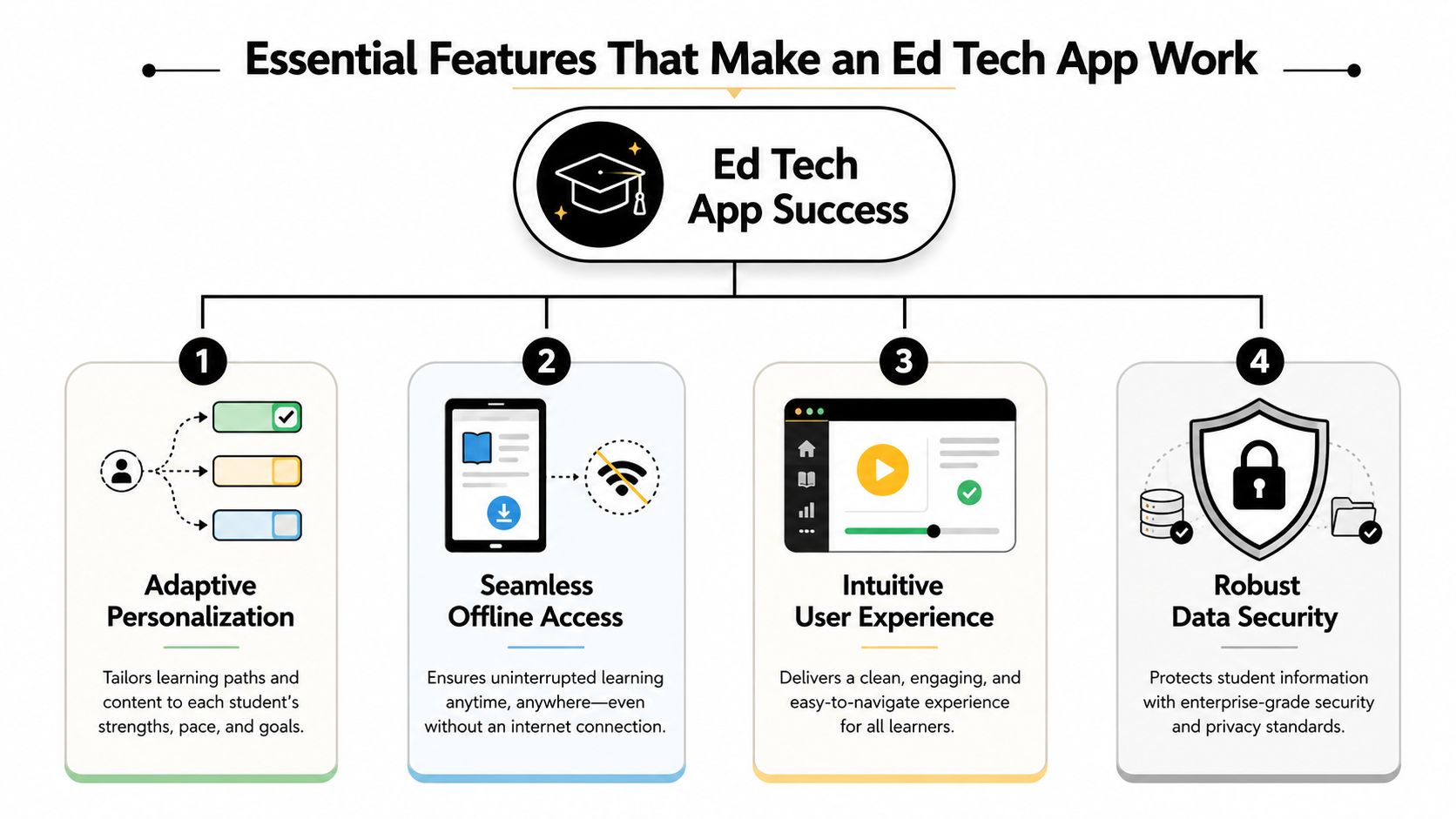
Many teams start by adding features. The better move is to decide which features truly earn daily use, because in education, unused software is still a cost. The strongest apps usually win on four pillars, and each pillar solves a different kind of failure.
Learner experience has to survive messy reality
The first pillar is learner experience. That includes adaptive content, multilingual support, accessibility, and offline-first behavior. A lesson that disappears when Wi-Fi drops isn't resilient, it's fragile.
Products for tutoring businesses often get judged hard. A good checklist of practical tutoring workflows appears in features tutoring businesses actually need, especially around scheduling, communication, and continuity between sessions. In education, continuity matters because the learner's context changes constantly.
Progress tools turn activity into evidence
The second pillar is engagement and progress. Streaks, spaced repetition, formative assessment, and teacher dashboards matter because they turn a session into something measurable. A learner can feel productive, but a teacher still needs to know what actually stuck.
That's why quiz results alone aren't enough. The useful question is whether the app helps a teacher intervene before confusion compounds. A dashboard that shows struggling concepts is more valuable than a glossy streak meter that only rewards taps.
Integration is what makes a pilot survive
The third pillar is integration and interoperability. In schools, that means LTI, SSO, and exportable reporting formats such as CSV, xAPI, and SCORM. In practice, this is often the difference between a small classroom trial and district-wide rollout, because the app can live inside systems people already trust.
Safety and compliance are not add-ons
The fourth pillar is safety and compliance. That includes data minimization, parental consent where required, and audit trails that show who did what and when. If those basics are missing, procurement gets slower and support gets painful.
A product can be loved by teachers and still fail procurement if it can't explain its data handling clearly.
That's why feature cost matters too. Engagement features help a pilot feel alive, but integration features help the product scale. Privacy and compliance features protect the deal itself. For a user-experience lens that ties the UI to real classroom adoption, this app user experience guide is a useful companion.
How an Ed Tech App Is Built and How It Scales
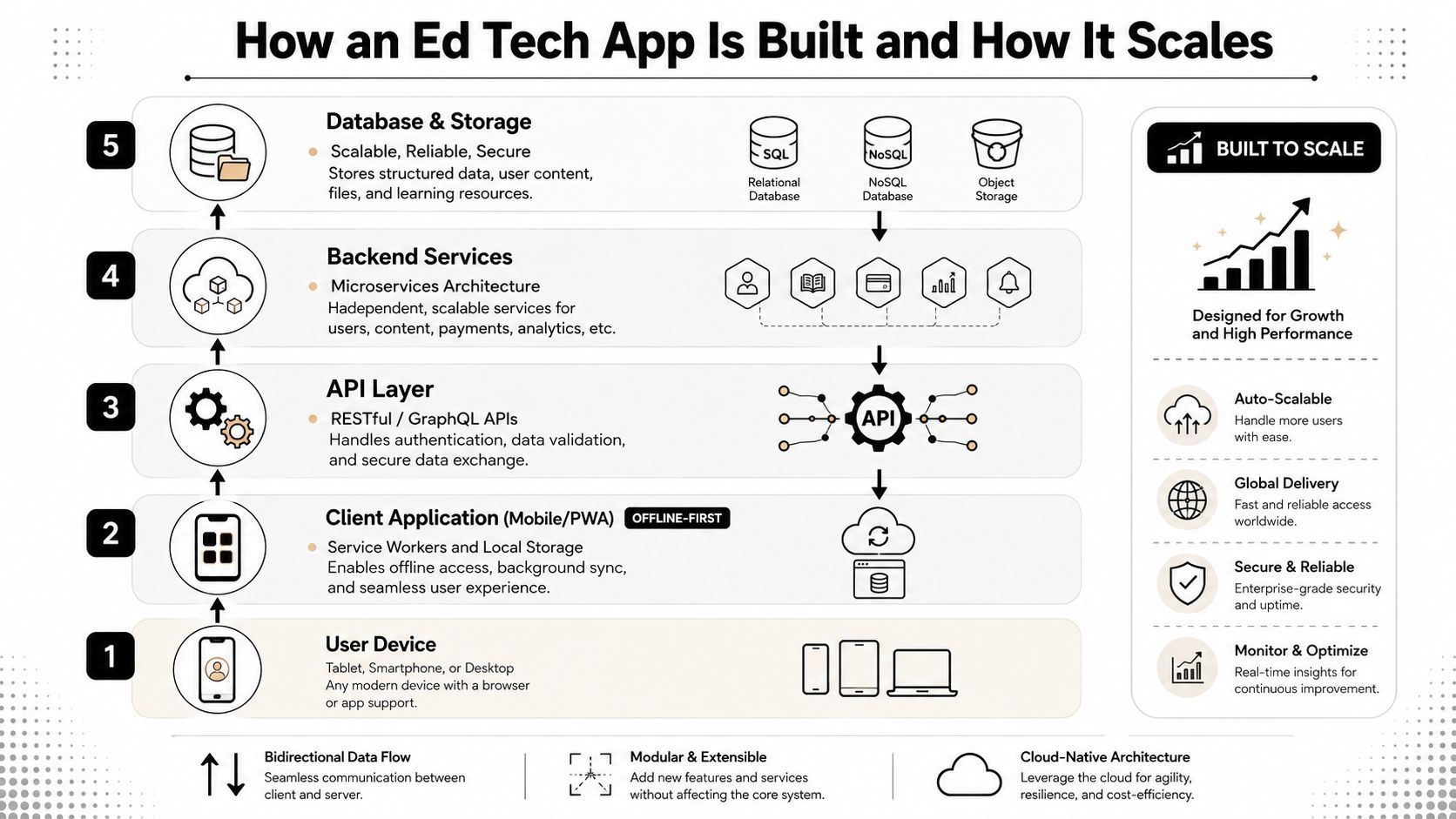
The cleanest way to think about architecture is from the device up. A student's tablet is the entry point, but the actual product is the chain of systems behind it. If any layer is weak, the learning flow breaks somewhere between login and completion.
Build from the client upward
Start with a mobile app or PWA client that assumes connectivity will fail. Use Service Workers and local storage, and keep learner progress on the device until sync is possible. In mobile stacks, local embedded databases such as SQLite, WatermelonDB, or Isar are a practical fit when the learner may need to keep working in transit or on unstable Wi-Fi.
Above that sits the API layer. Its first jobs are authentication, content delivery, and assessment submission. If the API is hard to reason about, every downstream feature becomes brittle.
Then comes the integration layer. LTI launches and SSO handshakes happen here, and the app either feels native inside a school ecosystem or feels like an extra system people must remember to visit. The final layer is data and analytics, which turns learning events into dashboards for teachers, admins, and product teams.
Scalability is classroom messiness at scale
A lot of teams hear “scalability” and think traffic spikes. In ed tech, scalability also means shared devices, roster churn, multiple ages in one room, and low-bandwidth usage. Queue-based retries and background sync matter because they keep a lesson moving even when the network doesn't cooperate.
Design for interruption. In education, the interruption isn't an edge case, it's part of normal use.
Two deployment shapes show up often. A single-tenant setup fits enterprise customers with stricter data residency or isolation needs. A multi-tenant SaaS setup is usually better for consumer or freemium products that need efficient operation and faster iteration.
Instrument the product from day one. Track lesson start, lesson completion, time-on-task, error rates, and content performance. Once those signals flow reliably, you can make better decisions about what to improve, what to automate, and what to remove. If you want a product concept translated into implementation details, the architecture and systems guidance in the earlier linked resource is a strong starting point.
Adding AI to an Ed Tech App Without Losing Control
AI is becoming normal in learning products, but the model itself is rarely the hardest part. The challenge is keeping behavior predictable when prompts change, data sources shift, and costs accumulate across vendors. If you're treating AI like a widget, you'll get widget-level control. If you're treating it like production infrastructure, you can trust it.
AI usually lands in three places
The first place is the tutor or chat experience. Here the model answers questions, explains concepts, or guides practice. The input needs are simple in theory, but easy to get wrong in practice, because the model needs context about the learner, the lesson, and the boundaries of what it should not do.
The second place is content generation and personalization. AI can help draft quizzes, rewrite explanations, or vary practice paths. That's useful, but it also means every output needs guardrails so the product doesn't generate content that drifts away from curriculum goals.
The third place is analytics for teachers and operators. AI can summarize class patterns, flag gaps, or cluster learner behavior. Those are high-value use cases, but they depend on trustworthy event data and clear permission boundaries.
Governance matters more than novelty
The cost problem shows up fast. Every AI call costs tokens. Every prompt can drift. Every model version can change behavior in a way the team didn't expect. A product owner who can't see that clearly is operating blind.
That's why a prompt management system becomes an administrative layer, not just a convenience layer. It gives teams a prompt vault with versioning so prompts can be reviewed and rolled back. It adds a parameter manager so internal database access can feed the model safely. It keeps a logging system across integrated AI providers so debugging and audits don't become detective work. It also includes a cost manager so entrepreneurs can see cumulative spend instead of getting surprised at the end of the month.
For practical classroom-side context on AI adoption, the guide on AI for educators is a useful read because it keeps the discussion grounded in teaching realities rather than hype. That matters, because schools don't buy “AI,” they buy safer and better ways to support learning.
The cleanest AI feature is the one a district can understand, audit, and turn off if needed.
The build-vs-buy question comes next. Some teams will want to assemble their own prompt layer. For most growing ed tech apps, centralizing prompt operations early is cheaper than retrofitting observability after the product is already in the wild. That's especially true when multiple models and multiple teams are involved.
Privacy, Equity, and the Procurement Reality
Sales conversations don't happen in a demo room. They happen when a procurement officer asks for the privacy policy, the data flow diagram, the subprocessor list, and the learning evidence. If your app touches minors, compliance isn't paperwork, it's the gate to revenue.
Privacy failures kill trust fast
A 2022 report found that 96% of apps used or recommended by K-12 schools share students' personal information with third parties, and about three-fourths of the time that data is shared with advertisers or other entities that may profit from it, while 79% could access student location information and 52% could access calendar and contact information, according to the K-12 Dive summary of the Internet Safety Labs report. Human Rights Watch's analysis of 164 EdTech products across 49 countries found that 89% risked children's privacy by embedding trackers tied to the advertising industry, as summarized in this global tracker review. Those are not niche problems.
The lesson is simple. Minimize data collection. Make consent legible. Keep audit trails. Don't ask schools to defend a product they can't explain.
The FTC's action against Edmodo is the cautionary tale here. The agency said Edmodo collected children's personal data without obtaining parental consent, used it for advertising, and failed to give schools and teachers enough information about its data practices, according to the FTC's press release. That's what happens when compliance gets treated as someone else's job.
Equity is a product decision, not a slogan
A product that only works well on fast Wi-Fi and personal devices is not neutral. It favors already-connected learners. The stronger products are built for mobile-first, offline-ready, multilingual use from the start, because many learners still deal with shared devices, weak connectivity, and unsupported first languages.
That point lines up with the accessibility guidance from 1EdTech, which says accessibility should be built in, not added later, and that products for public education increasingly need to align with WCAG 2.1 AA expectations. The compliance details matter, but the product decision matters first. If learners can't use the app where they are, the market for the app is smaller than it looks.
Buyer's test: if legal, IT, and classroom staff all need separate explanations just to understand the data path, the product isn't ready for procurement.
Before a sales conversation, a serious ed tech app should be able to ship a clear privacy policy, a data flow diagram, a subprocessor list, and an evidence summary that disaggregates learning impact by user group. That package builds trust faster than a polished demo ever will.
Monetization and Go-to-Market for an Ed Tech App
The best monetization model depends on who feels the pain most. Some products are bought by individuals, some by institutions, and some by organizations with training budgets. The wrong model doesn't just reduce revenue, it changes the product roadmap in unhealthy ways.
Compare the three common models
| Model | Who Pays | What They Need | Biggest Risk |
|---|---|---|---|
| Freemium or consumer subscription | Individual learners or parents | Delight, habit, and simple upgrades | Needing mass adoption before revenue is stable |
| Institutional licensing | Schools, districts, colleges, or tutoring organizations | Interoperability, reporting, and admin controls | Long sales cycles and onboarding complexity |
| Enterprise or workforce sales | Corporate L&D or compliance buyers | Auditability, completion tracking, and services | Heavy implementation expectations |
Consumer subscriptions can work when the product has strong retention loops and a willingness to wait for scale. Duolingo is the obvious reference point, but it's a ceiling case, not a default strategy. Few teams will achieve that level of success, and they shouldn't plan as if they will.
Institutional licensing fits products that can slot into school workflows and survive procurement. The buyers want proof, not just polish. If the product can't fit rosters, reporting, and support processes, sales will stall no matter how clever the learning design is.
Enterprise and workforce sales reward products that solve specific training or compliance pain. The buyer may accept more setup if the product can make completion, reporting, and management easier. That path usually works best when the product has a clear operational story, not just content.
A few go-to-market mistakes keep showing up. Teams treat marketing like a post-launch task. They forget that teacher onboarding is part of product quality. They underestimate how long district sales cycles take. They also assume the app can fix adoption problems after launch, when those problems really started in the first 30 seconds of setup.
Modernizing an Ed Tech App for the Next Five Years
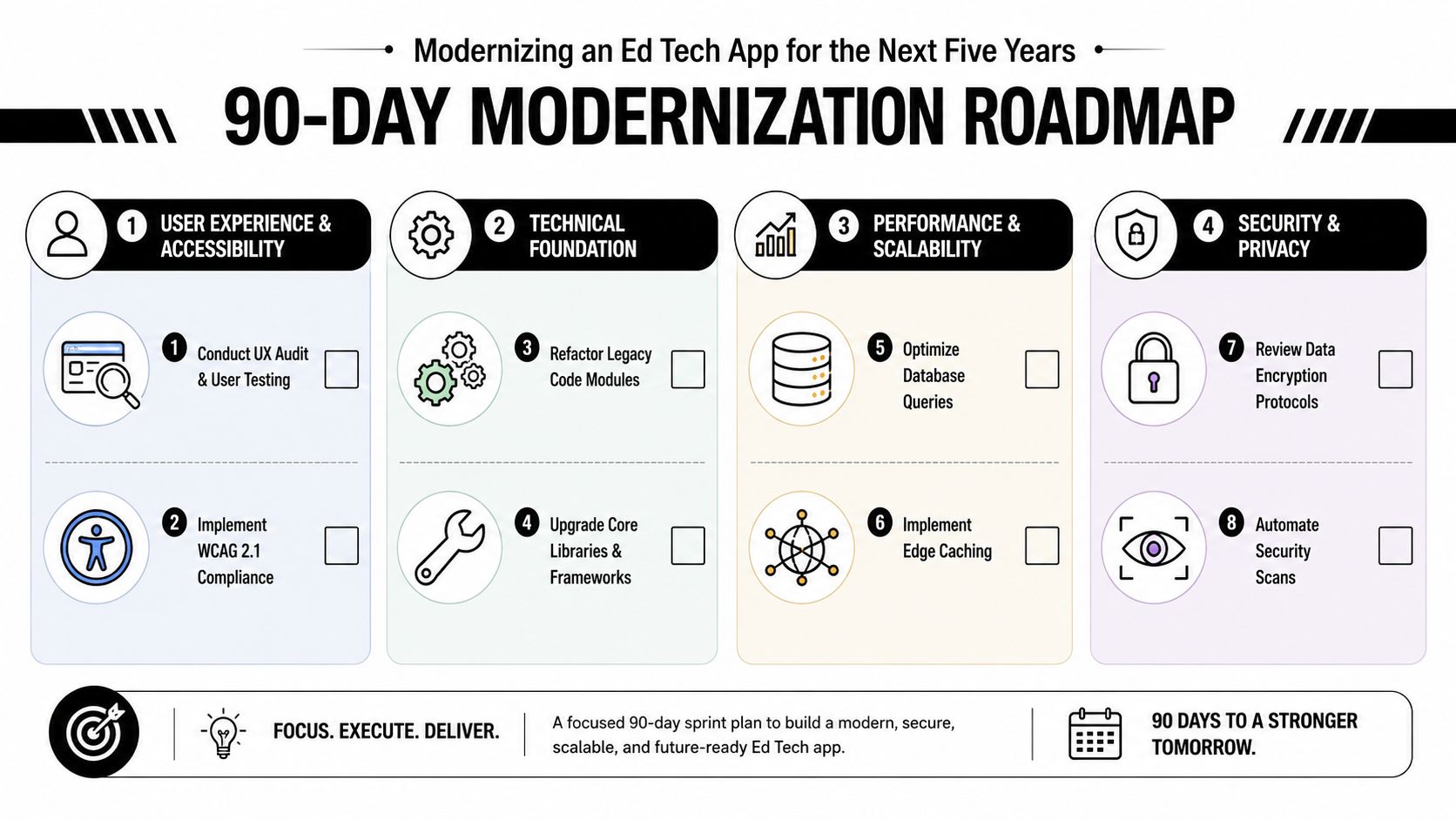
Modernization works best as a 90-day rhythm, not a dramatic rewrite. The teams that stay competitive keep improving the stack in parallel, because waiting five years between upgrades usually means the product has drifted away from the market.
Run four workstreams at once
First, do an architecture audit. Map the current product against LTI, SSO, and offline-first readiness, then identify where the weakest link sits. Second, run an AI workstream that centralizes prompts, parameters, logging, and cost across every model the product uses. Third, complete a privacy and equity workstream that produces procurement-ready documentation. Fourth, build a measurement workstream that moves the team from engagement metrics to learning impact metrics, disaggregated by user group.
A prompt management system is the connective tissue across those efforts because it keeps AI behavior visible and governable while the rest of the product evolves. Without that control plane, AI features become harder to support, harder to audit, and harder to cost correctly.
The long-term habit is simpler than the tooling. Ship for the least connected learner. Treat AI as a governed system. Prove learning impact. Modernize every quarter, not every five years.
If you're planning an ed tech app, or modernizing one that's already in market, Wonderment Apps can help you connect the product, AI, and compliance pieces without rebuilding from scratch. Visit Wonderment Apps to explore how their prompt management, integration, and modernization work can support a learning platform that's ready for real classrooms, real procurement, and real scale.