

Most production failures trace back to preventable testing gaps, not a lack of effort. The historical warning is substantial: NIST's software-testing infrastructure report found that more than half of software defects weren't discovered until downstream development stages. That's the wrong time to discover that checkout retries can charge a customer again.
The practical response isn't to ask QA to work harder before launch. It's to make quality part of requirements, architecture, code reviews, deployment decisions, and everyday operations. Modern software testing best practices also need to cover prompts, model behavior, database access, and AI spending, because a feature can return a technically successful response that's inaccurate, unsafe, or unnecessarily expensive.
For this new reality, Wonderment Apps has developed a prompt management system that developers and entrepreneurs can plug into existing software. Its administrative controls help teams manage AI integration rather than treating prompts as mysterious text tucked inside application code. A demo is available on request.
Use this 2026 checklist to prioritize work from strategy through scale. You don't need a brand-new testing department or a heroic rewrite. You need clear ownership, useful checks at the right layer, and a reliable way to learn from what happens after release.
1. Treat AI Prompts as Versioned, Testable Assets
A prompt change is a behavior change. Replacing a phrase in a support assistant's instructions can change its tone, tool selection, response length, or willingness to answer an uncertain question.
AI-assisted development doesn't remove the need for evaluation. In Katalon's State of Software Quality Report 2025, 76% of respondents reported using AI-powered tools in software testing. Adoption makes prompt governance relevant, but it doesn't prove those tools produce trustworthy results.

Test behavior, not matching sentences
Say a retailer uses AI to generate product descriptions. Build an evaluation set containing incomplete specifications, ambiguous sizing, restricted claims, and instructions hidden inside product data. Check whether outputs stay factual and follow the required structure.
- Version the full configuration. Record the prompt, model identifier, generation settings, retrieval configuration, and evaluation results together.
- Use meaningful thresholds. Assess factual support, required fields, prohibited content, latency, and cost rather than demanding identical wording.
- Separate approval from editing. Let someone revise a prompt without automatically promoting it to production.
- Prepare rollback. Keep the previously approved configuration available and test the rollback path.
Store prompts separately from application logic when independent deployment makes sense, but preserve a traceable relationship between both releases. Our prompt vault with versioning supports that administrative foundation. Teams still need representative evaluations and explicit release decisions.
2. Shift Left and Test Early in the Development Lifecycle
The cheapest requirement to change is the one nobody has implemented yet. Bring QA into story kickoff and design review, before developers commit to behavior that product, security, and support interpret differently. A prompt change belongs in that same review. It alters behavior just as surely as a code change, and it needs acceptance criteria before anyone tunes wording.
Historical defect-cost comparisons summarized in a verification-economics review show rising repair costs across development stages, with substantial variation between datasets. Use that finding to justify earlier feedback. Avoid claiming every production bug costs the same multiple.
Make stories testable before coding
Consider a healthcare portal adding caregiver access. A design review should establish which records caregivers can see, how authorization expires, and what happens when a patient revokes permission during an active session. For an AI-assisted feature, add the refusal cases: what the system must not reveal, which inputs it must reject, and how it behaves when context is missing.
Those questions belong in acceptance criteria, not in a frantic release-day conversation.
- Add a readiness check. Require observable outcomes, boundary conditions, permission rules, failure behavior, and prompt expectations before implementation begins.
- Pair QA with developers. Walk through examples and identify which checks belong in unit, API, or user-interface tests.
- Review architecture for testability. Make clocks, external services, and identity contexts replaceable in tests.
- Track discovery phase. Record where defects originated and where the team detected them. A defect found in design review is cheaper to fix than one found in staging, even when the root cause is the same.
Practical rule: If nobody can explain how to verify a requirement, it isn't ready for implementation.
Early testing doesn't mean predicting everything. It means resolving expensive ambiguity while changing direction is still straightforward.
3. Follow the Test Pyramid for a Balanced Test Suite
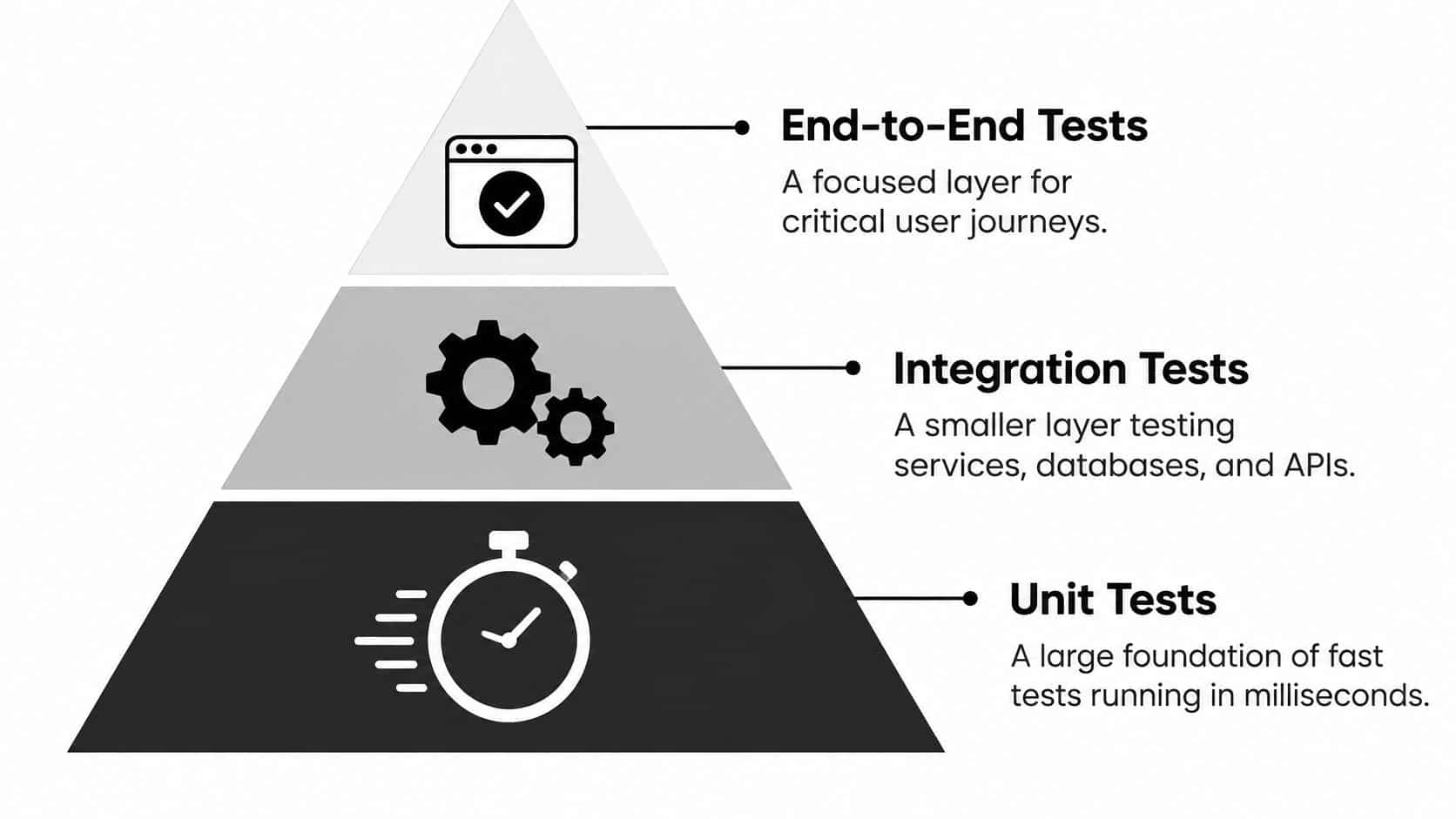
A browser test shouldn't be your primary tool for checking tax arithmetic. It's an expensive way to verify logic that a focused unit test can exercise directly.
Build a broad foundation of unit and component tests, add integration and contract tests around boundaries, and reserve end-to-end tests for important user journeys. Our guide to functional tests versus unit tests helps distinguish business-behavior coverage from isolated code checks.
Put each assertion where it belongs
For an ecommerce checkout, test discount combinations and rounding in units. Test payment-provider responses, inventory reservations, and order persistence through integration checks. Use the browser to verify that a customer can complete the assembled journey.
- Audit execution time. Identify which suites consume pipeline time and whether their assertions require that layer.
- Keep boundaries honest. Use contract tests to detect incompatible API changes between mobile clients and backend services.
- Avoid duplicate coverage. Don't repeat every pricing variation through the interface.
- Keep realism where it matters. Preserve end-to-end checks for authentication, payment, and critical navigation.
The pyramid isn't a mandatory ratio. A service-heavy application may need substantial integration coverage, while a desktop editor may need deeper component testing. Choose the mix by architecture and failure risk, not by how neatly a dashboard resembles a triangle.
4. Use Test-Driven and Behavior-Driven Development
A transaction-limit requirement sounds simple until someone asks whether pending transfers count toward the limit. Behavior-driven development, or BDD, makes that disagreement visible before it becomes inconsistent code.
Write scenarios in Given, When, Then form and review them with product, engineering, QA, and relevant domain specialists. Our behavior-driven development framework guide explains how shared examples can become executable specifications.
Start with the business rule
For a fintech transfer feature, describe an account with pending activity, a customer attempting another transfer, and the expected approval or rejection. Add scenarios for cancellation, reversal, and requests arriving concurrently.
Keep the scenario about account behavior, not which button somebody clicks. Tools such as Cucumber or Behave can connect those readable scenarios to automated checks.
Test-driven development, or TDD, works closer to implementation: write a failing test, implement enough behavior to pass it, then refactor.
- Apply TDD selectively. Start with pricing, eligibility, permissions, and other complicated business logic.
- Write useful failures. A failing test should explain the broken rule without requiring a debugging expedition.
- Keep BDD examples focused. Separate distinct rules instead of writing sprawling scenarios.
- Refactor the tests too. Remove duplication without hiding the intent behind layers of helpers.
Don't turn either practice into ceremony. A test written first can still assert the wrong thing, and a plain-language scenario isn't useful if nobody responsible for the business rule reviews it.
5. Apply Risk-Based Testing to Prioritize Effort
When release time gets tight, don't distribute testing effort evenly. A broken account-access rule deserves more attention than a slightly awkward marketing-page animation.
Risk-based testing combines the likelihood of failure with its consequences. Include revenue, privacy, security, accessibility, operational disruption, and the difficulty of recovering after something goes wrong.
Rank failures, not just features
Say a nonprofit is launching a donation platform. Payment completion matters, but so do duplicate-charge prevention, receipt delivery, recurring-gift cancellation, and restoring a donor's progress after an interrupted connection.
Write those failure modes down. A feature-level label such as payments is too broad to guide a tester's next action.
- Describe the consequence. Specify who gets harmed and whether the damage can be reversed.
- Consider exposure. Review recent changes, external dependencies, concurrency, and unfamiliar implementation areas.
- Assign the testing response. Connect each major risk to named checks and an accountable owner.
- Record residual risk. Make untested conditions visible to whoever approves the release.
Prioritize the failure you can least afford, not the defect that makes the loudest screenshot.
Revisit priorities after incidents, architectural changes, and new integrations. An AI assistant that starts retrieving internal records needs different tests from one that only rewrites public text.
Risk scoring supports judgment; it doesn't replace it. Don't let a tidy spreadsheet downgrade an authorization flaw because the team thinks exploitation is unlikely.
6. Build Continuous Testing into CI/CD Pipelines
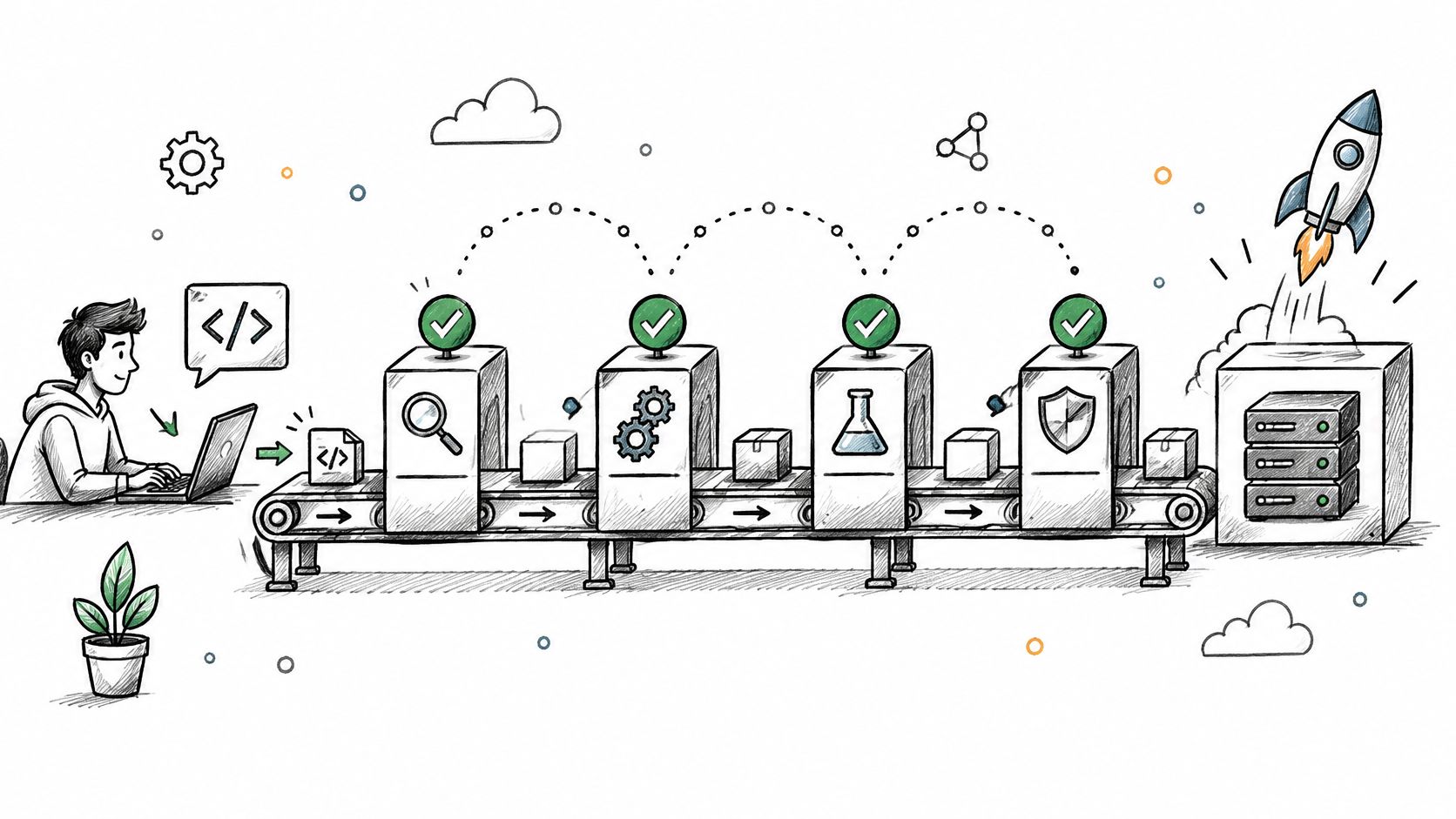
A deployment pipeline should produce evidence, not merely move artifacts. Run checks where they can stop a bad change before it reaches a broader audience.
The integration challenge is familiar: mabl's 2024 State of Testing in DevOps Report found that 89% of surveyed development and quality professionals said their teams were prioritizing DevOps transformation. Testing needs to be part of that delivery work, not an independent queue afterward.
Make failures actionable
A SaaS pipeline might run linting, unit tests, and secret scanning on proposed changes; integration and contract suites before promotion; and smoke checks after deployment. Use GitHub Actions, GitLab CI, Jenkins, or Azure DevOps according to the environment your team maintains.
Give each failure enough context to reproduce it: configuration, sanitized input, relevant logs, and the deployed revision.
- Put fast checks first. Don't wait for browser tests to discover a compilation failure.
- Isolate test state. Create deterministic fixtures and separate accounts or namespaces for parallel runs.
- Quarantine responsibly. Assign flaky checks an owner and repair deadline, while preserving alternative coverage for critical behavior.
- Define promotion rules. Specify which failures block deployment and who may approve exceptions.
Retries can help diagnose intermittent infrastructure problems. They shouldn't turn a consistently unreliable check into a reassuring green badge.
7. Choose Modern Test Automation Frameworks Wisely
Choose the framework your team can debug under pressure, not the one with the flashiest demonstration. Language fit, application architecture, device support, and failure diagnostics matter more than a long feature list.
Automation also creates maintenance work. TestRail's 2025 industry report found that organizations automated 40% of testing on average, with obstacles including test breakages, test-data problems, and skills gaps.
Pilot the difficult journey
For a retail platform, evaluate Playwright against checkout behavior involving redirects, asynchronous updates, and browser differences. For native mobile applications, evaluate Appium against permission dialogs, device behavior, and recovery after the app moves into the background.
Use Postman collections for repeatable API workflows where they fit, but distinguish response assertions from actual consumer-provider contract verification.
- Prefer stable selectors. Use accessible roles or dedicated test attributes instead of brittle CSS paths.
- Wait for conditions. Check observable readiness rather than inserting arbitrary sleeps.
- Inspect failure artifacts. Traces, screenshots, network details, and device logs should shorten diagnosis.
- Budget for ownership. Include fixtures, runner maintenance, dependency updates, and reviewer time.
Start with repeatable smoke and regression checks, then expand where automation saves meaningful effort. Don't automate a rapidly changing interface just to inflate coverage.
A useful pilot ends with another engineer maintaining the tests. If only the author can understand the suite, you've created a dependency, not a capability.
8. Include Performance and Scalability Testing
A checkout that passes for one tester can fail when simultaneous sessions hit the same inventory row. Load, stress, and soak testing answer different questions, so a brief traffic burst is not a performance strategy.
Use load tests for expected demand, stress tests for behavior beyond it, and soak tests for degradation during sustained operation. Our guide to what load testing involves covers how to design realistic workloads before you set thresholds.
Reproduce the workload, not just the request count
For a seasonal retail sale, model browsing, searching, cart updates, payment attempts, and retries. Vary cache state and test data instead of hammering the easiest endpoint. If checkout depends on a third-party API, ask for throughput evidence and failure behavior, as in Context.dev powers Bystreet's million scrapes, then reproduce your own mix. Vendor evidence informs dependency questions; it does not replace your traffic model.
- Set performance budgets. Define acceptable latency, error behavior, queue growth, and resource use.
- Observe the whole path. Inspect database contention, connection pools, downstream limits, and background jobs.
- Test recovery. Confirm the application stabilizes after overload instead of staying unhealthy.
- Exercise AI limits. Include provider throttling, slow responses, long outputs, and expensive retry loops. Run the same scenario against each prompt version you plan to ship, because longer prompts and larger outputs change latency and token cost.
For a media app, run sustained playback while watching memory and connection growth. Schedule performance tests regularly so infrastructure and dependency changes do not invalidate earlier results.
9. Complement Automation with Exploratory Testing
A script can confirm that a form submitted. A skilled tester can notice that the form's error message makes recovery almost impossible.
Exploratory testing combines learning, test design, and execution. Give testers a focused charter, such as exploring donation recovery after an interrupted payment, and let them follow suspicious behavior instead of obeying a rigid click path.
Include accessibility as lived experience
Automated checks are useful, but they don't establish that people can complete a task. Applause's 2026 accessibility testing findings reported that 56% of assistive-technology users regularly encountered inaccessible apps during 2026.
For a healthcare consent flow, combine axe or WAVE checks with keyboard-only navigation, screen-reader testing, zoom and reflow review, and sessions involving people who use assistive technologies.
- Explore realistic disruptions. Try expired sessions, unexpected keyboards, malformed data, and interrupted connections.
- Assess task completion. Record whether users can understand errors and recover without outside help.
- Bring different perspectives. Invite support staff, product managers, and representative users.
- Capture reproducible evidence. Document the environment, steps, actual behavior, and user impact.
Release question: Can people finish the important task, or did the scanner merely stop reporting violations?
Reserve explicit time and budget for human validation. When resources are constrained, prioritize essential journeys and barriers that block completion rather than polishing a violation count.
Turn repeatable discoveries into regression checks where appropriate. Keep human exploration for questions that still require judgment.
10. Monitor Quality in Production and Control AI Costs with a Prompt Management Toolkit
A successful deployment proves that software shipped. Production monitoring helps establish whether users can rely on it.
For AI-enabled products, track output quality alongside latency, errors, tool access, and spending. A model call can succeed technically while producing an unsupported answer or triggering an expensive chain of retries.
Connect behavior to its configuration
Our administrative prompt management toolkit plugs into existing applications to support AI modernization. It includes a prompt vault with versioning, a parameter manager for internal database access, logging across integrated AI models, and a cost manager showing cumulative spend.
A SaaS team could use these capabilities to investigate a costly support workflow, identify its prompt configuration, and evaluate a shorter alternative before release. For broader evaluation criteria, compare the approaches discussed in this guide to the best tools for prompt version control.
- Record useful metadata. Capture prompt version, model, latency, token usage, outcome, and correlation identifiers.
- Protect sensitive content. Redact personal information, restrict log access, and define retention policies.
- Set operational boundaries. Configure spend alerts, request limits, timeouts, and fallback behavior.
- Measure useful outcomes. Review cost per completed task alongside response quality, not token usage alone.
A parameter manager doesn't replace server-side authorization. Test permission boundaries and prompt-injection attempts independently.
Use feature flags and controlled rollouts to limit exposure while observing new behavior. Request a toolkit demo to examine how prompt administration, traceability, and cost visibility would fit your existing release process.
The 10 Best Practices at a Glance
| Practice | Lifecycle Stage | Primary Benefit | Best For | Main Challenge |
|---|---|---|---|---|
| Treat AI Prompts as Versioned, Testable Assets | Development and release | Catches prompt quality regressions | AI products needing reliable, auditable outputs | Building representative evaluation datasets |
| Shift Left: Test Early in the Development Lifecycle | Requirements, design, and coding | Finds defects earlier and reduces fix costs | Teams seeking faster feedback and clearer requirements | Establishing new collaboration habits |
| Follow the Test Pyramid for a Balanced Test Suite | Test design and development | Keeps testing fast and maintainable | Teams balancing unit, integration, and end-to-end tests | Choosing a useful balance for each project |
| Use Test-Driven and Behavior-Driven Development | Requirements and development | Aligns implementation with intended behavior | Teams building complex business logic or shared specifications | Learning the practices and maintaining scenarios |
| Apply Risk-Based Testing to Prioritize Effort | Planning and testing | Directs effort toward consequential failures | Teams with limited time or testing resources | Keeping risk assessments objective and current |
| Build Continuous Testing into CI/CD Pipelines | Integration, delivery, and deployment | Enables faster, safer releases | Teams delivering frequent software changes | Maintaining reliable, efficient pipelines |
| Choose Modern Test Automation Frameworks Wisely | Test planning and implementation | Provides repeatable regression coverage | Teams automating web, API, or mobile tests | Maintaining scripts as applications change |
| Include Performance and Scalability Testing | Pre-release and ongoing operations | Reveals capacity and performance bottlenecks | Applications expecting high or variable traffic | Creating realistic test environments and scenarios |
| Complement Automation with Exploratory Testing | Development and testing | Finds unexpected usability and edge-case issues | Teams validating new features and real-world workflows | Results depend on tester skill and documentation |
| Monitor Quality in Production and Control AI Costs with a Prompt Management Toolkit | Production and ongoing operations | Improves visibility into quality, usage, and AI spend | AI-enabled products needing traceability and cost control | Acting on monitoring data while protecting sensitive logs |
Make Quality a Habit, Not a Phase
Treat these software testing best practices as a maturity checklist, not a shopping list. Buying another runner won't resolve ambiguous acceptance criteria, and adding browser tests won't compensate for missing authorization checks.
Start with shift-left testing and risk-based prioritization. Make requirements testable, identify the failures that would hurt users most, and assign ownership for verifying them. Those decisions give your team a defensible answer when release pressure forces trade-offs.
Build capability in a practical order
Once the team agrees on expected behavior, improve the testing layers and delivery process. Move isolated business rules into focused tests, verify service boundaries explicitly, and keep end-to-end coverage centered on essential journeys.
- Establish the foundation. Define acceptance criteria, representative test data, major risks, and accountable owners.
- Make feedback dependable. Maintain automation, isolate test state, and repair unreliable checks.
- Connect testing to delivery. Use pipeline gates that produce clear evidence and actionable failures.
- Extend governance into production. Version prompts, observe real outcomes, and monitor AI cost alongside quality.
Measure whether these changes help people make better release decisions. Useful signals include escaped defects, feedback time, flaky-test trends, recovery time, and how often pipeline failures reveal actual product problems.
Avoid turning any metric into the objective. A team can increase test count without covering another meaningful risk, just as it can reduce AI spending by producing answers that no longer help customers.
Make ownership visible
Every critical journey needs someone responsible for its quality evidence. Every unstable suite needs a maintainer, and every production alert needs a response plan that someone can execute.
At Wonderment Apps, our SaaS quality assurance blends manual and automated QA techniques. Teams can also request a demo of the prompt management toolkit or explore our staffing and managed project support when they need additional QA, engineering, product, or delivery capacity.
Keep the next step small enough to finish and important enough to matter. Pick the two practices your team is weakest on, give each a named owner and acceptance criteria, and schedule them into the next sprint.
We offer manual and automated QA, AI modernization, and a prompt management toolkit for versioning, logging, controlled database parameters, and cost visibility. Visit Wonderment Apps to request a toolkit demo or discuss QA staffing and managed project support for your next release.