

Is your AI-powered app ready for an audit tomorrow morning? If your team has been shipping AI features faster than your documentation has kept up, the answer is probably “mostly, but not comfortably.” The hard part isn't adding another model or API, it's proving what's running, who owns it, what data it touches, and how you control it when something changes.
That's where a compliance audit checklist stops being a paperwork exercise and starts acting like an operating system for governance. For product and engineering teams, especially those using AI in customer-facing workflows, the checklist should cover prompt versioning, model behavior, data handling, vendor risk, and cost controls in one place. A strong setup also makes audit prep a routine part of delivery, not a panic sprint before a review.
Wonderment Apps' prompt management approach fits naturally into that reality. A prompt vault with versioning, a parameter manager for internal database access, logging across integrated AI systems, and a cost manager for cumulative spend can give teams the evidence trail they need without turning every release into a scavenger hunt.
1. AI Integration Governance and Prompt Management Documentation
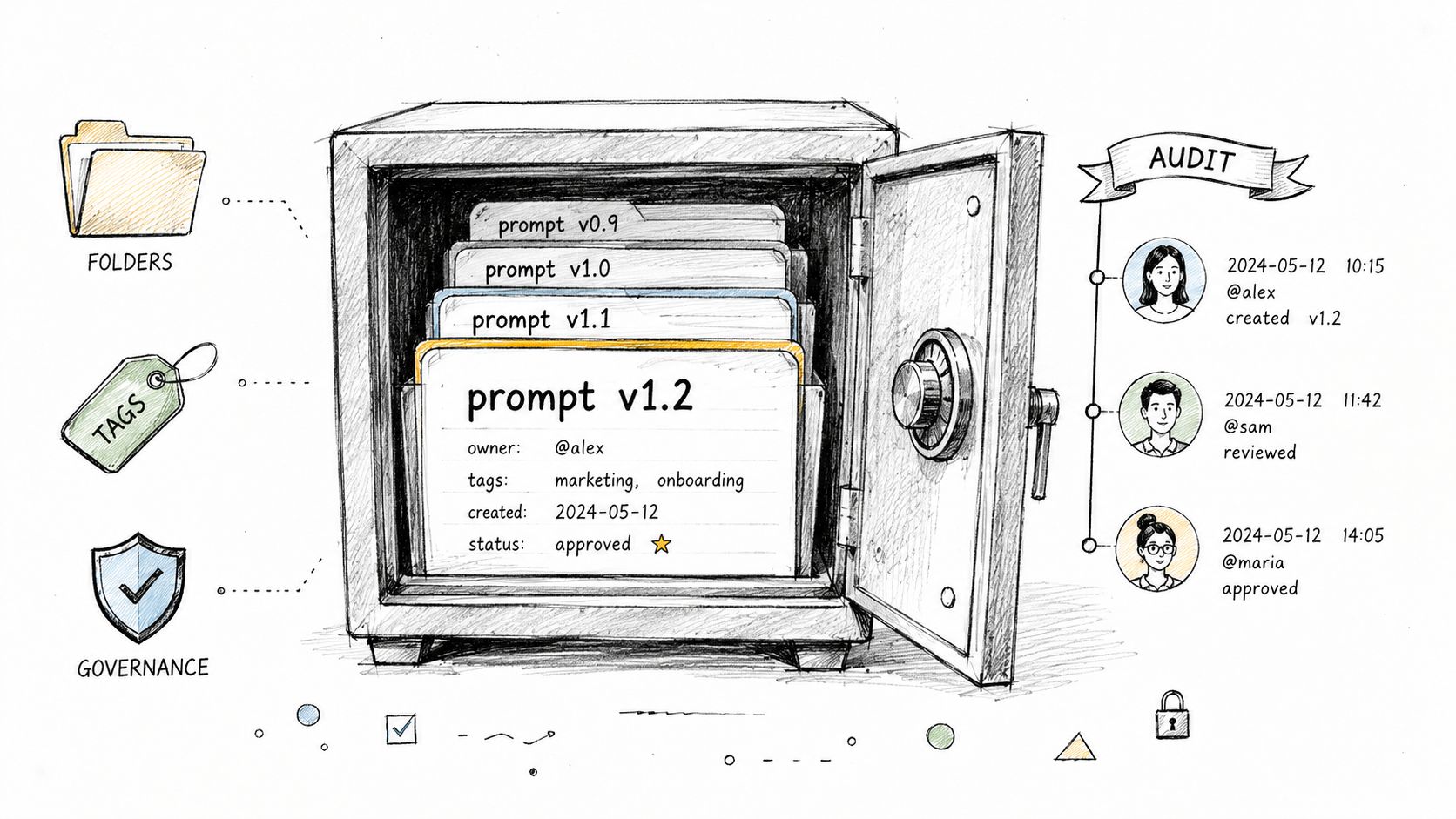
AI governance falls apart fastest when prompts live in scattered docs, Slack threads, and someone's browser history. A real audit trail starts with a complete inventory of every AI integration, then ties each one to a business purpose, an owner, and the exact prompt version in production. That lines up with the standard compliance sequence of defining scope, mapping obligations, assigning owners, gathering evidence, testing controls, and documenting gaps, which is why the checklist works better as a control framework than as a static form, as outlined in Hyperproof's compliance audit checklist guidance.
For product teams, the practical risk is prompt drift. A recommendation prompt that got tweaked for one campaign can change outputs across ecommerce, fintech, or healthcare workflows, and nobody notices until a reviewer asks which version produced which decision.
What to capture and what not to leave to memory
Practical rule: if a prompt can influence a customer outcome, treat it like a production dependency.
That means documenting the prompt text, version history, approved parameters, rollback path, and the owner who signed off on the change. A good naming convention matters more than many teams realize, because an audit review usually goes faster when version names tell a story without needing a detective.
A few controls make this manageable:
- Inventory every integration: List each AI feature, model, endpoint, and downstream workflow.
- Record business ownership: Name the team and person responsible for the prompt's behavior.
- Track prompt versions: Keep a clear history of edits, approvals, and deployment dates.
- Alert on production changes: Notify owners when a live prompt changes so drift doesn't hide.
- Review on a schedule: Revisit active prompts monthly or quarterly so stale logic doesn't linger.
Teams using prompt management tools usually discover that governance gets simpler once versioning is centralized. Without that layer, audit evidence turns into screenshots, guesswork, and a lot of “I think we changed that back in March.”
2. AI Model Training Data and Bias Audit
A model can pass a functional test and still create uneven outcomes. That becomes a real problem when the system influences lending decisions, healthcare prioritization, hiring workflows, or product recommendations, because auditors will ask where the training data came from, how it was screened for imbalance, and whether the testing process can be repeated by someone outside the original team.
Product and engineering teams need to treat this as part of the build, not a follow-up exercise. A fintech lending feature, for example, cannot look accurate in aggregate if it behaves differently for comparable applicants. Ecommerce teams should pay attention too, because personalization that consistently favors one group over another can damage customer trust long before it shows up as a formal compliance finding.
Bias review needs evidence, not a comfort statement
Start with the dataset, not the dashboard. If the team cannot explain the data sources, labeling choices, sampling approach, and feature selection, the fairness review is already too shallow to trust.
Practical rule: model accuracy is not a substitute for fairness testing.
Use established fairness frameworks, then keep the audit trail plain enough that another reviewer can follow it without guessing. Document the test method, the metrics used, the sample set, and the remediation path when a concern appears. It also helps to add a feedback loop so users can report outcomes that feel off, then route those reports into the model review process instead of letting them disappear into support tickets.
A solid review also needs a clear connection to model evaluation work. The team should be able to point to the same evidence used in the broader evaluation process, which is why a structured AI model evaluation process matters so much here. If the evaluation method changes from one release to the next, the bias review loses credibility fast.
For healthcare, fintech, and ecommerce teams, the trade-off is straightforward. More model complexity can improve performance, but it can also make explainability and fairness harder to prove. If the organization cannot defend the dataset and the testing method, the model should not be treated as audit-ready.
3. Token Cost Tracking and API Spending Controls
AI cost control is easy to miss at first. Early bills look small, then a new feature ships, traffic climbs, multiple models enter the stack, and finance still cannot tell which workflow is consuming budget. Audit reviewers now look for cost tracking at the feature level, not just the application level, especially in products that rely on more than one AI provider.
The practical payoff is straightforward. Product owners can see cumulative spend across each AI-enabled feature, compare that spend with business value, and decide whether a model call should stay in the product. Wonderment Apps' cost manager is built around that kind of visibility, which helps engineering teams defend AI usage with facts instead of enthusiasm.

Budget controls should be boring and predictable
The strongest cost control process is plain. It needs clear ownership, alerts that fire before the bill gets out of hand, and a review rhythm that product and finance can follow.
A few controls matter more than fancy reporting. Track spend at the feature level, so one expensive workflow does not hide inside a broad platform bucket. Set alert thresholds at 50%, 75%, and 100% of the monthly budget, which matches the operational guidance in the verified data from Sprinto's compliance statistics and checklist guidance. Review usage every month, so the team can act before the next billing cycle closes. Use caching and batching where prompts repeat, especially in summarization or other repetitive tasks. Forecast vendor demand with real usage patterns, because pricing talks go better when the numbers are grounded in actual consumption.
For product and engineering teams integrating AI, the trade-off is direct. More usage visibility can slow down casual feature sprawl, but it also makes it possible to keep spend tied to value. A media app summarizing content or a SaaS product layering several AI features can use the same discipline, and teams that want to claims platform security credentials should be able to show cost controls with the same level of care. If the organization cannot explain where the tokens go, it does not really control AI spend.
4. Data Privacy, Retention, and Security Controls for AI Systems
AI privacy failures usually start with over-sharing. A team sends too much customer data to an external API, keeps sensitive outputs longer than needed, or treats generated content as if it were harmless even when it includes personal information. A usable checklist should force the team to trace data from collection to processing to storage, then show that retention, encryption, and access controls are applied consistently at each step.
That approach lines up with the practical privacy and security controls already expected in regulated environments. It also fits the broader audit reality that reviewers want evidence across policies, access reviews, incident records, and vendor controls, as summarized in Hyperproof's audit workflow guidance. For teams building AI into products, the design standard should start earlier, with privacy by design principles shaping what data enters the system in the first place.
A healthcare app using external diagnostics should not casually send identifiable patient data into a third-party model when de-identified data would do. Fintech and public sector teams need the same discipline. One loose integration can create retention, logging, and access problems at the same time, which is why teams that want to claims platform security credentials need to show how those controls work in practice, not just on paper.
Good privacy design starts with restraint
Use the smallest data set that still lets the model do useful work.
That rule sounds obvious, but it gets ignored as soon as a team wants better model performance or easier debugging. Synthetic or anonymized data is the better default for testing and development, and access to sensitive prompts, outputs, and logs should stay limited to the people who need them. Security review should also cover where those artifacts are stored, how deletion requests are handled, and whether old logs still contain data that no longer belongs in the system.
The audit record should show the following:
- Data flow mapping: Where personal data enters, moves, and exits the system.
- Minimization decisions: What data was intentionally excluded from AI calls.
- Retention rules: How long inputs, outputs, and logs are kept.
- Security safeguards: Encryption, access restrictions, and penetration testing evidence.
- Deletion handling: How customer deletion requests propagate across systems.
For regulated teams, the question is not whether data security exists in theory. It is whether the trail is clear enough for an auditor to verify it without guessing.
5. AI Model Performance Monitoring and Degradation Detection
A model that performs well in staging can still age badly in production. User behavior shifts, input data changes, and business conditions drift, which is why monitoring can't stop at launch day. The checklist should require live logging of predictions, outcomes, and version history so the team can tell when the model is slipping and whether the issue is technical or behavioral.
Many AI programs get too optimistic. They track uptime, but not quality. They track API latency, but not whether the recommendation or decision is still useful. A recommendation engine that loses relevance during a seasonal change, or a fraud model that starts generating too many false alarms, creates support burden, lost revenue, and user frustration long before anyone files a formal complaint.
Monitoring needs baselines and a response path
The best practice is to define a baseline during the initial release, then compare production behavior against it over time. That sounds straightforward, but it only works if product, data, and operations teams agree on what “bad enough to investigate” means.
Practical rule: if nobody owns the alert, the alert is decoration.
Track both technical and business indicators. Accuracy matters, but so do user outcomes and revenue-linked metrics where they apply. Use multiple alert severities so a warning doesn't get treated the same as a production incident, and keep a deployment log that makes it easy to correlate a model change with a behavior change.
A good runbook should tell the team who investigates, how to isolate the issue, and when to roll back. That's especially important in healthcare and fintech, where a degraded model can affect the wrong person at the wrong moment.
6. Third-Party AI Provider Due Diligence and Vendor Management
A lot of AI teams do not own the full stack. They depend on vendors for models, cloud infrastructure, embeddings, safety layers, and monitoring tools, which means the compliance audit has to examine the provider as carefully as the product itself. OpenAI, Anthropic, AWS, Google Cloud, and similar providers can be strong partners, but the audit trail still needs to show how security, compliance, liability, and data handling were reviewed before the integration went live.
That review belongs in the control environment, not in a procurement sidebar. A useful vendor file includes a scorecard, security review, SLA review, DPA review, and a communication plan for incidents. In healthcare, the checklist also needs Business Associate Agreements where PHI is involved. In government or regulated public sector work, the vendor has to meet the required security posture before a pilot turns into production.
Some teams still treat vendor onboarding like a formality. That creates gaps fast. If a provider cannot support your retention policy, your logging expectations, or your regulatory obligations, the integration may be convenient and still fail an audit.
Contracts should match the way the product actually works
The agreement should reflect the actual data flow, not a generic template.
Vendor diligence also needs periodic review. Providers change features, terms, subprocessors, and infrastructure over time, and those changes can affect your risk profile even if the product team does not change anything. If a critical AI service becomes a single point of failure, a multi-vendor strategy can reduce operational risk, but it also adds integration work, testing overhead, and more governance to maintain.
A strong vendor file should include:
- Security evidence: Recent audit reports and certifications.
- Compliance fit: HIPAA, SOC 2, ISO 27001, FedRAMP, or other applicable requirements.
- Service expectations: SLA terms, incident handling, and support response.
- Data handling terms: DPA language, retention commitments, and subprocessors.
- Escalation paths: Who notifies whom if there is a breach or service disruption.
For teams that want a concrete reference point, a real claims platform security credentials announcement shows how vendors present trust signals in practice.
7. AI System Explainability and Transparency Documentation
Explainability is where engineering rigor meets human trust. If a loan application is denied, a recommendation is made, or a diagnostic suggestion is generated, someone has to explain why the system reached that outcome in language a non-technical stakeholder can understand. That's not just a nice-to-have. It's often the difference between a useful AI feature and a black box nobody trusts.
The internal checklist should therefore test whether the team can describe the model, the major inputs, and the decision logic in a way that support teams, product managers, and end users can follow. For customer-facing AI, transparency also means admitting what the model does not know, because hidden limitations turn into support tickets and escalations very quickly.
Explanations need to travel farther than the model team
Use interpretability tools where they fit, but don't stop at the analysis notebook. SHAP, LIME, and similar techniques are helpful when the goal is to understand feature influence, yet the audit also needs user-facing explanation templates and training for support staff.
Practical rule: if the support team can't explain a decision, the product isn't transparent enough.
Ecommerce teams can explain why a product recommendation surfaced. Healthcare teams can document which clinical data points influenced a suggestion. Financial services teams can connect applicant outcomes to the factors that mattered in the model. The important part is consistency, because transparency that works only when the model engineer is available doesn't help in an actual review.
Keep the documentation honest. A good audit file includes known limitations, likely edge cases, and the boundaries of the model's reliability. That level of candor usually helps more than marketing language ever will.
8. AI System Change Management and Testing Protocols
A production AI change can look minor on paper and still change behavior in ways a normal software release would not. A prompt edit, a model swap, or a parameter tweak can shift outputs without changing the interface at all, which is why the checklist needs a written change policy, staging validation, rollout steps, rollback criteria, and clear notification rules before anything goes live.
Good teams treat AI releases as controlled changes, not ad hoc pushes. They test in staging, validate behavior with reusable test suites, release in stages, and keep a record of the approval path so auditors can follow what happened later. That documented trail should survive the release itself, not be recreated after someone asks questions, which is the same practical discipline reflected in SpringVerify's checklist guidance.
Release controls should fit the pace of the product
A change process has to protect the business without turning every update into a bottleneck. If the workflow is heavy enough that engineers avoid it, they will look for shortcuts. If it is too loose, production becomes the testing ground.
A practical release setup usually includes canary or phased rollout, explicit rollback triggers, and a test suite that covers the cases the model sees in production. Version history should capture model version, prompt version, and configuration changes together, because those moving parts often interact. Product, support, and compliance teams also need to know what changed and why before the release ships.
Testing should reflect AI-specific failure modes, not just standard software checks. Prompt updates can change tone or refusal behavior. Model replacements can alter ranking, summarization, or classification quality. Parameter changes can make the system more permissive or more cautious even when the codebase stays the same. Teams that build or review automated AI-driven workflows often use resources like the definitive guide on AI scraping tools to think through controlled automation, data access, and operational guardrails with the same level of care.
The strongest review process asks a simple question, would we be comfortable explaining this change to support, product, and an auditor after it has already reached users. If the answer is uncertain, the change is not ready.
8-Point AI Compliance Checklist Comparison
| Item | Implementation complexity | Resource requirements | Expected outcomes | Ideal use cases | Key advantages |
|---|---|---|---|---|---|
| AI Integration Governance and Prompt Management Documentation | Moderate, establish vaults, versioning, workflows | Dev time, process adoption, tooling for version control | Traceable prompts, reproducibility, audit-ready history | Apps relying on prompts (recommendations, assistants) in regulated contexts | Consistency, compliance, rollback capability, accountability |
| AI Model Training Data and Bias Audit | High, data lineage and fairness testing required | Data scientists, compute, labeled demographic data, analysis tooling | Reduced bias, documented fairness tests, regulatory evidence | Fintech, healthcare, hiring systems, any decisioning that affects people | Prevents discriminatory outcomes, reputation protection, legal defensibility |
| Token Cost Tracking and API Spending Controls | Low–Moderate, logging and dashboards | Engineering for instrumentation, monitoring tools, finance integration | Visibility into spend, budget enforcement, cost optimization | High-volume AI features, multi-vendor integrations, SaaS platforms | Prevents budget overruns, ROI clarity, identifies cost drivers |
| Data Privacy, Retention, and Security Controls for AI Systems | High, encryption, masking, access controls, policies | Security engineers, legal/compliance, encryption tools, audits | Regulatory compliance, reduced breach risk, audited data flows | Healthcare, fintech, public sector, sensitive PII/PHI processing | Compliance with GDPR/CCPA/HIPAA, data protection, customer trust |
| AI Model Performance Monitoring and Degradation Detection | Moderate–High, metrics, drift detection, alerts | Monitoring infrastructure, storage, SRE/ML engineers, analytics | Early detection of degradation, maintained accuracy, alerting | Recommendation engines, fraud detection, clinical diagnostics | Rapid issue detection, continuous improvement, minimized business impact |
| Third-Party AI Provider Due Diligence and Vendor Management | Moderate, contract reviews, security assessments | Legal/procurement, security reviews, vendor audit resources | Reduced vendor risk, contractual protections, SLA enforcement | Any org using external AI services, especially regulated industries | Risk reduction, clear SLAs/DPAs, contractual recourse |
| AI System Explainability and Transparency Documentation | Moderate–High, explainability methods and user docs | ML engineers, explainability tools (SHAP/LIME), communications effort | Understandable decision explanations, regulatory compliance, user trust | Loan decisions, medical diagnostics, employment screening | Builds trust, meets explainability requirements, aids debugging |
| AI System Change Management and Testing Protocols | Moderate, staged rollouts, testing policies, runbooks | Staging environments, CI/CD, feature flags, team training | Safer deployments, traceable changes, quicker rollback | Model updates, production-critical AI features, regulated deployments | Reduced deployment risk, controlled rollouts, documented change history |
Turn Your Checklist into Audit-Ready Confidence
A compliance audit checklist is your map, but continuous readiness is the ultimate destination. For AI-powered products, the goal isn't to gather evidence only when someone asks for it. The goal is to build systems where evidence already exists, owners already know their responsibilities, and the latest prompt, model, log, or spending report is easy to find.
That's the shift modern teams need. Compliance used to live in documents and annual reviews. Now it lives in the product itself, in the workflows that govern prompts, data, vendor access, and releases. The teams that win here are the ones that treat governance as part of engineering quality, not as a separate administrative burden.
Wonderment Apps' administrative toolkit is designed for that reality. The prompt vault gives you versioning and traceability for AI governance, the logging system helps you monitor behavior across integrated AI services, and the cost manager shows cumulative spend so budget control doesn't become an afterthought. Pair that with disciplined documentation, and audit prep becomes a routine check rather than a fire drill.
The best part is that this approach helps more than auditors. It gives product leaders clearer ownership, gives engineers fewer last-minute surprises, and gives business stakeholders better confidence that AI features can scale without losing control. If your team is building AI into a custom app, modernizing a legacy system, or trying to make compliance feel less like a scramble, this is exactly the kind of foundation that pays off over and over again.
Wonderment Apps helps teams build AI-enabled software that's easier to govern, easier to scale, and easier to audit. If you want prompt versioning, integration logging, and cost control built into the way your product runs, visit Wonderment Apps and schedule a demo.