

$37 billion. That's where the global enterprise AI market landed in 2025, up from $11.5 billion in 2024, a 3.2x year-over-year increase, with the application layer alone reaching $19 billion and accounting for more than half of generative AI spending, according to Menlo Ventures analysis summarized by Thrumos.
That number matters because it changes the conversation. Enterprise AI isn't just about adding a chatbot to your website or automating one repetitive task in the back office. The overall shift is broader. Businesses are using AI to increase execution capacity, meaning their ability to turn strategy into action faster, with fewer bottlenecks, across more teams.
That's a more useful way to think about enterprise AI solutions. If your team already knows what it wants to do, launch a new product experience, personalize more intelligently, tighten compliance workflows, support customers better, modernize a legacy desktop app, then AI can help you execute that plan with more speed and consistency. It's less like hiring a robot intern and more like upgrading the operating system of the business.
The AI Tipping Point Is Here
Most business leaders first meet AI through task automation. Draft an email. Summarize a call. Route a support ticket. Those are valid use cases, but they're the shallow end of the pool.
The deeper value shows up when AI improves how the organization executes as a whole. A merchandising team gets recommendations into production faster. A fintech platform spots anomalies before they become customer-facing issues. A healthcare product team gives staff better tools to surface the right information in the right workflow. In each case, the win isn't just “one task done faster.” The win is that the business can move.
From automation to execution capacity
Forbes has argued that enterprise AI's next frontier is execution, not just more workflows. That's a helpful lens because it explains why some AI projects feel impressive in a demo yet disappointing in actual practice. They automate an isolated step but never improve the company's ability to deliver on priorities.
Execution capacity comes from combining AI with real systems, real permissions, real data, and real decisions.
A few examples make this concrete:
- In ecommerce, AI can help a team launch personalized product experiences without waiting on manual rule-writing for every segment.
- In fintech, AI can support faster internal review cycles by pulling context from multiple systems into one decision flow.
- In healthcare, AI can improve staff follow-through by fitting into existing tools instead of forcing people into a separate dashboard.
Practical rule: If an AI initiative doesn't help a team decide faster, ship faster, or respond faster, it may be automation theater.
Why growth creates management problems
As AI spreads, it also creates a new operational burden. Teams need to manage prompts, model behavior, access to internal data, logging, cost visibility, and rollout discipline. The hard part isn't only “Can the model answer?” It's “Can the business run this reliably inside production software?”
That's why enterprise AI solutions have become a category, not a feature. They need controls, architecture, governance, and monitoring. They also need administrative tooling that helps teams manage prompts and model behavior the same way they manage code, environments, and releases.
The companies that benefit most from AI won't just have good models. They'll have a better system for turning those models into dependable business capability.
Under the Hood of an Enterprise AI Solution
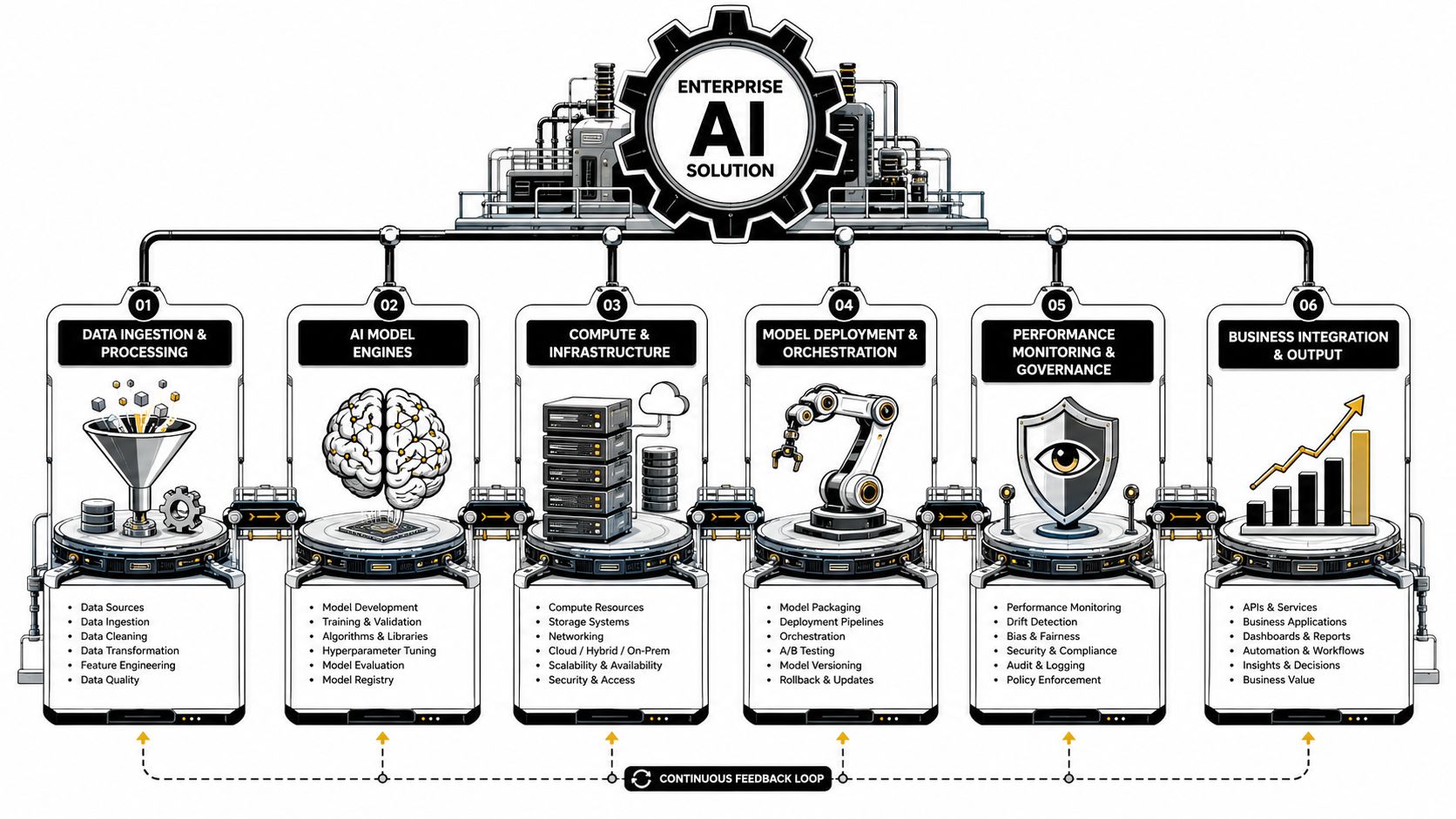
A useful way to understand enterprise AI solutions is to picture a high-performance factory.
The AI model is the machine people notice first. It cuts, sorts, predicts, summarizes, or recommends. But a factory doesn't run on machinery alone. It also needs materials arriving on time, loading docks that connect to the outside world, floor managers who keep operations moving, and quality standards that stop defects before they spread.
That's how enterprise AI works inside custom software too.
The five working parts
Here are the core pillars in plain language.
| Pillar | Factory analogy | What it does in software |
|---|---|---|
| AI models | Main machinery | Generates text, predictions, classifications, or decisions |
| Data pipelines | Supply chain | Collects, cleans, and delivers the right data |
| Integrations | Loading docks | Connects CRM, ERP, support systems, content libraries, and apps |
| MLOps and operations | Factory floor management | Handles deployment, monitoring, updates, and reliability |
| Governance | Quality control and safety | Manages permissions, auditability, risk, and oversight |
The model matters, but it's only one piece. If the data pipeline is messy, the model gets bad materials. If integrations are thin, the model works in isolation. If governance is weak, the system becomes risky the moment it touches sensitive information.
Why data engineering is the real plumbing
Many leaders assume AI starts with picking a model. In practice, it often starts with data readiness.
Production AI requires collection, transformation, and pipeline management across the full lifecycle, with governance, monitoring, and auditing built in for higher-risk use cases, as described in Nexla's enterprise AI overview. That sounds technical, but the business meaning is simple. Your AI system needs trustworthy ingredients and a repeatable way to deliver them.
For a retailer, that may mean current product catalog data, inventory context, and customer behavior signals. For a healthcare workflow, it may mean pulling structured records plus approved unstructured notes into one governed flow.
If you want a non-enterprise but very clear example of AI integrated with domain-specific workflows, Hera Fertility's look at AI-powered sperm test analysis shows how AI becomes useful only when it's tied to the right data and interpretation context.
Integrations turn intelligence into action
A smart model inside a sealed box isn't very helpful. Enterprise AI solutions create value when they can read from and write to the systems your business already runs.
That's why modern teams need API connections, event flows, and application-level orchestration. A desktop application might use AI to summarize account activity and trigger the next workflow step. A mobile app might use AI to personalize a customer experience based on account state, usage context, and support history.
If you want a practical primer on the mechanics, this guide on what AI integration means in real software projects is a solid companion.
Good enterprise AI feels less like “asking a bot a question” and more like the software already knows the next useful move.
Governance keeps the factory safe
A common misunderstanding among buyers is thinking governance is just legal review. It isn't.
Governance includes who can access which prompt, which data source a model may call, how outputs are logged, who approves changes, and what happens when performance drifts. In a strong system, human oversight isn't bolted on later. It's part of the design.
That's what separates an experiment from a platform. The machinery may be exciting, but the factory only becomes valuable when it runs safely, repeatedly, and at scale.
How Leading Industries Win with AI
The fastest way to make enterprise AI solutions feel real is to look at how they change daily work inside different industries.
Not every company needs the same kind of AI. An ecommerce brand doesn't have the same pressures as a fintech platform. A healthcare product team doesn't work like a media company. But they all want the same business outcome. They want to execute faster with less friction.
Ecommerce and retail get closer to the customer
A retail team often starts with a familiar problem. There's plenty of customer data, but turning it into better experiences takes too long. Merchandisers, marketers, product managers, and developers all touch the process, which means personalization can stall inside approvals and backlog grooming.
AI changes that when it's integrated directly into the platform. Product recommendations become more adaptive. Search gets more context-aware. Customer service tools can surface better answers tied to live catalog data and order history.
The result isn't only a smoother customer experience. Internal teams also move faster because they spend less time stitching together information by hand.
Fintech teams reduce drag in high-stakes workflows
Fintech companies don't have much tolerance for fuzziness. They need secure systems, careful permissions, and software that behaves predictably under pressure.
That makes enterprise AI especially valuable in places where staff must review large amounts of information quickly. AI can summarize account activity, flag anomalies for human review, organize documentation, and improve support operations by giving agents better context inside the existing interface.
Workers using AI report saving 40 to 60 minutes per day while also completing new technical tasks such as advanced data analysis and coding, according to OpenAI's State of Enterprise AI 2025 report. In fintech, that kind of reclaimed time is powerful because teams can spend more attention on risk judgment and exception handling rather than routine synthesis.
Healthcare and wellness improve the experience around care
Healthcare organizations often don't need more dashboards. They need less fragmentation.
That's why some of the strongest AI opportunities sit around patient engagement, staff support, triage assistance, scheduling flows, intake experiences, and knowledge retrieval inside secure systems. When AI is embedded well, it reduces the number of clicks and handoffs required to get someone the right answer or next step.
For leaders exploring that space, this piece on AI solutions for healthcare gives a useful look at how compliant, user-centered implementations take shape.
Media and SaaS products create more responsive experiences
Media and SaaS teams usually care about speed, discoverability, and retention. They want apps that feel responsive to the user, not static.
AI helps by improving recommendation logic, search relevance, content classification, moderation support, and in-app guidance. A content-rich product can present better next actions. A SaaS platform can use AI to help users complete complex workflows inside the app instead of leaving them to dig through help docs.
Here's the strategic shift across all four industries:
- Before AI: Teams often chase efficiency one task at a time.
- After strong AI integration: Teams build systems that help people execute strategy with less waiting, less switching, and better context.
The best industry use cases don't replace judgment. They protect it by removing the low-value work around it.
Your Phased Roadmap to AI Implementation
Most AI projects fail for a boring reason. They try to do too much, too fast, with unclear ownership.
A better path is phased. Not because that sounds safe, but because enterprise AI touches software, data, workflows, people, and governance all at once. You need momentum without chaos.
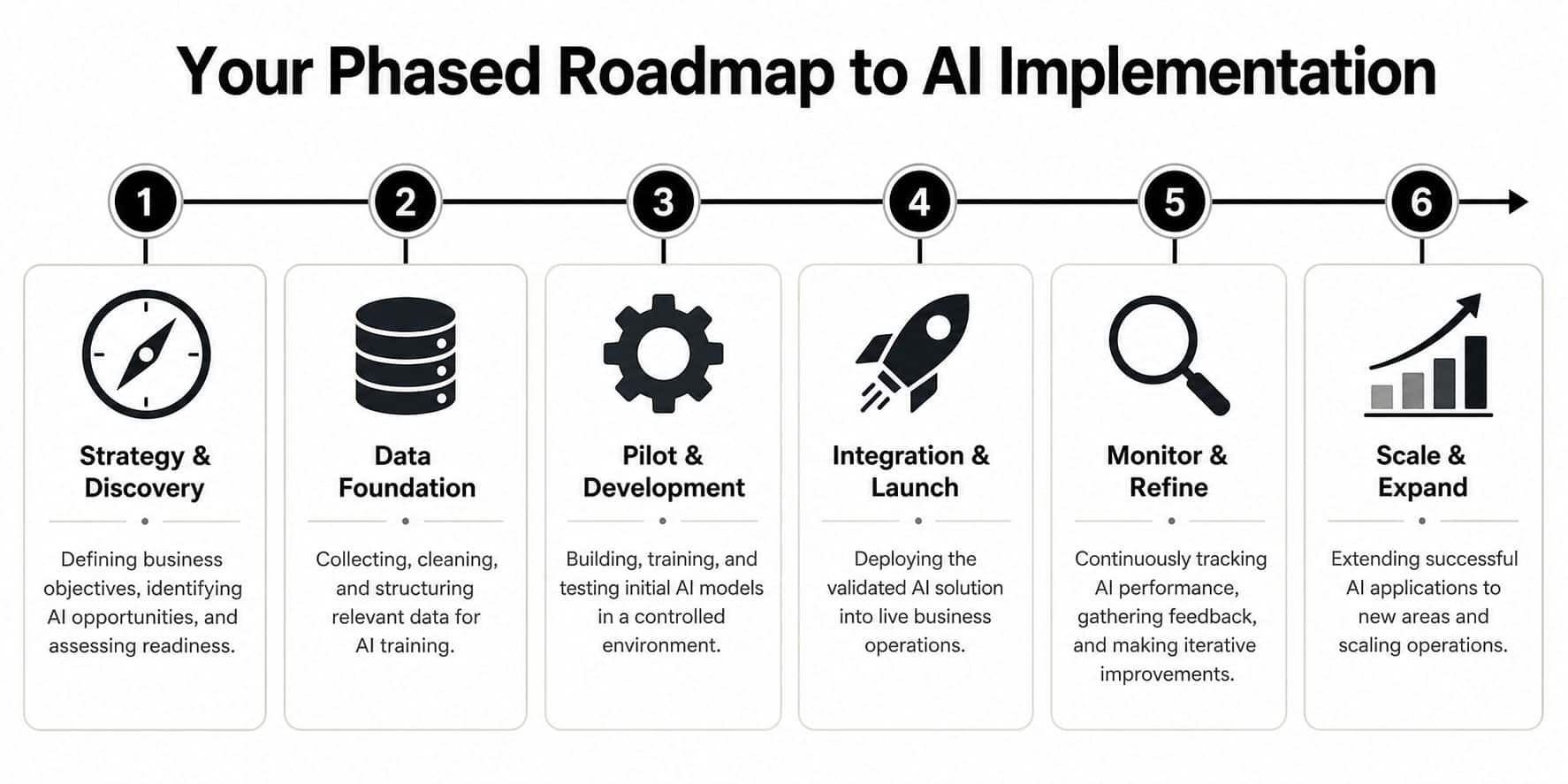
Phase 1 builds the business case
Start with one question. Where does better execution create business value fastest?
Don't begin with “Where can we use AI?” That usually creates a junk drawer of ideas. Start with a real business choke point. Slow product content operations. Support teams buried in repetitive triage. Staff who can't access the right internal knowledge fast enough. A legacy desktop process that still depends on copy-paste work between systems.
A strong discovery phase usually includes:
- Workflow mapping: Identify where people wait, re-enter data, review repetitive materials, or switch systems.
- Data inspection: Check whether the needed information exists, is accessible, and is usable.
- Risk review: Decide early which workflows can tolerate AI assistance and which require tighter guardrails.
- Success definition: Choose business outcomes that matter to the team running the work.
This is also the point where you choose the right integration pattern. To bring AI into custom desktop and mobile software, organizations need to select an API-based, embedded model, RAG-powered, or agentic pattern, then re-engineer processes so the AI operates on proprietary data tuned to real workflows, as outlined in this AI integration guide from Intellectyx.
Phase 2 proves value in a contained pilot
A pilot shouldn't try to impress the whole company. It should answer one hard question clearly: Does this improve execution in a real workflow?
That means using actual users, actual data boundaries, and real approval paths. If your support team will use AI inside an admin dashboard, put it there. If a mobile app will surface AI recommendations, test them where customers already interact.
A solid pilot tends to include:
- Parallel testing where AI runs alongside existing logic.
- Human review for outputs that affect customers, compliance, or money movement.
- Prompt and workflow tuning based on real edge cases.
- Logging and traceability so teams can see what the model did and why.
Field note: A pilot is successful when it reveals constraints early, not when it hides them behind a polished demo.
Phase 3 scales what actually worked
Many teams stumble at this point. They assume scaling means “turn it on for everyone.” It doesn't.
Scaling means strengthening the surrounding system. You expand data access carefully. Tighten role permissions. Improve monitoring. Build escalation paths when the AI isn't confident or a dependency slows down. You also train teams on when to trust the tool and when to override it.
Here's a simple way to think about the move from pilot to production:
| Stage | Main question | Common mistake |
|---|---|---|
| Strategy | Is this the right problem? | Choosing flashy use cases |
| Pilot | Does this work in practice? | Testing in artificial conditions |
| Scale | Can we run this reliably? | Expanding before controls are ready |
Phase 4 keeps the system useful over time
AI isn't a one-time feature release. Your app changes. Your users change. Your business rules change.
That's why mature teams plan for ongoing model updates, prompt improvements, workflow revisions, and dashboard review. This is especially important in mobile and desktop products that need to stay useful for years, not just impress during launch month.
The long-term win comes from treating AI modernization the way you'd treat any critical product capability. You maintain it, measure it, refine it, and keep it aligned with the business.
Evaluating Solutions and Choosing the Right Partner
The wrong enterprise AI solution can still look great in a demo.
That's because demos usually happen under perfect conditions. Clean prompts. ideal data. no messy permissions. no overloaded systems. no awkward handoffs to humans. Real production environments are less polite.
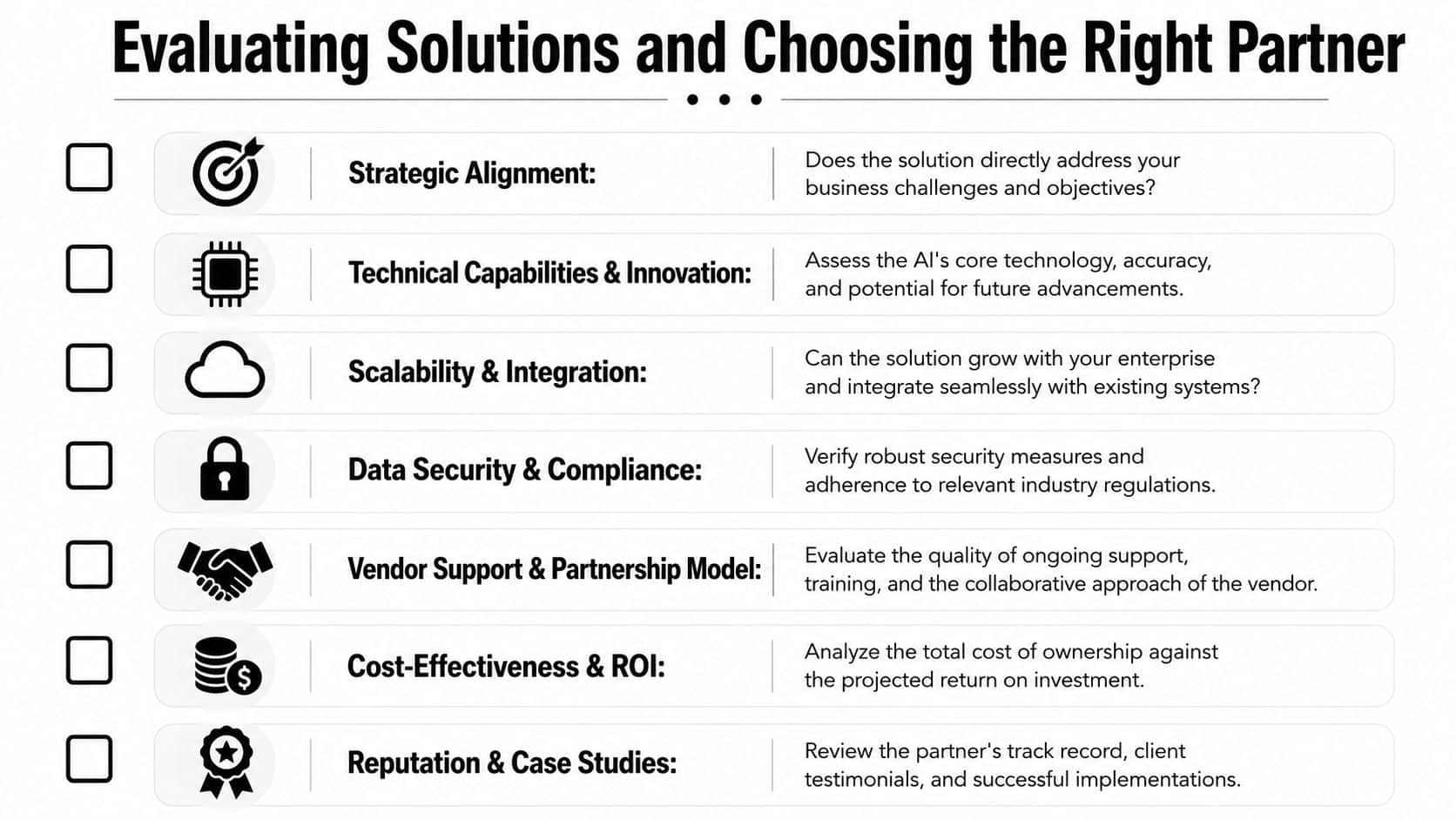
So when you evaluate vendors, platforms, or development partners, you need a tougher lens.
Use BASIC instead of marketing language
A practical framework for assessing enterprise AI solutions is BASIC. That stands for Bounded, Accurate, Speedy, Inexpensive, and Concise. The point is to judge real-world utility, not benchmark theater.
According to Enterprise Bot's explanation of the BASIC framework, enterprise AI should be evaluated by balancing latency targets such as p95 and p99, token cost per transaction, and hallucination rates, rather than leaning only on broad model scores like MMLU or HumanEval.
Here's how a business leader can turn that into vendor questions.
Bounded
Can the system stay inside the guardrails you need?
Ask how prompts are controlled, how retrieval is limited, how permissions are enforced, and what happens when the AI doesn't have enough confidence. “Bounded” means the system knows the job it's allowed to do.
Accurate
Accuracy in enterprise software isn't just a model trait. It's a system trait.
Ask what data sources are used, how outputs are tested against real workflows, how edge cases are reviewed, and whether your team can inspect failures. A vendor should be comfortable discussing error patterns, not only strengths.
Speedy
A response that arrives too late can still fail.
Ask about latency at meaningful percentiles, not averages. Also ask what happens when connectors to your CRM, ERP, or knowledge base slow down. Fast enough in a sandbox doesn't mean fast enough in production.
Inexpensive
Cheap demos can become expensive operations.
You need visibility into token spend, infrastructure load, and the cost impact of retries, longer prompts, or multi-step orchestration. A mature partner should talk comfortably about cost control, not just capability.
Concise
Verbose output often creates more work.
Ask whether responses can be shaped for the user's context. A customer support agent may need a compact answer with next actions. A compliance reviewer may need a fuller trace. Good systems don't just answer. They answer appropriately.
Check the non-negotiables
Beyond BASIC, enterprise readiness comes down to some very practical controls. Strong solutions should support SSO through SAML 2.0 or OIDC, automated provisioning with SCIM 2.0, granular role-based access, tenant isolation, encryption in transit and at rest, exportable audit logs, and hooks for SIEM, DLP, and CASB integrations, based on this enterprise-grade AI checklist from Buzzi.ai.
That list isn't glamorous, but it's where real trust is built.
How to vet the development partner
The platform is one choice. The team implementing it is another.
When choosing developers for an AI project, look at reputation, portfolio, support model, and compliance awareness. Also check whether the team uses staged deployment methods such as parallel testing and controlled rollout. This overview of AI development services is a useful benchmark for what capable implementation support should look like.
A quick shortlist for partner interviews:
- Ask for workflow depth: Can they explain how AI fits your specific process, not just your industry?
- Ask for rollout discipline: How do they test alongside existing logic before replacement?
- Ask for architecture clarity: Can they explain integrations, observability, and fallback behavior in plain English?
- Ask for long-term ownership: Who maintains prompts, connectors, and model changes after launch?
If a partner talks only about the model and not about operations, permissions, monitoring, and rollout, you're not hearing the full story.
The Wonderment Advantage Your AI Control Center
Once AI is live inside a product, a new problem appears. Someone has to manage it.
Prompts evolve. Parameters change. Internal data access needs guardrails. Costs rise if nobody is watching. Different teams plug in different models and suddenly nobody has a clear view of what's running where.
That's why an administrative layer matters.
Why control beats improvisation
Many teams start with AI in a scrappy way. A developer hardcodes prompts. A product lead tweaks wording in a doc. Someone adds access to an internal database field because a workflow needs it. It works, until the app grows, the team grows, or compliance asks questions.
A dedicated control center fixes that by making AI operations visible and governable.
What a modern prompt management tool needs
The strongest administrative tools don't just store prompts. They support the full operational reality of AI in production software.
Here's what matters most:
- Prompt vault with versioning: Teams need a single place to manage prompts as living assets. Version history matters because prompt changes can alter user experience, business logic, and cost behavior.
- Parameter manager for internal database access: AI becomes more useful when it can work with proprietary data, but access has to be intentional. Parameter controls help teams define what the AI can reach and how.
- Unified logging across integrated AIs: When multiple models or use cases are running across a desktop or mobile product, teams need traceability. Logging helps product, engineering, QA, and compliance understand what happened.
- Cost manager for cumulative spend: AI costs can be slippery because they accumulate through usage patterns, retries, longer contexts, and multi-step workflows. Spend visibility lets entrepreneurs and operators make sane decisions early.
Why this matters to entrepreneurs and product teams
If you're modernizing existing software, this kind of tooling reduces risk in a very practical way. It gives developers a cleaner workflow. It gives product teams better visibility. It gives founders and operators a view into spend and behavior before surprises pile up.
It also helps software last longer. AI features won't remain static. Models change. Prompts need tuning. User expectations rise. A product that can manage those changes from a central administrative layer is much easier to maintain than one stitched together from one-off integrations.
The promise of AI isn't just smarter features. It's manageable intelligence inside software you can operate.
Building Your Future with Intelligent Software
Enterprise AI solutions matter because they change the pace at which a business can act. That's the core idea worth keeping. AI isn't only a tool for shaving time off repetitive tasks. It's a way to build more execution capacity into the software your teams and customers already depend on.
That shift becomes much easier to manage when you hold onto a simple mental model.
First, understand the system under the hood. Models matter, but they only create value when data pipelines, integrations, governance, and operations are working together. Second, implement in phases. Start with a constrained business problem, prove value in a real workflow, then scale with stronger controls. Third, evaluate solutions and partners based on reality, not excitement. Benchmarks, guardrails, rollout discipline, and operational visibility matter more than a polished demo.
This is especially important for companies modernizing legacy platforms. A desktop application, mobile product, customer portal, or internal operations tool doesn't need a layer of AI hype. It needs reliable intelligence that fits the product, respects the workflow, and can be maintained over time.
That's good news for business leaders because it makes the path feel achievable. You don't need to rebuild everything. You need to choose the right opportunities, connect AI to your real systems, and put the right controls around it.
The businesses that win here won't just “use AI.” They'll build software that helps people make decisions faster, serve customers better, and carry out strategy with less friction. That's a durable advantage, and it's within reach when the engineering, product thinking, and operational tooling are all aligned.
If you're exploring how to modernize your app, launch AI features responsibly, or bring order to prompts, integrations, and token spend, Wonderment Apps can help. Their team builds scalable web and mobile software, supports AI modernization in legacy systems, and offers a prompt management platform with versioning, parameter controls, logging, and cost visibility. If you want to see what that looks like in practice, book a demo and take a closer look.