

Your product probably doesn't have a design problem. It has a coordination problem.
That usually shows up as design debt on the surface. The checkout flow feels stitched together. The onboarding copy sounds like three different companies wrote it. Search works one way on web, another way on mobile, and your new AI feature answers with the right information in the wrong tone. Support feels the friction before leadership does. Then growth slows, internal debates get louder, and everyone starts asking for a redesign.
A user experience team fixes the root cause when it's set up as an operating function, not a pixel factory. That matters even more if you're modernizing a product with AI. Once prompts, model behavior, fallback states, personalization rules, and cost controls enter the product, UX stops being “make it cleaner” work. It becomes the discipline that keeps the experience coherent, testable, and safe for real users.
Why Your Next Big Move Is a User Experience Team
The warning signs are familiar. Product managers are writing UX copy because nobody else owns it. Engineers are making interaction decisions in tickets. Marketing is pushing for consistency while support is logging confusion no one is turning into product changes. AI features make the gap worse because they introduce variable outputs into a product that may already be inconsistent.
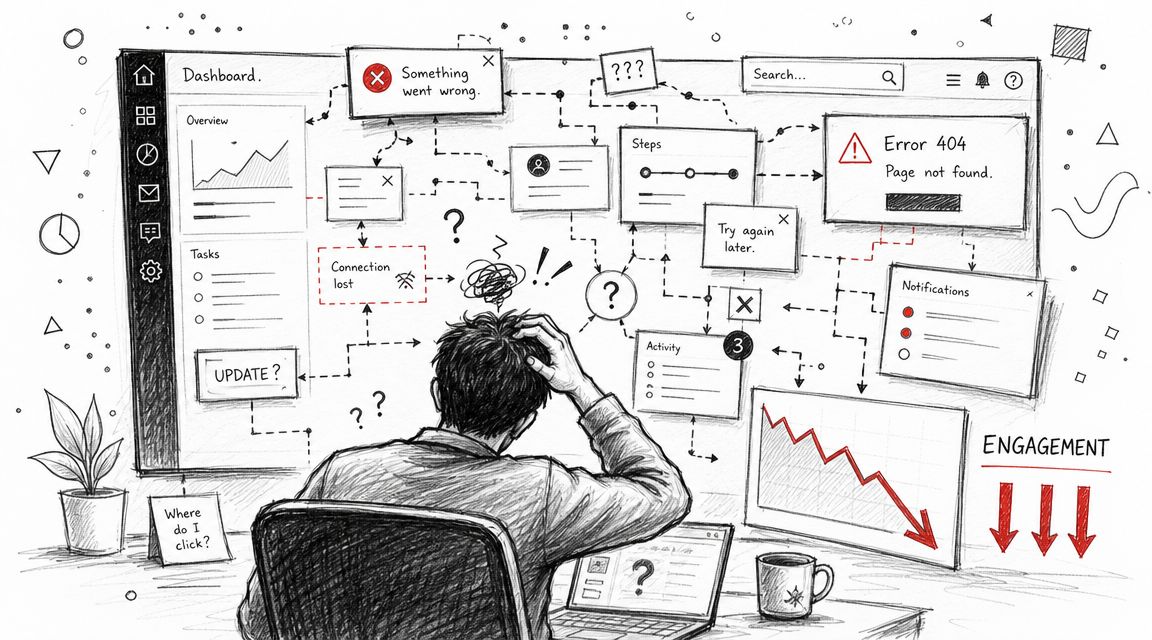
This is why a user experience team isn't a luxury anymore. The field itself grew from about 10,000 people in the late 1990s to nearly 1 million by 2017, which shows how quickly UX moved from a niche specialty into a core business function tied to product quality and strategy, as summarized in these UX field growth figures. Companies didn't add that capability for decoration. They added it because digital products got more complex and poor experience got more expensive.
What changes when UX becomes a team function
When UX sits inside the operating model, three things get better fast:
- Decisions become more consistent because navigation, interaction patterns, copy, and feedback states are reviewed against shared principles.
- Research gets closer to roadmap decisions so teams stop shipping features users didn't need or understand.
- AI behavior gets governed instead of improvised, which matters when prompt changes can alter user trust, tone, or task completion.
In ecommerce, that often means fewer dead ends in search, cart, and returns. In fintech, it means clearer flows around risk, onboarding, permissions, and failure states. In healthcare, it means reducing confusion in moments where users are already anxious and less forgiving.
Practical rule: If your product team debates user behavior more often than it observes user behavior, you don't need another redesign sprint. You need a UX function.
AI raises the bar for experience quality
Static screens were easier. AI-powered products introduce behavior that can drift over time. A helpful feature can become noisy if prompt logic changes. A smart assistant can create mistrust if it sounds confident in edge cases. Personalization can feel useful one day and invasive the next if nobody owns the experience rules.
That's why modern UX work now includes things product teams didn't have to formalize before:
| Experience area | Old pattern | AI-era requirement |
|---|---|---|
| Content behavior | Fixed copy in UI | Prompt versioning and response review |
| User context | Basic preferences | Controlled parameters tied to product logic |
| Issue diagnosis | Reproduce visual bugs | Review logs across model interactions |
| Cost awareness | Mostly infrastructure concern | Experience design shaped by usage cost constraints |
This is also where specialized admin tooling starts to matter. Once your team is testing prompts, controlling parameters, and reviewing AI logs, UX quality depends on backend discipline as much as interface craft.
Defining Your Core UX Roles and Seniority Levels
Many organizations make the same initial hiring mistake. They post for a “unicorn” who can do strategy, interviews, UI polish, content design, prototyping, analytics, and stakeholder management. That person rarely exists, and when they do, they usually shouldn't be your first general-purpose hire unless the team is very small.
A useful user experience team starts by separating responsibilities clearly enough that work doesn't fall through the cracks.
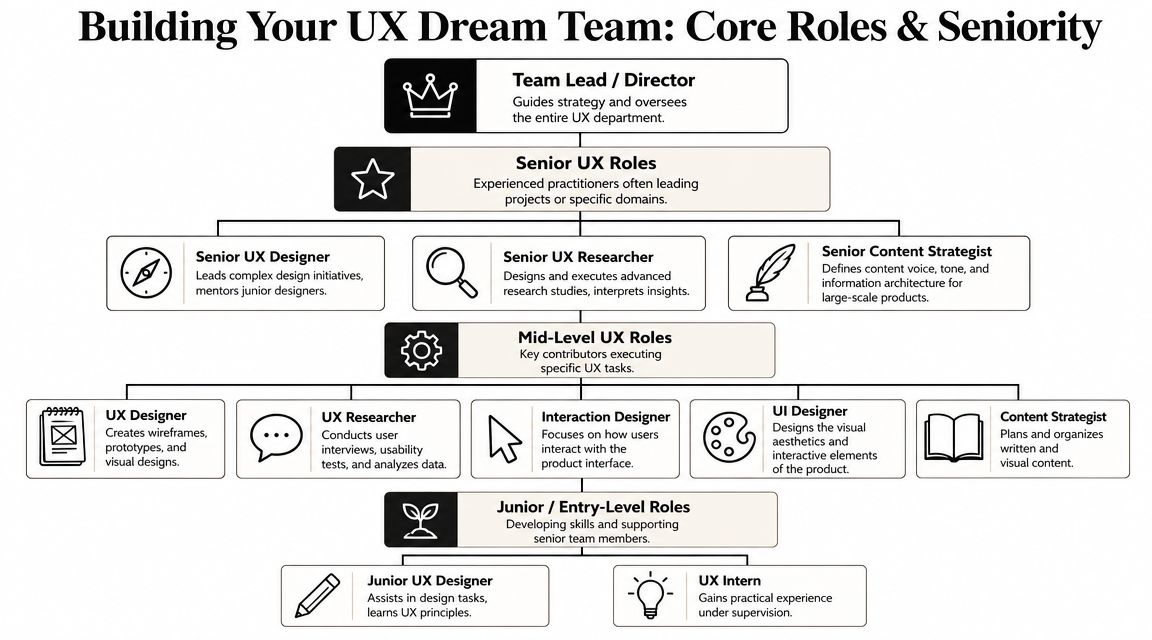
The core roles that actually matter
UX Researcher
This role answers, “What's really happening with users?” In a healthcare product, that may mean uncovering where patients hesitate during intake. In a SaaS admin tool, it may mean learning why setup stalls before activation. Good researchers don't just collect quotes. They define the question, run the right method, and turn findings into product decisions.
UX Designer
This person shapes flows, structure, and interaction logic. If users can't move from intent to outcome without friction, that's usually a UX design problem. In practice, this role often works on wireframes, prototypes, task flows, and requirement shaping with PMs and engineers.
UI Designer or Product Designer with strong visual craft
Some companies fold this into product design, and that can work. But someone still needs to own visual hierarchy, states, spacing, responsiveness, and component behavior. On an ecommerce platform, this role sweats details like filter clarity, product card scannability, and checkout confidence.
UX Writer or Content Strategist
Teams skip this role all the time, then wonder why the product sounds uncertain. Words are interface. In fintech and government services, the wrong label or instruction can slow task completion, trigger support contacts, or create compliance risk.
For leaders building managers and leads, this overview of insights on team leadership is useful because it frames the job accurately. The lead isn't there to “approve design.” The lead sets standards, clears obstacles, allocates attention, and keeps the team aligned with business priorities.
How seniority should change the job
A junior hire should contribute with support and direction. A senior hire should reduce ambiguity for everyone else.
- Junior hires usually need scoped work, close feedback, and a strong review culture. They can absolutely be productive, but they shouldn't be the sole UX owner for a critical product line.
- Mid-level practitioners should run defined projects independently. They're expected to make sound decisions within a known system.
- Senior practitioners should handle ambiguity, influence roadmap choices, and mentor others. They don't just execute. They frame the problem well.
- Lead or Director roles own team shape, quality bar, cross-functional relationships, and hiring strategy.
A title should tell you how much ambiguity a person can absorb without creating chaos for the rest of the organization.
A simple hiring ladder
| Level | Best fit | What to expect |
|---|---|---|
| Junior | Growing team with strong mentorship | Reliable execution on scoped tasks |
| Mid-level | Product area with established patterns | Independent delivery within a team |
| Senior | Complex product, weak alignment, high stakes flows | Strategic judgment and cross-functional influence |
| Lead or Director | Multiple product lines or team scaling | Org design, standards, staffing, and stakeholder management |
If your company is early, hire fewer people and hire for range. If your company is scaling, stop pretending one designer can carry research, systems, content, and product strategy at the same time.
Choosing the Right Organizational Structure
Where the user experience team reports and how it works with product squads will shape speed, consistency, and morale more than most leaders expect. The right answer depends on your product portfolio, regulatory burden, and how mature your product management function really is.
A weak structure creates familiar failure modes. Central teams become service desks. Embedded designers become isolated ticket-takers. Hybrid models collapse if nobody defines who owns standards versus delivery.
The three structures most teams choose from
Centralized model
All UX roles sit together under one leader. Requests come in from product teams, and the UX group assigns work across initiatives. This model often works well when consistency, governance, and accessibility matter across many surfaces.
A fintech company with heavy compliance demands may prefer this approach. Shared review standards matter. So do consistent flows for identity, permissions, disclosure, and error handling.
Embedded model
Designers and researchers sit directly inside product squads. They attend standups, help shape backlog decisions, and move with the speed of that team. This can work well in fast-moving media, content, or growth environments where immediate collaboration matters more than strict standardization.
The downside is predictable. Designers can start solving only for their local team. Patterns drift. Naming diverges. Design debt grows unnoticed.
Hybrid model
This is usually the most practical answer for companies beyond the earliest stage. Designers are embedded enough to influence daily decisions, but they still report into UX leadership and work within a shared system for quality, research ops, design systems, and content standards.
UX Team Structure Comparison
| Factor | Centralized Model | Embedded Model | Hybrid Model |
|---|---|---|---|
| Speed to squad decisions | Lower | Higher | Balanced |
| Consistency across products | Higher | Lower | Balanced |
| Craft development | Stronger peer learning | Can become isolated | Strong if managed well |
| Research coordination | Easier to prioritize centrally | Can become fragmented | Shared methods with local execution |
| Best fit | Regulated, multi-product, standards-heavy orgs | Fast-moving single-product or growth teams | Scaling companies with multiple priorities |
What usually works and what usually doesn't
A centralized team works when leadership respects prioritization. It fails when every product manager thinks they have direct claim on design bandwidth.
An embedded model works when product leads already value UX and involve designers early. It fails when designers are added late for screen production and told the strategy is already settled.
The hybrid model works when two conditions are true:
- UX leadership owns standards and talent development
- Product squads involve UX in discovery, not just delivery
If you embed UX into squads without shared standards, you'll move fast and accumulate inconsistency. If you centralize everything without close product context, you'll get beautiful artifacts nobody uses.
A practical decision filter
Use these questions before choosing:
- How much regulatory or accessibility risk do you carry
- How many products or major workflows share the same users
- How mature is your design system
- Do product managers know how to work with design in discovery
- Will AI features need shared governance across teams
That last question matters more now. If several squads are building AI-powered support, search, workflow assistants, or recommendation experiences, someone needs shared rules for tone, logging, fallbacks, and human override points. Hybrid structures usually handle that better than either extreme.
A Practical Hiring and Interviewing Playbook
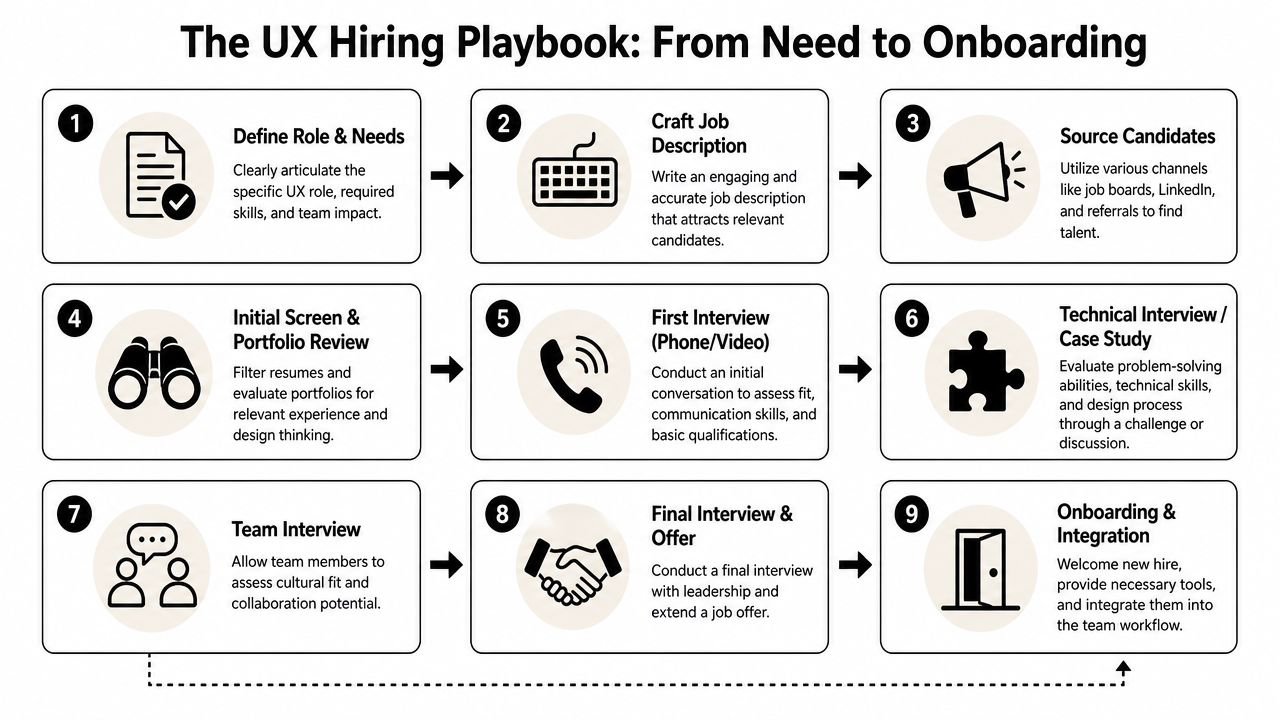
A lot of UX hiring breaks before interviews even start. The job description is vague, the portfolio review is inconsistent, and the interview loop tests presentation polish more than actual judgment. Then the team hires someone who demos well and struggles in the actual operating environment.
The fix is a hiring process that reflects how UX work happens in your company.
Start with a job description that says something real
Most UX job posts read like wish lists. A better one answers five things plainly:
- What product area they'll own
- What kind of problems they'll solve
- Who they'll work with each week
- What good work looks like after six months
- What skills are required versus nice to have
If you're hiring for an AI-enabled product, say so directly. Don't just mention “innovation” and “emerging technology.” Say whether the designer will shape conversational flows, evaluate prompt-driven outputs, define fallback states, or collaborate with engineers on model behavior.
For a broader recruiting framework, Wonderment Apps has a practical guide on how to recruit the best talent in tech that aligns well with this kind of role clarity.
Use an interview loop with clear intent
I prefer four stages. More than that often adds noise.
Stage one: recruiter or talent screen
Check for communication clarity, role fit, and motivation. This isn't the place for design trivia.
Ask:
- Why this role now
- What kind of team helps you do your best work
- Which projects in your portfolio reflect your actual contribution
Stage two: hiring manager conversation
Test judgment. Talk through trade-offs, not just outcomes.
Good questions include:
- Tell me about a project where the business wanted speed and users needed clarity. What did you do
- What do you need from engineering to make your work effective
- How do you decide when research is sufficient to move forward
Stage three: portfolio review and working session
At this stage, you learn whether the candidate can reason through messy situations. Keep the exercise realistic and short. Don't ask for unpaid free work that resembles a production sprint.
For a designer, I want to hear how they framed the problem, what constraints mattered, and what changed after feedback or testing. For a researcher, I want to know how they selected method, recruited participants, handled conflicting signals, and drove decisions.
Stage four: team panel
Use this to assess collaboration style. Include PM, engineering, and maybe content or QA. Don't let it become a vibe check with no rubric.
What to watch for in portfolios
A polished deck can hide weak practice. Look for these signals instead:
| Strong signal | Weak signal |
|---|---|
| Explains decision-making | Over-focuses on final screens |
| Names constraints honestly | Rewrites history into a perfect process |
| Shows collaboration with PM and engineering | Presents design as solo hero work |
| Discusses what failed and changed | Claims every idea worked smoothly |
The best candidates talk comfortably about trade-offs, limitations, and what they'd do differently. That's usually a better sign than a spotless case study.
A note on whiteboard challenges
Use them carefully. Whiteboarding can reveal collaboration and framing skills, but it can also reward confidence over thoughtfulness. Give candidates the problem in advance if possible. During the session, look for how they ask questions, define assumptions, and handle uncertainty.
If the role is senior, evaluate influence and prioritization. If the role is junior, evaluate structure and learning mindset. Don't score both groups the same way.
Onboarding New Hires for Effective Collaboration
A strong hire can still fail if the first month is a blur of tools, jargon, and disconnected meetings. Onboarding for a user experience team should help new people understand users, product economics, technical constraints, and internal decision patterns. If they only learn the Figma file structure, you've onboarded a production resource, not a product partner.
The biggest gap to close early is the one between design and engineering. That gap gets wider in AI products because behavior doesn't live only in screens. It lives in prompts, service logic, parameters, logging, and exception handling.
A practical 30 60 90 plan
First 30 days
Focus on context. New hires should review roadmap priorities, support tickets, analytics definitions, existing research, and the current design system. They should also meet engineering leads and understand how front-end decisions connect to APIs, data constraints, and release cadence.
Days 31 to 60
Shift to participation. The new hire should co-own a scoped initiative, attend discovery sessions, and observe or run at least one round of user feedback. In doing so, they learn how your company really makes trade-offs under deadline pressure.
Days 61 to 90
Move into ownership. By now they should be able to drive a small workflow improvement, propose a research-backed change, or tighten a recurring handoff problem between design and development.
A simple onboarding checklist helps:
- Business fluency through customer segments, revenue model, and success metrics
- User fluency through research readouts, support themes, and live call observation
- Technical fluency through architecture walkthroughs, component constraints, and release workflow
- Team fluency through working agreements, review rituals, and decision ownership
Why early testing saves pain later
The timing of UX work matters as much as the quality. Organizations that invest in UX during the concept phase can reduce product development cycles by 33% to 50%, while fixing an error after development can cost 100x more than fixing it before development, according to this UX research benchmark summary.
That changes how onboarding should work. Don't train new hires to enter at handoff. Train them to work upstream, where they can influence problem framing before engineering commits to the wrong thing.
Collaboration habits worth enforcing
- Bring engineers into design reviews early so feasibility questions surface before designs calcify.
- Use annotated flows, not just screens because state logic, empty states, and failure paths matter.
- Review real edge cases together especially around permissions, missing data, and AI output quality.
- Track unresolved assumptions so they don't disappear between prototype approval and implementation.
Good handoff isn't a file transfer. It's shared understanding about behavior, constraints, and what must not break for the user.
Measuring UX Success and Proving Business ROI
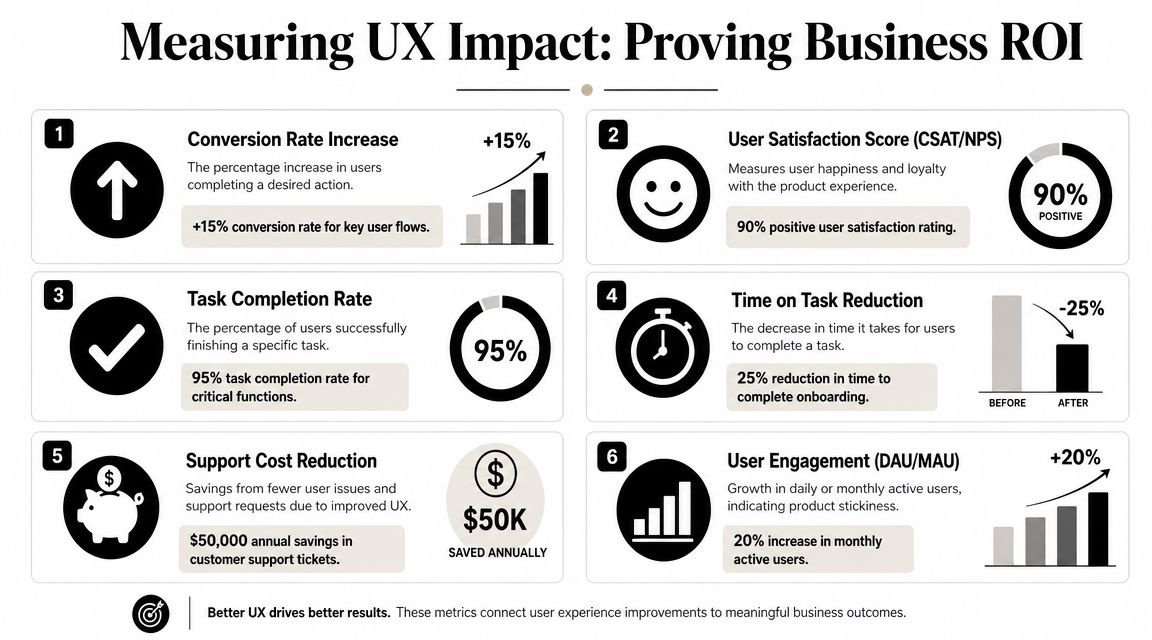
Many UX teams face a common struggle. They know the work is valuable, but they present it in design language while leadership is listening for business language. “The experience feels clearer” won't carry much weight in a roadmap review. “Users complete the setup flow more reliably, with fewer support-dependent moments” will.
That translation is the actual job.
Start with one usability metric that is hard to argue with
Task success rate is one of the simplest and most useful ways to measure whether users can do what matters. Nielsen Norman Group recommends defining the task goal clearly, deciding what counts as success, running the study, and reporting the result with a confidence interval so the team can distinguish real change from sampling noise. Their example notes that if 35 out of 100 users complete a task with a minor issue, the right report is 35% at that success level, not a vague pass-fail result, as explained in NN/g's guidance on task success rate.
That's the bridge metric. It's not the business KPI itself. It's the operational signal that predicts one.
Connect UX metrics to business outcomes
A user experience team should tie each measured behavior to a business consequence.
| UX metric | What it tells you | Business KPI it influences |
|---|---|---|
| Task success rate | Can users complete a critical action | Conversion, activation, support burden |
| Time on task | How much effort a task requires | Drop-off risk, operational efficiency |
| Error patterns | Where users get blocked or confused | Support contacts, trust, abandonment |
| Qualitative feedback themes | Why friction exists | Prioritization, retention risk, roadmap clarity |
In ecommerce, task success may map to product discovery, cart completion, or returns initiation. In SaaS, it may map to workspace setup or first-value moment. In healthcare and government services, it often maps to form completion, scheduling, or document submission without support intervention.
Use ROI language carefully and directly
The bigger argument for UX investment is already strong. Research commonly cited in the field reports that every $1 invested in UX can return about $100, often expressed as a 9,900% ROI, and that strategic UX design can raise conversion rates by as much as 400%, according to these UX ROI benchmarks.
That doesn't mean you should promise those outcomes internally. It means leadership already has a credible reason to treat UX as a business lever rather than a design service.
For goal-setting, I like to connect UX work to product planning using examples like these product team OKR examples. They're a useful reference for phrasing UX outcomes in a way executives and product leads can align around.
A practical pattern looks like this:
- Objective Improve first-session activation for a new AI workflow
- Key result Increase successful completion of the setup task
- Key result Reduce support-driven setup failures
- Key result Improve confidence and clarity in post-task feedback
If your team wants a usable starting point for validation work, this guide to web page usability testing is a solid operational reference.
The political side of proving value
There's also an internal challenge. Nielsen Norman Group notes that practitioners often face inaccurate perceptions of UX, difficulty demonstrating measurable impact, weak stakeholder buy-in, and insufficient resources in their discussion of common UX challenges. That's why small wins matter.
Show one improved flow. Tie it to one operational metric. Build a trail of evidence leadership can repeat back in budget meetings. Teams rarely win support by defending design as a craft. They win by making business risk, inefficiency, and user friction visible.
Modernizing Your App with AI and Next-Generation UX
AI changes the scope of UX work. The team is no longer designing only pages, forms, and interactions. It's shaping system behavior that can vary by prompt, context, model, and data access. That changes the definition of product quality.
An AI-enabled experience needs more than clever interface ideas. It needs governance. Someone has to decide how the system behaves when confidence is low, what gets logged, how prompts are versioned, how personalized inputs are controlled, and where users can recover when the model output isn't good enough. Those are UX decisions as much as engineering ones.
What the user experience team should own in AI products
The strongest teams I've seen take explicit ownership of these questions:
- Response quality by defining acceptable behavior, fallback messaging, and escalation paths
- Transparency by showing what the AI is doing, what it used, and when the user should verify
- Control by giving users ways to edit, retry, confirm, or reject model-generated output
- Operational feedback by partnering with engineering on logs, prompt revisions, and issue review
This is one reason AI modernization often needs tighter collaboration between UX, product, and engineering than standard feature work. Teams building agent-like tools, internal copilots, or AI search experiences also need developers who can operationalize that thinking cleanly. If you're staffing around Python-heavy AI services, this guide on how to hire python developers is a practical resource for understanding the skill profile behind those systems.
The tooling layer matters more than people expect
A lot of AI product teams still manage prompts in docs, debug behavior across scattered logs, and track spend manually. That setup doesn't hold for long.
One option in this space is Wonderment Apps, which offers an administrative prompt management system for teams modernizing software with AI. The tool includes a prompt vault with versioning, a parameter manager for controlled internal database access, a logging system across integrated AI services, and a cost manager for tracking cumulative spend. For teams evaluating how UX and engineering should work together on AI features, that kind of operational layer matters because it gives product teams a way to test, govern, and refine the experience without treating model behavior as a black box. Their broader perspective on using AI to modernize software applications is relevant if you're planning that shift.
The AI feature users experience on the front end is only as trustworthy as the workflow your team runs behind the scenes.
A mature user experience team can lead that work if leadership gives it the right remit. Not just screen design. Not just usability fixes. Product behavior, service quality, and the rules that make intelligence feel usable instead of unpredictable.
If you're modernizing a digital product and need a partner that can connect UX, engineering, and AI operations, take a look at Wonderment Apps. They work across web, mobile, and AI-enhanced software, and their team can help evaluate where a stronger user experience function and better AI infrastructure will make the biggest difference.