

A lot of software teams still release important features like they're moving antiques across a tiled floor. One wrong step, and something expensive breaks.
A business leader usually sees the symptoms first. Releases slip because a senior developer has to manually merge branches. QA becomes a rush job. Someone logs into a cloud console late at night to tweak an environment setting. The team gets the feature out, but nobody feels good about how it happened. They feel lucky.
That's where automation in software development stops being a technical nice-to-have and starts looking like operational discipline. Good automation removes repetitive human handling from the parts of delivery that should be repeatable anyway. It turns fragile heroics into systems your team can trust.
Beyond the Manual Grind to Intelligent Creation
A familiar pattern shows up in growing companies. Product wants faster releases. Engineering wants fewer surprises. Operations wants fewer emergency fixes. Everyone agrees on the goal, but the path there is blocked by manual work.
Take a common release cycle. A developer finishes a feature, another teammate reviews it, QA checks the obvious paths, and then someone manually moves it through staging and production. If the environment differs even slightly between systems, bugs appear that nobody saw earlier. The root problem usually isn't effort. It's inconsistency.
What automation changes
Automation in software development replaces those one-off actions with defined workflows. Code gets built the same way every time. Tests run the same way every time. Infrastructure gets provisioned from code instead of memory. Releases follow an approved path rather than a late-night checklist.
That matters because repeatability is what lowers delivery risk. Independent industry guidance notes that infrastructure-as-code tools such as Terraform, Ansible, and CloudFormation make environments reproducible, while CI/CD platforms like Jenkins, GitLab CI, GitHub Actions, and CircleCI automate builds and deployments. The result is fewer manual handoffs, less configuration drift, and more consistency across development, staging, and production environments, as outlined in Jellyfish's engineering leader playbook on software automation.
Practical rule: Automate the steps your team performs the same way every week. Leave judgment-heavy work with people.
Why the next wave is harder
The new wrinkle is AI.
Teams aren't just automating builds and deployments now. They're adding AI-assisted coding, AI-powered product features, and model-driven workflows into apps that customers use. That creates a different management problem. You're no longer only maintaining code and infrastructure. You're also managing prompts, parameters, model behavior, logging, and spend.
Traditional automation tools help move software. They don't fully govern the intelligence inside that software. That's why modern delivery conversations now include questions that didn't exist a few years ago. Which prompt version is in production? Who changed it? Which model handled a response? Why did the output quality change? Why did costs jump this week?
Automation used to mean fewer manual steps. Increasingly, it also means better control over machine-generated behavior.
The Pillars of a Modern Digital Factory
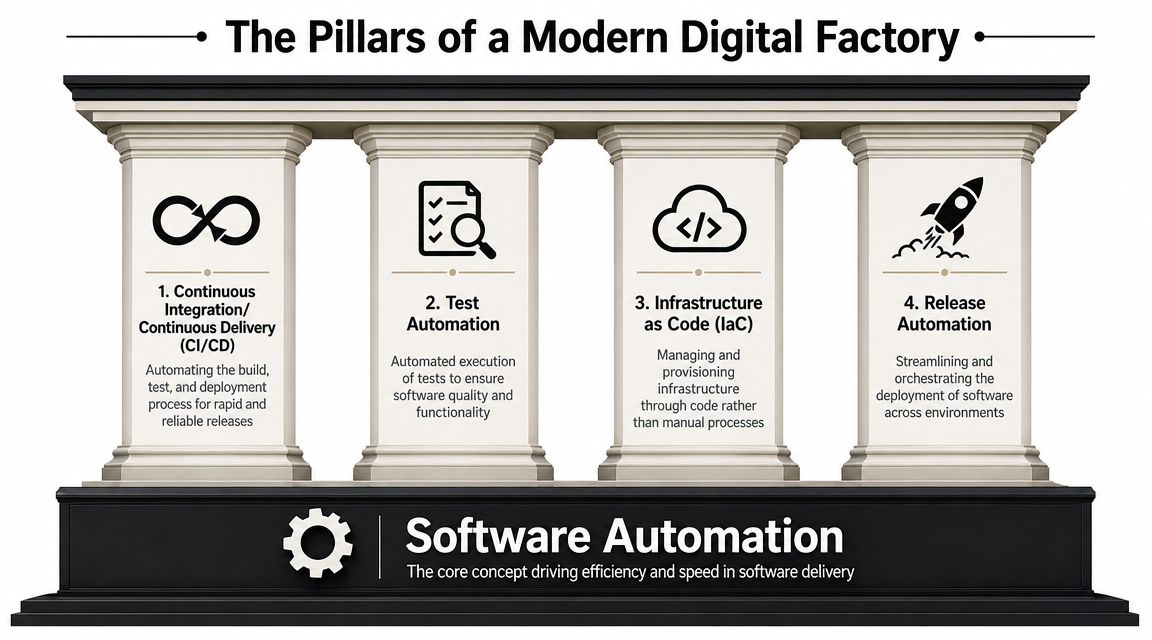
A modern digital factory is built for repeatability, control, and fast feedback. The goal is not automation for its own sake. The goal is a delivery system that can ship code, validate behavior, provision environments, and manage AI-driven application logic without relying on memory, heroics, or fragile handoffs.
CI/CD as the production system
Continuous Integration and Continuous Delivery, or CI/CD, gives teams a controlled way to move change from commit to production. Code enters a shared path. Builds run, checks execute, artifacts are created, and releases follow rules the team can inspect and improve.
That matters at the business level because release quality stops depending on who is available to coordinate the launch. A disciplined pipeline reduces waiting, exposes failure points early, and gives leadership a clearer picture of delivery capacity. For teams tightening that process, Wonderment's guide to CI/CD pipeline best practices lays out the operational patterns that make pipelines dependable at scale.
Test automation as risk control
Automated testing is less about speed than about controlled risk. It gives teams a way to prove that common failure paths are covered before customers see the consequences.
Different test layers answer different business questions:
- Unit tests check whether a small piece of logic behaves as expected.
- Integration tests confirm that services, APIs, and databases work together under realistic conditions.
- Regression tests protect revenue-generating features from accidental breakage during routine changes.
- API tests verify service contracts that mobile apps, partners, and internal systems depend on.
Tool choice matters here. Slow, brittle test suites create a false sense of safety and eventually get ignored. Teams reviewing options for service-level validation can use this list of best API testing tools as a practical starting point.
Infrastructure as Code as the operating baseline
Infrastructure as Code, or IaC, turns environment setup into a versioned asset instead of an undocumented task. Servers, permissions, networking rules, and deployment targets are defined in files that can be reviewed, approved, and reproduced.
That shift changes governance. Instead of asking which engineer configured production, leaders can ask which approved configuration is running and when it changed. It also lowers the cost of growth. New environments become easier to create, audits become easier to support, and configuration drift becomes easier to catch before it creates downtime.
If production stability depends on tribal knowledge, the business is carrying hidden operational debt.
AI orchestration and prompt management as the new pillar
For many teams, the factory model now includes one more layer. AI behavior itself has to be managed like any other production asset.
Once an application relies on prompts, model routing, fallback logic, output evaluation, and usage controls, traditional automation is only part of the answer. A build pipeline can deploy the application, but it does not tell you why output quality changed after a prompt edit, which model version increased cost, or who approved a behavior change that affected customers. That is why prompt management is becoming a missing operational layer in modern application delivery.
Companies often stall by automating code delivery but leaving AI behavior scattered across source files, dashboards, and team knowledge. A managed approach brings prompts, model settings, testing, version history, and monitoring into the same operating discipline as the rest of the software stack. That is the difference between experimenting with AI and running it responsibly in production.
Release automation and monitoring as the control loop
Release automation handles approvals, sequencing, and rollback paths. Monitoring verifies what happened after the release and whether the system is still meeting its targets.
Both matter. Fast deployment without observability only shortens the time between change and incident. Strong teams connect release workflows to logs, metrics, traces, and alerting so they can see whether a deployment improved the product or introduced a new problem. The same principle applies to AI-enabled features, where teams need visibility into latency, output quality, failure rates, and spend.
The companies that get the most value from automation do not treat these pillars as separate tools. They run them as one operating model. That is usually the point where software delivery becomes more predictable, governance improves, and modernization efforts start producing measurable business results.
Calculating the Real ROI of Automation
Automation is easy to support in theory because nobody argues for more repetitive work. The harder question is whether the investment produces better business outcomes or just moves effort around.
That's the right question. Leaders shouldn't fund automation because it sounds modern. They should fund it because it improves delivery economics, product quality, and operational control.
Where the upside is real
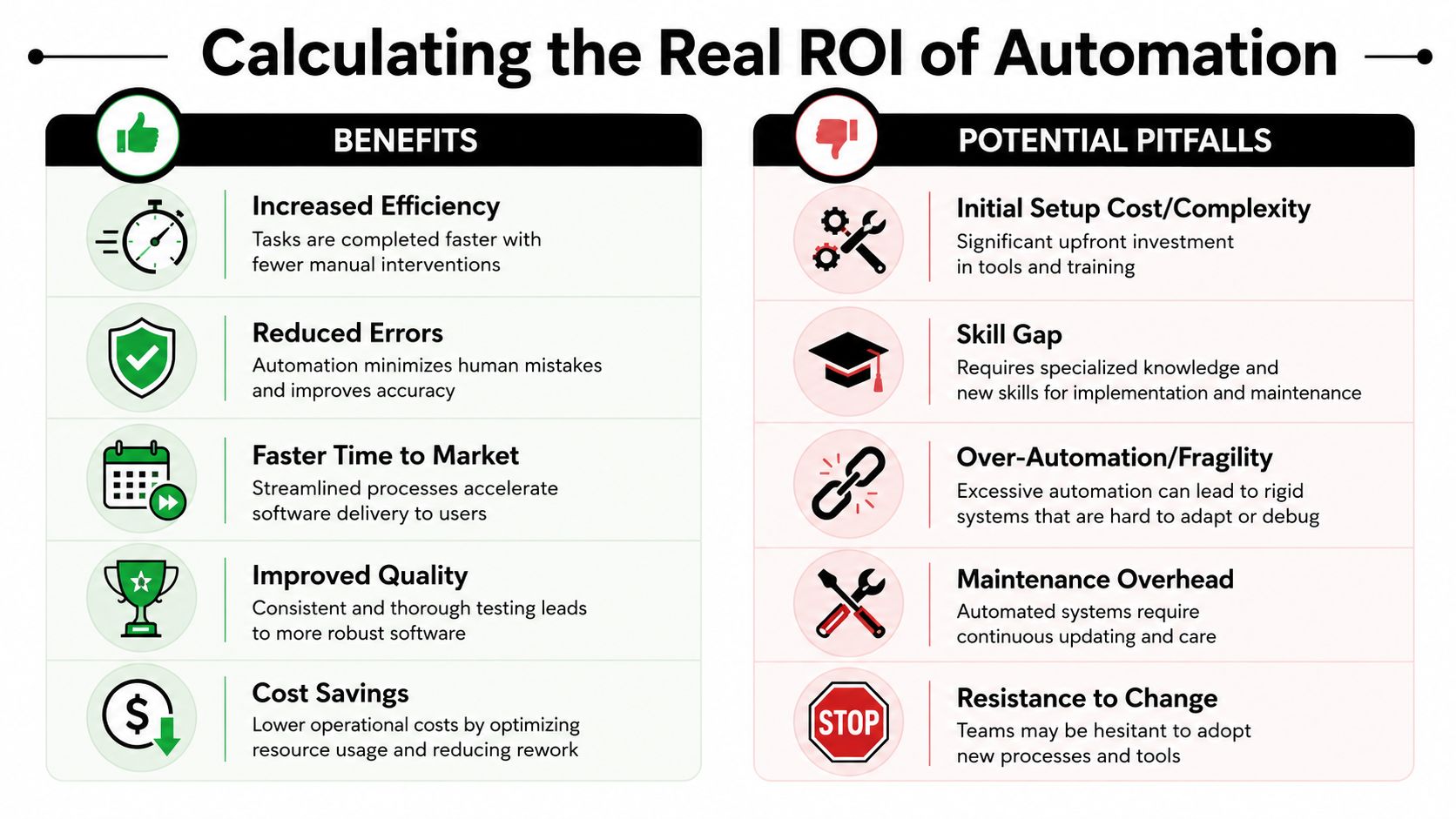
A strong automation program usually creates value in a few clear ways.
| Business outcome | How automation contributes |
|---|---|
| Faster delivery | Teams spend less time waiting on manual handoffs and release coordination |
| Better consistency | The same scripts and checks run across environments, reducing variability |
| Higher quality | Automated validation catches issues before they reach production |
| Lower operational drag | Developers spend less time on repetitive setup, deployment, and verification work |
| Stronger governance | Changes become versioned, reviewable, and easier to audit |
The gain isn't just speed. It's confidence. A team that can release safely can respond faster to customer feedback, ship product improvements with less organizational stress, and reduce the management overhead around every launch.
Where teams get misled
The common trap is assuming all automation removes toil. Sometimes it just relocates it.
A frequently missed angle is whether automation reduces developer toil at the system level or shifts it into review, debugging, and workflow management. A 2024 ACM study on generative AI adoption in software engineering highlights complexity, governance, and integration challenges as core barriers, as discussed in the ACM research on generative AI adoption in software engineering.
That lines up with what many teams experience in practice. An automated pipeline can save time if it's reliable. A brittle pipeline creates a new dependency that only a few people understand. AI coding tools can accelerate drafts, but they can also create extra review overhead if output quality is uneven.
How to evaluate ROI without fooling yourself
A sensible ROI review looks at more than labor savings. It also checks whether the system becomes easier or harder to run.
Use questions like these:
- Did release coordination shrink? Fewer meetings, approvals, and manual checks usually indicate real improvement.
- Did production quality improve? If more defects escape, the automation may be optimizing the wrong thing.
- Did specialists become bottlenecks? If only one engineer can fix the pipeline, resilience didn't improve.
- Did governance get better? Version control, approvals, logs, and traceability matter, especially in regulated environments.
If you need a finance-friendly framework for the business side of that analysis, MetricMosaic's ROI guide gives a straightforward way to structure the conversation.
Automation pays off fastest when it removes repeatable friction from a healthy process. It disappoints when it accelerates a messy one.
Your Phased Roadmap to Automation Success
A release is due Friday. By Wednesday, engineers are still running manual regression checks, one senior developer is fixing a deployment script nobody else wants to touch, and product is asking whether a late change can still make the cut. That is usually the moment leadership decides it wants automation. The mistake is treating that decision like a single tooling project instead of an operating change.
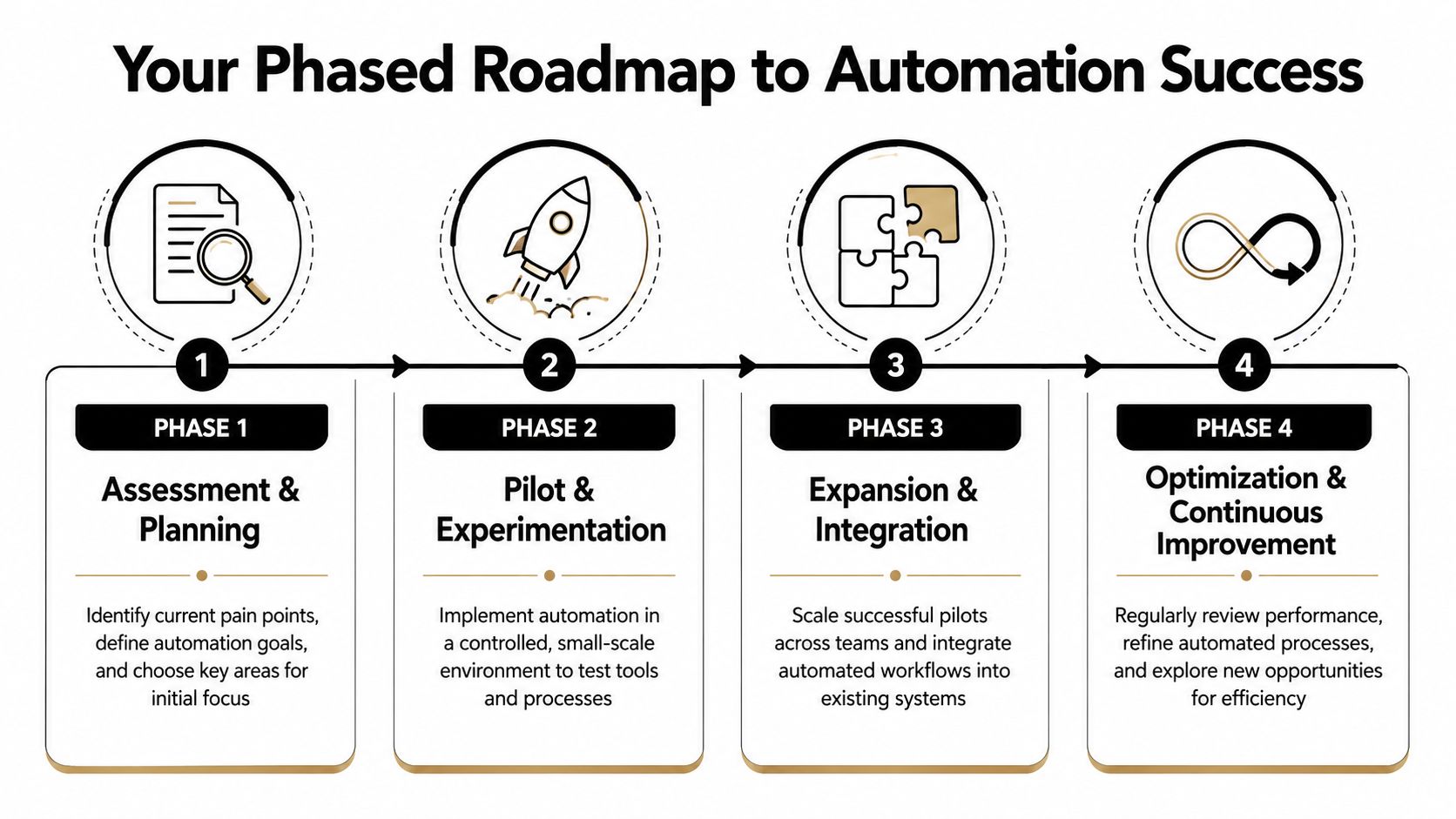
A phased roadmap works because it reduces risk while building proof. It also creates the discipline needed for AI-driven automation, where the challenge is no longer just automating steps, but managing how intelligent systems behave across environments, workflows, and teams. Without that control layer, prompt logic, model settings, approvals, and fallbacks turn into a new kind of sprawl.
Phase 1 assessment and planning
Start with one business problem that creates visible drag.
Good candidates share a few traits. The work is repetitive, the path is predictable, and failures cost time, revenue, or credibility. In practice, that often means release validation, environment provisioning, deployment approvals, or the handoffs around them. For teams adding AI into delivery, it can also mean prompt updates that are being made informally, without version control or review.
A short assessment usually surfaces opportunities like:
- Manual regression checks that delay releases and create uneven coverage
- Environment setup that depends on tribal knowledge
- Build and deployment tasks held together by scripts with unclear ownership
- AI prompt and workflow changes managed in docs, chat threads, or application code instead of a controlled system
The goal in this phase is not a tool shortlist. It is a decision about where automation will remove friction without creating a fresh governance problem.
Phase 2 pilot and experimentation
Choose one workflow, one accountable owner, and one outcome that the business can recognize.
A pilot should solve a real annoyance fast enough that people trust the direction. Build and deployment automation often make sense as a first step because the boundary is clear and the before-and-after is easy to see. If release confidence is the issue, automate tests around a high-risk user path. If you are introducing AI into an application, pilot one contained use case and define how prompts, approvals, logging, and rollback will be managed before usage expands.
I have seen teams get early wins from simple pilots and lose momentum because nobody decided who owned changes after launch. Ownership is part of the pilot design, not a cleanup task.
Phase 3 expansion and integration
Once the pilot proves value, turn it into a repeatable operating model.
Many automation programs frequently stall. One team has a working pipeline, but every other team has to rebuild the same patterns from scratch. Standard reviews, naming conventions, deployment rules, alerting, and rollback procedures reduce that reinvention. AI automation adds another layer. Prompt templates, model selection, evaluation criteria, and approval paths need the same treatment or the system becomes harder to govern as adoption grows.
If testing is part of your rollout, Wonderment's guide to automating regression testing shows how to scale repeatable quality checks without turning the test suite into its own maintenance burden.
Phase 4 optimization and continuous improvement
Automation needs product-style maintenance.
Review failures. Remove brittle steps. Add better monitoring. Retire workflows that people bypass because they no longer trust them. For AI-enabled processes, monitor output quality, prompt drift, and handoff points where human review still matters. The strongest systems are not the ones with the most automation. They are the ones the team can understand, improve, and control under pressure.
That is also where a prompt management system starts to matter. Once AI is part of the application, managing prompts as shared, versioned, observable assets becomes a practical requirement. It gives teams a way to update behavior safely, audit changes, and improve outputs without burying business logic inside scattered code and ad hoc experiments.
Good automation scales because it stays governable. That is the difference between a useful pilot and a modernized delivery system.
Automation in Action Across Key Industries
Automation in software development looks different once it meets industry pressure. The underlying mechanics stay similar, but the business value shifts depending on what the organization must protect.
Ecommerce and retail
An ecommerce team usually feels pressure around release speed and checkout stability. Promotions change quickly. Merchandising wants updates live without waiting on a risky overnight deployment. At the same time, a broken cart or checkout flow immediately affects revenue.
That's why ecommerce teams often start with automated testing around product detail pages, pricing logic, cart behavior, and checkout. CI/CD then helps them ship campaign changes safely and often. Instead of bundling many changes into one tense release, they can move smaller updates through a controlled pipeline.
The strategic upside is simple. Fewer release bottlenecks mean the business can respond faster to merchandising needs, seasonal shifts, and customer behavior.
Fintech and SaaS
Fintech teams care about speed too, but compliance and auditability carry more weight. Manual infrastructure changes are risky because they're hard to trace, review, and reproduce.
Infrastructure as Code helps here because it turns operational setup into versioned configuration. Teams can review changes, track approvals, and reduce the chance that production differs from expected policy. Automated testing around permissions, transaction flows, and service integrations also gives teams a safer path to frequent updates.
The strongest result isn't “faster code.” It's controlled delivery in a setting where mistakes cost trust.
Healthcare and wellness
Healthcare organizations often work across older systems, sensitive data, and strict operational requirements. In that environment, automation is less about flashy release velocity and more about reliability and consistency.
A telehealth application, for example, benefits from automated deployment pipelines because reliability matters every time a patient opens the app. Testing automation can verify key user journeys after changes. Environment automation reduces the chance of inconsistent configurations between staging and production.
Healthcare teams also tend to benefit from disciplined logging and change control because they need to understand what changed, when, and why. Automation supports that by making critical workflows more repeatable and reviewable.
Across all three sectors, the pattern is the same. The best automation doesn't remove responsibility. It makes responsibility executable.
Modernize Your App with Managed AI Integration
Software teams have spent years learning how to automate code movement. Now they're learning how to manage code generation, AI-assisted workflows, and AI-powered product features. That's a different category of challenge.
The issue isn't just whether AI can help. It's whether your organization can control the way AI behaves inside production systems.
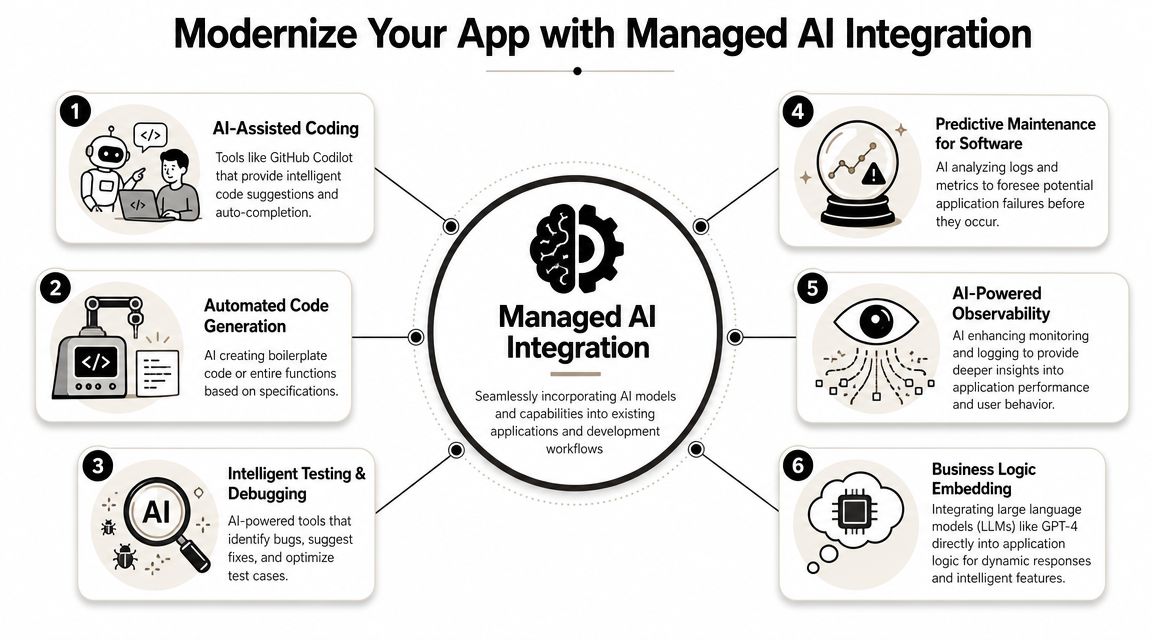
AI adoption is mainstream. Governance is the hard part
Stack Overflow's 2025 survey found that 84% of developers now use or plan to use AI tools in their development process, up from 76% in 2024. The same source reports that 66% of developers' biggest frustration is AI output that is “almost right, but not quite,” and 45% say debugging AI-generated code takes extra time, as summarized in Keyhole Software's review of software development statistics.
That mix should sound familiar to any business leader. Adoption moves quickly. Oversight catches up later.
If your team embeds large language models into customer-facing workflows, internal operations, search, support, summarization, recommendations, or decision support, you inherit a new control surface:
- Prompt versioning so teams know what changed
- Parameter management so model inputs are structured and secure
- Unified logging so behavior can be reviewed across providers and environments
- Cost visibility so usage doesn't drift unnoticed
- Model flexibility so teams can change providers without rebuilding application logic
Traditional automation tools don't solve this well
CI/CD can deploy AI features. IaC can provision the environment they run in. Testing can validate parts of their behavior. None of those, by themselves, give product and engineering leaders a clean operating layer for prompts, model routing, logs, and spend.
That's why managed AI integration is becoming such an important modernization topic. Once AI becomes part of business logic, teams need the same discipline they already expect from application code. Version control. change history. observability. governance.
For leaders thinking through that shift, Wonderment's perspective on how to leverage artificial intelligence is a good overview of what responsible adoption looks like in production software.
The companies that get durable value from AI won't be the ones with the most prompts. They'll be the ones that can manage prompts like product assets.
What good AI operations looks like
A mature setup usually includes one place to manage prompts, one way to log model activity, clear controls around application parameters and data access, and visibility into cumulative spend.
That sounds administrative, but that's the point. AI features become much more useful once they stop living as scattered strings in codebases, hidden settings, and undocumented experiments.
The stage is set for practical modernization. The conversation shifts from “can we add AI?” to “can we operate AI reliably inside our software stack?” The second question is the one that determines whether the first creates value.
Frequently Asked Questions About Software Automation
A lot of leadership questions about automation aren't technical. They're operational. They usually come down to timing, scope, and risk.
Common questions for business leaders
| Question | Answer |
|---|---|
| Where should a company start if delivery is still mostly manual? | Start with the most repetitive workflow that creates visible pain. That's often deployments, regression testing, or environment setup. Early wins matter more than broad ambition. |
| Should every repetitive task be automated? | No. Automate tasks that happen often, follow clear rules, and create meaningful drag or risk when done manually. Some low-frequency work is cheaper to leave manual. |
| How do we keep automation from becoming fragile? | Treat it like product infrastructure. Put it in version control, assign ownership, review changes, document failure modes, and monitor how it behaves in real usage. |
A final practical filter
If a process is unclear, unstable, or disputed, don't automate it first. Clarify it first.
If a process is repeatable, necessary, and boring, that's usually your best candidate.
That distinction saves a lot of money and a surprising number of internal arguments.
If your team is modernizing an application, adding AI features, or trying to make software delivery more reliable without adding process bloat, Wonderment Apps can help. They design and build scalable web and mobile products, support AI modernization, and offer a prompt management system with a prompt vault, versioning, parameter controls, unified logging, and cost tracking so teams can manage AI integration with the same discipline they expect from the rest of their software stack. If you want to see what that looks like in practice, book a demo and talk through your use case.