

Your product works. Customers can log in, search, submit forms, and check out. Yet revenue stalls, support tickets pile up, and your team keeps debating whether the problem is marketing, engineering, or design.
In many companies, that's the moment when “make it look better” gets mistaken for a strategy. It isn't. A polished interface can help, but it won't fix a product that asks users to work too hard, trust too much, or guess what happens next.
That's why user experience strategy matters. It gives leaders a way to connect interface decisions to business outcomes like conversion, retention, trust, and operational efficiency. It also becomes more important when you modernize for AI. Once you add AI-generated outputs, model choices, prompts, handoffs, and admin controls, the experience no longer lives only on the customer-facing screen. It also lives in the tools your product, engineering, and operations teams use to govern that system well.
If you're upgrading a platform, adding personalization, or exploring AI integration, UX strategy is the difference between shipping features and building an experience people adopt.
Beyond Easy to Use What Is a User Experience Strategy
A lot of executives hear “UX” and think about buttons, colors, and page layouts. That's understandable, but it's incomplete. A user experience strategy is a business plan for how your product should feel, behave, and perform for users in a way that supports company goals.
A simple test helps separate tactics from strategy. If your team says, “We need a cleaner dashboard,” that's a design task. If your team says, “We need users to complete onboarding with less friction so more accounts become active customers,” that's strategy.
What strategy changes in practice
Without a strategy, teams usually make local improvements. One group tweaks the homepage. Another rewrites emails. Engineering ships new features based on urgency. Support keeps documenting workarounds. Each decision may be reasonable on its own, but the product still feels inconsistent.
With a user experience strategy, leaders align around a few questions:
- Who are we designing for
- What user problems matter most
- Which moments drive business value
- What trade-offs are worth making
- How will we know the experience is getting better
That alignment affects more than UI. It shapes feature prioritization, onboarding flow, content clarity, accessibility, trust signals, service design, and even what not to build.
Practical rule: If a product decision can't be tied to a user outcome and a business outcome, it probably isn't strategic yet.
Why “user-friendly” is too small a goal
“User-friendly” sounds good, but it's vague. Friendly for whom. Friendly during which task. Friendly enough to reduce abandonment, increase trust, or shorten the path to value.
A stronger strategy uses specific intent. For example:
| Weak goal | Strategic goal |
|---|---|
| Improve the app | Help first-time users complete setup with less confusion |
| Modernize the interface | Reduce friction in key workflows that affect activation and retention |
| Add AI features | Add AI where it helps users decide faster, with clear controls and auditability |
This matters even more in AI modernization. Once teams introduce AI into a custom web or mobile application, they aren't only designing what end users see. They're also designing how developers and operators manage prompts, parameters, logs, model behavior, and spending.
That's where many teams get stuck. They treat AI as a feature layer instead of part of the experience architecture. A real UX strategy reaches deeper. It informs the front-end journey and the administrative systems behind it, so the customer experience stays coherent as the product scales.
The Billion Dollar Case for a User Experience Strategy
Executives rarely need another speech about empathy. They need a financial case. UX strategy has one.
Forrester Research has reported that every $1 invested in user experience returns about $100, or roughly 9,900% ROI, and that a well-designed, frictionless UX can raise conversion rates by up to 400% according to Adobe's summary of UX business impact. That's why smart operators don't treat UX as decorative work. They treat it as a growth lever.
Where the money actually comes from
The return doesn't appear by magic. It comes from reducing friction in moments that influence buying and staying.
Three examples show why this is so powerful:
- Checkout and conversion: If people hesitate, can't find answers, or lose confidence, they abandon.
- Onboarding and activation: If setup feels unclear, users never reach the value that justifies the sale.
- Support and operations: If the product is confusing, your team pays for that confusion later in tickets, training, and churn prevention.
Baymard Institute's testing, summarized in the same Adobe resource, found that 70% of customers abandon purchases due to bad user experience in ecommerce contexts. For a CEO, that turns UX from a design preference into a revenue protection issue.
Why the C-suite should care
A good user experience strategy does four things a board can understand:
- Protects demand by preventing avoidable drop-off.
- Improves unit economics by increasing the value of traffic and acquisition spend.
- Strengthens retention because people return to products that feel reliable and easy.
- Builds differentiation when competitors offer similar features but a worse path to value.
If your company is already investing in paid acquisition, sales enablement, product development, or AI capability, weak UX can dilute those investments. Better messaging won't save a broken workflow. More features won't fix poor findability. A new AI assistant won't help if users can't trust or control what it does.
For leaders working on digital performance, even adjacent topics like improving website conversion rates become easier when the underlying experience strategy is sound. Optimization works best when the journey itself makes sense.
The fastest way to waste a technology budget is to layer growth tactics on top of unresolved friction.
The Four Pillars of a Bulletproof UX Strategy
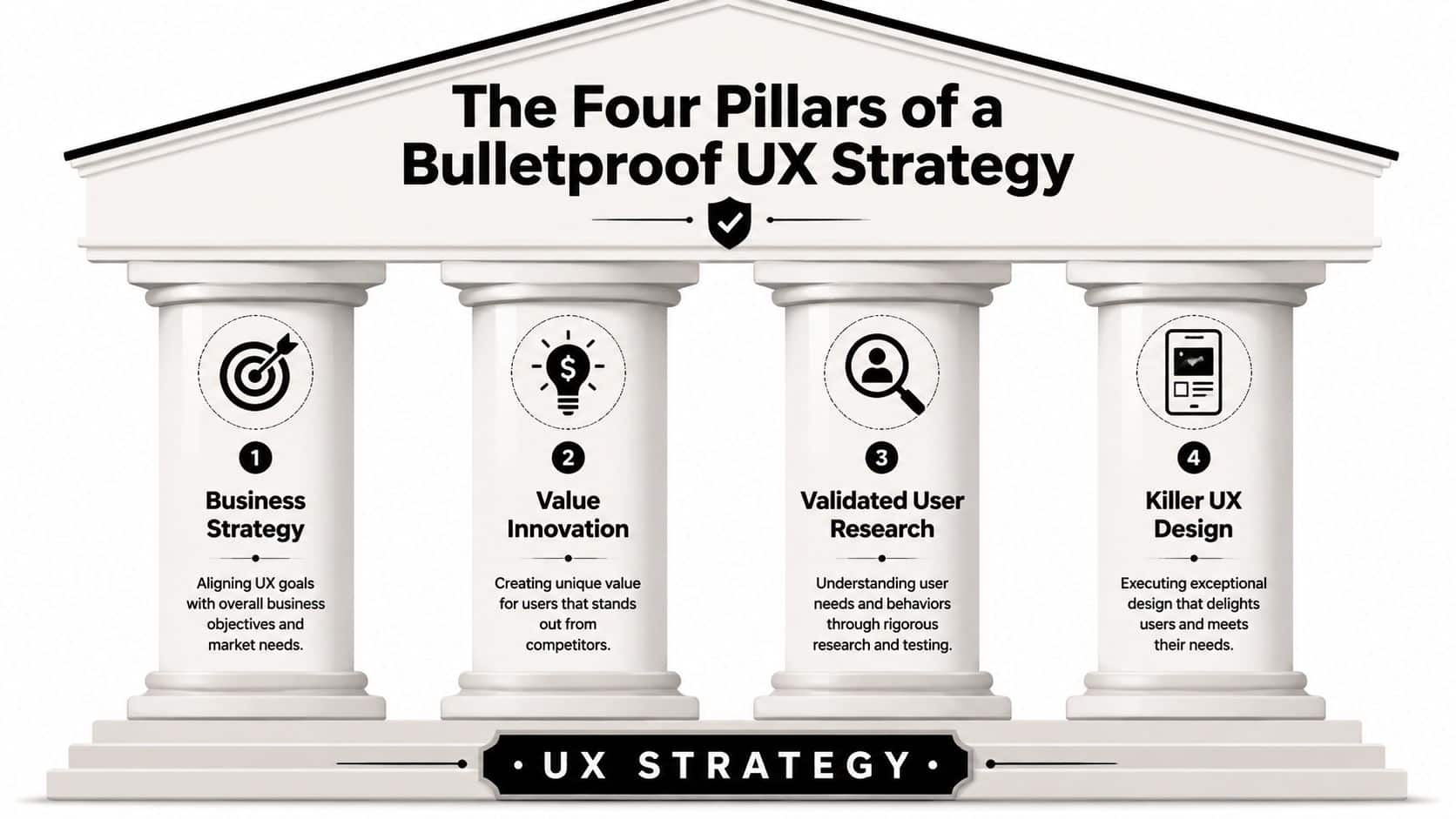
Frameworks can get fluffy fast, so it helps to use one that's concrete. Jaime Levy formalizes UX strategy around four tenets: business strategy, value innovation, validated user research, and killer UX design, as outlined in this overview of Levy's UX strategy model.
Those four pillars work because they force teams to connect ambition to evidence.
Business strategy
This pillar asks the hard commercial questions first. Who is the target customer. What's the revenue model. Why should this product win. Which workflows matter most to profitability or retention.
If you skip this step, design teams end up polishing experiences that don't move the business. A lovely feature that serves the wrong segment is still the wrong feature.
Value innovation
Teams define how the product creates distinctive value while removing unnecessary cost or effort. In plain language, it means solving a meaningful problem in a way that feels better than the alternatives.
Sometimes that means simplifying a bloated flow. Sometimes it means making a complex task feel safer and clearer. In ecommerce, it may be reducing checkout friction. In SaaS, it may be helping users reach their “aha” moment sooner.
Good UX strategy doesn't add complexity with style. It removes complexity with intent.
Validated user research
This pillar keeps teams honest. Internal opinions are useful, but they're not evidence. Validated research means hearing from real users through interviews, observation, surveys, prototypes, or usability testing.
The important word is validated. Many companies talk to a few customers and call it strategy. Real validation means testing whether assumptions hold up when users try to complete important tasks.
Killer UX design
This is the visible part, but it belongs last for a reason. Great design is what turns strategic choices into screens, flows, states, copy, and interactions that feel coherent.
It's not decoration. It's execution quality.
A helpful way to think about the four pillars is as a chain:
| Pillar | Core question |
|---|---|
| Business strategy | What must this product achieve commercially |
| Value innovation | Why will users choose it over alternatives |
| Validated user research | Do we know this is true from user evidence |
| Killer UX design | Can people actually experience that value smoothly |
Weakness in any one pillar creates drag in the others. Strong design without research is guesswork. Research without business strategy produces interesting findings with no priority. Business goals without good execution remain slide-deck ambitions.
How to Build Your UX Strategy Step by Step
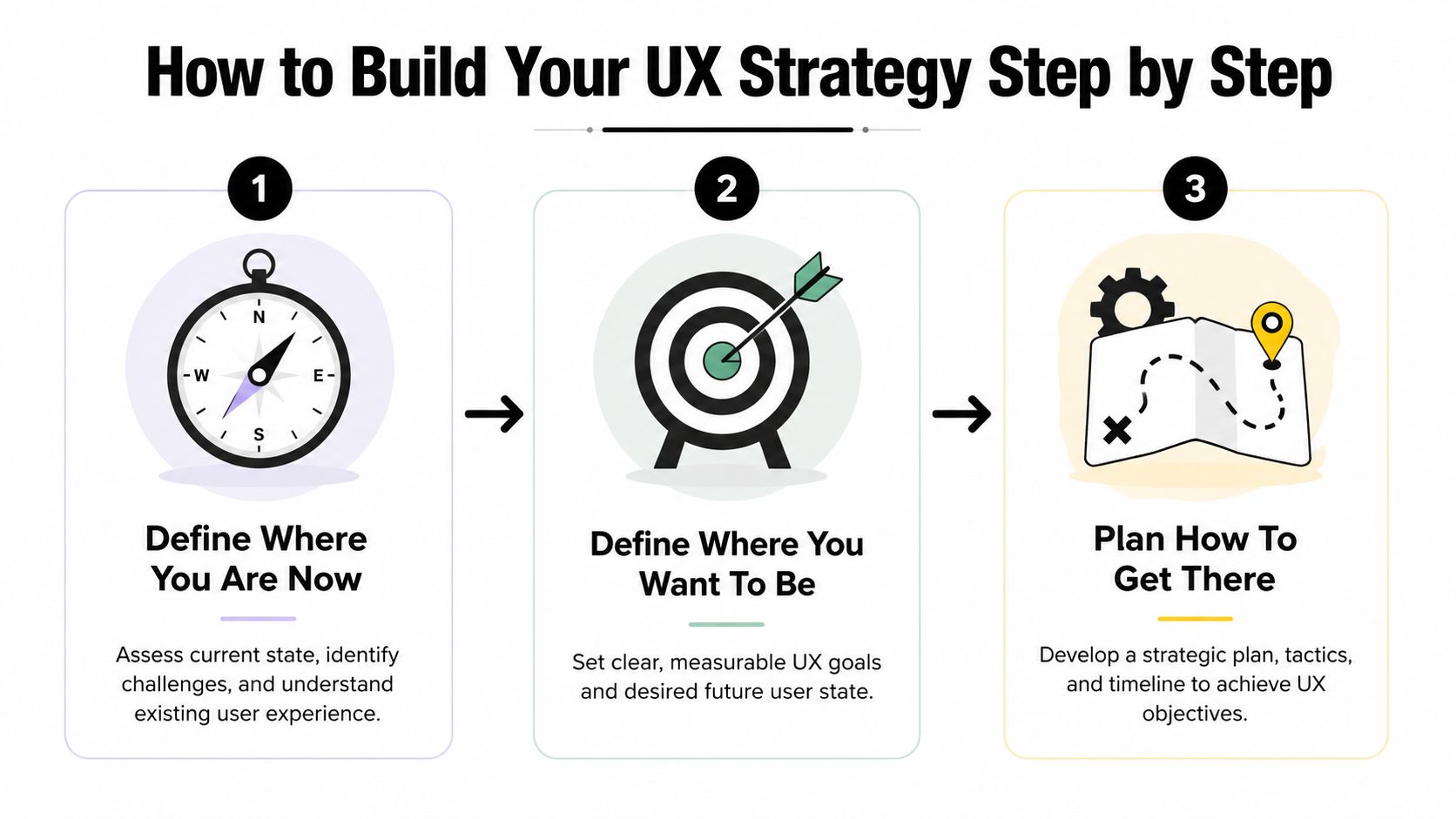
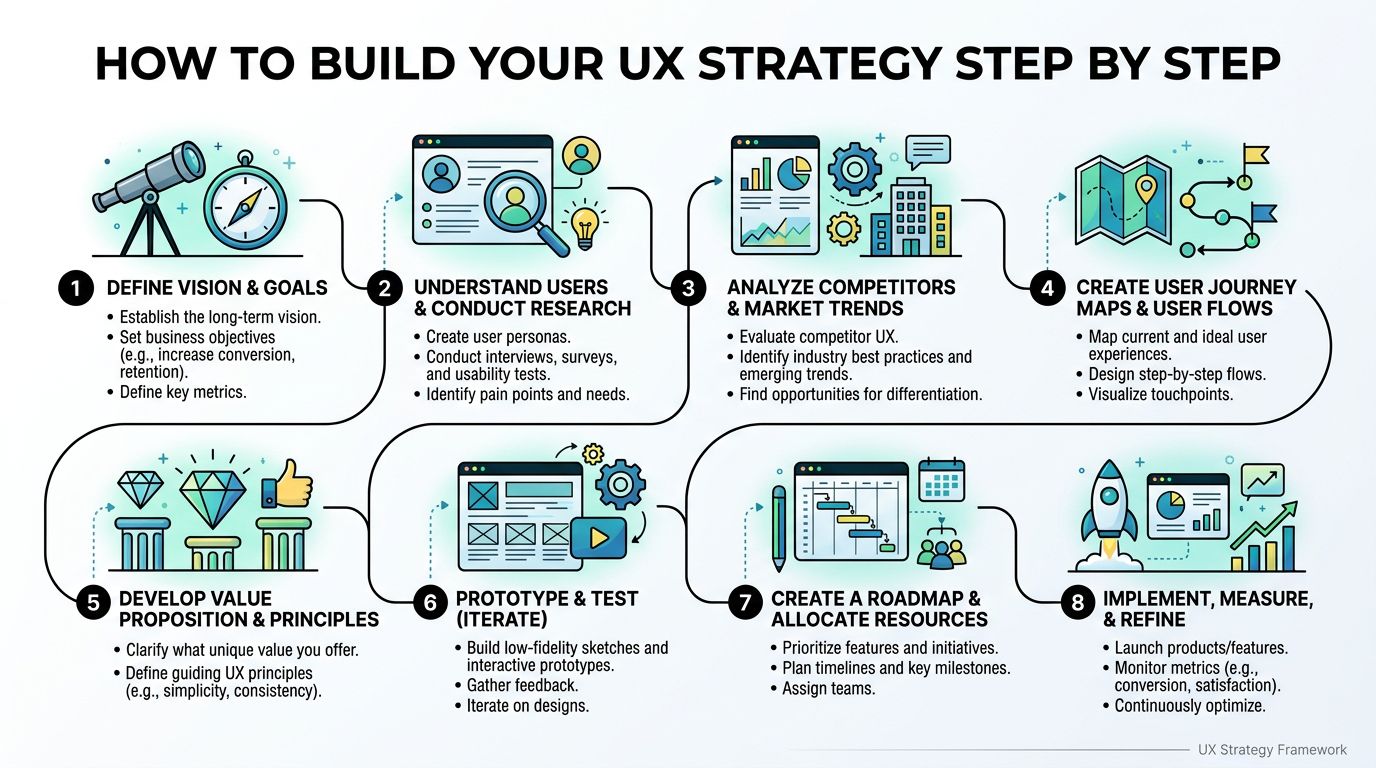
Good strategy documents are often shorter than people expect. The useful ones answer three questions clearly: where the experience is today, where it should be, and how the team will close that gap, as described in this practical guide to UX strategy documentation.
That sounds simple. The work is in making each answer specific enough to guide decisions.
Step 1 Define where you are now
Start with an honest snapshot of the current experience. Not the brand promise. Not the roadmap. The actual journey users face today.
Look at the product through three lenses:
- Behavioral evidence: Where do users drop off, repeat actions, backtrack, or ask for help?
- User evidence: What confuses them, slows them down, or weakens trust?
- Operational evidence: Where does your team spend time compensating for a weak experience?
A simple audit usually includes key flows like onboarding, search, checkout, account setup, dashboard use, support paths, and mobile responsiveness. If your product spans web and mobile, compare the experiences side by side. Many companies discover they've built two different products without meaning to.
Step 2 Define where you want to be
This part should be directional but concrete. “Deliver a better experience” doesn't help anyone choose between projects.
Useful target states sound more like this:
- Reduce friction in the first-use journey
- Increase trust during high-stakes actions
- Help users complete priority tasks with fewer errors
- Make the experience consistent across desktop, mobile, and support touchpoints
For CEOs, the important move is linking these experience goals to business goals. A clearer onboarding flow supports activation. Better transparency supports trust. Simpler handoffs support retention and lower support burden.
A product team often sharpens these goals during planning rituals. If your teams already work in cycles, connecting UX work to delivery planning through product management sprints and UX sprints can prevent strategy from becoming a separate document nobody uses.
A UX strategy should help teams say no. If every idea still looks equally urgent, the strategy isn't sharp enough.
Step 3 Plan how to close the gap
Now turn principles into a roadmap. Many organizations get lost during this process because they jump from insight to redesign without sequencing the work.
A better approach is to organize initiatives by business impact, user pain, and implementation complexity.
- Fix severe friction first. Broken or confusing moments in critical workflows deserve early attention.
- Prioritize trust-heavy moments. Payments, identity checks, consent, and data sharing need extra clarity.
- Standardize recurring patterns. Navigation, forms, messages, and mobile interactions should behave consistently.
- Build feedback loops. Every release should create new evidence, not just new screens.
Your roadmap should also assign owners. UX strategy fails when everyone agrees with it but nobody is responsible for moving it.
A concise strategy document often works best when it includes these elements:
| Part | What it should contain |
|---|---|
| Current state | Main user groups, tasks, pain points, and system constraints |
| Future state | Clear principles that guide design and product choices |
| Action plan | Priorities, responsibilities, trade-offs, and timing |
Keep it brief enough that product, design, engineering, and leadership can use it in decision-making. If it only lives in a workshop deck, it's not a strategy yet.
UX Strategy in Action Examples Across Industries
The principles stay consistent, but priorities change by industry. A strong user experience strategy always reflects the stakes of the context.
Ecommerce and retail
An ecommerce team usually cares about discovery, trust, and checkout momentum. If users can't compare products easily, understand shipping, or finish checkout without second-guessing, revenue leaks out of the funnel.
A practical ecommerce strategy often focuses on reducing unnecessary decisions. Clear product detail pages, better filtering, transparent costs, and a calmer checkout flow usually matter more than adding one more promotional banner.
Fintech and SaaS
Fintech products ask for confidence before they ask for action. Users are making payments, managing accounts, verifying identities, or authorizing sensitive steps. SaaS products face a related challenge. They need users to understand value quickly while still feeling in control.
That changes the tone of UX strategy. In these products, a smooth experience isn't just about speed. It's about clarity, transparency, and predictable system behavior. Error states, confirmations, permissions, and audit visibility carry more weight than they might in a content app.
Healthcare and public sector
Regulated environments raise the bar again. In healthcare and public services, the experience has to support comprehension, trust, and procedural accuracy. According to NNGroup's discussion of UX strategy in regulated settings, recent OECD work notes that 73% of member countries require explainable and auditable AI interfaces in public services. That shifts UX strategy away from pure engagement and toward compliance and risk reduction.
At this stage, accessibility also becomes operational, not optional. Teams often benefit from checking real pages and flows with a practical tool like a website accessibility checker, especially when forms, notifications, and consent paths affect essential services.
In regulated products, the “best” experience is often the one that helps people act correctly and confidently, not the one that feels most novel.
Media and content platforms
Media teams optimize for discovery, continuity, and performance. Users need to find something worth engaging with quickly, then move through content without friction. Strategy decisions often revolve around recommendations, navigation depth, search quality, and playback or reading continuity across devices.
The core lesson across all five sectors is simple. UX strategy is not a template. It's a decision framework shaped by the risks, behaviors, and business model of your industry.
Integrating UX Strategy with AI and Engineering
AI changes UX strategy because it introduces a second layer of experience. Users see the front-end behavior, but teams also have to manage prompts, model updates, observability, fallback logic, access rules, and costs behind the scenes.
That's why UX strategy can't stop at screen design. It has to shape architecture and internal tooling too.

Why AI products break consistency so easily
A 2023 Forrester report on enterprise AI adoption, summarized in this discussion of UX strategy gaps in AI projects, highlighted that 68% of organizations struggle with UX consistency across AI-augmented touchpoints because UX strategy teams are not involved in early architecture decisions. That's the heart of the issue.
If engineering chooses models and workflows before product and UX define experience standards, teams end up with fragmented behavior. One part of the app sounds formal. Another gives vague answers. A third has no audit trail. Admin teams can't tell which prompt version caused what result. Finance can't see cumulative AI spend clearly enough to govern usage.
What operationalizing UX strategy looks like
For AI-enabled software, UX strategy should reach into engineering practices like:
- Prompt versioning: Teams need to know which prompt is live and what changed.
- Parameter control: Inputs tied to internal data need guardrails and traceability.
- Unified logging: Operators need visibility across integrated AI services.
- Cost awareness: Product owners need cumulative spend visibility before usage drifts.
These aren't just engineering concerns. They directly influence consistency, trust, and maintainability.
For leaders exploring implementation patterns, resources on effective AI strategies for professionals can help frame the broader operating model. But in a product environment, the key is making those strategies manageable inside day-to-day workflows.
One example is Wonderment Apps' prompt management system, an administrative tool that can plug into an existing app or software product to support AI modernization. It includes a prompt vault with versioning, a parameter manager for internal database access, a logging system across integrated AI tools, and a cost manager for viewing cumulative spend. Those features matter because they give developers and entrepreneurs operational control over the AI layer, which helps preserve a consistent end-user experience across desktop and mobile products. For teams evaluating where to begin, a practical primer on how to leverage artificial intelligence can help connect the business case to implementation choices.
The broader lesson is simple. In AI products, internal admin tools are part of the UX strategy. If the builders can't manage the system coherently, users won't experience it coherently either.
Make Your UX Strategy a Reality
A user experience strategy isn't a design deliverable you approve once and file away. It's an operating discipline. It helps leaders decide what to build, what to simplify, what to measure, and how to align product, design, and engineering around the same outcomes.
That matters even more when your product is scaling across web, mobile, and AI-enabled workflows. In that environment, surface-level polish won't carry the business. You need a strategy that connects customer journeys, system behavior, governance, and delivery choices.
Start small. Audit a few high-stakes flows. Identify where trust drops, where effort spikes, and where teams compensate manually for a poor experience. If you're building internal capability, outside support like AI engineer placement can help fill execution gaps while your strategy matures.
If your roadmap includes AI modernization, ask one extra question early. What tools will your team use to manage prompts, parameters, logs, and spend over time? That answer will shape the user experience more than most companies expect.
If you're ready to turn UX strategy into a practical roadmap, explore Wonderment Apps. Their work spans UX-driven product delivery, AI modernization for web and mobile software, and a prompt management demo for teams that need stronger control over versioning, logging, parameters, and cumulative AI spend.