


Your team ships a Kotlin Android app and a Swift iOS app from the same specification. The screens look right, but login behaves differently, push notifications arrive inconsistently, and background sync stops when someone locks their phone. Picking a different framework won't fix those problems. Drawing better boundaries might.
Mobile application development architecture is the set of decisions about where state, business rules, platform behavior, data, and operational controls belong. The useful question isn't which framework wins. It's which responsibilities you can safely share, and which ones need direct ownership.
Why Mobile Architecture Is Its Own Discipline
A shared product specification does not create a shared runtime. Android and iOS have different lifecycle rules, permission systems, notification services, and release processes. StatCounter's worldwide mobile operating-system series provides platform-market context, but market reach alone cannot determine how either app should behave.
Phones are a primary access channel. Mobile devices accounted for an average 58.5% of worldwide website traffic in 2025, according to StatCounter data reported by Statista. That figure measures website traffic, not app usage. It still shows why mobile deserves deliberate product and engineering decisions.
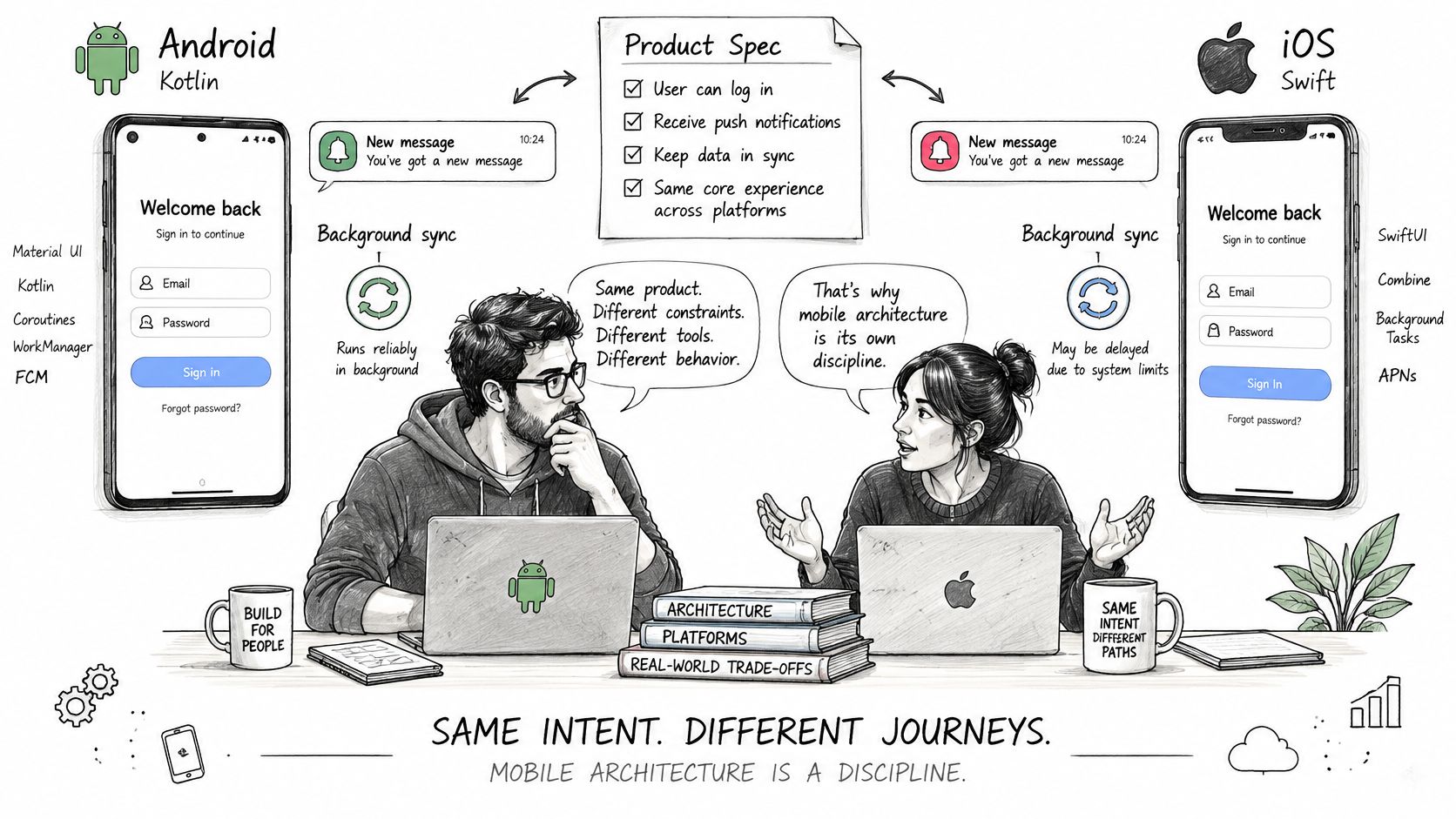
Three forces shape the work:
- Platform fragmentation: screens, hardware capabilities, and operating-system behavior vary across devices.
- Device constraints: apps must handle process termination, limited memory, battery pressure, and unreliable connections.
- Shared-code costs: common implementations can reduce duplication, but they also add coordination overhead and may leave platform-specific fixes and releases to each team.
Core rule: Share business rules and backend contracts where they behave consistently. Keep presentation, permissions, storage adapters, and notifications close to the platform when their behavior differs.
Architecture is a boundary decision, not a framework contest. Score each area by capability: shared accessibility behavior, background work, and AI acceleration may have different platform needs. Then include the costs that comparisons often overlook, such as maintaining shared code, reconciling offline changes, and managing on-device AI's resource demands. For broader engineering context, browse software engineering articles from 3rd-i.
The same boundary thinking applies to AI modernization: Wonderment Apps offers an administrative toolkit for prompt management, integrations, and token cost control that can be reviewed alongside an existing application.
MVC, MVVM and Clean Architecture Side by Side
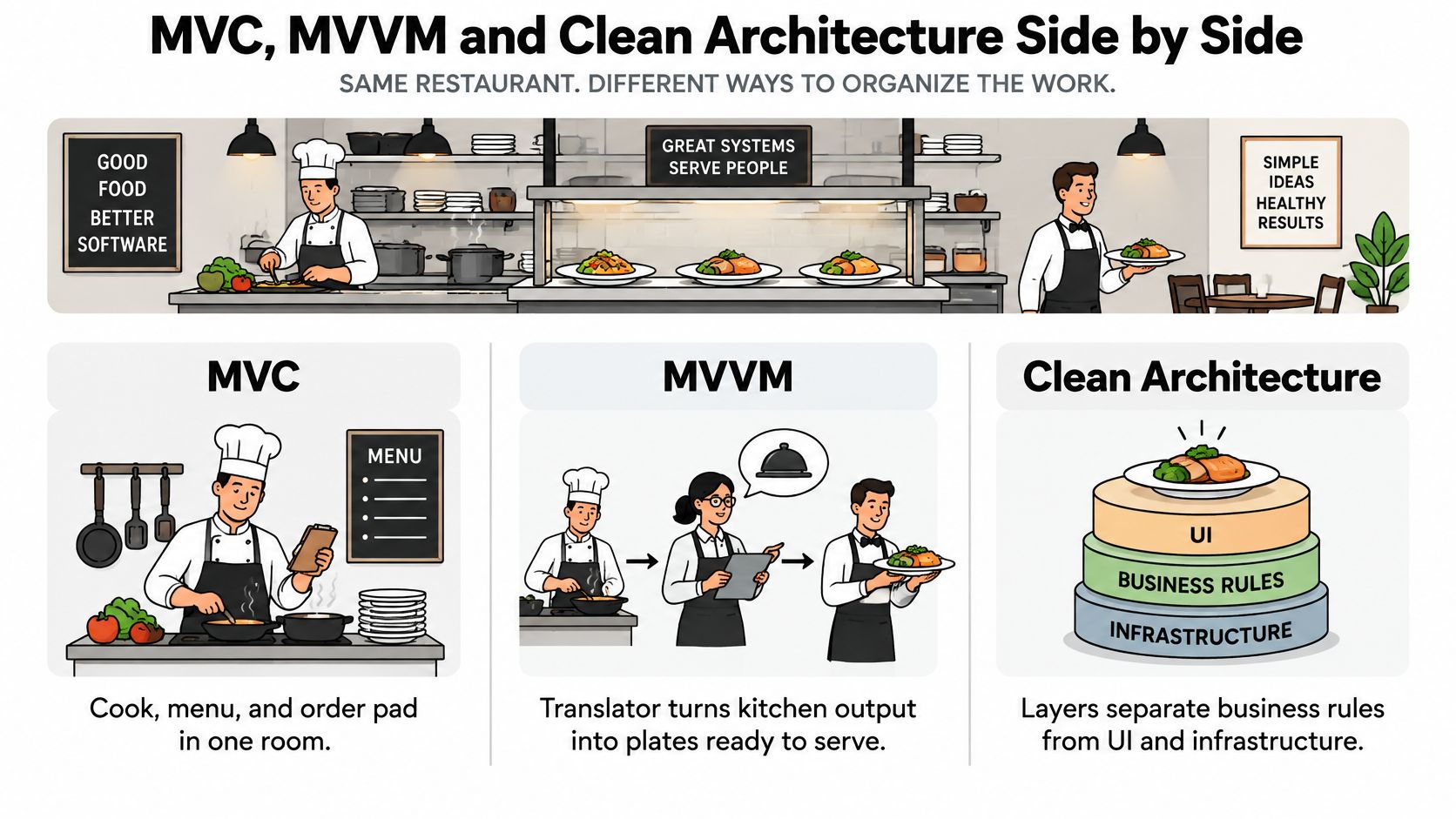
Think of a restaurant kitchen. MVC keeps the cook, menu, and order pad in the same room. MVVM adds a translator who turns kitchen output into plates ready to serve. Clean Architecture separates the recipes, suppliers, and dining room so replacing a supplier doesn't require rewriting the menu.
The analogy isn't about sophistication. A sandwich counter doesn't need the operating model of a hotel kitchen. Likewise, extra layers only help when they isolate responsibilities that change independently.
Architecture patterns compared on the criteria that matter
| Pattern | Where logic lives | Testability | Boilerplate | Best fit |
|---|---|---|---|---|
| MVC | Controller, often bloated with networking and formatting | Low to medium; controllers are hard to unit test | Low | Prototypes and short-lived apps |
| MVVM | ViewModel holds presentation state and logic | High for ViewModels; views need little logic testing | Medium | Most single-team consumer apps |
| Clean Architecture | Use cases hold business rules across separated layers | Very high; domain tests run without a device | High | Large teams, regulated fintech and healthcare apps |
Where each pattern earns its keep
In UIKit-based MVC, the view controller can easily absorb request handling, date formatting, navigation, and business policy. That's convenient until testing discount eligibility requires constructing a screen. MVC remains reasonable for prototypes and short-lived internal tools, provided controllers delegate data access rather than becoming the application.
With MVVM, a ViewModel exposes presentation state and accepts actions. Jetpack Compose fits this approach directly; SwiftUI can use an observable presentation model serving the same purpose. A checkout ViewModel might expose whether submission is available, while a separate business rule determines whether the order qualifies for a discount.
Views still need accessibility, interaction, and rendering tests. Moving logic into a ViewModel reduces the logic hidden inside views; it doesn't make the interface correct by definition.
Clean Architecture separates presentation, domain, and data responsibilities. Use cases express operations such as evaluating consent or submitting a transfer, while interfaces keep those rules independent of databases and network clients.
Choose by the cost of change
For most single-team consumer apps, MVVM is a sensible starting point. Add domain use cases where rules are reused, financially important, or difficult to test through presentation code.
For larger teams and long-lived regulated products, Clean Architecture can clarify ownership and make policy changes easier to review. But regulation doesn't mandate a particular folder structure. Traceable decisions, tested controls, and explicit responsibilities matter more than architectural branding.
The cost is real: more interfaces, mapping code, files, and navigation between layers. A small app doesn't benefit from a use case that forwards an unchanged argument to a repository.
Choose the lightest pattern that keeps business rules testable without launching a device.
How to Lay Out Layers and Data Flow Step by Step
Android's official architecture guidance recommends separating UI and data responsibilities, using observable state and unidirectional data flow, and introducing a domain layer when it helps. Build those boundaries in an order that makes mistakes visible.
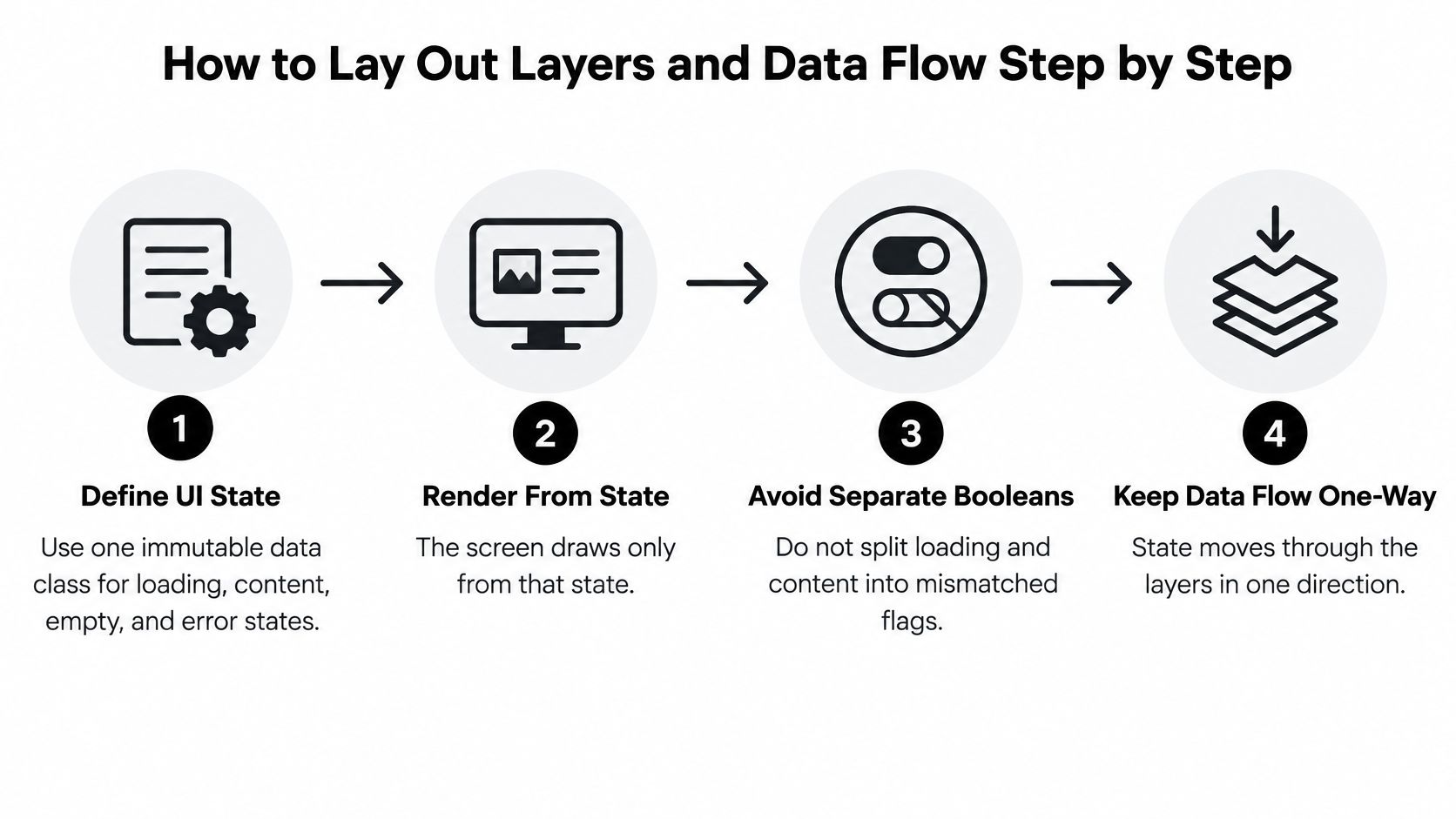
Define screen state. Use an immutable state model covering loading, content, empty, and error conditions. Avoid unrelated booleans that allow impossible combinations, such as an empty screen marked both successful and failed.
Expose state through a state holder. Let the ViewModel or presenter publish an observable stream and accept explicit user events. Don't let the view mutate shared state behind its back.
Introduce a repository. Put API calls, database reads, and cache decisions behind it, with a clear authoritative source. Calling an API directly from a composable makes repeated requests and divergent screen state much harder to control.
Extract meaningful business rules. Discount eligibility and consent checks belong in testable functions or use cases. Don't create a new class for every trivial forwarding operation.
Inject replaceable dependencies. Supply repositories and data sources through constructors or dependency injection. Tests can then replace the API with a fake that deliberately returns timeouts, invalid responses, or expired credentials.
Persist what matters. Save drafts and durable records outside UI components, and make transient navigation or selection state restorable. An operating system can terminate the process without giving your screen a polite goodbye.
Treat data flow as a one-way conveyor belt: events go up, state comes down. Use coroutines or reactive flows to coordinate asynchronous work, and dispatch blocking I/O away from the main thread.
Check behavior, not folder names
Rotate an Android device during a request and confirm that the resulting screen remains correct. Then test process recreation separately, because surviving rotation doesn't prove the app can recover after termination.
Native, Cross-Platform or Hybrid and Where to Draw the Line
Draw a line through capabilities, not through a framework popularity contest. Domain rules and design tokens are usually good sharing candidates. Accessibility behavior, background execution, camera pipelines, and AI acceleration deserve platform-specific scrutiny.
Platform approaches compared
| Approach | Code sharing | Performance ceiling | Native API access | Best fit |
|---|---|---|---|---|
| Native (Swift and Kotlin) | None by default; each platform built separately | Highest | Full and same-day SDK access | Camera, AR, and deep OS integration |
| React Native | High for logic and most UI | High for typical apps | Through native modules | Teams with React and web skills |
| Flutter | High; one UI codebase | High; custom rendering | Through platform channels | Consistent custom UI across platforms |
| Kotlin Multiplatform | High for domain and data; UI can stay native | High | Full in the native UI layer | Shared business logic with native UI |
| Hybrid web wrapper | High | Lowest for complex screens | Limited without native plugins | Content-first apps and internal tools |
These are starting positions, not benchmarks. A poorly implemented native screen can still perform worse than a carefully built shared screen.
In a 2025 worldwide survey of 725 businesses, 90% selected React as a leading frontend framework for mobile application development, according to GoodFirms. That suggests a familiar skills ecosystem, not proof that a React developer can handle mobile signing, lifecycle recovery, or accessibility.
Scale is possible with shared tooling: 20% of 3,501 respondents to the 2024–2025 React Native developer survey reported applications serving more than 100,000 users, according to DevClass's survey coverage. The framework alone doesn't establish backend capacity or operational maturity.
Score the boundary before sharing it
The modular approach discussed in Dogtown Media's platform-update guide is useful when modules isolate real platform differences. Evaluate each candidate capability against:
- Startup time and crash-free sessions, measured on representative devices.
- Accessibility defects, including screen-reader focus and large-text behavior.
- Upgrade lead time, including blocked dependencies.
- Native escape-hatch frequency, meaning how often shared code needs platform exceptions.
- Total ownership cost, including debugging, specialist staffing, and release coordination.
A shared background scheduler that accumulates platform exceptions may cost more than separate native adapters. Count maintenance work, not just shared lines.
For a deeper delivery comparison, use our native versus cross-platform development guide. When comparing staffing routes, LatHire's Hire Latin American Developers resource can support candidate sourcing, but ask candidates for shipped apps and an explanation of where they drew the native boundary.
Share what changes slowly and behaves consistently. Keep direct platform control where operating-system behavior determines correctness.
Backend, API Design and Offline-First Sync
A commuter submits an order as the train enters a tunnel. The app must distinguish between an order saved locally, a request sent without confirmation, and an order accepted by the server. A cheerful success animation isn't a transaction protocol.
Keep the mobile client focused on interaction, local resilience, and device capabilities. Put authoritative authorization, inventory, and financial decisions on the server. Independently deployable services can help when teams need separate ownership or scaling, but don't split a straightforward backend into services without an operational reason.
Design APIs for interrupted conversations
Use versioned contracts, cursor pagination, and selective response fields to avoid forcing every client to download everything. Our API design principles provide a useful foundation for those decisions.
For operations such as payment or order submission, persist an idempotency key with the local operation. The server must recognize retries and return the established outcome rather than executing the operation again. A client-generated key alone provides no protection unless the server enforces it.
For offline-first screens, read from a local database and record mutations in a durable write queue. Store an operation identifier, payload, timestamp, retry status, and relevant server version. Show pending, confirmed, and failed states clearly.
Match the sync strategy to the consequence
- Profile edits can use last-write-wins when losing an earlier value is acceptable.
- Orders need queued mutations and server reconciliation, including fresh price and stock checks.
- Collaborative notes can use conflict-free replicated data types when concurrent editing justifies their complexity.
- Product catalogs often need a read-only cache with a time-to-live and a visible refresh policy.
For terminology and synchronization fundamentals, agentcentral's guide to data synchronization is a useful companion. The architectural choice still rests on what the product may safely overwrite, defer, or reject.
Clock skew makes device timestamps unreliable for resolving valuable changes. Expired tokens require reauthentication without discarding queued work, while a long offline period can leave mutations targeting records the server has deleted.
Use exponential retry backoff with jitter, a retry ceiling, and a queue limit. Warn users before storage pressure prevents new work, and never discard an unsent order to make room.
Make recovery observable
Track queue age, rejected mutations, and repeated authentication failures. Give support teams an operation identifier they can trace without exposing the user's private payload.
Deciding Whether AI Runs on the Device or in the Cloud
On-device AI isn't automatically more private or cheaper. A local model still needs secure distribution, diagnostic controls, output handling, and a fallback policy. Akoode's mobile development trends overview discusses the shift toward AI-native and hybrid mobile designs; the practical decision is where each task belongs.
Use local inference for suitable text classification, OCR, or suggestions when privacy, responsiveness, or offline operation justifies it. Use cloud models for broader reasoning and large context, subject to the application's data policy.
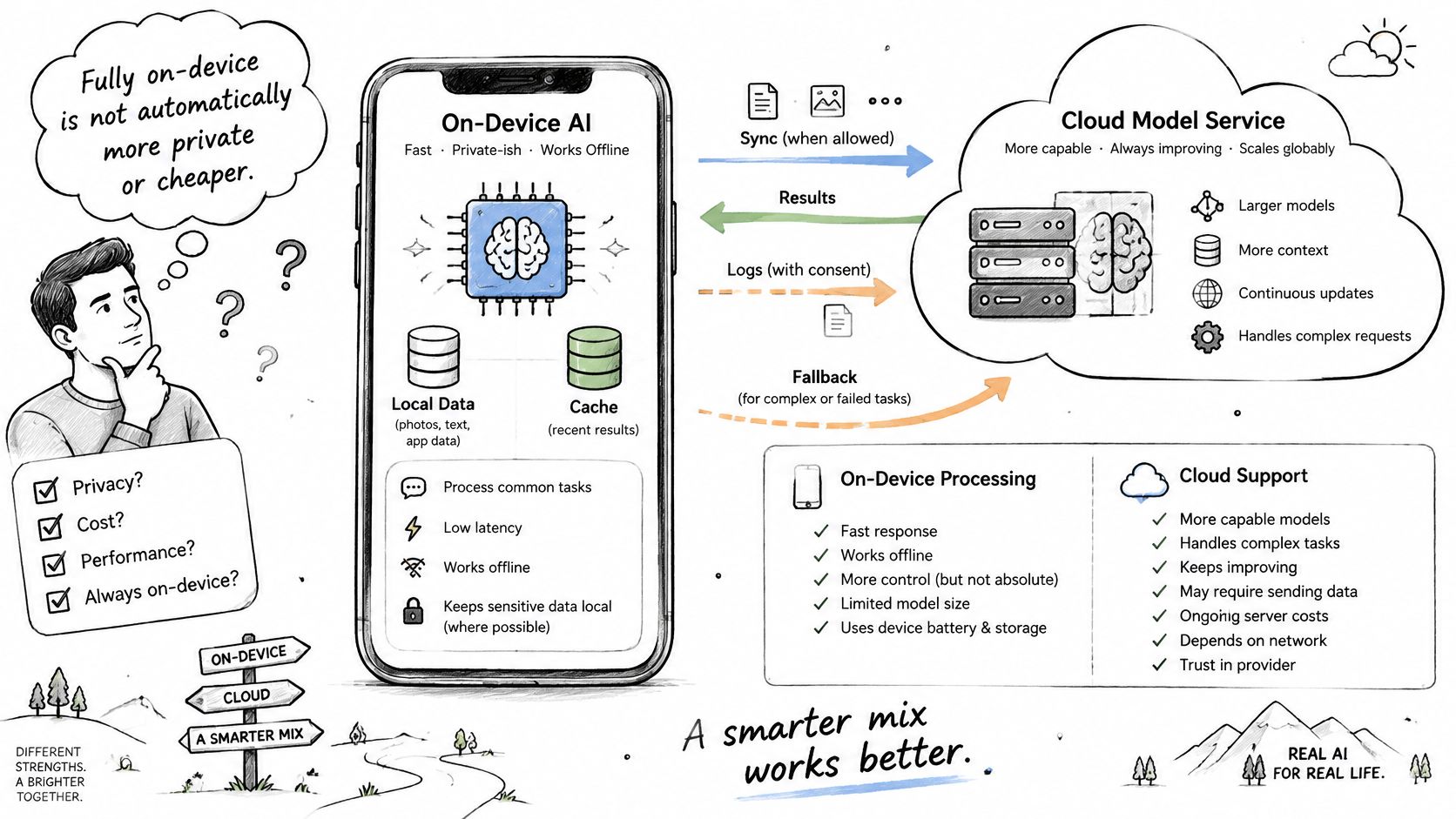
Device versus cloud inference by criterion
| Criterion | Run on device | Run in cloud |
|---|---|---|
| Data sensitivity | Sensitive inputs can remain local if logs and sync also stay local | Data leaves the device; apply consent, minimization, and transport encryption |
| Latency target | Predictable for a supported small model | Network quality affects response time |
| Connectivity | Works offline after installation | Requires connectivity |
| Model size | Constrained by available memory and runtime | Supports larger models and longer context |
| Battery and thermal impact | Adds device load and possible throttling | Moves inference load to servers |
| Inference cost per user | Avoids per-call server inference charges; distribution and support remain | Track usage-based charges and feature-level spend |
| Update speed | Requires a model download or app release | Server deployment, with evaluation and rollback |
| Device support | Check runtime, memory, and accelerator compatibility | Requires a supported client and connection |
Treat models as deployable dependencies
Version the model, tokenizer, and preprocessing contract together. Keep a known-good rollback option and gate activation with a remote flag; that flag can't rescue a device that's currently offline.
Check available memory and neural-accelerator support, then select a smaller model or an explicitly permitted cloud fallback. Redact personal information before logging prompts and outputs. Our guide to AI in mobile apps expands the integration choices.
Execution rule: Start evaluation in the cloud when data policy permits. Move inference on-device when a measured requirement justifies the added lifecycle work.
Security, Testing and Scalability Before Launch
In 2023, 95% of approximately 6,500 mobile applications analyzed by NowSecure failed at least one category of the OWASP Mobile Application Security Verification Standard, according to NowSecure's industry benchmark. That finding describes the analyzed applications, not every app, but it makes a strong case for testing security controls rather than assuming they exist.
Close the obvious doors first
- Protect credentials. Store tokens in iOS Keychain; on Android, use Keystore-backed protection rather than plaintext preferences.
- Secure sensitive transport. Consider certificate pinning for high-risk APIs only with a tested rotation and recovery plan.
- Encrypt local records. Protect database keys separately and define what happens on logout or account removal.
- Minimize permissions. Request access at the point of need and handle denial without trapping the user.
- Keep authorization server-side. Verify access to every resource and operation, regardless of what the interface hides.
- Treat obfuscation as friction. It can complicate reverse engineering, but it doesn't protect embedded secrets or repair broken authorization.
Use a testing pyramid that reflects where failures originate. Run fast unit tests around business rules and presentation state, then integration tests for repositories against fake servers that return failures intentionally.
Keep UI automation focused on critical journeys such as login, checkout, and sync recovery. Add device-farm coverage across supported operating-system versions, and test real accessibility behavior rather than checking only that labels exist.
Make release gates enforceable
Your CI pipeline should run tests, dependency checks, and static analysis before signing a release artifact. Protect signing credentials, restrict release permissions, and preserve a traceable build history.
Start staged deployment with a small audience. Define halt thresholds for crash-free sessions, failed authentication, rejected payments, and stalled synchronization before release day, not while a dashboard is turning red.
Feature flags should disable risky capabilities and switch approved model versions without requiring a new binary. They don't replace rollback planning: database migrations and incompatible API changes may make an old build unsafe.
For scalability, use pagination, carefully scoped caching, backend autoscaling, and load tests that reproduce expensive journeys. Avoid logging sensitive payloads while connecting client operations to server logs and traces through correlation identifiers.
Release expansion should require someone to review those signals. Automatic deployment is useful; automatic optimism isn't.
Confirm Your Architecture Before You Build
A team can agree on an architecture diagram and still be unprepared for the first offline session or AI feature change. Confirm the decisions in order: architecture pattern, platform boundary, offline behavior for each core action, AI execution location, and security and release gates.
Record the evidence behind each choice. Business-rule tests can support a pattern decision; device measurements can show whether shared code meets performance and accessibility needs; recovery tests can expose sync failures. Model evaluations help determine where AI should run.
Give AI operations an administrative boundary
AI features need an operating model alongside their application architecture. Define how teams will manage prompts, connect integrations, and control token costs. Consider who can change each setting and how changes will be reviewed.
Discuss a real workflow, such as catalog assistance or document classification, with Wonderment Apps. Its AI modernization work includes prompt management, integrations, and token cost control, alongside building connections between legacy systems and AI models.
Wonderment Apps develops mobile applications for iOS and Android. Its Technology Services include Backend Architecture, API & Database Development, Frontend Interface Development, Server Side Development, Manual + Automated Quality Assurance, and Tech Consulting and Staffing Services. The team listens, advises, then designs and develops.
Write a one-page architecture decision record this week. Name the boundaries, alternatives you rejected, evidence still needed, and the person responsible for revisiting each choice. Include shared-code costs, offline recovery, accessibility, background work, and whether AI belongs on the device or in the cloud.
Wonderment Apps works across AI modernization, web and mobile development, and UX-driven delivery. Discuss your architecture and AI workflow with Wonderment Apps.