


Your sale campaign is ready, the mobile app looks sharp, and someone has asked whether the platform can handle the traffic. At 2 a.m., it's nearly idle. When the promotion lands, shoppers could flood checkout within minutes, while personalization requests and AI usage climb alongside them.
The question isn't just whether you can add servers. It's whether you can add the right capacity quickly enough, keep customers moving, and stop paying for that capacity when the crowd leaves. That's where cloud computing elasticity becomes a product and business concern, not just an infrastructure setting.
What Cloud Computing Elasticity Actually Means
Say your retail app handles the overnight lull comfortably. Then the sale opens, shoppers refresh product pages, recommendation requests multiply, and checkout queues start growing. An elastic system provisions additional capacity in response, then releases it as demand falls.
Cloud computing elasticity means rapidly provisioning and releasing resources so capacity moves outward and inward with demand, sometimes automatically. In 2011, the U.S. National Institute of Standards and Technology formalized this in Special Publication 800-145, naming rapid elasticity among five essential characteristics, alongside on-demand self-service, broad network access, resource pooling, and measured service.
That makes elasticity a foundational cloud property, not a decorative checkbox. Customers can request resources without owning enough physical hardware for every possible peak, which makes available capacity feel practically unlimited. It isn't a promise that account quotas or provisioning delays disappear.
Elasticity versus scalability
Scalability describes the ability to grow; elasticity adds rapid, reversible adjustments aligned with demand. Scalability can support expansion without automatically shrinking afterward, while an elastic design must handle the return journey too.
| Property | Scalability | Elasticity |
|---|---|---|
| Direction of change | Usually outward growth | Outward and inward with demand |
| Speed | Planned and often slower | Rapid, sometimes automatic |
| Typical trigger | Forecast, redesign, or a larger tier | Live demand signals |
| Cost behavior | Peak capacity often stays paid for | Idle capacity is released; usage is metered |
| Design test | Can it serve a larger peak? | Can it add and remove capacity without an outage? |
| NIST status | Not a named essential characteristic | Rapid elasticity in SP 800-145 |
These are useful planning distinctions, not rigid categories. A scalable application can support automation, and a scheduled capacity change can contribute to elasticity. The deciding issue is whether resources track changing demand in both directions.
Hardware still matters beneath those abstractions. For readers following processor and infrastructure developments, NeoTeo's cloud hardware news for Intel watchers provides useful context, but hardware availability alone doesn't establish application elasticity.
AI needs a visible bill too
In custom desktop and mobile apps, an audience spike can increase backend load and AI token consumption together. Wonderment's prompt management system is an administrative tool teams can plug into existing software for AI modernization, keeping prompts and cumulative spend visible as usage expands.
Practical rule: Before calling your system elastic, verify that it can retire capacity safely, not merely acquire more.
Label your current system: elastic, or only scalable?
How Fast and Accurate Scaling Should Be
A dashboard showing a large instance count doesn't prove good elasticity. Customers care whether capacity arrived before checkout stalled; finance cares whether it left after the promotion ended. Judge the transition, not just the eventual fleet size.
NIST's cloud definition describes resources as rapidly provisionable and releasable in proportion to demand. Turn that principle into measurable acceptance criteria rather than treating an enabled autoscaler as evidence of success.
Score the transition from separate angles
Use these connected but distinct measures:
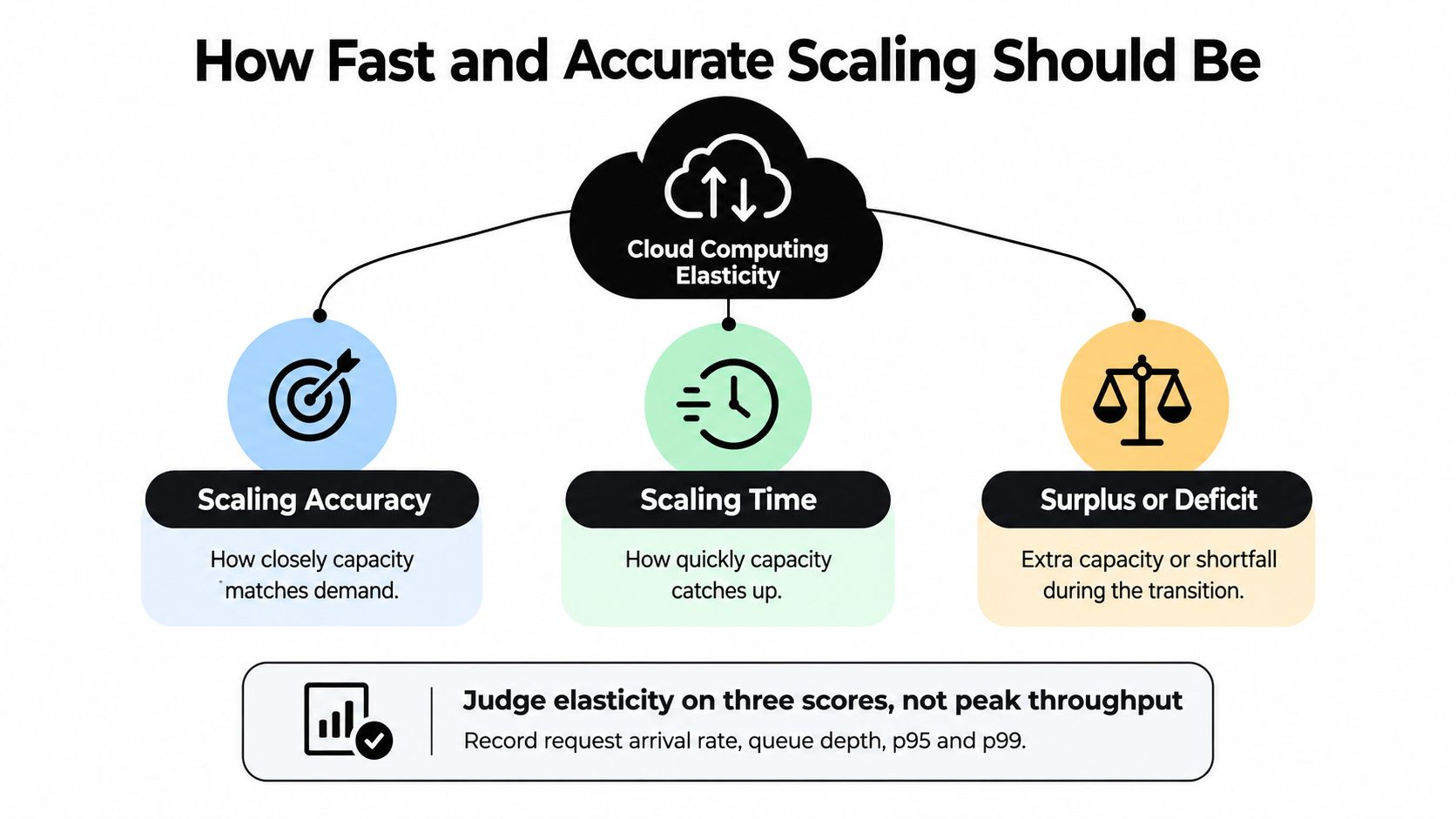
- Scaling accuracy: How closely does provisioned capacity match the workload? Evaluate allocation and deallocation separately so strong scale-out doesn't conceal wasteful scale-in.
- Scaling time: How long passes between the demand change and usable capacity becoming available, or unnecessary capacity being released?
- Surplus or deficit: How much excess capacity, or missing capacity, accumulates while the system adapts?
A correct final instance count can still accompany a poor customer experience. During the gap, requests accumulate, users retry, and the queue can grow faster than newly available workers can drain it. Conversely, keeping a generous fleet after recovery may hide a deallocation problem.
Record request arrival rate, queue depth, p95 and p99 latency, provisioned capacity, utilization, and cost on a shared timeline. Tail-latency percentiles show the slower end of customer experience, which an average can conceal. Choose sampling intervals short enough to reveal the burst rather than smoothing it into a pleasant-looking line.
Replay patterns, not just peak load
Test a gradual ramp, a sharp burst, and repeated oscillation. A threshold policy that handles steady growth may repeatedly add and remove resources when a noisy metric hovers around its trigger.
For each test, mark when demand changed, when the policy acted, when capacity became healthy, and when service recovered. Then continue through the decline. Stopping the test at peak traffic is like judging a restaurant's operations before anyone clears the tables.
The commercial history makes the distinction concrete. According to TechCrunch's account of EC2's development, Amazon launched the EC2 public beta on August 24, 2006, with instances booting in minutes, usage-based payment, and initially one instance type and one region; in early 2008, Animoto expanded from fewer than 100 instances to 3,400 within one week, an increase of more than 34 times.
That example demonstrates access to dramatic temporary expansion without buying the equivalent permanent hardware. It doesn't establish the right scaling delay or capacity margin for your application.
Translate the test into customer journeys
Different businesses need different pass conditions:
- Retail: Exercise checkout and personalization together, then check whether abandoned sessions leave unnecessary work running.
- Fintech: Simulate an opening-time surge while enforcing the payment path's tail-latency cap.
- Healthcare: Model patients following a benefits notice into login, records, and appointment workflows.
- Media: Replay a premiere's rise and fade, including content processing after viewing traffic subsides.
The boundary may cross providers: the Parallels Cloud Report 2025, based on more than 600 IT experts and leaders surveyed in late 2024, found that 50% ran workloads across multiple clouds.
Pick a burst from your last quarter. Mark where capacity lagged and where it lingered, then give each failure an owner.
Vertical Horizontal and Predictive Autoscaling
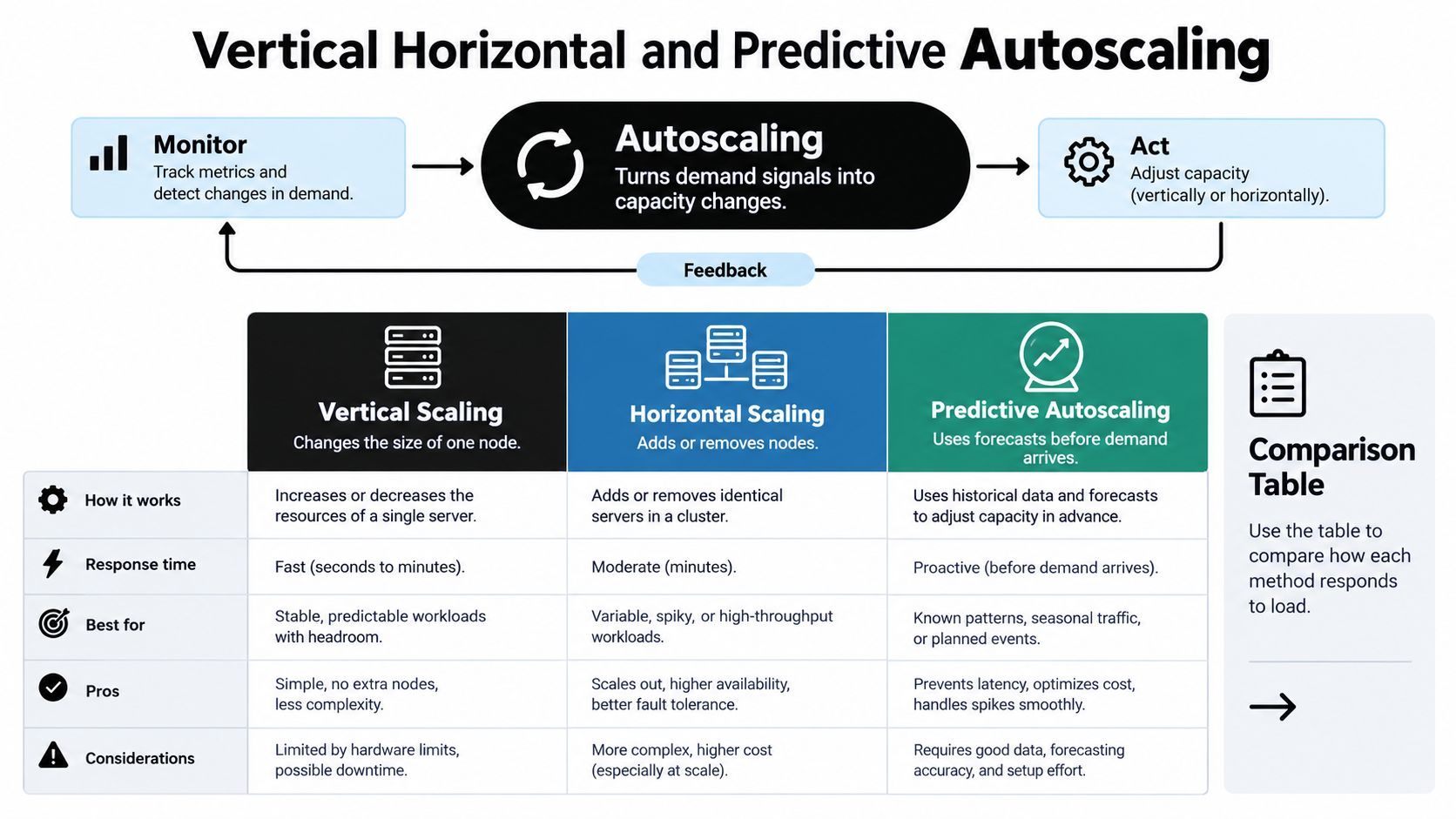
Autoscaling is the control loop that translates demand signals into capacity changes. The options below aren't all competing alternatives: vertical and horizontal describe what changes, while reactive, predictive, and queue-aware approaches describe how the decision gets made.
Autoscaling models and when to use them
| Model | What changes | Best for | Main risk | Typical signal |
|---|---|---|---|---|
| Vertical | CPU, memory, or instance size | Databases and single-node limits | Restart downtime and a hard ceiling | Saturation on one node |
| Horizontal | Number of instances or pods | Stateless web tiers and APIs | Cold starts and sticky state | Request rate with latency |
| Reactive threshold | Capacity after a metric crosses a line | Simple, steady ramps | Lag and oscillation | CPU, error rate, or latency threshold |
| Predictive | Capacity before a known spike | Sales events and premieres | Bad forecast and overspend | History plus a calendar |
| Queue-aware | Workers sized to the backlog | Async jobs and personalization batches | Scaling the wrong service | Queue depth and age |
Choose the capacity change first
Vertical scaling gives a single process more resources. It's useful when a database needs memory or a legacy component can't distribute work across machines, but confirm whether resizing requires a restart. A bigger machine won't fix inefficient queries or unlimited connection growth.
Horizontal scaling adds application instances or workers. It fits services whose requests can reach any healthy instance, but sessions stored only in local memory complicate removal. If every new instance must rebuild a large cache before serving requests, the advertised launch time isn't the usable-capacity time.
For a mobile backend, horizontal scaling might expand the API fleet while a database uses a separately managed resizing policy. There's no prize for forcing every component into the same model.
Choose the decision policy next
A reactive threshold policy is straightforward: observe a metric, compare it with a boundary, and act. It suits manageable ramps, but error rate needs interpretation. More instances won't cure invalid credentials, a faulty release, or an unavailable payment provider.
Predictive scaling prepares for expected traffic using history or a known calendar. A product drop or scheduled broadcast provides a useful lead signal, but a canceled campaign can leave the forecast enthusiastically provisioning for an audience that never arrives. Keep reactive correction available.
Queue-aware scaling adjusts workers using backlog size and age. It's especially useful for image processing and personalization batches, where users don't need to wait synchronously for every result. Include processing rate and completion deadlines so the policy distinguishes a healthy backlog from a growing service failure.
Forecasts help you arrive early. Live telemetry tells you whether you should stay.
Threshold policies can oscillate when scale-out and scale-in boundaries sit too close together or cooldowns don't allow a change to settle. Treat that behavior as a policy defect, not evidence that the workload needs permanently excessive capacity.
For checkout and payments, choose a policy that preserves ready headroom. For batch processing and model training, use forecasts or queues to match completion requirements without pretending every task deserves immediate execution.
Architecture Patterns That Scale Both Ways
Follow a checkout request from the edge through the API, recommendation service, cache, database, and payment integration. If the database is saturated, adding API instances can create more simultaneous database requests. You've expanded the waiting room, not the service desk.
Dependency-aware scaling starts by distinguishing where a delay appears from where it originates. Front-end CPU can remain comfortable while a downstream service determines the customer-visible response time.
Draw the path before changing the fleet
Start with a request-path sketch and annotate each dependency with its capacity constraint. Include database connection pools, cache misses, external API quotas, and network boundaries, not just application processes.
Then assign policies by responsibility:
- Stateless web tiers: Use incoming workload and service latency, with readiness checks and graceful connection draining.
- Asynchronous workers: Use queue age, backlog, and processing rate, while limiting pressure on downstream systems.
- Caches: Account for memory pressure, hit rate, warm-up behavior, and the database load created by misses.
- Stateful stores: Respect replication, storage performance, connection limits, and safe topology changes.
This separation is central to practical cloud-native architecture. A shared CPU threshold couples unlike services to a signal that may explain none of their actual bottlenecks.
Coordinate the control loop
Combine workload rate, utilization, queue length, and service-level latency before deciding which related components should change. A published microservice autoscaling design predicts required service instances every 30 seconds, using real-time telemetry to coordinate interrelated services while aiming to remain within an SLA-compatible response-time interval without unnecessary overprovisioning.
That design illustrates an important principle, not a universal polling schedule. Your loop must allow enough time to observe the effect of its own actions. Otherwise, the controller can issue additional changes before the first change becomes measurable.
Use cooldown periods to let adjustments settle and hysteresis to establish different conditions for expansion and contraction. Before removing an instance, stop assigning it new work and let active requests finish or transfer safely.
Design check: An instance isn't disposable until you know what happens to its unfinished work.
Containers don't remove operational boundaries
VM boot time, container startup, cold caches, and telemetry lag all affect the reserve your architecture needs. Containers help package and deploy services, but databases, persistent storage, networking, deployment permissions, and disaster recovery still need explicit ownership and tested limits.
For fintech, healthcare, and ecommerce, coordinate the dependencies behind payment, records, and checkout paths. Where a dependency cannot expand safely, cap concurrency, queue eligible work, or degrade optional features rather than flooding it.
Test tail latency, queue recovery, error rate, and the duration of underprovisioning. Finally, return to your sketch: mark the first saturated dependency and write the signal that should scale or protect that dependency, rather than its caller.
Cost Latency Carbon and SLA Trade-Offs
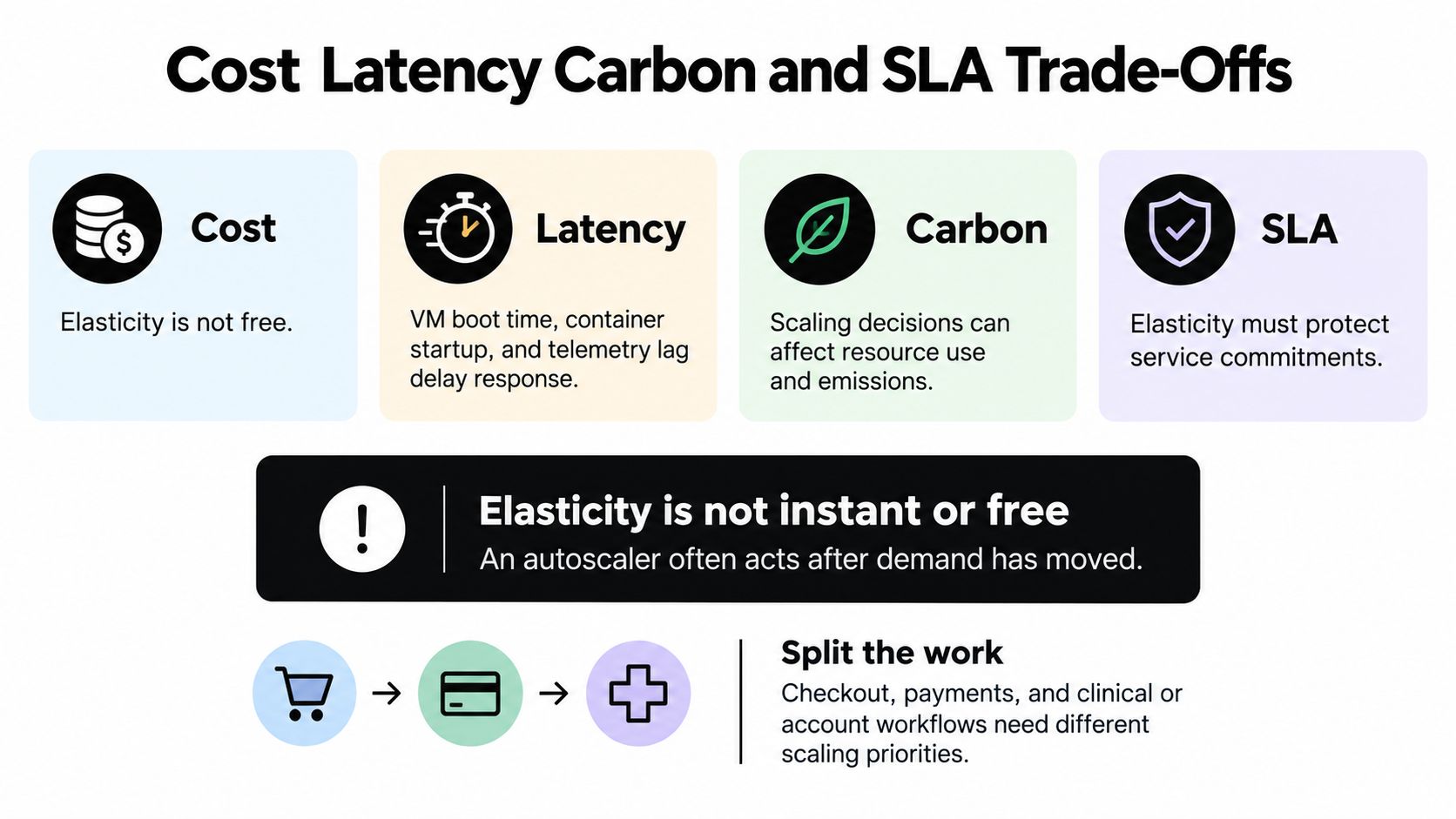
Elasticity isn't instant or free. An autoscaler may act on delayed telemetry, then wait for boot, image pull, startup, and health checks before capacity serves traffic. An analysis of cloud elasticity constraints identifies these delays and the difficulty of coordinating capacity across microservices, hybrid systems, and edge-cloud environments.
Split work by what customers can tolerate. Checkout, payments, and clinical or account views need protected tail latency; batch processing, model training, and background jobs may accept delayed execution under explicit completion targets.
Size the safety margin from observed lag
Use a repeatable procedure rather than choosing a comforting instance count:
- Time trigger to ready. Include image pulls, initialization, dependency connections, and health checks.
- Measure backlog growth. Replay a real burst and observe how much demand existing capacity can't absorb during that interval.
- Convert work into capacity. Arrival rate multiplied by readiness lag estimates arriving work, not a server count. Subtract work the existing fleet can complete, then use measured per-instance throughput to size headroom; check database pools and downstream API quotas separately.
- Stabilize the margin. Keep cooldown and hysteresis aligned with recovery behavior so temporary noise doesn't repeatedly remove the reserve.
This is reliability engineering expressed as capacity policy: define the failure mode, measure its duration, and establish a tested response.
Signals that show an elastic system is healthy
Treat these as acceptance checks to validate for your workload, not automatic promises.
| Signal | Why it matters | Healthy check |
|---|---|---|
| p95 and p99 latency | User-visible SLA, not the average | Stays inside the target through the burst |
| Queue depth and age | Demand running ahead of capacity | Drains inside the cooldown window |
| Scale-out time | Boot, pull, and ready lag | Faster than the ramp, or covered by headroom |
| Utilization after scale-in | Reveals whether capacity matches remaining work | Capacity drops without an SLA breach; survivors avoid saturation |
| Errors during scale-out | Failed launches and bad releases | Near zero, with rollback that keeps traffic |
| Cost per request | Whether the spike became a surprise bill | Target flat or lower at peak versus a fixed fleet |
Don't confuse lower utilization with successful scale-in. Removing idle instances can increase utilization on the remaining fleet while reducing total spend.
Carbon belongs in the same decision
For flexible work, the cheapest execution window isn't necessarily the lowest-carbon one. A 2024 peer-reviewed CarbonScaler study evaluated Kubernetes-based allocation for machine-learning training and MPI jobs, reducing emissions by 51% versus carbon-agnostic execution and 37% versus suspend-resume scheduling while preserving workload elasticity.
Those results aren't a guarantee for interactive applications. Temporarily expanding during a cleaner electricity window may finish flexible work with lower emissions than running a smaller allocation through a dirtier period.
Don't relocate interactive traffic if latency or data-residency obligations would break. Across clouds, evaluate transfer costs, carbon intensity, residency, and service commitments together. Interactive paths buy response time; flexible paths can buy a better execution window.
Build Elastic Systems That Stay Affordable
A traffic spike is only half the test. An affordable elastic system also releases unneeded capacity, keeps response times within policy, and makes spend visible while demand changes. Treat the work as a delivery sequence, with a clear owner and observable exit criteria for each step.
- Write the demand signals. Assign owners to active users, request rate, queue length, and tail latency. Specify which signals can trigger a capacity change, and how quickly the system should respond.
- Separate interactive and batch policies. Set completion requirements, cooldown behavior, and a safety margin for each workload. Interactive requests need timely responses; batch work can often wait for a suitable execution window.
- Test failure as well as growth. Exercise a ramp, a burst, failed scale-out, and noisy telemetry before production. Include a rollback that preserves traffic.
- Meter the whole service. Track compute, storage, bandwidth, and AI usage through cloud cost optimization practices. Tie budgets and alerts to operational owners.
- Hire for delivery skills. Ask developers to package a service, configure environments, manage secrets, explain quotas, and demonstrate safe rollback. Naming frameworks alone does not show they can operate an elastic system.
Evaluate engineers and AI output
Container knowledge is a useful baseline, not a reliability certificate. The 2025 Stack Overflow technology survey reported Docker usage at 71% among cloud-development and infrastructure technologies. Candidates should also be able to explain persistent data and production recovery, which a container image alone does not provide.
AI adoption does not remove the need for review. The Stack Overflow 2025 Developer Survey announcement reported 84% using or planning to use AI tools, up from 76% in 2024. The same announcement reported that 46% distrusted AI-output accuracy, compared with 31% previously.
Keep business logic separate from model-specific adapters. Validate generated results against application rules, protect sensitive inputs, and define fallback behavior for an unavailable or incorrect model. Track AI cost alongside infrastructure cost so an increase in usage does not arrive as a surprise.
Make AI modernization administrable
For an existing web, desktop, or mobile product, an administrative layer for prompt management, integrations, and AI cost tracking can bring scattered prompts and disconnected usage records into view. It should help teams manage prompts and integrations while keeping token costs visible.
Acceleration still needs architecture. McKinsey reports modernization timelines 40% to 50% faster and costs about 40% lower with generative AI. Treat those figures as a reason to measure your own modernization, not as savings to assume in advance. Review prompt behavior and spending as the audience grows.
Wonderment Apps offers AI modernization, scalable application development, and right-sized teams spanning engineering, design, QA, and project management. Visit Wonderment Apps to discuss prompt management, integrations, and AI cost control for your product.