

You've got a working app, a leadership team asking for AI, and a demo that took an afternoon to build. Then someone asks what happens when the model gives a wrong refund policy, who pays the token bill, and how you roll it back on a Friday. That's when the hard work begins.
What AI Software Development Means in 2026
AI software development means building, running, and changing software where models, prompts, and data are designed parts of the system, not a plugin you bolt on at the end. The model call is usually the smallest piece. Data access, review, security, cost controls, and rollback decide whether the feature survives contact with real users.
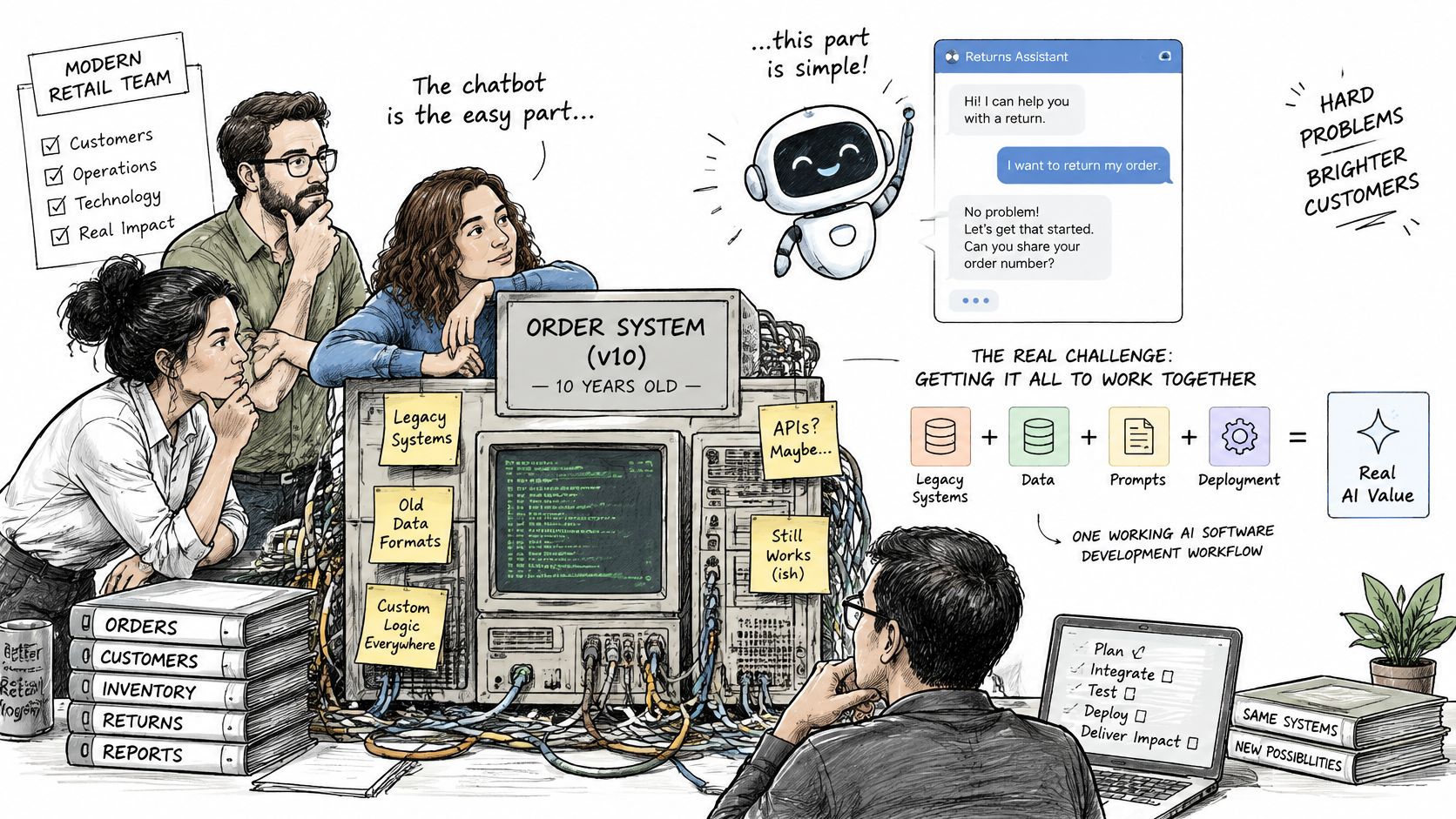
Say a retail team runs a ten-year-old order system and wants a returns chatbot. The chat window is easy. The hard questions arrive fast. Which returns policy is current, can the bot look up an order without exposing another customer's address, and who approves a refund the bot promises?
It helps to separate three levels. AI features live inside an app, like search or summarization. AI assistants help developers write and review code. AI across the lifecycle shapes requirements, testing, deployment, and operations too. Many groups use a combination of all three, often without naming it.
Adoption is already mainstream, even if governance isn't. The Stack Overflow 2024 Developer Survey found that 62% of developers were already using AI tools in their development process, up from 44% in 2023, and 76% were using or intended to use AI tools during 2024. Workplace access more than doubled, with the share of professional developers with access to AI-assisted technology rising from 15.7% to 32.4%.
That gap between use and control is exactly why teams need an admin layer for prompts, access, logs, and spend, which is the problem Wonderment Apps' prompt management system is built to plug into an existing app to solve.
The AI Software Development Lifecycle at a Glance
| Stage | What AI Changes | Output That Proves It Is Done | Most Common Risk |
|---|---|---|---|
| Requirements and specification | Drafts user stories and acceptance criteria | Testable spec with measurable model-behavior criteria | Vague success metrics |
| Design and architecture | Adds model-backed components, retrieval and fallbacks | Architecture decision records | Hidden lock-in to one provider |
| Data preparation | Labels, cleans and generates test data | Versioned datasets with lineage | Personal data copied into training or test sets |
| Model selection and prototyping | Benchmarks candidate models on your own tasks | Evaluation report with cost and latency | Public benchmarks that do not match real traffic |
| Build and integration | Generates code, prompt templates and API wiring | Reviewed pull requests with tests | Generated code merged without review |
| Testing and security review | Runs evaluation suites, regression tests and red-team prompts | Release gate results | Quality drops after a prompt change go unnoticed |
| Deployment and operations | Monitors quality, drift and token spend | Dashboards, alerts and cost reports | Runaway token spend with no per-feature cap |
Read this as a map, not a one-way conveyor belt. Stages loop back. When evaluation fails, you don't just tune the prompt and hope. You revisit the spec, the data, or the architecture that produced the failure.
Where Teams Get Surprised
Requirements surprise people first. Say a claims-processing team uses AI to draft acceptance criteria for summarizing adjuster notes. The draft reads well. Then the evaluation set fails because nobody defined what a good summary must never omit, like a coverage denial date. The model didn't invent that gap. It exposed it.
Build and integration surprise people differently. Code arrives faster, so review becomes the bottleneck. If reviewers rubber-stamp large generated diffs, you've moved risk downstream and called it velocity. Small, readable changes with clear naming are easier for both humans and models to reason about, which is boring advice that keeps paying off.
The strongest results come from redesigning the workflow, not generating more code. In an enterprise-scale longitudinal study of 300 engineers, the overall pull-request review cycle fell by 31.8%, and after process interventions cycle time decreased by 33.8% and review time by 29.8%. AI was built into drafting, testing, review preparation, and feedback triage.
Lines of generated code tell you almost nothing. Cycle time, review time, defect escapes, and rework tell you whether the system got faster or just busier.
That's the lens for everything that follows. Architecture, data, model choice, security, and operations aren't support acts for coding. They're where AI software development succeeds or undermines its own gains.
Architecture Patterns for AI-Powered Applications
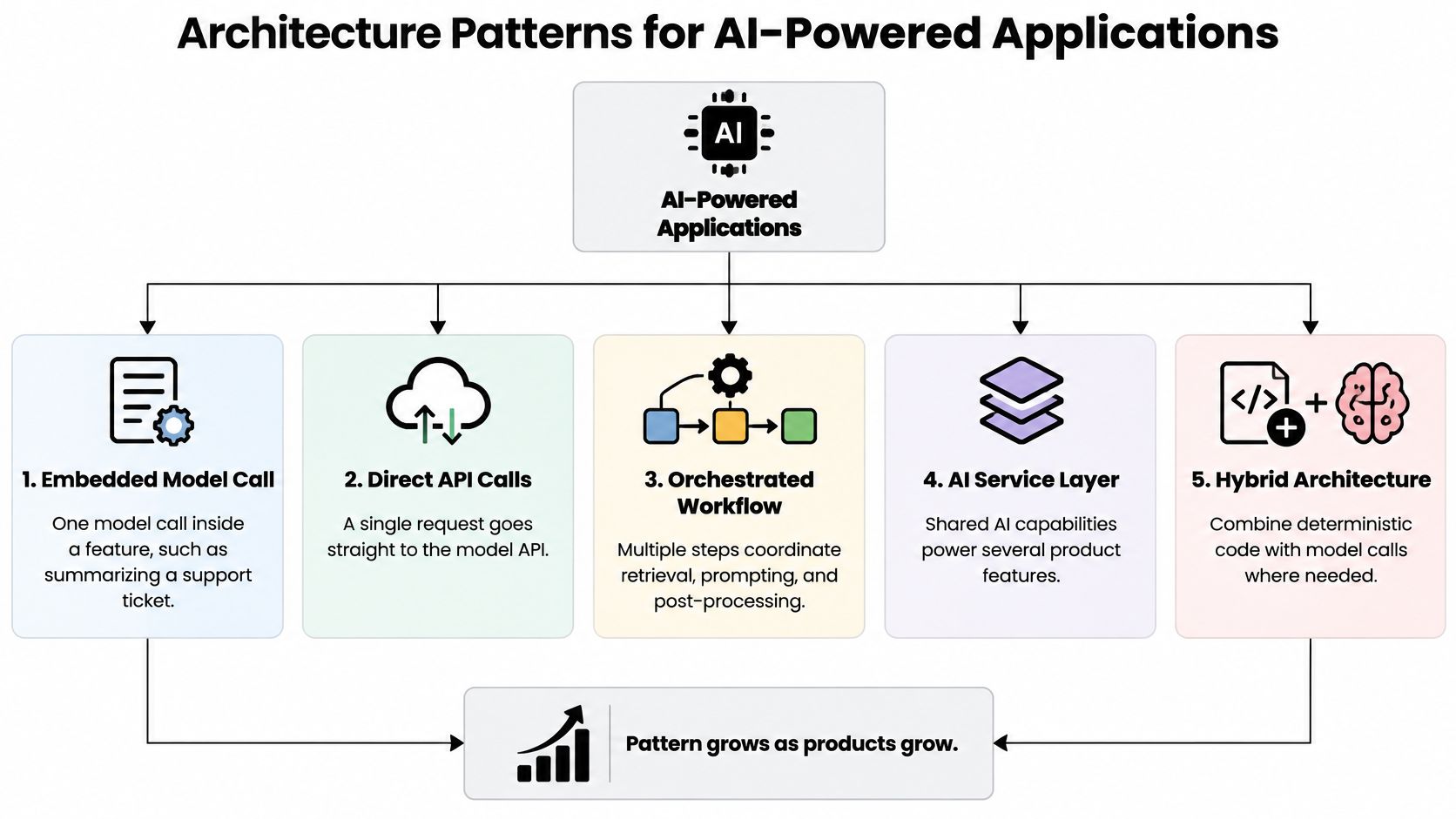
Start with the smallest honest pattern. An embedded model call sits inside one feature, like summarizing a support ticket so an agent sees the issue in two lines. It's cheap to build and easy to remove. The trade-off is that prompts, timeouts, and error handling live inside feature code, which gets messy when the second and third features copy the first.
A direct API call setup works for a single, low-risk feature, such as drafting a product description for human approval. You get speed. You also get no shared place to swap providers, cap spend, or log consistently. Fine for a prototype, painful as a platform.
The Patterns You Grow Into
An orchestration layer holds prompt templates, routes requests between models, applies timeouts, and falls back to rules when a model fails. Think of the expediter in a busy kitchen, deciding which station gets which ticket and what happens when a dish stalls. Nobody praises the expediter until service falls apart without one.
A retrieval layer searches your documents and passes the best passages to the model, so a help assistant answers from your current policy pages instead of its memory of the internet. Retrieval quality decides answer quality. Stale documents produce confident, outdated answers.
An agent or workflow loop lets a model call tools across several steps, like checking inventory, then drafting a reply, then opening a ticket. I get strict at this point. Cap the steps, set a cost ceiling per request, and require human approval for anything that changes records. Unbounded loops are how a helpful assistant becomes an expensive random process generator.
Set a latency budget per feature, for example a chat reply that starts streaming within about two seconds, and design backward from it. Teams balancing live retrieval against response speed will find useful trade-offs in this guide to balancing data freshness and API latency. Fresh data that arrives too late is just slow data.
Draw a hard boundary between the AI layer and business logic. Checkout, billing, and permissions shouldn't change because you swapped models. That boundary discipline pairs well with broader software architecture best practices around clear interfaces and replaceable components.
For mobile and desktop, decide device versus cloud per feature. A small on-device model can classify or summarize with no network round trip, which helps battery life and privacy. Larger hosted models handle long, open-ended tasks. Keep one orchestration layer for both paths so older devices fall back to the cloud cleanly.
My rule is simple. Match the pattern to the feature's risk and speed needs, and no further. Complexity you don't need yet is complexity you'll debug at the worst possible time.
Data Requirements You Must Meet First
| Data Type | Minimum Requirement | Common Failure | Owner |
|---|---|---|---|
| Fine-tuning examples | Representative labeled examples, start with hundreds and grow | Labels inconsistent across annotators | Domain experts |
| Evaluation set | 100-300 hand-checked cases that include edge cases, built before launch | Test cases drawn only from easy examples | QA and product |
| Retrieval corpus | Documents chunked, deduplicated and stamped with update dates | Stale or duplicate content | Content owner |
| Prompt and parameter inputs | Versioned templates with typed variables | Untracked prompt edits | Engineering |
| Production logs | Inputs and outputs stored with consent and redaction | Personal data stored in plain text | Data governance |
| User corrections | Thumbs-up, thumbs-down and correction events linked to a version | Feedback recorded without version IDs | Product |
For AI features, data is the specification. Model behavior follows the examples, documents, and logs it sees. If your examples contradict each other, the model will pick a side at random and you'll call it inconsistency.
The Order That Works
Build the evaluation set first. Without hand-checked cases that include awkward, incomplete, and adversarial inputs, you can't judge any model, prompt, or retrieval change. You're just vibes-testing with extra steps.
Clean the retrieval corpus next. Remove duplicates and stale pages, stamp each document with its update date, and decide who can retire content. A returns assistant grounded in last year's holiday policy will answer fluently and wrongly.
Then decide what production logs may store, before launch. In healthcare and fintech, logs containing patient records or card numbers must be redacted before storage, and retention windows set upfront rather than after an audit asks uncomfortable questions. Sound data governance frameworks make these decisions routine instead of emergency meetings.
Lineage ties it together. Every dataset and prompt in a release should trace to a version, so a bad answer leads back to its source. User corrections are a cheap, valuable signal, but only when each correction links to the version that produced the answer. Otherwise you're collecting complaints without coordinates.
Choosing and Connecting the Right Model
| Approach | Best For | Main Trade-off | Relative Upfront Cost |
|---|---|---|---|
| Hosted frontier model via API | Fast prototypes and broad language tasks | Less control over data location, per-token cost | Low |
| Self-hosted open-weight model | Data residency and predictable high volume | GPU infrastructure and staff time | High |
| Smaller specialized model | Classification, extraction and high-volume tasks | Narrower capability, needs careful evaluation | Low to medium |
| Retrieval-augmented generation on a hosted model | Answers grounded in your own documents | Retrieval quality decides accuracy | Medium |
| Fine-tuned model | Consistent output format or domain style | Training data preparation and retraining effort | Medium to high |
| Traditional non-generative model | Forecasting, scoring and anomaly detection | Needs labeled historical data | Low to medium |
Don't start by picking a model. Start by writing the task as a measurable test. Build an evaluation set from real examples, then score each candidate on accuracy, latency, cost per 1,000 requests, data residency, and the cost of leaving the provider. Public leaderboards measure someone else's workload.
A Worked Example
Say a fintech team extracts fields from invoices. Vendor, total, due date, line items. On a 200-case evaluation set drawn from messy real invoices, a smaller specialized model matches the frontier model on the fields that matter, at a fraction of the cost per request. The frontier model writes nicer explanations nobody asked for. The smaller model wins the job.
Support teams face the same pattern, and this breakdown of choosing language models for support teams is a useful companion when you're weighing capability against cost and response quality. The method travels even when the use case changes. Test on your data, or you're renting someone else's confidence.
Connecting It Without Painting Yourself In
Keep every model call behind one internal interface. Feature code asks for a task, like classify or summarize, and the interface decides which provider answers. When a provider deprecates a model, and they will, you change one adapter instead of hunting through forty call sites.
- Pin model versions: Never float to the latest release in production, because behavior changes ride along.
- Version prompts with the code: A prompt edit is a behavior change and deserves review like one.
- Keep a tested fallback: A secondary model you've run your evaluation against, not a name in a wiki page.
The classic mistake is fine-tuning first. It's slower, costlier, and harder to undo than prompt design plus retrieval, and teams often reach for it to fix problems that better examples would solve. Show the model good examples before you retrain it. Models are pattern matchers, so give them patterns.
Rule of thumb: Start with the cheapest approach that passes your evaluation. Move up only when a measured gap remains, and write down what that gap is.
That discipline also protects your budget. Cost per successful task, not cost per call, is the number that matters. A cheap model that needs three retries and a human cleanup isn't cheap.
Security and Compliance Controls Before Launch
A support message contains an instruction to reveal internal data. A retrieved PDF tells the model to ignore its rules. Both are prompt-injection attempts carried in ordinary text. A penetration test alone will not catch every failure point in a system that reads documents and can take actions.
The Pre-Launch Checklist
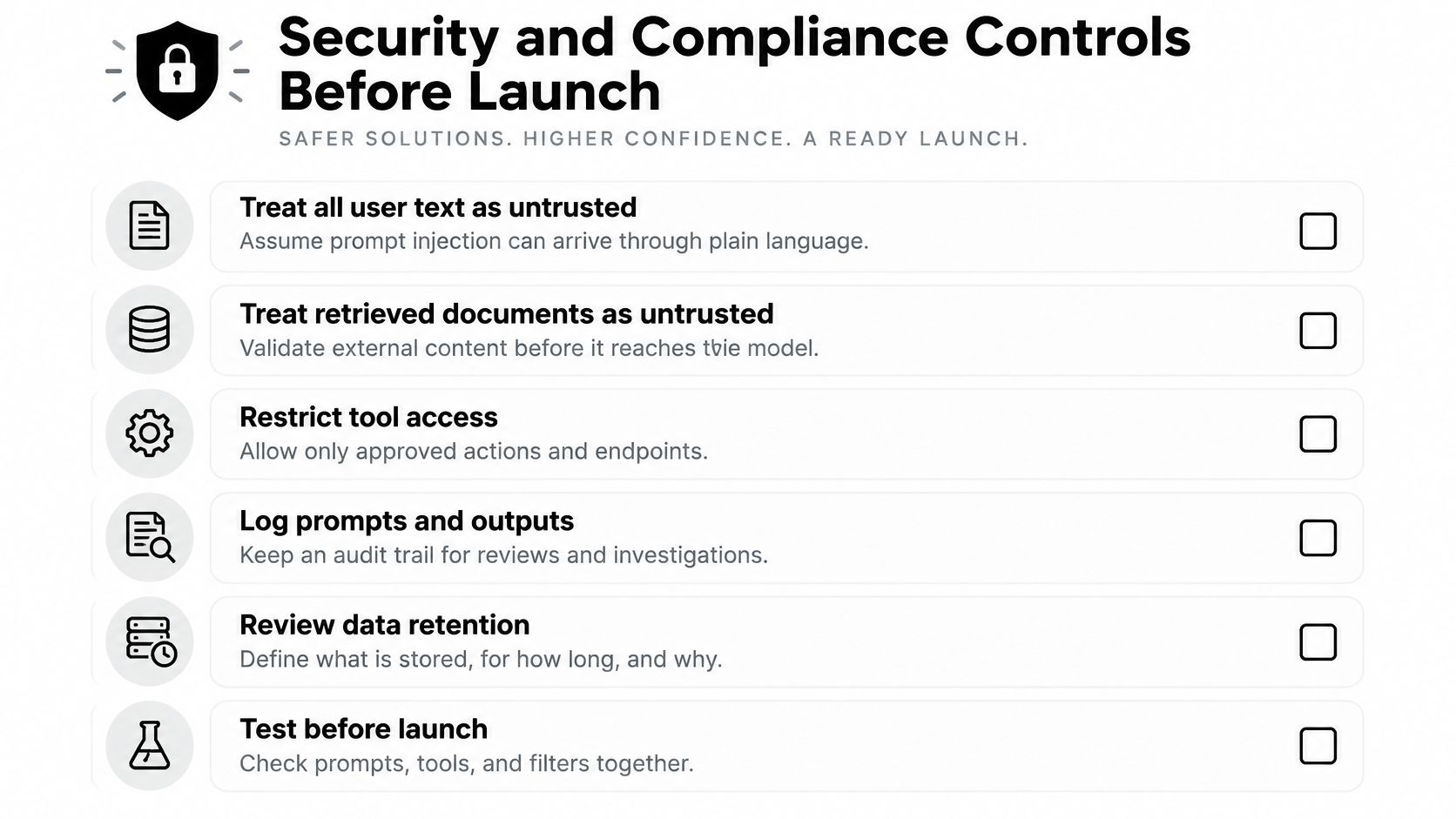
- Treat user text and retrieved documents as untrusted: Instructions in a web page or PDF are data, not commands.
- Validate model output before action: Check format, ranges, and permissions before a response can trigger a refund, send an email, or change a record.
- Grant least database access: Give each AI tool only the fields and operations its task requires.
- Log every tool call: Record the user, prompt version, and parameters so investigators can trace what happened.
- Keep personal data out of prompts: Redact it before the model sees it unless the task requires it.
These controls align with AI-specific practices in NIST SP 800-218A, which extends the Secure Software Development Framework to cover AI-related security risks, model and data requirements, and evaluation during development and deployment. For model selection or customization, establish baseline performance measures so you can tell whether a change improves the task or introduces regressions.
Map regulations to your sector early, while changes are still manageable. GDPR governs personal data in the EU, HIPAA covers US health data, PCI DSS covers payment card data, and SOC 2 supports SaaS trust reporting. The EU AI Act introduces phased obligations for high-risk uses, making clear records of versions and evaluations useful for compliance work.
A model update can improve task accuracy while exposing more personal data in logs or responding more readily to adversarial inputs. An accuracy dashboard alone will miss those regressions. Rerun security and resilience tests after changes to the model or prompt, rather than relying on an annual check.
Set a release gate before launch: record dataset and configuration versions, run red-team prompts, establish baseline benchmarks, and enable drift monitoring. If a change fails the gate, hold the release until the failure is understood and addressed.
Keeping AI Features Reliable and Measuring ROI
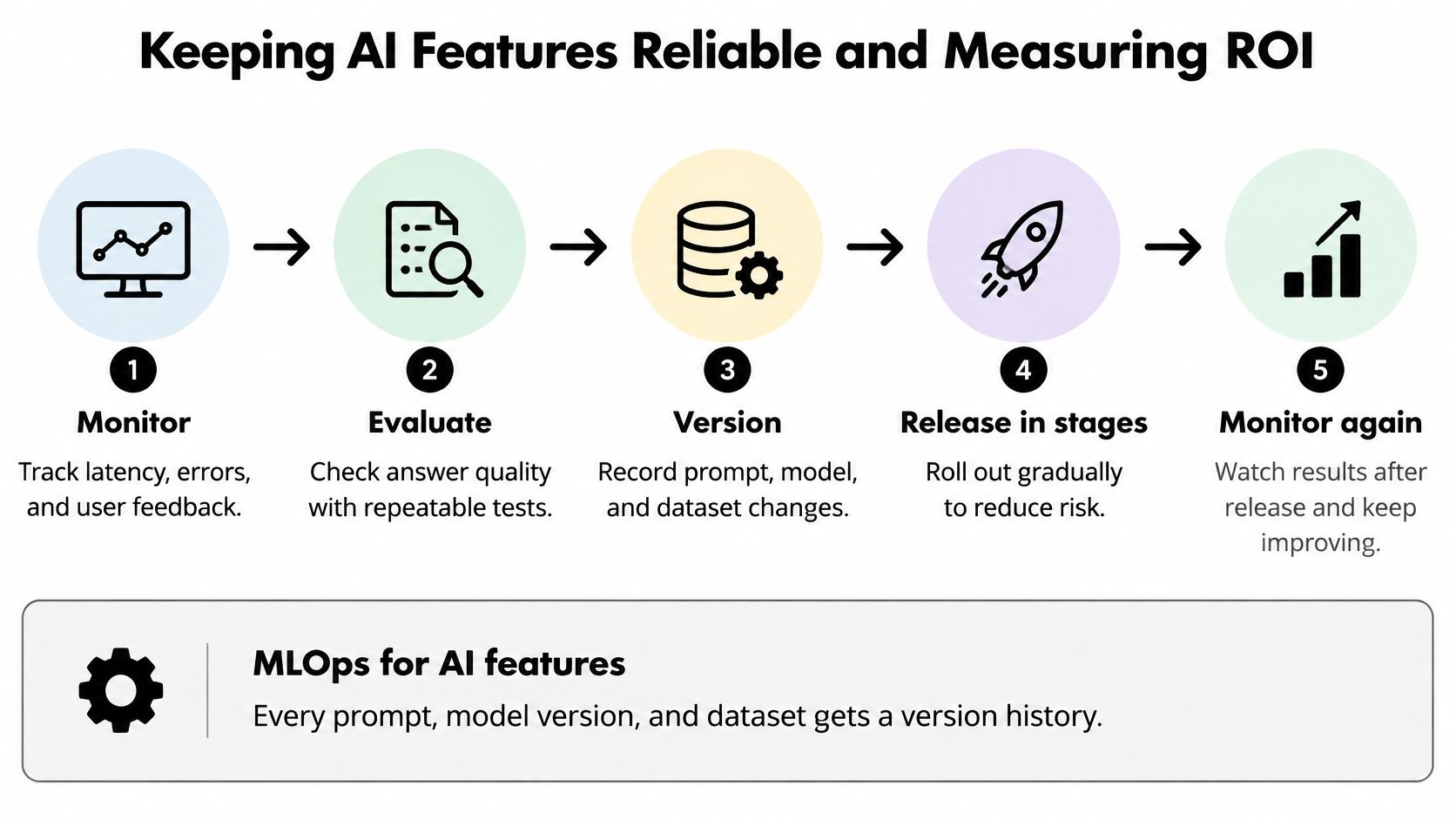
A team ships an AI feature in half the estimated sprint time, then loses three weeks to a bad model update, a prompt regression, and a rollback nobody rehearsed. That pattern is why reliability work, not code generation, decides whether AI pays off.
The loop is monitor, evaluate, version, release in stages, then monitor again. Every prompt, model version, and dataset carries a version number. Each change passes an evaluation gate before release, and rollouts go to a small share of traffic first, for example 5%, then 25%, then 100%, with automatic rollback when quality or error rates cross a threshold set in advance.
In production, watch sampled human review of answers, latency percentiles, error rates, and drift in input types. Track cost per successful task rather than cost per call, because a cheap call that fails half the time is expensive. Disciplined AI model evaluation turns these checks into a repeatable gate instead of a launch-week scramble.
Faster Code Is Not the Same as Faster Delivery
Here's the uncomfortable part. Reporting summarized by TechTarget on market research into AI coding tools notes that more than 80% of DORA respondents said AI improved their productivity, and 78% of respondents in an IDC developer survey reported an average 35% productivity increase. Higher AI usage was also associated with greater software-delivery instability, including increased change-failure and rework rates. Beyond those figures, many developers report trusting AI output less and finding AI-generated code slower to debug.
Both things can be true at once. A developer finishes the task faster, then review queues, debugging, and one rollback hand the savings back. In ecommerce, fintech, healthcare, and public-sector systems, defect and compliance costs dwarf the price of writing the code. The hours saved at the keyboard get spent again at the pull request, the evaluation run, and the incident channel.
| Metric | What to Record | Why It Matters |
|---|---|---|
| Specification quality | Share of stories with testable acceptance criteria | Vague specs surface late as failed evaluations |
| Review effort | Reviewer minutes per pull request, split by AI-assisted and manual | Shows where review time actually moves |
| Test creation | Hours to build and maintain unit and evaluation tests | Tests are the hidden cost of AI features |
| Defect escape rate | Defects found after release per 100 changes | Catches faster code that breaks production |
| Remediation time | Hours from defect report to verified fix | Debugging AI-generated code is a known drain |
| Deployment stability | Change-failure rate and rollback count | Tracks delivery instability directly |
| Infrastructure cost | Token, hosting and GPU spend per successful task | Cost per call hides real unit economics |
| Post-release support | Support tickets and on-call hours per feature | Shows total cost after launch |
Measure total cycle time from requirements through secure deployment and maintenance. That's the ROI question worth answering, and I'd treat any productivity claim that ignores review and remediation time as marketing.
Choosing Developers and Building the Right Team
A developer who ships a slick chatbot demo in a weekend isn't automatically the person who keeps an AI feature reliable for three years. Demos hide evaluation, cost control, and deprecation. Production exposes all three.
You need four roles covered, even if one person wears two hats. A backend engineer owns integration and the adapter layer. An applied AI engineer runs model selection and evaluation. A QA lead owns the evaluation set and release gate. A product owner signs off on acceptable error rates, in writing.
Four Screening Steps
- Fix a prompt regression: Give candidates a sample repository where a prompt change broke output, and ask which test would've caught it.
- Estimate token cost: Ask for a monthly estimate at 50,000 requests and the cap they'd set before finance asks questions.
- Redact the logs: Ask how they'd strip personal data from production logs before storage.
- Review a rejected pull request: Show one where AI-generated code was turned down and ask what the reviewer caught.
Red flags include demo-only portfolios, no mention of evaluation, and no plan for model deprecation. Wider market context on sourcing software engineers in 2026 helps calibrate how scarce this mix of skills is. In contracts, tie milestones to evaluation pass rates and rollback drills, not lines of code delivered. For internal teams, pair engineers on the evaluation harness for two sprints before anyone owns a production AI feature alone.
Start Your Legacy AI Modernization With One Workflow
Modernizing a legacy system with AI isn't a rewrite. It's a controlled expansion, one workflow at a time, with the old system still paying the bills. I would start smaller than feels ambitious. Small is how you learn where your data and rules live.
The Five-Step Sequence
- Inventory what the feature will touch: List the APIs, databases, and business rules in scope, including the ones nobody documented but everybody depends on.
- Write characterization tests: Lock in current behavior before any change, so you can prove the new path didn't alter pricing, eligibility, or status rules.
- Add an AI adapter layer: Use the strangler pattern so one workflow routes through new code while everything else stays on the old path.
- Pick a low-risk first workflow: Ticket summaries or internal search beat payments and clinical decisions. Set a monthly cost cap before launch.
- Pilot with logging and rollback on: Expand one workflow at a time only after the pilot holds up under real traffic.
Expect edge cases. Legacy databases often lack clean keys, so joining an AI feature to customer or order records takes unglamorous data work first. Undocumented business rules surface as evaluation failures, which is annoying and also the point. Some teams can't change their release cadence, so staged rollouts need feature flags rather than new deploy trains.
Where a Prompt Management Layer Fits
This sequence creates ongoing jobs that outlive the pilot: prompts change, integrations multiply, and token spend climbs with usage. Wonderment Apps' administrative toolkit covers prompt management, integrations, and token cost control, plugging into an existing app as a control layer around whichever models you already use.
The mapping is direct. Prompt management supports the adapter layer from step three, integrations serve the data connections you inventoried in step one, and token cost control keeps the monthly cap from step four visible as a running number rather than a surprise invoice. Logging and rollback for the pilot stay in your own release process, so budget engineering time for them the same way you budgeted for the adapter. Teams that stumble in production usually planned for the model and forgot the scaffolding around it.
That mapping is also how you evaluate tooling. Tools earn their place by covering jobs your process already demands. Cost control without managed integrations leaves you rebuilding connections by hand. Prompt management without cost visibility leaves you explaining a bad invoice. You want both conversations to be short.
Pick one workflow to pilot within the next 30 days. Ticket summaries for your support team, internal search over policy documents, or draft replies a human approves before sending. Bring that workflow to a demo and judge the tooling on one question: does it make the pilot safer to run and easier to expand? One workflow, measured carefully, teaches you more than a roadmap deck ever will.
Wonderment Apps helps teams modernize existing web and mobile applications with AI features, prompt management, integrations, and token cost control, so you can pilot one workflow safely and scale what works. Visit Wonderment Apps to request a demo and map your first AI workflow with an engineering team that builds for the long term.