

Your nightly batch is already late, finance keeps asking why the cloud bill changes every month, and product wants customer signals fast enough to shape the next recommendation. That's the pressure cooker behind data warehouse modernization. The work isn't about chasing a shinier platform, it's about getting the warehouse to behave like a reliable operating system for the business, and that usually means tightening governance, controlling cost, and making change safer to ship. If you're also thinking about the AI layer that now sits on top of the warehouse, Wonderment Apps' prompt and parameter management stack is a useful example of the kind of admin tooling that belongs in the post-modernization stack, not as an afterthought.
Why Modernize the Data Warehouse Now
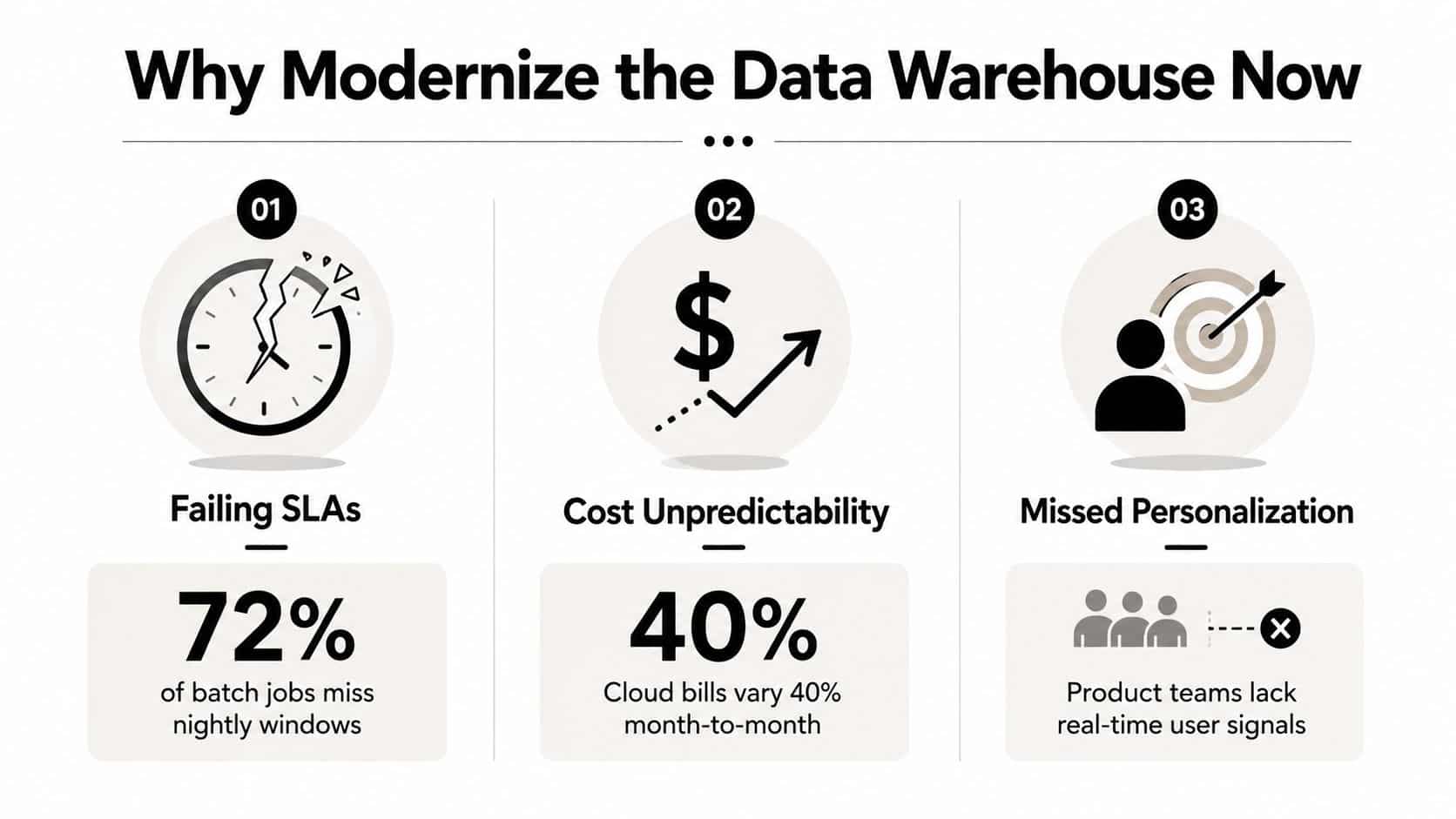
The classic warning sign is easy to spot. A nightly batch misses its window, finance can't explain the cloud invoice, and product teams keep asking for personalization signals that are still trapped in yesterday's warehouse. That combination usually means the platform isn't just old, it's constraining how the business works.
The case for data warehouse modernization is mostly operational. A 2023 industry report found that 55% of respondents planned to improve data quality and another 55% planned to automate manual steps in their data-management processes, which tells you the agenda is about reducing friction and improving trust at the same time, not just adding features to a stack (2023 Data Warehouse and Data Vault Adoption Trends). BARC also found that the most pressing issue for 44% of participants was a lack of agility in the data warehouse development process (BARC infographic on warehouse modernization). That bottleneck is what matters, business teams don't just need more data, they need changes to land faster.
The three goals that usually justify the work
Most programs converge on three goals. First, faster time to insight, because a warehouse that takes too long to adapt loses relevance every time the business shifts. Second, lower and more predictable cost, because unmanaged infrastructure spend turns every decision into a budget argument. Third, trusted data for self-service, because a model that analysts don't trust becomes a bottleneck dressed up as enablement.
Those goals line up with broader modernization programs too. BARC's modernization data shows that 43% of organizations cited application modernization, while 38% cited building a cloud data lake or data warehouse and 38% cited migrating on-premises workloads to the cloud as top initiatives over the next 18 months (BARC infographic on warehouse modernization). That's a strong signal that warehouse work now sits inside wider platform change, not off to the side.
Practical rule: if the warehouse still needs a human hand for every new question, it hasn't really been modernized, it's just been relocated.
For a clean conceptual reset before you touch architecture, the simplest backgrounder is this overview of the data warehousing concept. And if you need a parallel lens on the broader migration pattern, the framing in legacy system modernization strategies maps well to what happens in data teams too, especially when governance and operating-model work gets ignored.
Audit the Current Estate Before Picking a Platform
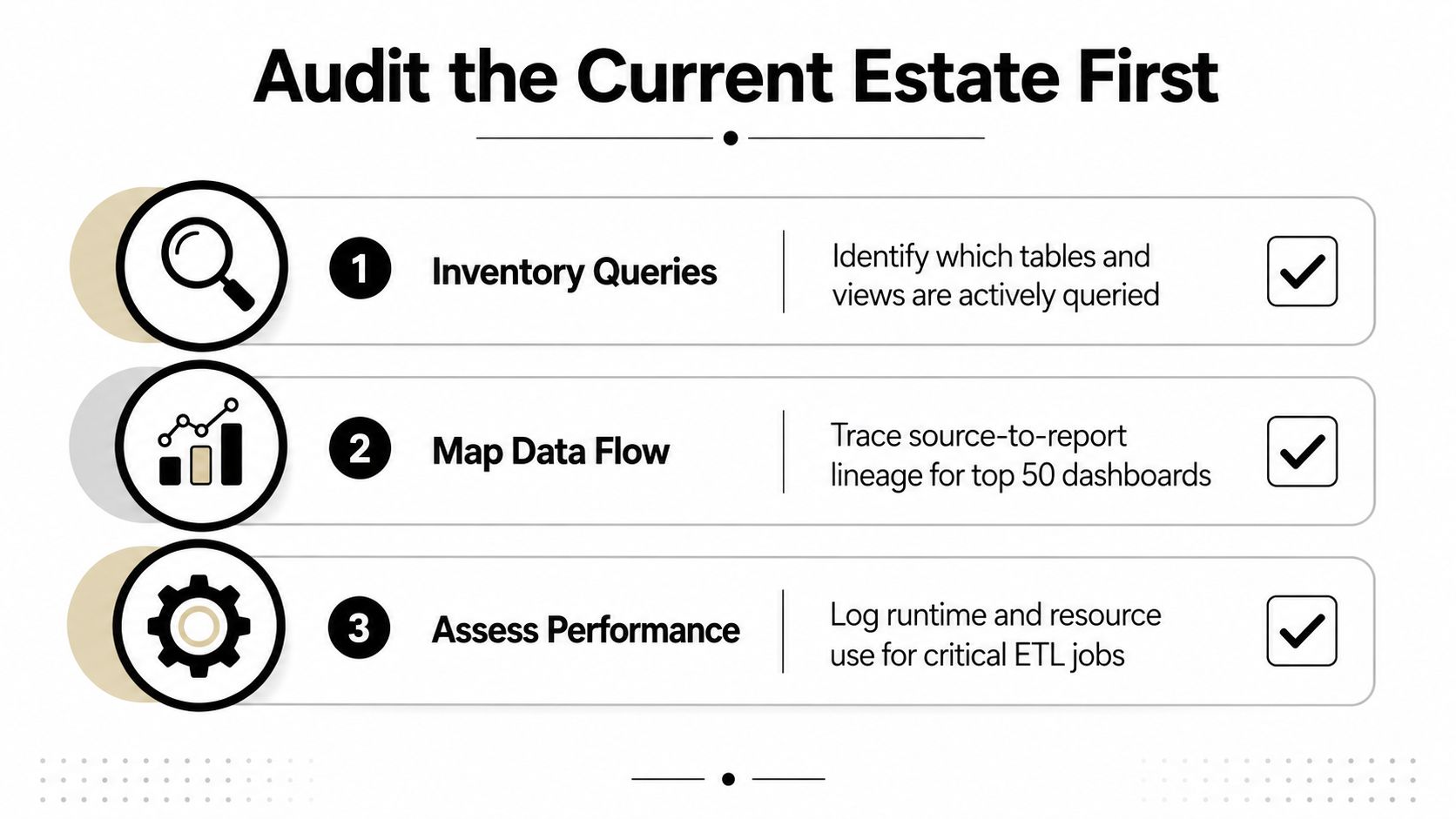
The most expensive mistake is picking a platform before you know what's being used. I've seen teams move beautifully documented tables that nobody queries, then leave the brittle logic that drives revenue sitting in the old system because nobody traced the lineage. That's how modernization turns into an expensive rearrangement.
Start with usage, not tooling. Build an inventory of queried tables, upstream ingestion dependencies, downstream consumers, duplicated business logic, and ETL ownership. Then trace query history and lineage until the active surface area is obvious. The point isn't perfect documentation, it's enough visibility to stop modernizing dead weight.
What a useful audit output looks like
A good audit gives you a short, decision-ready set of artifacts:
- High-traffic tables with proof that they matter to reporting, ops, or customer-facing workflows.
- Ownership map showing who runs each pipeline, who approves changes, and who answers incidents.
- Zombie pipelines that still move data but don't feed any current business decision.
- Lineage notes that connect source systems to dashboards, models, and downstream exports.
That kind of inventory is what keeps teams from moving low-value assets just because they're familiar. The newer guidance on modernization makes the same point plainly, if you don't first discover what's used, you risk modernizing the wrong slice of the estate (Legacy Leap guidance on data warehouse modernization).
Why the audit changes the rest of the project
The audit usually reveals a small set of tables and pipelines that drive most of the pain, and that's where the first wave belongs. The rest can wait. If you skip this step, you'll keep the old cost structure, inherit the same operational brittleness, and still end up with a cloud bill.
The warehouse isn't modernized because it runs in a new place. It's modernized when the used parts are visible, owned, and safe to change.
That's also where some teams finally discover how much duplicate logic exists between BI layers and ETL jobs. Once that duplication is visible, refactoring gets easier because you're not guessing which transformation is canonical. If you want a broader planning perspective on what modernization can look like in practice, the early-stage framing in distribution-focused cloud transformation examples is a useful adjacent read, especially for teams dealing with messy operational dependencies.
Choosing Between Cloud, Lakehouse, and Streaming
The architecture choice gets easier when you stop treating it like a referendum on fashion. The right fit depends on query volume, data formats, latency needs, and the skill set the team already has. That's why the audit matters, it tells you whether you're dealing with governed SQL analytics, mixed semi-structured workloads, or use cases that need live signal movement.
A cloud data warehouse fits cleanly when the workload is SQL-heavy, the reporting model is governed, and the business needs predictable analytics more than experimental flexibility. A lakehouse makes more sense when the same platform has to serve structured data, semi-structured data, and machine learning use cases without splitting the storage layer. A streaming-first pattern is the right answer when the business really does need near real-time personalization, fraud response, or operational alerting.
For a deeper comparison of the warehouse and lakehouse trade-offs, this guide to data lakehouse versus data warehouse is a solid companion. The practical reality, though, is that many estates end up with a hybrid shape, because one architecture rarely serves every workload well.
Architecture Fit by Workload Profile
| Workload Profile | Best Fit | Watch Out For |
|---|---|---|
| Governed BI dashboards and finance reporting | Cloud data warehouse | Overbuilding for use cases that don't need low-latency ingestion |
| Mixed analytics with ML and semi-structured data | Lakehouse | Letting governance lag behind flexibility |
| Customer personalization, fraud, ops alerts | Streaming-first | Expanding scope before the event model is stable |
| Transitional enterprise estate | Hybrid mix | Tool sprawl if ownership isn't explicit |
The fit question isn't abstract. If your team mostly serves SQL-based reporting, don't buy streaming complexity you won't use. If product and ops need live signals, don't trap them in batch processing just because the old warehouse is comfortable.
If you're evaluating implementation patterns outside of a lab, the cloud transformation examples from nexus IT group show why architecture decisions usually follow operating needs, not the other way around. That's the useful mindset here. Pick the smallest architecture that can support the jobs your users keep asking for, then add the next layer only when the audit proves it's justified.
Migration Strategies From Lift and Shift to Refactor
The wrong way to think about migration is “what's the most modern option?” The right way is “what degree of change can the business absorb without breaking trust?” Once you answer that, the options stop looking like a menu of ideology and start looking like a set of trade-offs.
Lift and shift gets workloads into the cloud with the least disruption. It's the fastest path when the business wants movement now and the warehouse still has too much embedded logic to rewrite safely. The catch is obvious, legacy SQL, batch assumptions, and old inefficiencies come with it. That's why lift and shift should be treated as a temporary landing zone, not a finish line.
Replatform is the middle path you need. You swap the engine, adjust physical design, and keep more of the logical structure intact than a rewrite would allow. That gives you a cleaner path to performance gains without forcing every transformation to be redesigned on day one.
Refactor is where the biggest payoff lives, but it takes the longest runway. Pipelines get rewritten for ELT, micro-batches, or streaming, which makes the platform easier to operate later. The cost is change management, validation, and patience.
Practical rule: don't refactor the whole estate at once. Redesign only what the audit proved matters, then prove the new pattern on a narrow slice before you widen the blast radius.
The strongest execution guidance in the sources is the hybrid pattern, preserve 70% to 80% of existing workloads and redesign only about 20% for cloud-native optimization, which is reported to reduce cost by 30% to 40% within 6 to 9 months (legacy warehouse modernization strategy). That's not a license to get lazy. It's a reminder that selective redesign often creates more value than heroic rewrites.
For migration mechanics in practice, this database migration playbook from Wonderment Apps aligns well with a phased data-plan approach. The safe pattern is small wave size, hard validation gates, and rollback paths that are still real if the numbers diverge. If you can't explain how you'll reverse a bad wave, you're not migrating, you're gambling.
Governance, Security, and FinOps From Day One
Governance doesn't belong after cutover. If you wait until the new warehouse is live to define ownership, access rules, or cost controls, you'll build a fresh environment that inherits the same confusion as the old one. The better pattern is centralized trust first, then selective decentralization only where domain teams are mature enough to own the consequences.
A modern estate needs certified semantic models so different teams don't define the same metric five different ways. It needs data contracts between producers and consumers so schema changes don't become surprise outages. It also needs column-level access, sensible handling for PII, and a clean story for who can see what, when, and why.
What to put in wave one
The first wave should include the boring controls that prevent future rework:
- Semantic ownership: one certified definition for critical business metrics.
- Access boundaries: column-level and row-level policies where sensitive data exists.
- Producer and consumer contracts: explicit expectations for schema, freshness, and downstream compatibility.
- Operational visibility: FinOps dashboards that show spend by team and workload, not just total cloud cost.
That may sound conservative, but it's the only way to keep self-service from turning into self-inflicted chaos. The governance guidance in newer modernization material makes the same point, centralized trust comes first, then decentralization only where the organization can sustain it (Querio on data warehouse modernization governance).
If ownership is vague, incidents become debates. If ownership is explicit, incidents become tickets.
Security and compliance are part of the same design problem. Modernization doesn't remove the need for auditability, it increases it because the system moves faster and serves more people. That's why controls around access, masking, and usage visibility need to be designed into the operating model rather than bolted on after the first production complaint.
This is also the point where AI tooling starts to matter. Once models and agents query the modernized warehouse, you need governance for prompts, parameters, and logged interactions just as much as you need governance for tables and roles. A prompt vault, versioning, a parameter manager for internal database access, logging across integrated AI systems, and a cost manager that surfaces cumulative spend all belong in that same control plane. Wonderment Apps' prompt management system fits that post-migration layer as one concrete example of how the admin stack expands once AI becomes a warehouse consumer.
A 90 Day Rollout Plan With Parallel Run
The cleanest rollout plan I've seen is the one that treats dates as checkpoints, not commitments. Teams move when validation passes, not because the calendar says so. That's what keeps broken data from getting promoted just because the schedule looks tidy.
Days 1 to 30, Foundation
Lock the audit, pick the first domain, and define what success means in plain operational terms. Stand up governance, access controls, and FinOps dashboards before any meaningful migration starts. If ownership and spending aren't visible now, they'll be harder to fix later.
Days 31 to 60, Build
Launch CDC pipelines for 1 to 2 high-value sources and define initial data SLOs for freshness, uptime, and quality, following Fivetran's implementation guidance (Fivetran modern data warehouse guidance). Refactor the slowest or most failure-prone legacy ETL jobs into ELT, then compare outputs against the legacy warehouse until the deltas make sense. Keep the wave narrow enough that one bad mapping doesn't poison the whole release.
Days 61 to 90, Validate
Run the legacy and cloud environments in parallel for the agreed coexistence window, which the strategy guidance describes as 30 to 90 days of sync operation (legacy warehouse modernization strategy). Resolve fidelity differences, confirm downstream behavior in dashboards and exports, and only then cut over the first domain. Don't decommission anything until the new system has proven it can carry the workload without handholding.
A tight rollout should end with these checks passing:
- Data fidelity: legacy and modern outputs match on agreed fields.
- Consumer behavior: dashboards, exports, and feeds still work downstream.
- Operational control: access, logging, and spend visibility are active.
- Rollback readiness: the old path can still be reactivated if a critical issue appears.
The main discipline here is restraint. A lot of teams want to move fast, but speed without validation just transfers risk from the old warehouse to the new one. That isn't progress, it's a more expensive outage.
Post Migration Operations and Continuous Improvement
Modernization doesn't end when the first domain goes live. In practice, the warehouse stays healthy only when teams treat it like a living service with a release rhythm, not like a project that's done once the board deck is updated. TDWI notes that most data warehouse teams have settled on a quarterly schedule for updates, which is a useful anchor for how often the platform should be reviewed and adjusted (TDWI data warehouse modernization paper).
The steady-state loop is simple enough to describe and hard enough to execute well. Review SLOs for freshness and reliability, inspect lineage for broken assumptions, reassign cost where usage has shifted, and keep a backlog of refactor candidates so technical debt doesn't pile up invisibly. That's also where post-migration ownership matters most, because centralized trust only works if somebody still maintains the definitions after the excitement fades.
The habits that keep a warehouse modern
- Quarterly reviews: revisit the warehouse update cadence and compare it with current business demand.
- Lineage checks: confirm that critical dashboards still trace back to certified sources.
- Cost reviews: reallocate spend to the teams using the compute.
- Refactor backlog: keep a living list of jobs that should move from legacy patterns to cleaner ones.
This is also where AI governance starts to feel familiar. Once models and agents query the warehouse, prompt versions, parameter controls, and token spend should be managed the same way data contracts and access rules are managed today. That's the gap a unified admin layer closes, it lets you see what's being asked of the system, who changed it, and what it's costing.
A warehouse stays modern when people keep asking three questions, is the data still trusted, is the spend still sensible, and are new consumers being governed before they create a mess? If the answer to any of those is “not sure,” the work isn't finished.
If your team is planning a warehouse refresh, Wonderment Apps can help you design the migration path, the governance layer, and the AI-ready admin controls that sit on top of it. Visit Wonderment Apps to talk through the warehouse, prompt, and integration stack you need to keep modern systems from drifting back into legacy behavior.