

Your competitors are shipping AI features into apps your customers already use. A support inbox now suggests replies. A fintech dashboard flags suspicious activity before a human reviews it. A healthcare portal personalizes guidance instead of serving the same static flow to everyone.
If you're leading a product, platform, or modernization effort, the question usually isn't whether AI matters. It's what your move is, and whether adding AI will create value or just add another expensive layer to manage. That's where most explanations of AI integration fall short. They talk about connecting a model. They don't talk enough about controlling prompt behavior, token spend, logging, and compliance once the model is live inside your software.
Beyond the Buzzword What AI Integration Means for You
At a practical level, AI integration means connecting AI capabilities to the software you already run so the AI can work inside real workflows, not beside them. You're not building a model from scratch in most cases. You're connecting an AI "brain" to your product's data, rules, and interfaces so it can help users make decisions, automate steps, and improve the experience in desktop and mobile applications.
That sounds simple, but the strategic shift is much bigger than the API call. The global data integration market was USD 13.6 billion in 2023 and is projected to reach USD 43.38 billion by 2033, with a 12.32% CAGR from 2024 through 2033, according to Precedence Research's data integration market analysis. That kind of growth tells you something important. AI integration has moved out of the lab and into core business operations.
What business leaders usually mean when they ask about AI
Most leaders asking "what is AI integration" are really asking four things at once:
- Can we add AI without replacing everything? Usually yes, if the architecture work is done carefully.
- Will it improve the product experience? It can, when tied to a specific workflow instead of a vague innovation goal.
- Will it scale across desktop and mobile apps? Yes, if the app, infrastructure, and observability are designed for it.
- How do we stop costs from drifting upward after launch? This is the part too many teams ignore.
Most AI projects don't fail because the demo was weak. They fail because nobody planned how to operate the feature once real users started hitting it.
That matters in regulated and document-heavy environments especially. Teams working in procurement and public sector workflows, for example, often need AI features that are grounded in live records and auditable processes. If that's your world, tools focused on AI for Government Contracting show how valuable domain-specific integration can be when the AI is tied to actual operational data instead of generic chat.
The overlooked part of integration
A useful AI feature isn't just connected. It's managed. If prompts change, someone needs version control. If models reach into internal systems, someone needs parameter controls. If costs spike, someone needs visibility and throttles. If your app serves healthcare, finance, or public sector users, someone needs logs.
That's why the answer to what AI integration means isn't "we added an AI endpoint." It's "we embedded AI into the product, and we built the controls to keep it useful, safe, and affordable."
How AI Integration Works Under the Hood
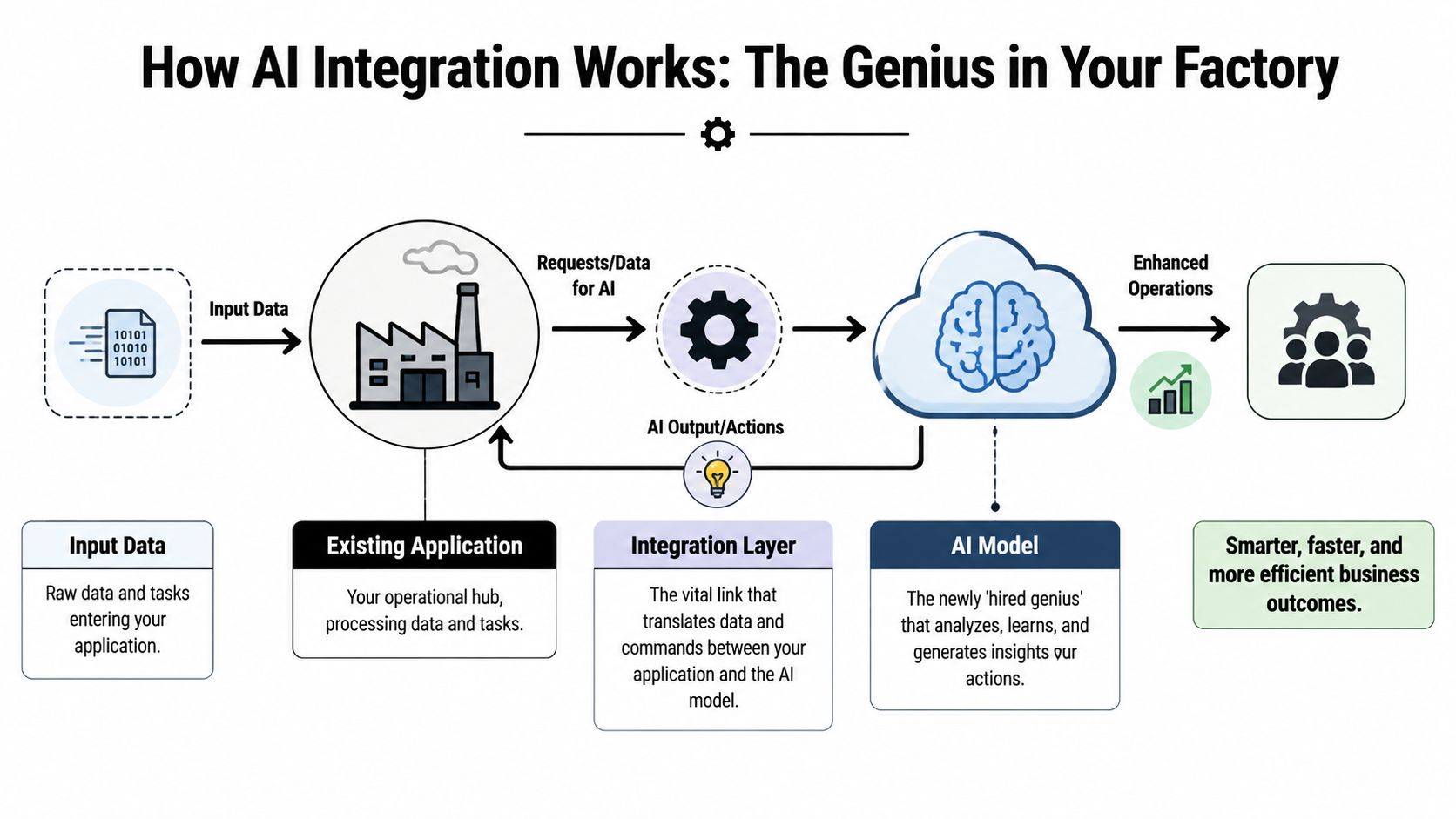
Think of your application as a factory. It already has machines, workers, inventory, and processes. An AI model is like hiring a brilliant consultant, but that consultant is useless if locked in the parking lot. AI integration is the communication system that gets the consultant onto the factory floor, gives access to current information, and lets recommendations feed directly back into operations.
The three moving parts
Most integrated systems have three core components:
| Component | What it is | What it does in practice |
|---|---|---|
| AI model | The intelligence layer | Generates text, classifications, predictions, summaries, or recommendations |
| Data source | Your systems of record | Supplies CRM data, ERP records, support tickets, product catalog data, transactions, and user activity |
| Integration layer | The bridge | Moves requests and responses between your app and the AI while enforcing rules |
The integration layer matters more than many teams expect. That's where developers connect models into APIs and data pipelines, manage authentication, shape prompts, filter context, and decide what the model can trigger inside the app.
Why real-time connection changes the outcome
Technically, AI integration embeds machine learning models into enterprise APIs and data pipelines. This shift from static batch processing to live data streams can reduce decision latency from hours to milliseconds, enabling scenarios like real-time fraud detection, as described in Forbes Technology Council's overview of AI integration in business operations.
That architectural change is the difference between "AI as a side tool" and "AI as part of the product." A standalone assistant can summarize yesterday's support transcripts. An integrated assistant can read the current ticket, check account status, detect sentiment, suggest a reply, and route the case before the customer waits another hour.
For teams building that kind of product behavior, a strong grounding in knowledge in artificial intelligence helps clarify where model capability ends and integration design begins.
What this looks like in an app
In a desktop operations platform, integration might let an account manager ask natural-language questions against live customer records. In a mobile banking app, it might score an event while the session is still active. In an ecommerce app, it might adjust recommendations based on current browsing, cart behavior, and inventory state.
Practical rule: If the AI can't access the right data at the right moment, it won't feel intelligent to the user, no matter how advanced the model is.
The hard part isn't calling a model once. The hard part is creating a reliable loop between user action, business data, model reasoning, and product response.
The Business Benefits of Smart AI Integration
AI integration only matters if it solves business problems. The strongest projects don't start with "where can we use AI?" They start with friction. Slow support triage. Weak personalization. Manual review work. Bottlenecks inside workflows that staff and customers feel every day.
Where the business value shows up
AI-powered data integration platforms can reduce the manual effort spent on data mapping and maintenance by up to 80%, and 69% of organizations already have at least one AI project in production, according to Informatica's CIO perspective on the future of data management. That combination matters. It shows both operational savings and market maturity.
Here's where leaders usually see the payoff:
Automation that handles nuance
This isn't just rule-based scripting. Integrated AI can review context, classify inputs, and trigger next steps inside the same workflow.Personalization that feels timely
Recommendations and guidance become more relevant when the app responds to current behavior instead of fixed segments.Better operational judgment
Teams don't have to dig through disconnected systems to figure out what matters now. AI can surface patterns inside the tools they already use.More room for technical teams to build
When mapping, maintenance, and repetitive review work drop, engineering time shifts toward product improvements instead of upkeep.
What works and what doesn't
A smart integration improves a step that already matters. A weak one adds AI where nobody needed it.
What tends to work
- Workflow-first design: Add AI to a task users already perform often.
- Tight system access: Give the model the exact context it needs, not broad undisciplined access.
- Human review where risk is high: Keep people in the loop for money movement, clinical guidance, or legally sensitive output.
What usually disappoints
- Chatbot-only thinking: A floating chat widget rarely changes the business on its own.
- No ownership after launch: If no team owns prompts, logs, and evaluation, quality drifts.
- Feature theater: AI that looks impressive in a demo but doesn't shorten a workflow won't earn repeat use.
A good AI feature removes steps. A bad one adds curiosity and clicks, then sends the user back to the old process.
The business case gets strongest when AI becomes part of the application's operating logic, not just a novelty layered on top.
AI Integration Use Cases Across Key Industries
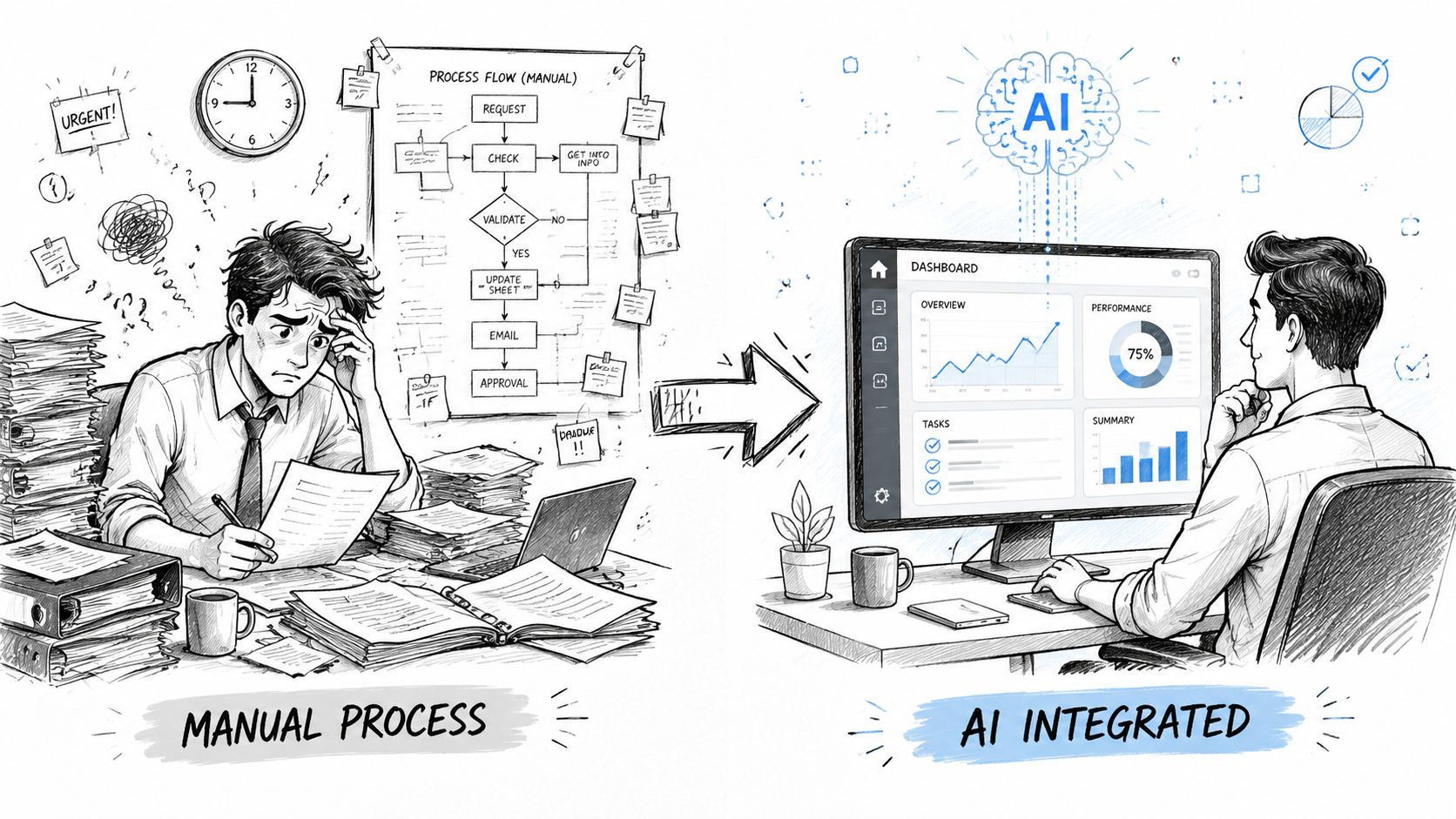
Use cases get clearer when you compare the old workflow to the integrated one. The change usually isn't dramatic on the surface. It feels more like replacing lag with flow.
Ecommerce and retail
Before integration, a storefront often relies on static recommendation rules, broad merchandising categories, and generic search behavior. A customer who browses premium products may still see flat promotions and stale suggestions because the app doesn't adapt quickly enough.
After integration, the app can respond to live browsing patterns, cart activity, support signals, and inventory changes. Product recommendations, bundling suggestions, and on-site guidance become part of the shopping flow. The result isn't magic. It's a store that feels more attentive.
Fintech and SaaS
A common pre-AI setup runs reviews in batches or forces analysts to inspect queues after the fact. That means suspicious patterns are detected late, and legitimate users can get caught in slow manual handling.
Once AI is integrated into live transaction and event pipelines, the system can score activity while it happens, assist with investigation, and route edge cases for human review. In SaaS products, the same pattern applies to churn prediction, support prioritization, and account health monitoring.
Healthcare and wellness
Without integration, many patient-facing apps behave like static forms with content attached. A user enters information, receives general guidance, and then waits for a human to stitch together the next step.
With AI connected to the right systems and guardrails, the experience becomes more responsive. A symptom intake flow can tailor follow-up questions, summarize inputs for providers, and support personalized guidance while preserving auditability and access controls.
In healthcare, useful AI isn't the loudest feature. It's the one that shortens the path between patient input and clinician action without creating compliance headaches.
Media and entertainment
Media teams often juggle large content libraries with tagging, summarization, clipping, and recommendation work spread across disconnected tools. That slows publishing and weakens discovery.
Integrated AI can tag assets as they're ingested, generate summaries for editorial workflows, and improve discovery inside consumer apps. It helps both sides of the business. Editors move faster, and audiences find relevant content with less friction.
Government and nonprofit services
Public-facing service systems often struggle with intake complexity, high document volume, and limited staff capacity. Citizens and applicants get long forms, slow routing, and uneven follow-up.
An integrated AI layer can support guided intake, document classification, service triage, and simulation tools for planning. In these environments, integration quality matters more than flashy output because the workflow has to remain clear, governed, and explainable.
Your Four-Phase AI Integration Roadmap
The fastest way to waste budget is to start with a model before you've defined the operational problem. A better path is phased. That gives your team room to make architectural choices deliberately, test with real workflows, and add governance before usage grows.
Phase 1 Strategy and model selection
Start with one business problem that is painful, frequent, and measurable. Don't begin with "we want an AI assistant." Begin with something sharper, such as reducing support handling time, improving recommendation quality, or speeding document triage.
Then choose the best-fit model, not the most talked-about one. Some jobs need structured extraction. Others need summarization, classification, or agentic workflow support. The right choice depends on data sensitivity, latency tolerance, product surface, and how much control your team needs over prompting and outputs.
Phase 2 Data readiness and architecture
When data sources are inconsistent, many promising projects get exposed. If your CRM, ERP, warehouse, and app database disagree with each other, the model won't rescue you. It will amplify confusion.
Use this phase to define what context the AI needs, where it will get it, and what the permissions model should be. For mobile and desktop products, this is also where teams decide whether inference happens centrally, at the edge, or in a mixed setup. If you're planning modernization work, guidance on leveraging artificial intelligence in business software is useful when translating strategy into architecture.
Phase 3 Phased implementation and testing
Build narrow before you build broad. Connect one workflow, one user type, or one operational lane first. Test the model's responses against real business edge cases, not just clean demo prompts.
A practical test cycle usually includes:
- Functional testing to verify system actions, handoffs, and fallbacks.
- Prompt testing to see how output changes across realistic input variation.
- Security review for data access, role boundaries, and sensitive content handling.
- UX testing to make sure users understand what the AI did and what they should do next.
If users can't tell when to trust, verify, or override the AI, the integration isn't finished.
Phase 4 Governance and optimization
Launch isn't the finish line. It's when your operating discipline starts to matter. Prompts evolve. Models change. Usage grows. Costs creep upward if nobody watches them.
A mature integration needs:
- Monitoring for quality: Track output usefulness, exceptions, and failure patterns.
- Prompt governance: Version prompts and review changes with the same discipline you use for code.
- Budget controls: Watch model usage, high-cost flows, and unnecessary token consumption.
- Compliance support: Maintain logs, access records, and reviewable histories where regulation applies.
Teams that treat this fourth phase as part of the product, not an afterthought, usually get far more durable results.
Best Practices for Controlling Costs and Ensuring Success
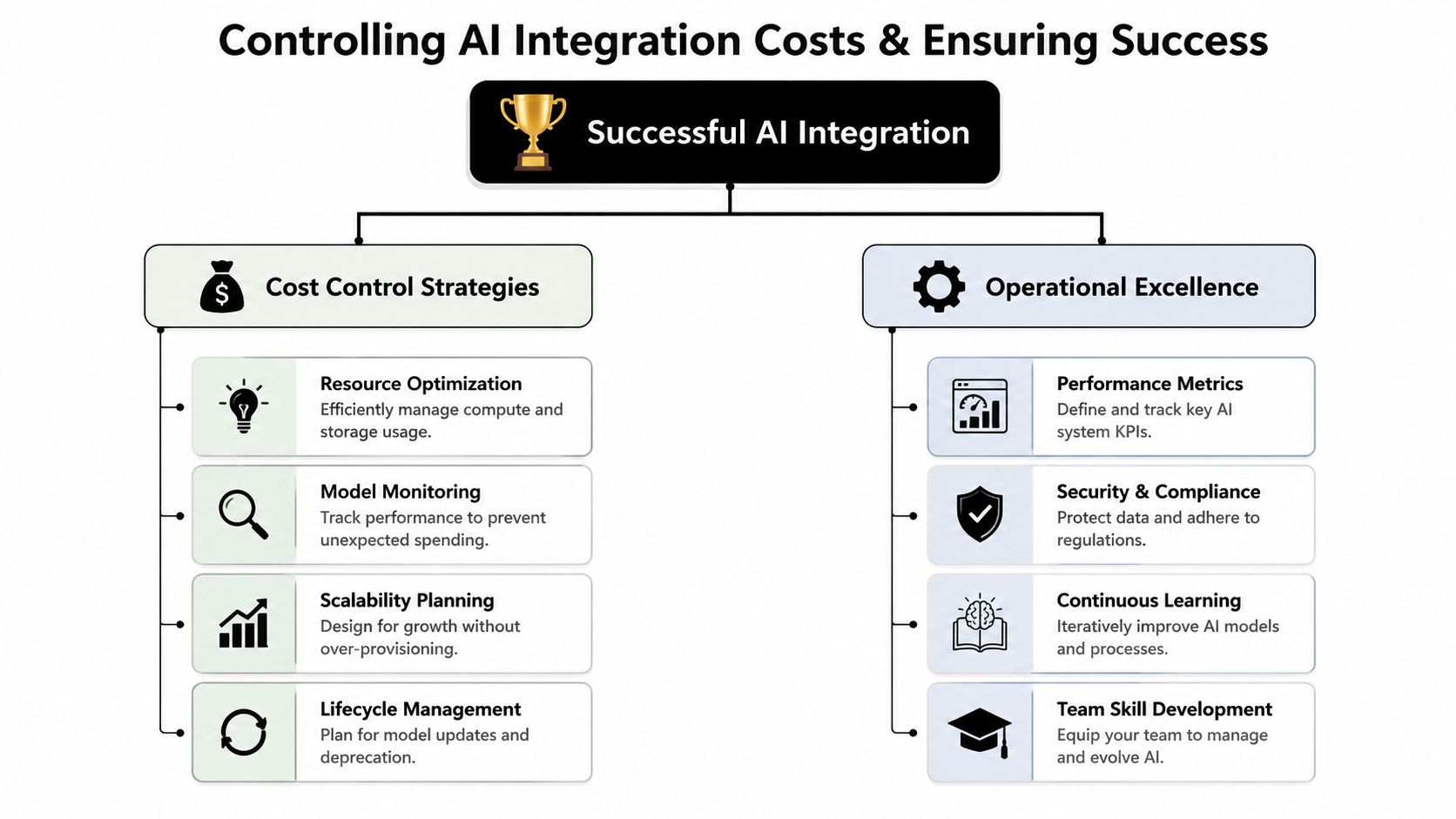
While planning for model access and API wiring is typical, fewer anticipate what I think of as AI borrowing costs. Those are the operational expenses and risks that accumulate after deployment: token usage, prompt drift, logging gaps, rework from poor outputs, and compliance friction when nobody can explain what the system did.
That hidden layer is why some AI features look affordable in a pilot and frustrating in production.
Start with operational controls, not just model access
A useful long-term setup usually includes governance-first architecture. That means role-based access, encryption, strong logging, and scalable infrastructure are built into the integration layer. It also means teams can inspect how prompts, parameters, and model calls behave over time.
For regulated products and cost-sensitive platforms, prompt management belongs here too. Integrating prompt management systems with version-controlled vaults can reduce AI token costs by 22% annually while also supporting mandatory audit trails by logging AI interactions, according to Upland's overview of AI integration and prompt management.
The toolkit serious teams end up needing
This is the operational stack I recommend thinking about early:
Prompt vault with versioning
Prompts change constantly in production. Without version control, teams lose track of what improved results and what introduced regressions.Parameter manager for internal data access
Models should receive structured, approved context. A parameter layer helps control how internal systems are queried and what data is exposed.Universal logging system
When AI touches customer support, financial operations, healthcare workflows, or public services, logs aren't optional. They support debugging, compliance review, and product refinement.Cost manager and throttling controls
Leaders need visibility into cumulative spend and the ability to constrain costly patterns before usage balloons.
One example of this type of administrative layer is Wonderment Apps, which offers a prompt management system with a versioned prompt vault, a parameter manager for internal database access, logging across integrated AIs, and cost management for cumulative spend visibility. That's not a replacement for product engineering. It's part of operating AI responsibly inside modern software.
What separates durable integrations from expensive experiments
| Practice | Why it matters |
|---|---|
| Scalable app design | Prevents AI features from collapsing under growth or uneven demand |
| Tight developer workflows | Keeps prompt, model, and app changes coordinated |
| Security and compliance discipline | Reduces risk when AI touches sensitive data |
| Ongoing evaluation | Prevents quality drift after launch |
The cheapest AI feature is often the one with the clearest constraints.
A lot of failures come from overbreadth. Teams give the model too much freedom, too much context, and too little operational oversight. Better integrations are narrower, more observable, and much easier to improve.
Measuring Your Return and Finding the Right Partner
Return on AI integration should be measured where the product or workflow changed. Look at operational time saved, support load shifted, conversion quality, retention signals, throughput, or review effort reduced. If the integration is strategic, the outcome should show up in how quickly teams act, how smoothly users move, or how much manual work disappears.
Choosing the right partner matters because AI modernization isn't just model wiring. It includes legacy systems, mobile and desktop UX, security, governance, testing discipline, and post-launch operations. A team that can build a demo but can't manage prompts, logging, and cost behavior will leave you with a fragile feature.
When evaluating partners, look for evidence of engineering depth in the frameworks your app depends on. According to Wits' analysis of AI integration teams, prioritizing teams with 85%+ certification rates in core frameworks can reduce costly token errors by 35% and accelerate deployment cycles by 25%. That kind of competence affects ROI because integration work lives in the seams between systems, not just in the model itself.
For leaders mapping next steps, practical guidance on how to implement AI in business can help frame the evaluation process around business fit, not hype.
The strongest partner won't just ask what model you want. They'll ask what workflow should improve, what systems need to connect, what compliance obligations apply, and how you'll control the AI after launch.
If you're modernizing an app and need AI that works in production instead of just in demos, Wonderment Apps can help you evaluate the right integration path and see a prompt management system in action. A hands-on demo is the fastest way to understand how prompt versioning, parameter controls, logging, and cost visibility fit into a durable AI rollout.