

Your product team is ready to ship an AI feature. The demo looks great. Users get smarter recommendations, support replies arrive faster, and internal teams finally see a path to modernizing a creaky app without rebuilding everything from scratch.
Then the harder questions show up.
What data is the model allowed to use? Who can inspect prompts and logs? How do you keep personalization useful without turning the product into a surveillance machine? And if a regulator, customer, or enterprise buyer asks how privacy is handled, can anyone answer without opening five dashboards and starting a Slack archaeology project?
That's where privacy by design principles stop being abstract. They become a product strategy. They help teams decide what data to collect, what to avoid, what to lock down, and how to keep AI features useful without making trust collateral damage. They also make modern tooling far more important. If your stack now includes prompts, model parameters, AI logs, and cost controls, those administrative layers aren't just ops plumbing. They're part of privacy execution.
Building Trust in an AI-Powered World
A lot of teams hit the same wall. They want AI-driven search, recommendations, summaries, or workflow automation, but the moment the feature gets close to launch, the room splits in two. One side wants speed and richer data. The other side wants guardrails, approvals, and fewer surprises.
Both sides are right.
The mistake is treating privacy as the department of “no.” In practice, privacy by design principles help product, engineering, and compliance teams make better tradeoffs earlier. That usually leads to fewer painful reworks later. It also produces software that customers trust enough to use extensively.
The real risk isn't only legal
Most privacy failures in digital products don't start with dramatic misconduct. They start with ordinary product decisions that nobody challenged early enough. A signup flow asks for more data than the feature needs. An analytics event captures personal information by default. A prompt sent to a model includes raw user details because it was faster than building a safer pattern.
None of that looks catastrophic in isolation. Together, it creates a product that feels invasive and difficult to defend.
Privacy problems are often architecture problems wearing legal clothes.
Business leaders usually feel this first through friction. Enterprise customers ask uncomfortable diligence questions. Healthcare and fintech teams stall releases while they untangle data flows. Consumer users don't always complain directly, but they become cautious. They share less, trust less, and abandon features that feel too eager to know them.
Trust is a product capability
The strongest teams build trust into the operating model, not just the privacy policy. They define what data each feature needs. They restrict access by role. They log AI interactions in a way that supports oversight without turning logs into a new privacy mess. They make privacy settings understandable enough for real people to use.
That work isn't glamorous, but it's where durable product advantage comes from. AI makes this more urgent because it expands the number of places sensitive data can travel. Prompts, model outputs, third-party integrations, fine-tuning datasets, and evaluation workflows all create new paths for exposure.
Privacy by design principles give teams a way to control that complexity before it controls them.
What Is Privacy by Design and Why It Matters Now
Privacy by design is a development approach that puts privacy into the blueprint from the beginning. It doesn't wait for launch, audit pressure, or a customer complaint. It asks teams to make privacy decisions while they're still deciding what the product should do and how it should work.
The easiest way to understand it is through architecture. A skyscraper doesn't become safe because someone bolts on emergency exits after tenants move in. Safety has to be part of the plan, the materials, the access points, and the operating procedures. Privacy works the same way in software.
Built in, not bolted on
When privacy is an afterthought, teams usually end up with awkward fixes. They add consent text to flows that were never designed for clear choices. They scramble to strip personal information from logs after systems are already connected. They patch over broad internal access with policy language instead of technical controls.
When privacy is designed in, the product changes shape much earlier:
- Signup flows stay lean. Teams collect what the feature needs.
- User controls make sense. Preferences are visible and understandable.
- Data flows are constrained. Fewer systems touch sensitive information.
- Operations stay cleaner. Retention, deletion, and access rules are easier to enforce.
That's good governance, but it's also good product discipline.
This isn't a new fad
The modern privacy by design framework was formally published in 2009 and then adopted by the International Assembly of Privacy Commissioners and Data Protection Authorities in 2010 (privacy by design background). That history matters because it shows this wasn't created as a late response to AI hype or app store anxiety. It was built as an engineering-minded framework for product and system design.
Its seven principles established a simple but durable idea. Privacy should be addressed proactively, embedded into design, and carried through the full lifecycle of a system. That's why strong teams don't treat it as a checkbox owned only by legal. They use it to shape requirements, UX, architecture, and operations.
Why it matters more in modern software
AI-era products increase both value and exposure. The same feature that makes an app feel intelligent can also widen the data surface fast. More events get logged. More model calls are made. More internal people may need debugging access. More vendors may process data somewhere in the flow.
That's exactly why privacy by design principles still hold up. They force teams to answer practical questions early:
| Product decision | Better question to ask early |
|---|---|
| Personalization feature | What's the minimum user data needed to make this useful? |
| AI prompt workflow | Which fields are allowed into prompts, and which are blocked? |
| Analytics setup | Do we need identifiable events, or will aggregated patterns do? |
| Admin access | Which roles need visibility, and who definitely doesn't? |
If those questions wait until launch week, privacy becomes expensive. If they show up during planning, privacy becomes a design advantage.
The 7 Foundational Principles of Privacy by Design
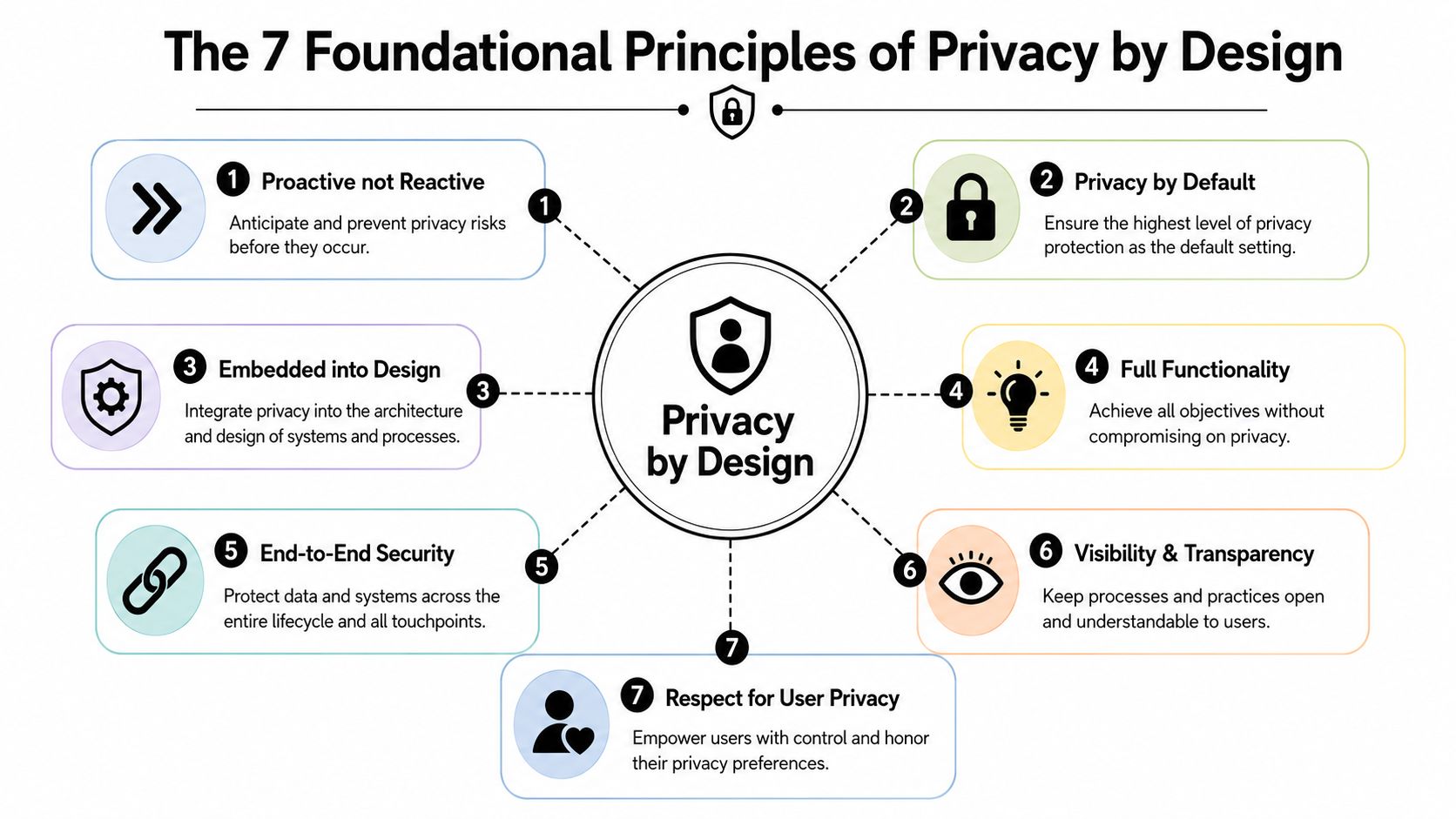
The seven privacy by design principles are useful because they're broad enough to guide strategy and concrete enough to change product decisions. They don't belong only in policy decks. They belong in backlog grooming, UX reviews, architecture discussions, and release checklists.
Principle one through four
Proactive not reactive
Don't wait for a complaint or breach to think about privacy. Teams should identify likely privacy risks during planning and design. In a mobile app, that might mean reviewing whether location access is necessary before the feature is specced.Privacy as the default setting
Users shouldn't have to hunt through settings to protect themselves. In practice, this means collecting the minimum data required and starting with privacy-friendly defaults. A simple example is leaving optional marketing preferences unselected instead of assuming consent.Privacy embedded into design
Privacy shouldn't be a layer added after engineering decisions are already made. If an app needs user analytics, the architecture should support minimization, scoped access, and safe retention from the start.Full functionality, positive-sum not zero-sum
This principle pushes back on the lazy assumption that teams must choose between privacy and performance. The better question is how to design for both. A recommendation engine, for example, can still be effective when product teams reduce unnecessary identifiers and separate raw personal data from operational workflows.
Practical rule: If a feature only works when nobody asks hard questions about the data flow, the feature isn't production-ready.
Principle five through seven
End-to-end security, full lifecycle protection
Privacy breaks when data is exposed at any stage, not just at collection. Secure handling has to cover transmission, storage, access, retention, and deletion. For a healthcare-adjacent app, that could mean encrypted storage, strict role access, and clear deletion procedures when data is no longer needed.Visibility and transparency
Teams should be able to explain what data they collect, why they collect it, and how it moves through the system. Users should be able to understand that too. Clear notices beat vague, over-lawyered language every time.Respect for user privacy, keep it user-centric
Through this principle, many products either earn trust or burn it. Good privacy UX gives people understandable choices, sensible defaults, and straightforward control. Bad privacy UX hides options, uses confusing language, or turns opt-out into a maze.
What this looks like in a real app
A strong implementation doesn't announce privacy values and then ask for everything at signup. It doesn't expose support logs to anyone with admin access. It doesn't retain personal data “just in case.” It uses the principles as constraints that improve the product.
A simple way to think about the seven principles is this:
- The first three shape how the product is conceived.
- The middle two shape how value and protection coexist.
- The final two shape how systems behave over time and how users experience trust.
That's why privacy by design principles work so well for digital products. They don't sit outside delivery. They improve delivery quality.
Implementing Privacy by Design A Checklist for Teams
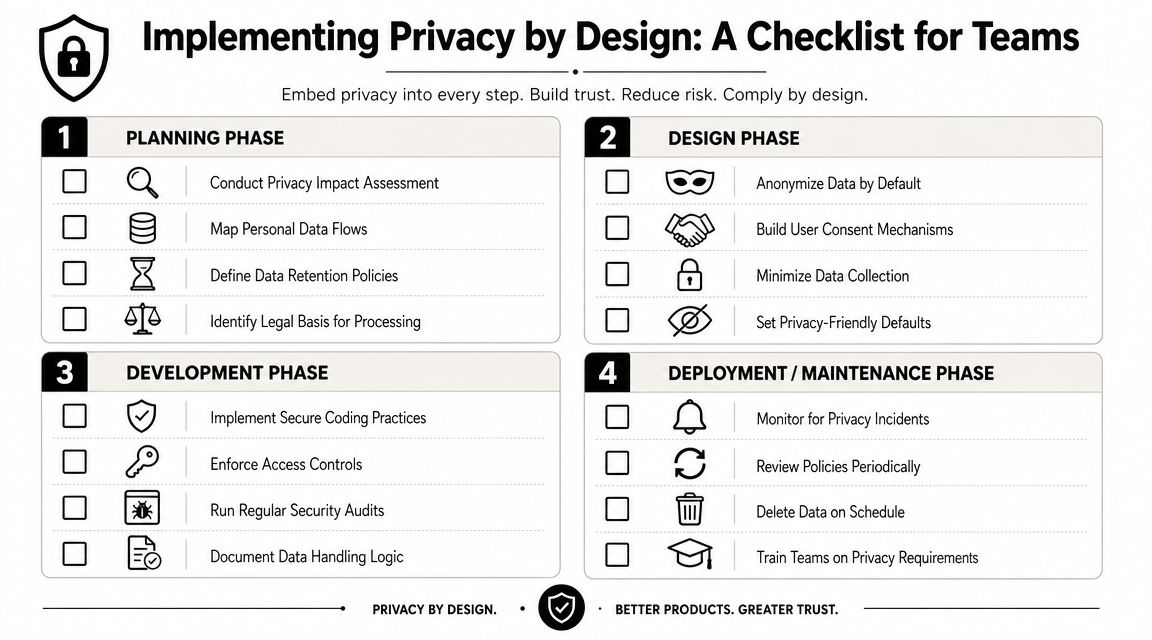
Teams often don't fail because they disagree with privacy by design principles. They fail because nobody turned the principles into delivery habits. The fix is operational. Give product, design, engineering, and operations teams a checklist they can use.
Planning and requirements
Before design starts, teams should pin down the boundaries of the feature.
- Define purpose clearly. Write down what the feature does, what user problem it solves, and what data it needs.
- Map data flows early. Identify where personal information enters, where it's stored, and which systems receive it.
- Challenge collection assumptions. If a field or event exists because “it might be useful later,” treat that as a warning sign.
- Review risk before build. A privacy impact review doesn't need to be theatrical. It needs to be honest.
This is also the stage where technical and security practices should align. A practical companion resource is this actionable app security guide, which pairs well with privacy planning because weak security usually undermines privacy promises fast.
Design and development
At this stage, a lot of privacy intent gets lost unless someone translates it into interfaces and code.
| Phase | What strong teams do |
|---|---|
| Design | Use plain-language consent, visible controls, and minimal form fields |
| Development | Enforce role-based access, reduce sensitive logging, and scope integrations tightly |
| QA | Test privacy settings, deletion flows, and edge cases around permissions |
| DevOps | Carry access, retention, and environment controls into deployment workflows |
For teams tightening engineering practices around release pipelines and operational safeguards, Wonderment's piece on security in DevOps is a useful reference.
The cleanest privacy program is usually the one with the fewest exceptions.
Launch and operations
A launch checklist should include privacy controls, not just uptime and analytics.
- Retention rules exist. Data shouldn't live forever because nobody owns deletion.
- Access gets reviewed. People change roles. Old permissions linger.
- Logs are useful, not reckless. You need enough detail to debug without dumping personal information everywhere.
- User requests are workable. If someone asks what data you hold or wants it removed, the team should know how that happens.
What doesn't work is relying on a policy page to carry the whole burden. The durable approach is boring in the best way. Smaller data footprints. Fewer systems in the chain. Clear permissions. Clean operations. That's usually what makes privacy manageable at scale.
Privacy by Design in the Age of AI and Machine Learning
AI changes the privacy conversation because it introduces new kinds of data handling. Traditional apps already collect, store, and analyze user information. AI systems add prompt inputs, model outputs, evaluation datasets, monitoring logs, fallback paths, and sometimes external model providers. The data surface expands quickly.
That doesn't mean privacy by design principles become less useful. It means they become more practical.
The false tradeoff teams still make
A common mistake is assuming privacy and AI utility are opposing goals. That's not what the framework says. The stronger nuance is that privacy by design is not anti-data, and its full functionality principle is meant to avoid a zero-sum tradeoff between privacy and business goals. That same perspective also points teams toward implementation patterns such as data minimization, pseudonymization, and lifecycle access controls (practical nuance on full functionality).
That matters because AI teams often over-collect in the name of experimentation. They pass raw user records into prompts because it speeds up prototyping. They keep broad logs because debugging is hard. They expose too many internal users to model traces because the workflow isn't designed yet.
Those choices may help in a sprint. They create messes in production.
Better patterns for AI products
A privacy-aware AI product usually behaves differently in a few key ways:
- Minimization in prompts. Send the model only the fields required for the task.
- Pseudonymization in workflows. Replace direct identifiers where the feature doesn't need them.
- Scoped access for debugging. Let teams inspect failures without giving everyone access to sensitive details.
- Retention discipline. Don't keep prompt and output histories forever unless there's a defensible reason.
- Separated environments. Testing and evaluation shouldn't casually inherit production-grade personal data.
A mature AI program also evaluates models with privacy in mind, not only accuracy and latency. Teams that want a stronger process around this should review AI model evaluation through both a quality and governance lens.
If your model needs every piece of personal data to be useful, the design probably needs work.
What works better than slogans
“Be transparent” and “respect user privacy” sound good, but AI teams need operational interpretations.
A recommender system can often use behavior categories instead of direct identity in more places than teams first assume. A support assistant can be designed to access approved fields through controlled parameters instead of unrestricted database context. An internal AI copilot can log usage for oversight while stripping unnecessary personal content from trace records.
What doesn't work is treating AI as a magical exception to the normal rules of product design. The same discipline still applies. Define purpose. Limit inputs. Control access. Review outputs. Shorten retention. Audit the workflow.
That's how privacy by design principles become useful in machine learning instead of decorative on a slide.
Mapping Privacy by Design to GDPR and HIPAA
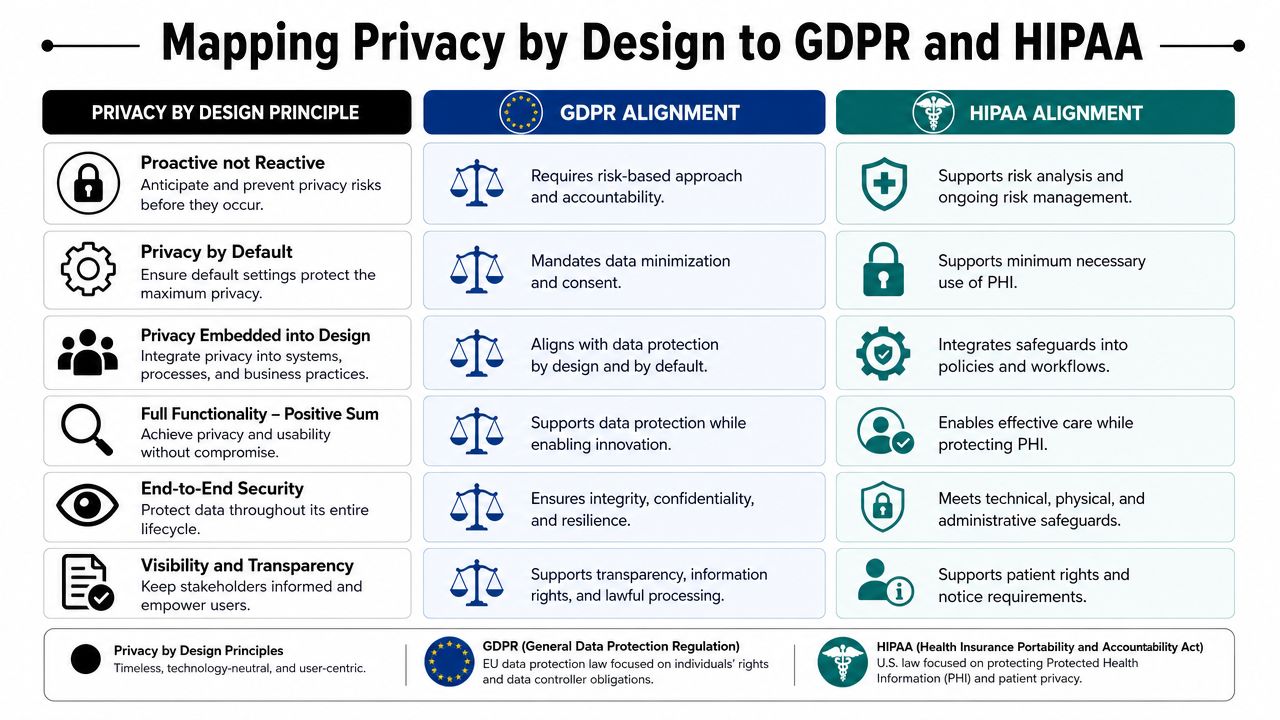
For regulated teams, privacy by design principles aren't just philosophically compatible with compliance. They map directly to it. That's especially clear in GDPR-related practice, where design-time privacy expectations are explicit.
The UK ICO's guidance states that organizations must limit personal information to what is necessary for each purpose, specify what personal information is needed before use, and design technical and organizational measures from the initial planning stages onward. The guidance also says organizations should consider the state of the art, cost of implementation, the nature, scope, context, and purposes of processing, and risks to people's rights and freedoms (ICO guidance on data protection by design and by default).
How the mapping works in practice
Privacy by design gives teams a working model for satisfying legal obligations through product decisions.
- Purpose-focused collection aligns well with GDPR expectations around limiting data to specific uses.
- Privacy as default supports the idea that users shouldn't have to fight the system to protect their information.
- End-to-end security helps teams operationalize safeguards throughout the data lifecycle.
- User-centric controls support transparency and access expectations.
HIPAA uses different language and applies in a narrower context, but many of the operational instincts are similar. Teams handling protected health information still need constrained access, disciplined use, strong safeguards, and clear handling rules. In practice, privacy by design helps healthcare product teams turn legal requirements into build requirements.
For organizations working through that translation in healthcare software, this guide to HIPAA-compliant app development is a useful complement.
A simple leadership view
Here's the executive-level version:
| Privacy by design principle | GDPR relevance | HIPAA relevance |
|---|---|---|
| Privacy as default | Supports data minimization and design-time restraint | Supports minimum-necessary thinking in product behavior |
| Embedded into design | Fits the expectation that controls begin early | Encourages safeguards as part of system architecture |
| Visibility and transparency | Helps explain data use and governance clearly | Strengthens accountability around handling sensitive information |
The practical takeaway is straightforward. If teams build with privacy by design principles from the beginning, compliance work becomes easier to demonstrate and easier to sustain. If they wait until the product is already live, compliance becomes a retrofit project.
Putting It All Together Your Modern Privacy Toolkit
Privacy by design principles matter because they force good decisions early. They make teams clarify purpose, limit data, constrain access, and build transparency into the product instead of stapling it on later. In AI-powered software, that discipline becomes even more valuable because the operational surface is bigger and easier to lose track of.
Modern teams also need tooling that matches that reality.
A strong administrative layer helps make privacy real in day-to-day delivery. A prompt vault with versioning supports traceability and change control. A parameter manager can act as a technical boundary around what data an AI workflow is allowed to access. Unified logging helps teams investigate behavior, monitor usage, and maintain oversight. Cost controls add another management benefit because they make AI operations visible instead of mysterious.
That combination matters more than it might first appear. Privacy programs often fail not because leaders disagree with the principles, but because implementation is scattered across too many tools and too many people. Once prompt behavior, access boundaries, logging, and operational review live in one managed system, teams have a much better chance of keeping privacy controls consistent over time.
Privacy by design isn't about making products timid. It's about making them trustworthy, defensible, and easier to scale. That's a competitive advantage in any market, and it's becoming a baseline expectation in AI-enabled software.
Wonderment Apps helps teams build modern, trustworthy digital products with AI modernization, custom web and mobile development, and an administrative toolkit designed for real operational control. If you want to see how prompt versioning, parameter management, unified AI logging, and cost visibility can support a stronger privacy-by-design practice, explore a Wonderment Apps demo.