

When a team goes distributed without changing how it operates, the symptoms show up fast. Slack turns into a help desk. Product decisions live in meeting recordings nobody watches. Engineers wait half a day for answers because the person who knows the context is asleep in another time zone. Everybody feels busy, but delivery feels slippery.
That situation isn't unusual anymore. Hybrid and distributed work are mainstream, not edge cases. 74% of companies have embraced a hybrid work model according to Envoy's overview of distributed team practices. The management problem has changed shape. You're not trying to recreate the office on Zoom. You're trying to build an operating system that works when people, tools, and decisions are spread out.
The teams that handle this well don't rely on goodwill or heroic communication. They use explicit rules, stable rhythms, and integrated tools. That's true for team operations, and it's increasingly true for software operations too, especially once AI enters the stack and prompts, parameters, logs, and cost controls need the same kind of discipline as code and tickets.
From Chaos to Cadence The New Reality of Team Management
A familiar pattern plays out in distributed engineering teams.
A product manager posts a requirement update in Slack. An engineer replies with a technical concern two hours later. Design adds a Figma comment overnight. Someone spins up a quick meeting for the next morning, but half the team can't attend. By the time a decision lands, the sprint has already absorbed the uncertainty. Nobody did anything obviously wrong. The system did.
That's the core lesson in distributed team management. Friction rarely comes from lack of effort. It comes from hidden dependencies, unclear ownership, and too many conversations happening in places that weren't designed to preserve context.
The business cost is real. Distributed teams are 25% more likely to miss deadlines than teams working in the same office, according to Insightful's guide to distributed team management. That's not a moral judgment on remote work. It's a warning that distance creates operational overhead, and unmanaged overhead shows up as missed delivery dates.
What chaos looks like in practice
Leaders usually notice the same signals first:
- Status without clarity. People can report activity, but they can't answer what's blocked, who owns the next move, or when a decision was made.
- Meetings that patch over process gaps. Teams schedule another call because the handoff model is weak, not because the issue needs live discussion.
- Documentation that exists but doesn't help. Notes are scattered across Slack, Jira, Confluence, email, and recordings.
Distributed teams don't fail because people are remote. They fail because the work still depends on office-style shortcuts.
The fix isn't “communicate more.” It's to communicate with a playbook. Teams need rules for where work lives, how decisions get recorded, when someone is expected to respond, and what happens when a handoff crosses time zones.
For leaders who want a practical manager's view, Madeira Remote has a useful set of practical steps for remote work. The specifics may vary by team, but the direction is right. Replace improvisation with repeatable operating habits.
Cadence beats constant availability
The strongest distributed teams don't chase responsiveness all day. They create cadence. They know when planning happens, where specs live, how blockers escalate, and what format decisions take. That predictability reduces stress because people stop guessing where to look and how to act.
Once you have cadence, tools become amplifiers instead of noise machines. Without cadence, even a polished stack turns into organized confusion.
Build Your Foundation with a Team Charter
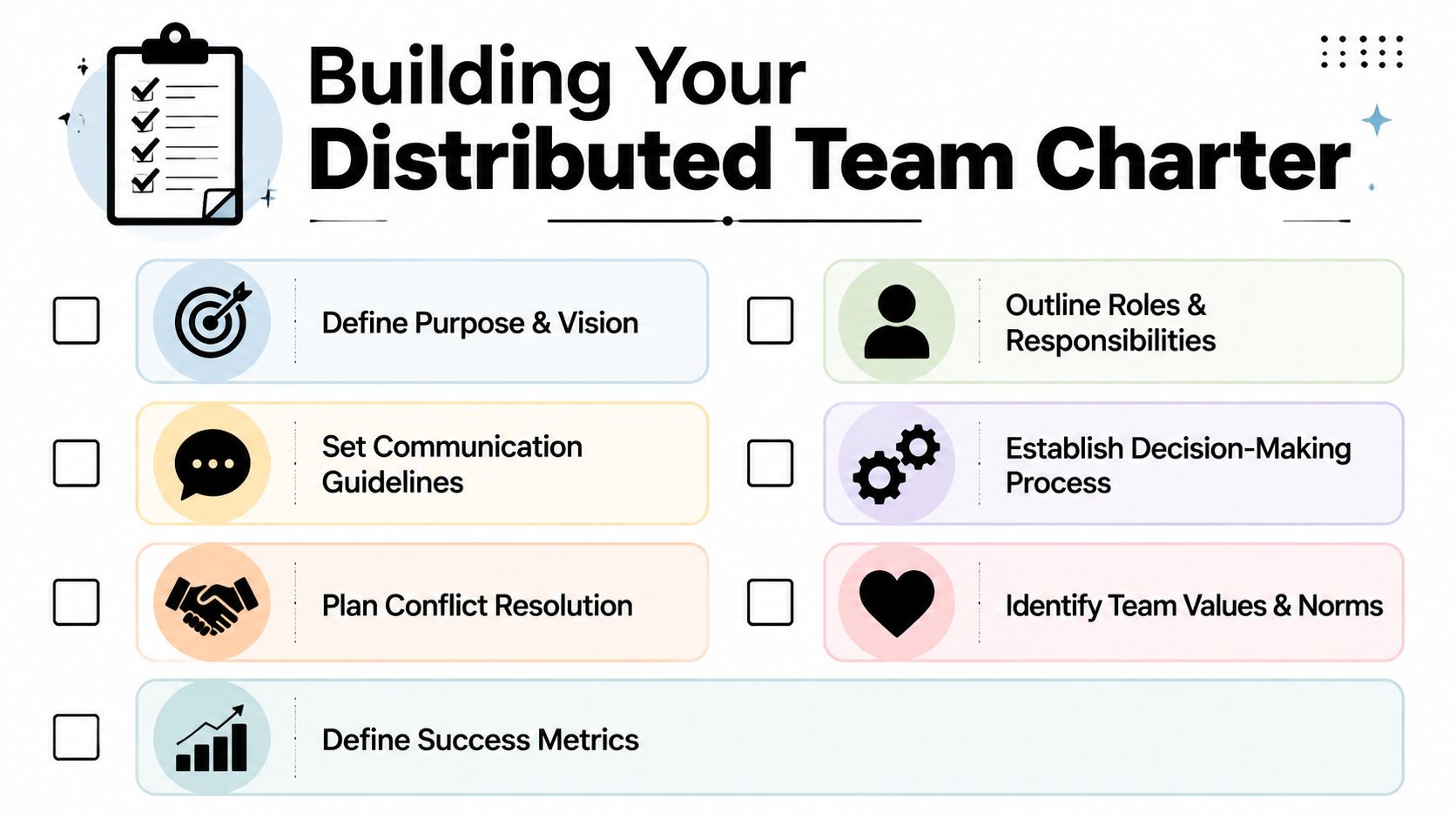
A team charter is the document that stops distributed work from becoming a collection of personal preferences. It sets the rules for how the team operates when people aren't in the same room and can't rely on informal alignment.
High-performing distributed teams depend on explicit operating rules, clear responsibilities, and regular feedback loops, as described in RST Software's guidance on distributed agile teams. If you skip this step, every workflow becomes negotiable. That's exhausting.
What belongs in the charter
Don't make the charter aspirational. Make it operational.
Mission and scope
Define what the team owns and what it doesn't. If platform engineering owns deployment tooling but not release communications, write that down.Roles and decision rights
Clarify who recommends, who approves, who implements, and who needs visibility. This is especially important for product, design, engineering, QA, and security handoffs.Core collaboration hours
Set overlap windows for real-time work. Teams don't need to share full schedules, but they do need protected windows for decision-heavy collaboration.Communication channel rules
Decide what belongs in Slack, Jira, email, GitHub, Confluence, or your chosen equivalents. If production issues go to one channel and feature clarifications go somewhere else, name it.Escalation paths
Define what counts as urgent, who gets paged, and when someone should move from async to live communication.Review and retrospective rhythm
Add recurring checkpoints for improving the system. Good distributed teams adjust working agreements as reality changes.
A simple charter format that works
A practical charter usually fits on a few pages. If it needs a workshop to interpret, it's too complicated.
| Area | Question to answer |
|---|---|
| Ownership | Who owns roadmap, architecture, quality, and release decisions? |
| Hours | When do we overlap, and what happens outside that window? |
| Channels | Where do requests, decisions, specs, and blockers go? |
| Escalation | What is urgent, and how do we raise it? |
| Delivery | How do we define ready, done, and blocked? |
Practical rule: If a new hire can't read the charter and understand how the team actually works, the charter is too vague.
Split sync and async on purpose
One of the most useful rules in distributed team management is simple. Use synchronous communication for moments that need high bandwidth, like conflict resolution, architecture trade-offs, or sensitive feedback. Default routine coordination to async channels with clear response expectations, as recommended in CTO Magazine's distributed team management tips.
That means the charter should answer questions like these:
- What gets a meeting? Complex decisions, not status updates.
- What gets an async post? Routine updates, ticket clarifications, progress reporting.
- What response time should people expect? Enough to keep work moving, without manufacturing urgency.
- Do meetings get recorded or summarized? They should, especially when regions can't attend live.
A lot of remote frustration comes from teams mixing these modes badly. They hold meetings for things that needed a written brief, then bury the final decision in chat.
What doesn't work
Some charter mistakes are predictable:
- Values without mechanics. “Communicate openly” sounds nice. It doesn't tell anyone where to put a blocker.
- Rules nobody enforces. If the team says decisions belong in Jira or Confluence but keeps making them in DMs, the actual process wins.
- Static agreements. Teams evolve. The charter should change when the team learns something isn't working.
A charter isn't bureaucracy. It's an agreement that protects focus, speed, and accountability when distance removes the safety net of hallway alignment.
Master Asynchronous Workflows and Tooling
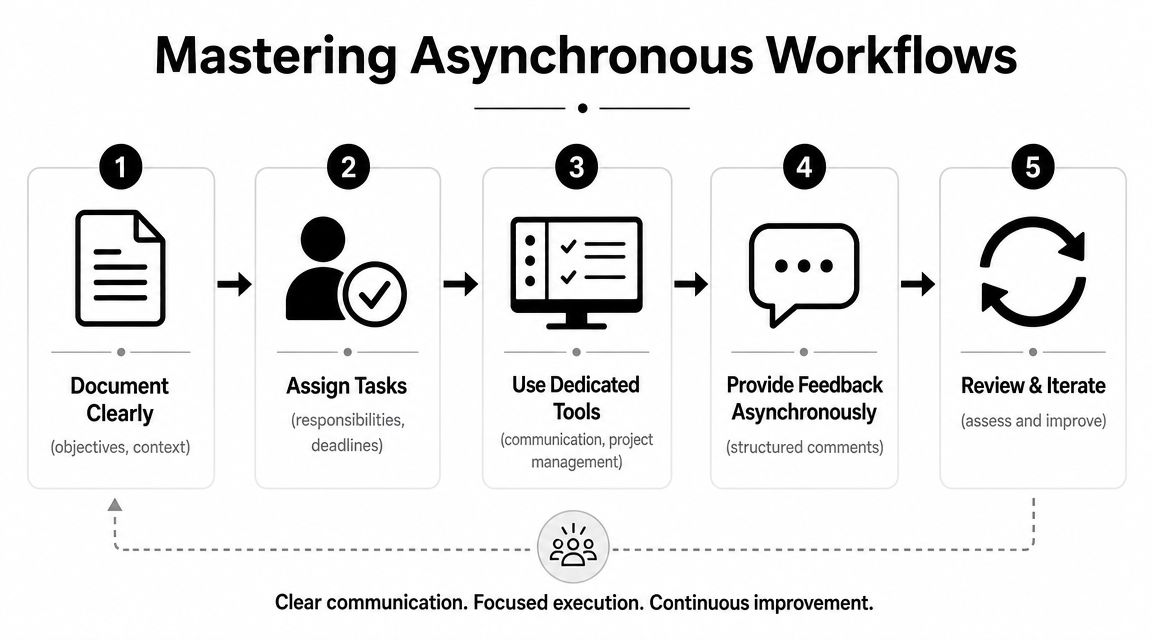
Async work gets oversimplified. People say “document everything,” then wonder why execution still stalls. Documentation alone doesn't create flow. Good async systems do three things at once. They preserve context, reduce dependency on live availability, and make the next action obvious.
That's why distributed team management is really a workflow design problem. If work can't move unless the right people are online at the same time, the team isn't distributed. It's just delayed.
Build around a single source of truth
Every work item needs a home base. For engineering teams, that's often Jira, Linear, or Azure DevOps. For code, it's GitHub, GitLab, or Bitbucket. For durable knowledge, it might be Confluence, Notion, or a docs repo.
The rule is simple. Slack can alert. It shouldn't be the archive.
A healthy async workflow usually looks like this:
- A ticket holds the current status. Scope, owner, dependency, and acceptance criteria are visible there.
- A spec or design doc holds the reasoning. Why the work exists, what trade-offs matter, and what constraints are fixed.
- A decision log records the conclusion. Not a meeting link. The actual decision.
- Code and review history stay attached to the work item. The trail matters.
If your team can't reconstruct why something happened without interviewing three people, your async system is weak.
Improve decision quality, not just documentation volume
One of the hardest problems in distributed work is preserving decision quality when teams operate across time zones. Management30 highlights the need for explicit agreements, transparent decision paths, and context-rich documentation in its discussion of leading distributed agile teams.
That last phrase matters. Context-rich documentation.
A short update like “We changed the API shape” isn't enough. A useful async record answers:
- What changed
- Why it changed
- What alternatives were considered
- Who approved it
- What other teams need to know
The best async teams don't write more. They write so the next person can act without scheduling a meeting.
Make your tools work as a system
Teams often already have enough tools. The issue is that the tools behave like islands.
Here's a cleaner model:
| Need | Primary tool | Supporting behavior |
|---|---|---|
| Task tracking | Jira or Linear | Link specs, PRs, and blockers directly |
| Documentation | Confluence, Notion, or docs repo | Keep decision summaries near the work |
| Code collaboration | GitHub or GitLab | Reference issue IDs in pull requests |
| Chat | Slack or Teams | Use for alerts and discussion, then link back to system of record |
If your stack is fragmented, it helps to review how modern team management platforms handle visibility, collaboration, and handoffs across tools. The goal isn't adding software for its own sake. It's reducing the number of places people must check before they can move.
Where AI tooling starts to matter
Async workflows get harder once AI is part of the product or internal engineering process. Now you're not only tracking tickets and code. You're also tracking prompts, model behavior, parameters, logs, and spend. That's one reason teams use administrative layers such as Wonderment Apps' prompt management system, which includes a prompt vault with versioning, a parameter manager for internal database access, cross-model logging, and cost management. Those functions don't replace Jira, GitHub, or Slack. They give AI-integrated work the same traceability and control that mature engineering teams expect elsewhere.
That's the pattern worth copying. Put context where the work happens. Make state visible. Reduce the need for memory and live intervention.
Hire and Onboard Talent for a Distributed World
Some people are excellent in an office and struggle badly in a distributed environment. Not because they lack skill, but because the environment rewards a different set of habits. Strong distributed teams hire for technical ability plus communication discipline, autonomy, and comfort with written context.
A lot of hiring mistakes happen when managers evaluate remote candidates as if proximity will solve gaps later. It won't. If someone can't explain trade-offs clearly, manage ambiguity, and leave a useful paper trail, distance makes that weakness more expensive.
What to screen for during hiring
The usual technical interview loop isn't enough. Add signals that reflect how work happens on a distributed team.
Try questions like these:
How do you handle a blocker when the person you need is offline?
Good answers include documenting the issue clearly, proposing options, and unblocking parallel work.Tell me about a time you disagreed with a decision and had to respond in writing.
You're looking for calm reasoning, not performative confidence.How do you keep teammates informed without spamming them?
Strong candidates talk about concise updates, clear ownership, and channel selection.What do you include when handing work to another person or team?
Look for structure. Context, status, risks, next action.
Warning signs managers often miss
Not every candidate who says they “love remote work” will work well in a distributed system.
Watch for:
- Reliance on informal alignment. They talk about “just grabbing time” with coworkers to resolve everything.
- Thin written communication. Their follow-ups are vague or incomplete.
- Low ownership language. They frame blockers as somebody else's problem to solve.
- Tool resistance. They treat documentation and tracking as administrative overhead instead of delivery infrastructure.
A distributed team can coach style. It can't compensate forever for weak ownership habits.
Onboarding needs structure, not friendliness alone
Remote onboarding fails when teams confuse warmth with clarity. A welcome call is nice. A clear path through systems, people, and expectations is what makes a new hire productive.
A workable onboarding plan includes:
Access and environment setup
Every account, repository, environment, and documentation hub should be ready early.An onboarding buddy
Not their manager. A peer who can answer the “how things really work here” questions.A reading path
Team charter, architecture overview, product roadmap, incident process, delivery workflow.A first win
Give them a low-risk task that touches the actual stack and ships through the normal process.Scheduled check-ins
Use regular manager check-ins to confirm understanding, surface friction, and adjust pace.
For companies building globally distributed teams, this guide on how to hire an offshore development team is useful because it focuses on fit, communication, and execution risk, not just cost or availability.
The unwritten rules should become written
The biggest onboarding trap in distributed team management is expecting new people to absorb unwritten norms by osmosis. There is no osmosis when the team is spread out.
Create short documents for the things veterans “just know”:
- How priorities change
- How incidents get escalated
- How architecture proposals are reviewed
- How product and engineering resolve trade-offs
- How much detail updates should include
That work feels tedious once. It pays off every time a new person joins and every time an existing person changes teams.
Measure Performance and Secure Your Environment
Leaders usually ask two questions about distributed teams. Are they producing? And is the environment safe?
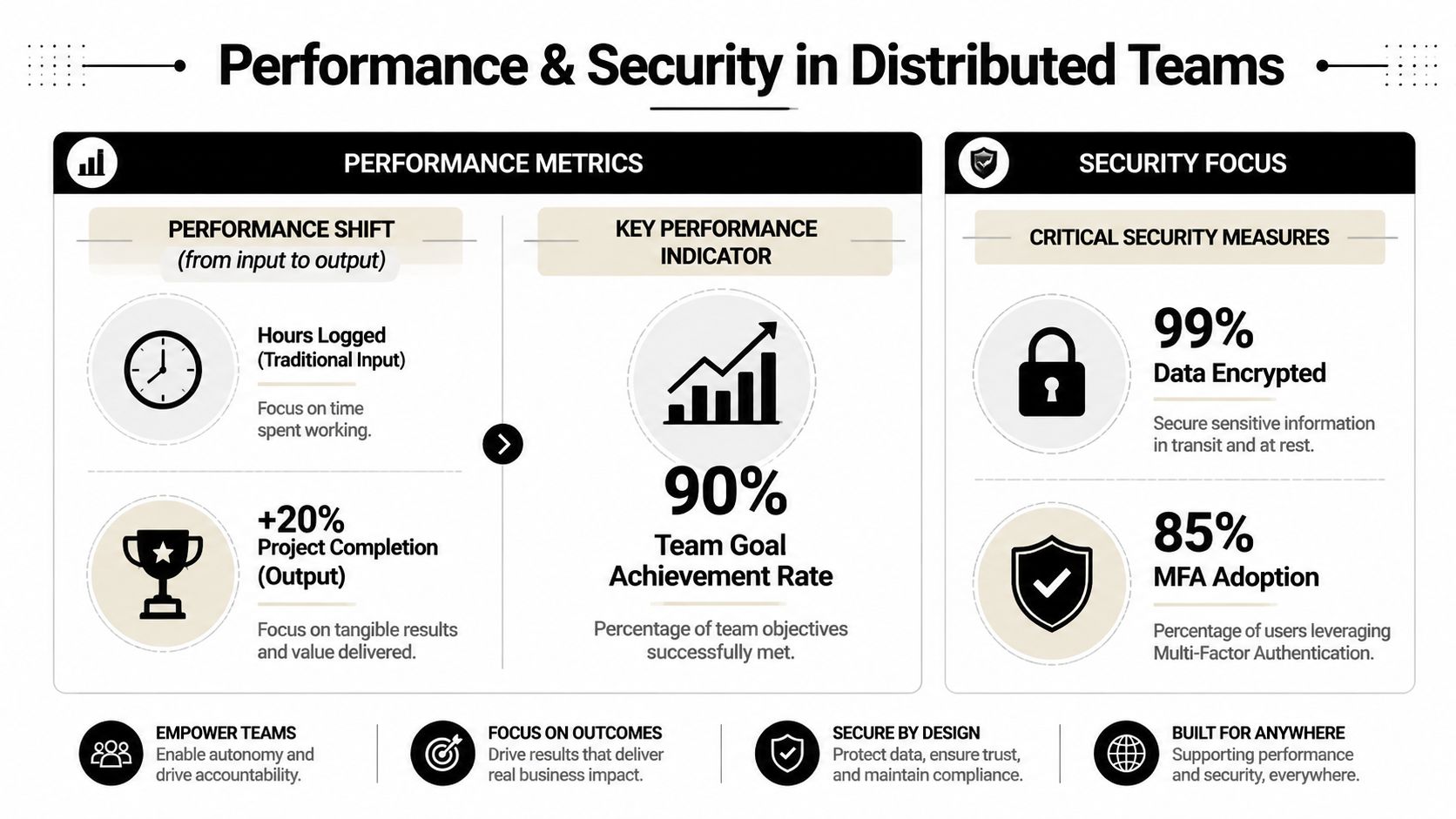
Those are fair questions. They just get answered badly when managers fall back on visibility theater. Hours online, green dots, rapid replies, and meeting attendance tell you very little about whether a software team is delivering meaningful work or protecting sensitive systems.
Measure outcomes people can improve
For engineering and product teams, output beats surveillance. You want signals that reveal flow, quality, and customer impact.
That usually means looking at indicators such as:
- Cycle time for work moving from ready to done
- Deployment frequency or release rhythm
- Change failure patterns and rollback pain
- Customer-facing defect trends
- Goal completion against team commitments
These measures aren't useful because they create pressure. They're useful because they reveal where the system is slowing down. A team with long cycle times may have approval bottlenecks. A team with frequent defects may have ambiguous acceptance criteria or weak testing discipline.
If you're reviewing frameworks for outcome-based tracking, this breakdown of agile performance metrics is a practical place to start.
Protect decision quality as you scale
A distributed environment weakens one thing faster than many leaders expect. Decision accountability. When discussions span chat, comments, docs, and time zones, teams can lose the thread of who decided what and why.
Management30's guidance on distributed agile leadership points to a better model. Use explicit working agreements, transparent decision paths, and documentation tied closely to the work itself. That's the only reliable way to preserve accountability when real-time supervision isn't the default.
A few habits help immediately:
| Risk | Better practice |
|---|---|
| Decisions vanish into chat | Record the decision in the work item or decision log |
| Ownership is blurry | Name a directly responsible owner |
| Context gets detached | Link rationale, alternatives, and dependencies together |
| Teams wait for approval | Define what people can decide without escalation |
Clarity is a security control and a performance control. Confused teams make preventable mistakes.
Security has to fit the way the team actually works
Security guidance for distributed teams doesn't need to be exotic. It needs to be enforceable.
Start with the basics that teams can apply consistently:
- Use multi-factor authentication across core services
- Standardize device management
- Limit access by role
- Require secure handling of sensitive data
- Train people on phishing, credential hygiene, and escalation paths
- Document what to do when a device is lost, compromised, or retired
The biggest security failure mode in distributed teams is inconsistency. One contractor uses a personal machine with loose controls. One shared credential survives longer than it should. One production access exception never gets cleaned up.
Good leaders don't separate operational rigor from security rigor. They're the same habit expressed in different systems.
Find Your Rhythm and Modernize Your Tech
A distributed team starts to feel stable when people know where decisions happen, when updates are expected, and which meetings are worth attending. Without that operating rhythm, calendars fill up, chat becomes a backlog, and simple handoffs start taking a full day.
For product and engineering teams, the goal is a cadence people can follow without thinking about it.
A cadence people can remember
Start of week
Run a short planning checkpoint. Confirm priorities, surface risks, and call out dependencies that could stall delivery.Daily flow
Use async standups or written status updates. Keep them tight: what changed, what is blocked, and what happens next.Mid-cycle
Hold live decision reviews or design discussions only for issues that benefit from real-time debate.End of cycle
Demo what shipped. Record what slipped, why it slipped, and who owns the follow-up.Monthly
Review the system itself. Look at handoff delays, planning accuracy, meeting load, and tooling friction, not just sprint output.
The right rhythm is not universal. Early-stage teams can run lighter. Larger teams usually need more structure because cross-functional dependencies multiply fast. The mistake is copying a ceremony schedule from another company instead of designing one around your actual failure points.
The same rule applies to the stack behind the team. If the workflow depends on scattered docs, chat threads, and local habits, the team will feel slower than it is. If you are adding AI into product development or internal operations, that problem gets sharper. Prompt versions drift, parameters get changed without review, costs show up after the fact, and nobody can trace which prompt produced a user-facing output.
Administrative tooling is part of team management.

A mature AI-integrated stack needs the same operational controls as a distributed engineering team. Teams need version history they can trust, clear ownership, visible logs, and cost data that is easy to review. Prompt management belongs in that system. So do parameter controls and centralized logging across models and environments.
This is one of the newer management gaps I see. Leaders put good process around code, tickets, and releases, then leave AI behavior in shared docs and ad hoc scripts. That creates a second operating model inside the same team, and it usually breaks under scale.
If you're reworking team operations while integrating AI into product or internal workflows, Wonderment Apps is worth a look. They build and modernize digital products, and their prompt management tooling gives teams a structured way to manage prompt versioning, parameters, cross-AI logging, and cost visibility inside existing software environments. A demo is a practical way to see whether that administrative layer fits how your team already ships.