

A lot of companies don’t realize they need ERP software development services until the weekly numbers stop matching.
Sales exports one report. Finance has another. Operations keeps a “temporary” spreadsheet that somehow runs half the business. Your team spends more time reconciling data than acting on it. Then growth makes the problem worse. New products, new channels, new compliance requirements, and more edge cases all pile onto the same shaky setup.
That’s usually the moment leadership asks the wrong question: “Which ERP should we buy?” The better question is, “What operating model do we need, and what system will support it for the next stage of growth?” In many cases, that answer isn’t a generic platform. It’s a custom ERP strategy that unifies data, fits the way the business works, and leaves room for AI-powered workflows you can control instead of fear.
Beyond Spreadsheets Why Your Business Needs ERP Software Development Services
The pain usually looks ordinary at first. A controller notices margin reports arrive late. A warehouse manager catches inventory mismatches after orders are already promised. A customer support lead keeps asking three teams for a simple status update. Nothing is fully broken, but nothing is reliable either.
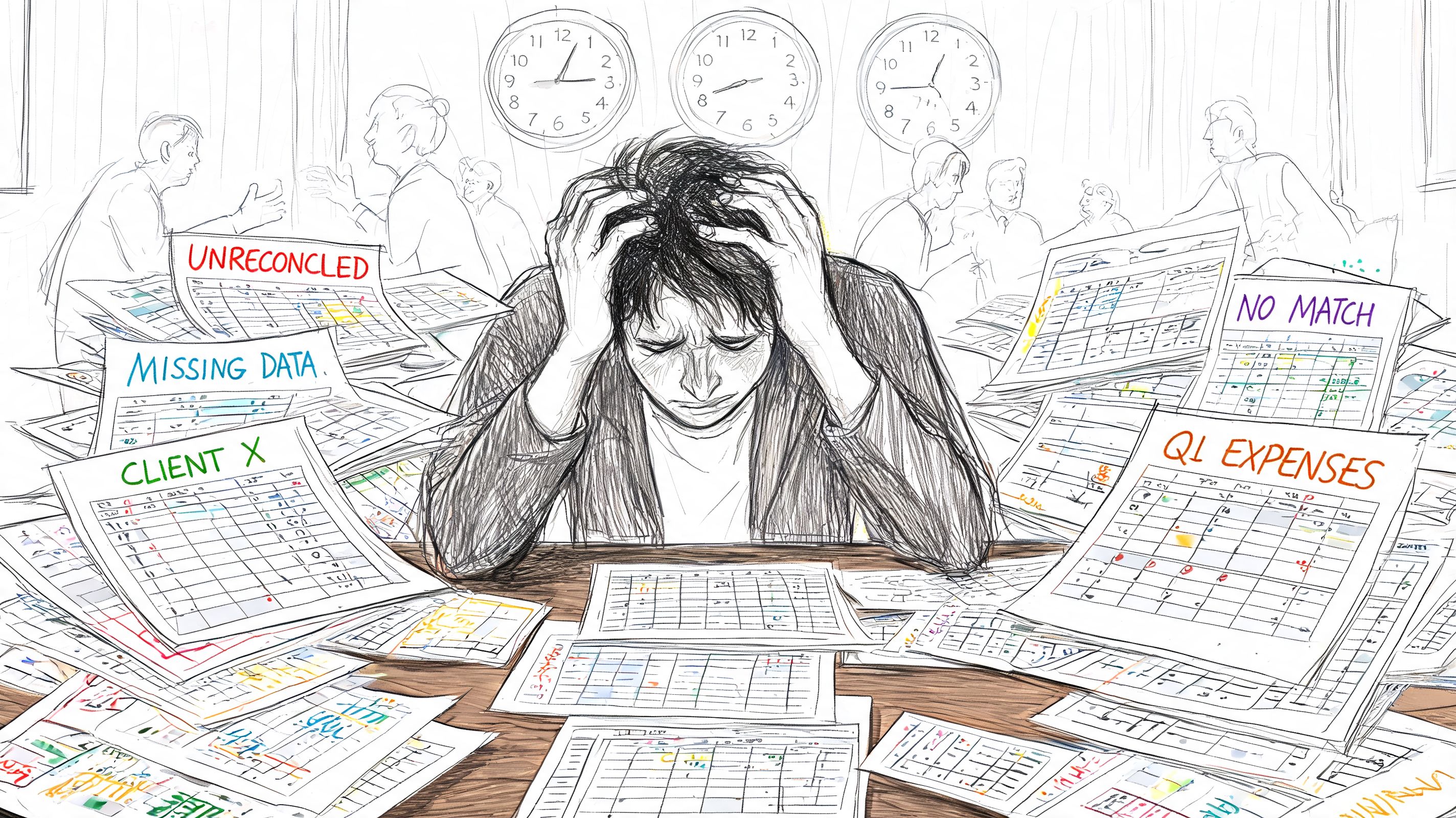
That’s where erp software development services start to matter. Not as a technology refresh. As a way to stop running the company through disconnected tools that were never designed to share context.
What the spreadsheet stage really costs
Spreadsheets aren’t the enemy. They’re useful for analysis, planning, and quick what-if work. The problem starts when they become the system of record.
Once that happens, three predictable things follow:
- Data drifts fast: One team updates values manually while another exports stale data from a different tool.
- Workarounds multiply: Employees create side processes to fill gaps in accounting, purchasing, fulfillment, or approvals.
- Decision speed drops: Leaders stop trusting dashboards and ask for “one more manual check” before acting.
Custom ERP development fixes the root issue by creating a shared operational model. Orders, inventory, revenue, purchasing, staffing, compliance, and reporting all pull from a consistent foundation. That changes the conversation from “Whose number is right?” to “What should we do next?”
Practical rule: If two departments are maintaining the same business-critical data in different places, you don’t have a reporting problem. You have a systems problem.
Why this has become a strategic priority
This isn’t a niche concern anymore. The global ERP software market was valued at $77.08 billion in 2025 and is projected to reach $157.07 billion by 2033, with 50% of companies actively acquiring, upgrading, or planning to update their ERP systems, according to Grand View Research’s ERP software market analysis.
That demand makes sense. Businesses need cleaner operations, better visibility, and less manual reconciliation. They also need a platform that can support the next layer of capability: AI inside core workflows.
The next problem after modernization
Many executives assume the hard part is replacing spreadsheets with a unified ERP. That’s only half the job now. The harder long-term question is how your ERP will handle intelligence.
Once you add AI for forecasting, anomaly detection, routing, support recommendations, or internal search, you create new management challenges. Prompts need versioning. Model behavior needs logging. Costs need tracking. Internal data access needs guardrails. If you don’t plan for that operationally, your “smart” ERP becomes another black box.
That’s why modern ERP development isn’t just about centralizing data. It’s about building a business system your team can trust, scale, and govern.
Building Your Businesss Central Nervous System
A custom ERP is best understood as the central nervous system of the business. It receives signals from every department, routes them to the right place, and helps the organization respond in a coordinated way.
That framing matters because many leaders still think of ERP as a big accounting package with extra tabs. A well-designed ERP is much more than that. It connects business functions so actions in one area immediately inform the rest of the company.
What a custom ERP actually connects
Most ERP conversations get lost in feature lists. The better way to evaluate it is by asking which business functions need to operate as one system.
A typical ERP backbone brings these functions together:
- Finance and accounting: Revenue, payables, receivables, reconciliations, approvals, and audit trails.
- Operations and inventory: Purchasing, stock movement, order allocation, returns, and supplier coordination.
- People and workflow management: HR records, role-based permissions, task routing, and approvals.
- Customer and commercial context: Contracts, order history, service events, and account-level data.
When these functions share a common model, businesses gain a real operational advantage. Organizations that implement ERP systems report broad gains, with 49% seeing improvements across all business processes. The most common ROI areas are reduced IT costs at 40%, reduced inventory levels at 38%, and reduced cycle time at 35%, based on Parsimony’s ERP statistics roundup.
Why off-the-shelf platforms often hit a wall
Platforms like SAP, NetSuite, Microsoft Dynamics 365, and Odoo can be a good fit when your workflows are standard and your differentiation doesn’t live in operations. But that’s not how many growth-stage companies work.
Ecommerce businesses often have nonstandard fulfillment logic, bundled inventory rules, returns complexity, or marketplace reconciliation issues. Fintech teams deal with custom compliance workflows, exception handling, and permission models. Healthcare organizations have unusual intake, documentation, and approval paths.
Those are not cosmetic differences. They shape how work gets done.
A custom ERP gives you control over:
- Workflow design: Your team follows the process that fits the business, not the vendor demo.
- Data structure: You define the records, relationships, and validation rules needed for reliable reporting.
- Ownership: You aren’t trapped by a product roadmap that prioritizes someone else’s market.
- Integration choices: CRM, billing, ecommerce, support, analytics, and AI layers can connect through the architecture you choose.
For companies planning a broader systems overhaul, enterprise application integration best practices are often the difference between a clean ERP rollout and a brittle one.
A custom ERP shouldn’t reproduce your chaos in nicer screens. It should remove unnecessary steps, clarify ownership, and make good decisions easier.
The executive lens that matters
The business case for custom ERP isn’t “more software.” It’s operational coherence.
When leadership can see margin, fulfillment health, staffing constraints, and customer impact in one environment, decisions stop bouncing between departments. That is the fundamental value. The ERP becomes the operating backbone that supports growth, not a patchwork of systems your team has to babysit.
Designing an ERP That Grows with You
Plenty of ERP projects fail long before launch. They fail in architecture. The team chooses a structure that works for today’s org chart, then the business adds a new market, a new compliance requirement, or a new digital channel and the system starts resisting change.
That’s why the architecture discussion matters at the executive level. It decides whether your ERP becomes a durable asset or an expensive future rewrite.
The architecture pattern that supports real scale
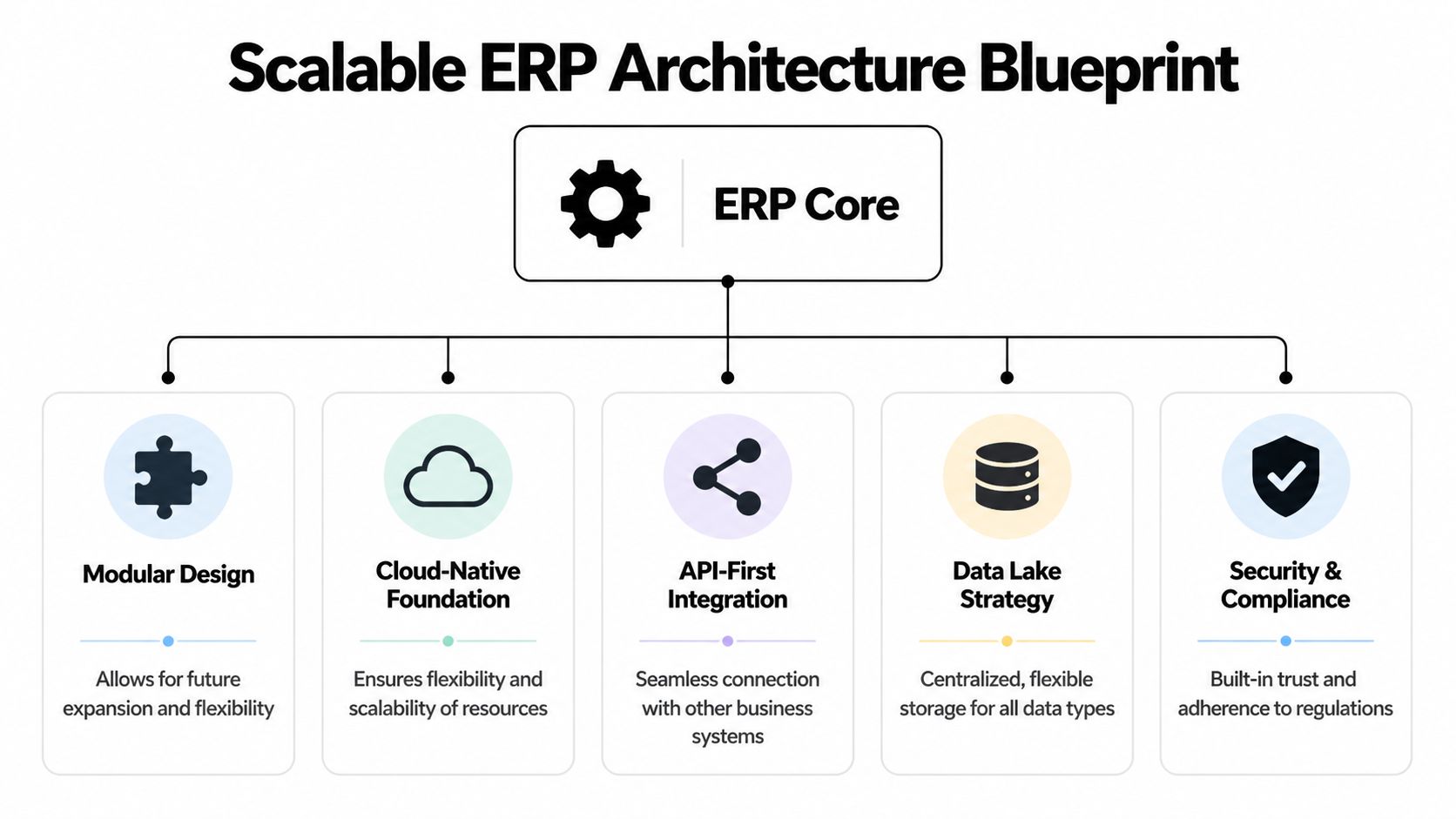
At enterprise scale, strong ERP systems usually follow a five-layer architecture made up of Presentation, Application, Data, Integration, and Reporting/Analytics. This model has been linked to 30% to 50% reductions in processing cycles when replacing legacy ecosystems, and it supports security features needed in regulated sectors such as fintech and healthcare, according to Cudio’s overview of ERP system levels.
That sounds technical, but the business implication is simple. Each layer has a job, and changes in one area don’t have to destabilize the whole system.
| Architecture choice | Business impact | What to watch for |
|---|---|---|
| Modular services | Lets teams evolve one capability without rewriting everything | Poor service boundaries create integration headaches |
| Cloud-native deployment | Makes scaling and resilience easier as demand changes | Lifting old workflows into the cloud doesn’t fix bad design |
| API-first integration | Keeps CRM, ecommerce, billing, and analytics connected cleanly | Weak API governance leads to duplicate logic |
| Dedicated reporting layer | Improves access to dashboards and operational KPIs | Reporting built directly on transactional tables can slow the system |
Monolith versus modular thinking
A monolithic ERP can work if the business is stable, the workflows are simple, and change is infrequent. But most growth companies don’t live in that world.
A modular approach is usually better when:
- New channels arrive often: Ecommerce brands add marketplaces, subscriptions, and regional fulfillment patterns.
- Rules change regularly: Fintech and healthcare teams deal with policy, audit, and approval changes that can’t wait for a giant release cycle.
- Different teams move at different speeds: Finance may want strict change control while customer operations needs rapid iteration.
This doesn’t mean “microservices everywhere.” That phrase gets overused. It means separating business domains thoughtfully so one change doesn’t trigger a full-platform regression test.
The stack choices executives should ask about
You don’t need to pick the framework yourself, but you should ask why a partner recommends one stack over another.
Useful questions include:
- How will you separate core transactional logic from reporting and AI features?
- What breaks if we add a new region, business unit, or product line?
- How will external systems connect without custom point-to-point messes?
- How are security and permissions handled across modules?
Good ERP partners will answer in plain language. They’ll explain where tools like React, Node.js, Python, PostgreSQL, Docker, Jenkins, Selenium, AWS, or Azure fit into the picture and why.
The right architecture doesn’t just handle growth. It lowers the cost of future change.
What future-proofing really means
Future-proofing isn’t guessing every feature your business might ever need. It’s designing an ERP so new capabilities can be added without destabilizing the foundation.
That means clean APIs, strong data modeling, cloud infrastructure, role-based access, and room for intelligent automation. If those decisions are made early, your ERP can grow with the business instead of forcing the business to work around the software.
Making Your ERP Smart with AI Modernization
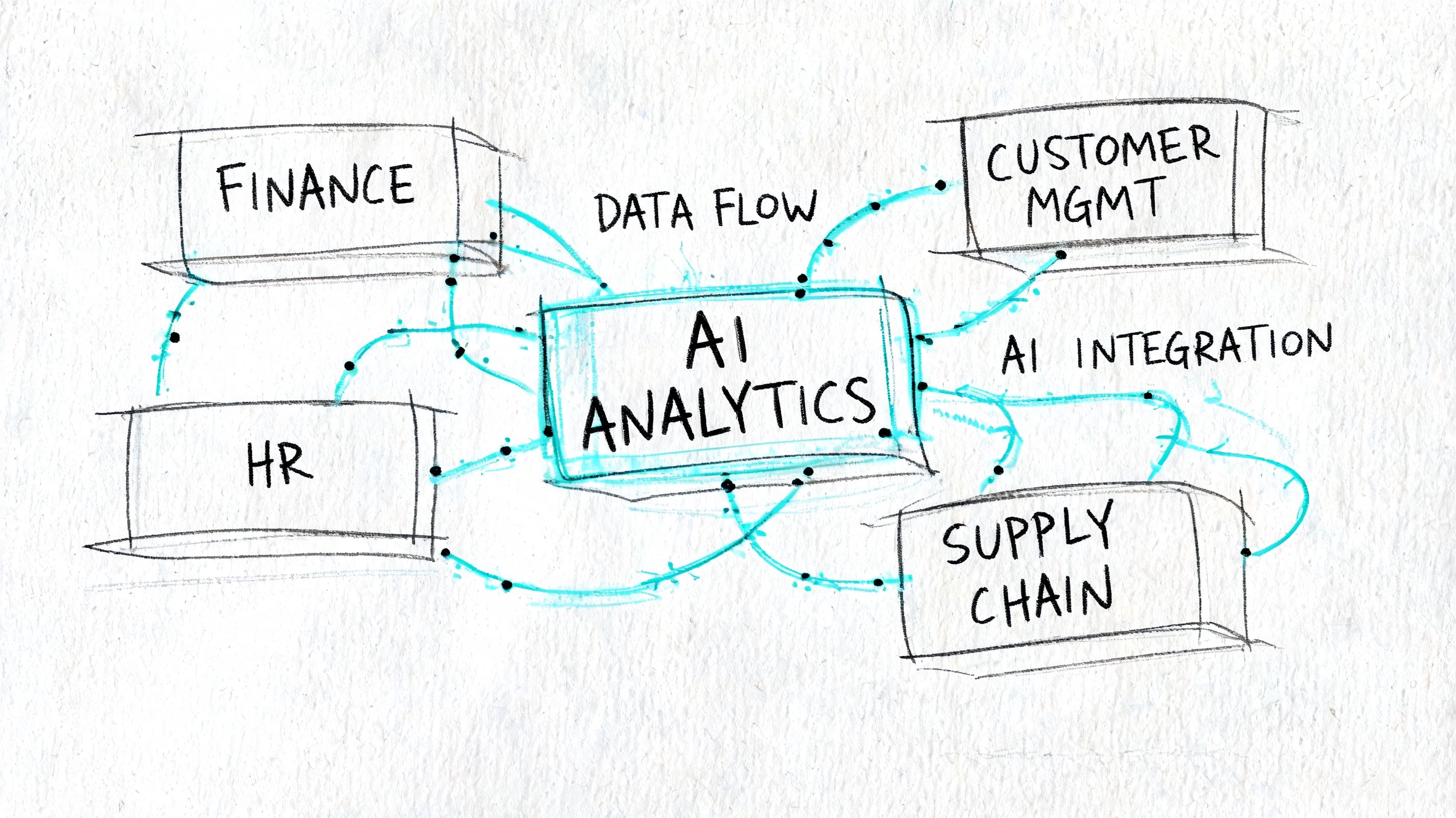
An ERP without an intelligence layer is now incomplete for many businesses. It can still centralize data and standardize workflows, but it won’t help much when leaders need faster decisions, automated pattern detection, or customized actions at scale.
That’s where AI modernization changes the role of ERP. The system stops being a passive record keeper and starts acting like an operational advisor.
Where AI creates practical value
The strongest ERP AI use cases aren’t gimmicks. They sit inside workflows your teams already depend on.
For example:
- Ecommerce and retail: AI can help flag unusual returns behavior, improve product or offer personalization, support forecasting, and surface stock risks earlier.
- Fintech and SaaS: AI can assist with anomaly detection, document classification, fraud review support, operational triage, and internal compliance workflows.
- Healthcare and wellness: AI can support scheduling decisions, intake routing, records summarization, and patient communication workflows with human oversight.
What matters is fit. The AI should work inside your process model, not beside it as a disconnected experiment.
Why rigid ERP products leave value on the table
This is one of the clearest reasons to invest in custom ERP development. While 53% of organizations achieve positive ROI from ERP, 60% of features go underutilized due to system rigidity, and one of the biggest missed opportunities is custom AI for personalization and anomaly detection, as noted in Softices’ discussion of ERP implementation challenges.
That underuse tells you something important. Companies don’t struggle because software is missing menus. They struggle because the system doesn’t match how decisions are made in practice.
A custom AI layer fixes that by embedding intelligence into the right moments:
- an order needs review
- a transaction looks unusual
- a forecast is drifting
- a support queue needs routing
- a manager needs a summary, not raw data
Teams exploring AI development services for business applications usually discover the same thing fast. AI is easy to demo and hard to govern.
If AI can change a decision, it needs the same operational discipline as finance logic or access control.
The hard part isn’t adding AI
It’s managing it.
Once prompts start driving workflows, you need discipline around how they’re written, tested, approved, and monitored. You also need visibility into which model handled what task, which inputs were used, what response came back, and what it cost.
That’s why smart ERP modernization should include governance for:
- Prompt versioning: So changes don’t inadvertently alter business behavior.
- Parameter controls: So models can access the right internal data without exposing the wrong data.
- Unified logging: So operations, engineering, and compliance teams can audit AI behavior.
- Cost visibility: So token usage doesn’t become a surprise line item.
The businesses getting the most from AI-enabled ERP aren’t chasing novelty. They’re building controlled systems that make intelligence usable in production.
Your Roadmap for a Successful ERP Implementation
ERP projects go sideways when teams treat them like a single install instead of an operating change program. The software matters, but the sequence matters more. Good implementation work reduces uncertainty in stages, not all at once.
A solid roadmap also prevents two common mistakes. The first is trying to define every edge case before building anything. The second is rushing into development before the business agrees on process ownership.
Phase one and two define the operating model
In the first phase, discovery and strategy, teams identify pain points, map current workflows, define business rules, and decide what the system must do on day one versus later. Leaders should expect hard conversations here, especially around exceptions and approvals.
The second phase is design and prototyping. That’s where workflow logic turns into screens, role permissions, records, and integration plans. If a team skips prototyping, users often don’t discover misunderstandings until the build is expensive to change.
Bad ERP projects usually start with software screens. Good ones start with business decisions.
Agile delivery works when scope is disciplined
After design, the build should move in increments. That doesn’t mean chaotic sprints with shifting priorities. It means structured releases where finance, operations, and leadership can validate real workflows before the entire platform is considered “done.”
A practical implementation pattern often looks like this:
- Build the core records first: Customers, products, inventory, vendors, chart of accounts, user roles.
- Connect the highest-risk workflows next: Order flow, billing, purchasing, reconciliation, approvals.
- Integrate external systems carefully: Ecommerce platforms, CRM, payment systems, support tools, reporting environments.
- Test with real operational scenarios: Edge cases matter more than happy-path demos.
- Train by role: Controllers, ops managers, customer service leads, and admins each need different onboarding.
Where targeted custom modules pay off
Not every requirement needs a giant workstream. Some of the best returns come from focused modules built to close specific data gaps.
In custom ERP development, targeted modules for needs like job costing or non-standard inventory logic typically cost between $5,000 and $10,000, and those modules can drive 20% to 30% efficiency gains in financial reporting for mid-sized firms by standardizing workflows and improving data quality, according to Excel Complete’s ERP software development services guide.
That’s useful because it gives executives a more flexible planning model. You don’t need to solve every business problem in one release. You need to solve the right problems in the right order.
What usually works and what usually doesn’t
Here’s the blunt version.
What works
- Executive ownership: Someone on the business side has to make process decisions.
- Role-based validation: Real users test real scenarios before go-live.
- Clean data discipline: Migration planning starts early, not the week before launch.
- Incremental rollout: Teams absorb change better in phases than in one giant switch.
What doesn’t
- Design by committee: Too many stakeholders with veto power stalls decisions.
- “We’ll fix it after launch” thinking: Teams won’t trust a system that starts unreliable.
- Copying old processes blindly: Legacy friction shouldn’t get preserved in modern software.
- Training as an afterthought: Adoption drops when users don’t understand the why behind changes.
A successful ERP implementation feels methodical, not dramatic. That’s a good sign.
How to Pick the Right ERP Development Partner
The wrong ERP partner will nod at every request, disappear into jargon, and hand you a system that technically works but operationally misses the point. The right one will challenge assumptions, clarify trade-offs, and help leadership make better decisions before code starts.
That’s why vendor selection is less about portfolio polish and more about how a team thinks.
What to evaluate before you sign
Start with business fit, not feature promises. Ask whether the partner understands the pressure points in your industry. An ecommerce project isn’t just “inventory plus checkout.” A fintech platform isn’t just “transactions plus dashboard.” A healthcare workflow isn’t just “forms plus permissions.”
You also want to know how they work when reality changes. Scope always shifts a bit. Regulations change. Users discover exceptions. Strong partners handle that through process, not panic.
For leaders comparing options in the broader market, this guide to enterprise software development services is a useful framing tool.
ERP Development Partner Vetting Checklist
| Evaluation Criteria | Why It Matters | Green Flag / Red Flag |
|---|---|---|
| Industry fluency | ERP logic changes by sector, especially in regulated work | Green: Can describe your workflow risks in plain language. Red: Talks only in generic modules |
| Discovery process | Prevents vague scope and expensive rework | Green: Runs workshops, maps roles, documents decisions. Red: Jumps straight to estimates |
| Architecture judgment | Determines whether the system can evolve sanely | Green: Explains modularity, APIs, security, reporting boundaries. Red: Suggests one-size-fits-all stack |
| Data migration discipline | Bad migration can poison adoption from day one | Green: Plans audits, validation, and staged migration. Red: Treats migration as simple import work |
| Communication style | ERP success depends on shared understanding | Green: Gives direct answers and clear trade-offs. Red: Hides behind acronyms and optimism |
| QA and rollout approach | Operational systems need rigorous validation | Green: Tests real workflows and role-based scenarios. Red: Relies on surface-level demos |
| Post-launch support | ERP work continues after release | Green: Has a plan for optimization and change requests. Red: Treats go-live as the finish line |
Questions worth asking in the first meeting
Some questions reveal more than a case study deck ever will:
- Which business decisions do you need from us before development starts?
- How do you prevent customization from becoming long-term maintenance debt?
- How do you handle permission design in regulated environments?
- What will we test with end users before go-live?
- Who owns communication when timelines or scope shift?
A serious ERP partner won’t just promise delivery. They’ll define how decisions get made when the project gets complicated.
The cultural fit matters too
ERP projects expose weak collaboration fast. If a partner avoids hard conversations, overpromises on certainty, or treats stakeholders like blockers, the relationship won’t hold up.
Look for teams that combine product thinking, engineering discipline, and operational empathy. You want a partner that can talk to executives about margin visibility, to managers about workflow friction, and to engineers about APIs, data models, and deployment risk. That combination is rare, and it matters.
Your Next Steps to a Smarter Business Engine
A modern ERP should do more than centralize records. It should help the business move faster with less confusion, cleaner workflows, and better decisions. That’s the baseline.
The next layer is intelligence. Once AI starts shaping forecasts, recommendations, anomaly reviews, summaries, and routing decisions inside your ERP, leadership needs better controls than “the prompt lives in a document somewhere.”
The operating controls AI-enabled ERP needs
An intelligent ERP needs its own management layer. In practice, that means having a way to control prompts, data access, logs, and spend across the models powering your workflows.
The most useful setup looks like a cockpit, not a black box:
- Prompt vault with versioning: Teams can track prompt changes over time and avoid silent workflow drift.
- Parameter manager for internal data access: AI features can use the right database context without uncontrolled exposure.
- Unified logging across AI integrations: Operations and compliance teams can inspect what happened, when, and why.
- Cost management dashboard: Leaders can see cumulative model spend instead of discovering it after the month closes.
Those controls become even more valuable when the ERP is connected to a broader product ecosystem. For instance, if part of your modernization plan includes adding specialized engineering capacity, a flexible option like Laravel team augmentation can help internal teams extend delivery without overcommitting to a permanent hiring cycle.
What to do next
If your business is still reconciling spreadsheets across departments, start with a workflow audit. Identify where data gets re-entered, where approvals stall, and where teams stop trusting reports.
If you already have an ERP but it feels rigid, review where users fall back to side tools. That usually reveals the highest-value opportunities for custom modules or AI modernization.
If AI is already being discussed, don’t approve scattered experiments without governance. Decide how prompts, logging, access controls, and spend will be managed before those workflows become business-critical.
A smart ERP isn’t just software. It’s the business engine that coordinates data, process, and intelligence in one system your team can run.
If you’re planning an ERP build, a legacy modernization effort, or an AI layer for an existing platform, Wonderment Apps can help you turn that vision into a scalable system with the right controls. Schedule a demo to see how their prompt management platform supports versioned prompts, secure parameter handling, unified AI logging, and cost visibility inside real-world software environments.